radio controls CADILLAC LYRIC 2023 User Guide
[x] Cancel search | Manufacturer: CADILLAC, Model Year: 2023, Model line: LYRIC, Model: CADILLAC LYRIC 2023Pages: 424, PDF Size: 4.76 MB
Page 168 of 424
Cadillac Lyriq Owner Manual (GMNA-Localizing-U.S./Canada-15644413) -
2023 - CRC - 2/23/22
Infotainment System 167
Assistant on the Home screen,
or by using the wake up words
“Hey Google”or“OK Google.”
However, not all features
within these areas are
supported by voice commands
and requires the user to have
a data subscription in order to
use the Google Assistant
feature.
Using Voice Recognition
Voice recognition becomes
available once the system is
initialized. This begins when
the vehicle is turned on.
Initialization may take a few
moments.
1. Press
gon the steering
wheel controls, touch
Google Assistant on the
Home screen, or use the
wake up words “Hey
Google” or“OK Google” to
activate voice recognition.
2. Clearly speak one of the commands described later
in this section.
Canceling Google
Assistant
.Presscon the steering
wheel controls to cancel the
Google Assistant request.
Helpful Hints for Speaking
Commands
Voice recognition identifies
commands that are naturally
stated in sentence form,
or direct commands that state
the application and the task.
For best results:
.Speak the command
naturally, not too fast, not
too slow.
.Use direct commands
without a lot of extra words.
For example, “Call
work,” “Play” followed by the
artist or song name,
or “Tune” followed by the
radio station number.
Direct commands are more
clearly understood by the
system. An example of a direct
command is “Dial
saved with a name and a place,
the direct command should
include both. For example
“Call
Voice Recognition for the
Radio
If browsing the audio sources
when voice is touched, the
voice recognition commands
for AM, FM, and SiriusXM (if
equipped) are available.
“Play
Tune to the radio station
frequency identified in the
command (like “nine fifty”).
“Play
Tune to the radio station
frequency identified in the
command (like “one oh one
point one”).
“Play channel
to the SiriusXM radio station
channel number identified in
the command. This command
may require an online
connection.
Page 169 of 424
Cadillac Lyriq Owner Manual (GMNA-Localizing-U.S./Canada-15644413) -
2023 - CRC - 2/23/22
168 Infotainment System
“Play
on Sirius XM”:Tune to the
SiriusXM radio station channel
name identified in the
command. This command may
require an online connection.
Voice Recognition for the
Phone
Make sure the phone is paired
using Bluetooth to use the
phone related voice
commands.
“Call
Initiate a call to a stored
contact. The command may
include location if the contact
has location numbers stored.
“Call
“At Work,” “On Mobile,” or
“On Other” :Initiate a call to a
stored contact and location at
home, at work, on mobile
device, or on another phone.
“Call < phone number>” :
Initiate a call to a phone
number of seven digits or 10
digits. “Redial”
:Initiate a call to the
last dialed number.
Voice Recognition for
Navigation
Navigation commands can be
used to start, cancel route,
or add way points/POI.
“Navigate to
to the address in the
command.
“Add
way” :Adds a way-point to the
current route.
“Take me home” :Starts
navigation to Home location
set in Google maps.
Onboard Vehicle
Commands
These commands can be used
to adjust vehicle temperature
or control window defrosters.
“Turn on the A/C” :Turns on
the air conditioning. “Set temperature to
:Set to a
specific temperature inside
your vehicle.
Phone Assistant Voice
Recognition
While a device is connected
via Bluetooth, press and hold
gon the steering wheel
controls to pass through and
launch Google assistant on the
phone or Siri.
Phone
Bluetooth (Overview)
The Bluetooth-capable system
can interact with many mobile
devices to:
.Place and receive calls in a
hands-free mode.
.Share the device’s address
book or contact list with the
vehicle.
.Stream audio (music,
podcasts).
Page 190 of 424
Cadillac Lyriq Owner Manual (GMNA-Localizing-U.S./Canada-15644413) -
2023 - CRC - 2/23/22
Climate Controls 189
Caution (Continued)
with a razor blade or
anything else that is sharp.
This may damage the rear
window defogger grid and
affect the radio's ability to
pick up stations clearly. The
repairs would not be
covered by the vehicle
warranty.
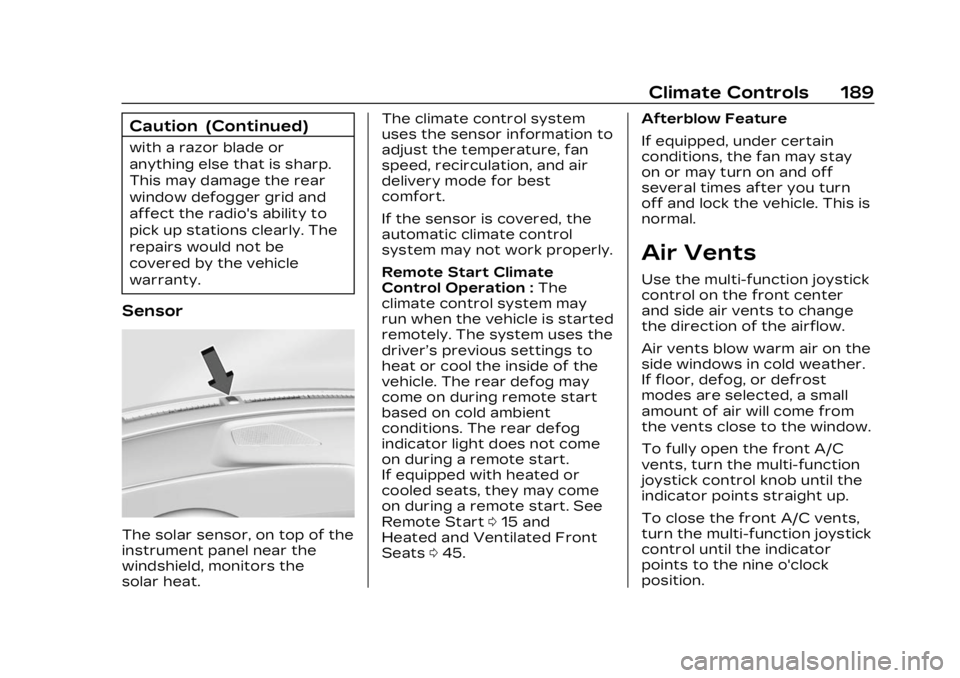
Sensor
The solar sensor, on top of the
instrument panel near the
windshield, monitors the
solar heat.The climate control system
uses the sensor information to
adjust the temperature, fan
speed, recirculation, and air
delivery mode for best
comfort.
If the sensor is covered, the
automatic climate control
system may not work properly.
Remote Start Climate
Control Operation :
The
climate control system may
run when the vehicle is started
remotely. The system uses the
driver’s previous settings to
heat or cool the inside of the
vehicle. The rear defog may
come on during remote start
based on cold ambient
conditions. The rear defog
indicator light does not come
on during a remote start.
If equipped with heated or
cooled seats, they may come
on during a remote start. See
Remote Start 015 and
Heated and Ventilated Front
Seats 045. Afterblow Feature
If equipped, under certain
conditions, the fan may stay
on or may turn on and off
several times after you turn
off and lock the vehicle. This is
normal.
Air Vents
Use the multi-function joystick
control on the front center
and side air vents to change
the direction of the airflow.
Air vents blow warm air on the
side windows in cold weather.
If floor, defog, or defrost
modes are selected, a small
amount of air will come from
the vents close to the window.
To fully open the front A/C
vents, turn the multi-function
joystick control knob until the
indicator points straight up.
To close the front A/C vents,
turn the multi-function joystick
control until the indicator
points to the nine o'clock
position.
Page 398 of 424
Cadillac Lyriq Owner Manual (GMNA-Localizing-U.S./Canada-15644413) -
2023 - CRC - 3/2/22
Customer Information 397
Canadian Cadillac Customer
Care Centre
General Motors of Canada
Company
500 Wentworth Street W
Oshawa, ON L1J 0C5
In Mexico, call 800-466-0805
or 800-212-234-5522.
In other Central America and
Caribbean Countries, call
52-555-901-2369.
Vehicle Data
Recording and
Privacy
The vehicle has a number of
computers that record
information about the vehicle’s
performance and how it is
driven or used. For example,
the vehicle uses computer
modules to monitor and
control electric drive unit
performance, to monitor the
conditions for airbag
deployment and to deploy
them in a crash, and,if equipped, to provide antilock
braking to help the driver
control the vehicle. These
modules may store data to
help the dealer technician
service the vehicle or to help
GM improve safety or
features. Some modules may
also store data about how the
vehicle is operated, such as
rate of energy consumption or
average speed. These
modules may retain personal
preferences, such as radio
presets, seat positions, and
temperature settings.
Cybersecurity
GM collects information about
the use of your vehicle
including operational and
safety related information. We
collect this information to
provide, evaluate, improve, and
troubleshoot our products and
services and to develop new
products and services. The
protection of vehicle
electronics systems and
customer data fromunauthorized outside
electronic access or control is
important to GM. GM
maintains appropriate security
standards, practices,
guidelines and controls aimed
at defending the vehicle and
the vehicle service ecosystem
against unauthorized
electronic access, detecting
possible malicious activity in
related networks, and
responding to suspected
cybersecurity incidents in a
timely, coordinated and
effective manner. Security
incidents could impact your
safety or compromise your
private data. To minimize
security risks, please do not
connect your vehicle
electronic systems to
unauthorized devices or
connect your vehicle to any
unknown or untrusted
networks (such as Bluetooth,
WIFI or similar technology). In
the event you suspect any
security incident impacting
your data or the safe
Page 415 of 424

Cadillac Lyriq Owner Manual (GMNA-Localizing-U.S./Canada-15644413) -
2023 - CRC - 2/23/22
414 INDEX
Electrical (cont'd)System Overload . . . . . . . . . . 323
Electrical System Fuses and CircuitBreakers . . . . . . . . . . . . . . . . . . . . 325
Instrument Panel Fuse Block . . . . . . . . . . . . . . . . . . . . . . . . . . 331
Emergency OnStar . . . . . . . . . . . . . . . . . . . . . . . . . 401
Energy Efficiency Driving . . . . . . . . . . . . . . . . . . . . . . . . . 193
Engine
Cooling System . . . . . . . . . . . . . 313
Entry Lighting . . . . . . . . . . . . . . . . . 147
Equipment, Towing . . . . . . . . . 303
Event Data Recorders . . . . . 398
Exit Lighting . . . . . . . . . . . . . . . . . . . 148
Extended Parking . . . . . . . . . . . . 210
Extender, Seat Belt . . . . . . . . . . . 58
Exterior Lamp Controls . . . . . . . . . . . . . . 139
Lamps Off Reminder . . . . . . 142
Lighting Battery Saver . . . 149F
Flash-to-Pass . . . . . . . . . . . . . . . . . . 142
Flashers, Hazard
Warning . . . . . . . . . . . . . . . . . . . . . . . 145
Flat Tire . . . . . . . . . . . . . . . . . . . . . . . . 355
Floor Mats . . . . . . . . . . . . . . . . . . . . . 373
Fluid
Brakes . . . . . . . . . . . . . . . . . . . . . . . . . 316
Washer . . . . . . . . . . . . . . . . . . . . . . . . 314
Folding Mirrors . . . . . . . . . . . . . . . . . 28
Forward
Collision Alert (FCA)System . . . . . . . . . . . . . . . . . . . . . . 270
Frequency Statement
Radio . . . . . . . . . . . . . . . . . . . . . . . . . . 395
Front Heated and VentilatedSeats . . . . . . . . . . . . . . . . . . . . . . . . . . 45
Pedestrian Braking
(FPB) System . . . . . . . . . . . . . . 274
Fuses Fuses and CircuitBreakers . . . . . . . . . . . . . . . . . . . . 325
Instrument Panel Fuse
Block . . . . . . . . . . . . . . . . . . . . . . . . . . 331
Underhood Compartment . . . . . . . . . . . . . 326
G
Garage Door Opener . . . . . . . . 136Programming . . . . . . . . . . . . . . . . 136
Gas Strut(s) . . . . . . . . . . . . . . . . . . . . 321
Gauges Battery . . . . . . . . . . . . . . . . . . . . . . . . 110
Odometer . . . . . . . . . . . . . . . . . . . . . 110
Power Indicator . . . . . . . . . . . . . . 111
Speedometer . . . . . . . . . . . . . . . . 110
Trip Odometer . . . . . . . . . . . . . . 110
Warning Lights andIndicators . . . . . . . . . . . . . . . . . . . 108
General Information Service and
Maintenance . . . . . . . . . . . . . . 375
Towing . . . . . . . . . . . . . . . . . . . . . . . . 295
Vehicle Care . . . . . . . . . . . . . . . . 308
Global Positioning System (GPS) . . . . . . . . . . . . . . . . 165
Glove Box . . . . . . . . . . . . . . . . . . . . . . . . 94
GM Mobility Reimbursement
Program . . . . . . . . . . . . . . . . . . . . . . 388
Guidance
Problems with theRoute . . . . . . . . . . . . . . . . . . . . . . . . . 166