wheel CADILLAC LYRIC 2023 User Guide
[x] Cancel search | Manufacturer: CADILLAC, Model Year: 2023, Model line: LYRIC, Model: CADILLAC LYRIC 2023Pages: 424, PDF Size: 4.76 MB
Page 118 of 424
Cadillac Lyriq Owner Manual (GMNA-Localizing-U.S./Canada-15644413) -
2023 - CRC - 2/23/22
Instruments and Controls 117
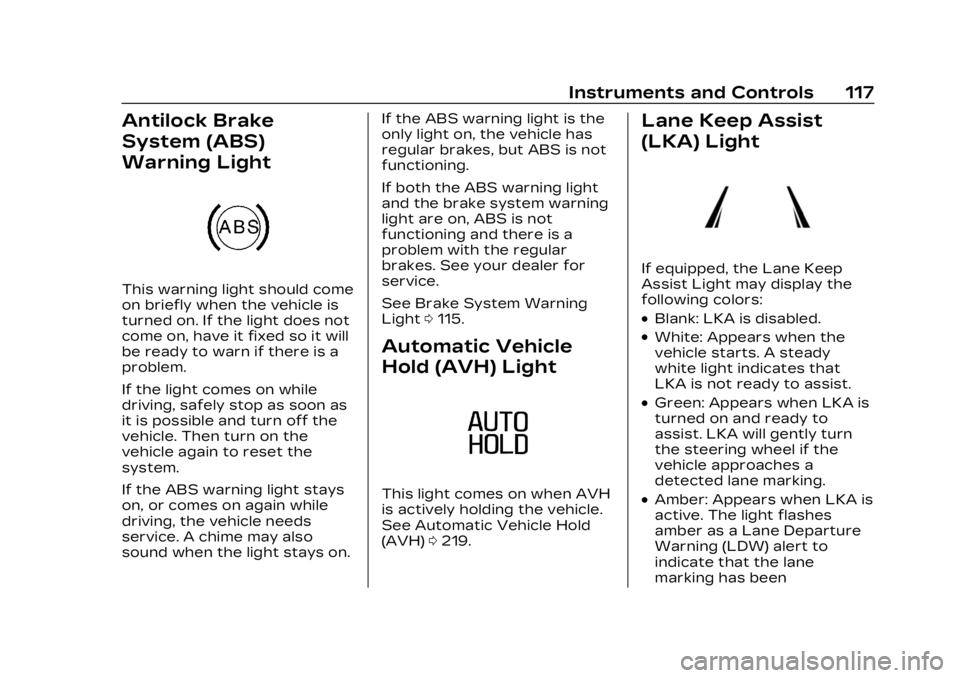
Antilock Brake
System (ABS)
Warning Light
This warning light should come
on briefly when the vehicle is
turned on. If the light does not
come on, have it fixed so it will
be ready to warn if there is a
problem.
If the light comes on while
driving, safely stop as soon as
it is possible and turn off the
vehicle. Then turn on the
vehicle again to reset the
system.
If the ABS warning light stays
on, or comes on again while
driving, the vehicle needs
service. A chime may also
sound when the light stays on.If the ABS warning light is the
only light on, the vehicle has
regular brakes, but ABS is not
functioning.
If both the ABS warning light
and the brake system warning
light are on, ABS is not
functioning and there is a
problem with the regular
brakes. See your dealer for
service.
See Brake System Warning
Light
0115.
Automatic Vehicle
Hold (AVH) Light
This light comes on when AVH
is actively holding the vehicle.
See Automatic Vehicle Hold
(AVH) 0219.
Lane Keep Assist
(LKA) Light
If equipped, the Lane Keep
Assist Light may display the
following colors:
.Blank: LKA is disabled.
.White: Appears when the
vehicle starts. A steady
white light indicates that
LKA is not ready to assist.
.Green: Appears when LKA is
turned on and ready to
assist. LKA will gently turn
the steering wheel if the
vehicle approaches a
detected lane marking.
.Amber: Appears when LKA is
active. The light flashes
amber as a Lane Departure
Warning (LDW) alert to
indicate that the lane
marking has been
Page 120 of 424
Cadillac Lyriq Owner Manual (GMNA-Localizing-U.S./Canada-15644413) -
2023 - CRC - 2/23/22
Instruments and Controls 119
If equipped, this indicator will
display amber when a nearby
pedestrian is detected in front
of the vehicle.
See Front Pedestrian Braking
(FPB) System0274.
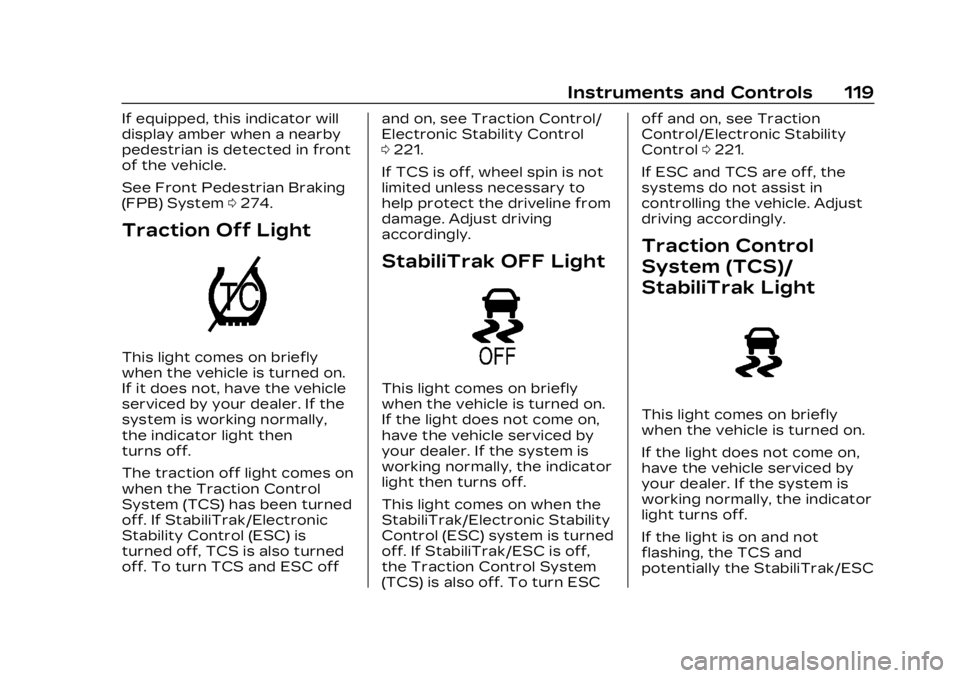
Traction Off Light
This light comes on briefly
when the vehicle is turned on.
If it does not, have the vehicle
serviced by your dealer. If the
system is working normally,
the indicator light then
turns off.
The traction off light comes on
when the Traction Control
System (TCS) has been turned
off. If StabiliTrak/Electronic
Stability Control (ESC) is
turned off, TCS is also turned
off. To turn TCS and ESC off and on, see Traction Control/
Electronic Stability Control
0
221.
If TCS is off, wheel spin is not
limited unless necessary to
help protect the driveline from
damage. Adjust driving
accordingly.
StabiliTrak OFF Light
This light comes on briefly
when the vehicle is turned on.
If the light does not come on,
have the vehicle serviced by
your dealer. If the system is
working normally, the indicator
light then turns off.
This light comes on when the
StabiliTrak/Electronic Stability
Control (ESC) system is turned
off. If StabiliTrak/ESC is off,
the Traction Control System
(TCS) is also off. To turn ESC off and on, see Traction
Control/Electronic Stability
Control
0221.
If ESC and TCS are off, the
systems do not assist in
controlling the vehicle. Adjust
driving accordingly.
Traction Control
System (TCS)/
StabiliTrak Light
This light comes on briefly
when the vehicle is turned on.
If the light does not come on,
have the vehicle serviced by
your dealer. If the system is
working normally, the indicator
light turns off.
If the light is on and not
flashing, the TCS and
potentially the StabiliTrak/ESC
Page 136 of 424
Cadillac Lyriq Owner Manual (GMNA-Localizing-U.S./Canada-15644413) -
2023 - CRC - 2/23/22
Instruments and Controls 135
by pressing the thumbwheel.
The messages that require
immediate action cannot be
cleared until that action is
performed.
All messages should be taken
seriously; clearing the
message does not correct the
problem.
If a SERVICE message
appears, see your dealer.
Follow the instructions given
in the messages. The system
displays messages regarding
the following topics:
.Service Messages
.Fluid Levels
.Vehicle Security
.Brakes
.Ride Control Systems
.Driver Assistance Systems
.Cruise Control
.Lighting and Bulb
Replacement
.Wiper/Washer Systems
.Doors and Windows
.Seat Belts
.Airbag Systems
.Propulsion
.Tire Pressure
.Battery
.Steering
Propulsion Power
Messages
REDUCED
ACCELERATION DRIVE
WITH CARE
This message displays when
the vehicle's propulsion power
is reduced. A reduction in
propulsion power can affect
the vehicle's ability to
accelerate. If this message is
on, but there is no observed
reduction in performance,
proceed to your destination.
Under certain conditions, the
performance may be reduced
the next time the vehicle is
driven. The vehicle may be
driven while this message is
on, but maximum acceleration
and speed may be reduced.
Anytime this message stayson, or displays repeatedly, the
vehicle should be taken to
your dealer for service as
soon as possible.
This message can be displayed
when the high voltage battery
charge level is low. The vehicle
is limiting power to maximize
range.
Under certain operating
conditions propulsion will be
disabled. Try restarting after
the vehicle has been off for
two minutes.
PROPULSION POWER
REDUCED DUE TO
TEMPERATURE
This message displays when
the vehicle is on, the battery
temperature is low, and when
the vehicle’s performance is
limited. The duration of the
limited vehicle performance
depends, in part, on the high
voltage battery charge level.
If the high voltage battery
charge level is relatively high,
as the vehicle is driven, the
Page 144 of 424
Cadillac Lyriq Owner Manual (GMNA-Localizing-U.S./Canada-15644413) -
2023 - CRC - 2/23/22
Lighting 143
For vehicles first sold in
Canada, the DRL can only be
turned off when the vehicle is
parked.
Automatic Headlamp
System
When the exterior lamp
control is set to Auto and it is
dark enough outside, the
headlamps come on
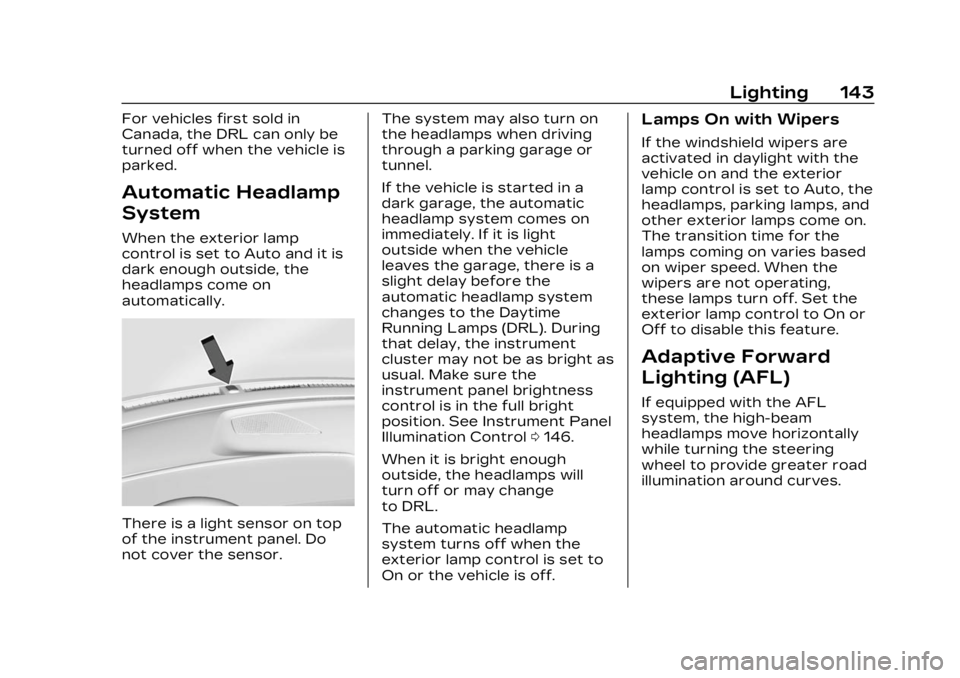
automatically.
There is a light sensor on top
of the instrument panel. Do
not cover the sensor.The system may also turn on
the headlamps when driving
through a parking garage or
tunnel.
If the vehicle is started in a
dark garage, the automatic
headlamp system comes on
immediately. If it is light
outside when the vehicle
leaves the garage, there is a
slight delay before the
automatic headlamp system
changes to the Daytime
Running Lamps (DRL). During
that delay, the instrument
cluster may not be as bright as
usual. Make sure the
instrument panel brightness
control is in the full bright
position. See Instrument Panel
Illumination Control
0146.
When it is bright enough
outside, the headlamps will
turn off or may change
to DRL.
The automatic headlamp
system turns off when the
exterior lamp control is set to
On or the vehicle is off.
Lamps On with Wipers
If the windshield wipers are
activated in daylight with the
vehicle on and the exterior
lamp control is set to Auto, the
headlamps, parking lamps, and
other exterior lamps come on.
The transition time for the
lamps coming on varies based
on wiper speed. When the
wipers are not operating,
these lamps turn off. Set the
exterior lamp control to On or
Off to disable this feature.
Adaptive Forward
Lighting (AFL)
If equipped with the AFL
system, the high-beam
headlamps move horizontally
while turning the steering
wheel to provide greater road
illumination around curves.
Page 147 of 424
Cadillac Lyriq Owner Manual (GMNA-Localizing-U.S./Canada-15644413) -
2023 - CRC - 2/23/22
146 Lighting
Turn and
Lane-Change Signals
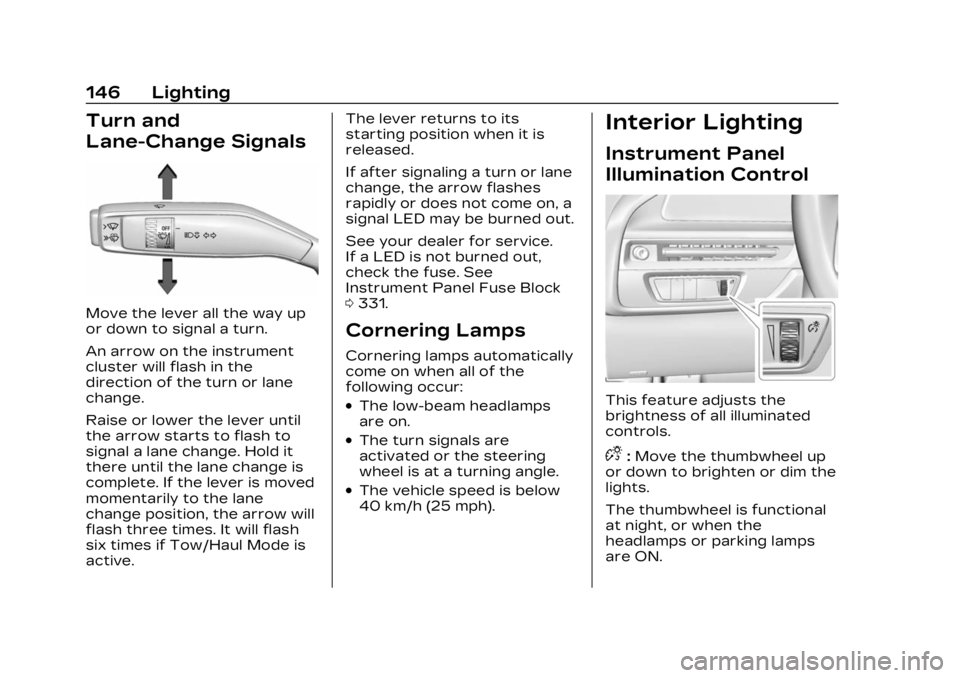
Move the lever all the way up
or down to signal a turn.
An arrow on the instrument
cluster will flash in the
direction of the turn or lane
change.
Raise or lower the lever until
the arrow starts to flash to
signal a lane change. Hold it
there until the lane change is
complete. If the lever is moved
momentarily to the lane
change position, the arrow will
flash three times. It will flash
six times if Tow/Haul Mode is
active.The lever returns to its
starting position when it is
released.
If after signaling a turn or lane
change, the arrow flashes
rapidly or does not come on, a
signal LED may be burned out.
See your dealer for service.
If a LED is not burned out,
check the fuse. See
Instrument Panel Fuse Block
0
331.
Cornering Lamps
Cornering lamps automatically
come on when all of the
following occur:
.The low-beam headlamps
are on.
.The turn signals are
activated or the steering
wheel is at a turning angle.
.The vehicle speed is below
40 km/h (25 mph).
Interior Lighting
Instrument Panel
Illumination Control
This feature adjusts the
brightness of all illuminated
controls.
D:Move the thumbwheel up
or down to brighten or dim the
lights.
The thumbwheel is functional
at night, or when the
headlamps or parking lamps
are ON.
Page 151 of 424
Cadillac Lyriq Owner Manual (GMNA-Localizing-U.S./Canada-15644413) -
2023 - CRC - 2/23/22
150 Infotainment System
Infotainment
System
Introduction
Introduction . . . . . . . . . . . . . . . . . 150
Overview . . . . . . . . . . . . . . . . . . . . . . 151
Steering WheelControls . . . . . . . . . . . . . . . . . . . . . 152
Using the System . . . . . . . . . . 153
Software Updates . . . . . . . . . 155
Radio
AM-FM Radio . . . . . . . . . . . . . . . 156
Radio Data System (RDS) . . . . . . . . . . . . . . 157
Satellite Radio . . . . . . . . . . . . . . . 157
Radio Reception . . . . . . . . . . . . 159
Multi-Band Antenna . . . . . . . 160
Audio Players
Avoiding Untrusted Media Devices . . . . . . . . . . . . . 160
USB Port . . . . . . . . . . . . . . . . . . . . . 160
Bluetooth Audio . . . . . . . . . . . . . 161
Navigation
Using the Navigation System . . . . . . . . . . . . . . . . . . . . . . 162
Maps . . . . . . . . . . . . . . . . . . . . . . . . . . . 163
Navigation Symbols . . . . . . . 164 Destination . . . . . . . . . . . . . . . . . . . 164
Global Positioning
System (GPS) . . . . . . . . . . . . . . 165
Vehicle Positioning . . . . . . . . 165
Problems with Route Guidance . . . . . . . . . . . . . . . . . . . . 166
Voice Recognition
Voice Recognition . . . . . . . . . 166
Phone
Bluetooth (Overview) . . . . . 168
Bluetooth (Pairing andUsing a Phone) . . . . . . . . . . . . 170
Apple CarPlay and Android Auto . . . . . . . . . . . . . . 174
Settings
Settings . . . . . . . . . . . . . . . . . . . . . . . 176
Teen Driver . . . . . . . . . . . . . . . . . . 178
Trademarks and License
Agreements
Trademarks and LicenseAgreements . . . . . . . . . . . . . . . . 182
Introduction
Read the following pages to
become familiar with the
features.
{Warning
Taking your eyes off the
road for too long or too
often while using any
infotainment feature can
cause a crash. You or others
could be injured or killed. Do
not give extended attention
to infotainment tasks while
driving. Limit your glances at
the vehicle displays and
focus your attention on
driving. Use voice commands
whenever possible.
The infotainment system has
built-in features intended to
help avoid distraction by
disabling some features when
driving. These features may
gray out when they are
unavailable. Many infotainment
Page 152 of 424
Cadillac Lyriq Owner Manual (GMNA-Localizing-U.S./Canada-15644413) -
2023 - CRC - 2/23/22
Infotainment System 151
features are also available
through the instrument cluster
and steering wheel controls.
Before driving:
.Become familiar with the
operation, center stack
controls, steering wheel
controls, and infotainment
display.
.Set up the audio by
presetting favorite stations,
setting the tone, and
adjusting the speakers.
.Set up phone numbers in
advance so they can be
called easily by pressing a
single control or by using a
single voice command.
See Distracted Driving 0195.
Overview
Infotainment System
The infotainment system is
controlled by using the
infotainment display,
multifunction controller (MCF) on the center console,
steering wheel controls, and
voice recognition, if available.
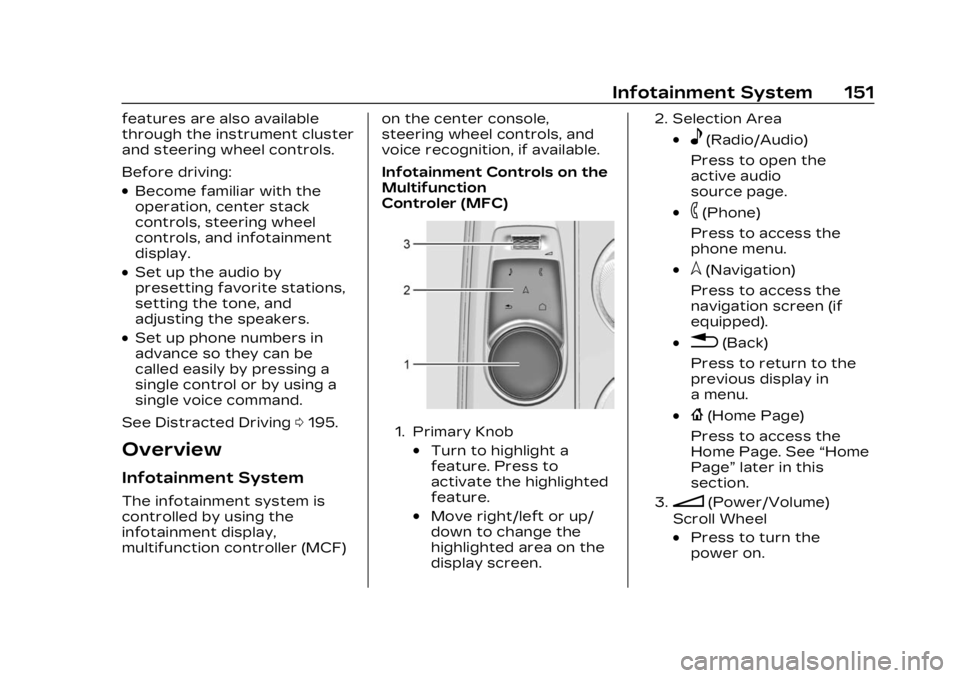
Infotainment Controls on the
Multifunction
Controler (MFC)
1. Primary Knob
.Turn to highlight a
feature. Press to
activate the highlighted
feature.
.Move right/left or up/
down to change the
highlighted area on the
display screen.
2. Selection Area
.e(Radio/Audio)
Press to open the
active audio
source page.
.6(Phone)
Press to access the
phone menu.
.l(Navigation)
Press to access the
navigation screen (if
equipped).
.0(Back)
Press to return to the
previous display in
a menu.
.{(Home Page)
Press to access the
Home Page. See “Home
Page” later in this
section.
3.n(Power/Volume)
Scroll Wheel
.Press to turn the
power on.
Page 153 of 424
Cadillac Lyriq Owner Manual (GMNA-Localizing-U.S./Canada-15644413) -
2023 - CRC - 2/23/22
152 Infotainment System
.Press and hold when
the system is on to turn
the power off.
.Press to mute/unmute
the system when on.
.Scroll up or down to
increase or decrease
the volume.
Home Page
The Home Page is where
vehicle application icons are
accessed. Some applications
are disabled when the vehicle
is moving.
Swipe left or right across the
display or use the MFC to
move the home page. Move
the knob right/left to change
the page or touch on one of
the page count indicators at
the bottom of the screen to
jump to a specific page.
Managing Home Page Icons1. Touch and hold any of the Home Page icons to enter
edit mode. Edit mode is not
available when the vehicle is
moving. 2. Continue holding the icon
and drag it to the desired
position.
3. Release your finger to drop the icon in the desired
position.
4. To move an application to another page, drag the icon
to the edge of the display
toward the desired page
5. Continue dragging and dropping application icons
as desired.
6. Touch Done to save changes or Cancel to not
save and exit edit mode.
There will always be 10 icons
per page except on the last
page. If an icon is moved from
the first page to the second,
then that icon from the
second page will replace the
one removed from the first.
Steering Wheel
Controls
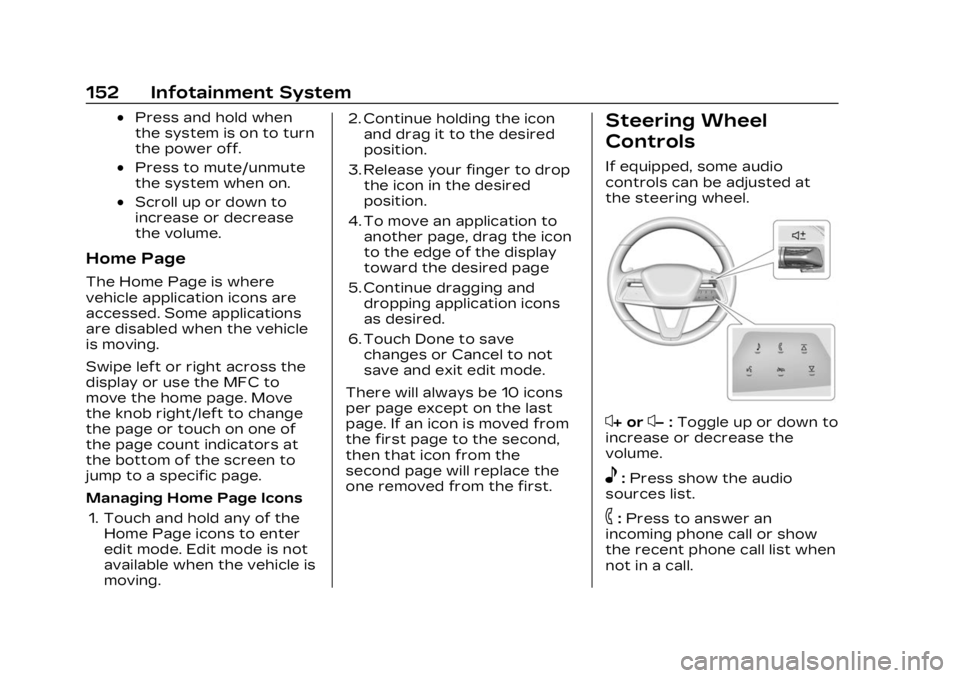
If equipped, some audio
controls can be adjusted at
the steering wheel.
x+ orx− :Toggle up or down to
increase or decrease the
volume.
e: Press show the audio
sources list.
6: Press to answer an
incoming phone call or show
the recent phone call list when
not in a call.
Page 162 of 424
Cadillac Lyriq Owner Manual (GMNA-Localizing-U.S./Canada-15644413) -
2023 - CRC - 2/23/22
Infotainment System 161
3. Touch Source and selectthe USB icon or source
option.
Use the following when
playing an active USB source:
p: Touch to play the current
media source.
j: Touch to pause playback of
the current media source.
7:
.Touch to seek the beginning
of the current or previous
track.
6:
.Touch to seek the next
track.
Shuffle : Touch the shuffle
icon to play music in random
order.
USB Sound Menu
See “Infotainment System
Sound Menu” under AM-FM
Radio 0156. File System and Naming
File systems supported by the
USB may include:
.FAT32
.NTFS
The songs, artists, albums, and
genres are taken from the
file’s song information and are
only displayed if present. The
radio displays the file name as
the track name if the song
information is not available.
Media Playback and Mute
USB playback will be paused if
the system is muted. If the
steering wheel mute control is
pressed again, playback will
resume.
If the source is changed while
in mute, playback resumes and
audio will unmute.
Bluetooth Audio
Music may be played from a
paired Bluetooth device. See
Bluetooth (Overview) 0168 or Bluetooth (Pairing and Using a
Phone)
0170 for help pairing a
device.
Volume and song selection
may be controlled by using the
infotainment controls or the
mobile device. If Bluetooth is
selected and no volume is
present, check the volume
setting on both your mobile
device and the infotainment
system.
Music can be launched by
touching Bluetooth from the
recent sources list on the left
of the display or by touching
the More option and then
touching the Bluetooth device.
To play music via Bluetooth:
1. Power on the device, and pair to connect the device.
2. Once paired, touch Audio from the Home Page, then
touch Source and touch the
Bluetooth device.
Page 167 of 424
Cadillac Lyriq Owner Manual (GMNA-Localizing-U.S./Canada-15644413) -
2023 - CRC - 2/23/22
166 Infotainment System
.The vehicle changes
directions more than once,
or the vehicle is turning on a
turn table in a parking lot.
.The vehicle is entering and/
or exiting a parking lot,
garage, or a lot with a roof.
.The GPS signal is not
received.
.A roof carrier is installed on
the vehicle.
.Tire chains are installed on
the vehicle.
.The tires are replaced
or worn.
.The tire pressure for the
tires is incorrect.
.This is the first navigation
use after the map data is
updated.
.The 12-volt battery has been
disconnected for
several days.
.The vehicle is driving in
heavy traffic where driving is
at low speeds, and the
vehicle is stopped and
started repeatedly.
Problems with Route
Guidance
Inappropriate route guidance
can occur under one or more
of the following conditions:
.The turn was not made on
the road indicated.
.Route guidance might not be
available when using
automatic rerouting for the
next right or left turn.
.The route might not be
changed when using
automatic rerouting.
.There is no route guidance
when turning at an
intersection.
.Automatic rerouting might
display a route returning to
the set waypoint if heading
for a destination without
passing through a set
waypoint.
.The route prohibits the
entry of a vehicle due to a
regulation by time or season
or any other regulation
which may be given.
.Some routes might not be
searched.
.The route to the destination
might not be shown if there
are new roads, if roads have
recently changed, or if
certain roads are not listed
in Maps.
To recalibrate the vehicle's
position on the map, park with
the vehicle running for two to
five minutes, until the vehicle
position updates. Make sure
the vehicle is parked in a
location that is safe and has a
clear view of the sky and away
from large obstructions.
Voice Recognition
If equipped, Google Assistant
allows for hands-free use of,
media and messaging,
navigation and climate control
functionality in the vehicle.
This feature can be started by
pressing
gon the steering
wheel, touching Google