battery CADILLAC LYRIC 2023 Owner's Manual
[x] Cancel search | Manufacturer: CADILLAC, Model Year: 2023, Model line: LYRIC, Model: CADILLAC LYRIC 2023Pages: 424, PDF Size: 4.76 MB
Page 113 of 424
Cadillac Lyriq Owner Manual (GMNA-Localizing-U.S./Canada-15644413) -
2023 - CRC - 2/23/22
112 Instruments and Controls
Regenerative Power Limited
Regenerative power may be
limited when the high voltage
battery is near full charge or
cold. This will affect the
vehicle’s maximum
regenerative braking power.
Seat Belt Reminders
Driver Seat Belt Reminder
Light
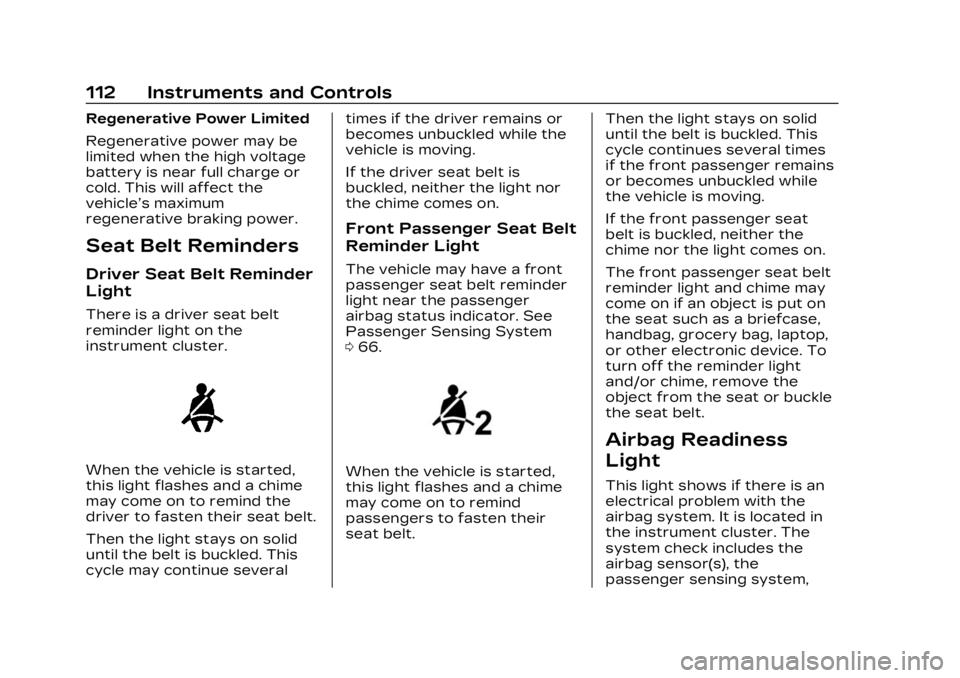
There is a driver seat belt
reminder light on the
instrument cluster.
When the vehicle is started,
this light flashes and a chime
may come on to remind the
driver to fasten their seat belt.
Then the light stays on solid
until the belt is buckled. This
cycle may continue severaltimes if the driver remains or
becomes unbuckled while the
vehicle is moving.
If the driver seat belt is
buckled, neither the light nor
the chime comes on.
Front Passenger Seat Belt
Reminder Light
The vehicle may have a front
passenger seat belt reminder
light near the passenger
airbag status indicator. See
Passenger Sensing System
0
66.
When the vehicle is started,
this light flashes and a chime
may come on to remind
passengers to fasten their
seat belt. Then the light stays on solid
until the belt is buckled. This
cycle continues several times
if the front passenger remains
or becomes unbuckled while
the vehicle is moving.
If the front passenger seat
belt is buckled, neither the
chime nor the light comes on.
The front passenger seat belt
reminder light and chime may
come on if an object is put on
the seat such as a briefcase,
handbag, grocery bag, laptop,
or other electronic device. To
turn off the reminder light
and/or chime, remove the
object from the seat or buckle
the seat belt.
Airbag Readiness
Light
This light shows if there is an
electrical problem with the
airbag system. It is located in
the instrument cluster. The
system check includes the
airbag sensor(s), the
passenger sensing system,
Page 115 of 424
Cadillac Lyriq Owner Manual (GMNA-Localizing-U.S./Canada-15644413) -
2023 - CRC - 2/23/22
114 Instruments and Controls
If, after several seconds, both
status indicator lights remain
on, or if there are no lights at
all, or if the airbag readiness
light is on, there may be a
problem with the lights or the
passenger sensing system.
See your dealer for service
right away.
{Warning
If the airbag readiness light
ever comes on and stays on,
it means that something may
be wrong with the airbag
system. To help avoid injury
to yourself or others, have
the vehicle serviced right
away. See Airbag Readiness
Light0112 for more
information, including
important safety
information.
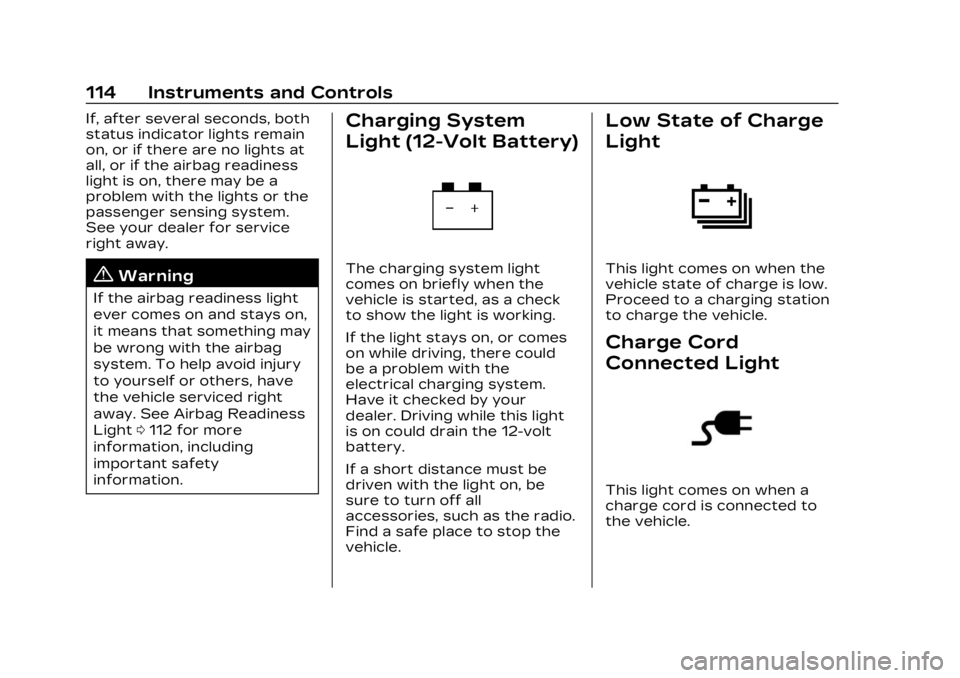
Charging System
Light (12-Volt Battery)
The charging system light
comes on briefly when the
vehicle is started, as a check
to show the light is working.
If the light stays on, or comes
on while driving, there could
be a problem with the
electrical charging system.
Have it checked by your
dealer. Driving while this light
is on could drain the 12-volt
battery.
If a short distance must be
driven with the light on, be
sure to turn off all
accessories, such as the radio.
Find a safe place to stop the
vehicle.
Low State of Charge
Light
This light comes on when the
vehicle state of charge is low.
Proceed to a charging station
to charge the vehicle.
Charge Cord
Connected Light
This light comes on when a
charge cord is connected to
the vehicle.
Page 116 of 424
Cadillac Lyriq Owner Manual (GMNA-Localizing-U.S./Canada-15644413) -
2023 - CRC - 2/23/22
Instruments and Controls 115
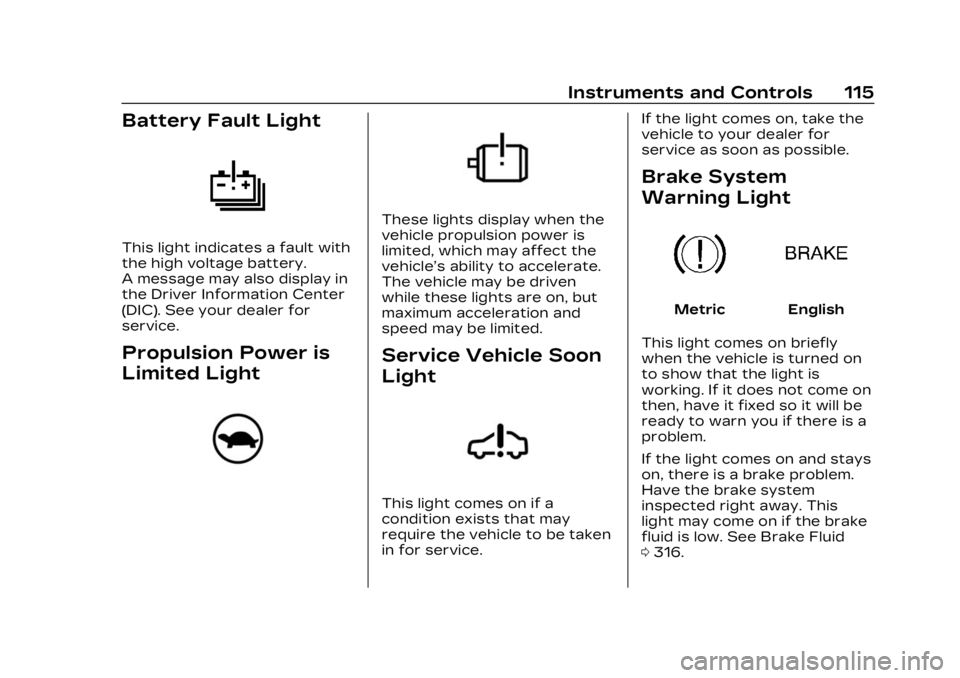
Battery Fault Light
This light indicates a fault with
the high voltage battery.
A message may also display in
the Driver Information Center
(DIC). See your dealer for
service.
Propulsion Power is
Limited Light
These lights display when the
vehicle propulsion power is
limited, which may affect the
vehicle’s ability to accelerate.
The vehicle may be driven
while these lights are on, but
maximum acceleration and
speed may be limited.
Service Vehicle Soon
Light
This light comes on if a
condition exists that may
require the vehicle to be taken
in for service.If the light comes on, take the
vehicle to your dealer for
service as soon as possible.
Brake System
Warning Light
MetricEnglish
This light comes on briefly
when the vehicle is turned on
to show that the light is
working. If it does not come on
then, have it fixed so it will be
ready to warn you if there is a
problem.
If the light comes on and stays
on, there is a brake problem.
Have the brake system
inspected right away. This
light may come on if the brake
fluid is low. See Brake Fluid
0 316.
Page 126 of 424
Cadillac Lyriq Owner Manual (GMNA-Localizing-U.S./Canada-15644413) -
2023 - CRC - 2/23/22
Instruments and Controls 125
{Warning
Do not charge your vehicle’s
battery above an 80%
charge if you are going to
drive down long, steep
grades such as mountain
passes. This provides room
in the battery for
regenerative braking to
supplement your
conventional brakes during
the descent. This is
especially important when
towing a trailer, which puts
additional stress on your
vehicle’s braking system.
See Hill and Mountain Roads
0200 for important
information about driving on
grades.
The default charge level is
100% when plugged in. To set
a different charge level, drag
the circular marker on the
Target Charge Level Gauge to
the preferred value. To lower
the desired Charge Level, drag the Charge Level marker
counterclockwise, and to
increase it drag the marker
clockwise. The Charge Level
can also be changed by
tapping
«andªinside the
gauge on the screen. The
multifunction controller (MCF)
on the center console can also
be used to set the Charge
Level by rotating clockwise or
counterclockwise when the
Target Charge Level Gauge is
highlighted. The Range
estimate updates once the
desired Charge Level is set.
To optimize battery health, the
minimum allowable Charge
Level is determined by the
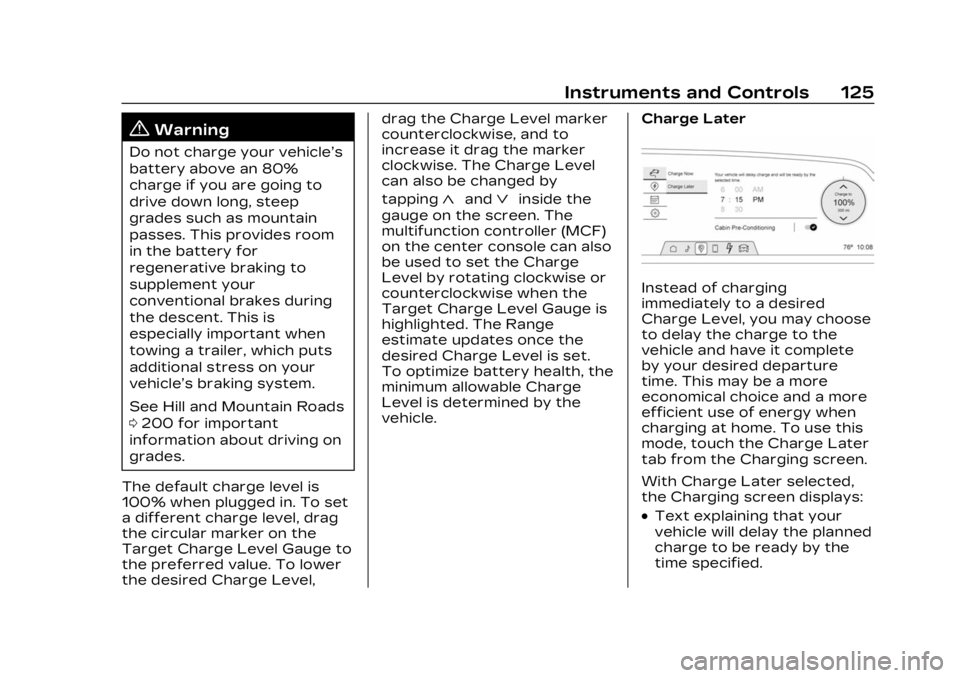
vehicle. Charge Later
Instead of charging
immediately to a desired
Charge Level, you may choose
to delay the charge to the
vehicle and have it complete
by your desired departure
time. This may be a more
economical choice and a more
efficient use of energy when
charging at home. To use this
mode, touch the Charge Later
tab from the Charging screen.
With Charge Later selected,
the Charging screen displays:
.Text explaining that your
vehicle will delay the planned
charge to be ready by the
time specified.
Page 127 of 424
Cadillac Lyriq Owner Manual (GMNA-Localizing-U.S./Canada-15644413) -
2023 - CRC - 2/23/22
126 Instruments and Controls
.Time Selector: Used to set
the desired time at which
the vehicle will finish
charging and be ready for
departure.
.Target Charge Level Gauge:
Sets the percentage at
which the vehicle will stop
charging. The gauge also
displays an estimate of the
vehicle's range upon
completing the charging
session.
.Cabin Pre-Conditioning:
Allows the vehicle to heat or
cool the cabin to your
desired temperature using
energy from the charger.
This means energy from the
battery is not used to
condition the cabin, ensuring
the vehicle gets the greatest
range from the charging
session. Cabin
pre-conditioning happens at
the end of the charge, and
right before the
departure time.To set the time at which the
vehicle will complete the
charge and be ready for
departure:
Swipe up or down on each
value within the Time Selector
until the preferred time is
selected. The time selector
can also be modified using the
multifunction controller (MCF)
on the center console by
turning the knob when the
preferred value is highlighted.
If the desired Charge Level
cannot be reached by the
selected time, a message will
display that one of the two
preferences will need to be
adjusted.
To adjust desired Charge
Level in Charge Later mode,
see
“Charge Now” earlier in
this section.
Setting the Cabin
Pre-Conditioning preference:
Touch the switch to turn on
Cabin Pre-conditioning. Cabin
Pre-Conditioning temperature
can be adjusted in Settings, or by touching Cabin
Pre-Conditioning on this
screen.
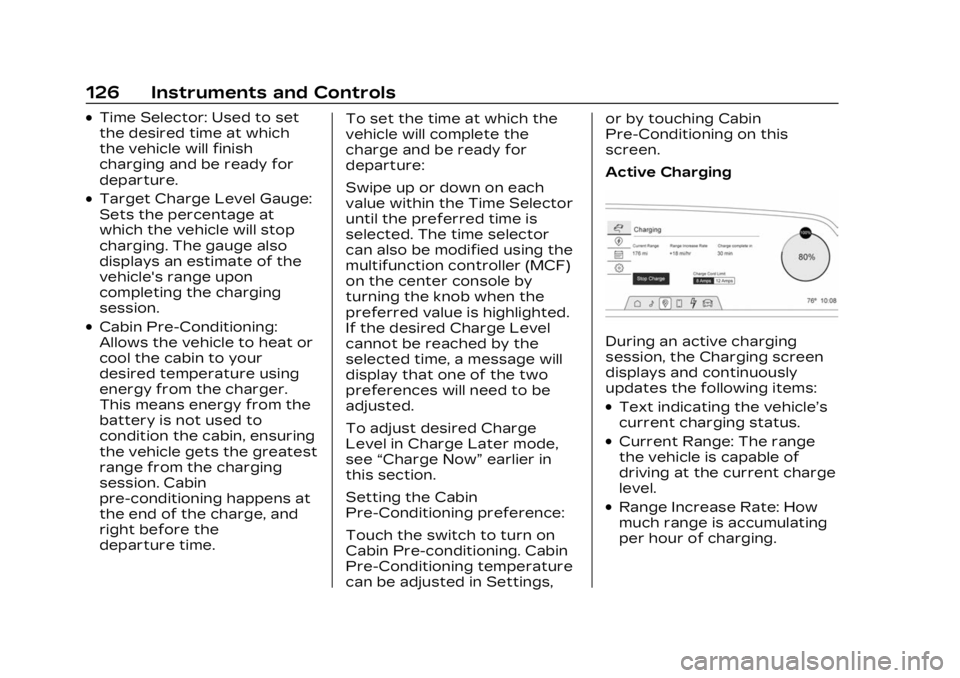
Active ChargingDuring an active charging
session, the Charging screen
displays and continuously
updates the following items:
.Text indicating the vehicle’s
current charging status.
.Current Range: The range
the vehicle is capable of
driving at the current charge
level.
.Range Increase Rate: How
much range is accumulating
per hour of charging.
Page 128 of 424
Cadillac Lyriq Owner Manual (GMNA-Localizing-U.S./Canada-15644413) -
2023 - CRC - 2/23/22
Instruments and Controls 127
.Charge Complete at/in: The
estimated time at which the
vehicle will reach the desired
Charge Level. The words at
and in will change depending
on how much time is
remaining—over an hour,
or less than an hour.
.Target Charge Level Gauge:
During an Active Charge, the
gauge displays the vehicle's
current Charge Level as
a percentage and a colored
section of the circular gauge
to represent this value.
To update the desired Charge
Level for the active charging
session, drag the marker on
the Target Charge Level
Gauge.
Touching the Stop Charge
button at any time ends the
active charging session and
presents a summary of the
current vehicle Range, Charge
Level, and amount of Range
Gained during the charging session. For information on
beginning a charging session,
see Plug-In Charging
0285.
For Level 1 chargers, you can
also select the appropriate
Charge Cord Limit of either
8 amps or 12 amps. This
determines how much current
can flow from an electrical
outlet to the vehicle battery.
It also ensures proper charge
time estimates.
When the Charge Cord Limit is
changed from 8 amps to
12 amps on a 120V circuit a
notification is displayed.
If no Home Charge Location is
set, the Level 1 Cord Limit will
revert to 8 amps every time
the vehicle is shifted out
of (P) Park.
Range and charge time
estimates fluctuate depending
on a number of factors such
as Charge Cord Level/Limit,
battery temperature, and
outside air temperature. To learn more about the vehicle
battery see Plug-In Charging
0
285.
The peek-in charging screen
can be used to monitor your
vehicle’s charge status
remotely, see Instrument
Cluster 0108. To monitor the
charging status from outside
the vehicle, download the
myCadillac app on your mobile
device.
DC Fast Charging
The vehicle will immediately
begin charging when plugged
into a DC fast charging
station. While DC Fast
Charging, the vehicle will
bypass any schedule or
departure time selection. See
Plug-In Charging 0285.
All the Active Charging screen
information will be present.
The Charge Level Gauge will
allow you to set your desired
Charge Level for the DC fast
charge.
Page 132 of 424
Cadillac Lyriq Owner Manual (GMNA-Localizing-U.S./Canada-15644413) -
2023 - CRC - 2/23/22
Instruments and Controls 131
according to any existing
schedules. The Home Charge
Location can be changed or
deleted at this screen.
The wireless service and GPS
satellite technologies must be
available and operating for
features to function properly.
These systems may not
operate if the battery is
disconnected, or if the vehicle
has been off for an extended
period of time. If GPS is
unavailable, a message
displays on the infotainment
screen. GPS functionality may
resume after the next time
you drive the vehicle.
Notifications
This section contains on/off
preferences for multiple
notifications triggered during
the Charging session.
Charge Status Feedback :
Provides an audible
notification through horn
chirps that accompany
changes in the charging
status.Charge Cord Unplugged
Alert :
When on and your
vehicle is locked, your vehicle
will honk the horn and flash
the lights if charge cord
becomes unplugged.
Charge Power Loss Alert :
When on, your vehicle will
honk the horn and flash the
lights if Charging power is
cut off.
DC Fast Charge Battery
Conditioning
If equipped, adjusts the
battery to the optimal
temperature for quicker DC
Fast Charging. This should be
done before charging at a DC
Fast Charger.
Depending on the outside and
battery temperature, battery
conditioning could take longer
to reach the optimal
temperature. While en route to a DC fast
charge station using Google
Maps, DC Fast Charge
Conditioning happens
automatically.
Cabin Pre-Conditioning
Temperature
Allows for the preferred cabin
temperature to be set. During
a planned charging session at
the vehicle's Home Charge
Location, the vehicle cabin is
warmed or cooled to this
temperature if set to ON in
either the Charge Later
screen, or in an active
Schedule.
Preferred Charge Times
Allows preferred charge time
windows to be enabled for the
Home Charge Location during
both weekday and weekend
planned charging sessions.
It does so whether the vehicle
is set to Charge Later,
or observing a scheduled
charge. This allows for
charging at a lower cost by
prioritizing charging during the
Page 135 of 424
Cadillac Lyriq Owner Manual (GMNA-Localizing-U.S./Canada-15644413) -
2023 - CRC - 2/23/22
134 Instruments and Controls
Tires :Tire Pressure card
displays the approximate
pressures of all four tires. Tire
pressure is displayed in either
kilopascal (kPa) or in pounds
per square inch (psi). If the
pressure is low, the value for
that tire is shown in amber.
See Tire Pressure Monitor
System 0343 and
Tire Pressure Monitor
Operation 0344.
When selected, the following
options may be chosen in the
dialog: Relearn Tire Pressure,
Reset Leak Detection, Turn
Off/On Leak Detection, and
Show in Cluster. When
enabled, you will receive alerts
when a fast and/or slow tire
leak is detected. The Leak
Detection speeds shown are
either Tire Leak or Fast Leak.
When disabled, you will still
receive low tire pressure
alerts. However, you will stop
receiving additional alerts
when a tire is leaking air. Energy Info :
Energy Usage
card displays how energy is
being used for the current
drive since the last time the
vehicle was started.
Percentages of the Driving,
Remote Start, Climate and
Conditioning vehicle systems
as overall vehicle energy use
are shown. When selected,
distance driven, total energy,
energy usage bar diagram, and
selectable categories are
displayed. Select a category to
learn more about how your
vehicle uses energy from the
battery.
Energy Efficiency card
displays a graph showing the
energy efficiency that has
been used by the vehicle over
the last 48 km (30 mi). When
selected, regenerated range,
and instant efficiency is shown
along with average efficiency
in the dialog.Vehicle Messages
Messages displayed on the
Driver Information Center
(DIC) indicate the status of the
vehicle or some action that
may be needed to correct a
condition. Multiple messages
may appear one after another.
Vehicle status notifications
are also sent to the
infotainment display. Touching
Uon the bottom right corner
of the infotainment display
opens the notification drawer
where all the active vehicle
messages can be viewed.
Depending on the message,
you can schedule a service,
find the nearest dealer, or find
the nearest charging station.
When there are active
messages that can be viewed,
a red dot appears on top of
the notification icon on the
infotainment display.
The messages that do not
require immediate action can
be acknowledged and cleared
Page 136 of 424
Cadillac Lyriq Owner Manual (GMNA-Localizing-U.S./Canada-15644413) -
2023 - CRC - 2/23/22
Instruments and Controls 135
by pressing the thumbwheel.
The messages that require
immediate action cannot be
cleared until that action is
performed.
All messages should be taken
seriously; clearing the
message does not correct the
problem.
If a SERVICE message
appears, see your dealer.
Follow the instructions given
in the messages. The system
displays messages regarding
the following topics:
.Service Messages
.Fluid Levels
.Vehicle Security
.Brakes
.Ride Control Systems
.Driver Assistance Systems
.Cruise Control
.Lighting and Bulb
Replacement
.Wiper/Washer Systems
.Doors and Windows
.Seat Belts
.Airbag Systems
.Propulsion
.Tire Pressure
.Battery
.Steering
Propulsion Power
Messages
REDUCED
ACCELERATION DRIVE
WITH CARE
This message displays when
the vehicle's propulsion power
is reduced. A reduction in
propulsion power can affect
the vehicle's ability to
accelerate. If this message is
on, but there is no observed
reduction in performance,
proceed to your destination.
Under certain conditions, the
performance may be reduced
the next time the vehicle is
driven. The vehicle may be
driven while this message is
on, but maximum acceleration
and speed may be reduced.
Anytime this message stayson, or displays repeatedly, the
vehicle should be taken to
your dealer for service as
soon as possible.
This message can be displayed
when the high voltage battery
charge level is low. The vehicle
is limiting power to maximize
range.
Under certain operating
conditions propulsion will be
disabled. Try restarting after
the vehicle has been off for
two minutes.
PROPULSION POWER
REDUCED DUE TO
TEMPERATURE
This message displays when
the vehicle is on, the battery
temperature is low, and when
the vehicle’s performance is
limited. The duration of the
limited vehicle performance
depends, in part, on the high
voltage battery charge level.
If the high voltage battery
charge level is relatively high,
as the vehicle is driven, the
Page 137 of 424
Cadillac Lyriq Owner Manual (GMNA-Localizing-U.S./Canada-15644413) -
2023 - CRC - 2/23/22
136 Instruments and Controls
battery temperature will
increase, and the vehicle will
return to normal operation.
If the high voltage battery
charge level is relatively low
the vehicle will not return to
normal operation until
charged.
Keep the vehicle plugged in,
even when fully charged, to
keep the high voltage battery
temperature ready for the
next drive. This is important
when outside temperatures
are extremely hot or cold.
Vehicle Speed
Messages
SPEED LIMITED TO XXX
KM/H (MPH)
This message shows that the
vehicle speed has been limited
to the speed displayed. The
limited speed is a protection
for various propulsion and
vehicle systems, such aslubrication, thermal, brakes,
suspension, Teen Driver if
equipped, or tires.
Universal Remote
System
See Radio Frequency
Statement
0395.
Universal Remote
System Programming
If equipped, the Universal
Garage Door (Universal
Remote) controls are located
on the infotainment screen.
This system can replace up to
eight remote control
transmitters used to activate
devices such as garage door
openers, security systems,
and home automation devices.
These instructions refer to a
garage door opener, but can
be used for other devices.
Do not use the Universal
Remote system with any
garage door opener that does not have the stop and reverse
feature. This includes any
garage door opener model
manufactured before April
1, 1982.
Keep the original hand-held
transmitter for use in other
vehicles as well as for future
programming. Erase the
programming when vehicle
ownership is terminated. See
“Erasing Universal Remotes.”
To program a garage door
opener, park outside directly in
line with and facing the garage
door opener receiver. Clear all
people and objects away from
the garage door.
Make sure the hand-held
transmitter has a new battery
for quick and accurate
transmission of the
radio-frequency signal.
Programming the
Universal Remote System
Programming involves
time-sensitive actions and may
time out, requiring the