battery CADILLAC LYRIC 2023 User Guide
[x] Cancel search | Manufacturer: CADILLAC, Model Year: 2023, Model line: LYRIC, Model: CADILLAC LYRIC 2023Pages: 424, PDF Size: 4.76 MB
Page 35 of 424

Cadillac Lyriq Owner Manual (GMNA-Localizing-U.S./Canada-15644413) -
2023 - CRC - 2/23/22
34 Keys, Doors, and Windows
Express Window
Operation
The windows have an express
feature which allows the
windows to be lowered or
raised without holding the
switch. To automatically raise
or lower the window, pull a
window switch up or press it
down all the way and release.
Stop the window by pressing
or pulling the switch in the
same direction a second time,
or by briefly operating the
switch to the first position in
either direction.
Remote Window
Operation
If equipped, this feature allows
all the windows to be opened
remotely. If enabled in vehicle
personalization, press and
hold
Kon the remote key. To
view available settings for this
feature, touch the Settings
icon on the infotainment home
page. Select “Vehicle”to display the list of available
options and select
“Remote
Lock, Unlock, Start”.
Safety Function
This is for vehicles with the
express-up feature. If any
object is in the path of the
window when the express-up
feature is active, the window
will stop and auto-reverse to a
preset position. Weather
conditions may cause the
window to auto-reverse. The
window switch may be held up
to the second position to close
the window. The window will
return to normal operation
once the obstruction or
condition is removed.
Safety Function Override
This is for vehicles with the
express-up feature. If the
battery on the vehicle has
been recharged or
disconnected, or is not
working, the windows will need
to be reprogrammed for the
express-up feature to work. Before reprogramming,
replace or recharge the
vehicle's battery.
To program the driver window:
1. Close all doors with the vehicle on or in
Service Mode.
2. Press and hold the power window switch until the
window is fully open.
3. Pull the power window switch up until the window
is fully closed.
4. Continue holding the switch up for approximately
two seconds after the
window is completely
closed.
Window Lockout
This feature prevents the rear
passenger windows from
operating, except from the
driver position.
There is a button on the
infotainment display used to
enable or disable this feature.
Page 67 of 424
Cadillac Lyriq Owner Manual (GMNA-Localizing-U.S./Canada-15644413) -
2023 - CRC - 2/23/22
66 Seats and Restraints
systems are damaged in the
crash they may not operate as
normal.
{Warning
A crash severe enough to
inflate the airbags may have
also damaged important
functions in the vehicle, such
as the brake and steering
systems, etc. Even if the
vehicle appears to be
drivable after a moderate
crash, there may be
concealed damage that
could make it difficult to
safely operate the vehicle.
Use caution if attempting to
restart the vehicle after a
crash has occurred.
Plug-in vehicles have a high
voltage battery and a
standard 12-volt battery.
If an airbag inflates or the
vehicle has been in a crash,
the sensing system may shut
down the high voltage system. When this occurs, the high
voltage battery is
disconnected and the vehicle
will not start. Before the
vehicle can be operated again,
it must be serviced at your
dealer.
In many crashes severe
enough to inflate the airbag,
windshields are broken by
vehicle deformation. Additional
windshield breakage may also
occur from the front outboard
passenger airbag.
.Airbags are designed to
inflate only once. After an
airbag inflates, you will need
some new parts for the
airbag system. If you do not
get them, the airbag system
will not be there to help
protect you in another crash.
A new system will include
airbag modules and possibly
other parts. The service
manual for the vehicle
covers the need to replace
other parts.
.The vehicle has a crash
sensing and diagnostic
module which records
information after a crash.
See Vehicle Data Recording
and Privacy
0397 and
Event Data Recorders 0398.
.Let only qualified technicians
work on the airbag system.
Improper service can mean
that an airbag system will
not work properly. See your
dealer for service.
Passenger Sensing
System
The vehicle has a passenger
sensing system for the front
outboard passenger position.
The passenger airbag status
indicator will light on the
overhead console when the
vehicle is started.
Page 72 of 424
Cadillac Lyriq Owner Manual (GMNA-Localizing-U.S./Canada-15644413) -
2023 - CRC - 2/23/22
Seats and Restraints 71
put on an unoccupied seat.
If this is not desired, remove
the object from the seat.
{Warning
Stowing articles under the
passenger seat or between
the passenger seat cushion
and seatback may interfere
with the proper operation of
the passenger sensing
system.
Servicing the
Airbag-Equipped
Vehicle
Airbags affect how the vehicle
should be serviced. There are
parts of the airbag system in
several places around the
vehicle. Your dealer and the
service manual have
information about servicing
the vehicle and the airbag
system. To purchase a service
manual, see Publication
Ordering Information0394.
{Warning
For up to 10 seconds after
the vehicle is turned off and
the battery is disconnected,
an airbag can still inflate
during improper service. You
can be injured if you are
close to an airbag when it
inflates. Avoid yellow
connectors. They are
probably part of the airbag
system. Be sure to follow
proper service procedures,
and make sure the person
performing work for you is
qualified to do so.
Adding Equipment to
the Airbag-Equipped
Vehicle
Adding accessories that
change the vehicle's frame,
bumper system, height, front
end, or side sheet metal may
keep the airbag system from
working properly. The operation of the airbag
system can also be affected
by changing, including
improperly repairing or
replacing, any parts of the
following:
.Airbag system, including
airbag modules, front or side
impact sensors, sensing and
diagnostic module, or airbag
wiring
.Front seats, including
stitching, seams or zippers
.Seat belts
.Steering wheel, instrument
panel, overhead console,
ceiling trim, or pillar
garnish trim
.Inner door seals, including
speakers
Your dealer and the service
manual have information about
the location of the airbag
modules and sensors, sensing
and diagnostic module, and
airbag wiring along with the
proper replacement
procedures.
Page 99 of 424
Cadillac Lyriq Owner Manual (GMNA-Localizing-U.S./Canada-15644413) -
2023 - CRC - 2/23/22
98 Instruments and Controls
Instruments and
Controls
Controls
Steering WheelAdjustment . . . . . . . . . . . . . . . . . . 99
Heated Steering Wheel . . . 99
Horn . . . . . . . . . . . . . . . . . . . . . . . . . . . 100
Pedestrian Safety Signal . . . . . . . . . . . . . . . . . . . . . . . . 100
Windshield Wiper/ Washer . . . . . . . . . . . . . . . . . . . . . 100
Compass . . . . . . . . . . . . . . . . . . . . . 102
Clock . . . . . . . . . . . . . . . . . . . . . . . . . . . 102
Power Outlets . . . . . . . . . . . . . . 102
Wireless Charging . . . . . . . . . 104
Warning Lights, Gauges,
and Indicators
Warning Lights, Gauges, and Indicators . . . . . . . . . . . . . 108
Instrument Cluster . . . . . . . . 108
Speedometer . . . . . . . . . . . . . . . . 110
Odometer . . . . . . . . . . . . . . . . . . . . . 110
Trip Odometer . . . . . . . . . . . . . . 110
Battery Gauge (High Voltage) . . . . . . . . . . . . . . . . . . . . . 110
Power Indicator Gauge . . . . 111
Seat Belt Reminders . . . . . . . 112 Airbag Readiness Light . . . 112
Passenger Airbag Status
Indicator . . . . . . . . . . . . . . . . . . . . . 113
Charging System Light (12-Volt Battery) . . . . . . . . . . . 114
Low State of Charge Light . . . . . . . . . . . . . . . . . . . . . . . . . . 114
Charge Cord Connected Light . . . . . . . . . . . . . . . . . . . . . . . . . . 114
Battery Fault Light . . . . . . . . . 115
Propulsion Power is Limited Light . . . . . . . . . . . . . . . 115
Service Vehicle Soon Light . . . . . . . . . . . . . . . . . . . . . . . . . . 115
Brake System Warning Light . . . . . . . . . . . . . . . . . . . . . . . . . . 115
Electric Parking Brake Light . . . . . . . . . . . . . . . . . . . . . . . . . . 116
Service Electric Parking Brake Light . . . . . . . . . . . . . . . . . 116
Antilock Brake System (ABS) Warning Light . . . . . 117
Automatic Vehicle Hold (AVH) Light . . . . . . . . . . . . . . . . . . 117
Lane Keep Assist (LKA) Light . . . . . . . . . . . . . . . . . . . . . . . . . . 117
Automatic Emergency Braking (AEB) Disabled
Light . . . . . . . . . . . . . . . . . . . . . . . . . . 118 Vehicle Ahead
Indicator . . . . . . . . . . . . . . . . . . . . . 118
Pedestrian Ahead Indicator . . . . . . . . . . . . . . . . . . . . . 118
Traction Off Light . . . . . . . . . . 119
StabiliTrak OFF Light . . . . . 119
Traction Control System
(TCS)/StabiliTrak
Light . . . . . . . . . . . . . . . . . . . . . . . . . . 119
Driver Mode Control Light . . . . . . . . . . . . . . . . . . . . . . . . . 120
Tire Pressure Light . . . . . . . 120
Security Light . . . . . . . . . . . . . . . 121
Vehicle Ready Light . . . . . . . . 121
One-Pedal Driving Light . . . . . . . . . . . . . . . . . . . . . . . . . . 121
High-Beam On Light . . . . . . . 121
Lamps On Reminder . . . . . . 122
Cruise Control Light . . . . . . 122
Door Ajar Light . . . . . . . . . . . . . 122Information Displays
Charging . . . . . . . . . . . . . . . . . . . . . . 123
Driver Information Center (DIC) . . . . . . . . . . . . . . . . 132
Vehicle Information . . . . . . . . 133
Vehicle Messages
Vehicle Messages . . . . . . . . . 134
Propulsion Power Messages . . . . . . . . . . . . . . . . . . . 135
Page 104 of 424
Cadillac Lyriq Owner Manual (GMNA-Localizing-U.S./Canada-15644413) -
2023 - CRC - 2/23/22
Instruments and Controls 103
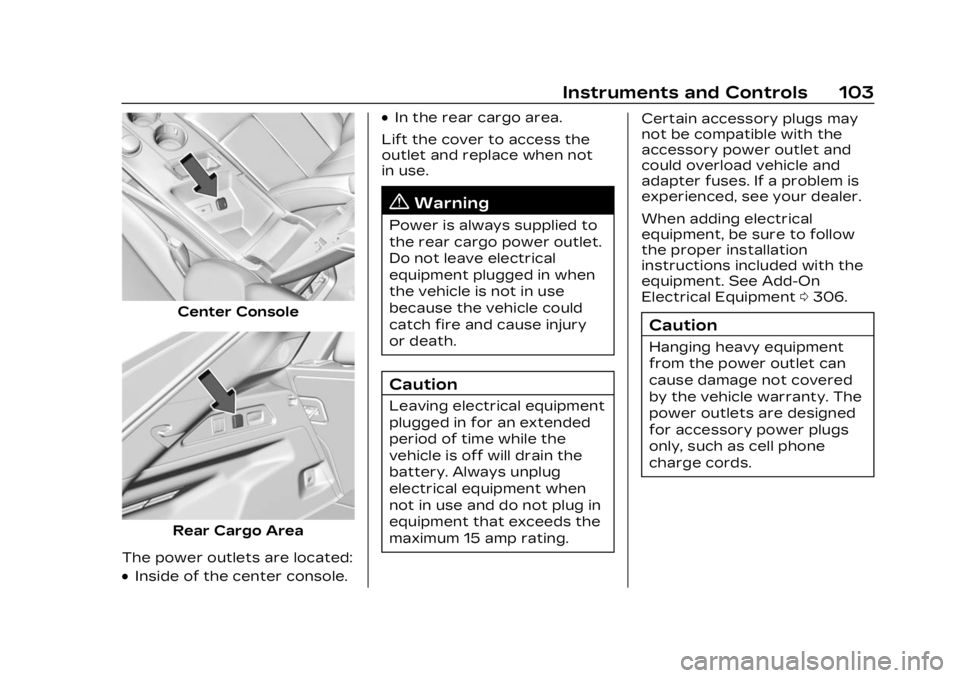
Center Console
Rear Cargo Area
The power outlets are located:
.Inside of the center console.
.In the rear cargo area.
Lift the cover to access the
outlet and replace when not
in use.
{Warning
Power is always supplied to
the rear cargo power outlet.
Do not leave electrical
equipment plugged in when
the vehicle is not in use
because the vehicle could
catch fire and cause injury
or death.
Caution
Leaving electrical equipment
plugged in for an extended
period of time while the
vehicle is off will drain the
battery. Always unplug
electrical equipment when
not in use and do not plug in
equipment that exceeds the
maximum 15 amp rating. Certain accessory plugs may
not be compatible with the
accessory power outlet and
could overload vehicle and
adapter fuses. If a problem is
experienced, see your dealer.
When adding electrical
equipment, be sure to follow
the proper installation
instructions included with the
equipment. See Add-On
Electrical Equipment
0306.
Caution
Hanging heavy equipment
from the power outlet can
cause damage not covered
by the vehicle warranty. The
power outlets are designed
for accessory power plugs
only, such as cell phone
charge cords.
Page 107 of 424
Cadillac Lyriq Owner Manual (GMNA-Localizing-U.S./Canada-15644413) -
2023 - CRC - 2/23/22
106 Instruments and Controls
To maximize the charge
rate, ensure the
smartphone is fully seated
and centered in the holder
with nothing under it.
A thick smartphone case
may prevent the charger
from working, or reduce the
charging performance. See
your dealer for additional
information.
4. A green
]will appear on
the infotainment display,
next to the phone icon. This
indicates that the
smartphone is detected.
5. If a smartphone is placed on the charger and
]turns off
or a yellow triangle appears,
remove the smartphone and
any objects from the pocket.
Turn the smartphone
180 degrees and wait a few
seconds before placing/
aligning it on the pocket
again.
6. If a smartphone is placed on the charger and a red circle
appears, the charger and/or the smartphone is
overheated. Remove the
smartphone and any objects
from the charger in order to
cool the system.
The smartphone may become
warm during charging. This is
normal. In warmer
temperatures, the speed of
charging may be reduced.
For vehicles with wireless
phone projection, the
smartphone may overheat
during wireless charging. The
smartphone may slow down,
stop charging, or shut down to
protect the battery. The
phone may need to be
removed from its case to
prevent overheating. The
]
may flash while the phone is
cooling down enough for
wireless charging to
automatically resume. This is
normal. Individual phone
performance may vary. Software Acknowledgements
Certain Wireless Charging
Module product from LG
Electronics, Inc. ("LGE")
contains the open source
software detailed below. Refer
to the indicated open source
licenses (as are included
following this notice) for the
terms and conditions of
their use.
OSS Notice Information
To obtain the source code
that is contained in this
product, please visit
https://opensource.lge.com. In
addition to the source code, all
referred license terms,
warranty disclaimers and
copyright notices are available
for download. LG Electronics
will also provide open source
code to you on CD-ROM for a
charge covering the cost of
performing such distribution
(such as the cost of media,
shipping, and handling) upon
email request to
[email protected]. This
Page 109 of 424
Cadillac Lyriq Owner Manual (GMNA-Localizing-U.S./Canada-15644413) -
2023 - CRC - 2/23/22
108 Instruments and Controls
Warning Lights,
Gauges, and
Indicators
Warning lights and gauges can
signal that something is wrong
before it becomes serious
enough to cause an expensive
repair or replacement. Paying
attention to the warning lights
and gauges could prevent
injury.
Some warning lights come on
briefly when the propulsion
system is started to indicate
they are working. When one of
the warning lights comes on
and stays on while driving,
or when one of the gauges
shows there may be a
problem, check the section
that explains what to do.
Waiting to do repairs can be
costly and even dangerous.
Instrument Cluster
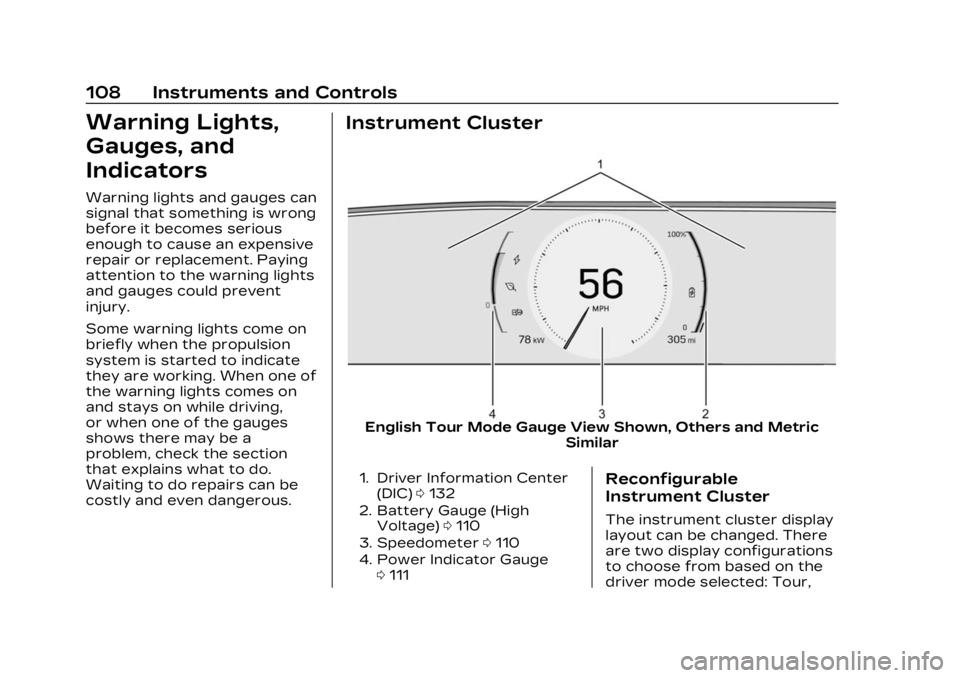
English Tour Mode Gauge View Shown, Others and MetricSimilar
1. Driver Information Center
(DIC) 0132
2. Battery Gauge (High Voltage) 0110
3. Speedometer 0110
4. Power Indicator Gauge 0111Reconfigurable
Instrument Cluster
The instrument cluster display
layout can be changed. There
are two display configurations
to choose from based on the
driver mode selected: Tour,
Page 110 of 424
Cadillac Lyriq Owner Manual (GMNA-Localizing-U.S./Canada-15644413) -
2023 - CRC - 2/23/22
Instruments and Controls 109
and Sport. To see how to
change the Driver Mode, see
“Mode Activation”under
Driver Mode Control 0223.
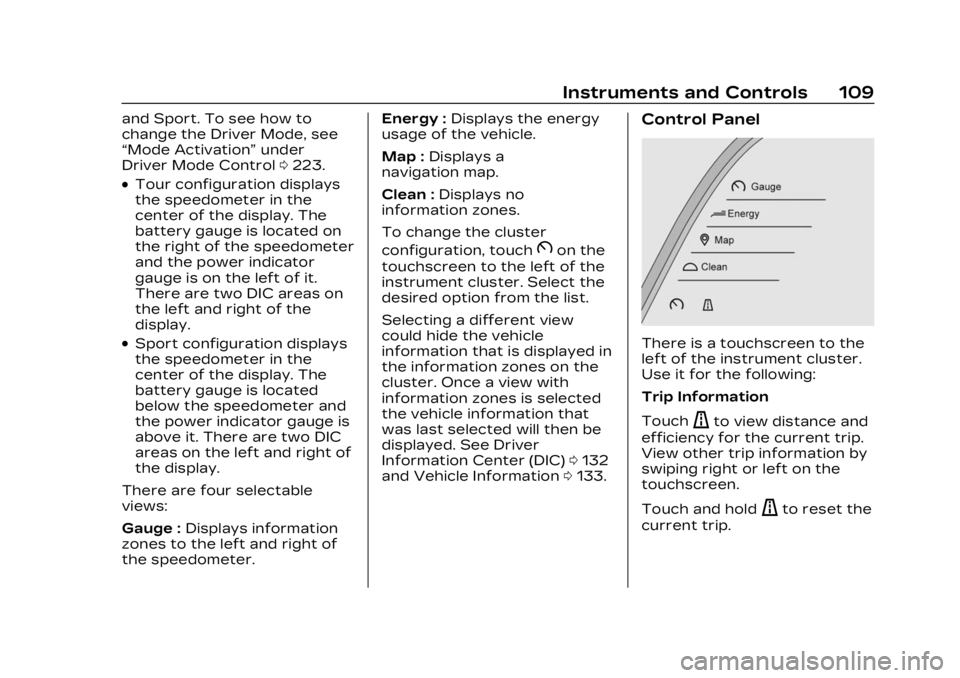
.Tour configuration displays
the speedometer in the
center of the display. The
battery gauge is located on
the right of the speedometer
and the power indicator
gauge is on the left of it.
There are two DIC areas on
the left and right of the
display.
.Sport configuration displays
the speedometer in the
center of the display. The
battery gauge is located
below the speedometer and
the power indicator gauge is
above it. There are two DIC
areas on the left and right of
the display.
There are four selectable
views:
Gauge : Displays information
zones to the left and right of
the speedometer. Energy :
Displays the energy
usage of the vehicle.
Map : Displays a
navigation map.
Clean : Displays no
information zones.
To change the cluster
configuration, touch
Bon the
touchscreen to the left of the
instrument cluster. Select the
desired option from the list.
Selecting a different view
could hide the vehicle
information that is displayed in
the information zones on the
cluster. Once a view with
information zones is selected
the vehicle information that
was last selected will then be
displayed. See Driver
Information Center (DIC) 0132
and Vehicle Information 0133.
Control Panel
There is a touchscreen to the
left of the instrument cluster.
Use it for the following:
Trip Information
Touch
ato view distance and
efficiency for the current trip.
View other trip information by
swiping right or left on the
touchscreen.
Touch and hold
ato reset the
current trip.
Page 111 of 424
Cadillac Lyriq Owner Manual (GMNA-Localizing-U.S./Canada-15644413) -
2023 - CRC - 2/23/22
110 Instruments and Controls
Instrument Cluster Layout
Touch
Bto view and select
the available instrument
cluster layouts.
Display Settings
The following options can be
turned on or off using the
infotainment display. See
Settings 0176.
Speed Information
Choose which speed-related
information is shown in the
instrument cluster:
Digital Speedometer : The
speedometer shows how fast
the vehicle is moving in either
kilometers per hour (km/h) or
miles per hour (mph). The
speedometer cannot be reset.
Speed Sign : Shows sign
information, which comes from
a roadway database in the
onboard navigation,
if equipped. The sign will show
“− −” when there is no
detected speed limit or the
system is unavailable. Speed Warning Color :
The
overspeeding area within the
analog gauge is shown red. In
digital speedometer, the digital
number is shown red.
Turn-by-Turn Graphics
When on, you will see
turn-by-turn navigation
graphics in the instrument
cluster when a route is active.
These graphics provide visual
directions for upcoming
maneuvers.
Speedometer
The speedometer shows the
vehicle speed in either
kilometers per hour (km/h) or
miles per hour (mph).
Odometer
The odometer shows how far
the vehicle has been driven, in
either kilometers or miles.
Trip Odometer
The trip odometer shows how
far the vehicle has been driven
since the trip odometer was
last reset.
The trip odometer is accessed
and reset through the Driver
Information Center (DIC). See
Driver Information Center
(DIC) 0132.
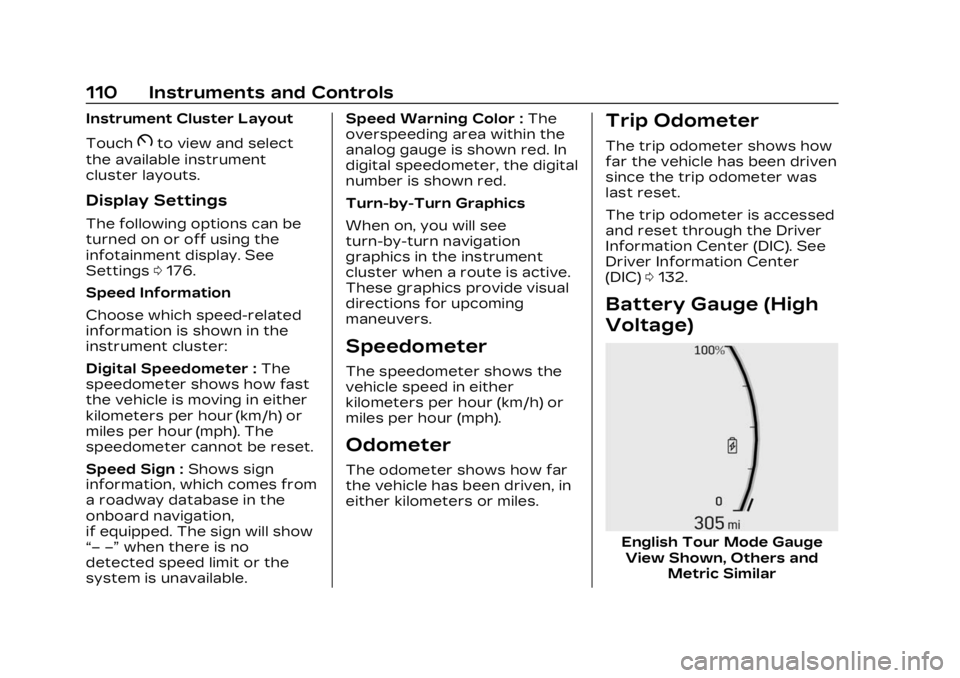
Battery Gauge (High
Voltage)
English Tour Mode Gauge
View Shown, Others and Metric Similar
Page 112 of 424
Cadillac Lyriq Owner Manual (GMNA-Localizing-U.S./Canada-15644413) -
2023 - CRC - 2/23/22
Instruments and Controls 111
This displays the high voltage
battery state of charge. The
value at the bottom is an
estimate of how far the
vehicle can be driven on the
remaining charge based on
recent driving habits,
conditions, and HVAC usage.
The fill bars shown inside of
the gauge indicate
the percentage range as
estimated from current vehicle
conditions and climate
settings. The range estimate
on the bottom also may be
affected by climate settings,
current vehicle conditions and
ambient conditions. Estimated
range may increase and
decrease based on climate
control energy consumption.
Driving aggressively through
hard acceleration and/or
braking events, excessive
HVAC usage, using heated or
cooled seats, battery
preconditioning, and
performance modes can affect
vehicle range estimates.When the high voltage battery
state of charge level gets low,
the gauge will change color to
amber. When the charge is
very low the gauge will flash,
and the estimated range value
on the bottom will change to
LOW. Additional alerts may
display and a sound may also
be heard at low state of
charge.
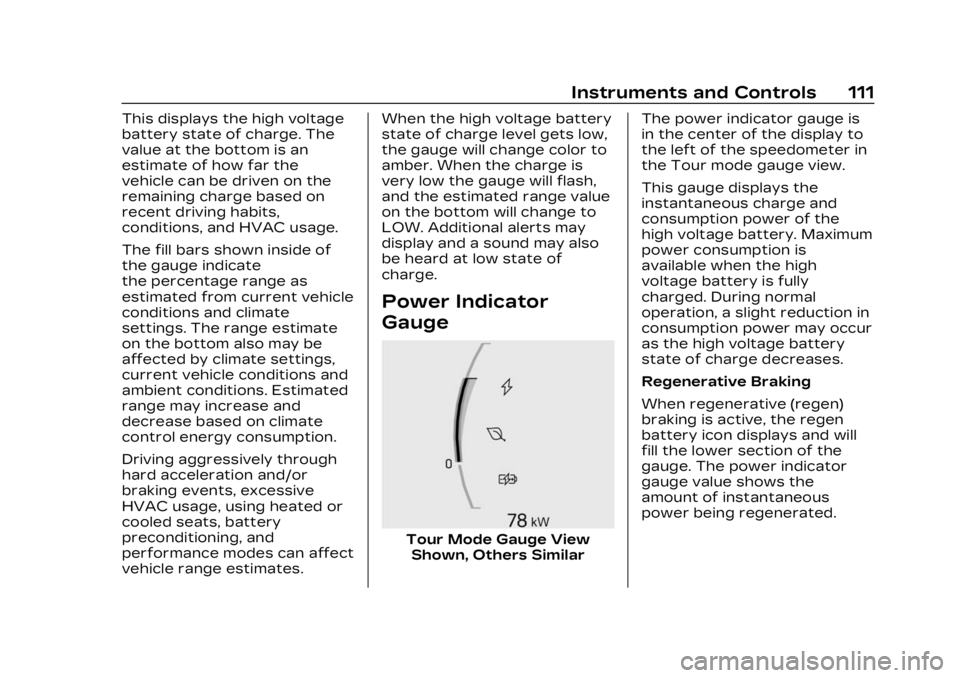
Power Indicator
Gauge
Tour Mode Gauge View
Shown, Others Similar The power indicator gauge is
in the center of the display to
the left of the speedometer in
the Tour mode gauge view.
This gauge displays the
instantaneous charge and
consumption power of the
high voltage battery. Maximum
power consumption is
available when the high
voltage battery is fully
charged. During normal
operation, a slight reduction in
consumption power may occur
as the high voltage battery
state of charge decreases.
Regenerative Braking
When regenerative (regen)
braking is active, the regen
battery icon displays and will
fill the lower section of the
gauge. The power indicator
gauge value shows the
amount of instantaneous
power being regenerated.