lock CADILLAC LYRIC 2023 Service Manual
[x] Cancel search | Manufacturer: CADILLAC, Model Year: 2023, Model line: LYRIC, Model: CADILLAC LYRIC 2023Pages: 424, PDF Size: 4.76 MB
Page 93 of 424
Cadillac Lyriq Owner Manual (GMNA-Localizing-U.S./Canada-15644413) -
2023 - CRC - 2/23/22
92 Seats and Restraints
finger clearance between
the push button and the
child restraint.
When the passenger
sensing system has turned
off the front outboard
passenger frontal airbag
and knee airbag, the OFF
indicator on the passenger
airbag status indicator
should light and stay lit
when you start the vehicle.
See Passenger Airbag
Status Indicator0113.
2. Put the child restraint on the seat.
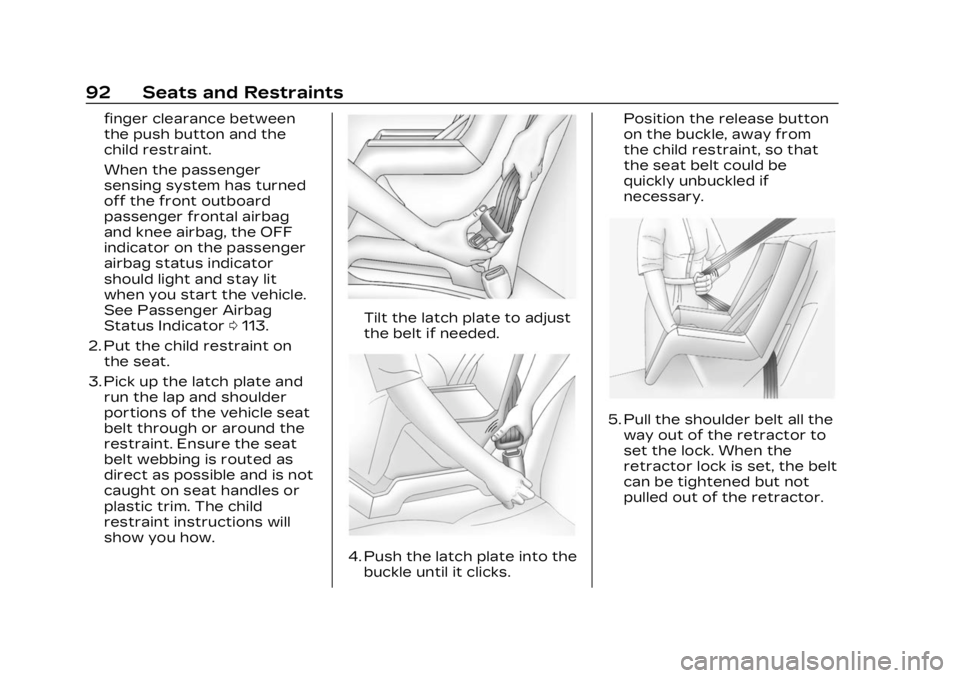
3. Pick up the latch plate and run the lap and shoulder
portions of the vehicle seat
belt through or around the
restraint. Ensure the seat
belt webbing is routed as
direct as possible and is not
caught on seat handles or
plastic trim. The child
restraint instructions will
show you how.
Tilt the latch plate to adjust
the belt if needed.
4. Push the latch plate into thebuckle until it clicks. Position the release button
on the buckle, away from
the child restraint, so that
the seat belt could be
quickly unbuckled if
necessary.
5. Pull the shoulder belt all the
way out of the retractor to
set the lock. When the
retractor lock is set, the belt
can be tightened but not
pulled out of the retractor.
Page 94 of 424
Cadillac Lyriq Owner Manual (GMNA-Localizing-U.S./Canada-15644413) -
2023 - CRC - 2/23/22
Seats and Restraints 93
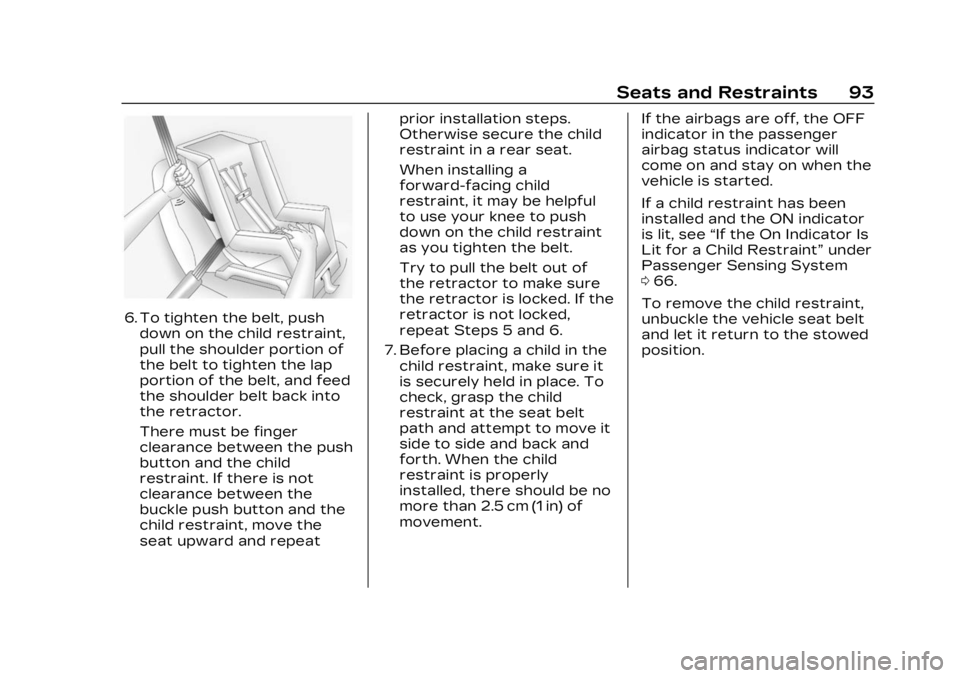
6. To tighten the belt, pushdown on the child restraint,
pull the shoulder portion of
the belt to tighten the lap
portion of the belt, and feed
the shoulder belt back into
the retractor.
There must be finger
clearance between the push
button and the child
restraint. If there is not
clearance between the
buckle push button and the
child restraint, move the
seat upward and repeat prior installation steps.
Otherwise secure the child
restraint in a rear seat.
When installing a
forward-facing child
restraint, it may be helpful
to use your knee to push
down on the child restraint
as you tighten the belt.
Try to pull the belt out of
the retractor to make sure
the retractor is locked. If the
retractor is not locked,
repeat Steps 5 and 6.
7. Before placing a child in the child restraint, make sure it
is securely held in place. To
check, grasp the child
restraint at the seat belt
path and attempt to move it
side to side and back and
forth. When the child
restraint is properly
installed, there should be no
more than 2.5 cm (1 in) of
movement. If the airbags are off, the OFF
indicator in the passenger
airbag status indicator will
come on and stay on when the
vehicle is started.
If a child restraint has been
installed and the ON indicator
is lit, see
“If the On Indicator Is
Lit for a Child Restraint” under
Passenger Sensing System
0 66.
To remove the child restraint,
unbuckle the vehicle seat belt
and let it return to the stowed
position.
Page 97 of 424
Cadillac Lyriq Owner Manual (GMNA-Localizing-U.S./Canada-15644413) -
2023 - CRC - 2/23/22
96 Storage
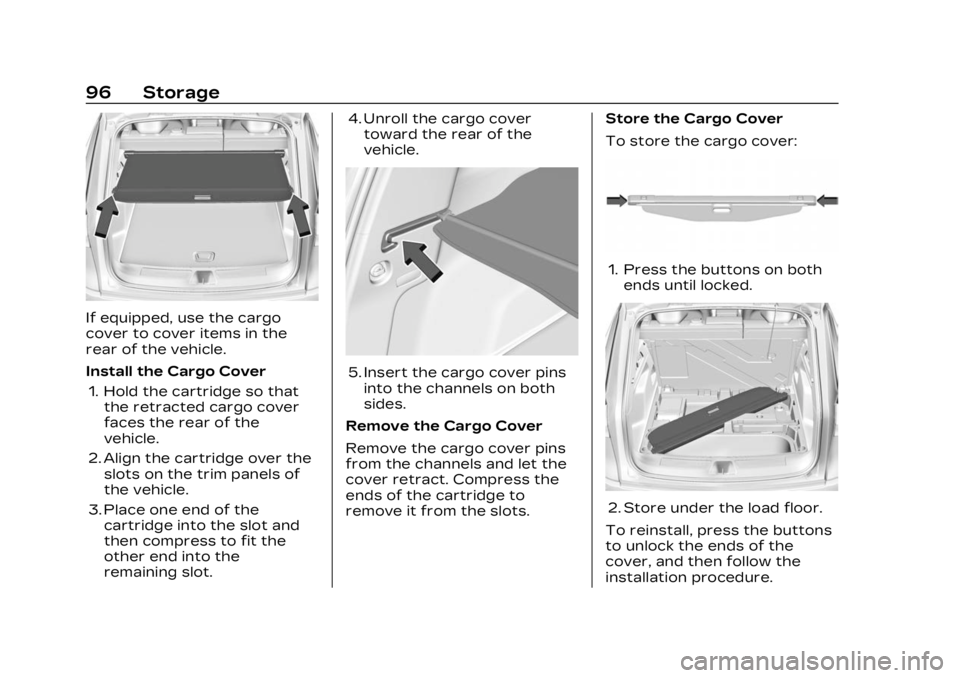
If equipped, use the cargo
cover to cover items in the
rear of the vehicle.
Install the Cargo Cover1. Hold the cartridge so that the retracted cargo cover
faces the rear of the
vehicle.
2. Align the cartridge over the slots on the trim panels of
the vehicle.
3. Place one end of the cartridge into the slot and
then compress to fit the
other end into the
remaining slot. 4. Unroll the cargo cover
toward the rear of the
vehicle.
5. Insert the cargo cover pinsinto the channels on both
sides.
Remove the Cargo Cover
Remove the cargo cover pins
from the channels and let the
cover retract. Compress the
ends of the cartridge to
remove it from the slots. Store the Cargo Cover
To store the cargo cover:
1. Press the buttons on both
ends until locked.
2. Store under the load floor.
To reinstall, press the buttons
to unlock the ends of the
cover, and then follow the
installation procedure.
Page 99 of 424
Cadillac Lyriq Owner Manual (GMNA-Localizing-U.S./Canada-15644413) -
2023 - CRC - 2/23/22
98 Instruments and Controls
Instruments and
Controls
Controls
Steering WheelAdjustment . . . . . . . . . . . . . . . . . . 99
Heated Steering Wheel . . . 99
Horn . . . . . . . . . . . . . . . . . . . . . . . . . . . 100
Pedestrian Safety Signal . . . . . . . . . . . . . . . . . . . . . . . . 100
Windshield Wiper/ Washer . . . . . . . . . . . . . . . . . . . . . 100
Compass . . . . . . . . . . . . . . . . . . . . . 102
Clock . . . . . . . . . . . . . . . . . . . . . . . . . . . 102
Power Outlets . . . . . . . . . . . . . . 102
Wireless Charging . . . . . . . . . 104
Warning Lights, Gauges,
and Indicators
Warning Lights, Gauges, and Indicators . . . . . . . . . . . . . 108
Instrument Cluster . . . . . . . . 108
Speedometer . . . . . . . . . . . . . . . . 110
Odometer . . . . . . . . . . . . . . . . . . . . . 110
Trip Odometer . . . . . . . . . . . . . . 110
Battery Gauge (High Voltage) . . . . . . . . . . . . . . . . . . . . . 110
Power Indicator Gauge . . . . 111
Seat Belt Reminders . . . . . . . 112 Airbag Readiness Light . . . 112
Passenger Airbag Status
Indicator . . . . . . . . . . . . . . . . . . . . . 113
Charging System Light (12-Volt Battery) . . . . . . . . . . . 114
Low State of Charge Light . . . . . . . . . . . . . . . . . . . . . . . . . . 114
Charge Cord Connected Light . . . . . . . . . . . . . . . . . . . . . . . . . . 114
Battery Fault Light . . . . . . . . . 115
Propulsion Power is Limited Light . . . . . . . . . . . . . . . 115
Service Vehicle Soon Light . . . . . . . . . . . . . . . . . . . . . . . . . . 115
Brake System Warning Light . . . . . . . . . . . . . . . . . . . . . . . . . . 115
Electric Parking Brake Light . . . . . . . . . . . . . . . . . . . . . . . . . . 116
Service Electric Parking Brake Light . . . . . . . . . . . . . . . . . 116
Antilock Brake System (ABS) Warning Light . . . . . 117
Automatic Vehicle Hold (AVH) Light . . . . . . . . . . . . . . . . . . 117
Lane Keep Assist (LKA) Light . . . . . . . . . . . . . . . . . . . . . . . . . . 117
Automatic Emergency Braking (AEB) Disabled
Light . . . . . . . . . . . . . . . . . . . . . . . . . . 118 Vehicle Ahead
Indicator . . . . . . . . . . . . . . . . . . . . . 118
Pedestrian Ahead Indicator . . . . . . . . . . . . . . . . . . . . . 118
Traction Off Light . . . . . . . . . . 119
StabiliTrak OFF Light . . . . . 119
Traction Control System
(TCS)/StabiliTrak
Light . . . . . . . . . . . . . . . . . . . . . . . . . . 119
Driver Mode Control Light . . . . . . . . . . . . . . . . . . . . . . . . . 120
Tire Pressure Light . . . . . . . 120
Security Light . . . . . . . . . . . . . . . 121
Vehicle Ready Light . . . . . . . . 121
One-Pedal Driving Light . . . . . . . . . . . . . . . . . . . . . . . . . . 121
High-Beam On Light . . . . . . . 121
Lamps On Reminder . . . . . . 122
Cruise Control Light . . . . . . 122
Door Ajar Light . . . . . . . . . . . . . 122Information Displays
Charging . . . . . . . . . . . . . . . . . . . . . . 123
Driver Information Center (DIC) . . . . . . . . . . . . . . . . 132
Vehicle Information . . . . . . . . 133
Vehicle Messages
Vehicle Messages . . . . . . . . . 134
Propulsion Power Messages . . . . . . . . . . . . . . . . . . . 135
Page 102 of 424
Cadillac Lyriq Owner Manual (GMNA-Localizing-U.S./Canada-15644413) -
2023 - CRC - 2/23/22
Instruments and Controls 101
Clear snow and ice from the
wiper blades and windshield
before using them. If frozen to
the windshield, carefully
loosen or thaw them.
Damaged blades should be
replaced. See Wiper Blade
Replacement0320.
{Warning
In freezing weather, do not
use the washer until the
windshield is warmed.
Otherwise the washer fluid
can form ice on the
windshield, blocking your
vision.
{Warning
Before driving the vehicle,
always clear snow and ice
from the hood, windshield,
washer nozzles, roof, and
rear of the vehicle, including
all lamps and windows.
(Continued)
Warning (Continued)
Reduced visibility from snow
and ice buildup could lead to
a crash.
Wiper Arm Assembly
Protection
When using an automatic car
wash, move the windshield
wiper lever to OFF. This
disables the automatic
Rainsense windshield wipers.
With Rainsense, if the vehicle
is in N (Neutral) and the speed
is very slow, the wipers will
automatically stop at the base
of the windshield.
The wiper operations return
to normal when the vehicle is
no longer in N (Neutral) or the
vehicle speed has increased.
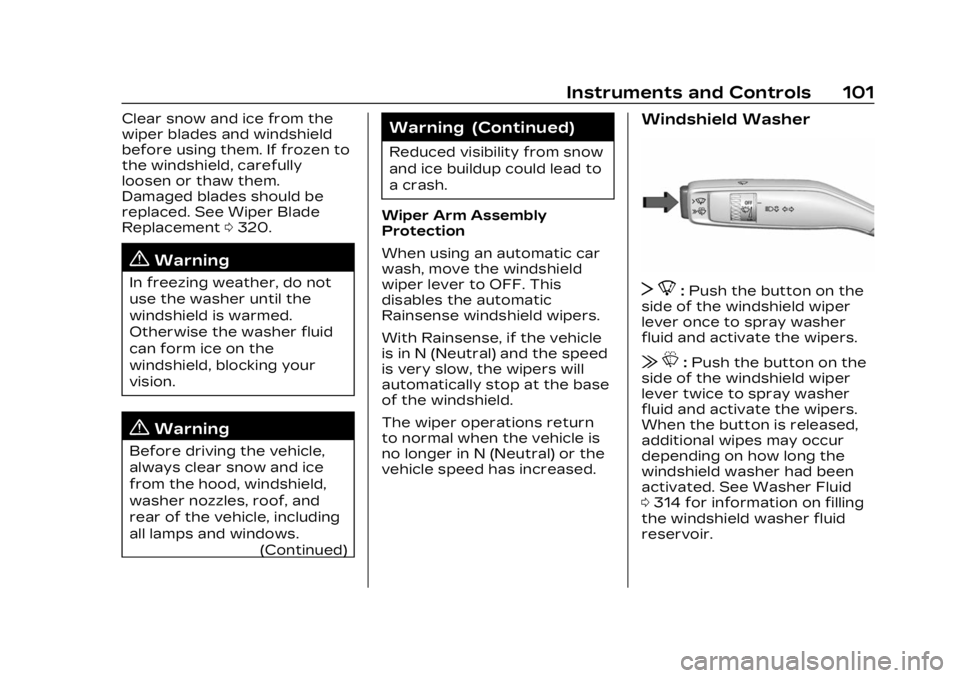
Windshield Washer
T 8:Push the button on the
side of the windshield wiper
lever once to spray washer
fluid and activate the wipers.
| L:Push the button on the
side of the windshield wiper
lever twice to spray washer
fluid and activate the wipers.
When the button is released,
additional wipes may occur
depending on how long the
windshield washer had been
activated. See Washer Fluid
0 314 for information on filling
the windshield washer fluid
reservoir.
Page 103 of 424
Cadillac Lyriq Owner Manual (GMNA-Localizing-U.S./Canada-15644413) -
2023 - CRC - 2/23/22
102 Instruments and Controls
Wiper Parking
If the vehicle is off while the
wipers are on LO or HI, they
will immediately stop.
LL
If the windshield wiper lever is
then moved to OFF before the
driver door is opened or within
10 minutes, the wipers will
restart and move to the base
of the windshield.
If the vehicle is off while the
wipers are performing wipes
due to windshield washing or
Rainsense, the wipers
continue to run until they
reach the base of the
windshield.Rear Camera Washer
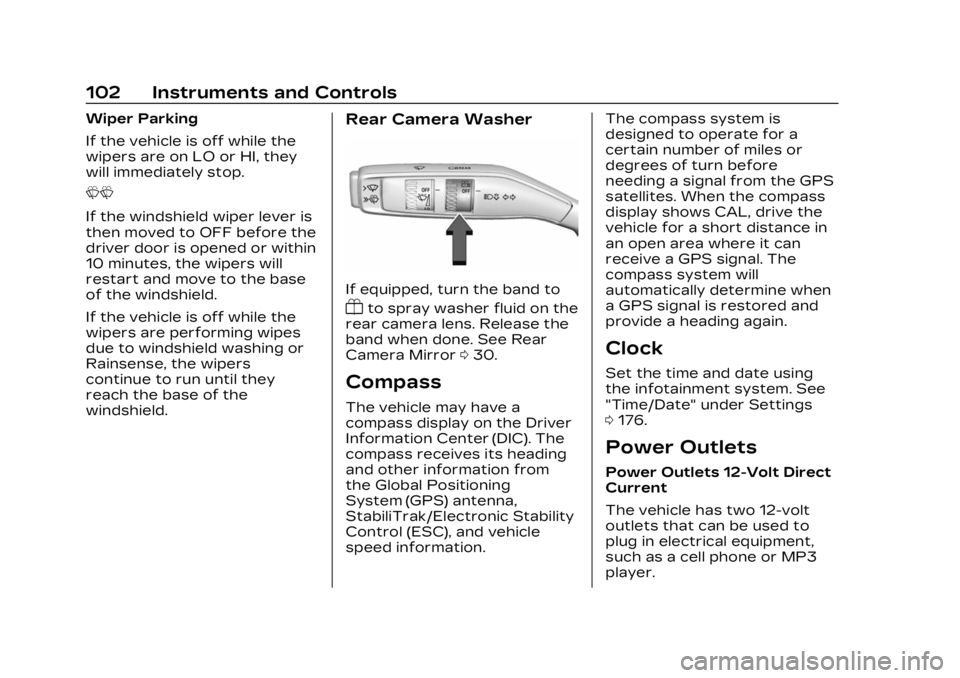
If equipped, turn the band to
Yto spray washer fluid on the
rear camera lens. Release the
band when done. See Rear
Camera Mirror 030.
Compass
The vehicle may have a
compass display on the Driver
Information Center (DIC). The
compass receives its heading
and other information from
the Global Positioning
System (GPS) antenna,
StabiliTrak/Electronic Stability
Control (ESC), and vehicle
speed information. The compass system is
designed to operate for a
certain number of miles or
degrees of turn before
needing a signal from the GPS
satellites. When the compass
display shows CAL, drive the
vehicle for a short distance in
an open area where it can
receive a GPS signal. The
compass system will
automatically determine when
a GPS signal is restored and
provide a heading again.
Clock
Set the time and date using
the infotainment system. See
"Time/Date" under Settings
0
176.
Power Outlets
Power Outlets 12-Volt Direct
Current
The vehicle has two 12-volt
outlets that can be used to
plug in electrical equipment,
such as a cell phone or MP3
player.
Page 118 of 424
Cadillac Lyriq Owner Manual (GMNA-Localizing-U.S./Canada-15644413) -
2023 - CRC - 2/23/22
Instruments and Controls 117
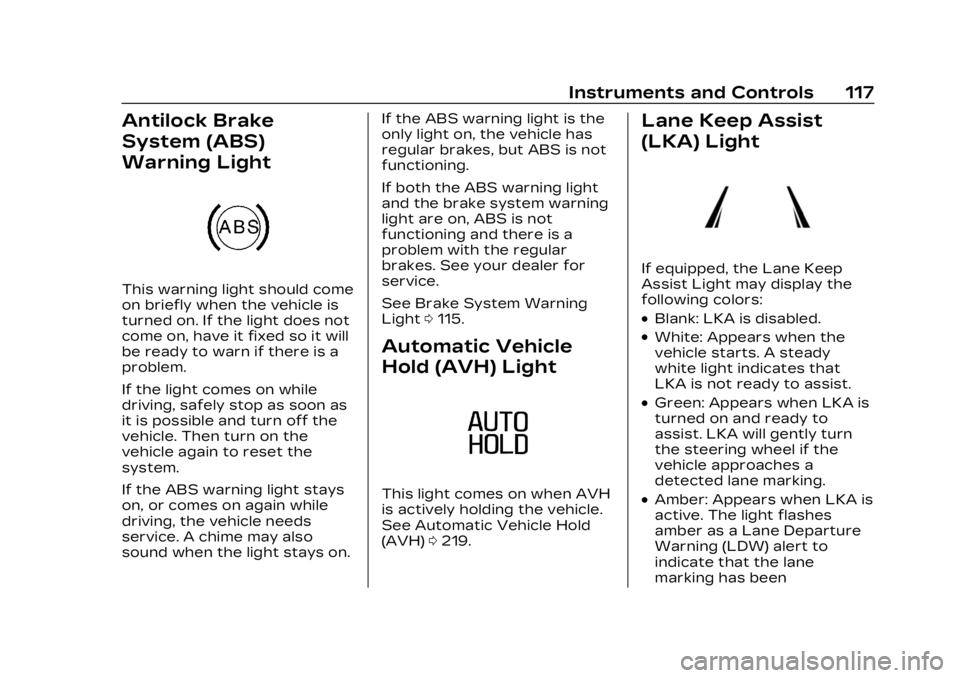
Antilock Brake
System (ABS)
Warning Light
This warning light should come
on briefly when the vehicle is
turned on. If the light does not
come on, have it fixed so it will
be ready to warn if there is a
problem.
If the light comes on while
driving, safely stop as soon as
it is possible and turn off the
vehicle. Then turn on the
vehicle again to reset the
system.
If the ABS warning light stays
on, or comes on again while
driving, the vehicle needs
service. A chime may also
sound when the light stays on.If the ABS warning light is the
only light on, the vehicle has
regular brakes, but ABS is not
functioning.
If both the ABS warning light
and the brake system warning
light are on, ABS is not
functioning and there is a
problem with the regular
brakes. See your dealer for
service.
See Brake System Warning
Light
0115.
Automatic Vehicle
Hold (AVH) Light
This light comes on when AVH
is actively holding the vehicle.
See Automatic Vehicle Hold
(AVH) 0219.
Lane Keep Assist
(LKA) Light
If equipped, the Lane Keep
Assist Light may display the
following colors:
.Blank: LKA is disabled.
.White: Appears when the
vehicle starts. A steady
white light indicates that
LKA is not ready to assist.
.Green: Appears when LKA is
turned on and ready to
assist. LKA will gently turn
the steering wheel if the
vehicle approaches a
detected lane marking.
.Amber: Appears when LKA is
active. The light flashes
amber as a Lane Departure
Warning (LDW) alert to
indicate that the lane
marking has been
Page 126 of 424
Cadillac Lyriq Owner Manual (GMNA-Localizing-U.S./Canada-15644413) -
2023 - CRC - 2/23/22
Instruments and Controls 125
{Warning
Do not charge your vehicle’s
battery above an 80%
charge if you are going to
drive down long, steep
grades such as mountain
passes. This provides room
in the battery for
regenerative braking to
supplement your
conventional brakes during
the descent. This is
especially important when
towing a trailer, which puts
additional stress on your
vehicle’s braking system.
See Hill and Mountain Roads
0200 for important
information about driving on
grades.
The default charge level is
100% when plugged in. To set
a different charge level, drag
the circular marker on the
Target Charge Level Gauge to
the preferred value. To lower
the desired Charge Level, drag the Charge Level marker
counterclockwise, and to
increase it drag the marker
clockwise. The Charge Level
can also be changed by
tapping
«andªinside the
gauge on the screen. The
multifunction controller (MCF)
on the center console can also
be used to set the Charge
Level by rotating clockwise or
counterclockwise when the
Target Charge Level Gauge is
highlighted. The Range
estimate updates once the
desired Charge Level is set.
To optimize battery health, the
minimum allowable Charge
Level is determined by the
vehicle. Charge Later
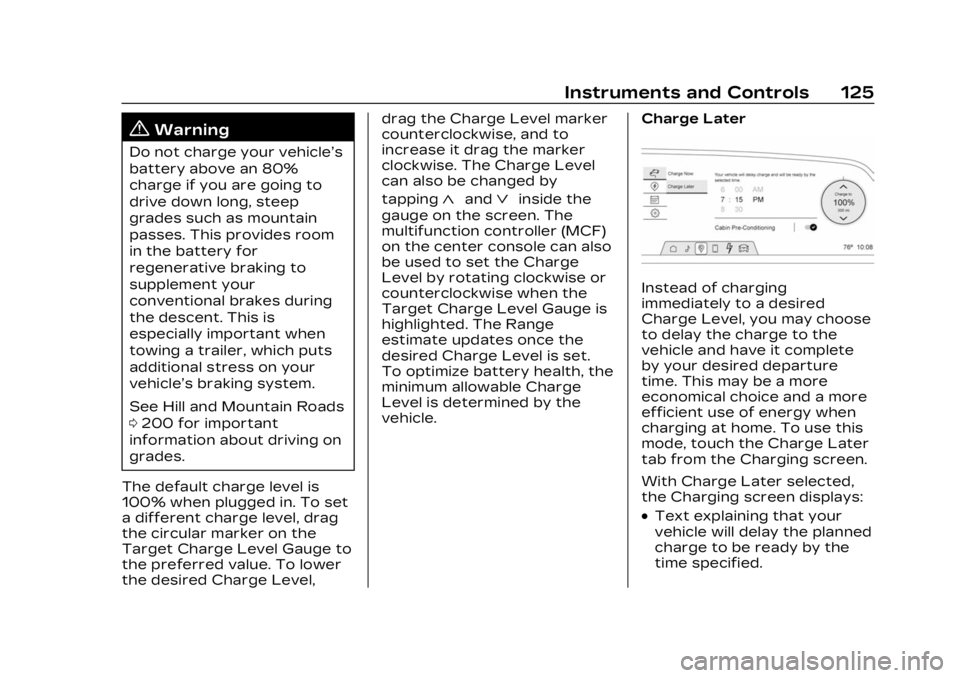
Instead of charging
immediately to a desired
Charge Level, you may choose
to delay the charge to the
vehicle and have it complete
by your desired departure
time. This may be a more
economical choice and a more
efficient use of energy when
charging at home. To use this
mode, touch the Charge Later
tab from the Charging screen.
With Charge Later selected,
the Charging screen displays:
.Text explaining that your
vehicle will delay the planned
charge to be ready by the
time specified.
Page 132 of 424
Cadillac Lyriq Owner Manual (GMNA-Localizing-U.S./Canada-15644413) -
2023 - CRC - 2/23/22
Instruments and Controls 131
according to any existing
schedules. The Home Charge
Location can be changed or
deleted at this screen.
The wireless service and GPS
satellite technologies must be
available and operating for
features to function properly.
These systems may not
operate if the battery is
disconnected, or if the vehicle
has been off for an extended
period of time. If GPS is
unavailable, a message
displays on the infotainment
screen. GPS functionality may
resume after the next time
you drive the vehicle.
Notifications
This section contains on/off
preferences for multiple
notifications triggered during
the Charging session.
Charge Status Feedback :
Provides an audible
notification through horn
chirps that accompany
changes in the charging
status.Charge Cord Unplugged
Alert :
When on and your
vehicle is locked, your vehicle
will honk the horn and flash
the lights if charge cord
becomes unplugged.
Charge Power Loss Alert :
When on, your vehicle will
honk the horn and flash the
lights if Charging power is
cut off.
DC Fast Charge Battery
Conditioning
If equipped, adjusts the
battery to the optimal
temperature for quicker DC
Fast Charging. This should be
done before charging at a DC
Fast Charger.
Depending on the outside and
battery temperature, battery
conditioning could take longer
to reach the optimal
temperature. While en route to a DC fast
charge station using Google
Maps, DC Fast Charge
Conditioning happens
automatically.
Cabin Pre-Conditioning
Temperature
Allows for the preferred cabin
temperature to be set. During
a planned charging session at
the vehicle's Home Charge
Location, the vehicle cabin is
warmed or cooled to this
temperature if set to ON in
either the Charge Later
screen, or in an active
Schedule.
Preferred Charge Times
Allows preferred charge time
windows to be enabled for the
Home Charge Location during
both weekday and weekend
planned charging sessions.
It does so whether the vehicle
is set to Charge Later,
or observing a scheduled
charge. This allows for
charging at a lower cost by
prioritizing charging during the
Page 141 of 424
Cadillac Lyriq Owner Manual (GMNA-Localizing-U.S./Canada-15644413) -
2023 - CRC - 2/23/22
140 Lighting
IntelliBeam System
If equipped, this system turns
the high-beam headlamps on
and off according to
surrounding traffic conditions.
The system turns the
high-beam headlamps on when
it is dark enough and there is
no other traffic present.
This light
bappears on the
instrument cluster when the
IntelliBeam system is enabled.
Turning the IntelliBeam On
and Off
To enable and disable the
IntelliBeam system on the
infotainment home screen,
select Virtual Control App >
Lights >
bAuto High Beams
when the headlights are set in
the Auto position.
Driving with IntelliBeam
The system only activates the
high beams when driving over
40 km/h (25 mph). The blue high-beam on light
appears on the instrument
cluster when the high beams
are on.
There is a sensor near the top
center of the windshield that
automatically controls the
system. Keep this area of the
windshield clear of debris to
allow for best system
performance.
The high-beam headlamps
remain on, under the
automatic control, until one of
the following situations
occurs:
.The system detects an
approaching vehicle's
headlamps.
.The system detects a
preceding vehicle's taillamps.
.The outside light is bright
enough that high-beam
headlamps are not required.
.The vehicle speed drops
below 20 km/h (12 mph).
The high beams may not turn
off automatically if the system
cannot detect another
vehicle's lamps because of any
of the following:
.The other vehicle's lamps
are missing, damaged,
obstructed from view,
or otherwise undetected.
.The other vehicle's lamps
are covered with dirt, snow,
and/or road spray.
.The other vehicle's lamps
cannot be detected due to
dense exhaust, smoke, fog,
snow, road spray, mist,
or other airborne
obstructions.
.The vehicle windshield is
dirty, cracked, or obstructed
by something that blocks the
view of the light sensor.
.The vehicle is loaded such
that the front end points
upward, causing the light
sensor to aim high and not
detect headlamps and
taillamps.