Drive CADILLAC LYRIC 2023 Owners Manual
[x] Cancel search | Manufacturer: CADILLAC, Model Year: 2023, Model line: LYRIC, Model: CADILLAC LYRIC 2023Pages: 424, PDF Size: 4.76 MB
Page 3 of 424
Cadillac Lyriq Owner Manual (GMNA-Localizing-U.S./Canada-15644413) -
2023 - CRC - 3/2/22
2 Introduction
Introduction
The names, logos, emblems,
slogans, vehicle model names,
and vehicle body designs
appearing in this manual
including, but not limited to,
GM, the GM logo, the
CADILLAC Emblem,
CADILLAC, and LYRIQ are
trademarks and/or service
marks of General Motors LLC,
its subsidiaries, affiliates,
or licensors.
For vehicles first sold in
Canada, substitute the name
“General Motors of Canada
Company”for Cadillac Motor
Car Division wherever it
appears in this manual.
This manual describes
features that may or may not
be on the vehicle because of optional equipment that was
not purchased on the vehicle,
model variants, country
specifications, features/
applications that may not be
available in your region,
or changes subsequent to the
printing of this owner’s
manual, including changes in
standard or optional content.
Refer to the purchase
documentation relating to
your specific vehicle to
confirm the features.
Keep this manual in the vehicle
for quick reference.
Canadian Vehicle
Owners
A French language manual can
be obtained from your dealer,
at www.helminc.com, or from:
Propriétaires Canadiens
On peut obtenir un exemplaire
de ce guide en français auprès
du concessionnaire ou à
l'adresse suivante:
Helm, Incorporated
Attention: Customer Service
47911 Halyard Drive
Plymouth, MI 48170
USA
Using this Manual
To quickly locate information
about the vehicle, use the
Index in the back of the
manual. It is an alphabetical list
of what is in the manual and
the page number where it can
be found.
Danger, Warning, and
Caution
Warning messages found on
vehicle labels and in this
manual describe hazards and
what to do to avoid or
reduce them.
{Danger
Danger indicates a hazard
with a high level of risk
which will result in serious
injury or death.
Page 7 of 424

Cadillac Lyriq Owner Manual (GMNA-Localizing-U.S./Canada-15644413) -
2023 - CRC - 3/2/22
6 Introduction
1. Air Vents0189.
2. Turn Signal Lever. See Turn and Lane-Change Signals
0146.
Windshield Wiper/Washer
0 100.
3. Shift Lever. See Electric Drive Unit 0211.
4. Light Sensor. See Automatic Headlamp
System 0143.
5. Infotainment Display. See Introduction 0150.
Instrument Cluster 0108.
6. Instrument Panel Fuse Block 0331.
7. Glove Box 094.
8. Dual Automatic Climate Control System 0185.
9. Sliding Storage Tray. See Instrument Panel Storage
094 (If Equipped).
10. Lower Storage. See Instrument Panel Storage
094 (If Equipped).
11. Wireless Charging 0104.
12. Infotainment Controls. 13. Power Button
0206 (Out
of View).
14. Radio Controls. See Steering Wheel Controls
0152.
15. Horn 0100.
16. Steering Wheel Adjustment 099 (Out of View).
17. Adaptive Cruise Control (Advanced) 0225.
Super Cruise 0236.
Forward Collision Alert
(FCA) System 0270 (If
Equipped).
Heated Steering Wheel
0 99.
18. Hood Release. See Hood 0310.
19. Electric Parking Brake 0217.
Lane Keep Assist (LKA)
0 280 (If Equipped).
Automatic Vehicle Hold
(AVH) 0219.
Instrument Panel
Illumination Control 0146.
Page 10 of 424
Cadillac Lyriq Owner Manual (GMNA-Localizing-U.S./Canada-15644413) -
2023 - CRC - 2/23/22
Keys, Doors, and Windows 9
Other conditions can impact
the performance of the
remote key. See Remote Key
08.
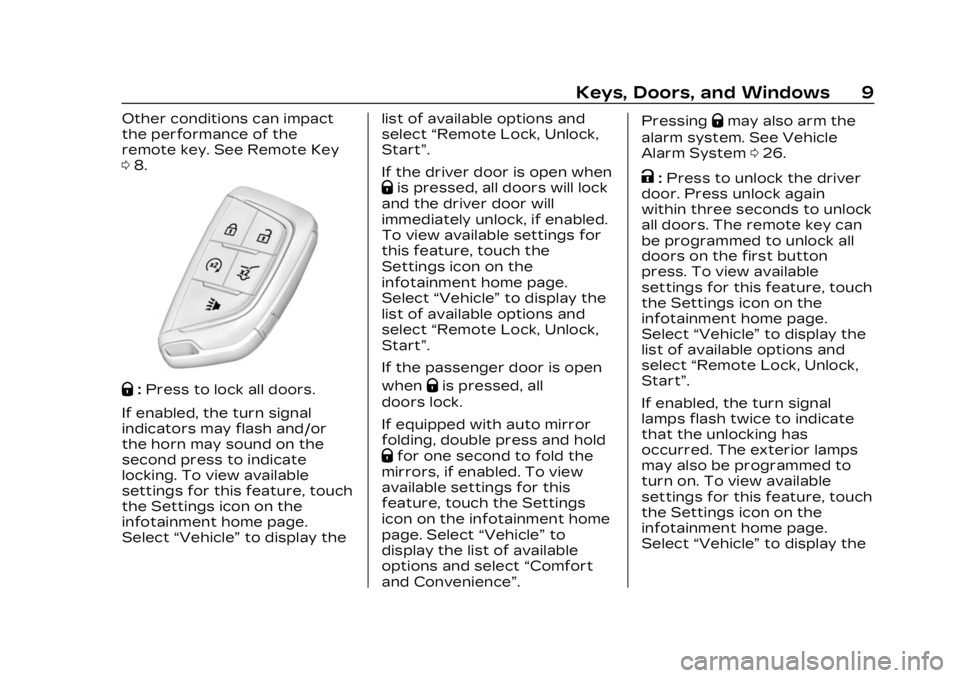
Q:Press to lock all doors.
If enabled, the turn signal
indicators may flash and/or
the horn may sound on the
second press to indicate
locking. To view available
settings for this feature, touch
the Settings icon on the
infotainment home page.
Select “Vehicle” to display the list of available options and
select
“Remote Lock, Unlock,
Start”.
If the driver door is open when
Qis pressed, all doors will lock
and the driver door will
immediately unlock, if enabled.
To view available settings for
this feature, touch the
Settings icon on the
infotainment home page.
Select “Vehicle” to display the
list of available options and
select “Remote Lock, Unlock,
Start”.
If the passenger door is open
when
Qis pressed, all
doors lock.
If equipped with auto mirror
folding, double press and hold
Qfor one second to fold the
mirrors, if enabled. To view
available settings for this
feature, touch the Settings
icon on the infotainment home
page. Select “Vehicle”to
display the list of available
options and select “Comfort
and Convenience”. Pressing
Qmay also arm the
alarm system. See Vehicle
Alarm System 026.
K:Press to unlock the driver
door. Press unlock again
within three seconds to unlock
all doors. The remote key can
be programmed to unlock all
doors on the first button
press. To view available
settings for this feature, touch
the Settings icon on the
infotainment home page.
Select “Vehicle” to display the
list of available options and
select “Remote Lock, Unlock,
Start”.
If enabled, the turn signal
lamps flash twice to indicate
that the unlocking has
occurred. The exterior lamps
may also be programmed to
turn on. To view available
settings for this feature, touch
the Settings icon on the
infotainment home page.
Select “Vehicle” to display the
Page 11 of 424

Cadillac Lyriq Owner Manual (GMNA-Localizing-U.S./Canada-15644413) -
2023 - CRC - 2/23/22
10 Keys, Doors, and Windows
list of available options and
select“Remote Lock, Unlock,
Start”.
If equipped with auto mirror
unfolding, double press and
hold
Kuntil the mirrors fully
open. To view available
settings for this feature, touch
the Settings icon on the
infotainment home page.
Select “Vehicle” to display the
list of available options and
select “Comfort and
Convenience”.
Pressing
Kwill disarm the
alarm system. See Vehicle
Alarm System 026.
b:Press twice to open or
close the liftgate. Press once
to stop the liftgate from
moving. The vehicle must be in
P (Park).
7: Press and release one time
to initiate vehicle locator. The
exterior lamps flash and the
horn chirps three times. Press and hold
7for at least
three seconds to sound the
panic alarm. The horn sounds
and the turn signals flash for
about 30 seconds or until
7is
pressed again or the vehicle is
started.
/: Press and releaseQand
then immediately press and
hold
/for at least
four seconds to start the
vehicle's heating or air
conditioning systems and rear
window defogger from outside
the vehicle using the remote
key. See Remote Start 015.
Keyless Access Operation
The Keyless Access system
allows the doors and liftgate
to be unlocked without
pressing the remote key
button. The remote key must
be within 1 m (3 ft) of the
liftgate or door being opened.
Doors can be programmed to
the lock after exiting the
vehicle through Passive locking or delayed locking. The
remote key can also be used
to lock the doors
Keyless Access can be
programmed to unlock all
doors on the first unlock
button press from the driver
door. To view available
settings for this feature, touch
the Settings icon on the
infotainment home page.
Select
“Vehicle” to display the
list of available options and
select “Remote Lock, Unlock,
Start”.
Keyless Unlocking from
the Driver Door
When the doors are locked
and the remote key is within
1 m (3 ft) of the driver door
handle, pressing the large end
of the unlock button on the
driver door handle will unlock
and unlatch the driver door.
Page 13 of 424

Cadillac Lyriq Owner Manual (GMNA-Localizing-U.S./Canada-15644413) -
2023 - CRC - 2/23/22
12 Keys, Doors, and Windows
Select“Vehicle” to display the
list of available options and
select “Power Door Locks”.
Temporary Disable of
Passive Locking
Temporarily disable passive
locking by pressing and
holding
Kon the interior door
switch with a door open for at
least four seconds, or until
three chimes are heard.
Passive locking will then
remain disabled until
Qon the
interior door is pressed,
or until the vehicle is started.
Remote Left In Vehicle Alert
When the vehicle is turned off
and a remote key is left in the
vehicle, the horn will chirp
three times after all doors are
closed.
To view available settings for
this feature, touch the
Settings icon on the
infotainment home page.
Select “Vehicle” to display the list of available options and
select
“Remote Lock, Unlock,
Start”.
Remote Removed From
Vehicle Alert
If the vehicle is on with a door
open, and then all doors are
closed, the vehicle will check
for remote keys inside. If a
remote key is not detected,
the Driver Information Center
(DIC) will display NO KEY
FOUND and the horn will chirp
three times.
This occurs only once each
time the vehicle is driven.
To view available settings for
this feature, touch the
Settings icon on the
infotainment home page.
Select “Vehicle” to display the
list of available options and
select “Remote Lock, Unlock,
Start”.
Keyless Liftgate Opening
Press the touch pad on the
underside of the liftgate glass
and lift up to open if the remote key is within 1 m (3 ft)
and the doors are locked.
If the doors are unlocked, the
remote key is not required to
open the liftgate. See Liftgate
0
21.
Key Access
To access a vehicle with a
weak remote key battery, see
Door Locks 017.
Programming Remote
Keys to the Vehicle
Only remote keys programmed
to the vehicle will work. If a
remote key is lost or stolen, a
replacement can be purchased
and programmed through your
dealer. The vehicle can be
reprogrammed so that lost or
stolen remote keys no longer
work. Any remaining remote
keys will need to be
reprogrammed. Each vehicle
can have up to eight remote
keys matched to it.
Page 17 of 424

Cadillac Lyriq Owner Manual (GMNA-Localizing-U.S./Canada-15644413) -
2023 - CRC - 2/23/22
16 Keys, Doors, and Windows
Laws in some local
communities may restrict the
use of remote starters. For
example, some laws require a
person using remote start to
have the vehicle in view. Check
local regulations for any
requirements.
The vehicle cannot be remote
started if:
.The remote key is in the
vehicle.
.The hood is open.
.The total 40 minutes of
remote start time has
been used.
.The hazard flashers are on.
.The vehicle is not in P (Park).
.The vehicle is already
started.
If the battery level is low, do
not use the remote start
feature. The battery may fully
deplete. The remote key range may be
less while the vehicle is
running.
Other conditions may affect
the range and performance of
the remote key. See Remote
Key
08.
Starting the Vehicle Using
Remote Start
Press/twice on the remote
key. The turn signal lamps will
flash to confirm the remote
start request was received.
During the remote start, the
parking lamps will remain on as
long as the vehicle is on.
The vehicle will turn off after
20 minutes, unless you stop
the remote start before
remote start cycle has
completed or the vehicle is
turned on.
Press the brake pedal and
press POWER
Oto drive the
vehicle.
Extending Remote
Start Time
Remote start can be used for
up to 40 minutes of total
remote start time.
After two remote starts of
20 minutes, or multiple shorter
time starts totaling
40 minutes have been used,
the vehicle must be started
and then turned off before the
remote start can be used
again.
Canceling a Remote Start
To cancel a remote start, do
one of the following:
.Press/. The parking lamps
will turn off.
.Turn on the hazard warning
flashers.
.Turn the vehicle on and
then off.
Page 18 of 424
Cadillac Lyriq Owner Manual (GMNA-Localizing-U.S./Canada-15644413) -
2023 - CRC - 2/23/22
Keys, Doors, and Windows 17
Door Locks
{Warning
Unlocked doors can be
dangerous.
.Passengers, especially
children, can easily open
the doors and fall out of a
moving vehicle. The doors
can be unlocked and
opened while the vehicle is
moving. The chance of
being thrown out of the
vehicle in a crash is
increased if the doors are
not locked. So, all
passengers should wear
seat belts properly and
the doors should be
locked whenever the
vehicle is driven.
.Young children who get
into unlocked vehicles may
be unable to get out.
A child can be overcome
by extreme heat and can
suffer permanent injuries
or even death from heat(Continued)
Warning (Continued)
stroke. Always lock the
vehicle whenever
leaving it.
.Outsiders can easily enter
through an unlocked door
when you slow down or
stop the vehicle. Locking
the doors can help
prevent this from
happening.
To lock or unlock the doors
from outside the vehicle:
.Use the key in the liftgate to
lock and unlock the door
without the remote key. See
Liftgate 021.
.PressQorKon the remote
key to lock and unlock the
doors.
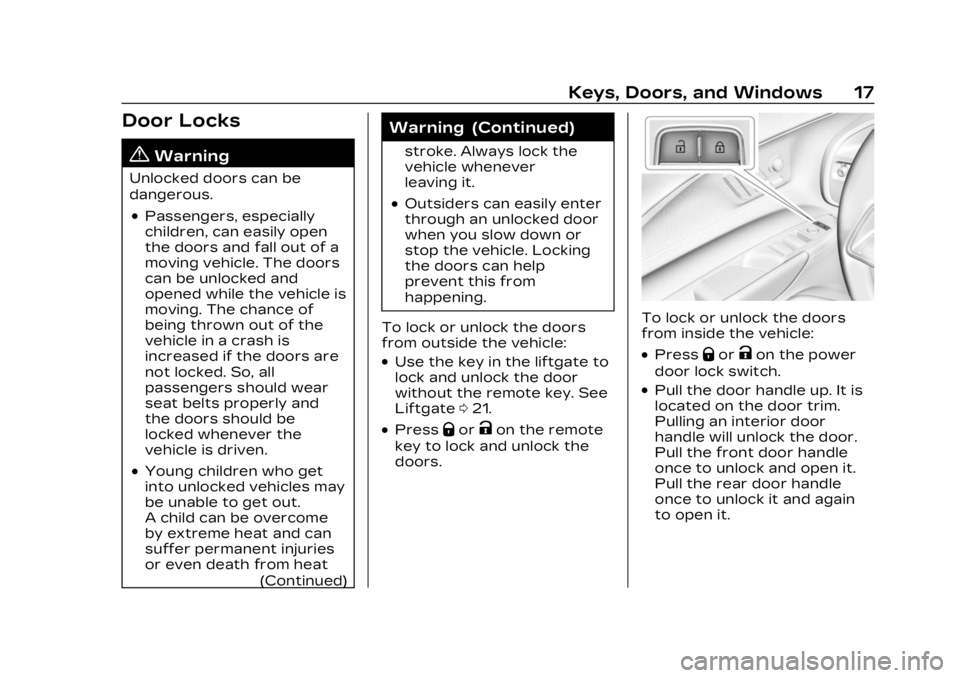
To lock or unlock the doors
from inside the vehicle:
.PressQorKon the power
door lock switch.
.Pull the door handle up. It is
located on the door trim.
Pulling an interior door
handle will unlock the door.
Pull the front door handle
once to unlock and open it.
Pull the rear door handle
once to unlock it and again
to open it.
Page 20 of 424

Cadillac Lyriq Owner Manual (GMNA-Localizing-U.S./Canada-15644413) -
2023 - CRC - 2/23/22
Keys, Doors, and Windows 19
WhenQis pressed on the
power door lock switch while
the door is open, a chime will
sound three times indicating
delayed locking is active.
The doors will lock
automatically five seconds
after all doors are closed. If a
door is reopened before that
time, the five-second timer will
reset when all doors are
closed again.
Press
Qon the door lock
switch again or press
Qon the
remote key to lock the doors
immediately.
To view available settings for
this feature, touch the
Settings icon on the
infotainment home page.
Select “Vehicle” to display the
list of available options and
select “Power Door Locks”.
Automatic Door
Locks
The doors will lock
automatically when all doors
are closed, the vehicle is on,
and the shift switch is out of
P (Park).
If a vehicle door is unlocked
and then opened and closed,
the doors will lock either when
your foot is removed from the
brake or the vehicle speed
becomes faster than
13 km/h (8 mph).
To unlock the doors:
.PressKon a door.
.Shift the vehicle into
P (Park).
Automatic door unlocking can
be programmed. To view
available settings for this
feature, touch the Settings
icon on the infotainment home
page. Select “Vehicle”to
display the list of available
options and select “Power
Door Locks”.
Lockout Protection
This feature protects you from
locking remote keys in the
vehicle.
When the lock button is
pressed and the vehicle is on,
with the driver door open, all
of the doors will lock and then
the driver door will unlock.
If the vehicle is off and locking
is requested while a door is
open, when all doors are
closed the vehicle will check
for remote keys inside. If a
remote key is detected and
the number of remote keys
inside has not reduced, the
driver door will unlock and the
horn will sound three times.
This can be manually
overridden by pressing and
holding
Qon the power door
lock switch.
Page 21 of 424
Cadillac Lyriq Owner Manual (GMNA-Localizing-U.S./Canada-15644413) -
2023 - CRC - 2/23/22
20 Keys, Doors, and Windows
Safety Locks
The rear door safety locks
prevent passengers from
opening the rear doors from
inside the vehicle.
To activate the safety locks:1. Touch the settings icon on the infotainment display.
2. Select Virtual Controls.
3. Touch DRIVE & PARK and then Child Safety Locks.
4. Select Off or On to activate or deactivate the safety
locks.
Digital Key
If equipped and enabled, the
Digital Key feature allows you
to access and operate the
vehicle using a smartphone or
other compatible device.
Only certain smartphones and
devices support Digital Key.
Please see www.cadillac.com
for a list of compatible
devices. If the smartphone battery is
out of charge, the DIC will
display NO KEY FOUND.
Charge the smartphone
battery as soon as possible.
Obtaining a Digital Key for a
Device
Digital Key is only available
with an OnStar account
associated with the vehicle.
1. Log in to your Digital Key account in the MyCadillac
mobile app.
2. Select the Digital Key menu option, and enroll your
phone.
3. Once the phone is successfully activated,
enter the vehicle with your
phone and a remote key.
4. Select “Pair”in the
phone app.
5. When the Digital Key is successfully created, a
notification will display in
the phone app. Using Your Digital Key
Digital Key allows you to:
.Automatically turn on
exterior lighting when
approaching the vehicle with
your phone.
.Passively lock and unlock the
vehicle’s doors, and access
the front or rear
compartments, without a
remote key, or having to
retrieve your phone from a
pocket or bag.
.Start and drive with your
phone present inside the
vehicle.
.Share digital keys for the
vehicle with other devices,
remotely.
Page 27 of 424
Cadillac Lyriq Owner Manual (GMNA-Localizing-U.S./Canada-15644413) -
2023 - CRC - 2/23/22
26 Keys, Doors, and Windows
Vehicle Security
This vehicle has
theft-deterrent features;
however, they do not make
the vehicle impossible to steal.
Vehicle Alarm System
Arming the Alarm System
1. Turn off the vehicle.
2. Lock the vehicle in one ofthree ways:
.Use the remote key.
.Use the Keyless Access
system.
.With a door open, pressQ
on the interior of
the door.
3. After 30 seconds the alarm system will arm, and the
indicator light will begin to
slowly flash. Pressing
Qon
the remote key a second
time will bypass the
30-second delay and
immediately arm the alarm
system. The vehicle alarm system will
not arm if the doors are locked
with the mechanical key.
If the driver door is opened
without first unlocking with
the remote key, the horn will
chirp and the lights will flash
to indicate pre-alarm. If the
vehicle is not started, or the
door is not unlocked by
pressing
Kon the remote key
during the 10-second
pre-alarm, the alarm will be
activated.
The alarm will also be
activated if a passenger door,
the tailgate, or the hood is
opened without first disarming
the system. When the alarm is
activated, the turn signals
flash and the horn sounds for
about 30 seconds. The alarm
system will then re-arm to
monitor for the next
unauthorized event.
Disarming the Alarm
System
To disarm the alarm system or
turn off the alarm if it has
been activated:
.PressKon the remote key.
.Unlock the vehicle using the
Keyless Access system.
.Start the vehicle.
To avoid setting off the alarm
by accident:
.Lock the vehicle after all
occupants have exited.
.Always unlock a door with
the remote key, or use the
Keyless Access system.
Unlocking the driver door
with the mechanical key will
not disarm the system or
turn off the alarm.