cruise control CADILLAC LYRIC 2023 Owners Manual
[x] Cancel search | Manufacturer: CADILLAC, Model Year: 2023, Model line: LYRIC, Model: CADILLAC LYRIC 2023Pages: 424, PDF Size: 4.76 MB
Page 7 of 424

Cadillac Lyriq Owner Manual (GMNA-Localizing-U.S./Canada-15644413) -
2023 - CRC - 3/2/22
6 Introduction
1. Air Vents0189.
2. Turn Signal Lever. See Turn and Lane-Change Signals
0146.
Windshield Wiper/Washer
0 100.
3. Shift Lever. See Electric Drive Unit 0211.
4. Light Sensor. See Automatic Headlamp
System 0143.
5. Infotainment Display. See Introduction 0150.
Instrument Cluster 0108.
6. Instrument Panel Fuse Block 0331.
7. Glove Box 094.
8. Dual Automatic Climate Control System 0185.
9. Sliding Storage Tray. See Instrument Panel Storage
094 (If Equipped).
10. Lower Storage. See Instrument Panel Storage
094 (If Equipped).
11. Wireless Charging 0104.
12. Infotainment Controls. 13. Power Button
0206 (Out
of View).
14. Radio Controls. See Steering Wheel Controls
0152.
15. Horn 0100.
16. Steering Wheel Adjustment 099 (Out of View).
17. Adaptive Cruise Control (Advanced) 0225.
Super Cruise 0236.
Forward Collision Alert
(FCA) System 0270 (If
Equipped).
Heated Steering Wheel
0 99.
18. Hood Release. See Hood 0310.
19. Electric Parking Brake 0217.
Lane Keep Assist (LKA)
0 280 (If Equipped).
Automatic Vehicle Hold
(AVH) 0219.
Instrument Panel
Illumination Control 0146.
Page 99 of 424
Cadillac Lyriq Owner Manual (GMNA-Localizing-U.S./Canada-15644413) -
2023 - CRC - 2/23/22
98 Instruments and Controls
Instruments and
Controls
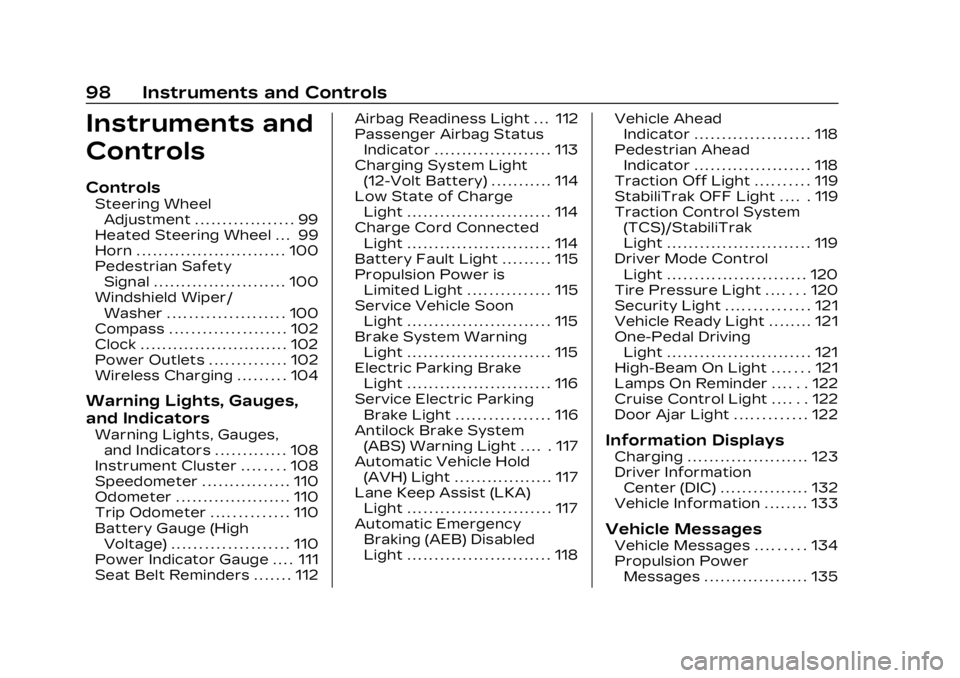
Controls
Steering WheelAdjustment . . . . . . . . . . . . . . . . . . 99
Heated Steering Wheel . . . 99
Horn . . . . . . . . . . . . . . . . . . . . . . . . . . . 100
Pedestrian Safety Signal . . . . . . . . . . . . . . . . . . . . . . . . 100
Windshield Wiper/ Washer . . . . . . . . . . . . . . . . . . . . . 100
Compass . . . . . . . . . . . . . . . . . . . . . 102
Clock . . . . . . . . . . . . . . . . . . . . . . . . . . . 102
Power Outlets . . . . . . . . . . . . . . 102
Wireless Charging . . . . . . . . . 104
Warning Lights, Gauges,
and Indicators
Warning Lights, Gauges, and Indicators . . . . . . . . . . . . . 108
Instrument Cluster . . . . . . . . 108
Speedometer . . . . . . . . . . . . . . . . 110
Odometer . . . . . . . . . . . . . . . . . . . . . 110
Trip Odometer . . . . . . . . . . . . . . 110
Battery Gauge (High Voltage) . . . . . . . . . . . . . . . . . . . . . 110
Power Indicator Gauge . . . . 111
Seat Belt Reminders . . . . . . . 112 Airbag Readiness Light . . . 112
Passenger Airbag Status
Indicator . . . . . . . . . . . . . . . . . . . . . 113
Charging System Light (12-Volt Battery) . . . . . . . . . . . 114
Low State of Charge Light . . . . . . . . . . . . . . . . . . . . . . . . . . 114
Charge Cord Connected Light . . . . . . . . . . . . . . . . . . . . . . . . . . 114
Battery Fault Light . . . . . . . . . 115
Propulsion Power is Limited Light . . . . . . . . . . . . . . . 115
Service Vehicle Soon Light . . . . . . . . . . . . . . . . . . . . . . . . . . 115
Brake System Warning Light . . . . . . . . . . . . . . . . . . . . . . . . . . 115
Electric Parking Brake Light . . . . . . . . . . . . . . . . . . . . . . . . . . 116
Service Electric Parking Brake Light . . . . . . . . . . . . . . . . . 116
Antilock Brake System (ABS) Warning Light . . . . . 117
Automatic Vehicle Hold (AVH) Light . . . . . . . . . . . . . . . . . . 117
Lane Keep Assist (LKA) Light . . . . . . . . . . . . . . . . . . . . . . . . . . 117
Automatic Emergency Braking (AEB) Disabled
Light . . . . . . . . . . . . . . . . . . . . . . . . . . 118 Vehicle Ahead
Indicator . . . . . . . . . . . . . . . . . . . . . 118
Pedestrian Ahead Indicator . . . . . . . . . . . . . . . . . . . . . 118
Traction Off Light . . . . . . . . . . 119
StabiliTrak OFF Light . . . . . 119
Traction Control System
(TCS)/StabiliTrak
Light . . . . . . . . . . . . . . . . . . . . . . . . . . 119
Driver Mode Control Light . . . . . . . . . . . . . . . . . . . . . . . . . 120
Tire Pressure Light . . . . . . . 120
Security Light . . . . . . . . . . . . . . . 121
Vehicle Ready Light . . . . . . . . 121
One-Pedal Driving Light . . . . . . . . . . . . . . . . . . . . . . . . . . 121
High-Beam On Light . . . . . . . 121
Lamps On Reminder . . . . . . 122
Cruise Control Light . . . . . . 122
Door Ajar Light . . . . . . . . . . . . . 122Information Displays
Charging . . . . . . . . . . . . . . . . . . . . . . 123
Driver Information Center (DIC) . . . . . . . . . . . . . . . . 132
Vehicle Information . . . . . . . . 133
Vehicle Messages
Vehicle Messages . . . . . . . . . 134
Propulsion Power Messages . . . . . . . . . . . . . . . . . . . 135
Page 123 of 424
Cadillac Lyriq Owner Manual (GMNA-Localizing-U.S./Canada-15644413) -
2023 - CRC - 2/23/22
122 Instruments and Controls
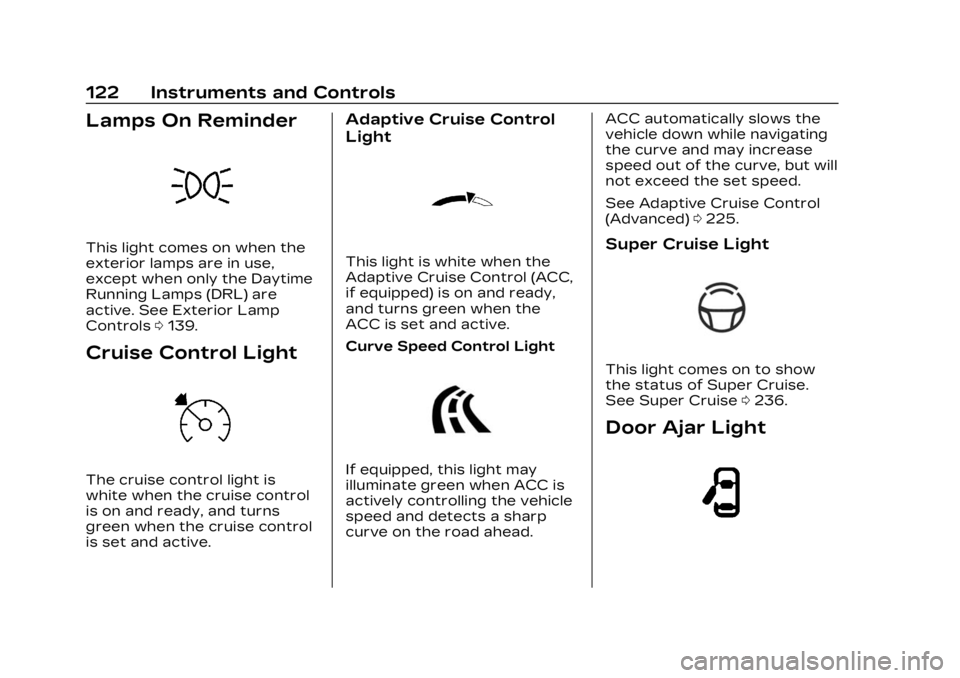
Lamps On Reminder
This light comes on when the
exterior lamps are in use,
except when only the Daytime
Running Lamps (DRL) are
active. See Exterior Lamp
Controls0139.
Cruise Control Light
The cruise control light is
white when the cruise control
is on and ready, and turns
green when the cruise control
is set and active.
Adaptive Cruise Control
Light
This light is white when the
Adaptive Cruise Control (ACC,
if equipped) is on and ready,
and turns green when the
ACC is set and active.
Curve Speed Control Light
If equipped, this light may
illuminate green when ACC is
actively controlling the vehicle
speed and detects a sharp
curve on the road ahead. ACC automatically slows the
vehicle down while navigating
the curve and may increase
speed out of the curve, but will
not exceed the set speed.
See Adaptive Cruise Control
(Advanced)
0225.
Super Cruise Light
This light comes on to show
the status of Super Cruise.
See Super Cruise 0236.
Door Ajar Light
Page 134 of 424
Cadillac Lyriq Owner Manual (GMNA-Localizing-U.S./Canada-15644413) -
2023 - CRC - 2/23/22
Instruments and Controls 133
reflects the approximate
average electrical energy
economy that the vehicle has
at that moment, and changes
as driving conditions change.
Left Zone
Time/Date :Displays current
date and time information.
Auto Lane Change : Displays
the status of a
driver-requested lane change
when Super Cruise is active.
See Super Cruise 0236.
Tire Pressure : Displays the
approximate pressures of all
four tires. Tire pressure is
displayed in either
kilopascal (kPa) or in pounds
per square inch (psi). If the
pressure is low, the value for
that tire is shown in amber.
See Tire Pressure Monitor
System 0343 and
Tire Pressure Monitor
Operation 0344.
Energy Usage : Displays
energy usage of the Driving,
Remote Start, Climate and Conditioning vehicle systems
as percentages of overall
vehicle energy use.
Energy Efficiency :
Displays a
graph showing the energy
efficiency that has been used
by the vehicle over the last
48 km (30 mi).
Right Zone
Audio Now Playing : Displays
the actively playing audio.
Navigation : Displays a variety
of navigation information.
Vehicle Information
The following are all possible
vehicle information features.
To access the vehicle
information menu touch
A
from the list of home page
icons displayed on the left side
of the infotainment display.
Vehicle information content is
shown on cards that are
grouped together in option
tabs that are displayed on the
infotainment display. Touching a card on the
infotainment display opens up
a dialog box for that card. To
select a desired option within
a dialog box, touch the option
and follow any message or
alerts that may display. Some
options may be unavailable
while driving.
Touch Show in Cluster to send
the desired card to the left
zone of the instrument cluster.
Touch Remove from Cluster to
remove the selected card from
the instrument cluster. See
Driver Information Center
(DIC)
0132.
Options
The following is the list of all
possible cards and their
locations. Some of the cards
may not be available for your
particular vehicle.
Summary : Displays an
interactive 3–D rendered
image of your vehicle that
shows performance and
health information.
Page 136 of 424
Cadillac Lyriq Owner Manual (GMNA-Localizing-U.S./Canada-15644413) -
2023 - CRC - 2/23/22
Instruments and Controls 135
by pressing the thumbwheel.
The messages that require
immediate action cannot be
cleared until that action is
performed.
All messages should be taken
seriously; clearing the
message does not correct the
problem.
If a SERVICE message
appears, see your dealer.
Follow the instructions given
in the messages. The system
displays messages regarding
the following topics:
.Service Messages
.Fluid Levels
.Vehicle Security
.Brakes
.Ride Control Systems
.Driver Assistance Systems
.Cruise Control
.Lighting and Bulb
Replacement
.Wiper/Washer Systems
.Doors and Windows
.Seat Belts
.Airbag Systems
.Propulsion
.Tire Pressure
.Battery
.Steering
Propulsion Power
Messages
REDUCED
ACCELERATION DRIVE
WITH CARE
This message displays when
the vehicle's propulsion power
is reduced. A reduction in
propulsion power can affect
the vehicle's ability to
accelerate. If this message is
on, but there is no observed
reduction in performance,
proceed to your destination.
Under certain conditions, the
performance may be reduced
the next time the vehicle is
driven. The vehicle may be
driven while this message is
on, but maximum acceleration
and speed may be reduced.
Anytime this message stayson, or displays repeatedly, the
vehicle should be taken to
your dealer for service as
soon as possible.
This message can be displayed
when the high voltage battery
charge level is low. The vehicle
is limiting power to maximize
range.
Under certain operating
conditions propulsion will be
disabled. Try restarting after
the vehicle has been off for
two minutes.
PROPULSION POWER
REDUCED DUE TO
TEMPERATURE
This message displays when
the vehicle is on, the battery
temperature is low, and when
the vehicle’s performance is
limited. The duration of the
limited vehicle performance
depends, in part, on the high
voltage battery charge level.
If the high voltage battery
charge level is relatively high,
as the vehicle is driven, the
Page 181 of 424
Cadillac Lyriq Owner Manual (GMNA-Localizing-U.S./Canada-15644413) -
2023 - CRC - 2/23/22
180 Infotainment System
On certain vehicles, when the
Speed Limiter is turned ON,
the vehicle’s maximum
acceleration will be limited.
The DIC will display a message
that the acceleration is limited.
Teen Driver Speed Warning :
Displays a warning in the DIC
when exceeding a selectable
speed. Turn the speed
warning on or off and choose
the desired speed warning
level. The speed warning does
not limit the speed of the
vehicle. On some infotainment
systems, touch Set Teen
Driver Speed Warning to set
the warning speed.
Set Teen Driver Speed
Warning :Choose the desired
speed warning level. The
speed warning does not limit
the speed of the vehicle.
SiriusXM Explicit Content
Filter : Allows the SiriusXM
Explicit Content Filter to be
turned ON or OFF. When ON,
the teen driver will not be able
to listen to SiriusXM stations that contain explicit content,
and the Explicit Content Filter
selection in the Audio Settings
will be unavailable for change.
When Teen Driver is Active:
.If equipped, the radio will
mute when the driver seat
belt, and in some vehicles
the front passenger seat
belt, is not buckled. The
audio from any device paired
to the vehicle will also be
muted.
.An object placed on the
front passenger seat, such
as a briefcase, handbag,
grocery bag, laptop, or other
electronic device, could
cause the passenger
sensing system to falsely
sense an unbuckled front
passenger and mute the
radio. If this happens,
remove the object from the
seat. See Passenger
Sensing System
066.
.Some safety systems, such
as Automatic Emergency
Braking, if equipped, cannot
be turned off.
.The gap setting for Adaptive
Cruise Control and alert
timing for Forward Collision
Alert, if equipped, cannot be
changed.
.When trying to change a
safety feature that is not
configurable in Teen Driver,
the feature may be grayed
out or removed from the
infotainment menu, or the
DIC will display a message
indicating that Teen Driver is
active and the action is not
available.
.Super Cruise, if equipped, is
not available.
.Do not tow a trailer if
equipped with Automatic
Emergency Braking.
Report Card
The vehicle owner must
secure the driver’s consent to
record certain vehicle data
when the vehicle is driven with
Page 193 of 424

Cadillac Lyriq Owner Manual (GMNA-Localizing-U.S./Canada-15644413) -
2023 - CRC - 2/23/22
192 Driving and Operating
Driving and
Operating
Driving Information
Driving for Better EnergyEfficiency . . . . . . . . . . . . . . . . . . . 193
Distracted Driving . . . . . . . . . 195
Defensive Driving . . . . . . . . . . 196
Impaired Driving . . . . . . . . . . . . 196
Control of a Vehicle . . . . . . . 196
Braking . . . . . . . . . . . . . . . . . . . . . . . . 196
Steering . . . . . . . . . . . . . . . . . . . . . . . 197
Off-Road Recovery . . . . . . . . 198
Loss of Control . . . . . . . . . . . . . 198
Driving on Wet Roads . . . . 199
Hill and Mountain Roads . . . . . . . . . . . . . . . . . . . . . . . 200
Winter Driving . . . . . . . . . . . . . . 201
If the Vehicle Is Stuck . . . . 202
Vehicle Load Limits . . . . . . . 202
Starting and Operating
New Vehicle Break-In . . . . 206
Power Button . . . . . . . . . . . . . . 206
Starting and Stopping the Vehicle . . . . . . . . . . . . . . . . 208
Retained Accessory Power (RAP) . . . . . . . . . . . . . . 209
Shifting Into Park . . . . . . . . . . 209 Shifting out of Park . . . . . . . 210
Extended Parking . . . . . . . . . . 210
Electric Drive Unit
Electric Drive Unit . . . . . . . . . . 211
One-Pedal Driving . . . . . . . . . 214
Drive Systems
All-Wheel Drive . . . . . . . . . . . . . 215
Brakes
Electric Brake Boost . . . . . . 216
Antilock Brake
System (ABS) . . . . . . . . . . . . . . 216
Electric Parking Brake . . . . 217
Brake Assist . . . . . . . . . . . . . . . . . 218
Hill Start Assist (HSA) . . . . 218
Automatic Vehicle Hold (AVH) . . . . . . . . . . . . . . . . . . 219
Regenerative Braking . . . . 220
Ride Control Systems
Traction Control/ Electronic Stability
Control . . . . . . . . . . . . . . . . . . . . . . 221
Driver Mode Control . . . . . . 223
Cruise Control
Adaptive Cruise Control (Advanced) . . . . . . . . . . . . . . . . . 225
Super Cruise . . . . . . . . . . . . . . . . 236
Driver Assistance
Systems
Driver Assistance Systems . . . . . . . . . . . . . . . . . . . . 255
Assistance Systems for Parking or Backing . . . . . . 257
Rear Vision Camera (RVC) . . . . . . . . . . . . . 257
Surround Vision System . . . . . . . . . . . . . . . . . . . . . . 258
Park Assist . . . . . . . . . . . . . . . . . . 260
Automatic Parking Assist (APA) . . . . . . . . . . . . . . . 262
Reverse Automatic Braking (RAB) . . . . . . . . . . . . . 267
Rear Pedestrian Alert . . . . 268
Rear Cross Traffic Alert (RCTA) System . . . . . . . . . . . 269
Assistance Systems for Driving . . . . . . . . . . . . . . . . . . . . . . 270
Forward Collision Alert (FCA) System . . . . . . . . . . . . . 270
Automatic Emergency Braking (AEB) . . . . . . . . . . . . . 273
Front Pedestrian Braking (FPB) System . . . . . . . . . . . . . . 274
Side Blind Zone Alert (SBZA) . . . . . . . . . . . . . . . 277
Lane Change Alert (LCA) . . . . . . . . . . . . . . . . . 277
Page 195 of 424
Cadillac Lyriq Owner Manual (GMNA-Localizing-U.S./Canada-15644413) -
2023 - CRC - 2/23/22
194 Driving and Operating
Acceleration/Braking/
Coasting
Avoid rapid accelerations and
decelerations.
Use cruise control when
appropriate.
Plan ahead for decelerations,
and coast whenever possible.
Do not rush to traffic signals,
and do not shift to N (Neutral)
to coast.
Use the One-Pedal Driving
feature when appropriate to
help recover energy during
coasting and braking.
One-Pedal mode recovers
more energy while coasting
and braking than D (Drive)
mode. See One-Pedal Driving
0214.
Use the steering wheel Regen
on Demand paddle during
deceleration to help recover
energy. See Regenerative
Braking 0220. Terrain and Vehicle Speed
Higher speeds and grade
changes use more energy and
can significantly reduce
electric range.
Climate Setting
Using the heat and air
conditioning systems
decreases the energy
available for electric driving.
Optimal energy efficiency is
achieved when the heat, air
conditioning, and fan are
turned off.
Use the heated and ventilated
seat features (if equipped)
instead of the climate control
system. Heating and
ventilating the seat uses less
energy than heating and
cooling the interior. See
Heated and Ventilated Front
Seats
045 and
Heated Rear Seats 049.
Use the Remote Start Climate
Control feature to heat or cool
the interior while the vehicle is
plugged in to use electricity from the electrical outlet
instead of using energy from
the battery. See Remote Start
0
15.
In hot weather, avoid parking
in direct sunlight. Use
sunshades inside the vehicle.
Keep the inside of the
windows clean to reduce
fogging. Turn off the front
defroster and rear defogger
when they are not needed.
Avoid driving with the
windows open at highway
speeds.
Use the Battery Gauge on the
Instrument Cluster to view the
effect of climate control
settings on your estimated
range. See Battery Gauge
(High Voltage) 0110.
Outside Temperature
On colder days, it is best to
plug in the vehicle overnight,
and then remote start the
vehicle.
Page 201 of 424
Cadillac Lyriq Owner Manual (GMNA-Localizing-U.S./Canada-15644413) -
2023 - CRC - 2/23/22
200 Driving and Operating
.Turn off cruise control.
Hill and Mountain
Roads
{Warning
Do not charge your vehicle’s
battery above an 80%
charge if you are going to
drive down long, steep
grades such as mountain
passes. This provides room
in the battery for
regenerative braking to
supplement your
conventional brakes during
the descent. This is
especially important when
towing a trailer, which puts
additional stress on your
vehicle’s braking system.
If the battery becomes full,
regenerative braking will be
limited or unavailable. The
brakes will have to do all the
work of slowing down the
vehicle and could become(Continued)
Warning (Continued)
too hot. Hot brakes may not
be able to slow the vehicle
enough to maintain speed
and control. To help avoid
the risk of a crash, limit the
battery’s charge and, if you
experience brake fade or
receive a brake warning,
stop the vehicle and allow
the brakes to cool.
See“Charge Now” under
Charging 0123 for
information on setting
charge limits.
Driving on steep hills or
through mountains is different
than driving on flat or rolling
terrain. Be sure to:
.Use regenerative braking to
help slow the vehicle or
maintain speed by keeping
the vehicle in gear and
limiting the initial battery
charge to 80% or less.
.When braking is necessary,
use frequent, light taps of
the brake pedal. This
maximizes regenerative
braking and minimizes the
load on the vehicle brake
system.
.Keep the vehicle serviced
and in good shape.
.Check all fluid levels, brakes,
tires and cooling system.
.Drive at speeds that keep
the vehicle in its own lane.
Do not swing wide or cross
the center line.
.Be alert on top of hills;
something could be in your
lane (e.g., stalled car, crash).
.Pay attention to special road
signs (e.g., falling rocks area,
winding roads, long grades,
passing or no-passing zones)
and take appropriate action.
Page 202 of 424
Cadillac Lyriq Owner Manual (GMNA-Localizing-U.S./Canada-15644413) -
2023 - CRC - 2/23/22
Driving and Operating 201
Winter Driving
Driving on Snow or IceCaution
To avoid damage to the
wheels and brake
components, always clear
snow and ice from inside the
wheels and underneath the
vehicle before driving.
Snow or ice between the tires
and the road creates less
traction or grip, so drive
carefully. Wet ice can occur at
about 0°C (32°F) when
freezing rain begins to fall.
Avoid driving on wet ice or in
freezing rain until roads can be
treated.
For Slippery Road Driving:
.Turn off cruise control.
.If enabled, turn off
One-Pedal Driving. See
One-Pedal Driving 0214
.If turned off, turn on the
Traction Control and the
Electronic Stability Control systems. See Traction
Control/Electronic Stability
Control
0221.
.Select the Snow/Ice driver
mode. See Driver Mode
Control 0223.
.Accelerate gently.
Accelerating too quickly
causes the wheels to spin
and makes the surface under
the tires slick.
.Allow greater following
distance and watch for
slippery spots. Icy patches
can occur on otherwise clear
roads in shaded areas. The
surface of a curve or an
overpass can remain icy
when the surrounding roads
are clear. Avoid sudden
steering maneuvers and
braking while on ice.
.Antilock Brake System (ABS)
improves vehicle stability
during hard stops, but the
brakes should be applied
sooner than when on dry
pavement. See Antilock
Brake System (ABS) 0216.
Blizzard Conditions
If you become stranded or
cannot continue driving due to
winter storm conditions, stop
the vehicle in a safe place and
signal for help. Stay with the
vehicle unless there is help
nearby.
If you stay in your vehicle
while waiting, signal for help
and keep everyone in the
vehicle safe by turning on the
hazard warning flashers and
tying a red cloth to an outside
mirror.
To conserve battery energy
while waiting for help, run the
vehicle for only short periods
as needed to warm the vehicle
and then shut the vehicle off
and partially close the window.
Moving about to keep warm
also helps. For additional tips
to help conserve battery
energy in cold weather, see
Driving for Better Energy
Efficiency 0193.