sport mode CADILLAC LYRIC 2023 Owners Manual
[x] Cancel search | Manufacturer: CADILLAC, Model Year: 2023, Model line: LYRIC, Model: CADILLAC LYRIC 2023Pages: 424, PDF Size: 4.76 MB
Page 110 of 424
Cadillac Lyriq Owner Manual (GMNA-Localizing-U.S./Canada-15644413) -
2023 - CRC - 2/23/22
Instruments and Controls 109
and Sport. To see how to
change the Driver Mode, see
“Mode Activation”under
Driver Mode Control 0223.
.Tour configuration displays
the speedometer in the
center of the display. The
battery gauge is located on
the right of the speedometer
and the power indicator
gauge is on the left of it.
There are two DIC areas on
the left and right of the
display.
.Sport configuration displays
the speedometer in the
center of the display. The
battery gauge is located
below the speedometer and
the power indicator gauge is
above it. There are two DIC
areas on the left and right of
the display.
There are four selectable
views:
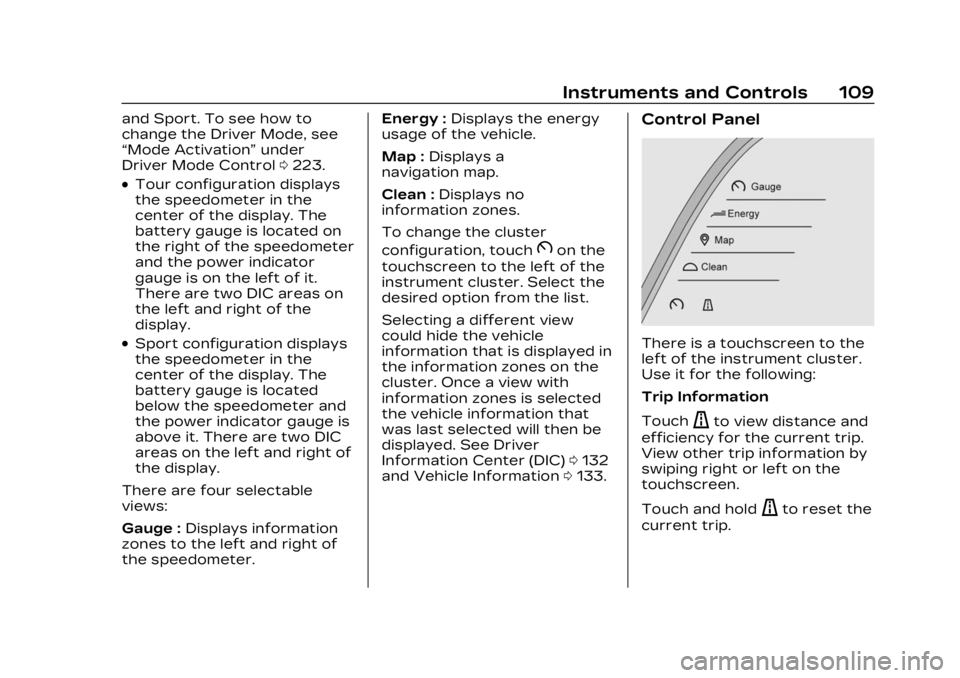
Gauge : Displays information
zones to the left and right of
the speedometer. Energy :
Displays the energy
usage of the vehicle.
Map : Displays a
navigation map.
Clean : Displays no
information zones.
To change the cluster
configuration, touch
Bon the
touchscreen to the left of the
instrument cluster. Select the
desired option from the list.
Selecting a different view
could hide the vehicle
information that is displayed in
the information zones on the
cluster. Once a view with
information zones is selected
the vehicle information that
was last selected will then be
displayed. See Driver
Information Center (DIC) 0132
and Vehicle Information 0133.
Control Panel
There is a touchscreen to the
left of the instrument cluster.
Use it for the following:
Trip Information
Touch
ato view distance and
efficiency for the current trip.
View other trip information by
swiping right or left on the
touchscreen.
Touch and hold
ato reset the
current trip.
Page 121 of 424
Cadillac Lyriq Owner Manual (GMNA-Localizing-U.S./Canada-15644413) -
2023 - CRC - 2/23/22
120 Instruments and Controls
system are not fully
operational and may not assist
in maintaining control. Adjust
driving accordingly. If the
condition persists, see your
dealer as soon as possible.
A Driver Information Center
(DIC) message may display.
The light flashes when the
TCS and/or the StabiliTrak/
ESC system is actively
working.
See Traction Control/
Electronic Stability Control
0221.
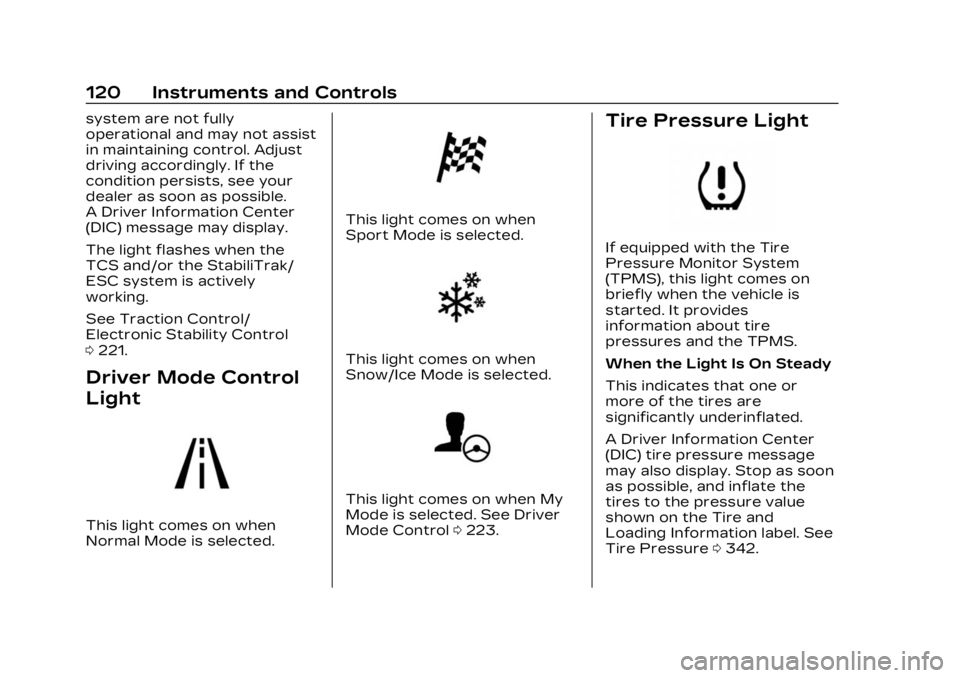
Driver Mode Control
Light
This light comes on when
Normal Mode is selected.
This light comes on when
Sport Mode is selected.
This light comes on when
Snow/Ice Mode is selected.
This light comes on when My
Mode is selected. See Driver
Mode Control 0223.
Tire Pressure Light
If equipped with the Tire
Pressure Monitor System
(TPMS), this light comes on
briefly when the vehicle is
started. It provides
information about tire
pressures and the TPMS.
When the Light Is On Steady
This indicates that one or
more of the tires are
significantly underinflated.
A Driver Information Center
(DIC) tire pressure message
may also display. Stop as soon
as possible, and inflate the
tires to the pressure value
shown on the Tire and
Loading Information label. See
Tire Pressure 0342.
Page 214 of 424
Cadillac Lyriq Owner Manual (GMNA-Localizing-U.S./Canada-15644413) -
2023 - CRC - 2/23/22
Driving and Operating 213
Car Wash Mode is not to be
used for vehicle towing. If the
vehicle needs to be towed, see
Transporting a Disabled
Vehicle0359.
Caution
The vehicle is not designed
to stay in N (Neutral) for
extended periods of time.
It will automatically shift into
P (Park).
Car Wash Mode (Vehicle
On) - Driver In Vehicle
To place the vehicle in
N (Neutral) with the vehicle on
and occupied: 1. Drive to the entrance of the car wash.
2. Apply the brake pedal.
3. Shift to N (Neutral).
4. Release the brake pedal. The vehicle is now ready for
the car wash. Car Wash Mode (Vehicle
On) - Driver Out of Vehicle
To place the vehicle in
N (Neutral) with the vehicle on
and unoccupied:
1. Drive to the entrance of the car wash.
2. Apply the brake pedal.
3. Open the door.
4. Shift to N (Neutral), then release the brake pedal.
5. The indicator should continue to show N. If it
does not, repeat Steps 2–4.
6. Exit the vehicle and close the door. The vehicle is now
ready for the car wash.
7. The vehicle may automatically shift into
P (Park) upon reentry.
D : This position is for normal
driving. If more power is
needed for passing, press the
accelerator pedal down. To shift into D (Drive):
1. Bring the vehicle to a complete stop.
2. From the center position, move the shift lever
rearward toward you and
then down..If the vehicle is in P (Park),
press the brake pedal
while moving the shift
lever.
.D will illuminate red.
3. After releasing the shift lever, it will return to the
center position.
To shift out of D (Drive): 1. Bring the vehicle to a complete stop.
2. Shift to the desired gear.
Page 224 of 424
Cadillac Lyriq Owner Manual (GMNA-Localizing-U.S./Canada-15644413) -
2023 - CRC - 2/23/22
Driving and Operating 223
on, the traction off lighti
displayed in the instrument
cluster will turn off. See
Traction Off Light0119.
If TCS is actively limiting wheel
spin when disabled, the
system will not turn off until
the wheels stop spinning.
To turn StabiliTrak/ESC off,
select
Tnext to the Traction
Control menu. Select the
Traction Control and ESC Off
option. The StabiliTrak/ESC
off light
gwill display in the
instrument cluster. See
StabiliTrak OFF Light 0119.
TCS cannot be on when
StabiliTrak/ESC is off.
StabiliTrak/ESC will
automatically turn on if the
vehicle exceeds 56 km/h
(35 mph) and cannot be turned
off again until speed is
reduced. Traction control will
remain off.
The vehicle has a Trailer Sway
Control (TSC) feature and a
Hill Start Assist (HSA) feature. See Trailer Sway Control
(TSC)
0304 or
Hill Start Assist (HSA) 0218.
Entering Teen Driver will
automatically enable both TCS
and StabiliTrak/ESC, and
prevent these safety features
from being turned off. See
Teen Driver 0178.
Adding accessories can affect
the vehicle performance. See
Accessories and Modifications
0 308.Driver Mode Control
Driver Mode Control allows
the driver to adjust the overall
driving experience by selecting
different modes. Driver Mode
Control has the following
modes: Tour, Sport, Snow/Ice,
and a customizable mode: My
mode. Driver mode availability
and affected vehicle
subsystems are dependent
upon trim level, region, and
optional features. If the vehicle is in Tour mode,
My mode, or Sport mode it will
stay in that mode through
future on/off cycles. If the
vehicle is in Snow/Ice mode, it
will return to Tour mode when
the vehicle is restarted. When
each mode is selected, a
unique and persistent
indicator is displayed in the
instrument cluster.
Mode Activation
To activate each mode, open
the Drive Mode App on the
infotainment home screen.
Activate each mode by
selecting the mode icon.
Mode Descriptions
Tour Mode :
Use for normal
city and highway driving to
provide a smooth ride. This
setting provides balance
between comfort and
handling.
Sport Mode : Use where road
conditions or personal
preference demand a more
controlled response. Sport
Page 225 of 424
Cadillac Lyriq Owner Manual (GMNA-Localizing-U.S./Canada-15644413) -
2023 - CRC - 2/23/22
224 Driving and Operating
mode improves vehicle
handling and acceleration on
dry pavement. When active,
Sport mode modifies steering
efforts, pedal tuning, electric
vehicle sound enhancement
(EVSE), adaptive cruise
control, and suspension
tuning, if equipped.
Snow/Ice Mode :Snow/Ice
mode improves vehicle
acceleration on snow covered
roads. When active, Snow/Ice
mode adjusts pedal tuning to
optimize traction on slippery
surfaces. This can affect the
acceleration on dry asphalt.
Snow/Ice mode also modifies
electric All-Wheel Drive
(eAWD) and steering.
My Mode : My mode is used to
personalize everyday driving.
This mode allows the driver to
configure the vehicle
subsystem settings to their
driving preferences. My mode
remains active across on/off
cycles. Through the infotainment
display, the following vehicle
subsystems may be available
for customization in this mode:
Acceleration Feel :
Relaxed,
Tour, Sport
Brake Feel : Tour, Sport
Steering : Tour, Sport
Motor Sound : Tour, Sport
For a more detailed
description of each selectable
option, refer to “Drive Mode
Customization.”
Drive Mode Customization
The vehicle is equipped to
modify the following settings
based on vehicle content.
Through the infotainment
home screen, select Settings >
Vehicle > Drive Mode
Customization to personalize
My mode. These settings will
be retained over each on/off
cycle, and do not have to be
reset each time the vehicle is
started. Acceleration Feel :
Choose
how responsive you want
acceleration to feel. You can
adjust the accelerator pedal to
provide increased power.
Brake Feel : Brake response
settings adjust the brake
pedal response. Brake pedal
feel is less sensitive at lower
settings and more sensitive at
higher settings.
Motor Sound : Customize how
your vehicle sounds when you
are accelerating. Your electric
motor remains quiet outside
but the sound you hear inside
changes as you drive faster or
slower.
Steering : Choose how
responsive you want the
steering to feel. You can set
the steering wheel to provide
more feedback, which requires
more steering effort.
Page 296 of 424
Cadillac Lyriq Owner Manual (GMNA-Localizing-U.S./Canada-15644413) -
2023 - CRC - 2/23/22
Driving and Operating 295
When electrical grid power is
completely blocked, the
vehicle will not charge until the
utility interruption has expired.
The vehicle should be left
plugged in so that the vehicle
will automatically resume
charging.
Changing the charge mode to
Charge Now or performing a
delayed charging override will
not disable a utility
interruption.
A message will display on the
instrument cluster indicating
that a utility interruption has
occurred.
Electrical
Requirements for
Battery Charging
This vehicle is compatible with
most vehicle charging
equipment that complies with
one or more of the following
standards:
.SAE J1772
.SAE J2847-2
.IEC 61851-1
.IEC 61851-22
.IEC 61851-23
.IEC 61851-24
.IEC 62196-1
.IEC 62196-2
.IEC 62196-3
The portable charge cord
requires a circuit capacity as
follows:
Minimum : 120 volt system –
15 amps
Maximum : 240 volt system –
50 amps
Caution
Do not use portable or
stationary backup
generating equipment to
charge the vehicle. This may
cause damage to the
vehicle's charging system.
Only charge the vehicle from
utility supplied power.
Trailer Towing
General Towing
Information
Only use towing equipment
that has been designed for the
vehicle. Contact your dealer or
trailering dealer for assistance
with preparing the vehicle to
tow a trailer. Read the entire
section before towing a trailer.
To tow a disabled vehicle, see
Transporting a Disabled
Vehicle 0359. To tow the
vehicle behind another vehicle
such as a motor home, see
Recreational Vehicle Towing
0 362.
Page 341 of 424
Cadillac Lyriq Owner Manual (GMNA-Localizing-U.S./Canada-15644413) -
2023 - CRC - 2/23/22
340 Vehicle Care
DOT Markings:A code
molded into the sidewall of
a tire signifying that the
tire is in compliance with
the U.S. Department of
Transportation (DOT)
Motor Vehicle Safety
Standards. The DOT code
includes the Tire
Identification Number (TIN),
an alphanumeric designator
which can also identify the
tire manufacturer,
production plant, brand,
and date of production.
GVWR
:Gross Vehicle
Weight Rating. See Vehicle
Load Limits 0202.
GAWR FRT
:Gross Axle
Weight Rating for the front
axle. See Vehicle Load
Limits 0202.
GAWR RR
:Gross Axle
Weight Rating for the rear
axle. See Vehicle Load
Limits 0202. Intended Outboard
Sidewall
:The side of an
asymmetrical tire, that
must always face outward
when mounted on a vehicle.
Kilopascal (kPa)
:The
metric unit for air pressure.
Light Truck (LT-Metric)
Tire
:A tire used on light
duty trucks and some
multipurpose passenger
vehicles.
Load Index
:An assigned
number ranging from 1 to
279 that corresponds to
the load carrying capacity
of a tire.
Maximum Inflation
Pressure
:The maximum
air pressure to which a cold
tire can be inflated. The
maximum air pressure is
molded onto the sidewall. Maximum Load Rating
:
The load rating for a tire at
the maximum permissible
inflation pressure for
that tire.
Occupant Distribution
:
Designated seating
positions.
Outward Facing Sidewall
:
The side of an
asymmetrical tire that has
a particular side that faces
outward when mounted on
a vehicle. The side of the
tire that contains a
whitewall, bears white
lettering, or bears
manufacturer, brand, and/
or model name molding
that is higher or deeper
than the same moldings on
the other sidewall of
the tire.
Page 361 of 424
Cadillac Lyriq Owner Manual (GMNA-Localizing-U.S./Canada-15644413) -
2023 - CRC - 2/23/22
360 Vehicle Care
Caution (Continued)
with drive axle tires on the
ground. Damage is not
covered by the vehicle
warranty.
Caution
The vehicle may be equipped
with an electric parking
brake and/or an electronic
shifter. In the event of a loss
of 12-volt battery power, the
electric parking brake
cannot be released, and the
vehicle cannot be shifted to
N (Neutral). Tire skates or
dollies must be used under
the non-rolling tires to
prevent damage while
loading/unloading the
vehicle. Dragging the vehicle
will cause damage not
covered by the vehicle
warranty.
Caution
The vehicle may be equipped
with a tow eye. Improper use
of the tow eye may cause
damage to the vehicle and is
not covered by the vehicle
warranty. If equipped, use
the tow eye to load the
vehicle onto a flatbed tow
truck from a flat road
surface, or to move the
vehicle a very short distance
at a walking pace. The tow
eye is not designed for
off-road recovery. The
vehicle must be in
N (Neutral) with the electric
parking brake released when
using the tow eye.
Contact a professional towing
service if the disabled vehicle
must be transported. GM
recommends a flatbed tow
truck to transport a disabled
vehicle. Use ramps to help
reduce approach angles,
if necessary. If equipped, a tow eye may be
located near the spare tire or
emergency jack. Do not use
the tow eye to pull the vehicle
from the snow, mud, sand,
or ditch. Tow eye threads may
have right or left-hand
threads. Use caution when
installing or removing the
tow eye.
The vehicle must be in
N (Neutral) and the electric
parking brake must be
released when loading the
vehicle onto a flatbed tow
truck.
.If the vehicle is equipped
with car wash mode and has
12-volt battery power, refer
to
“Car Wash Mode” under
Electric Drive Unit 0211 to
place the vehicle in
N (Neutral).
.If the 12-volt battery is dead
and/or the vehicle will not
start, the vehicle will not
move. Try to jump start the
Page 413 of 424

Cadillac Lyriq Owner Manual (GMNA-Localizing-U.S./Canada-15644413) -
2023 - CRC - 2/23/22
412 INDEX
CaliforniaPerchlorate Materials
Requirements . . . . . . . . . . . . . 308
California Proposition 65 Warning . . . . . . . . . . . . . . . . 1, 356
Camera Rear Vision (RVC) . . . . . . . . . . 257
Canadian Vehicle Owners . . . . 2
Capacities and Specifications . . . . . . . . . . . . . . . 383
Car Wash Mode . . . . . . . . . . . . . . . .211
Carbon Monoxide
Liftgate . . . . . . . . . . . . . . . . . . . . . . . . . . 21
Winter Driving . . . . . . . . . . . . . . . 201
Cargo Cover . . . . . . . . . . . . . . . . . . . . . . . . . . . 95
Management System . . . . . . 97
Tie-Downs . . . . . . . . . . . . . . . . . . . . . 97
Caution, Danger, and Warning . . . . . . . . . . . . . . . . . . . . . . . . . . 2
Center Console
Storage . . . . . . . . . . . . . . . . . . . . . . . . 95
Chains, Tire . . . . . . . . . . . . . . . . . . . 355
Charge Cord . . . . . . . . . . . . . . . . . . . . . . . . . . . . 291
Charge Cord Connected Light . . . . . . . . . . . . . . . . . . . . . . . . . . . . .114
Charging . . . . . . . . . . . . . . . . . . . . . . . . 123 Charging (cont'd)
Delay Override . . . . . . . . . . . . . 289
Plug-In . . . . . . . . . . . . . . . . . . . . . . . . 285
Status Feedback . . . . . . . . . . 289
System Light . . . . . . . . . . . . . . . . 114
Utility Interruption . . . . . . . . 294
Wireless . . . . . . . . . . . . . . . . . . . . . . . 104
Child Restraints Infants and YoungChildren . . . . . . . . . . . . . . . . . . . . . . . 75
Lower Anchors and Tethers for Children . . . . . . 80
Older Children . . . . . . . . . . . . . . . . 73
Securing . . . . . . . . . . . . . . . . . . 88, 90
Systems . . . . . . . . . . . . . . . . . . . . . . . . 77
Child Safety Locks . . . . . . . . . . . . 20
Circuit Breakers . . . . . . . . . . . . . 325
Cleaning
Exterior Care . . . . . . . . . . . . . . . 364
Interior Care . . . . . . . . . . . . . . . . 369
Climate Control Systems
Dual Automatic . . . . . . . . . . . . . . 185
Clock . . . . . . . . . . . . . . . . . . . . . . . . . . . . . 102
Cluster, Instrument . . . . . . . . . . 108
Collision Damage Repair . . . . . . . . . . . . . . . . . . . . . . . . . 392
Compartment Underhood . . . . . . . . . . . . . . . . . . . 312 Compartments
Storage . . . . . . . . . . . . . . . . . . . . . . . . 94
Compass . . . . . . . . . . . . . . . . . . . . . . . . 102
Connected Services Connections . . . . . . . . . . . . . . . . 407
Diagnostics . . . . . . . . . . . . . . . . . . 409
Navigation . . . . . . . . . . . . . . . . . . . 407
Connections Connected Services . . . . . . 407
Control Traction and
Electronic Stability . . . . . . . 221
Control of a Vehicle . . . . . . . . . 196
Controls Steering Wheel . . . . . . . . . . . . . 152
Convex Mirrors . . . . . . . . . . . . . . . . 28
Cooling . . . . . . . . . . . . . . . . . . . . . . . . . . 185
Cooling System . . . . . . . . . . . . . . . 313
Cornering Lamps . . . . . . . . . . . . . 146
Courtesy Transportation
Program . . . . . . . . . . . . . . . . . . . . . . . 391
Cover Cargo . . . . . . . . . . . . . . . . . . . . . . . . . . . 95
Cruise Control
Adaptive . . . . . . . . . . . . . . . . . . . . . 225
Light . . . . . . . . . . . . . . . . . . . . . . . . . . . . 122
Super . . . . . . . . . . . . . . . . . . . . . . . . . 236
Page 414 of 424

Cadillac Lyriq Owner Manual (GMNA-Localizing-U.S./Canada-15644413) -
2023 - CRC - 2/23/22
INDEX 413
Cupholders . . . . . . . . . . . . . . . . . . . . . . 95
Customer AssistanceOffices . . . . . . . . . . . . . . . . . . . . . . . . 386
Text Telephone (TTY)Users . . . . . . . . . . . . . . . . . . . . . . . . 387
Customer Information Publications Ordering
Information . . . . . . . . . . . . . . . . 394
Customer Satisfaction Procedure . . . . . . . . . . . . . . . . . . . 384
Cybersecurity . . . . . . . . . . . . . . . . 397
D
Damage Repair,
Collision . . . . . . . . . . . . . . . . . . . . . . . 392
Danger, Warning, and Caution . . . . . . . . . . . . . . . . . . . . . . . . . . . 2
Dashboard . . . . . . . . . . . . . . . . . . . . . . . . . 5
Data Collection Infotainment System . . . . . 399
OnStar . . . . . . . . . . . . . . . . . . . . . . . . 399
Data Recorders, Event . . . . 398
Daytime Running Lamps (DRL) . . . . . . . . . . . . . . . . . 142
Defensive Driving . . . . . . . . . . . . . 196
Delayed Charging Override . . . . . . . . . . . . . . . . . . . . . . 289
Delayed Locking . . . . . . . . . . . . . . . . 18 Destination . . . . . . . . . . . . . . . . . . . . . 164
Diagnostics
Connected Services . . . . . . 409
Digital Key . . . . . . . . . . . . . . . . . . . . . . . 20
Disabled Vehicle Transporting . . . . . . . . . . . . . . . . 359
Distracted Driving . . . . . . . . . . . . 195
Dome Lamps . . . . . . . . . . . . . . . . . . . 147
Door
Ajar Light . . . . . . . . . . . . . . . . . . . . . 122
Delayed Locking . . . . . . . . . . . . . . 18
Locks . . . . . . . . . . . . . . . . . . . . . . . . . . . . . 17
Power Locks . . . . . . . . . . . . . . . . . . . 18
Drive Systems All-Wheel Drive . . . . . . . . . . . . . . 215
Drive Unit
Electric . . . . . . . . . . . . . . . . . . . . . . . . . 211
Driver Assistance Systems . . . . . . 255
InformationCenter (DIC) . . . . . . . . . . . . . . . . 132
Mode Control . . . . . . . . . . . . . . . 223
Mode Control Light . . . . . . . . 120
Teen . . . . . . . . . . . . . . . . . . . . . . . . . . . . 178
Driving
Assistance Systems . . . . . . 270
Characteristics andTowing Tips . . . . . . . . . . . . . . . 296 Driving (cont'd)
Defensive . . . . . . . . . . . . . . . . . . . . . 196
Hill and Mountain
Roads . . . . . . . . . . . . . . . . . . . . . . . 200
If the Vehicle is Stuck . . . . 202
Impaired . . . . . . . . . . . . . . . . . . . . . . . 196
Loss of Control . . . . . . . . . . . . . 198
Off-Road Recovery . . . . . . . . 198
One-Pedal . . . . . . . . . . . . . . . . . . . . 214
Vehicle Load Limits . . . . . . . 202
Wet Roads . . . . . . . . . . . . . . . . . . . 199
Winter . . . . . . . . . . . . . . . . . . . . . . . . . 201
Driving for Better Energy Efficiency . . . . . . . . . . . 193
Dual Automatic Climate
Control System . . . . . . . . . . . . 185
E
ElectricBrake Boost . . . . . . . . . . . . . . . . . . 216
Drive Unit . . . . . . . . . . . . . . . . . . . . . . 211
Parking Brake . . . . . . . . . . . . . . . 217
Parking Brake Light . . . . . . . 116
Electrical Equipment, Add-On . . . . . . . 306
Requirements for
Battery Charging . . . . . . . . 295