reset CADILLAC SEVILLE 2004 5.G User Guide
[x] Cancel search | Manufacturer: CADILLAC, Model Year: 2004, Model line: SEVILLE, Model: CADILLAC SEVILLE 2004 5.GPages: 410, PDF Size: 2.64 MB
Page 168 of 410
CHANGE ENGINE OIL – 82:This means that the life
of the engine oil has expired and it should be changed
within 200 miles. After an oil change, the Oil Life
Indicator must be reset. SeeOil Life Indicator on
page 3-74. SeeEngine Oil on page 5-13.
CHANGE TRANS FLUID – 47:This message will
appear when it is time to change the transaxle fluid. See
Scheduled Maintenance on page 6-4for the proper
fluid and change intervals.
CHECK BRAKE FLUID – 37:This message will
display if the ignition is in ON to inform the driver that
the brake fluid level is low. Have the brake system
serviced by a technician as soon as possible. SeeBrake
System Warning and Parking Brake Indicator Light on
page 3-43.
CHECK COOLANT LEVEL – 2:This message will
appear when there is a low level of engine coolant. Have
the cooling system serviced by a technician as soon
as possible. SeeEngine Coolant on page 5-23.
CHECK FUEL GAGE – 50:This message will appear
when the fuel supply is less than 5 gallons (18.9 L)
and the display is turned off. A single chime will also
sound when this message is displayed.CHECK GAS CAP – 61:This message will appear if
the gas cap has not been fully tightened. You should
recheck your gas cap to ensure that it is on properly.
CHECK OIL LEVEL – 36:For correct operation of the
low oil sensing system, your vehicle should be on a
level surface. A false CHECK OIL LEVEL message may
appear if the vehicle is parked on a grade. The oil
level sensing system does not check for actual oil level
if the engine has been off for a short period of time,
and the oil level is never checked while the engine is
running. If the CHECK OIL LEVEL message appears,
and your vehicle has been parked on level ground
with the engine off for at least 30 minutes, the oil level
should be checked by observing the oil dipstick. Prior to
checking the oil level, be sure the engine has been
off for a few minutes and your vehicle is on a level
surface. Then check the dipstick and add oil if
necessary. SeeEngine Oil on page 5-13.
3-56
Page 172 of 410
SERVICE STABILITY SYS – 54:If you ever see the
SERVICE STABILITY SYS message, it means
there may be a problem with your stability enhancement
system. If you see this message, try to reset the
system (stop, turn off the engine, then start the engine
again). If the SERVICE STABILITY SYS message
still comes on, it means there is a problem. You should
see your dealer for service. Reduce your speed and
drive accordingly. A single chime will also sound when
this message is displayed.
SERVICE STEERING – 127:This message is displayed
when a problem has been detected in the magnetic
speed variable assist steering system. If message
comes on, service is required.
SERVICE SUSPENSION SYS – 84:This message is
displayed to indicate that the suspension system is
not operating properly. To correct this problem, have
your vehicle serviced at your dealership.
SERVICE THEFT SYSTEM – 34:This message means
there is a problem with the PASS-Key
®III system. A
fault has been detected in the system which means that
the system is disabled and is not protecting the
vehicle. The vehicle usually restarts, however, you may
want to take your vehicle to your dealer before turning
off the engine.SERVICE TPM SYSTEM – 51:When this message is
displayed, the Tire Pressure Monitor (TPM) system
is not working properly. See your dealer for service.
SERVICE TRANSMISSION – 100:See your dealer
for repair.
SERVICE VEHICLE SOON – 3:This message is
displayed when a non-emissions related powertrain
malfunction occurs. Have your vehicle serviced by
a technician as soon as possible.
SPEED LIMIT TO 90 – 113:A failure in the suspension
control system has occurred when this message
appears. The Powertrain Control Module (PCM)
determines the speed to which your vehicle is limited.
Have your vehicle serviced if this message appears.
STABILITY SYS ENGAGED – 55:You may see
the STABILITY SYS ENGAGED message on the Driver
Information Center. It means that an advanced,
computer-controlled system has come on to help your
vehicle continue to go in the direction in which you
are steering. This stability enhancement system
activates when the computer senses that your vehicle is
just starting to spin, as it might if you hit a patch of
ice or other slippery spot on the road. When the system
is on, you may hear a noise or feel a vibration in the
brake pedal. This is normal.
3-60
Page 175 of 410
DIC Vehicle Personalization
Your vehicle is equipped with personalization capabilities
that allows you to program certain features to a preferred
setting for up to two people. The number of
programmable features varies depending upon which
model of the vehicle is purchased. On all vehicles,
features such as climate control settings, radio preset
settings, exterior lighting at unlock, remote lock and
unlock confirmation, and automatic door locks have
already been programmed for your convenience. Some
vehicles are equipped with additional features that can be
programmed including the seat position, steering column
position (if equipped) and outside mirror position. The
navigation screen preferences (if equipped) will remain at
the last set position.
If your vehicle is equipped with the ability to program
additional personalization features, the driver’s
preferences are recalled by pressing the unlock button
on the remote keyless entry transmitter or by pressing
the appropriate memory button, 1 or 2, located on
the driver’s door. Certain features can be programmed
not to recall until the key is placed in the ignition.
To change feature preferences you must use one of the
following procedures.
Entering Feature Programming
To enter feature programming mode, do the following:
1. Turn the ignition to ON, making sure the vehicle is in
PARK (P).
2. If your vehicle has memory settings, press the
appropriate memory button, 1 or 2, located on
the driver’s door panel. The DIC display will show
either 1 or 2 depending on which button was
selected. Make sure the number on the DIC display
matches the number on the back of your key fob.
3. Press the INFO button until FEATURE
PROGRAMMING appears on the DIC display.
4. Press the ON/OFF button to enter FEATURE
PROGRAMMING.
3-63
Page 186 of 410
Driver’s Name Set/Recall
If your vehicle has the optional memory package, you
will have this feature. This feature allows individual
driver’s names to be displayed in the DIC when
the ignition is turned to ON. This feature only works
when the remote keyless entry transmitter is used
to unlock the vehicle or when buttons 1 or 2 on the
driver’s door are pressed. See your dealer for assistance
in programming this feature.
Exiting Feature Programming
To exit FEATURE PROGRAMMING, press the INFO
RESET or INFO button.
Trip Computer
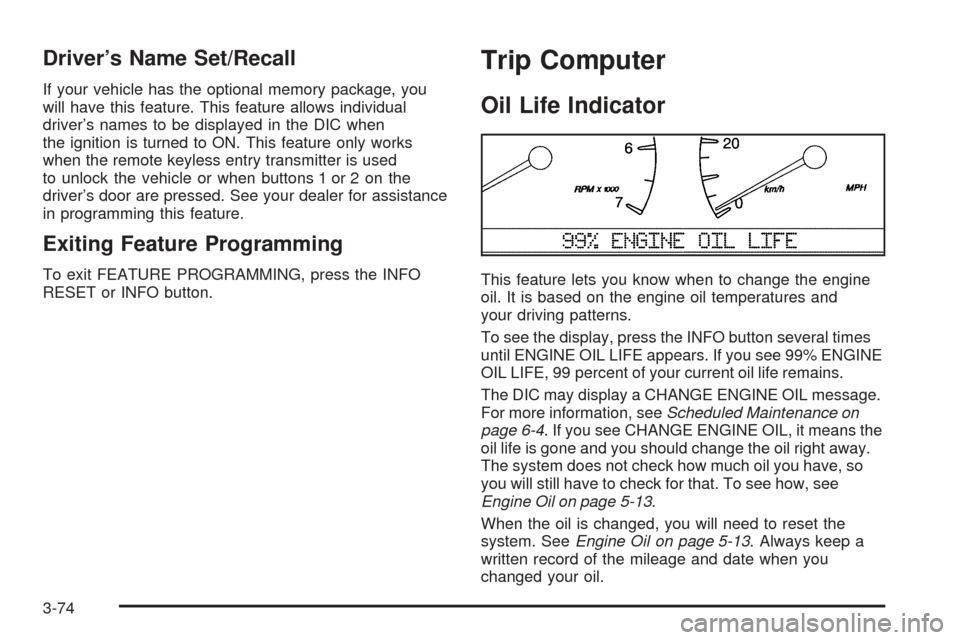
Oil Life Indicator
This feature lets you know when to change the engine
oil. It is based on the engine oil temperatures and
your driving patterns.
To see the display, press the INFO button several times
until ENGINE OIL LIFE appears. If you see 99% ENGINE
OIL LIFE, 99 percent of your current oil life remains.
The DIC may display a CHANGE ENGINE OIL message.
For more information, seeScheduled Maintenance on
page 6-4. If you see CHANGE ENGINE OIL, it means the
oil life is gone and you should change the oil right away.
The system does not check how much oil you have, so
you will still have to check for that. To see how, see
Engine Oil on page 5-13.
When the oil is changed, you will need to reset the
system. SeeEngine Oil on page 5-13. Always keep a
written record of the mileage and date when you
changed your oil.
3-74
Page 189 of 410
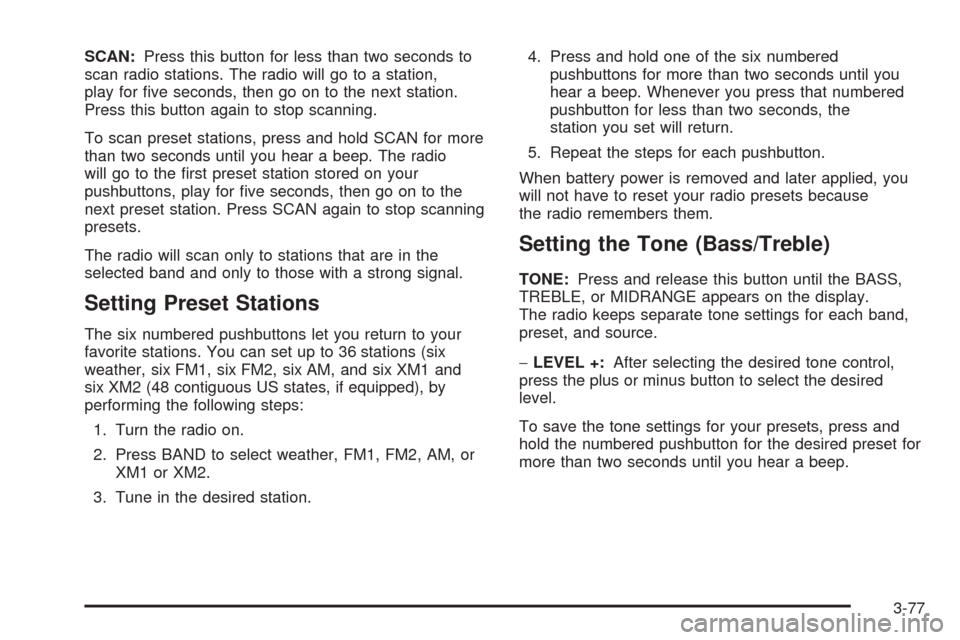
SCAN:Press this button for less than two seconds to
scan radio stations. The radio will go to a station,
play for five seconds, then go on to the next station.
Press this button again to stop scanning.
To scan preset stations, press and hold SCAN for more
than two seconds until you hear a beep. The radio
will go to the first preset station stored on your
pushbuttons, play for five seconds, then go on to the
next preset station. Press SCAN again to stop scanning
presets.
The radio will scan only to stations that are in the
selected band and only to those with a strong signal.
Setting Preset Stations
The six numbered pushbuttons let you return to your
favorite stations. You can set up to 36 stations (six
weather, six FM1, six FM2, six AM, and six XM1 and
six XM2 (48 contiguous US states, if equipped), by
performing the following steps:
1. Turn the radio on.
2. Press BAND to select weather, FM1, FM2, AM, or
XM1 or XM2.
3. Tune in the desired station.4. Press and hold one of the six numbered
pushbuttons for more than two seconds until you
hear a beep. Whenever you press that numbered
pushbutton for less than two seconds, the
station you set will return.
5. Repeat the steps for each pushbutton.
When battery power is removed and later applied, you
will not have to reset your radio presets because
the radio remembers them.
Setting the Tone (Bass/Treble)
TONE:Press and release this button until the BASS,
TREBLE, or MIDRANGE appears on the display.
The radio keeps separate tone settings for each band,
preset, and source.
−LEVEL +:After selecting the desired tone control,
press the plus or minus button to select the desired
level.
To save the tone settings for your presets, press and
hold the numbered pushbutton for the desired preset for
more than two seconds until you hear a beep.
3-77
Page 191 of 410
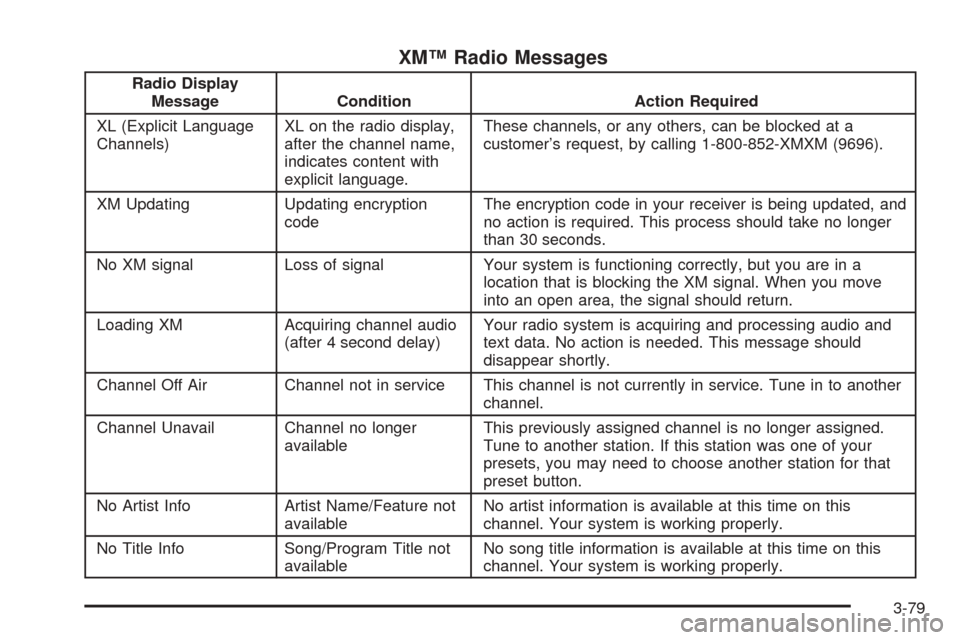
XM™ Radio Messages
Radio Display
Message Condition Action Required
XL (Explicit Language
Channels)XL on the radio display,
after the channel name,
indicates content with
explicit language.These channels, or any others, can be blocked at a
customer’s request, by calling 1-800-852-XMXM (9696).
XM Updating Updating encryption
codeThe encryption code in your receiver is being updated, and
no action is required. This process should take no longer
than 30 seconds.
No XM signal Loss of signal Your system is functioning correctly, but you are in a
location that is blocking the XM signal. When you move
into an open area, the signal should return.
Loading XM Acquiring channel audio
(after 4 second delay)Your radio system is acquiring and processing audio and
text data. No action is needed. This message should
disappear shortly.
Channel Off Air Channel not in service This channel is not currently in service. Tune in to another
channel.
Channel Unavail Channel no longer
availableThis previously assigned channel is no longer assigned.
Tune to another station. If this station was one of your
presets, you may need to choose another station for that
preset button.
No Artist Info Artist Name/Feature not
availableNo artist information is available at this time on this
channel. Your system is working properly.
No Title Info Song/Program Title not
availableNo song title information is available at this time on this
channel. Your system is working properly.
3-79
Page 196 of 410
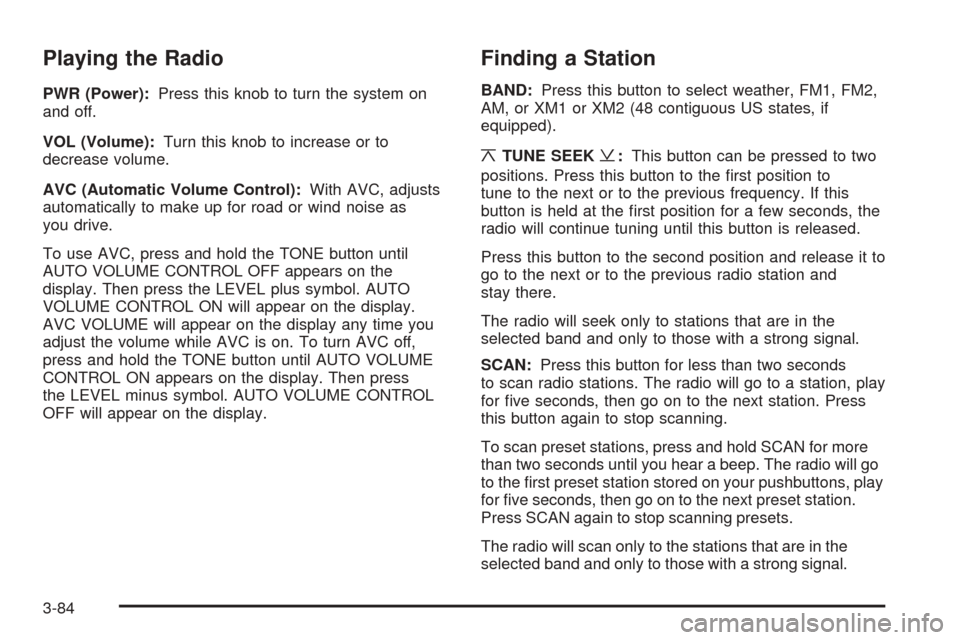
Playing the Radio
PWR (Power):Press this knob to turn the system on
and off.
VOL (Volume):Turn this knob to increase or to
decrease volume.
AVC (Automatic Volume Control):With AVC, adjusts
automatically to make up for road or wind noise as
you drive.
To use AVC, press and hold the TONE button until
AUTO VOLUME CONTROL OFF appears on the
display. Then press the LEVEL plus symbol. AUTO
VOLUME CONTROL ON will appear on the display.
AVC VOLUME will appear on the display any time you
adjust the volume while AVC is on. To turn AVC off,
press and hold the TONE button until AUTO VOLUME
CONTROL ON appears on the display. Then press
the LEVEL minus symbol. AUTO VOLUME CONTROL
OFF will appear on the display.
Finding a Station
BAND:Press this button to select weather, FM1, FM2,
AM, or XM1 or XM2 (48 contiguous US states, if
equipped).
¦TUNE SEEK¥:This button can be pressed to two
positions. Press this button to the first position to
tune to the next or to the previous frequency. If this
button is held at the first position for a few seconds, the
radio will continue tuning until this button is released.
Press this button to the second position and release it to
go to the next or to the previous radio station and
stay there.
The radio will seek only to stations that are in the
selected band and only to those with a strong signal.
SCAN:Press this button for less than two seconds
to scan radio stations. The radio will go to a station, play
for five seconds, then go on to the next station. Press
this button again to stop scanning.
To scan preset stations, press and hold SCAN for more
than two seconds until you hear a beep. The radio will go
to the first preset station stored on your pushbuttons, play
for five seconds, then go on to the next preset station.
Press SCAN again to stop scanning presets.
The radio will scan only to the stations that are in the
selected band and only to those with a strong signal.
3-84
Page 197 of 410
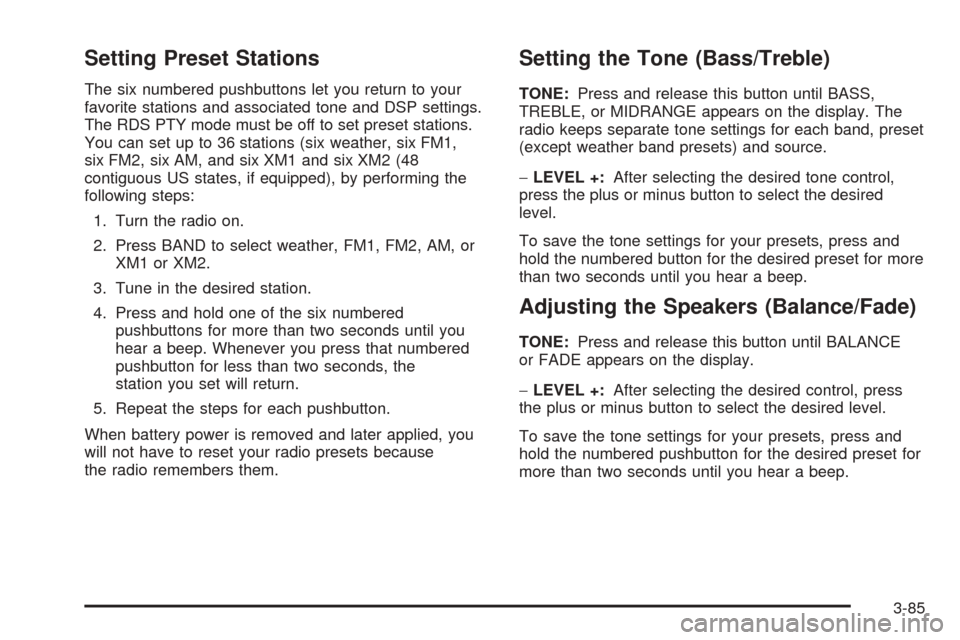
Setting Preset Stations
The six numbered pushbuttons let you return to your
favorite stations and associated tone and DSP settings.
The RDS PTY mode must be off to set preset stations.
You can set up to 36 stations (six weather, six FM1,
six FM2, six AM, and six XM1 and six XM2 (48
contiguous US states, if equipped), by performing the
following steps:
1. Turn the radio on.
2. Press BAND to select weather, FM1, FM2, AM, or
XM1 or XM2.
3. Tune in the desired station.
4. Press and hold one of the six numbered
pushbuttons for more than two seconds until you
hear a beep. Whenever you press that numbered
pushbutton for less than two seconds, the
station you set will return.
5. Repeat the steps for each pushbutton.
When battery power is removed and later applied, you
will not have to reset your radio presets because
the radio remembers them.
Setting the Tone (Bass/Treble)
TONE:Press and release this button until BASS,
TREBLE, or MIDRANGE appears on the display. The
radio keeps separate tone settings for each band, preset
(except weather band presets) and source.
−LEVEL +:After selecting the desired tone control,
press the plus or minus button to select the desired
level.
To save the tone settings for your presets, press and
hold the numbered button for the desired preset for more
than two seconds until you hear a beep.
Adjusting the Speakers (Balance/Fade)
TONE:Press and release this button until BALANCE
or FADE appears on the display.
−LEVEL +:After selecting the desired control, press
the plus or minus button to select the desired level.
To save the tone settings for your presets, press and
hold the numbered pushbutton for the desired preset for
more than two seconds until you hear a beep.
3-85
Page 198 of 410
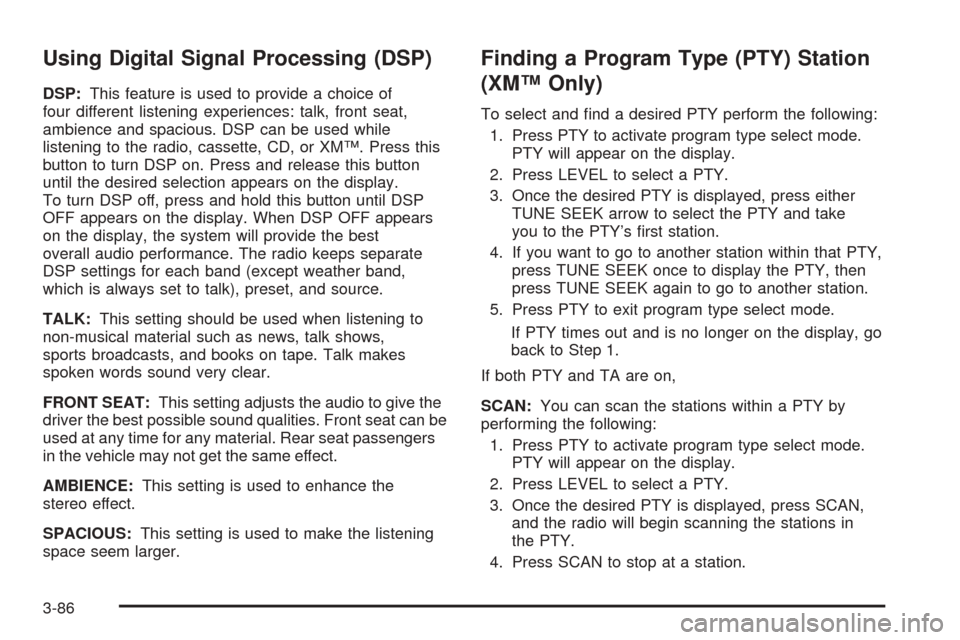
Using Digital Signal Processing (DSP)
DSP:This feature is used to provide a choice of
four different listening experiences: talk, front seat,
ambience and spacious. DSP can be used while
listening to the radio, cassette, CD, or XM™. Press this
button to turn DSP on. Press and release this button
until the desired selection appears on the display.
To turn DSP off, press and hold this button until DSP
OFF appears on the display. When DSP OFF appears
on the display, the system will provide the best
overall audio performance. The radio keeps separate
DSP settings for each band (except weather band,
which is always set to talk), preset, and source.
TALK:This setting should be used when listening to
non-musical material such as news, talk shows,
sports broadcasts, and books on tape. Talk makes
spoken words sound very clear.
FRONT SEAT:This setting adjusts the audio to give the
driver the best possible sound qualities. Front seat can be
used at any time for any material. Rear seat passengers
in the vehicle may not get the same effect.
AMBIENCE:This setting is used to enhance the
stereo effect.
SPACIOUS:This setting is used to make the listening
space seem larger.
Finding a Program Type (PTY) Station
(XM™ Only)
To select and find a desired PTY perform the following:
1. Press PTY to activate program type select mode.
PTY will appear on the display.
2. Press LEVEL to select a PTY.
3. Once the desired PTY is displayed, press either
TUNE SEEK arrow to select the PTY and take
you to the PTY’s first station.
4. If you want to go to another station within that PTY,
press TUNE SEEK once to display the PTY, then
press TUNE SEEK again to go to another station.
5. Press PTY to exit program type select mode.
If PTY times out and is no longer on the display, go
back to Step 1.
If both PTY and TA are on,
SCAN:You can scan the stations within a PTY by
performing the following:
1. Press PTY to activate program type select mode.
PTY will appear on the display.
2. Press LEVEL to select a PTY.
3. Once the desired PTY is displayed, press SCAN,
and the radio will begin scanning the stations in
the PTY.
4. Press SCAN to stop at a station.
3-86
Page 201 of 410
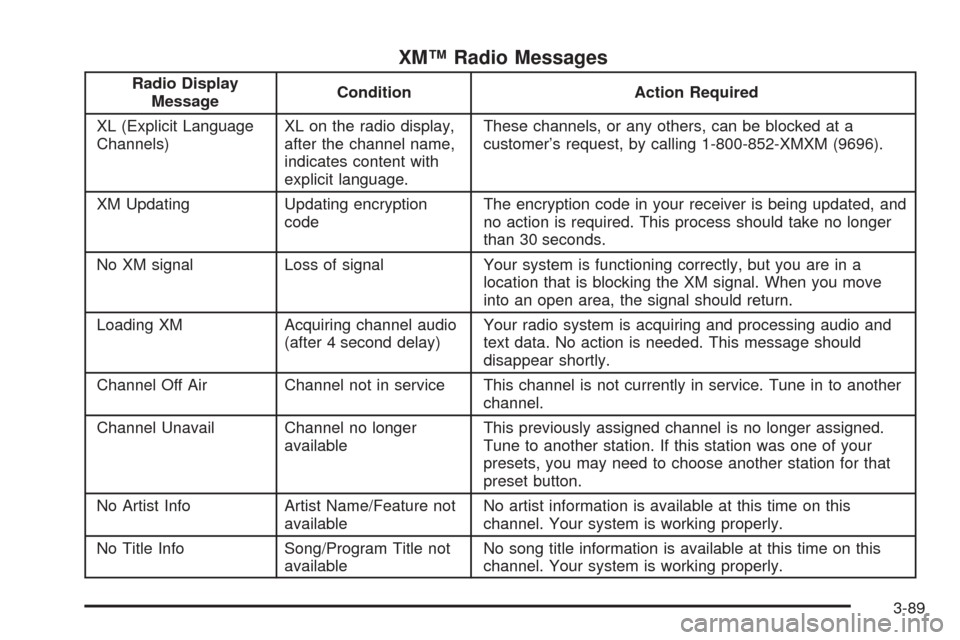
XM™ Radio Messages
Radio Display
MessageCondition Action Required
XL (Explicit Language
Channels)XL on the radio display,
after the channel name,
indicates content with
explicit language.These channels, or any others, can be blocked at a
customer’s request, by calling 1-800-852-XMXM (9696).
XM Updating Updating encryption
codeThe encryption code in your receiver is being updated, and
no action is required. This process should take no longer
than 30 seconds.
No XM signal Loss of signal Your system is functioning correctly, but you are in a
location that is blocking the XM signal. When you move
into an open area, the signal should return.
Loading XM Acquiring channel audio
(after 4 second delay)Your radio system is acquiring and processing audio and
text data. No action is needed. This message should
disappear shortly.
Channel Off Air Channel not in service This channel is not currently in service. Tune in to another
channel.
Channel Unavail Channel no longer
availableThis previously assigned channel is no longer assigned.
Tune to another station. If this station was one of your
presets, you may need to choose another station for that
preset button.
No Artist Info Artist Name/Feature not
availableNo artist information is available at this time on this
channel. Your system is working properly.
No Title Info Song/Program Title not
availableNo song title information is available at this time on this
channel. Your system is working properly.
3-89