buttons CADILLAC SRX 2004 1.G Owner's Manual
[x] Cancel search | Manufacturer: CADILLAC, Model Year: 2004, Model line: SRX, Model: CADILLAC SRX 2004 1.GPages: 468, PDF Size: 2.92 MB
Page 227 of 468
Using the Single CD Player
Insert a CD partway into the slot, label side up.
The player will pull it in. If the ignition and the radio are
on the CD will begin playing. CD will appear on the
display. A CD may be loaded with the radio off but it will
not start playing until the radio is on.
If you turn off the ignition or radio with a CD in the
player, it will stay in the player. When you turn on the
ignition or radio, the CD will start to play where it
stopped, if it was the last selected audio source.
The CD player can play the smaller 8cm single CDs
with an adapter ring. Full-size CDs and the smaller CDs
are loaded in the same manner.
If playing a CD-R the sound quality may be reduced
due to CD-R quality, the method of recording, the quality
of the music that has been recorded, and the way the
CD-R has been handled. You may experience an
increase in skipping, difficulty in nding tracks and/or
difficulty in loading and ejecting. If these problems occur
try a known good CD.
Do not add paper labels to CDs, they could get caught
in the CD player.Do not play 3 inch CDs without a standard adapter CD.
If an error appears on the display, see “CD Messages”
later in this section.
When a CD is inserted the CD functions will appear on
the display above the pushbuttons, in place of the
preset stations (if programmed).
F1 PREV (Previous):Press this pushbutton to go to
the previous track. Press and hold this pushbutton
to reverse quickly within a track. Release the pushbutton
to play the passage. The display will show the elapsed
time of the track.
F2 NEXT:Press this pushbutton to go to the next track.
Press and hold this pushbutton to advance quickly
within a track. Release the pushbutton to play the
passage. The display will show the elapsed time of the
track.
F3 RDM (Random):Press this pushbutton to listen to
the tracks in random, rather than sequential, order.
RANDOM will appear on the display. Press RDM again
to turn off random play. RANDOM will disappear from
the display.
3-105
Page 228 of 468

F4 RPT (Repeat):Press this pushbutton to hear a
track over again. REPEAT will appear on the display.
Press RPT again to turn off repeat play. REPEAT
will disappear from the display.
F6 DISP (Display):Press this pushbutton to display the
time of the track. Press this pushbutton again to
remove the time of the track from the display.
QSEEKR:Press the up or the down arrow to seek
to the next or to the previous track on the CD.
QSCAN:Press this button to listen to each track for
10 seconds. The CD will go to a track, play for
10 seconds, then go on to the next track. Press this
button again to stop scanning.
X(Eject):Press this button to stop a CD when it is
playing or to eject a CD when it is not playing. Eject may
be activated with the ignition and the radio off.
Using the Six-CD CD Changer
The CD player can play the smaller 8cm single CDs
with an adapter ring. Full-size CDs and the smaller CDs
are loaded in the same manner.
If playing a CD-R the sound quality may be reduced
due to CD-R quality, the method of recording, the quality
of the music that has been recorded, and the way the
CD-R has been handled. You may experience an
increase in skipping, difficulty in nding tracks and/or
difficulty in loading and ejecting. If these problems occur
try a known good CD.
Do not add paper labels to CDs, they could get caught
in the CD player.
Do not play 3 inch CDs without a standard adapter CD.
If an error appears on the display, see “CD Messages”
later in this section.
When a CD is inserted the CD functions will appear on
the display above the pushbuttons, in place of the
preset stations (if programmed).
3-106
Page 236 of 468
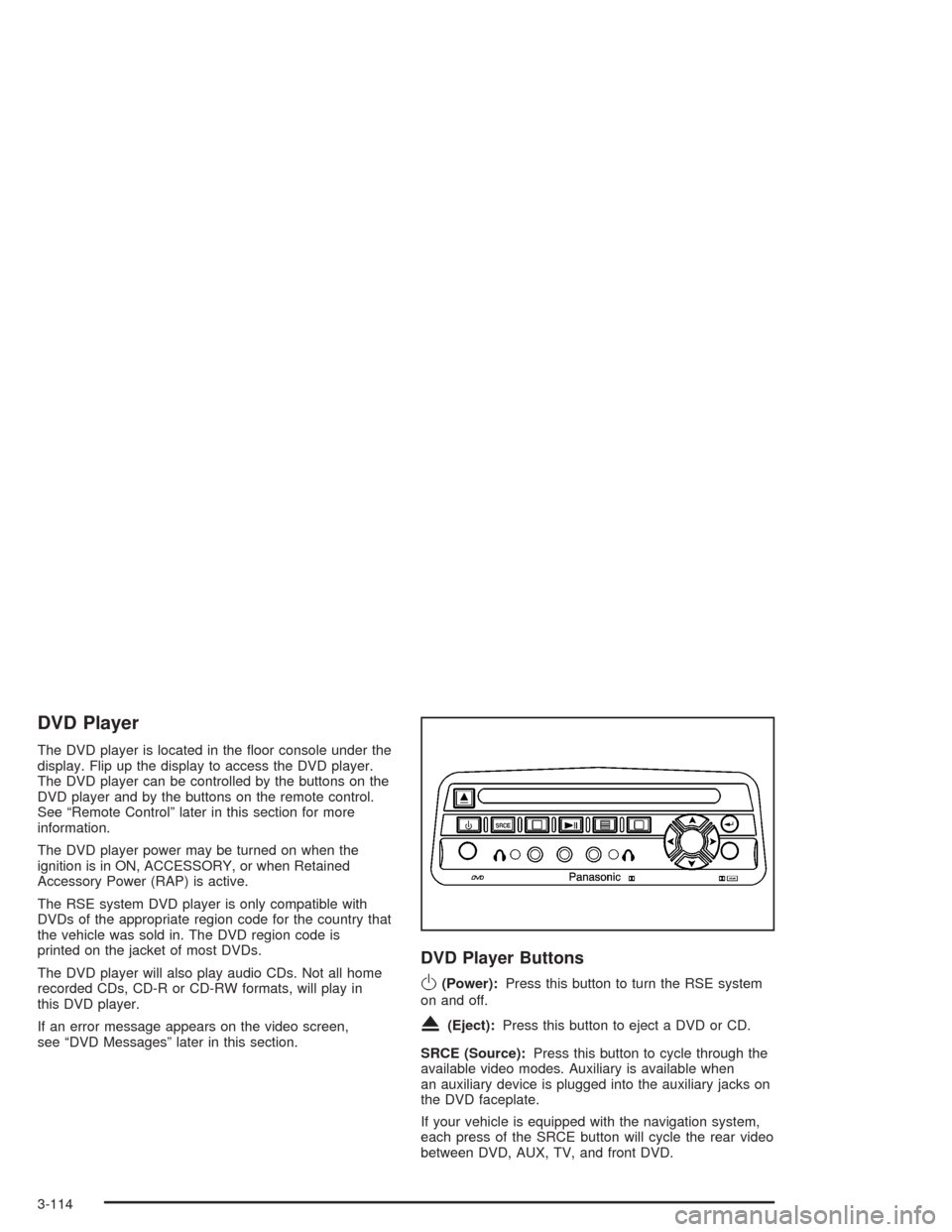
DVD Player
The DVD player is located in the oor console under the
display. Flip up the display to access the DVD player.
The DVD player can be controlled by the buttons on the
DVD player and by the buttons on the remote control.
See “Remote Control” later in this section for more
information.
The DVD player power may be turned on when the
ignition is in ON, ACCESSORY, or when Retained
Accessory Power (RAP) is active.
The RSE system DVD player is only compatible with
DVDs of the appropriate region code for the country that
the vehicle was sold in. The DVD region code is
printed on the jacket of most DVDs.
The DVD player will also play audio CDs. Not all home
recorded CDs, CD-R or CD-RW formats, will play in
this DVD player.
If an error message appears on the video screen,
see “DVD Messages” later in this section.
DVD Player Buttons
O(Power):Press this button to turn the RSE system
on and off.
X(Eject):Press this button to eject a DVD or CD.
SRCE (Source):Press this button to cycle through the
available video modes. Auxiliary is available when
an auxiliary device is plugged into the auxiliary jacks on
the DVD faceplate.
If your vehicle is equipped with the navigation system,
each press of the SRCE button will cycle the rear video
between DVD, AUX, TV, and front DVD.
3-114
Page 240 of 468
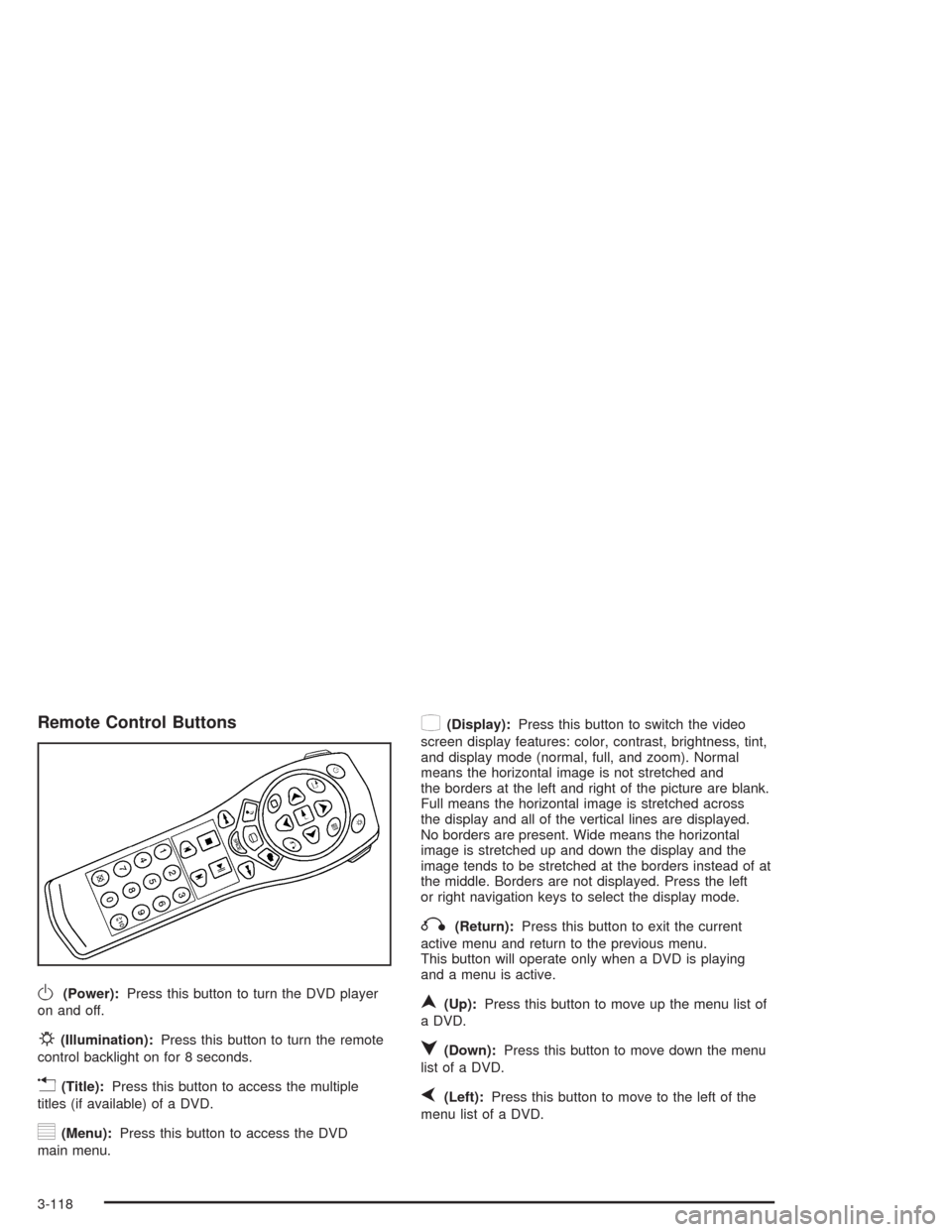
Remote Control Buttons
O(Power):Press this button to turn the DVD player
on and off.
P(Illumination):Press this button to turn the remote
control backlight on for 8 seconds.
v(Title):Press this button to access the multiple
titles (if available) of a DVD.
y(Menu):Press this button to access the DVD
main menu.
z(Display):Press this button to switch the video
screen display features: color, contrast, brightness, tint,
and display mode (normal, full, and zoom). Normal
means the horizontal image is not stretched and
the borders at the left and right of the picture are blank.
Full means the horizontal image is stretched across
the display and all of the vertical lines are displayed.
No borders are present. Wide means the horizontal
image is stretched up and down the display and the
image tends to be stretched at the borders instead of at
the middle. Borders are not displayed. Press the left
or right navigation keys to select the display mode.
q(Return):Press this button to exit the current
active menu and return to the previous menu.
This button will operate only when a DVD is playing
and a menu is active.
n(Up):Press this button to move up the menu list of
a DVD.
q(Down):Press this button to move down the menu
list of a DVD.
p(Left):Press this button to move to the left of the
menu list of a DVD.
3-118
Page 245 of 468
DVD Distortion
There may be an experience with audio distortion in the
wireless headphones when operating cellular phones,
scanners, CB radios, Global Positioning Systems
(GPS)*, two-way radios, mobile fax, or walkie talkies.
It may be necessary to turn off the DVD player
when operating one of these devices in or near the
vehicle.
* Excludes the OnStar
®System.
Cleaning the DVD Player
When cleaning the outside DVD faceplate and buttons,
use only a clean cloth dampened with clean water.
Cleaning the Video Screen
Pour some isopropyl or rubbing alcohol on a clean cloth
and gently wipe the video screen. Do not spray
directly onto the screen and do not press too hard or
too long on the video screen.
Theft-Deterrent Feature
THEFTLOCK®is designed to discourage theft of your
vehicle’s radio. The feature works automatically by
learning a portion of the Vehicle Identication Number
(VIN). If the radio is moved to a different vehicle,
it will not operate. If the radio is removed from your
vehicle, the original VIN in the radio can be used to trace
the radio back to your vehicle.
With THEFTLOCK
®activated, the radio will not operate
if stolen.
3-123
Page 246 of 468

Audio Steering Wheel Controls
Some audio controls can be adjusted at the steering
wheel. They include the following:
>(Mute):Press this button to silence the system.
Press this button again, or any other radio button, to turn
the sound on.
SRCE (Source):Press this button to switch between
FM1, FM2, AM, or XM1 or XM2 (if equipped), radio,
or CD.
g(OnStar/Voice Recognition):If your vehicle has
the Radio with CD or Radio with Six-Disc CD audio
system, press this button to interact with the OnStar
®
system. See the OnStar®manual provided with
your vehicle for more information.
If your vehicle has the navigation system, press this
button to initiate voice recognition. See “Voice
Recognition” in the Navigation System manual for more
information. You may be able to interact with the
OnStar
®system using this button. See the OnStar®
manual provided with your vehicle for more information.
1–6 (Preset Stations):Press this button to play
stations that are programmed on the radio preset
pushbuttons. The radio will only seek preset stations
with a strong signal that are in the selected band.
When a CD is playing, press this button to go to the
next track.
When a CD is playing in the six-disc CD changer, press
this button to go to the next available CD, if multiple
CDs are loaded.
+
u— (Volume):Press this button to increase or to
decrease the volume.
3-124
Page 378 of 468

TPM Sensor Identication Codes
Each TPM sensor has a unique identication code. Any
time you replace one or more of the TPM sensors,
the identication codes will need to be matched to the
new tire/wheel position. Each tire/wheel position is
matched, to a sensor, by increasing or decreasing the
tire’s air pressure. The sensors are matched, to the
tire/wheel positions, in the following order: left front (LF),
right front (RF), right rear (RR), and left rear (LR).
You will have one minute to match the rst tire/wheel
position, and ve minutes overall, to match all four
tire/wheel positions. If it takes longer than one minute,
to match the rst tire and wheel, or more than
ve minutes to match all four tire/wheel positions the
matching process stops and you will need to start over.
The TPM matching process is outlined below:
1. Set the Parking brake.
2. Turn the ignition switch to ON with the engine off.
3. Using the Remote Keyless Entry (RKE) transmitter,
lock and unlock the vehicle’s doors.
4. Press the lock and unlock buttons, at the same
time, on the RKE transmitter. A single horn chirp
will sound, indicating that the TPM system is ready,
and the sensor matching process can begin.5. Start with the left (driver’s side) front tire.
6. Remove the valve cap from the valve stem.
Activate the TPM sensor by increasing or
decreasing the tire’s air pressure for ve seconds,
or until a horn chirp sounds. The horn chirp,
which may take up to 30 seconds, conrms that the
sensor identication code has been matched to
this tire position. To decrease the tire’s air-pressure
use the pointy end of the valve cap, a pencil-style
air pressure gage or a key.
7. Proceed to the right (passenger’s side) front tire,
and repeat the procedure in Step 6.
8. Proceed to the right (passenger’s side) rear tire,
and repeat the procedure in Step 6.
9. Proceed to the left (driver’s side) rear tire, and
repeat the procedure in Step 6.
10. After hearing the conrming double horn chirp, for
the left rear tire, exit the matching process by
turning the ignition switch to OFF.
11. Set all four tires to the recommended air pressure
level as indicated on the tire and loading information
label.
12. Put the valve caps back on the valve stems.
5-70
Page 456 of 468

E
Electrical System
Add-On Equipment.....................................5-102
Fuses and Circuit Breakers.........................5-103
Power Windows and Other
Power Options.......................................5-102
Windshield Wiper Fuses.............................5-102
Emissions Inspection and Maintenance
Programs...................................................3-47
Engine
Air Cleaner/Filter.........................................5-22
Battery.......................................................5-43
Check and Service Engine Soon Light............3-44
Coolant......................................................5-25
Coolant Heater............................................2-24
Coolant Temperature Gage...........................3-43
Coolant Temperature Warning Light................3-43
Engine Compartment Overview......................5-12
Exhaust.....................................................2-33
Oil .............................................................5-15
Overheating................................................5-28
Starting......................................................2-23
Engine Coolant Hot – AC (Air Conditioning) Off......3-67
Engine Coolant Hot – Idle Engine.....................3-67
Engine Cooling When Trailer Towing..................4-58
Engine Oil Additives........................................5-19
Engine Overheated – Stop Engine....................3-67
Engine Power Reduced...................................3-67Engine Specications.....................................5-112
Engine Speed Limiter......................................3-39
Entering or Exiting the Third Row Seat................ 1-7
Entering the Personalization Menu.....................3-73
Entry Lighting.................................................3-21
Environmental Concerns..................................4-19
Erasing HomeLink
®Buttons..............................2-44
Event Data Recorders (EDR)............................. 7-9
Exiting the Personalization Menu.......................3-92
Express-Down Window....................................2-14
Express-Up Window........................................2-14
Extender, Safety Belt.......................................1-28
Exterior Lamps...............................................3-18
Exterior Lighting Battery Saver..........................3-20
F
Filter
Engine Air Cleaner......................................5-22
Finding a Station............................................3-96
Finish Care....................................................5-97
Finish Damage...............................................5-99
Flash-To-Pass Feature....................................... 3-9
Flat Tire........................................................5-78
Flat Tire, Changing.........................................5-79
Fluid
Automatic Transmission................................5-24
Power Steering...........................................5-37
Windshield Washer......................................5-38
6