light CADILLAC SRX 2004 1.G Manual PDF
[x] Cancel search | Manufacturer: CADILLAC, Model Year: 2004, Model line: SRX, Model: CADILLAC SRX 2004 1.GPages: 468, PDF Size: 2.92 MB
Page 212 of 468
Lock Passenger Window
This feature allows you to disable either all the passenger
window switches or the rear passenger window switches
only. If this feature is turned on, all passenger window
switches will be disabled when the window lockout button
is pressed. If the feature is off, only the rear passenger
window switches will be disabled. SeePower Windows
on page 2-14for more information.
Programmable Modes
Mode 1:ON
Mode 2:OFF
Before your vehicle was shipped from the factory, it was
programmed to Mode 2. The mode to which the
vehicle was programmed may have been changed since
it left the factory. To program the vehicle to a different
mode, use one of the following procedures:
To change the mode using the Base audio system,
do the following:
1. Enter the personalization portion of the SETUP
menu following the instructions listed previously.
2. Scroll to LOCK PASS WINDOW using the
TUNE/SEL knob to highlight it.3. Press the TUNE/SEL knob to switch back and forth
between on and off.
When the mode is turned on, a check mark will
appear next to the feature name.
To change the mode using the Navigation system,
do the following:
1. Enter the Personalization menu by following the
instructions listed previously.
2. Scroll to LOCK PASS WINDOW and press the
ON or OFF button next to it as desired. If the
item is turned on the color of the ON button will be
light blue. If the item is turned off the color of
the OFF button will be light blue.
The mode you selected is now set. You can either exit
the programming mode by following the instructions
later in this section or program the next feature available
on your vehicle.
3-90
Page 213 of 468
Mirror to Curb in Reverse
If your vehicle has the optional memory package, you
will have this feature. When this feature is turned on,
the passenger’s outside rearview mirror will move
downward so you can view the curb when the shift lever
is shifted into REVERSE (R). The mirror will return to
the last known driving position when the shift lever
is moved out of REVERSE (R). SeeOutside Curb View
Assist Mirror on page 2-39for more information.
Programmable Modes
Mode 1:ON
Mode 2:OFF
Before your vehicle was shipped from the factory, it was
programmed to Mode 2. The mode to which the
vehicle was programmed may have been changed since
it left the factory. To program the vehicle to a different
mode, use one of the following procedures:
To change the mode using the Base audio system,
do the following:
1. Enter the personalization portion of the SETUP
menu following the instructions listed previously.
2. Scroll to MIRROR TO CURB IN REV using the
TUNE/SEL knob to highlight it.3. Press the TUNE/SEL knob to switch back and forth
between on and off.
When the mode is turned on, a check mark will
appear next to the feature name.
To change the mode using the Navigation system,
do the following:
1. Enter the Personalization menu by following the
instructions listed previously.
2. Scroll to MIRROR TO CURB IN REVERSE and
press the ON or OFF button next to it as desired.
If the item is turned on the color of the ON
button will be light blue. If the item is turned off the
color of the OFF button will be light blue.
The mode you selected is now set. You can either exit
the programming mode by following the instructions
later in this section or program the next feature available
on your vehicle.
3-91
Page 214 of 468
Enhanced Chime Volume
This feature allows you to adjust the volume level of the
vehicle’s warning chimes. The chime volume cannot
be turned off, only adjusted.
Programmable Modes
Mode 1:NORMAL
Mode 2:LOUD
Before your vehicle was shipped from the factory, it was
programmed to Mode 1. The mode to which the
vehicle was programmed may have been changed since
it left the factory. To program the vehicle to a different
mode, use one of the following procedures:
To change the mode using the Base audio system,
do the following:
1. Enter the personalization portion of the SETUP
menu following the instructions listed previously.
2. Scroll to ENHANCED CHIME VOLUME using the
TUNE/SEL knob to highlight it.
3. Press the TUNE/SEL knob to switch back and forth
between the normal and loud settings.To change the mode using the Navigation system,
do the following:
1. Enter the Personalization menu by following the
instructions listed previously.
2. Scroll to ENHANCE CHIME VOLUME and press
the ON or OFF button next to it as desired. If the
item is turned on the color of the ON button will be
light blue. If the item is turned off the color of the
OFF button will be light blue.
The mode you selected is now set. You can either exit
the programming mode by following the instructions
later in this section or program the next feature available
on your vehicle.
Exiting the Personalization Menu
Once you’ve nished making your selections on the
Base audio system, you will return to the main audio
screen.
To exit Feature Programming using the Navigation
system, press any of the buttons located next to
the screen.
3-92
Page 233 of 468
Headphones
The RSE system includes two sets of wireless
headphones.
Each set of headphones has an ON/OFF control.
An indicator light will illuminate on the headphones when
they are on. If the light does not illuminate, the batteries
may need to be replaced. See “Battery Replacement”
later in this section for more information. To turn
the headphones OFF activate the ON/OFF control.
Each set of headphones has a volume knob. To adjust
the volume, adjust this knob.
The transmitters are located below the video display
screen. The headphones will shut off to save battery
power if they lose the signal from the system after about
four minutes. The signal may be lost if the system is
turned off or if the headphones are out of range of the
signal transmitters.
Notice:Do not store the headphones in heat or
direct sunlight. This could damage the headphones
and repairs would not be covered by your warranty.
Keep the headphones stored in a cool, dry place.
Battery Replacement
To change the batteries, do the following:
1. Loosen the screw on the battery compartment door
located on the left side of the headphone earpiece.
2. Replace the two AAA batteries in the compartment.
Make sure that they are installed correctly, using
the diagram on the inside of the battery
compartment.
3. Tighten the screws to close the compartment door.
If the headphones are to be stored for a long period
of time, remove the batteries and keep them in a cool,
dry place.
3-111
Page 234 of 468

Stereo RCA Jacks
The RCA jacks are located on the front of the DVD
player faceplate. These jacks allow audio and video
signals to be connected from an auxiliary device such as
a camcorder or a video game unit to the RSE system.
The L jack is for left audio input, the R jack is for
right audio input, and the V jack is used for video input.
The system requires standard RCA cables, not
included, to connect the auxiliary device to the RCA
jacks. Refer to the manufacturer’s instructions for
proper usage.
To use the auxiliary audio and video inputs, connect an
external auxiliary device such as a camcorder to the
RCA jacks and turn on both the auxiliary device power
and the power on the front of the RSE player. To
have use of these jacks, select AUX using the MODE
button on the DVD player faceplate or the remote
control.
How to Change the Video Format when in
the Auxiliary Mode
The auxiliary input video format is preset to NTSC.
In some countries, the video format may be in
PAL system. To change the video format,
perform the following:
1. Press the display menu button.
2. Press the down arrow button to highlight the Video
Format option.
3. Press the enter button to select Video Format.
4. Press the right or left arrow button to select
the video format.
5. Press the enter button to accept the change.
3-112
Page 239 of 468

Region Code Error:This message will be
displayed if the region code of the DVD is not
compatible with the DVD player. The disc will be
automatically ejected from the DVD player.
No Disc:This message will be displayed if the
PLAY button is pressed and no disc is in the player.
Parental Control Button:This button is located on the
navigation system screen. Press this button while a
DVD or CD is playing to freeze the video and mute the
audio. The video screen will display Parental Control
ON and the power indicator light on the DVD player will
ash. It will also disable all other button operations
from the remote control and the DVD player, with the
exception of the eject button. The driver will then be able
to gain the attention of the rear seat passengers.
Press this button again to restore normal operation of
the DVD player.
This button may also be used to turn the DVD player
power on and automatically resume play if the vehicle is
in an enabled power mode.
Remote Control
To use the remote control, aim it at the transmitter
window above the video screen and press the desired
button. Direct sunlight or very bright light may affect
the ability of the RSE system to receive signals from the
remote control. If the remote control does not seem to
be working, the batteries may need to be replaced.
See “Battery Replacement” later in this section.
Objects blocking the line of sight may also affect the
function of the remote control.
Notice:Storing the remote control in a hot area or
in direct sunlight may damage it, and the repairs
would not be covered by your warranty. Keep
the remote control stored in a cool, dry place.
3-117
Page 240 of 468
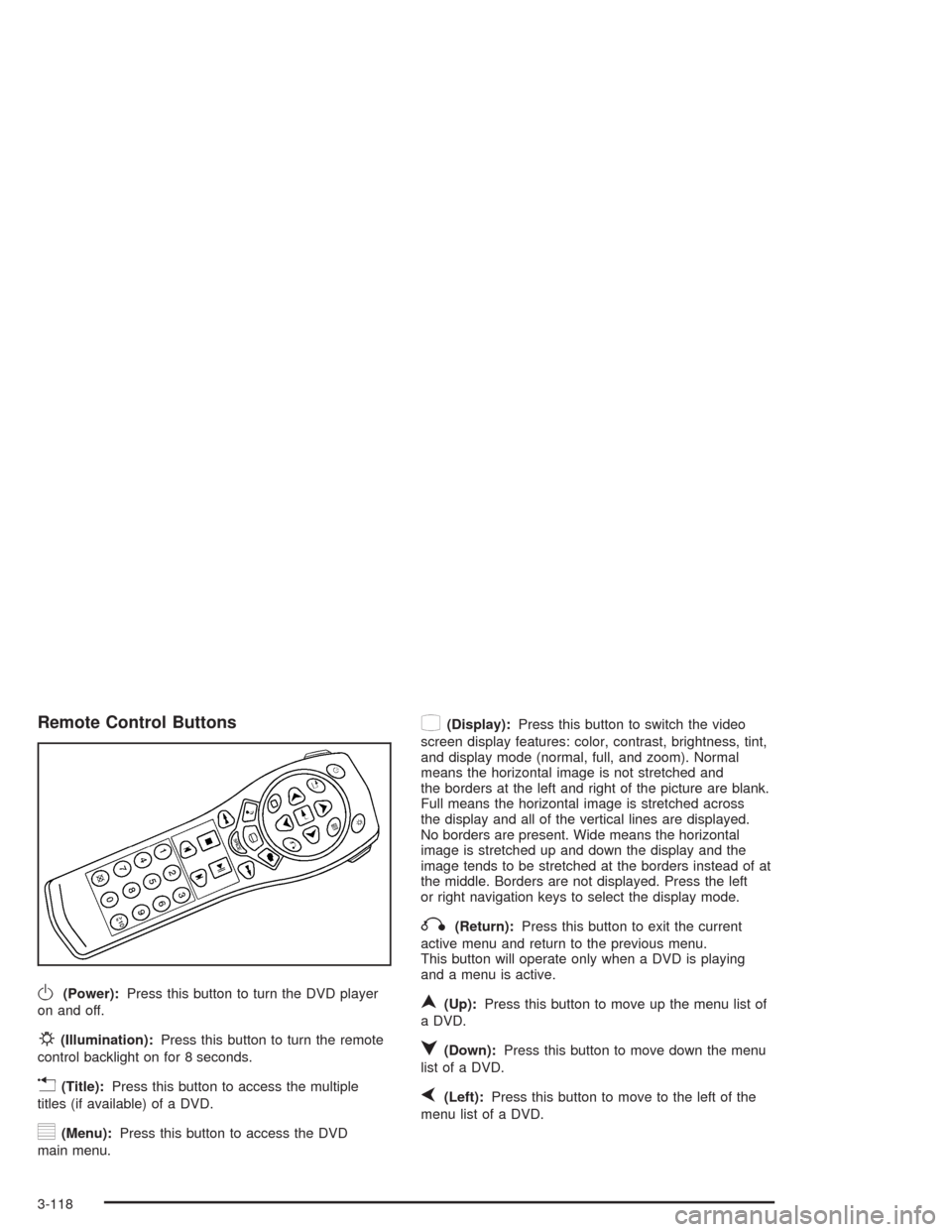
Remote Control Buttons
O(Power):Press this button to turn the DVD player
on and off.
P(Illumination):Press this button to turn the remote
control backlight on for 8 seconds.
v(Title):Press this button to access the multiple
titles (if available) of a DVD.
y(Menu):Press this button to access the DVD
main menu.
z(Display):Press this button to switch the video
screen display features: color, contrast, brightness, tint,
and display mode (normal, full, and zoom). Normal
means the horizontal image is not stretched and
the borders at the left and right of the picture are blank.
Full means the horizontal image is stretched across
the display and all of the vertical lines are displayed.
No borders are present. Wide means the horizontal
image is stretched up and down the display and the
image tends to be stretched at the borders instead of at
the middle. Borders are not displayed. Press the left
or right navigation keys to select the display mode.
q(Return):Press this button to exit the current
active menu and return to the previous menu.
This button will operate only when a DVD is playing
and a menu is active.
n(Up):Press this button to move up the menu list of
a DVD.
q(Down):Press this button to move down the menu
list of a DVD.
p(Left):Press this button to move to the left of the
menu list of a DVD.
3-118
Page 242 of 468
Battery Replacement
To change the batteries, do the following:
1. Remove the battery compartment door located on
the bottom of the remote control.
2. Replace the two AA batteries in the compartment.
Make sure that they are installed correctly, using the
diagram on the inside of the battery compartment.
3. Close the battery door securely.
If the remote control is to be stored for a long period of
time, remove the batteries and keep them in a cool,
dry place.
Problem Recommended Action
No power. The ignition might not be
in on or accessory.
The parental control
button might have been
turned on. The power
indicator light will ash.
Disc will not play. The system might be off.
The parental control
button might have been
turned on. The power
indicator light will ash.
The system might be in
auxiliary source mode.
Press the MODE button
to switch between the
DVD player and the
auxiliary source.
The disc is upside down
or is not compatible.
3-120
Page 243 of 468

Problem Recommended Action
The picture does not ll
the screen. There are
black borders on the
top and bottom or on
both sides or it looks
stretched out.Press the DISP button on
the DVD player or on the
remote control. Change
the display mode.
The disc was ejected,
but it was pulled back
into the DVD player.The disc is being stored
in the DVD player.
Press the eject button
again to eject the disc.
In auxiliary mode, the
picture moves or scrolls.Check the signal coming
from the auxiliary device
and make sure that the
connection and the signal
is good.
Change the Video Format
to PAL or NTSC. See
“Stereo RCA Jacks”
previously for how to
change the video format.Problem Recommended Action
The language in the audio
or on the screen is wrong.Press the MENU button
on the DVD player or on
the remote control and
change the audio or
language selection on
the DVD menu.
The remote control does
not work.Point the remote control
directly at the infrared
window below the video
screen while using.
Check that the batteries
are not dead or put in
wrong.
The parental control
button might have been
turned on. The power
indicator light will ash.
3-121
Page 248 of 468
Cellular Phone Usage
Cellular phone usage may cause interference with your
vehicle’s radio. This interference may occur when
making or receiving phone calls, charging the phone’s
battery, or simply having the phone on. This interference
is an increased level of static while listening to the
radio. If static is received while listening to the radio,
unplug the cellular phone and turn it off.
Care of Your CDs and DVDs
Handle discs carefully. Store them in their original cases
or other protective cases and away from direct sunlight
and dust. If the surface of a disc is soiled, dampen
a clean, soft cloth in a mild, neutral detergent solution
and clean it, wiping from the center to the edge.
Be sure never to touch the side without writing when
handling discs. Pick up discs by grasping the outer
edges or the edge of the hole and the outer edge.
Care of Your CD and DVD Player
The use of CD lens cleaners for CDs is not advised, due
to the risk of contaminating the lens of the CD optics
with lubricants internal to the CD mechanism.
Diversity Antenna System
The AM-FM antenna is integrated with the rear quarter
glass windows, located in the rear of the vehicle on
the driver and passenger sides. Make sure that
the inside surface of the rear windows are not scratched
and that the grid lines on the glass are not damaged.
If the inside surface is damaged, it could interfere
with radio reception.
Notice:Do not apply aftermarket glass tinting with
metallic lm. The metallic lm in some tinting
materials will interfere with or distort the incoming
radio reception. Any damage caused to your
backglass antenna due to metallic tinting materials
will not be covered by your warranty.
3-126