lock CADILLAC SRX 2005 1.G Service Manual
[x] Cancel search | Manufacturer: CADILLAC, Model Year: 2005, Model line: SRX, Model: CADILLAC SRX 2005 1.GPages: 442, PDF Size: 2.52 MB
Page 151 of 442
Operation Tips
Clear away any ice, snow or leaves from the air
inlets at the base of the windshield that may
block the ow of air into your vehicle.
Use of non-GM approved hood deectors may
adversely affect the performance of the system.
Keep the path under the front seats clear of objects
to help circulate the air inside of your vehicle more
effectively.
If the airow seems low when the fan speed is at
the highest setting, the passenger compartment
air lter may need to be replaced. For more
information, seePassenger Compartment Air Filter
on page 3-32.
Rear Air Conditioning System
If your vehicle has the rear air conditioning system it has
two fan speed selectors. One fan speed selector is
located in the front overhead console and the other is
located in the headliner above the second row seats. The
rear air conditioning system is designed to provide cooled
air only. There is no heating provided with this system.
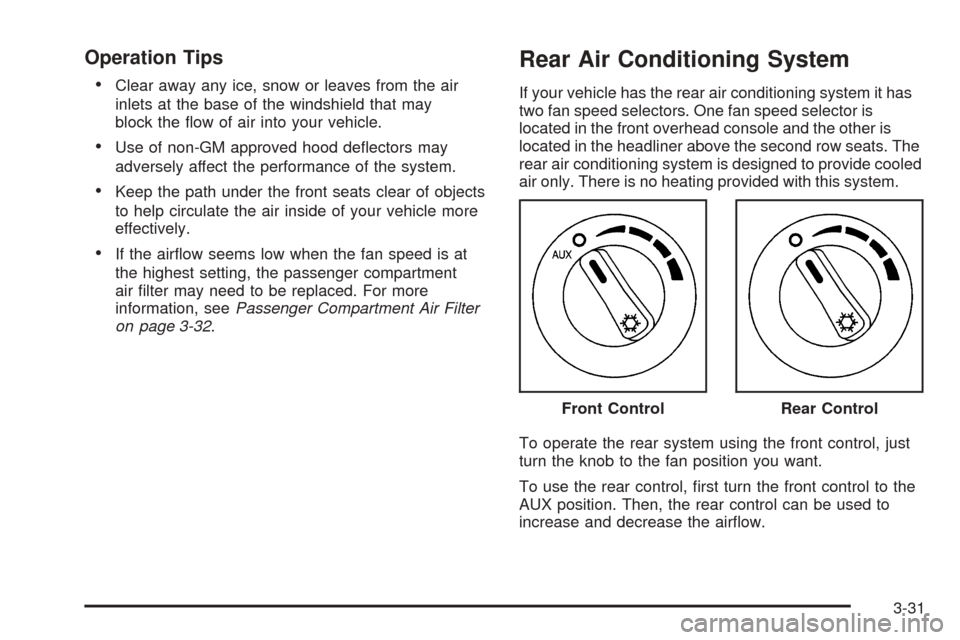
To operate the rear system using the front control, just
turn the knob to the fan position you want.
To use the rear control, rst turn the front control to the
AUX position. Then, the rear control can be used to
increase and decrease the airow.Front Control
Rear Control
3-31
Page 159 of 442

When the ignition is on, the brake system warning light
will also come on when you set your parking brake.
The light will stay on if your parking brake doesn’t
release fully. If it stays on after your parking brake is
fully released, it means you have a brake problem.
If the light comes on while you are driving, pull off the
road and stop carefully. You may notice that the pedal is
harder to push, or the pedal may go closer to the
oor. It may take longer to stop. If the light is still on,
have the vehicle towed for service. SeeTowing
Your Vehicle on page 4-50.
{CAUTION:
Your brake system may not be working
properly if the brake system warning light is
on. Driving with the brake system warning light
on can lead to an accident. If the light is still
on after you have pulled off the road and
stopped carefully, have the vehicle towed for
service.
Anti-Lock Brake System
Warning Light
With the anti-lock brake
system, the light will come
on when your engine is
started and may stay on for
several seconds. That is
normal.
If the ABS warning light comes on and stays on, there
may be a problem with the anti-lock portion of the brake
system. If the red BRAKE light is not on, you still
have brakes, but you do not have anti-lock brakes.
SeeBrake System Warning Light on page 3-38.
If the light stays on, turn the ignition to OFF. If the light
comes on when you are driving, stop as soon as
possible and turn the ignition off. Then start the engine
again to reset the system. If the light still stays on,
or comes on again while you are driving, your vehicle
needs service. If the regular brake system warning light
is not on, you still have brakes, but you do not have
anti-lock brakes. If the regular brake system warning
light is also on, you do not have anti-lock brakes
and there is a problem with your regular brakes.
SeeBrake System Warning Light on page 3-38.
3-39
Page 173 of 442
DIC Main Menu
Accessing the DIC Main Menu
To access the main menu of the DIC, do the following:
1. Press the TUNE/SEL knob once.
2. Turn the TUNE/SEL knob clockwise or
counterclockwise to scroll through the menu items.
The DIC main menu consists of the following menu
items:
eBASS - MID - TREBLE
eEQ
DSP
DVD
AVC
H/A
AUTO STORE
CAT
TA
RDS MSG
AF
SEEK LOCAL/DISTANT
9(English/Metric Units)
TCS
8(Clock)
8/4(Clock/Information Display)
SETUP
3-53
Page 176 of 442

9(English/Metric Units):Use this menu item to
adjust the measurement units.
You can choose between ENGLISH UNITS and
METRIC UNITS. To switch between the two, press the
TUNE/SEL knob. Once your choice is displayed,
turn the knob to set your choice and continue scrolling
through the main menu.
The measurement units that you choose will be reected
on all the vehicle system displays, not just the DIC
information. For example, the climate control panel will
display degrees Celsius if you choose METRIC UNITS.
TCS (Traction Control System):You can enable or
disable the traction control system using this menu item.
Press the TUNE/SEL knob to switch between on
and off.
You can also turn the traction control system off using
the traction control button located near the shift lever.
When you disable the traction control system, the
Traction Suspended message will appear on the DIC
and the traction control system warning light on the
instrument panel cluster will come on. SeeDIC
Warnings and Messages on page 3-57andTraction
Control System (TCS) Warning Light on page 3-40for
more information.8(Clock):Use this menu item to set the time on the
vehicle’s clock.
SeeSetting the Time on page 3-80for more information.
8/4(Clock/Information Display):Use this menu
item to toggle between the clock display and the XM™
Information (Song, Artist, Title), if available.
SeeRadio with CD on page 3-81for more information.
SETUP:When you select this menu item, the
following submenu is available:
Personalization
Language
Congure Display Keys
To change the language displayed on the radio, select
LANGUAGE by pressing the TUNE/SEL knob. Turn the
TUNE/SEL knob to scroll through the available languages
and press the knob to make your selection.
If you accidentally select a language that you did not
want, ENGLISH is always at the top of the language list.
For more information on the other items in the SETUP
menu, seeDIC Vehicle Personalization on page 3-66.
3-56
Page 186 of 442

DIC Vehicle Personalization
Your vehicle is equipped with personalization that allows
you to program certain features to a preferred setting
for up to two people. The number of programmable
features varies depending upon which model of
the vehicle is purchased.
On all vehicles, features such as climate control
settings, radio preset settings, exterior lighting at unlock,
remote lock and unlock conrmation, and automatic
door locks have already been programmed for
your convenience.
Some vehicles are equipped with additional features
that can be programmed including the seat and outside
rearview mirror position.
If your vehicle is equipped with the ability to program
additional personalization features, the driver’s
preferences are recalled by pressing the unlock button
on the remote keyless entry transmitter, 1 or 2, or
by pressing the appropriate memory button, 1 or 2,
located on the driver’s door. Certain features can
be programmed not to recall until the key is placed in
the ignition. To change feature preferences, see
“Entering the Personalization Menu” following.
Entering the Personalization Menu
To enter the feature programming mode, use the
following procedure:
1. Turn the ignition to ON, but do not start the engine.
Make sure the vehicle is in PARK (P).
2. If your vehicle has memory settings, press the
appropriate memory button, 1 or 2, located on
the driver’s door armrest. The DIC display will show
either Driver 1 or 2 depending on which button
was selected.
3. Press the TUNE/SEL knob once to access the main
menu of the DIC.
4. Turn the TUNE/SEL knob until SETUP is highlighted.
5. Press the TUNE/SEL knob once to access the
SETUP menu.
6. Scroll to the feature you want to change, and press
the TUNE/SEL knob to turn the feature on or off.
If the feature is turned on, a check mark will appear
next to the feature name.
If none of the personalization items are turned on,
turn on the personalization menu by pressing the
TUNE/SEL knob. The list of features will then appear,
and you can repeat Step 6.
3-66
Page 188 of 442
Remote Recall Memory
If your vehicle has the optional memory package, you
will have this feature. When this feature is turned on, you
can recall any previously programmed seat, adjustable
pedals and mirror controls when the unlock button
on the remote keyless entry transmitter is pressed.
Programmable Modes
Mode 1:ON
Mode 2:OFF
Before your vehicle was shipped from the factory, it was
programmed to Mode 2. The mode to which the
vehicle was programmed may have been changed since
it left the factory.
To program the vehicle to a different mode, the following
procedure:
1. Enter the personalization portion of the SETUP
menu following the instructions listed previously.
2. Scroll to REMOTE RECALL MEMORY to
highlight it.
3. Press the TUNE/SEL knob to switch back and forth
between on and off.
When the mode is turned on, a check mark will
appear next to the feature name.The mode you selected is now set. You can either exit
the programming mode by following the instructions
later in this section or program the next feature available
on your vehicle.
Remote Exit Recall
If your vehicle has the optional memory package, you
will have this feature. When this feature is turned on, you
can recall any previously programmed exit position for
the driver’s seat when the unlock button on the
remote keyless entry transmitter is pressed.
Programmable Modes
Mode 1:ON
Mode 2:OFF
Before your vehicle was shipped from the factory, it was
programmed to Mode 2. The mode to which the
vehicle was programmed may have been changed since
it left the factory.
3-68
Page 191 of 442

To determine the mode to which the vehicle is
programmed or to program the vehicle to a different
mode, use the following procedure:
1. Enter the personalization portion of the SETUP
menu following the instructions listed previously.
2. Scroll to TWILIGHT DELAY using the TUNE/SEL
knob to highlight it.
3. Press the TUNE/SEL knob to scroll through the
available delay settings. When the delay time
you want is highlighted, press the TUNE/SEL knob
once to select it.
When the mode is turned on, an X will appear in
the box to the left.
If you choose Mode 1, the exterior lamps will not
illuminate when you exit the vehicle. Only one mode
can be selected at a time.
The mode you selected is now set. You can either exit
the programming mode by following the instructions
later in this section or program the next feature available
on your vehicle.Lights Flash at Unlock
This feature ashes the exterior lamps when the remote
keyless entry transmitter is used to unlock the vehicle.
The lamps will ash for approximately 20 seconds
unless a door is opened, the ignition is turned to
ACCESSORY, ON or START or the remote keyless
entry transmitter is used to lock the vehicle.
Programmable Modes
Mode 1:ON
Mode 2:OFF
Before your vehicle was shipped from the factory, it was
programmed to Mode 1. The mode to which the
vehicle was programmed may have been changed since
it left the factory.
3-71
Page 192 of 442
To program the vehicle to a different mode, use the
following procedure:
1. Enter the personalization portion of the SETUP
menu following the instructions listed previously.
2. Scroll to LIGHTS FLASH AT UNLOCK to
highlight it.
3. Press the TUNE/SEL knob to switch back and forth
between on and off.
When the mode is turned on, a check mark will
appear next to the feature name.
The mode you selected is now set. You can either exit
the programming mode by following the instructions
later in this section or program the next feature available
on your vehicle.
Lights Flash at Lock
This feature allows the exterior lamps to ash once
when the remote keyless entry transmitter is used to
lock the vehicle. All doors must be closed for this feature
to work, and the lamps will not ash if the parking
lamps or headlamps are on.
Programmable Modes
Mode 1:ON
Mode 2:OFFBefore your vehicle was shipped from the factory, it was
programmed to Mode 1. The mode to which the
vehicle was programmed may have been changed since
it left the factory.
To program the vehicle to a different mode, use the
following procedure:
1. Enter the personalization portion of the SETUP
menu following the instructions listed previously.
2. Scroll to LIGHTS FLASH AT LOCK to highlight it.
3. Press the TUNE/SEL knob to switch back and forth
between on and off.
When the mode is turned on, a check mark will
appear next to the feature name.
You can select this feature by itself, or you can combine
it with Horn Sounds At Lock so that both the lights
ash and the horn chirps when you lock your vehicle.
The mode you selected is now set. You can either
exit the programming mode by following the instructions
later in this section or program the next feature
available on your vehicle.
3-72
Page 193 of 442

Horn Sounds at Lock
This feature sounds the horn once when the remote
keyless entry transmitter is used to lock the vehicle.
All doors must be closed for this feature to work.
Programmable Modes
Mode 1:ON
Mode 2:OFF
Before your vehicle was shipped from the factory, it was
programmed to Mode 2. The mode to which the
vehicle was programmed may have been changed since
it left the factory.
To program the vehicle to a different mode, use the
following procedure:
1. Enter the personalization portion of the SETUP
menu following the instructions listed previously.
2. Scroll to HORN SOUNDS AT LOCK to highlight it.
3. Press the TUNE/SEL knob to switch back and
forth between on and off.
When the mode is turned on, a check mark will
appear next to the feature name.If you select this feature to be on, Lights Flash At Lock
will also be on. You can choose Lights Flash At Lock
by itself, but Horn Sounds At Lock will always have
Lights Flash At Lock enabled when it is selected.
The mode you selected is now set. You can either exit
the programming mode by following the instructions
later in this section or program the next feature available
on your vehicle.
Exterior Lights at Unlock
This feature turns on the exterior lamps when the
remote keyless entry transmitter is used to unlock the
vehicle. The lamps will remain on for about 20 seconds
unless a door is opened, the ignition is turned to
ACCESSORY, ON or START or the remote keyless
entry transmitter is used to lock the vehicle.
Programmable Modes
Mode 1:ON
Mode 2:OFF
3-73
Page 194 of 442
Before your vehicle was shipped from the factory, it was
programmed to Mode 1. The mode to which the
vehicle was programmed may have been changed since
it left the factory.
To program the vehicle to a different mode, use the
following procedure:
1. Enter the personalization portion of the SETUP
menu following the instructions listed previously.
2. Scroll to EXT. LIGHT AT UNLOCK to highlight it.
3. Press the TUNE/SEL knob to switch back and forth
between on and off.
When the mode is turned on, a check mark will
appear next to the feature name.
The mode you selected is now set. You can either exit
the programming mode by following the instructions
later in this section or program the next feature available
on your vehicle.Driver Unlock in Park
The feature allows the driver’s door to automatically
unlock when the transmission is shifted into PARK (P).
Programmable Modes
Mode 1:ON
Mode 2:OFF
Before your vehicle was shipped from the factory, it was
programmed to Mode 2. The mode to which the
vehicle was programmed may have been changed since
it left the factory.
To program the vehicle to a different mode, use the
following procedure:
1. Enter the personalization portion of the SETUP
menu following the instructions listed previously.
2. Scroll to DRIVER UNLOCK IN PARK to highlight it.
3. Press the TUNE/SEL knob to switch back and
forth between on and off.
When the mode is turned on, a check mark will
appear next to the feature name.
The mode you selected is now set. You can either exit
the programming mode by following the instructions
later in this section or program the next feature available
on your vehicle.
3-74