ignition CADILLAC SRX 2006 1.G Service Manual
[x] Cancel search | Manufacturer: CADILLAC, Model Year: 2006, Model line: SRX, Model: CADILLAC SRX 2006 1.GPages: 456, PDF Size: 2.55 MB
Page 178 of 456
System Controls
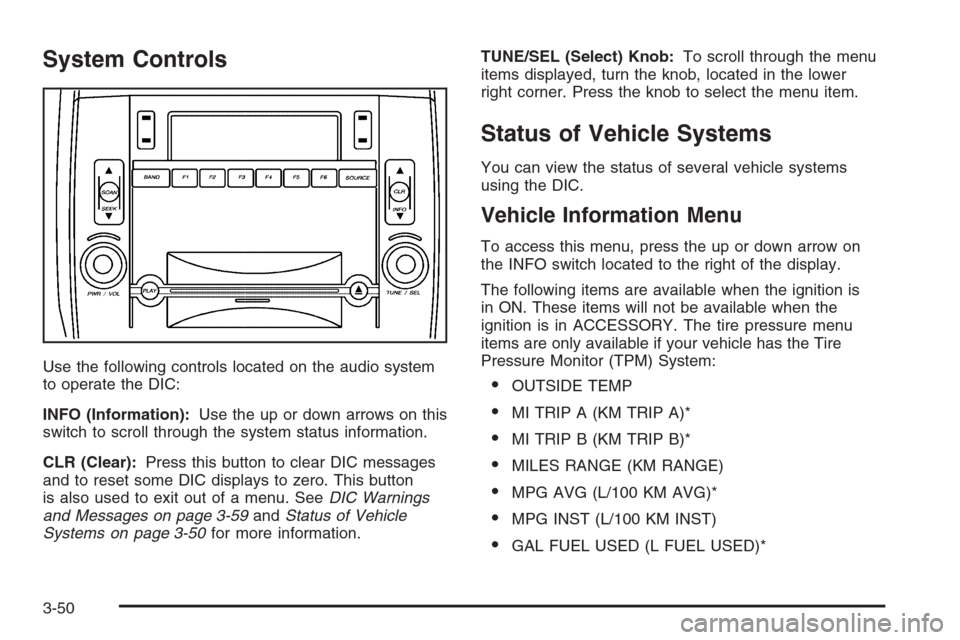
Use the following controls located on the audio system
to operate the DIC:
INFO (Information):Use the up or down arrows on this
switch to scroll through the system status information.
CLR (Clear):Press this button to clear DIC messages
and to reset some DIC displays to zero. This button
is also used to exit out of a menu. SeeDIC Warnings
and Messages on page 3-59andStatus of Vehicle
Systems on page 3-50for more information.TUNE/SEL (Select) Knob:To scroll through the menu
items displayed, turn the knob, located in the lower
right corner. Press the knob to select the menu item.
Status of Vehicle Systems
You can view the status of several vehicle systems
using the DIC.
Vehicle Information Menu
To access this menu, press the up or down arrow on
the INFO switch located to the right of the display.
The following items are available when the ignition is
in ON. These items will not be available when the
ignition is in ACCESSORY. The tire pressure menu
items are only available if your vehicle has the Tire
Pressure Monitor (TPM) System:
OUTSIDE TEMP
MI TRIP A (KM TRIP A)*
MI TRIP B (KM TRIP B)*
MILES RANGE (KM RANGE)
MPG AVG (L/100 KM AVG)*
MPG INST (L/100 KM INST)
GAL FUEL USED (L FUEL USED)*
3-50
Page 189 of 456
Check Brake Fluid
This message will display if the ignition is in ON to
inform the driver that the brake uid level is low. Have
the brake system serviced by your GM dealer as
soon as possible. SeeBrake System Warning Light on
page 3-39andBrakes on page 5-37for more
information.
Check Coolant Level
Notice:If your engine catches re because you
keep driving with no coolant, your vehicle can
be badly damaged. The costly repairs would not be
covered by your warranty. SeeOverheated Engine
Protection Operating Mode on page 5-29for
information on driving to a safe place in an
emergency.
This message will appear when there is a low level of
engine coolant. Have the cooling system serviced
by your GM dealer as soon as possible. SeeEngine
Coolant on page 5-24for more information.
Check Gas Cap
When this message appears on the display, the gas cap
has not been fully tightened. You should recheck the
gas cap to ensure that it is on and tightened properly.
See “If the Light Is On Steady” underMalfunction
Indicator Lamp on page 3-43for more information.
Check Tire Pressure
This message indicates that one or more of the vehicle’s
tires are low. SeeStatus of Vehicle Systems on
page 3-50for information on checking your vehicle’s tire
pressures. Also, seeTire Pressure Monitor System
on page 5-61andInation - Tire Pressure on page 5-59
for more information.
Check Washer Fluid
When this message appears on the display, it means
that your vehicle is low on windshield washer uid. You
should rell the windshield washer uid reservoir as
soon as possible. SeeWindshield Washer Fluid
on page 5-36for more information.
Driver Door Ajar
When this message appears on the display, it means
that the driver’s door was not closed completely.
You should make sure that the driver’s door is closed
completely.
3-61
Page 192 of 456
Passenger Door Ajar
When this message appears on the display, it means
that the passenger’s side front door was not closed
completely. You should make sure that the door
is closed completely.
Right Rear Door Ajar
When this message appears on the display, it means
that the passenger’s side rear door was not closed
completely. You should check to make sure that
the door is closed completely.
Service AC (Air Conditioning) System
This message appears when the electronic sensors that
control the air conditioning and heating systems are
no longer working. Have the climate control system
serviced by your GM dealer if you notice a drop
in heating and air conditioning efficiency.
Service Air Bag
There is a problem with the airbag system when this
message appears. Have your vehicle serviced by your
GM dealer immediately. SeeAirbag Readiness Light
on page 3-38for more information.
Service Brake Assist
This message will display when a problem with the
panic brake assist system has been detected. Have your
vehicle serviced by your GM dealer.
Service Charging System
This message will display when a problem with the
charging system has been detected. Have your vehicle
serviced by your GM dealer.
Service Electrical System
This message will display if an electrical problem has
occurred within the Powertrain Control Module (PCM) or
the ignition switch. Have your vehicle serviced by
your GM dealer.
Service Fuel System
The Powertrain Control Module (PCM) has detected a
problem within the fuel system when this message
appears. Have your vehicle serviced by your GM dealer.
Service Idle Control
A problem with the idle control has occurred when this
message displays. Have your vehicle serviced by
your GM dealer.
3-64
Page 193 of 456

Service Stability System
This message will be displayed if there has been a
problem detected with StabiliTrak®.
If this message comes on while you are driving, pull off
the road as soon as possible and stop carefully. Try
resetting the system by turning the ignition off and then
back on. If this message still stays on, or comes
back on again while you are driving, your vehicle needs
service. Have the StabiliTrak
®system inspected by
your GM dealer as soon as possible. SeeStabiliTrak®
System on page 4-11for more information.
Service Steering System
Your vehicle may have a speed variable assist steering
system. SeeSteering on page 4-12.
This message will be displayed if a problem is detected
with the speed variable assist steering system. When
this message is displayed, you may notice that the effort
required to steer the vehicle increases or feels heavier,
but you will still be able to steer the vehicle.
Service Suspension System
This message is displayed to indicate that the
suspension system is not operating properly. Have your
vehicle serviced at your GM dealer.
Service Theft System
This message means there is a problem with the
immobilizer. SeeImmobilizer on page 2-20for more
information. A fault has been detected in the system,
which means that the system is disabled and is not
protecting the vehicle. The vehicle usually restarts,
however, you may want to take your vehicle to your
GM dealer before turning off the engine.
Service Tire Monitor System
This message will appear if the Tire Pressure Monitor
(TPM) system is not working properly. Have your vehicle
serviced at your GM dealer as soon as possible. See
Tire Pressure Monitor System on page 5-61for
more information.
Service Transmission
This message will display if there is a problem with the
transmission of your vehicle. Have your vehicle
serviced by your GM dealer.
Service Vehicle Soon
This message is displayed when a non-emissions
related powertrain malfunction occurs. Have your vehicle
serviced by your GM dealer as soon as possible.
3-65
Page 194 of 456

Speed Limited to 80 mph (129 km/h)
This message indicates that your vehicle speed
is limited to 80 mph (129 km/h) because the vehicle
detects a problem in the suspension system. Have your
vehicle serviced at your GM dealer.
Stability System Engaged
This message will be displayed any time StabiliTrak®is
actively assisting you with directional control of the
vehicle. Slippery road conditions may exist when this
message is displayed, so adjust your driving accordingly.
This message may stay on for a few seconds after
StabiliTrak
®stops assisting you with directional control
of the vehicle. SeeStabiliTrak®System on page 4-11
for more information.
Stability System Off
This message will be displayed any time you turn off
StabiliTrak®using the TC (traction control) on/off button.
SeeTraction Control System (TCS) on page 4-9for
more information. When this message has been
displayed, StabiliTrak
®is no longer available to assist
you with directional control of the vehicle. Adjust
your driving accordingly.
Stability System Ready
This message will be displayed any time you turn
StabiliTrak®on again using the TC (traction control)
on/off button. SeeTraction Control System (TCS)
on page 4-9for more information. When this message
has been displayed, StabiliTrak
®is ready to assist
you with directional control of the vehicle, if needed.
Starting Disabled – Remove Key
This message will appear when the vehicle
theft-deterrent system detects that an improper ignition
key is being used to try to start the vehicle. Check
the ignition key for damage. If it is damaged, it may need
to be replaced. If it is not damaged, remove the key
and try to start the vehicle again. If it still does not start,
try another ignition key or have your vehicle serviced
by your GM dealer.
Starting Disabled – Throttle Problem
This message appears when your vehicle’s throttle
system is not functioning properly. Have your vehicle
serviced by your GM dealer.
3-66
Page 196 of 456
Some vehicles have additional features that can be
programmed including the seat and outside rearview
mirror position.
If your vehicle has the ability to program additional
personalization features, the driver’s preferences are
recalled by pressing the unlock button on the remote
keyless entry transmitter, 1 or 2, or by pressing the
appropriate memory button, 1 or 2, located on the
driver’s door. Certain features can be programmed not
to recall until the key is placed in the ignition. To
change feature preferences, see “Entering the
Personalization Menu” following.
Entering the Personalization Menu
To enter the feature programming mode, use the
following procedure:
1. Turn the ignition to ON, but do not start the engine.
Make sure the vehicle is in PARK (P).
2. If your vehicle has memory settings, press the
appropriate memory button, 1 or 2, located on
the driver’s door armrest. The DIC display will show
either Driver 1 or 2 depending on which button
was selected.
3. Press the TUNE/SEL knob once to access the main
menu of the DIC.4. Turn the TUNE/SEL knob until SETUP is
highlighted.
5. Press the TUNE/SEL knob once to access the
SETUP menu.
6. Turn the TUNE/SEL knob until the feature you want
to change is highlighted, then press the TUNE/SEL
knob to turn the feature on or off. If the feature
is turned on, a check mark will appear next to the
feature name.
If none of the personalization items are turned on,
turn on the personalization menu by pressing
the TUNE/SEL knob. The list of features will then
appear, and you can repeat Step 6.Personalization Features
The following choices are available for programming:
Personalization Name
This feature allows you to type in a name that will
appear on the DIC display whenever the corresponding
remote keyless entry transmitter is used or one of
the buttons on the driver’s door armrest (1 or 2) is
pressed.
If a customized name is not programmed, the system
will show DRIVER 1 or DRIVER 2 to correspond with the
numbers on the back of the remote keyless entry
transmitters.
3-68
Page 199 of 456

Key in Recall Memory
If your vehicle has the optional memory package, you
will have this feature. When this feature is turned on, you
can recall any previously programmed seat and mirror
positions when the key is inserted into the ignition.
Programmable Modes
Mode 1:ON
Mode 2:OFF
Before your vehicle was shipped from the factory, it
was programmed to Mode 2. The mode to which
the vehicle was programmed may have been changed
since it left the factory.
To program the vehicle to a different mode, use the
following procedure:
1. Enter the personalization portion of the SETUP
menu following the instructions listed previously.
2. Turn the TUNE/SEL knob until KEY IN RECALL
MEMORY is highlighted.
3. Press the TUNE/SEL knob to switch back and forth
between on and off.
When the mode is turned on, a check mark will
appear next to the feature name.
If this feature is selected, Remote Recall Memory
cannot be selected.The mode you selected is now set. You can either exit
the programming mode by following the instructions
later in this section or program the next feature available
on your vehicle.
Auto Exit Seat
If your vehicle has the optional memory package, you
will have this feature. When this feature is turned on, you
can recall any previously programmed exit position for
the driver’s seat when the key is removed from the
ignition and the driver’s door is opened.
Programmable Modes
Mode 1:ON
Mode 2:OFF
Before your vehicle was shipped from the factory, it
was programmed to Mode 2. The mode to which
the vehicle was programmed may have been changed
since it left the factory.
3-71
Page 201 of 456

To determine the mode to which the vehicle is
programmed or to program the vehicle to a different
mode, use the following procedure:
1. Enter the personalization portion of the SETUP
menu following the instructions listed previously.
2. Turn the TUNE/SEL knob until TWILIGHT DELAY
is highlighted.
3. Press the TUNE/SEL knob to scroll through and
select the available delay settings.
If you choose Mode 1, the exterior lamps will not
illuminate when you exit the vehicle. Only one mode
can be selected at a time.
The mode you selected is now set. You can either exit
the programming mode by following the instructions
later in this section or program the next feature available
on your vehicle.
Lights Flash at Unlock
This feature ashes the exterior lamps when the remote
keyless entry transmitter is used to unlock the vehicle.
The lamps will ash for approximately 20 seconds
unless a door is opened, the ignition is turned to
ACCESSORY, ON, or START, or the remote keyless
entry transmitter is used to lock the vehicle.Programmable Modes
Mode 1:ON
Mode 2:OFF
Before your vehicle was shipped from the factory, it was
programmed to Mode 1. The mode to which the
vehicle was programmed may have been changed since
it left the factory.
To program the vehicle to a different mode, use the
following procedure:
1. Enter the personalization portion of the SETUP
menu following the instructions listed previously.
2. Turn the TUNE/SEL knob until LIGHTS FLASH AT
UNLOCK is highlighted.
3. Press the TUNE/SEL knob to switch back and forth
between on and off.
When the mode is turned on, a check mark will
appear next to the feature name.
The mode you selected is now set. You can either exit
the programming mode by following the instructions
later in this section or program the next feature available
on your vehicle.
3-73
Page 203 of 456

To program the vehicle to a different mode, use the
following procedure:
1. Enter the personalization portion of the SETUP
menu following the instructions listed previously.
2. Turn the TUNE/SEL knob until HORN SOUNDS AT
LOCK is highlighted.
3. Press the TUNE/SEL knob to switch back and forth
between on and off.
When the mode is turned on, a check mark will
appear next to the feature name.
If you select this feature to be on, Lights Flash At Lock
will also be on. You can choose Lights Flash At Lock
by itself, but Horn Sounds At Lock will always have
Lights Flash At Lock enabled when it is selected.
The mode you selected is now set. You can either exit
the programming mode by following the instructions
later in this section or program the next feature available
on your vehicle.
Exterior Lights at Unlock
This feature turns on the exterior lamps when the
remote keyless entry transmitter is used to unlock the
vehicle. The lamps will remain on for about 20 seconds
unless a door is opened, the ignition is turned to
ACCESSORY, ON, or START, or the remote keyless
entry transmitter is used to lock the vehicle.Programmable Modes
Mode 1:ON
Mode 2:OFF
Before your vehicle was shipped from the factory, it
was programmed to Mode 1. The mode to which
the vehicle was programmed may have been changed
since it left the factory.
To program the vehicle to a different mode, use the
following procedure:
1. Enter the personalization portion of the SETUP
menu following the instructions listed previously.
2. Turn the TUNE/SEL knob until EXT. LIGHT AT
UNLOCK is highlighted.
3. Press the TUNE/SEL knob to switch back and forth
between on and off.
When the mode is turned on, a check mark will
appear next to the feature name.
The mode you selected is now set. You can either exit
the programming mode by following the instructions
later in this section or program the next feature available
on your vehicle.
3-75
Page 204 of 456

Driver Unlock in Park
The feature allows the driver’s door to automatically
unlock when the transmission is shifted into PARK (P).
Programmable Modes
Mode 1:ON
Mode 2:OFF
Before your vehicle was shipped from the factory, it
was programmed to Mode 2. The mode to which
the vehicle was programmed may have been changed
since it left the factory.
To program the vehicle to a different mode, use the
following procedure:
1. Enter the personalization portion of the SETUP
menu following the instructions listed previously.
2. Turn the TUNE/SEL knob until DRIVER UNLOCK
IN PARK is highlighted.
3. Press the TUNE/SEL knob to switch back and forth
between on and off.
When the mode is turned on, a check mark will
appear next to the feature name.
If this feature is selected, Driver Unlock Key Out, Doors
Unlock Key Out, or Doors Unlock in Park cannot be
selected.The mode you selected is now set. You can either exit
the programming mode by following the instructions
later in this section or program the next feature available
on your vehicle.
Driver Unlock Key Out
This feature allows the driver’s door to automatically
unlock when the key is removed from the ignition.
Programmable Modes
Mode 1:ON
Mode 2:OFF
Before your vehicle was shipped from the factory, it
was programmed to Mode 2. The mode to which
the vehicle was programmed may have been changed
since it left the factory.
To program the vehicle to a different mode, use the
following procedure:
1. Enter the personalization portion of the SETUP
menu following the instructions listed previously.
2. Turn the TUNE/SEL knob until DRIVER UNLOCK
KEY OUT is highlighted.
3. Press the TUNE/SEL knob to switch between on
and off.
When the mode is turned on, a check mark will
appear next to the feature name.
3-76