mirror CADILLAC SRX 2008 1.G User Guide
[x] Cancel search | Manufacturer: CADILLAC, Model Year: 2008, Model line: SRX, Model: CADILLAC SRX 2008 1.GPages: 448, PDF Size: 5.61 MB
Page 168 of 448
Defogging and Defrosting
Fog on the inside of windows is a result of high humidity
(moisture) condensing on the cool window glass.
This can be minimized if the climate control system
is used properly. There are two modes to clear fog
from the windshield.
W(Floor/Defog):Use this mode to clear the windows
of fog and warm the passengers. The system turns off
recirculation and runs the air conditioning compressor
unless the outside temperature is at or below freezing.
If recirculation mode is selected while using the defog
mode, the system recirculates air initially but returns to
the fresh air mode after 10 minutes.
0(Defrost):Use this mode to remove fog or frost
from the windshield more quickly. When selected, the
system turns off recirculation and runs the air conditioning
compressor, unless the outside temperature is at or
below freezing.
Do not drive the vehicle until all the windows are clear.
Rear Window Defogger
The rear window defogger uses a warming grid to
remove fog or frost from the rear window.
<(Rear Defogger):Press the center of the right
control to turn the rear window defogger on or off.
Be sure to clear as much snow from the rear window
as possible. The rear window defogger turns off
about 20 minutes after the button is rst pressed if the
vehicle is moving at slower speeds. At higher vehicle
speeds, the rear defogger can stay on continuously.
Each additional press runs the defogger for about
10 minutes.
The heated outside rearview mirrors also heat to help
clear fog or frost from the surface of the mirror when the
rear window defogger is on.
Notice:Do not use a razor blade or sharp object to
clear the inside rear window. Do not adhere anything
to the defogger grid lines in the rear glass. These
actions may damage the rear defogger. Repairs
would not be covered by your warranty.
3-28
Page 207 of 448
CHIME VOLUME
This feature allows you to select the volume level of the
chime.
Press the customization button until CHIME VOLUME
appears on the DIC display. Press the set/reset button
to access the settings for this feature. Then press the
menu up/down button to scroll through the following
settings:
NORMAL:The chime volume will be set to a normal
level.
LOUD:The chime volume will be set to a loud level.
NO CHANGE:No change will be made to this feature.
The current setting will remain.
There is no default for chime volume. The volume will
stay at the last known setting.
To select a setting, press the set/reset button while the
desired setting is displayed on the DIC.
PARK TILT MIRRORS
If your vehicle has this feature, it allows you to select
whether or not the outside mirror(s) will automatically tilt
down when the vehicle is shifted into REVERSE (R).
SeePark Tilt Mirrors on page 2-44for more information.
Press the customization button until PARK TILT
MIRRORS appears on the DIC display. Press the
set/reset button to access the settings for this feature.
Then press the menu up/down button to scroll through
the following settings:
OFF (default):Neither outside mirror will be tilted down
when the vehicle is shifted into REVERSE (R).
DRIVER MIRROR:The driver’s outside mirror
will be tilted down when the vehicle is shifted into
REVERSE (R).
PASSENGER MIRROR:The passenger’s outside
mirror will be tilted down when the vehicle is shifted into
REVERSE (R).
BOTH MIRRORS:The driver’s and passenger’s outside
mirrors will be tilted down when the vehicle is shifted
into REVERSE (R).
NO CHANGE:No change will be made to this feature.
The current setting will remain.
To select a setting, press the set/reset button while the
desired setting is displayed on the DIC.
3-67
Page 208 of 448
EASY EXIT SEAT
If the vehicle has this feature, it allows you to select
your preference for the automatic easy exit seat feature.
SeeMemory Seat and Mirrors on page 1-5for more
information.
Press the customization button until EASY EXIT SEAT
appears in the display. Press the set/reset button to
access the settings for this feature. Then press the menu
up/down button to scroll through the following settings:
OFF (default):No automatic seat exit recall will occur.
ON:The driver’s seat will move back when the key
is removed from the ignition.
The automatic easy exit seat movement will only occur
one time after the key is removed from the ignition.
If the automatic movement has already occurred, and
you put the key back in the ignition and remove it again,
the seat will stay in the original exit position, unless a
memory recall took place prior to removing the key
again.
NO CHANGE:No change will be made to this feature.
The current setting will remain.
To select a setting, press the set/reset button while the
desired setting is displayed on the DIC.
MEMORY SEAT RECALL
If the vehicle has this feature, it allows you to select
your preference for the remote memory seat recall
feature. SeeMemory Seat and Mirrors on page 1-5for
more information.
Press the customization button until MEMORY SEAT
RECALL appears in the display. Press the set/reset
button to access the settings for this feature. Then press
the menu up/down button to scroll through the following
settings:
OFF (default):No remote memory seat recall will
occur.
ON:The driver’s seat and outside mirrors will
automatically move to the stored driving position when
the unlock button on the Remote Keyless Entry (RKE)
transmitter is pressed. If your vehicle has the adjustable
throttle and brake pedal feature, the pedals will also
automatically move. See “RELEARN REMOTE KEY”
underDIC Operation and Displays on page 3-48for
more information on matching transmitters to driver ID
numbers.
NO CHANGE:No change will be made to this feature.
The current setting will remain.
To select a setting, press the set/reset button while the
desired setting is displayed on the DIC.
3-68
Page 245 of 448
Skidding
In a skid, a driver can lose control of the vehicle.
Defensive drivers avoid most skids by taking reasonable
care suited to existing conditions, and by not overdriving
those conditions. But skids are always possible.
The three types of skids correspond to your vehicle’s
three control systems. In the braking skid, the wheels are
not rolling. In the steering or cornering skid, too much
speed or steering in a curve causes tires to slip and lose
cornering force. And in the acceleration skid, too much
throttle causes the driving wheels to spin.
A cornering skid is best handled by easing your foot off
the accelerator pedal.
Remember: Any traction control system helps avoid only
the acceleration skid. If your traction control system is
off, then an acceleration skid is also best handled
by easing your foot off the accelerator pedal.
If your vehicle starts to slide, ease your foot off the
accelerator pedal and quickly steer the way you want
the vehicle to go. If you start steering quickly enough,
your vehicle may straighten out. Always be ready
for a second skid if it occurs.Of course, traction is reduced when water, snow, ice,
gravel, or other material is on the road. For safety, you
will want to slow down and adjust your driving to
these conditions. It is important to slow down on slippery
surfaces because stopping distance will be longer and
vehicle control more limited.
While driving on a surface with reduced traction, try
your best to avoid sudden steering, acceleration,
or braking, including reducing vehicle speed by
shifting to a lower gear. Any sudden changes could
cause the tires to slide. You may not realize the surface
is slippery until your vehicle is skidding. Learn to
recognize warning clues — such as enough water, ice,
or packed snow on the road to make a mirrored
surface — and slow down when you have any doubt.
Remember: Any Antilock Brake System (ABS) helps
avoid only the braking skid.
4-11
Page 259 of 448
Driving at Night
Night driving is more dangerous than day driving
because some drivers are likely to be impaired — by
alcohol or drugs, with night vision problems, or by
fatigue.
Night driving tips include:
Drive defensively.
Do not drink and drive.
Reduce headlamp glare by adjusting the inside
rearview mirror.
Slow down and keep more space between you and
other vehicles because your headlamps can only
light up so much road ahead.
Watch for animals.
When tired, pull off the road.
Do not wear sunglasses.
Avoid staring directly into approaching headlamps.
Keep the windshield and all glass on your vehicle
clean — inside and out.
Keep your eyes moving, especially during turns or
curves.
No one can see as well at night as in the daytime.
But, as we get older, these differences increase.
A 50-year-old driver might need at least twice as much
light to see the same thing at night as a 20-year-old.
4-25
Page 261 of 448
Before Leaving on a Long Trip
To prepare your vehicle for a long trip, consider having
it serviced by your dealer/retailer before departing.
Things to check on your own include:
Windshield Washer Fluid:Reservoir full? Windows
clean — inside and outside?
Wiper Blades:In good shape?
Fuel, Engine Oil, Other Fluids:All levels checked?
Lamps:Do they all work and are lenses clean?
Tires:Are treads good? Are tires inated to
recommended pressure?
Weather and Maps:Safe to travel? Have
up-to-date maps?
Highway Hypnosis
Always be alert and pay attention to your surroundings
while driving. If you become tired or sleepy, nd a
safe place to park your vehicle and rest.
Other driving tips include:
Keep the vehicle well ventilated.
Keep interior temperature cool.
Keep your eyes moving — scan the road ahead
and to the sides.
Check the rearview mirror and vehicle
instruments often.
4-27
Page 282 of 448
Before you start, check all trailer hitch parts and
attachments, safety chains, electrical connector, lamps,
tires and mirror adjustment. If the trailer has electric
brakes, start your vehicle and trailer moving and then
apply the trailer brake controller by hand to be sure
the brakes are working. This lets you check your
electrical connection at the same time.
During your trip, check occasionally to be sure that the
load is secure, and that the lamps and any trailer
brakes are still working.
Following Distance
Stay at least twice as far behind the vehicle ahead as
you would when driving your vehicle without a trailer.
This can help you avoid situations that require
heavy braking and sudden turns.
Passing
You will need more passing distance up ahead when
you are towing a trailer. And, because you are a
good deal longer, you will need to go much farther
beyond the passed vehicle before you can return
to your lane.
Backing Up
Hold the bottom of the steering wheel with one hand.
Then, to move the trailer to the left, just move that hand
to the left. To move the trailer to the right, move your
hand to the right. Always back up slowly and, if possible,
have someone guide you.
Making Turns
Notice:Making very sharp turns while trailering
could cause the trailer to come in contact with the
vehicle. Your vehicle could be damaged. Avoid
making very sharp turns while trailering.
When you are turning with a trailer, make wider turns
than normal. Do this so your trailer will not strike
soft shoulders, curbs, road signs, trees or other objects.
Avoid jerky or sudden maneuvers. Signal well in
advance.
4-48
Page 387 of 448
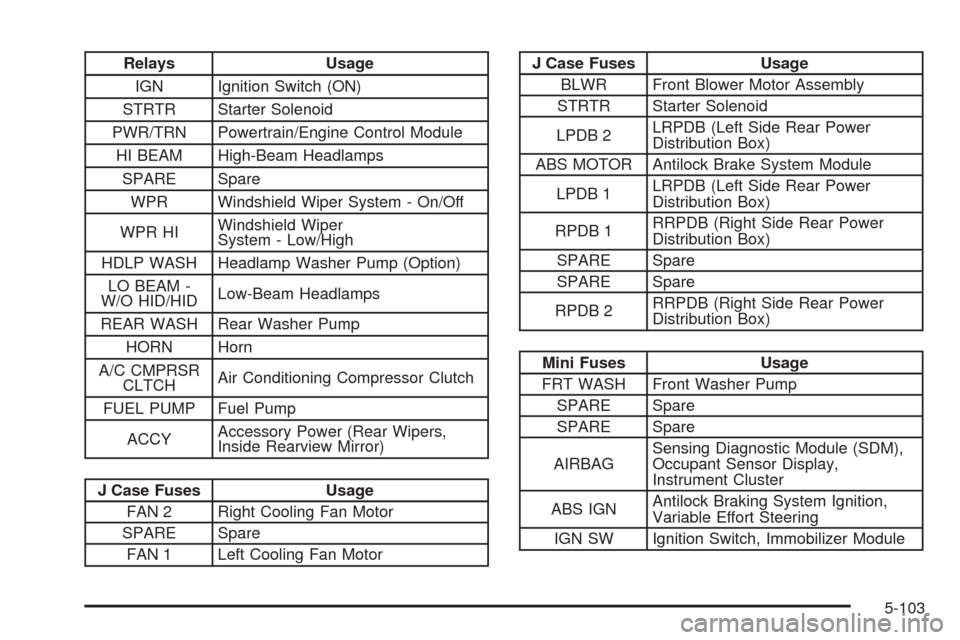
Relays Usage
IGN Ignition Switch (ON)
STRTR Starter Solenoid
PWR/TRN Powertrain/Engine Control Module
HI BEAM High-Beam Headlamps
SPARE Spare
WPR Windshield Wiper System - On/Off
WPR HIWindshield Wiper
System - Low/High
HDLP WASH Headlamp Washer Pump (Option)
LO BEAM -
W/O HID/HIDLow-Beam Headlamps
REAR WASH Rear Washer Pump
HORN Horn
A/C CMPRSR
CLTCHAir Conditioning Compressor Clutch
FUEL PUMP Fuel Pump
ACCYAccessory Power (Rear Wipers,
Inside Rearview Mirror)
J Case Fuses Usage
FAN 2 Right Cooling Fan Motor
SPARE Spare
FAN 1 Left Cooling Fan Motor
J Case Fuses Usage
BLWR Front Blower Motor Assembly
STRTR Starter Solenoid
LPDB 2LRPDB (Left Side Rear Power
Distribution Box)
ABS MOTOR Antilock Brake System Module
LPDB 1LRPDB (Left Side Rear Power
Distribution Box)
RPDB 1RRPDB (Right Side Rear Power
Distribution Box)
SPARE Spare
SPARE Spare
RPDB 2RRPDB (Right Side Rear Power
Distribution Box)
Mini Fuses Usage
FRT WASH Front Washer Pump
SPARE Spare
SPARE Spare
AIRBAGSensing Diagnostic Module (SDM),
Occupant Sensor Display,
Instrument Cluster
ABS IGNAntilock Braking System Ignition,
Variable Effort Steering
IGN SW Ignition Switch, Immobilizer Module
5-103
Page 389 of 448
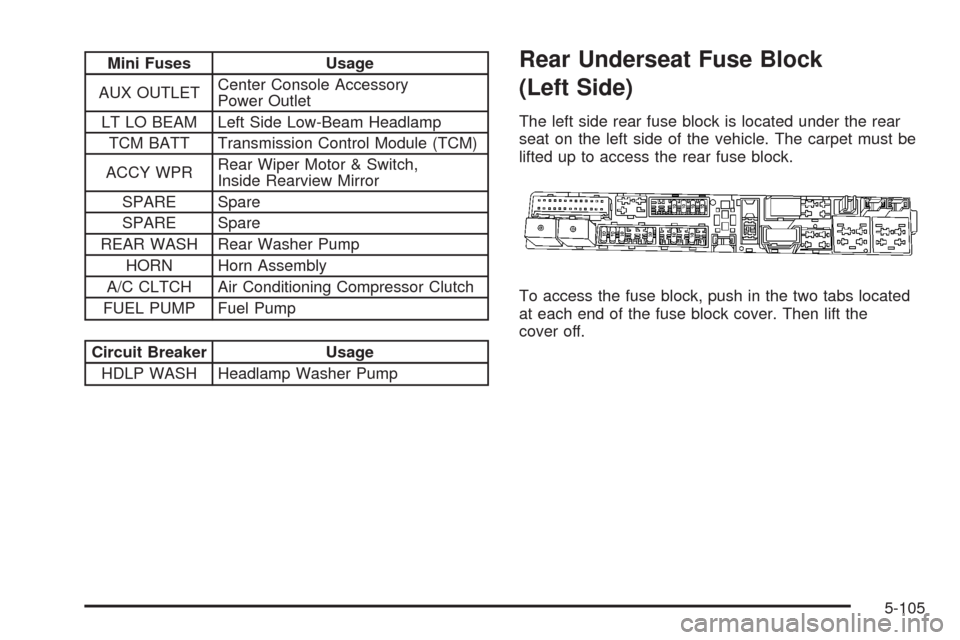
Mini Fuses Usage
AUX OUTLETCenter Console Accessory
Power Outlet
LT LO BEAM Left Side Low-Beam Headlamp
TCM BATT Transmission Control Module (TCM)
ACCY WPRRear Wiper Motor & Switch,
Inside Rearview Mirror
SPARE Spare
SPARE Spare
REAR WASH Rear Washer Pump
HORN Horn Assembly
A/C CLTCH Air Conditioning Compressor Clutch
FUEL PUMP Fuel Pump
Circuit Breaker Usage
HDLP WASH Headlamp Washer Pump
Rear Underseat Fuse Block
(Left Side)
The left side rear fuse block is located under the rear
seat on the left side of the vehicle. The carpet must be
lifted up to access the rear fuse block.
To access the fuse block, push in the two tabs located
at each end of the fuse block cover. Then lift the
cover off.
5-105
Page 391 of 448
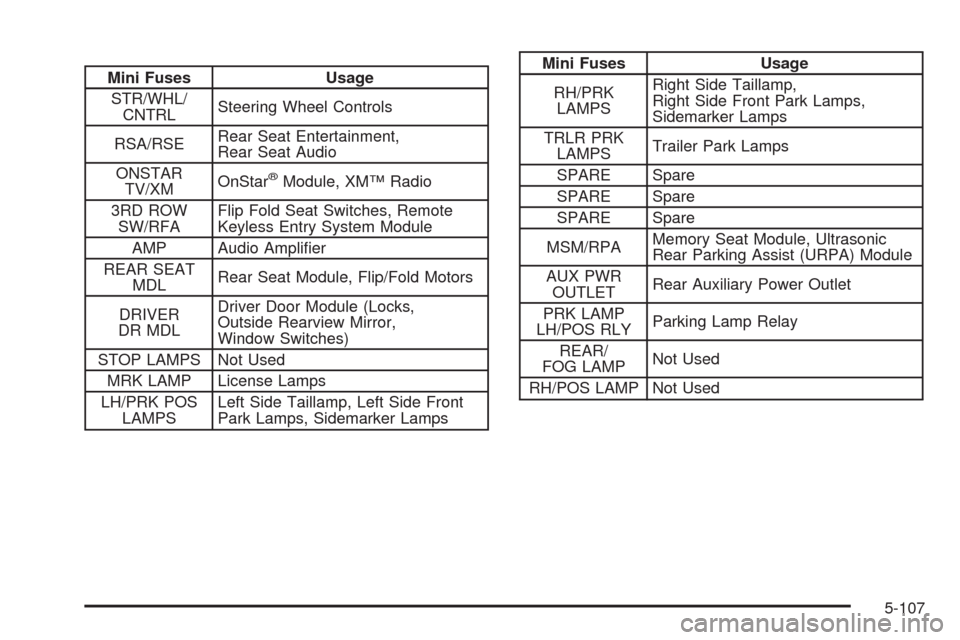
Mini Fuses Usage
STR/WHL/
CNTRLSteering Wheel Controls
RSA/RSERear Seat Entertainment,
Rear Seat Audio
ONSTAR
TV/XMOnStar
®Module, XM™ Radio
3RD ROW
SW/RFAFlip Fold Seat Switches, Remote
Keyless Entry System Module
AMP Audio Amplier
REAR SEAT
MDLRear Seat Module, Flip/Fold Motors
DRIVER
DR MDLDriver Door Module (Locks,
Outside Rearview Mirror,
Window Switches)
STOP LAMPS Not Used
MRK LAMP License Lamps
LH/PRK POS
LAMPSLeft Side Taillamp, Left Side Front
Park Lamps, Sidemarker Lamps
Mini Fuses Usage
RH/PRK
LAMPSRight Side Taillamp,
Right Side Front Park Lamps,
Sidemarker Lamps
TRLR PRK
LAMPSTrailer Park Lamps
SPARE Spare
SPARE Spare
SPARE Spare
MSM/RPAMemory Seat Module, Ultrasonic
Rear Parking Assist (URPA) Module
AUX PWR
OUTLETRear Auxiliary Power Outlet
PRK LAMP
LH/POS RLYParking Lamp Relay
REAR/
FOG LAMPNot Used
RH/POS LAMP Not Used
5-107