belt CADILLAC SRX 2008 1.G Workshop Manual
[x] Cancel search | Manufacturer: CADILLAC, Model Year: 2008, Model line: SRX, Model: CADILLAC SRX 2008 1.GPages: 448, PDF Size: 5.61 MB
Page 137 of 448
Cargo Cover
If your vehicle has a cargo cover, you can use it to
cover items in the rear of the vehicle. Pull the cover
from the passenger’s side to the driver’s side and slide
the ends into the slots to secure it. When it is not in
use, take the ends out of the slots and allow the cover
to roll back up.
Cargo Management System
Your vehicle may have a cargo management system.
It provides extra storage space for the rear of the
vehicle.
The cargo management system has three
compartments. The one closest to the front of the
vehicle opens from behind the second row. The center
compartment has a divider. The compartment closest
to the rear of the vehicle has a removable storage bin.
Sunroof
Sunroof (Ultra View)
{CAUTION:
People who are in a crash and not wearing a
safety belt properly can suffer much worse
injuries. They can hit things inside the vehicle
or be ejected from it, and be seriously injured
or killed. This is true for any vehicle occupant,
in any motor vehicle. In a rollover or other
crash, the Ultra View
®roof can be damaged
or destroyed. People who are unbelted would be
at risk of being ejected from the vehicle. Always
fasten your safety belt, and check that your
passengers’ belts are fastened properly too.
Your vehicle may have an Ultra View
®sunroof over
the rst two rows of seats. The ignition must be turned
to ON/RUN, ACC/ACCESSORY, or the Retained
Accessory Power (RAP) must be active to operate it.
SeeRetained Accessory Power (RAP) on page 2-26.
2-59
Page 139 of 448
Sunroof (Ultra View Plus)
{CAUTION:
People who are in a crash and not wearing a
safety belt properly can suffer much worse
injuries. They can hit things inside the vehicle
or be ejected from it, and be seriously injured
or killed. This is true for any vehicle occupant,
in any motor vehicle. In a rollover or other
crash, the Ultra View
®roof can be damaged or
destroyed. People who are unbelted would be at
risk of being ejected from the vehicle. Always
fasten your safety belt, and check that your
passengers’ belts are fastened properly too.
Your vehicle may have an Ultra View
®sunroof over the
rst two rows of seats and a smaller sunroof over
the third row seat. Both have sunshades, but the back
sunroof does not open. The ignition must be turned
to ON/RUN, ACC/ACCESSORY, or the Retained
Accessory Power (RAP) must be active to operate it.
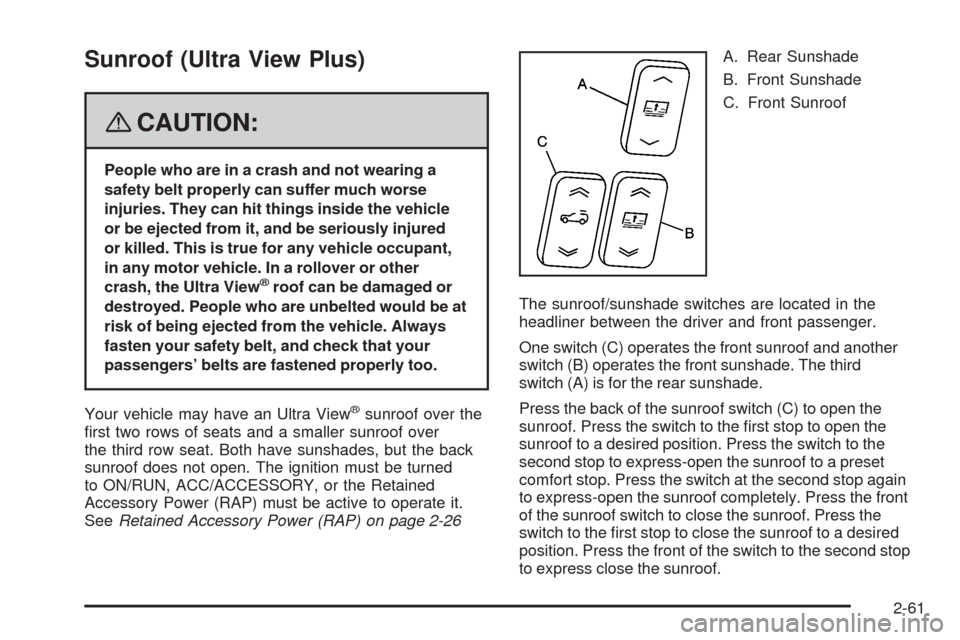
SeeRetained Accessory Power (RAP) on page 2-26A. Rear Sunshade
B. Front Sunshade
C. Front Sunroof
The sunroof/sunshade switches are located in the
headliner between the driver and front passenger.
One switch (C) operates the front sunroof and another
switch (B) operates the front sunshade. The third
switch (A) is for the rear sunshade.
Press the back of the sunroof switch (C) to open the
sunroof. Press the switch to the rst stop to open the
sunroof to a desired position. Press the switch to the
second stop to express-open the sunroof to a preset
comfort stop. Press the switch at the second stop again
to express-open the sunroof completely. Press the front
of the sunroof switch to close the sunroof. Press the
switch to the rst stop to close the sunroof to a desired
position. Press the front of the switch to the second stop
to express close the sunroof.
2-61
Page 142 of 448
Warning Lights, Gages, and Indicators............3-31
Instrument Panel Cluster................................3-32
Speedometer and Odometer...........................3-33
Tachometer.................................................3-33
Engine Speed Limiter....................................3-33
Safety Belt Reminders...................................3-33
Airbag Readiness Light..................................3-34
Passenger Airbag Status Indicator...................3-35
Charging System Light..................................3-37
Brake System Warning Light..........................3-38
Antilock Brake System Warning Light...............3-39
Traction Control System (TCS) Warning Light......3-39
Engine Coolant Temperature Warning Light......3-40
Engine Coolant Temperature Gage..................3-40
Tire Pressure Light.......................................3-41
Malfunction Indicator Lamp.............................3-42
Oil Pressure Light.........................................3-44
Security Light...............................................3-45
Fog Lamp Light............................................3-45
Lights On Reminder......................................3-46
Cruise Control Light......................................3-46Highbeam On Light.......................................3-46
Tow/Haul Mode Light....................................3-46
Fuel Gage...................................................3-47
Driver Information Center (DIC).......................3-47
DIC Operation and Displays...........................3-48
DIC Warnings and Messages.........................3-53
DIC Vehicle Customization.............................3-62
Audio System(s).............................................3-70
Setting the Time...........................................3-71
Radio(s) (MP3).............................................3-75
Using an MP3..............................................3-84
XM Radio Messages.....................................3-89
Navigation/Radio System..............................
.3-90
Rear Seat Entertainment (RSE) System...........3-90
Rear Seat Audio (RSA).................................3-90
Theft-Deterrent Feature..................................3-92
Audio Steering Wheel Controls.......................3-92
Radio Reception...........................................3-93
Rear Side Window Antenna...........................3-94
XM™ Satellite Radio Antenna System.............3-94
Section 3 Instrument Panel
3-2
Page 173 of 448

Speedometer and Odometer
The speedometer lets you see your speed in both miles
per hour (mph) and kilometers per hour (km/h). See
“SPEEDOMETER” underDIC Operation and Displays
on page 3-48for more information.
The odometer mileage can be checked without the
vehicle running. Your vehicle’s odometer works together
with the driver information center. You can set a Trip A
and a Trip B odometer. See “Trip Fuel” underDIC
Operation and Displays on page 3-48for more
information.
If your vehicle ever needs a new odometer installed,
the new one will be set to the correct mileage total of
the old odometer.
Tachometer
This gage indicates the engine speed in revolutions per
minute (rpm).
Engine Speed Limiter
This feature prevents the engine from operating at too
many revolutions per minute (rpm). When the engine’s
rpms are too high, the throttle is closed to reduce speed.
If this is not sufficient, then the fuel supply to the engine
will be limited. When the rpms return to normal, the fuel
supply will return to normal. This helps prevent damage
to the engine.
Safety Belt Reminders
Safety Belt Reminder Light
When the engine is started, a chime will come on for
several seconds to remind people to fasten their safety
belts, unless the driver’s safety belt is already buckled.
The safety belt light will
also come on and stay
on for several seconds,
then it will ash for
several more.
This chime and light is repeated if the driver remains
unbuckled and the vehicle is in motion. If the driver’s belt
is already buckled, neither the chime nor the light will
come on.
3-33
Page 174 of 448
Passenger Safety Belt Reminder Light
Several seconds after the engine is started, a chime
will sound for several seconds to remind the front
passenger to buckle their safety belt. This would only
occur if the passenger airbag is enabled. SeePassenger
Sensing System on page 1-65for more information.
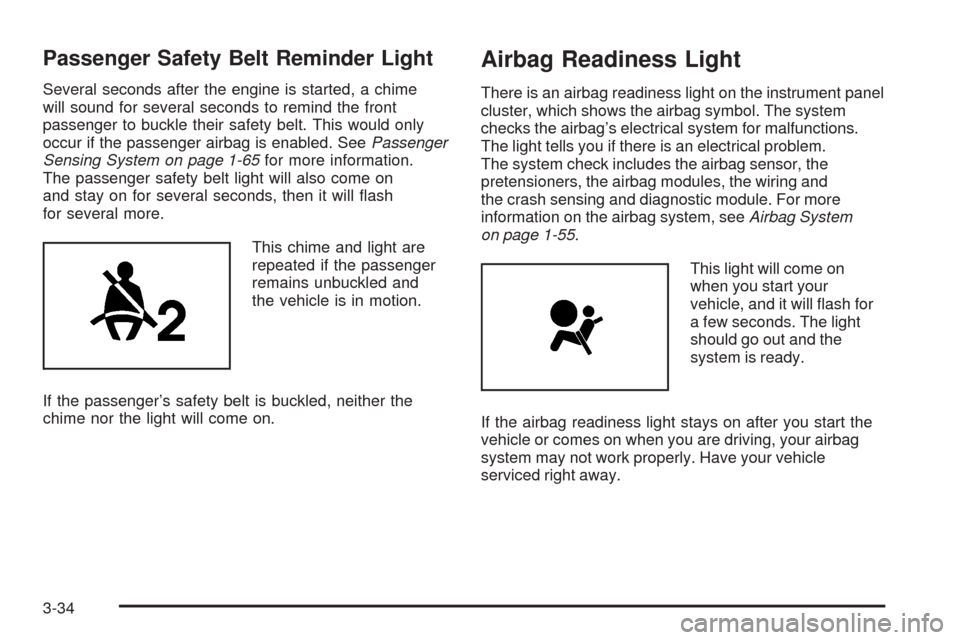
The passenger safety belt light will also come on
and stay on for several seconds, then it will ash
for several more.
This chime and light are
repeated if the passenger
remains unbuckled and
the vehicle is in motion.
If the passenger’s safety belt is buckled, neither the
chime nor the light will come on.
Airbag Readiness Light
There is an airbag readiness light on the instrument panel
cluster, which shows the airbag symbol. The system
checks the airbag’s electrical system for malfunctions.
The light tells you if there is an electrical problem.
The system check includes the airbag sensor, the
pretensioners, the airbag modules, the wiring and
the crash sensing and diagnostic module. For more
information on the airbag system, seeAirbag System
on page 1-55.
This light will come on
when you start your
vehicle, and it will ash for
a few seconds. The light
should go out and the
system is ready.
If the airbag readiness light stays on after you start the
vehicle or comes on when you are driving, your airbag
system may not work properly. Have your vehicle
serviced right away.
3-34
Page 177 of 448
{CAUTION:
If the airbag readiness light in the instrument
panel cluster ever comes on and stays on,
it means that something may be wrong with
the airbag system. If this ever happens, have
the vehicle serviced promptly, because an
adult-size person sitting in the right front
passenger’s seat may not have the protection
of the airbag(s). SeeAirbag Readiness Light
on page 3-34for more on this, including
important safety information.
Charging System Light
This light will come on
briey when you turn on the
ignition, but the engine is
not running, as a check to
show you it is working.
It should go out once the engine is running. If it stays
on, or comes on while you are driving, you may have a
problem with the charging system. A charging system
Driver Information Center (DIC) message may also
appear. SeeDIC Warnings and Messages on page 3-53
for more information. This light could indicate that you
have problems with a generator drive belt, or another
electrical problem. Have it checked right away. If you
must drive a short distance with the light on, be certain
to turn off all your accessories, such as the radio and air
conditioner.
3-37
Page 236 of 448
Your Driving, the Road, and
Your Vehicle
Defensive Driving
Defensive driving means “always expect the
unexpected.” The rst step in driving defensively
is to wear your safety belt — SeeSafety Belts:
They Are for Everyone on page 1-13.
{CAUTION:
Assume that other road users (pedestrians,
bicyclists, and other drivers) are going to be
careless and make mistakes. Anticipate what
they might do and be ready. In addition:
Allow enough following distance between
you and the driver in front of you.
Focus on the task of driving.
Driver distraction can cause collisions
resulting in injury or possible death. These
simple defensive driving techniques could
save your life.
Drunk Driving
{CAUTION:
Drinking and then driving is very dangerous.
Your reexes, perceptions, attentiveness,
and judgment can be affected by even a
small amount of alcohol. You can have a
serious — or even fatal — collision if you
drive after drinking. Do not drink and drive
or ride with a driver who has been drinking.
Ride home in a cab; or if you are with a group,
designate a driver who will not drink.
Death and injury associated with drinking and driving
is a global tragedy.
Alcohol affects four things that anyone needs to drive a
vehicle: judgment, muscular coordination, vision, and
attentiveness.
Police records show that almost 40 percent of all motor
vehicle-related deaths involve alcohol. In most cases,
these deaths are the result of someone who was drinking
and driving. In recent years, more than 17,000 annual
motor vehicle-related deaths have been associated with
the use of alcohol, with about 250,000 people injured.
4-2
Page 243 of 448
Speed limit signs near curves warn that you should
adjust your speed. Of course, the posted speeds
are based on good weather and road conditions. Under
less favorable conditions you will want to go slower.
If you need to reduce your speed as you approach
a curve, do it before you enter the curve, while the
front wheels are straight ahead.
Try to adjust your speed so you can drive through the
curve. Maintain a reasonable, steady speed. Wait
to accelerate until you are out of the curve, and then
accelerate gently into the straightaway.
Adding non-dealer/non-retailer accessories can affect
your vehicle’s performance. SeeAccessories and
Modifications on page 5-3.
Steering in Emergencies
There are times when steering can be more effective
than braking. For example, you come over a hill and nd
a truck stopped in your lane, or a car suddenly pulls
out from nowhere, or a child darts out from between
parked cars and stops right in front of you. You
can avoid these problems by braking — if you can stop
in time. But sometimes you cannot; there is not room.
That is the time for evasive action — steering around
the problem.
Your vehicle can perform very well in emergencies
like these. First, apply the brakes. SeeBraking
on page 4-3. It is better to remove as much speedas you can from a possible collision. Then steer around
the problem, to the left or right depending on the
space available.
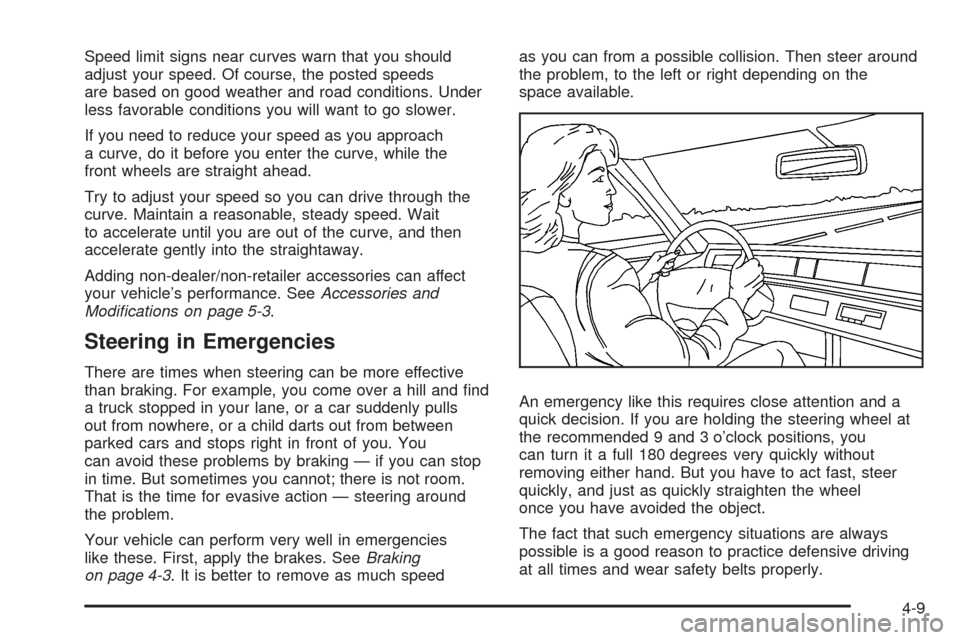
An emergency like this requires close attention and a
quick decision. If you are holding the steering wheel at
the recommended 9 and 3 o’clock positions, you
can turn it a full 180 degrees very quickly without
removing either hand. But you have to act fast, steer
quickly, and just as quickly straighten the wheel
once you have avoided the object.
The fact that such emergency situations are always
possible is a good reason to practice defensive driving
at all times and wear safety belts properly.
4-9
Page 246 of 448
Off-Road Driving
This off-road guide is for vehicles that have all-wheel
drive. If your vehicle does not have all-wheel drive,
you should not drive off-road unless you are on
a level, solid surface.
Many of the same design features that help make your
vehicle responsive on paved roads during poor weather
conditions — features like all-wheel drive — help make it
much better suited for off-road use. Its higher ground
clearance also helps your vehicle step over some off-road
obstacles. But your vehicle does not have features like
special underbody shielding and a transfer case low gear
range, things that are usually thought necessary for
extended or severe off-road service.
Also, seeBraking on page 4-3.
The airbag system is designed to work properly under a
wide range of conditions, including off-road usage.
Observe safe driving speeds, especially on rough
terrain. As always, wear your safety belt.
Off-road driving can be great fun. But it does have
some denite hazards. The greatest of these is
the terrain itself.“Off-roading” means you have left the North American
road system behind. Traffic lanes are not marked.
Curves are not banked. There are no road signs.
Surfaces can be slippery, rough, uphill, or downhill. In
short, you have gone right back to nature.
Off-road driving involves some new skills. And that is
why it is very important that you read this guide. You will
nd many driving tips and suggestions. These will
help make your off-road driving safer and more
enjoyable.
Before You Go Off-Roading
There are some things to do before you go out. For
example, be sure to have all necessary maintenance
and service work done. Check to make sure all
underbody shields, if the vehicle has them, are properly
attached. Is there enough fuel? Is the spare tire fully
inated? Are the uid levels up where they should be?
What are the local laws that apply to off-roading
where you will be driving? If you do not know, you
should check with law enforcement people in the area.
Will you be on someone’s private land? If so, be
sure to get the necessary permission.
4-12
Page 248 of 448
Always carry a litter bag — make sure all refuse is
removed from any campsite before leaving.
Take extreme care with open res where permitted,
camp stoves, and lanterns.
Never park your vehicle over dry grass or other
combustible materials that could catch re from the
heat of the vehicle’s exhaust system.
Traveling to Remote Areas
It makes sense to plan your trip, especially when going
to a remote area. Know the terrain and plan your
route. You are much less likely to get bad surprises.
Get accurate maps of trails and terrain. Try to learn of
any blocked or closed roads.
It is also a good idea to travel with at least one other
vehicle. If something happens to one of them, the other
can help quickly.
Getting Familiar with Off-Road Driving
It is a good idea to practice in an area that is safe
and close to home before you go into the wilderness.
Off-road driving does require some new and different
driving skills. Here is what we mean.
Tune your senses to different kinds of signals. Your eyes,
for example, need to constantly sweep the terrain for
unexpected obstacles. Your ears need to listen forunusual tire or engine sounds. With your arms, hands,
feet, and body, you will need to respond to vibrations and
vehicle bounce.
Controlling your vehicle is the key to successful off-road
driving. One of the best ways to control your vehicle
is to control your speed. Here are some things to keep
in mind. At higher speeds:
You approach things faster and you have less time
to scan the terrain for obstacles.
You have less time to react.
You have more vehicle bounce when you drive over
obstacles.
You will need more distance for braking, especially
since you are on an unpaved surface.
{CAUTION:
When you are driving off-road, bouncing and
quick changes in direction can easily throw
you out of position. This could cause you to
lose control and crash. So, whether you are
driving on or off the road, you and your
passengers should wear safety belts.
4-14