reset CADILLAC SRX 2009 1.G Owner's Manual
[x] Cancel search | Manufacturer: CADILLAC, Model Year: 2009, Model line: SRX, Model: CADILLAC SRX 2009 1.GPages: 442, PDF Size: 2.42 MB
Page 204 of 442
PARK TILT MIRRORS
If the vehicle has this feature, it allows you to select
whether or not the outside mirror(s) will automatically tilt
down when the vehicle is shifted into R (Reverse).
SeePark Tilt Mirrors on page 2-40for more information.
Press the customization button until PARK TILT
MIRRORS appears on the DIC display. Press the
set/reset button to access the settings for this feature.
Then press the menu up/down button to scroll through
the following settings:
OFF (default):Neither outside mirror will be tilted down
when the vehicle is shifted into R (Reverse).
DRIVER MIRROR:The driver’s outside mirror will be
tilted down when the vehicle is shifted into R (Reverse).
PASSENGER MIRROR:The passenger’s outside
mirror will be tilted down when the vehicle is shifted into
R (Reverse).
BOTH MIRRORS:The driver’s and passenger’s outside
mirrors will be tilted down when the vehicle is shifted
into R (Reverse).
NO CHANGE:No change will be made to this feature.
The current setting will remain.
To select a setting, press the set/reset button while the
desired setting is displayed on the DIC.
EASY EXIT SEAT
If the vehicle has this feature, it allows you to select
your preference for the automatic easy exit seat feature.
SeeMemory Seat and Mirrors on page 1-5for more
information.
Press the customization button until EASY EXIT SEAT
appears in the display. Press the set/reset button to
access the settings for this feature. Then press the
menu up/down button to scroll through the following
settings:
OFF (default):No automatic seat exit recall will occur.
ON:The driver’s seat will move back when the key
is removed from the ignition.
The automatic easy exit seat movement will only occur
one time after the key is removed from the ignition. If the
automatic movement has already occurred, and you put
the key back in the ignition and remove it again, the seat
will stay in the original exit position, unless a memory
recall took place prior to removing the key again.
NO CHANGE:No change will be made to this feature.
The current setting will remain.
To select a setting, press the set/reset button while the
desired setting is displayed on the DIC.
3-66
Page 205 of 442
MEMORY SEAT RECALL
If the vehicle has this feature, it allows you to select
your preference for the remote memory seat recall
feature. SeeMemory Seat and Mirrors on page 1-5
for more information.
Press the customization button until MEMORY SEAT
RECALL appears in the display. Press the set/reset
button to access the settings for this feature. Then press
the menu up/down button to scroll through the following
settings:
OFF (default):No remote memory seat recall will occur.
ON:The driver’s seat and outside mirrors will
automatically move to the stored driving position when
the unlock button on the Remote Keyless Entry (RKE)
transmitter is pressed. If the vehicle has the adjustable
throttle and brake pedal feature, the pedals will also
automatically move. See “RELEARN REMOTE KEY”
underDIC Operation and Displays on page 3-46
for more information on matching transmitters to driver
ID numbers.
NO CHANGE:No change will be made to this feature.
The current setting will remain.
To select a setting, press the set/reset button while the
desired setting is displayed on the DIC.
REMOTE START
If the vehicle has this feature, it allows you to turn
the remote start feature off or on. The remote start
feature allows you to start the engine from outside of
the vehicle using the Remote Keyless Entry (RKE)
transmitter. SeeRemote Vehicle Start on page 2-7
for more information.
Press the customization button until REMOTE START
appears on the DIC display. Press the set/reset button to
access the settings for this feature. Then press the
menu up/down button to scroll through the following
settings:
OFF:The remote start feature will be disabled.
ON (default):The remote start feature will be enabled.
NO CHANGE:No change will be made to this
feature. The current setting will remain.
To select a setting, press the set/reset button while the
desired setting is displayed on the DIC.
3-67
Page 206 of 442
FACTORY SETTINGS
This feature allows you to set all of the customization
features back to their factory default settings.
Press the customization button until FACTORY
SETTINGS appears on the DIC display. Press the
set/reset button to access the settings for this feature.
Then press the menu up/down button to scroll through
the following settings:
RESTORE ALL (default):The customization features
will be set to their factory default settings.
DO NOT RESTORE:The customization features will
not be set to their factory default settings.
To select a setting, press the set/reset button while the
desired setting is displayed on the DIC.
Exiting the Feature Settings Menu
The feature settings menu will be exited when any of
the following occurs:
The vehicle is shifted out of P (Park).
The ignition is no longer in ON/RUN.
The trip/fuel or vehicle information DIC buttons
are pressed.
The end of the feature settings menu is reached.
A 40 second time period has elapsed with no
selection made.
Audio System(s)
Determine which radio the vehicle has and read the
following pages to become familiar with its features.
{CAUTION:
Taking your eyes off the road for extended periods
could cause a crash resulting in injury or death to
you or others. Do not give extended attention to
entertainment tasks while driving.
This system provides access to many audio and non
audio listings.
To minimize taking your eyes off the road while driving,
do the following while the vehicle is parked:
Become familiar with the operation and controls of
the audio system.
Set up the tone, speaker adjustments, and preset
radio stations.
For more information, seeDefensive Driving on
page 4-2.
3-68
Page 212 of 442
Storing a Radio Station as a Favorite
Drivers are encouraged to set up their radio station
favorites while the vehicle is stopped. Tune to your
favorite stations using the presets, favorites button, and
steering wheel controls, if your vehicle has this
feature. SeeDefensive Driving on page 4-2.
FAV (Favorites):A maximum of 36 stations can be
programmed as favorites using the six pushbuttons
positioned below the radio station frequency labels and
by using the radio favorites page button. Press the
FAV button to go through up to six pages of favorites,
each having six favorite stations available per page.
Each page of favorites can contain any combination of
AM, FM, or XM stations. To store a station as a
favorite, perform the following steps:
1. Tune to the desired radio station.
2. Press the FAV button to display the page where
you want the station stored.
3. Press and hold one of the six pushbuttons until a
beep sounds. When that pushbutton is pressed
and released, the station that was set, returns.
4. Repeat the steps for each pushbutton radio station
you want stored as a favorite.The number of favorites pages can be setup using
the MENU button. To setup the number of favorites
pages:
1. Press the MENU button to display the radio
setup menu.
2. Press the pushbutton located below the
FAV 1-6 label.
3. Select the desired number of favorites pages by
pressing the pushbutton located below the
displayed page numbers.
4. Press the FAV button, or let the menu time out, to
return to the original main radio screen showing the
radio station frequency labels and to begin the
process of programming your favorites for the
chosen amount of numbered pages.
3-74
Page 225 of 442
XM Radio Messages
XL (Explicit Language Channels):These channels, or
any others, can be blocked at a customer’s request,
by calling 1-800-852-XMXM (9696).
XM Updating:The encryption code in the receiver is
being updated, and no action is required. This process
should take no longer than 30 seconds.
No XM Signal:The system is functioning correctly, but
the vehicle is in a location that is blocking the XM™
signal. When the vehicle is moved into an open area,
the signal should return.
Loading XM:The audio system is acquiring and
processing audio and text data. No action is needed.
This message should disappear shortly.
Channel Off Air:This channel is not currently in service.
Tune in to another channel.
Channel Unauth:This channel is blocked or cannot be
received with your XM Subscription package.
Channel Unavail:This previously assigned channel is
no longer assigned. Tune to another station. If this
station was one of the presets, choose another station
for that preset button.
No Artist Info:No artist information is available at this
time on this channel. The system is working properly.No Title Info:No song title information is available at
this time on this channel. The system is working properly.
No CAT Info:No category information is available at this
time on this channel. The system is working properly.
No Information:No text or informational messages are
available at this time on this channel. The system is
working properly.
CAT Not Found:There are no channels available for
the selected category. The system is working properly.
XM Theftlocked:The XM™ receiver in your vehicle
could have previously been in another vehicle. For
security purposes, XM™ receivers cannot be swapped
between vehicles. If this message is received after having
your vehicle serviced, check with your dealer/retailer.
XM Radio ID:If tuned to channel 0, this message
alternates with the XM™ Radio 8 digit radio ID label.
This label is needed to activate the service.
Unknown:If this message is received when tuned to
channel 0, there could be a receiver fault. Consult with
your dealer/retailer.
Check XM Receivr:If this message does not clear
within a short period of time, the receiver could have a
fault. Consult with your dealer/retailer.
XM Not Available:If this message does not clear
within a short period of time, the receiver could have a
fault. Consult with your dealer/retailer.
3-87
Page 228 of 442
PROG (Program):Press this button to go to the next
preset radio station or channel set on the main
radio. This function is inactive, with some radios, if the
front seat passengers are listening to the radio.
When a CD or DVD audio disc is playing, press this
button to go to the beginning of the CD or DVD audio.
This function is inactive, with some radios, if the
front seat passengers are listening to the CD or
DVD audio.
When a disc is playing in the CD or DVD changer,
press this button to select the next disc, if multiple discs
are loaded. This function is inactive, with some radios,
if the front seat passengers are listening to the disc.
When a DVD video menu is being displayed, press the
PROG button to perform the menu function, enter.
Theft-Deterrent Feature
THEFTLOCK®is designed to discourage theft of the
vehicle’s radio by learning a portion of the Vehicle
Identication Number (VIN). The radio does not operate
if it is stolen or moved to a different vehicle.
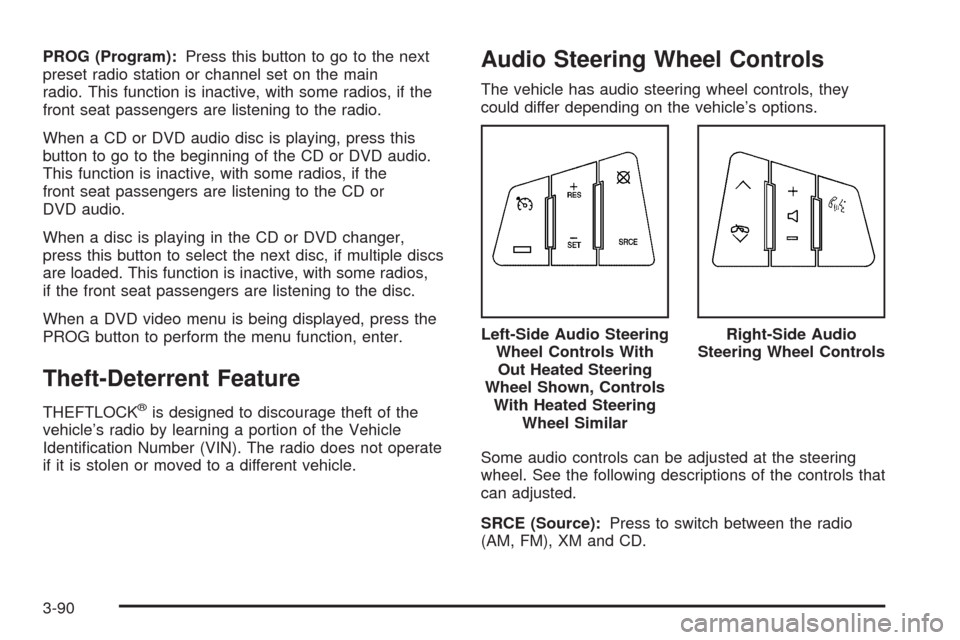
Audio Steering Wheel Controls
The vehicle has audio steering wheel controls, they
could differ depending on the vehicle’s options.
Some audio controls can be adjusted at the steering
wheel. See the following descriptions of the controls that
can adjusted.
SRCE (Source):Press to switch between the radio
(AM, FM), XM and CD.Left-Side Audio Steering
Wheel Controls With
Out Heated Steering
Wheel Shown, Controls
With Heated Steering
Wheel Similar
Right-Side Audio
Steering Wheel Controls
3-90
Page 299 of 442
Engine Oil Additives / Engine Oil
Flushes
Do not add anything to the oil. The recommended oils
with the starburst symbol that meet GM standards are all
you need for good performance and engine protection.
Engine oil system ushes are not recommended and
could cause engine damage not covered by the vehicle
warranty.
Engine Oil Life System
When to Change Engine Oil
This vehicle has a computer system that lets you know
when to change the engine oil and lter. This is based
on engine revolutions and engine temperature, and not
on mileage. Based on driving conditions, the mileage
at which an oil change will be indicated can vary
considerably. For the oil life system to work properly,
you must reset the system every time the oil is changed.
When the system has calculated that oil life has been
diminished, it will indicate that an oil change is necessary.
A CHANGE ENGINE OIL SOON message will come on.
SeeDIC Warnings and Messages on page 3-51. Change
the oil as soon as possible within the next 600 miles
(1 000 km). It is possible that, if you are driving under the
best conditions, the oil life system might not indicate that
an oil change is necessary for over a year. However, the
engine oil and lter must be changed at least once a yearand at this time the system must be reset. Your dealer/
retailer has trained service people who will perform this
work using genuine parts and reset the system. It is also
important to check the oil regularly and keep it at the
proper level.
If the system is ever reset accidentally, you must
change the oil at 3,000 miles (5 000 km) since the last
oil change. Remember to reset the oil life system
whenever the oil is changed.
How to Reset the Engine Oil Life
System
The Engine Oil Life System calculates when to change
the engine oil and lter based on vehicle use. Whenever
the oil is changed, reset the system so it can calculate
when the next oil change is required. If a situation occurs
where you change the oil prior to a CHANGE ENGINE
OIL SOON message being turned on, reset the system.
Always reset the engine oil life to 100% after every oil
change. It will not reset itself. To reset the Engine
Oil Life System:
1. Display the OIL LIFE REMAINING on the DIC.
2. Press and hold the SET/RESET button on the DIC
for more than ve seconds. The oil life will change
to 100%.
If the CHANGE ENGINE OIL SOON message comes
back on when you start the vehicle, the Engine Oil Life
System has not reset. Repeat the procedure.
5-19
Page 325 of 442
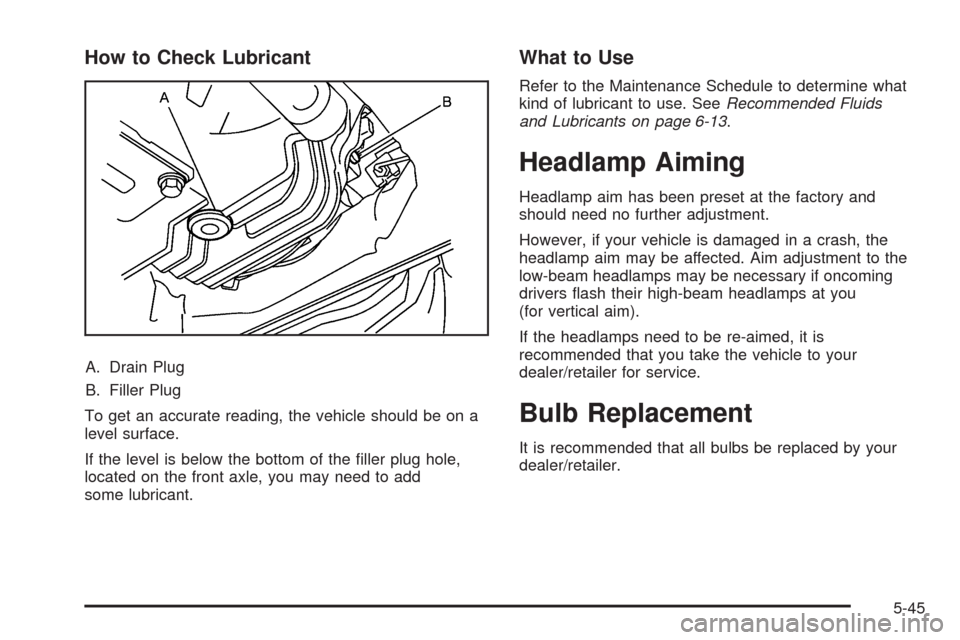
How to Check Lubricant
A. Drain Plug
B. Filler Plug
To get an accurate reading, the vehicle should be on a
level surface.
If the level is below the bottom of the ller plug hole,
located on the front axle, you may need to add
some lubricant.
What to Use
Refer to the Maintenance Schedule to determine what
kind of lubricant to use. SeeRecommended Fluids
and Lubricants on page 6-13.
Headlamp Aiming
Headlamp aim has been preset at the factory and
should need no further adjustment.
However, if your vehicle is damaged in a crash, the
headlamp aim may be affected. Aim adjustment to the
low-beam headlamps may be necessary if oncoming
drivers ash their high-beam headlamps at you
(for vertical aim).
If the headlamps need to be re-aimed, it is
recommended that you take the vehicle to your
dealer/retailer for service.
Bulb Replacement
It is recommended that all bulbs be replaced by your
dealer/retailer.
5-45
Page 345 of 442
Reset the Tire Pressure Monitor System. SeeTire
Pressure Monitor Operation on page 5-60.
Make certain that all wheel nuts are properly
tightened. See “Wheel Nut Torque” under
Capacities and Specifications on page 5-109.
{CAUTION:
Rust or dirt on a wheel, or on the parts to
which it is fastened, can make wheel nuts
become loose after time. The wheel could
come off and cause an accident. When you
change a wheel, remove any rust or dirt from
places where the wheel attaches to the
vehicle. In an emergency, you can use a
cloth or a paper towel to do this; but be
sure to use a scraper or wire brush later,
if needed, to get all the rust or dirt off.
SeeChanging a Flat Tire on page 5-74.
When It Is Time for New Tires
Various factors, such as maintenance, temperatures,
driving speeds, vehicle loading, and road conditions,
inuence when you need new tires.
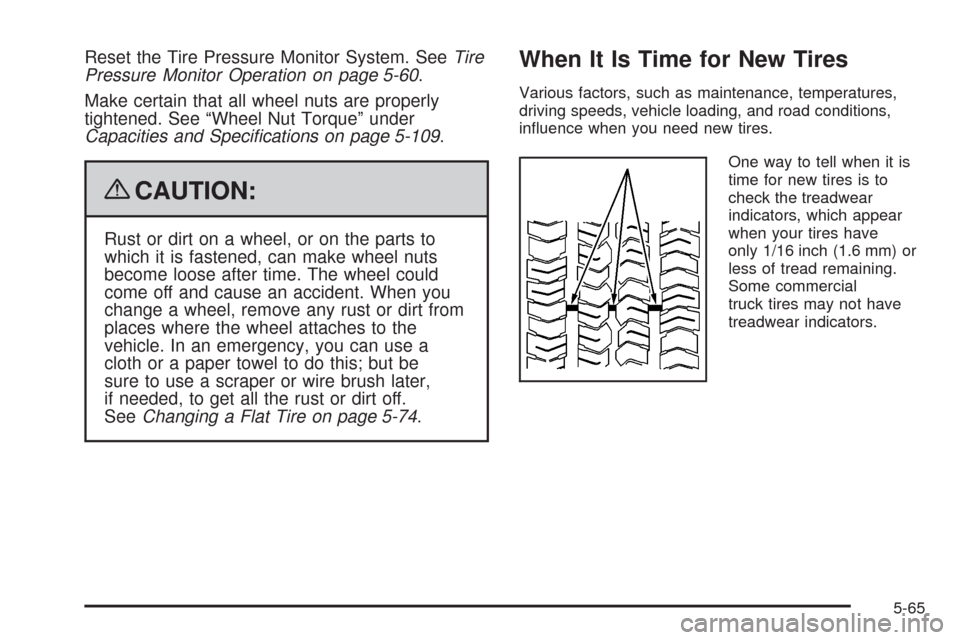
One way to tell when it is
time for new tires is to
check the treadwear
indicators, which appear
when your tires have
only 1/16 inch (1.6 mm) or
less of tread remaining.
Some commercial
truck tires may not have
treadwear indicators.
5-65
Page 394 of 442
Owner Checks and Services on page 6-9tells what
should be checked, when to check it, and what can easily
be done to help keep the vehicle in good condition.
The proper replacement parts, uids, and lubricants to
use are listed inRecommended Fluids and Lubricants
on page 6-13andMaintenance Replacement Parts
on page 6-15. When the vehicle is serviced, make sure
these are used. All parts should be replaced and all
necessary repairs done before you or anyone else
drives the vehicle. We recommend the use of genuine
parts from your dealer/retailer.
Scheduled Maintenance
To maintain the ride, handling, and performance of this
vehicle, it is important that the rst tire rotation service
be performed when the vehicle has 5,000 to 8,000 miles
(8 000 to 13 000 km). Check tires for ination pressures
and wear. SeeTires on page 5-48. If tire rotation is
recommended for the vehicle, rotate tires. SeeTire
Inspection and Rotation on page 5-64and “Tire Wear
Inspection” inAt Least Once a Month on page 6-10.When the CHANGE ENGINE OIL SOON message
displays, service is required for the vehicle. Have the
vehicle serviced as soon as possible within the next
600 miles (1 000 km). It is possible that, if driving under
the best conditions, the engine oil life system may
not indicate that vehicle service is necessary for over
a year. However, the engine oil and lter must be
changed at least once a year and at this time the system
must be reset. Your dealer/retailer has trained service
technicians who will perform this work using genuine
parts and reset the system.
If the engine oil life system is ever reset accidentally,
service the vehicle within 3,000 miles (5 000 km)
since the last service. Remember to reset the oil life
system whenever the oil is changed. SeeEngine Oil Life
System on page 5-19for information on the Engine
Oil Life System and resetting the system.
6-4