key battery CADILLAC SRX 2009 1.G Owners Manual
[x] Cancel search | Manufacturer: CADILLAC, Model Year: 2009, Model line: SRX, Model: CADILLAC SRX 2009 1.GPages: 442, PDF Size: 2.42 MB
Page 18 of 442
Stowable Seat
If the vehicle has a third row seat, it is a power
folding seat.
The head rests must be removed before folding the
third row seat. SeeHead Restraints on page 1-9
for more information.
The buttons to operate the power folding third row seat
are inside the liftgate and behind the second row
seat on the passenger side of the vehicle.
e:Press to tilt the seatback forward or rearward.
f:Press to fold the seat.
Notice:Folding a rear seat with the safety belts
still fastened may cause damage to the seat or the
safety belts. Always unbuckle the safety belts
and return them to their normal stowed position
before folding a rear seat.Before folding or unfolding the third row seat, all of the
following conditions must be met:
The liftgate or passenger side rear door must
be open.
The unlock button on either the Remote Keyless
Entry (RKE) transmitter or the door must be
pressed three times to enable the rear seat for
two minutes, or the ignition must be in ON/RUN or
ACC/ACCESSORY.
The vehicle must be in P (Park).
The vehicle cannot have a low battery.
After the seat is folded, fold the panel on the seat
forward at on the oor.
If the seat’s path is blocked, it will stop and back away.
Press the button again to return the seat to its
previous position.
Before returning the third row seat to the passenger
seating position, the panel must be folded back
upon itself. Press and hold one of the power folding
seat buttons and the seat will unfold into the seating
position. If the seat is not unfolded fully into the seating
position, a chime will sound when the vehicle is
shifted out of P (Park). This indicates that the seat is not
ready for a passenger.
Replace the head rests.
1-12
Page 84 of 442
Remote Keyless Entry (RKE)
System
The Remote Keyless Entry (RKE) system operates on
a radio frequency subject to Federal Communications
Commission (FCC) Rules and with Industry Canada.
This device complies with Part 15 of the FCC Rules.
Operation is subject to the following two conditions:
1. This device may not cause interference.
2. This device must accept any interference received,
including interference that may cause undesired
operation of the device.
This device complies with RSS-210 of Industry Canada.
Operation is subject to the following two conditions:
1. This device may not cause interference.
2. This device must accept any interference received,
including interference that may cause undesired
operation of the device.
Changes or modications to this system by other than
an authorized service facility could void authorization to
use this equipment.If there is a decrease in the RKE operating range,
try this:
Check the distance. The transmitter may be too
far from the vehicle. Stand closer during rainy
or snowy weather.
Check the location. Other vehicles or objects
may be blocking the signal. Take a few steps
to the left or right, hold the transmitter higher,
and try again.
Check the transmitter’s battery. See “Battery
Replacement” later in this section.
If the transmitter is still not working correctly,
see your dealer/retailer or a qualied technician
for service.
Remote Keyless Entry (RKE)
System Operation
The Remote Keyless Entry (RKE) transmitter functions
work up to 195 feet (60 m) away from the vehicle.
There are other conditions which can affect the
performance of the transmitter. SeeRemote Keyless
Entry (RKE) System on page 2-4.
2-4
Page 86 of 442
Programming Transmitters to the
Vehicle
Only RKE transmitters programmed to the vehicle
will work. If a transmitter is lost or stolen, a replacement
can be purchased and programmed through your
dealer/retailer. When the replacement transmitter is
programmed to the vehicle, all remaining transmitters
must also be programmed. Any lost or stolen transmitters
no longer work once the new transmitter is programmed.
Each vehicle can have up to eight transmitters
programmed to it. See “RELEARN REMOTE KEY”
underDIC Operation and Displays on page 3-46.
Battery Replacement
Replace the battery if the REPLACE BATTERY
IN REMOTE KEY message displays in the DIC.
See “REPLACE BATTERY IN REMOTE KEY”
underDIC Warnings and Messages on page 3-51.
Notice:When replacing the battery, do not touch
any of the circuitry on the transmitter. Static
from your body could damage the transmitter.To replace the battery:
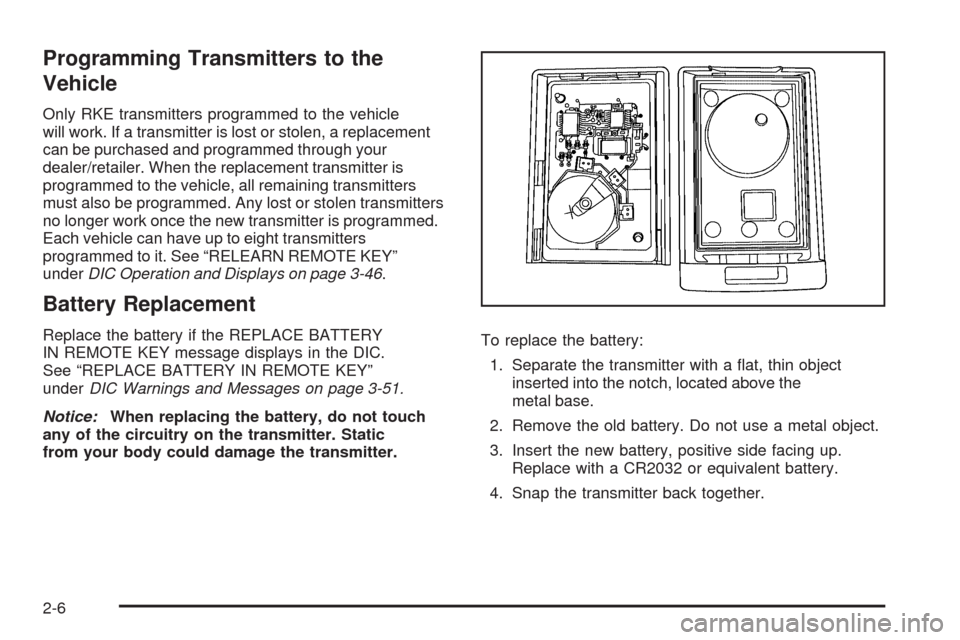
1. Separate the transmitter with a at, thin object
inserted into the notch, located above the
metal base.
2. Remove the old battery. Do not use a metal object.
3. Insert the new battery, positive side facing up.
Replace with a CR2032 or equivalent battery.
4. Snap the transmitter back together.
2-6
Page 92 of 442
Power Liftgate
Power Liftgate Operation
The vehicle has a power liftgate. The vehicle must
be in P (Park) to power open or close the liftgate.
The liftgate must be completely closed to power
open or completely opened to power close.
The taillamps will ash and a chime will sound at the
beginning of each power operation cycle.
{CAUTION:
You or others could be injured if caught in the
path of the power liftgate. Make sure there is no
one in the way of the liftgate as it is opening and
closing.
Notice:If you open the liftgate without checking for
overhead obstructions such as a garage door, you
could damage the liftgate or the liftgate glass. Always
check to make sure the area above and behind the
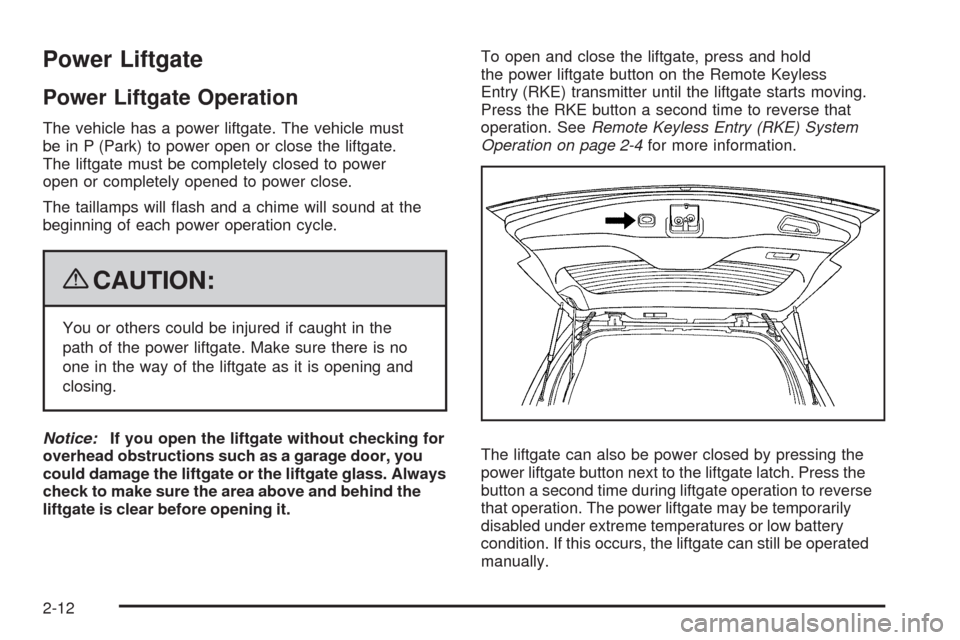
liftgate is clear before opening it.To open and close the liftgate, press and hold
the power liftgate button on the Remote Keyless
Entry (RKE) transmitter until the liftgate starts moving.
Press the RKE button a second time to reverse that
operation. SeeRemote Keyless Entry (RKE) System
Operation on page 2-4for more information.
The liftgate can also be power closed by pressing the
power liftgate button next to the liftgate latch. Press the
button a second time during liftgate operation to reverse
that operation. The power liftgate may be temporarily
disabled under extreme temperatures or low battery
condition. If this occurs, the liftgate can still be operated
manually.
2-12
Page 103 of 442
Do not tow a trailer during break-in. SeeTowing a
Trailer on page 4-39for the trailer towing capabilities
of your vehicle and more information.
Following break-in, engine speed and load can be
gradually increased.
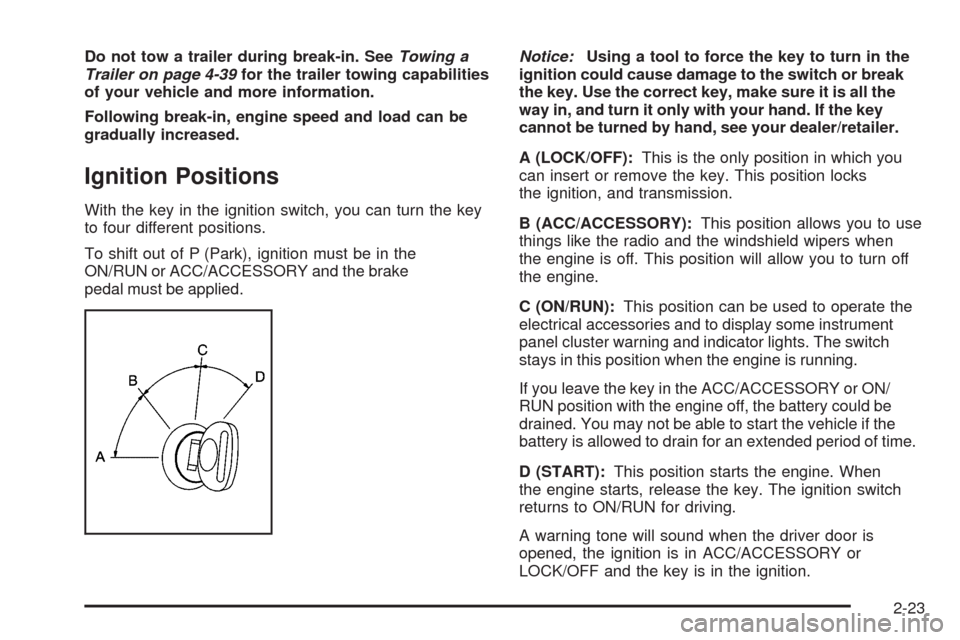
Ignition Positions
With the key in the ignition switch, you can turn the key
to four different positions.
To shift out of P (Park), ignition must be in the
ON/RUN or ACC/ACCESSORY and the brake
pedal must be applied.Notice:Using a tool to force the key to turn in the
ignition could cause damage to the switch or break
the key. Use the correct key, make sure it is all the
way in, and turn it only with your hand. If the key
cannot be turned by hand, see your dealer/retailer.
A (LOCK/OFF):This is the only position in which you
can insert or remove the key. This position locks
the ignition, and transmission.
B (ACC/ACCESSORY):This position allows you to use
things like the radio and the windshield wipers when
the engine is off. This position will allow you to turn off
the engine.
C (ON/RUN):This position can be used to operate the
electrical accessories and to display some instrument
panel cluster warning and indicator lights. The switch
stays in this position when the engine is running.
If you leave the key in the ACC/ACCESSORY or ON/
RUN position with the engine off, the battery could be
drained. You may not be able to start the vehicle if the
battery is allowed to drain for an extended period of time.
D (START):This position starts the engine. When
the engine starts, release the key. The ignition switch
returns to ON/RUN for driving.
A warning tone will sound when the driver door is
opened, the ignition is in ACC/ACCESSORY or
LOCK/OFF and the key is in the ignition.
2-23
Page 104 of 442
Retained Accessory Power (RAP)
These vehicle accessories can be used for up to
10 minutes after the engine is turned off:
Audio System
Power Windows
Sunroof (if equipped)
Power to the audio system will work up to 10 minutes or
until the driver door is opened. Power to the windows
or sunroof will work up to 10 minutes or until any door
is opened. For an additional 10 minutes of operation,
close all the doors and turn the key to ON/RUN and
then back to LOCK/OFF.
Starting the Engine
Move the shift lever to P (Park) or N (Neutral).
The engine will not start in any other position.
To restart the engine when the vehicle is already
moving, use N (Neutral) only.
Notice:Do not try to shift to P (Park) if the
vehicle is moving. If you do, you could damage
the transmission. Shift to P (Park) only when the
vehicle is stopped.
Starting Procedure
1. With your foot off the accelerator pedal, turn the
ignition to START. When the engine starts, let go of
the key. The idle speed will slow down as the engine
warms. Do not race the engine immediately after
starting it. Operate the engine and transmission
gently to allow the oil to warm up and lubricate
all moving parts.
The vehicle has a Computer-Controlled Cranking
System. This feature assists in starting the engine
and protects components. If the ignition key is turned
to the START position, and then released when the
engine begins cranking, the engine will continue
cranking for a few seconds or until the vehicle starts.
If the engine does not start and the key is held in
START, cranking will be stopped after 15 seconds
to prevent cranking motor damage. To prevent gear
damage, this system also prevents cranking if the
engine is already running. Engine cranking can
be stopped by turning the ignition switch to the
ACC/ACCESSORY or LOCK/OFF position.
Notice:Cranking the engine for long periods of
time, by returning the key to the START position
immediately after cranking has ended, can overheat
and damage the cranking motor, and drain the
battery. Wait at least 15 seconds between each
try, to let the cranking motor cool down.
2-24
Page 115 of 442
Shifting Out of Park
This vehicle is equipped with an electronic shift lock
release system. The shift lock release is designed to:
Prevent ignition key removal unless the shift
lever is in P (Park) with the shift lever button fully
released, and
Prevent movement of the shift lever out of
P (Park), unless the ignition is in ON/RUN or
ACC/ACCESSORY and the regular brake
pedal is applied.
The shift lock release is always functional except in the
case of an uncharged or low voltage (less than 9 volt)
battery.
If the vehicle has an uncharged battery or a battery with
low voltage, try charging or jump starting the battery.
SeeJump Starting on page 5-38for more information.
To shift out of P (Park) use the following:
1. Apply the brake pedal.
2. Press the shift lever button.
3. Move the shift lever to the desired position.If you still are unable to shift out of P (Park):
1. Fully release the shift lever button.
2. While holding down the brake pedal, press the shift
lever button again.
3. Move the shift lever to the desired position.
If you still cannot move the shift lever from P (Park),
consult your dealer/retailer.
Parking Over Things That Burn
{CAUTION:
Things that can burn could touch hot exhaust
parts under the vehicle and ignite. Do not park
over papers, leaves, dry grass, or other things
that can burn.
2-35
Page 156 of 442
Exterior Lighting Battery Saver
The exterior lamps turn off about 10 minutes after the
ignition is turned to LOCK/OFF, if the parking lamps
or headlamps have been left on. This protects against
draining the battery. The battery saver does not
work if the headlamps are turned on after the ignition is
turned to LOCK/OFF.
To keep the lamps on for more than 10 minutes, turn
the lamps back on with the exterior lamp control.
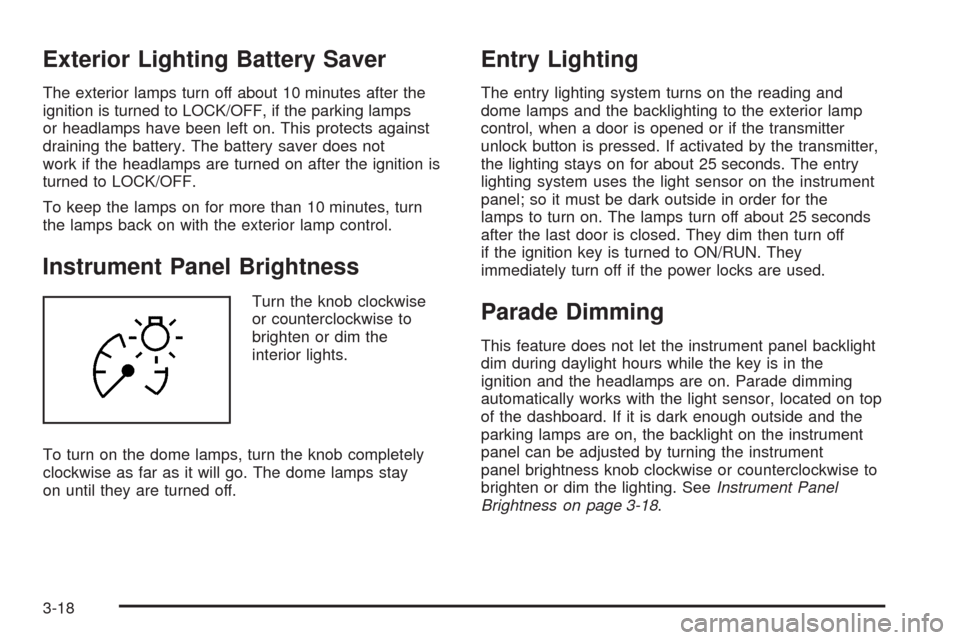
Instrument Panel Brightness
Turn the knob clockwise
or counterclockwise to
brighten or dim the
interior lights.
To turn on the dome lamps, turn the knob completely
clockwise as far as it will go. The dome lamps stay
on until they are turned off.
Entry Lighting
The entry lighting system turns on the reading and
dome lamps and the backlighting to the exterior lamp
control, when a door is opened or if the transmitter
unlock button is pressed. If activated by the transmitter,
the lighting stays on for about 25 seconds. The entry
lighting system uses the light sensor on the instrument
panel; so it must be dark outside in order for the
lamps to turn on. The lamps turn off about 25 seconds
after the last door is closed. They dim then turn off
if the ignition key is turned to ON/RUN. They
immediately turn off if the power locks are used.
Parade Dimming
This feature does not let the instrument panel backlight
dim during daylight hours while the key is in the
ignition and the headlamps are on. Parade dimming
automatically works with the light sensor, located on top
of the dashboard. If it is dark enough outside and the
parking lamps are on, the backlight on the instrument
panel can be adjusted by turning the instrument
panel brightness knob clockwise or counterclockwise to
brighten or dim the lighting. SeeInstrument Panel
Brightness on page 3-18.
3-18
Page 180 of 442
Emissions Inspection and
Maintenance Programs
Some state/provincial and local governments have or
might begin programs to inspect the emission control
equipment on the vehicle. Failure to pass this inspection
could prevent getting a vehicle registration.
Here are some things to know to help the vehicle pass
an inspection:
The vehicle will not pass this inspection if the check
engine light is on with the engine running, or if the
key is in ON/RUN and the light is not on.
The vehicle will not pass this inspection if the
OBD II (on-board diagnostic) system determines
that critical emission control systems have not been
completely diagnosed by the system. The vehicle
would be considered not ready for inspection.
This can happen if the battery has recently
been replaced or if the battery has run down.
The diagnostic system is designed to evaluate
critical emission control systems during normal
driving. This can take several days of routine
driving. If this has been done and the vehicle still
does not pass the inspection for lack of OBD II
system readiness, your dealer/retailer can prepare
the vehicle for inspection.
Oil Pressure Light
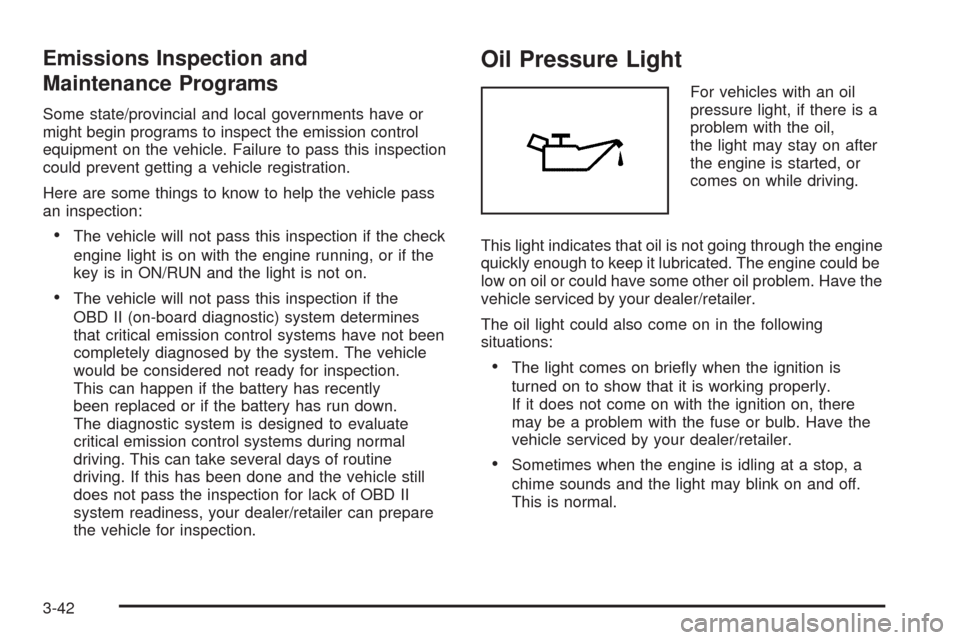
For vehicles with an oil
pressure light, if there is a
problem with the oil,
the light may stay on after
the engine is started, or
comes on while driving.
This light indicates that oil is not going through the engine
quickly enough to keep it lubricated. The engine could be
low on oil or could have some other oil problem. Have the
vehicle serviced by your dealer/retailer.
The oil light could also come on in the following
situations:
The light comes on briey when the ignition is
turned on to show that it is working properly.
If it does not come on with the ignition on, there
may be a problem with the fuse or bulb. Have the
vehicle serviced by your dealer/retailer.
Sometimes when the engine is idling at a stop, a
chime sounds and the light may blink on and off.
This is normal.
3-42
Page 193 of 442
REAR ACCESS OPEN
This message displays when the liftgate is not closed
completely. Make sure that the liftgate is closed
completely.
REMOTE KEY LEARNING ACTIVE
This message displays while you are matching a
Remote Keyless Entry (RKE) transmitter to your vehicle.
See “Matching Transmitter(s) to Your Vehicle” under
Remote Keyless Entry (RKE) System Operation
on page 2-4andDIC Operation and Displays on
page 3-46for more information.
REPLACE BATTERY IN REMOTE KEY
This message displays when the battery in the Remote
Keyless Entry (RKE) transmitter needs to be replaced.
To replace the battery, see “Battery Replacement” under
Remote Keyless Entry (RKE) System Operation on
page 2-4.
RIGHT REAR DOOR OPEN
This message displays when the passenger side rear
door is not closed completely. Make sure that the door is
closed completely.
SERVICE AIR BAG
This message displays when there is a problem with the
airbag system. Have your vehicle serviced by your
dealer/retailer immediately. SeeAirbag Readiness Light
on page 3-32for more information.
SERVICE A/C SYSTEM
This message displays when the air delivery mode
door or the electronic sensors that control the air
conditioning and heating systems are no longer working.
Have the climate control system serviced by your
dealer/retailer if you notice a drop in heating and air
conditioning efficiency.
SERVICE BATTERY CHARGING
SYSTEM
This message displays when there is a problem with the
generator and battery charging systems. Driving with
this problem could drain the battery. Turn off all
unnecessary accessories. Stop and turn off the vehicle
as soon as it is safe to do so. Have the electrical
system checked by your dealer/retailer. Under certain
conditions, the charging system light may also turn on in
the instrument panel cluster. SeeCharging System
Light on page 3-35for more information.
3-55