wheel CADILLAC SRX 2009 1.G Repair Manual
[x] Cancel search | Manufacturer: CADILLAC, Model Year: 2009, Model line: SRX, Model: CADILLAC SRX 2009 1.GPages: 442, PDF Size: 2.42 MB
Page 282 of 442
Buying New Tires.........................................5-66
Different Size Tires and Wheels......................5-68
Uniform Tire Quality Grading..........................5-68
Wheel Alignment and Tire Balance..................5-70
Wheel Replacement......................................5-70
Tire Chains..................................................5-72
If a Tire Goes Flat........................................5-73
Changing a Flat Tire.....................................5-74
Removing the Spare Tire and Tools................5-75
Removing the Flat Tire and Installing the
Spare Tire................................................5-78
Secondary Latch System...............................5-82
Storing a Flat or Spare Tire and Tools............5-85
Compact Spare Tire......................................5-88
Appearance Care............................................5-89
Interior Cleaning...........................................5-89
Fabric/Carpet...............................................5-90
Leather.......................................................5-91
Instrument Panel, Vinyl, and Other
Plastic Surfaces........................................5-92
Wood Panels...............................................5-92
Speaker Covers............................................5-92
Care of Safety Belts......................................5-92Weatherstrips...............................................5-93
Washing Your Vehicle...................................5-93
Cleaning Exterior Lamps/Lenses.....................5-93
Finish Care..................................................5-94
Windshield and Wiper Blades.........................5-94
Aluminum or Chrome-Plated Wheels and Trim . . .5-95
Tires...........................................................5-96
Sheet Metal Damage.....................................5-96
Finish Damage.............................................5-96
Underbody Maintenance................................5-96
Chemical Paint Spotting.................................5-96
Vehicle Identication......................................5-97
Vehicle Identication Number (VIN).................5-97
Service Parts Identication Label.....................5-97
Electrical System............................................5-98
Add-On Electrical Equipment..........................5-98
Windshield Wiper Fuses................................5-98
Power Windows and Other Power Options.......5-98
Fuses and Circuit Breakers............................5-99
Underhood Fuse Block..................................5-99
Rear Underseat Fuse Block (Left Side)..........5-103
Rear Underseat Fuse Block (Right Side)........5-106
Capacities and Specications........................5-109
Section 5 Service and Appearance Care
5-2
Page 316 of 442
Brake Wear
This vehicle has disc brakes. Disc brake pads have
built-in wear indicators that make a high-pitched warning
sound when the brake pads are worn and new pads
are needed. The sound can come and go or be heard all
the time the vehicle is moving, except when applying
the brake pedal rmly.
{CAUTION:
The brake wear warning sound means that soon
the brakes will not work well. That could lead to an
accident. When the brake wear warning sound is
heard, have the vehicle serviced.
Notice:Continuing to drive with worn-out brake
pads could result in costly brake repair.Some driving conditions or climates can cause a brake
squeal when the brakes are rst applied or lightly
applied. This does not mean something is wrong with
the brakes.
Properly torqued wheel nuts are necessary to help
prevent brake pulsation. When tires are rotated, inspect
brake pads for wear and evenly tighten wheel nuts in
the proper sequence to torque specications in
Capacities and Specifications on page 5-109.
Brake linings should always be replaced as complete
axle sets.Brake Pedal Travel
See your dealer/retailer if the brake pedal does not
return to normal height, or if there is a rapid increase in
pedal travel. This could be a sign that brake service
might be required.
Brake Adjustment
Every brake stop, the disc brakes adjust for wear.
5-36
Page 322 of 442
Notice:If the jumper cables are connected or
removed in the wrong order, electrical shorting may
occur and damage the vehicle. The repairs would
not be covered by your warranty. Always connect
and remove the jumper cables in the correct
order, making sure that the cables do not touch
each other or other metal.
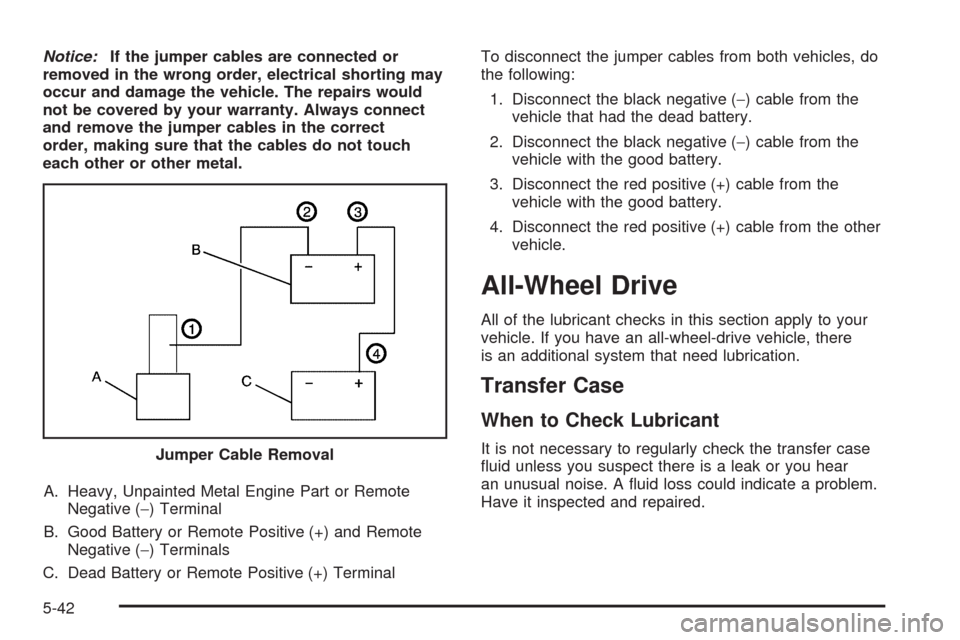
A. Heavy, Unpainted Metal Engine Part or Remote
Negative (−) Terminal
B. Good Battery or Remote Positive (+) and Remote
Negative (−) Terminals
C. Dead Battery or Remote Positive (+) TerminalTo disconnect the jumper cables from both vehicles, do
the following:
1. Disconnect the black negative (−) cable from the
vehicle that had the dead battery.
2. Disconnect the black negative (−) cable from the
vehicle with the good battery.
3. Disconnect the red positive (+) cable from the
vehicle with the good battery.
4. Disconnect the red positive (+) cable from the other
vehicle.
All-Wheel Drive
All of the lubricant checks in this section apply to your
vehicle. If you have an all-wheel-drive vehicle, there
is an additional system that need lubrication.
Transfer Case
When to Check Lubricant
It is not necessary to regularly check the transfer case
uid unless you suspect there is a leak or you hear
an unusual noise. A uid loss could indicate a problem.
Have it inspected and repaired. Jumper Cable Removal
5-42
Page 329 of 442
Low-Prole Performance Tire
If your vehicle has P255/50R20 size tires, they are
classied as low-prole performance tires. These
tires are designed for very responsive driving on
wet or dry pavement. You may also notice more
road noise with low-prole performance tires and
that they tend to wear faster.
Notice:If the vehicle has low-prole tires,
they are more susceptible to damage from road
hazards or curb impact than standard prole
tires. Tire and/or wheel assembly damage
can occur when coming into contact with
road hazards like, potholes, or sharp edged
objects, or when sliding into a curb. The
vehicle warranty does not cover this type of
damage. Keep tires set to the correct ination
pressure and, when possible avoid contact
with curbs, potholes, and other road hazards.
Winter Tires
If you expect to drive on snow or ice covered roads
often, you may want to get winter tires for your vehicle.
All season tires provide good overall performance on
most surfaces but they may not offer the traction
you would like or the same level of performance as
winter tires on snow or ice covered roads.Winter tires, in general, are designed for increased
traction on snow and ice covered roads. With winter
tires, there may be decreased dry road traction,
increased road noise, and shorter tread life. After
switching to winter tires, be alert for changes in vehicle
handling and braking.
See your dealer/retailer for details regarding winter tire
availability and proper tire selection. Also, seeBuying
New Tires on page 5-66.
If you choose to use winter tires:
Use tires of the same brand and tread type on all
four wheel positions.
Use only radial ply tires of the same size, load
range, and speed rating as the original equipment
tires.
Winter tires with the same speed rating as your original
equipment tires may not be available for H, V, W, Y,
and ZR speed rated tires. If you choose winter tires with
a lower speed rating, never exceed the tire’s maximum
speed capability.
5-49
Page 333 of 442
(C) Aspect Ratio:A two-digit number that
indicates the tire height-to-width measurements.
For example, if the tire size aspect ratio is 60, as
shown in item C of the illustration, it would mean
that the tire’s sidewall is 60 percent as high as
it is wide.
(D) Construction Code
:A letter code is used to
indicate the type of ply construction in the tire. The
letter R means radial ply construction; the letter D
means diagonal or bias ply construction; and the
letter B means belted-bias ply construction.
(E) Rim Diameter
:Diameter of the wheel in
inches.
(F) Service Description
:These characters
represent the load range and speed rating of the
tire. The load index represents the load carry
capacity a tire is certied to carry. The load index
can range from 1 to 279. The speed rating is the
maximum speed a tire is certied to carry a load.
Speed ratings range from A to Z.
Tire Terminology and Denitions
Air Pressure:The amount of air inside the
tire pressing outward on each square inch of the
tire. Air pressure is expressed in pounds per
square inch (psi) or kilopascal (kPa).
Accessory Weight
:This means the combined
weight of optional accessories. Some examples of
optional accessories are, automatic transmission,
power steering, power brakes, power windows,
power seats, and air conditioning.
Aspect Ratio
:The relationship of a tire’s height
to its width.
Belt
:A rubber coated layer of cords that is located
between the plies and the tread. Cords may be
made from steel or other reinforcing materials.
Bead
:The tire bead contains steel wires wrapped
by steel cords that hold the tire onto the rim.
Bias Ply Tire
:A pneumatic tire in which the plies
are laid at alternate angles less than 90 degrees
to the centerline of the tread.
5-53
Page 339 of 442
Tire Pressure Monitor System
The Tire Pressure Monitor System (TPMS) uses radio
and sensor technology to check tire pressure levels.
The TPMS sensors monitor the air pressure in
your vehicle’s tires and transmit tire pressure readings
to a receiver located in the vehicle.
Each tire, including the spare (if provided), should be
checked monthly when cold and inated to the ination
pressure recommended by the vehicle manufacturer
on the vehicle placard or tire ination pressure label.
(If your vehicle has tires of a different size than the
size indicated on the vehicle placard or tire ination
pressure label, you should determine the proper
tire ination pressure for those tires.)
As an added safety feature, your vehicle has been
equipped with a tire pressure monitoring system (TPMS)
that illuminates a low tire pressure telltale when one
or more of your tires is signicantly under-inated.
Accordingly, when the low tire pressure telltale
illuminates, you should stop and check your tires as soon
as possible, and inate them to the proper pressure.
Driving on a signicantly under-inated tire causes the
tire to overheat and can lead to tire failure. Under-ination
also reduces fuel efficiency and tire tread life, and may
affect the vehicle’s handling and stopping ability.Please note that the TPMS is not a substitute for proper
tire maintenance, and it is the driver’s responsibility to
maintain correct tire pressure, even if under-ination has
not reached the level to trigger illumination of the
TPMS low tire pressure telltale.
Your vehicle has also been equipped with a TPMS
malfunction indicator to indicate when the system is
not operating properly. The TPMS malfunction indicator
is combined with the low tire pressure telltale. When
the system detects a malfunction, the telltale will
ash for approximately one minute and then remain
continuously illuminated. This sequence will continue
upon subsequent vehicle start-ups as long as the
malfunction exists.
When the malfunction indicator is illuminated, the system
may not be able to detect or signal low tire pressure as
intended. TPMS malfunctions may occur for a variety of
reasons, including the installation of replacement or
alternate tires or wheels on the vehicle that prevent the
TPMS from functioning properly. Always check the TPMS
malfunction telltale after replacing one or more tires or
wheels on your vehicle to ensure that the replacement or
alternate tires and wheels allow the TPMS to continue to
function properly.
SeeTire Pressure Monitor Operation on page 5-60for
additional information.
5-59
Page 340 of 442
Federal Communications Commission
(FCC) and Industry and Science Canada
The Tire Pressure Monitor System (TPMS) operates
on a radio frequency and complies with Part 15 of
the FCC Rules. Operation is subject to the following
two conditions:
1. This device may not cause harmful interference.
2. This device must accept any interference received,
including interference that may cause undesired
operation.
The TPMS operates on a radio frequency and complies
with RSS-210 of Industry and Science Canada.
Operation is subject to the following two conditions:
1. This device may not cause interference.
2. This device must accept any interference received,
including interference that may cause undesired
operation of the device.
Changes or modications to this system by other than
an authorized service facility could void authorization to
use this equipment.
Tire Pressure Monitor Operation
This vehicle may have a Tire Pressure Monitor System
(TPMS). The TPMS is designed to warn the driver
when a low tire pressure condition exists. TPMS sensors
are mounted onto each tire and wheel assembly,
excluding the spare tire and wheel assembly. The TPMS
sensors monitor the air pressure in the vehicle’s tires
and transmits the tire pressure readings to a receiver
located in the vehicle.
When a low tire pressure
condition is detected, the
TPMS illuminates the low
tire pressure warning light
located on the instrument
panel cluster.
At the same time a message to check the pressure in a
specic tire appears on the Driver Information Center
(DIC) display. The low tire pressure warning light and the
DIC warning message come on at each ignition cycle
until the tires are inated to the correct ination pressure.
Using the DIC, tire pressure levels can be viewed by the
driver. For additional information and details about the
DIC operation and displays seeDIC Operation and
Displays on page 3-46andDIC Warnings and Messages
on page 3-51.
5-60
Page 342 of 442
One or more TPMS sensors are missing or
damaged. The DIC message and the TPMS
malfunction light should go off when the TPMS
sensors are installed and the sensor matching
process is performed successfully. See your dealer/
retailer for service.
Replacement tires or wheels do not match your
vehicle’s original equipment tires or wheels. Tires
and wheels other than those recommended for your
vehicle could prevent the TPMS from functioning
properly. SeeBuying New Tires on page 5-66.
Operating electronic devices or being near facilities
using radio wave frequencies similar to the TPMS
could cause the TPMS sensors to malfunction.
If the TPMS is not functioning it cannot detect or
signal a low tire condition. See your dealer/retailer for
service if the TPMS malfunction light and DIC message
comes on and stays on.
TPMS Sensor Matching Process
Each TPMS sensor has a unique identication code.
Any time you rotate your vehicle’s tires or replace one or
more of the TPMS sensors, the identication codes
will need to be matched to the new tire/wheel position.
The sensors are matched to the tire/wheel positions
in the following order: driver side front tire, passenger
side front tire, passenger side rear tire, and driver
side rear tire using a TPMS diagnostic tool. See your
dealer/retailer for service.
The TPMS sensors can also be matched to each
tire/wheel position by increasing or decreasing the tire’s
air pressure. If increasing the tire’s air pressure, do
not exceed the maximum ination pressure indicated on
the tire’s sidewall.
To decrease air-pressure out of a tire you can use the
pointed end of the valve cap, a pencil-style air pressure
gage, or a key.
5-62
Page 343 of 442
You have two minutes to match the rst tire/wheel
position, and ve minutes overall to match all four
tire/wheel positions. If it takes longer than two minutes, to
match the rst tire and wheel, or more than ve minutes
to match all four tire and wheel positions the matching
process stops and you need to start over.
The TPMS sensor matching process is outlined below:
1. Set the parking brake.
2. Turn the ignition switch to ON/RUN with the
engine off.
3. Press the Remote Keyless Entry (RKE) transmitter’s
LOCK and UNLOCK buttons at the same time for
approximately ve seconds. The horn sounds twice
to signal the receiver is in relearn mode and TIRE
LEARNING ACTIVE message displays on the DIC
screen.
4. Start with the driver side front tire.
5. Remove the valve cap from the valve cap stem.
Activate the TPMS sensor by increasing or
decreasing the tire’s air pressure for ve seconds,or until a horn chirp sounds. The horn chirp, which
may take up to 30 seconds to sound, conrms
that the sensor identication code has been
matched to this tire and wheel position.
6. Proceed to the passenger side front tire, and repeat
the procedure in Step 5.
7. Proceed to the passenger side rear tire, and repeat
the procedure in Step 5.
8. Proceed to the driver side rear tire, and repeat the
procedure in Step 5. The horn sounds two times to
indicate the sensor identication code has been
matched to the driver side rear tire, and the TPMS
sensor matching process is no longer active.
The TIRE LEARNING ACTIVE message on the DIC
display screen goes off.
9. Turn the ignition switch to LOCK/OFF.
10. Set all four tires to the recommended air pressure
level as indicated on the Tire and Loading
Information label.
11. Put the valve caps back on the valve stems.
5-63
Page 344 of 442
Tire Inspection and Rotation
We recommend that you regularly inspect your
vehicle’s tires, including the spare tire, for signs of
wear or damage. SeeWhen It Is Time for New
Tires on page 5-65for more information.
Tire rotation is not recommended if your vehicle
has the following tire combinations:
P235/65R17 size tires on the front wheels and
P255/60R17 size tires on the rear wheels.
P235/60R18 size tires on the front wheels and
P255/55R18 size tires on the rear wheels.
Different tire sizes should not be rotated front
to rear. Each tire and wheel should only be used
in its original front or rear position.
Tire rotation is recommended if your vehicle is
equipped with P255/50R20 size tires on all
four wheel positions. These tires should be rotated
every 5,000 to 8,000 miles (8 000 to 13 000 km).
SeeScheduled Maintenance on page 6-4.
The purpose of a regular tire rotation is to achieve
a uniform wear for all tires on the vehicle. This
will ensure that your vehicle continues to perform
most like it did when the tires were new.Any time you notice unusual wear, rotate your
tires as soon as possible and check wheel
alignment. Also check for damaged tires or wheels.
SeeWhen It Is Time for New Tires on page 5-65
andWheel Replacement on page 5-70.
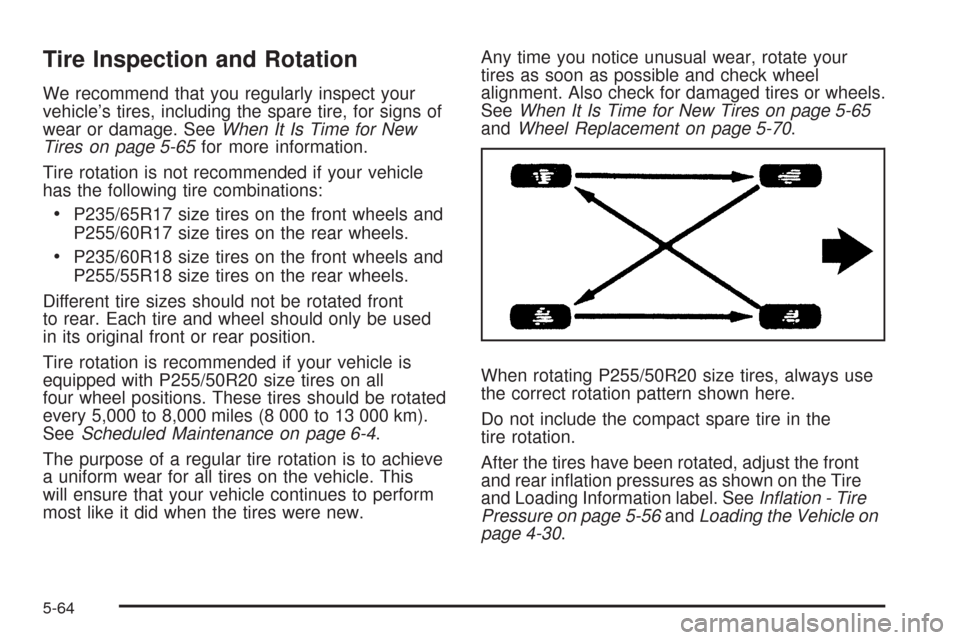
When rotating P255/50R20 size tires, always use
the correct rotation pattern shown here.
Do not include the compact spare tire in the
tire rotation.
After the tires have been rotated, adjust the front
and rear ination pressures as shown on the Tire
and Loading Information label. SeeInflation - Tire
Pressure on page 5-56andLoading the Vehicle on
page 4-30.
5-64