buttons CADILLAC SRX 2011 2.G User Guide
[x] Cancel search | Manufacturer: CADILLAC, Model Year: 2011, Model line: SRX, Model: CADILLAC SRX 2011 2.GPages: 498, PDF Size: 7.62 MB
Page 75 of 498
Black plate (11,1)Cadillac SRX Owner Manual - 2011
Seats and Restraints 3-11
The temperature performance of an
unoccupied seat may be reduced.
This is normal.
The heated seats will not turn on
during a remote start unless the
heated seat feature is enabled in
the vehicle personalization menu.
SeeRemote Vehicle Start on
page 2‑10 and“Remote Start
Auto Heated Seats” underVehicle
Personalization on page 5‑40 for
more information.
Heated and Ventilated
Front Seats
{WARNING
If you cannot feel temperature
change or pain to the skin,
the seat heater may cause
burns even at low temperatures.
See the Warning under Heated
Front Seats on page 3‑10.
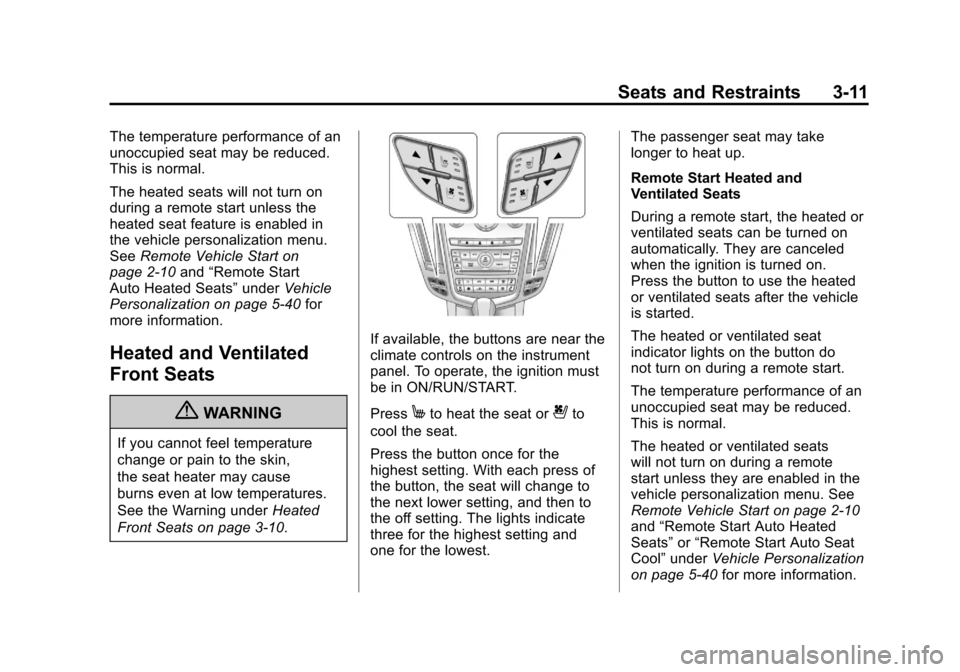
If available, the buttons are near the
climate controls on the instrument
panel. To operate, the ignition must
be in ON/RUN/START.
Press
Mto heat the seat or{to
cool the seat.
Press the button once for the
highest setting. With each press of
the button, the seat will change to
the next lower setting, and then to
the off setting. The lights indicate
three for the highest setting and
one for the lowest. The passenger seat may take
longer to heat up.
Remote Start Heated and
Ventilated Seats
During a remote start, the heated or
ventilated seats can be turned on
automatically. They are canceled
when the ignition is turned on.
Press the button to use the heated
or ventilated seats after the vehicle
is started.
The heated or ventilated seat
indicator lights on the button do
not turn on during a remote start.
The temperature performance of an
unoccupied seat may be reduced.
This is normal.
The heated or ventilated seats
will not turn on during a remote
start unless they are enabled in the
vehicle personalization menu. See
Remote Vehicle Start on page 2‑10
and
“Remote Start Auto Heated
Seats” or“Remote Start Auto Seat
Cool” under Vehicle Personalization
on page 5‑40 for more information.
Page 77 of 498
Black plate (13,1)Cadillac SRX Owner Manual - 2011
Seats and Restraints 3-13
To raise the seatback:
1. Lift the lever on top of theseatback. Raise the seatback
and release the lever. The rear
seatback lock indicator (A)
extends when the seatback is
unlocked.
2. Push the seatback rearward until it locks in the upright
position. The rear seatback lock
indicator (A) retracts when the
seatback is locked in place.
3. Make sure the rear safety belts are not twisted or caught
between the seat cushion and
the seatback.
Reclining the Seatbacks
To recline the seatback:
1. Lift and hold the lever on top ofthe seatback. The rear seatback
lock indicator (A) extends when
the seatback is unlocked. 2. Tilt the seatback rearward, and
then release the lever when
the seatback is in the desired
position. The rear seatback lock
indicator (A) retracts when the
seatback is locked in place.
Heated Rear Seats
{WARNING
If you cannot feel temperature
change or pain to the skin,
the seat heater may cause
burns even at low temperatures.
See the Warning under Heated
Front Seats on page 3‑10.
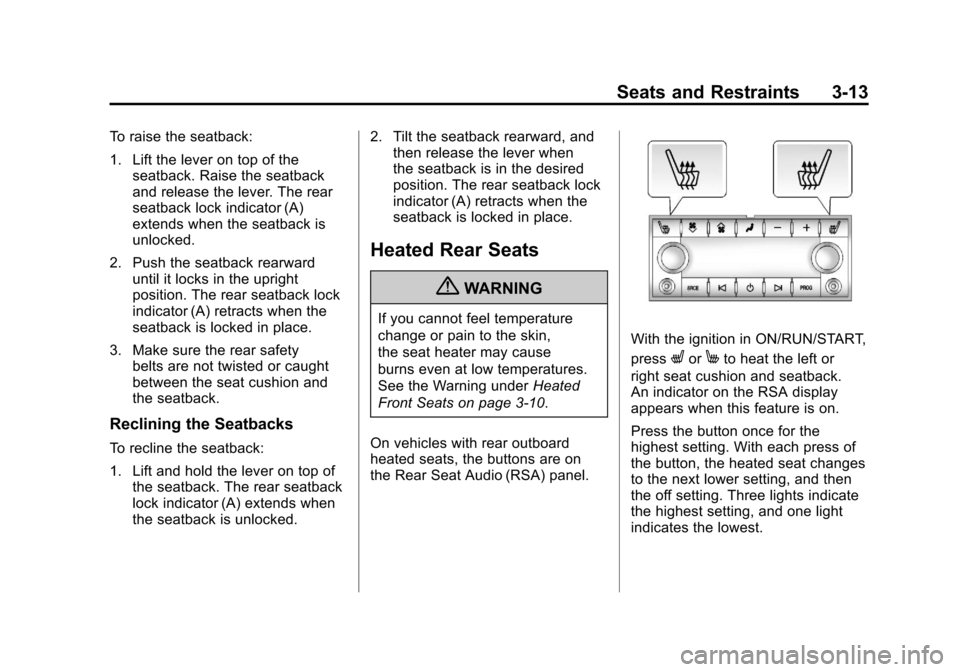
On vehicles with rear outboard
heated seats, the buttons are on
the Rear Seat Audio (RSA) panel.
With the ignition in ON/RUN/START,
press
LorMto heat the left or
right seat cushion and seatback.
An indicator on the RSA display
appears when this feature is on.
Press the button once for the
highest setting. With each press of
the button, the heated seat changes
to the next lower setting, and then
the off setting. Three lights indicate
the highest setting, and one light
indicates the lowest.
Page 127 of 498
Black plate (63,1)Cadillac SRX Owner Manual - 2011
Seats and Restraints 3-63
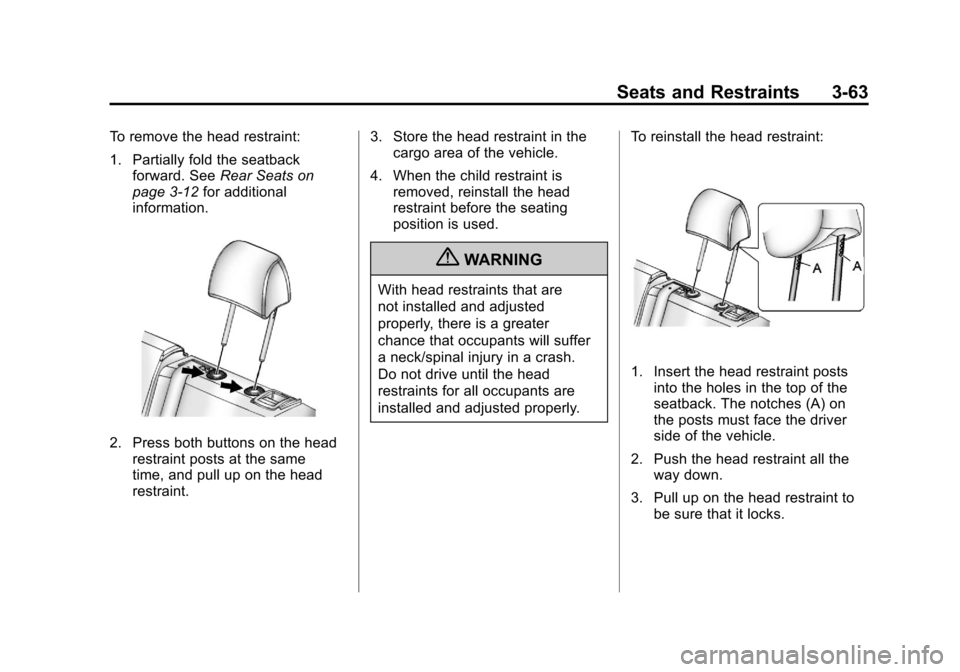
To remove the head restraint:
1. Partially fold the seatbackforward. See Rear Seats on
page 3‑12 for additional
information.
2. Press both buttons on the head restraint posts at the same
time, and pull up on the head
restraint. 3. Store the head restraint in the
cargo area of the vehicle.
4. When the child restraint is removed, reinstall the head
restraint before the seating
position is used.
{WARNING
With head restraints that are
not installed and adjusted
properly, there is a greater
chance that occupants will suffer
a neck/spinal injury in a crash.
Do not drive until the head
restraints for all occupants are
installed and adjusted properly. To reinstall the head restraint:
1. Insert the head restraint posts
into the holes in the top of the
seatback. The notches (A) on
the posts must face the driver
side of the vehicle.
2. Push the head restraint all the way down.
3. Pull up on the head restraint to be sure that it locks.
Page 136 of 498
Black plate (2,1)Cadillac SRX Owner Manual - 2011
4-2 Storage
Cupholders
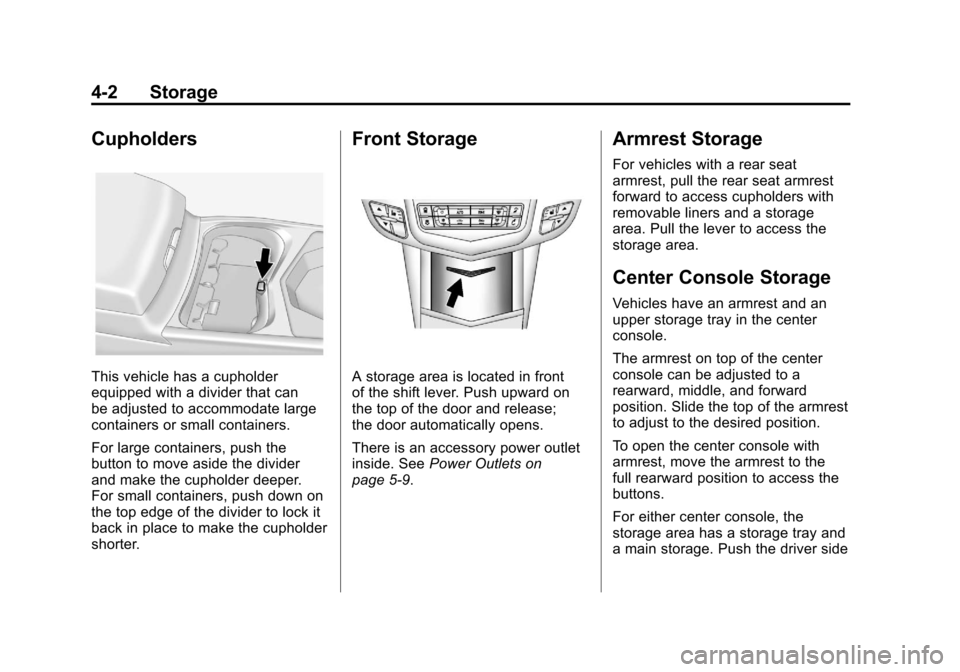
This vehicle has a cupholder
equipped with a divider that can
be adjusted to accommodate large
containers or small containers.
For large containers, push the
button to move aside the divider
and make the cupholder deeper.
For small containers, push down on
the top edge of the divider to lock it
back in place to make the cupholder
shorter.
Front Storage
A storage area is located in front
of the shift lever. Push upward on
the top of the door and release;
the door automatically opens.
There is an accessory power outlet
inside. SeePower Outlets on
page 5‑9.
Armrest Storage
For vehicles with a rear seat
armrest, pull the rear seat armrest
forward to access cupholders with
removable liners and a storage
area. Pull the lever to access the
storage area.
Center Console Storage
Vehicles have an armrest and an
upper storage tray in the center
console.
The armrest on top of the center
console can be adjusted to a
rearward, middle, and forward
position. Slide the top of the armrest
to adjust to the desired position.
To open the center console with
armrest, move the armrest to the
full rearward position to access the
buttons.
For either center console, the
storage area has a storage tray and
a main storage. Push the driver side
Page 141 of 498
Black plate (7,1)Cadillac SRX Owner Manual - 2011
Storage 4-7
U-Rail
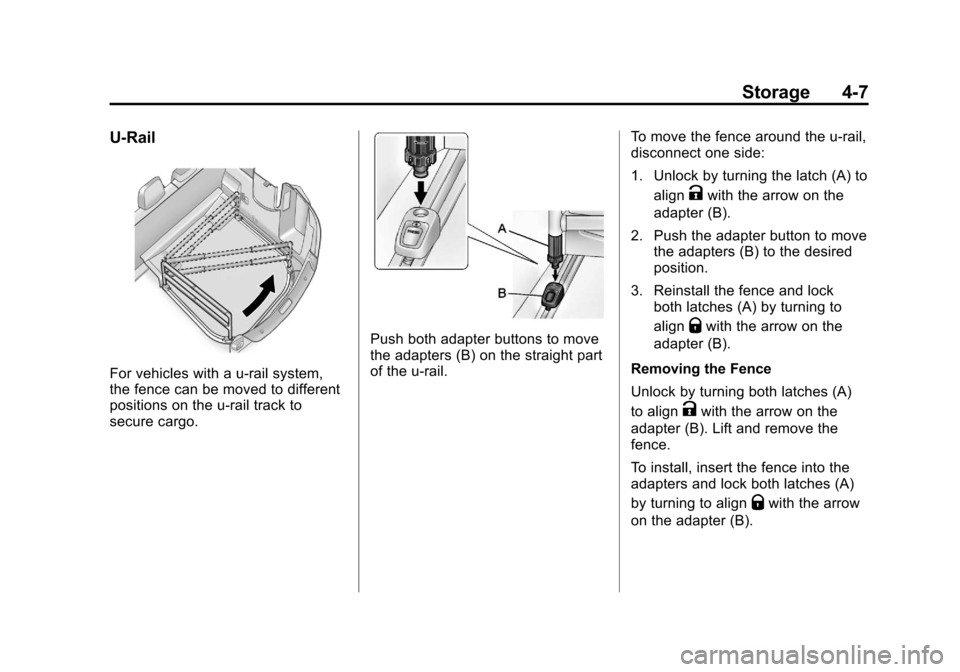
For vehicles with a u-rail system,
the fence can be moved to different
positions on the u-rail track to
secure cargo.
Push both adapter buttons to move
the adapters (B) on the straight part
of the u-rail.To move the fence around the u-rail,
disconnect one side:
1. Unlock by turning the latch (A) to
align
Kwith the arrow on the
adapter (B).
2. Push the adapter button to move the adapters (B) to the desired
position.
3. Reinstall the fence and lock both latches (A) by turning to
align
Qwith the arrow on the
adapter (B).
Removing the Fence
Unlock by turning both latches (A)
to align
Kwith the arrow on the
adapter (B). Lift and remove the
fence.
To install, insert the fence into the
adapters and lock both latches (A)
by turning to align
Qwith the arrow
on the adapter (B).
Page 153 of 498
Black plate (7,1)Cadillac SRX Owner Manual - 2011
Instruments and Controls 5-7
SeeWasher Fluid on page 10‑24 for
information on filling the windshield
washer fluid.
{WARNING
In freezing weather, do not
use your washer until the
windshield is warmed. Otherwise
the washer fluid can form ice on
the windshield, blocking your
vision.
Compass
The vehicle may have a compass
display on the Driver Information
Center (DIC). The compass
receives its heading and other
information from Global Positioning
System (GPS) antenna, StabiliTrak,
and vehicle speed information. Avoid covering the GPS antenna
for long periods of time with objects
that may interfere with the antenna's
ability to receive a satellite signal.
See
Multi-Band Antenna on
page 7‑19 for the location of the
vehicle's antennas. The compass
system is designed to operate for a
certain number of miles or degrees
of turn before needing a signal
from the GPS satellites. When the
compass display shows CAL, drive
the vehicle for a short distance in
an open area where it can receive
a GPS signal. The compass system
will automatically determine when
GPS signal is restored and provide
a heading again. See Compass
Messages on page 5‑34 for more
information on the messages that
may be displayed for the compass.
Clock (Analog Clock)
The analog clock is located on the
instrument panel above the radio.
The clock is not connected with any
other vehicle system and runs by
itself. To adjust the clock:
1. Locate the adjustment buttons directly below the clock face.
2. Push and hold either adjustment button to advance or reverse the
clock hands. Holding the buttons
down will cause the clock to
advance faster. Release the
buttons before reaching the
desired time.
3. Push and release the buttons to increase the time by one minute
increments until the desired time
is reached.
Page 175 of 498
Black plate (29,1)Cadillac SRX Owner Manual - 2011
Instruments and Controls 5-29
DIC Operation and Displays
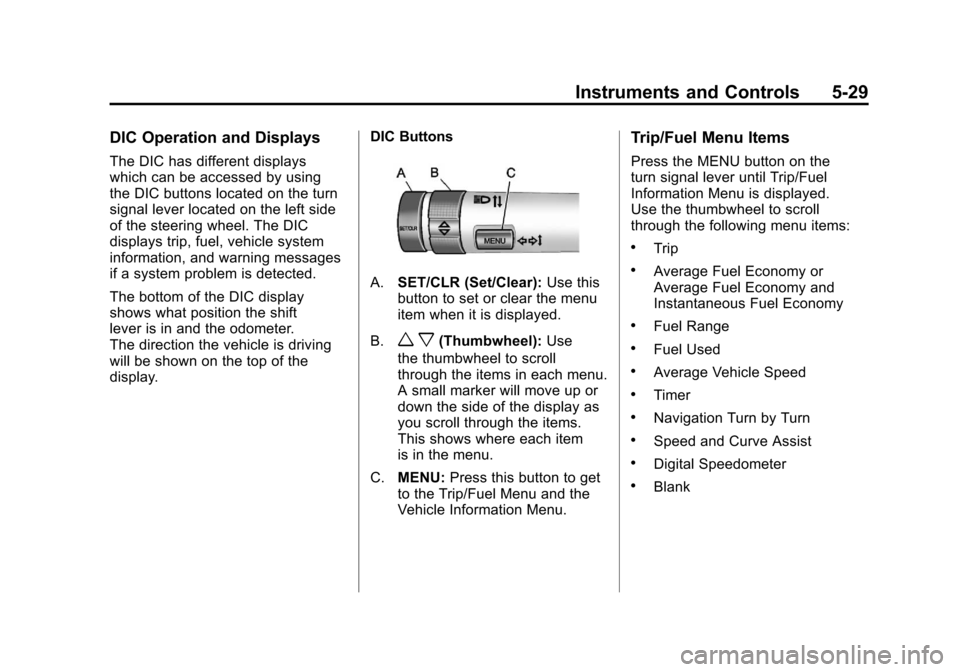
The DIC has different displays
which can be accessed by using
the DIC buttons located on the turn
signal lever located on the left side
of the steering wheel. The DIC
displays trip, fuel, vehicle system
information, and warning messages
if a system problem is detected.
The bottom of the DIC display
shows what position the shift
lever is in and the odometer.
The direction the vehicle is driving
will be shown on the top of the
display.DIC Buttons
A.
SET/CLR (Set/Clear): Use this
button to set or clear the menu
item when it is displayed.
B.
w x(Thumbwheel): Use
the thumbwheel to scroll
through the items in each menu.
A small marker will move up or
down the side of the display as
you scroll through the items.
This shows where each item
is in the menu.
C. MENU: Press this button to get
to the Trip/Fuel Menu and the
Vehicle Information Menu.
Trip/Fuel Menu Items
Press the MENU button on the
turn signal lever until Trip/Fuel
Information Menu is displayed.
Use the thumbwheel to scroll
through the following menu items:
.Trip
.Average Fuel Economy or
Average Fuel Economy and
Instantaneous Fuel Economy
.Fuel Range
.Fuel Used
.Average Vehicle Speed
.Timer
.Navigation Turn by Turn
.Speed and Curve Assist
.Digital Speedometer
.Blank
Page 192 of 498
Black plate (46,1)Cadillac SRX Owner Manual - 2011
5-46 Instruments and Controls
Universal Remote
System
SeeRadio Frequency
Statement on page 13‑20 for
information regarding Part 15
of the Federal Communications
Commission (FCC) rules and
Industry Canada Standards
RSS-210/220/310.
Universal Remote System
Programming
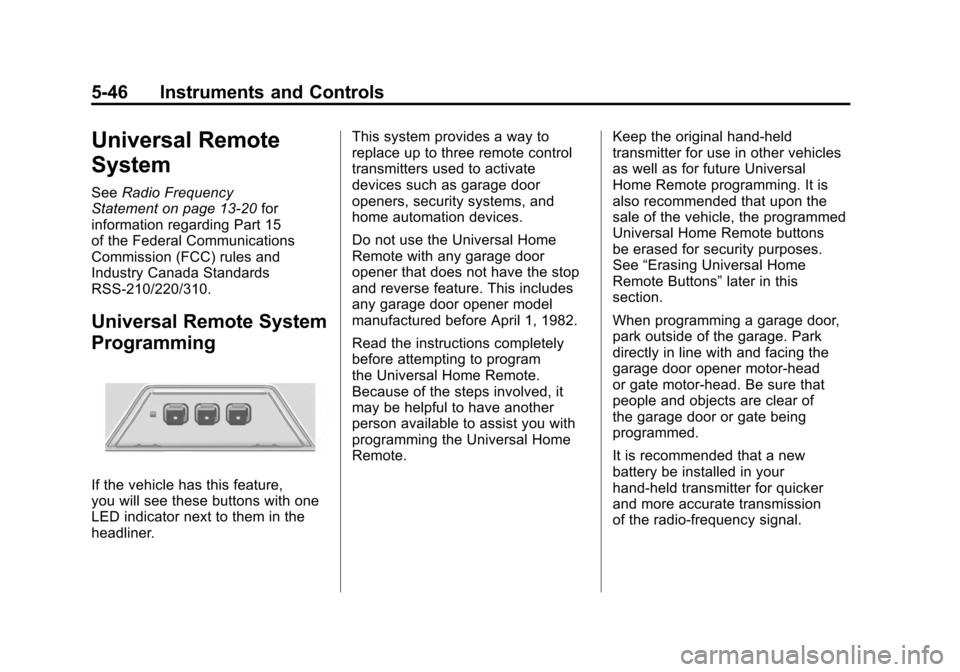
If the vehicle has this feature,
you will see these buttons with one
LED indicator next to them in the
headliner. This system provides a way to
replace up to three remote control
transmitters used to activate
devices such as garage door
openers, security systems, and
home automation devices.
Do not use the Universal Home
Remote with any garage door
opener that does not have the stop
and reverse feature. This includes
any garage door opener model
manufactured before April 1, 1982.
Read the instructions completely
before attempting to program
the Universal Home Remote.
Because of the steps involved, it
may be helpful to have another
person available to assist you with
programming the Universal Home
Remote.
Keep the original hand-held
transmitter for use in other vehicles
as well as for future Universal
Home Remote programming. It is
also recommended that upon the
sale of the vehicle, the programmed
Universal Home Remote buttons
be erased for security purposes.
See
“Erasing Universal Home
Remote Buttons” later in this
section.
When programming a garage door,
park outside of the garage. Park
directly in line with and facing the
garage door opener motor-head
or gate motor-head. Be sure that
people and objects are clear of
the garage door or gate being
programmed.
It is recommended that a new
battery be installed in your
hand-held transmitter for quicker
and more accurate transmission
of the radio-frequency signal.
Page 193 of 498
Black plate (47,1)Cadillac SRX Owner Manual - 2011
Instruments and Controls 5-47
Programming the Universal
Home Remote System
For questions or help programming
the Universal Home Remote
System, call 1‐800‐355‐3515
or go to www.homelink.com.
Programming a garage door opener
involves time-sensitive actions, so
read the entire procedure before
starting. Otherwise, the device will
time out and the procedure will have
to be repeated.
To program up to three devices:
1. Hold the end of yourhand-held transmitter about
3 to 8 cm (1 to 3 in) away
from the Universal Home
Remote buttons while keeping
the indicator light in view.
The hand-held transmitter was
supplied by the manufacturer
of your garage door opener
receiver (motor-head unit). 2. At the same time, press
and hold both the hand-held
transmitter button and one
of the three Universal Home
Remote buttons to be used
to operate the garage door.
Do not release the Universal
Home Remote button or the
hand-held transmitter button
until the indicator light changes
from a slowly to a rapidly
flashing light. You now may
release both buttons.
Some entry gates and
garage door openers may
require substitution of Step 2
with the procedure noted in
“Gate Operator and Canadian
Programming” later in this
section.
3. Press and hold for five seconds the newly-trained Universal
Home Remote button (the button selected in Step 2)
while observing the indicator
light and garage door activation..If the indicator light stays
on continuously or the
garage door starts to move
when the Universal Home
Remote button is pressed
and released, then the
programming is complete.
There is no need to
continue programming
Steps 4 through 6.
.If the Universal Home
Remote indicator
light blinks rapidly for
two seconds, then turns
to a constant light and the
garage door does not
move, continue with the
programming Steps 4
through 6.
It may be helpful to have
another person assist with
the remaining Steps 4
through 6.
Page 194 of 498
Black plate (48,1)Cadillac SRX Owner Manual - 2011
5-48 Instruments and Controls
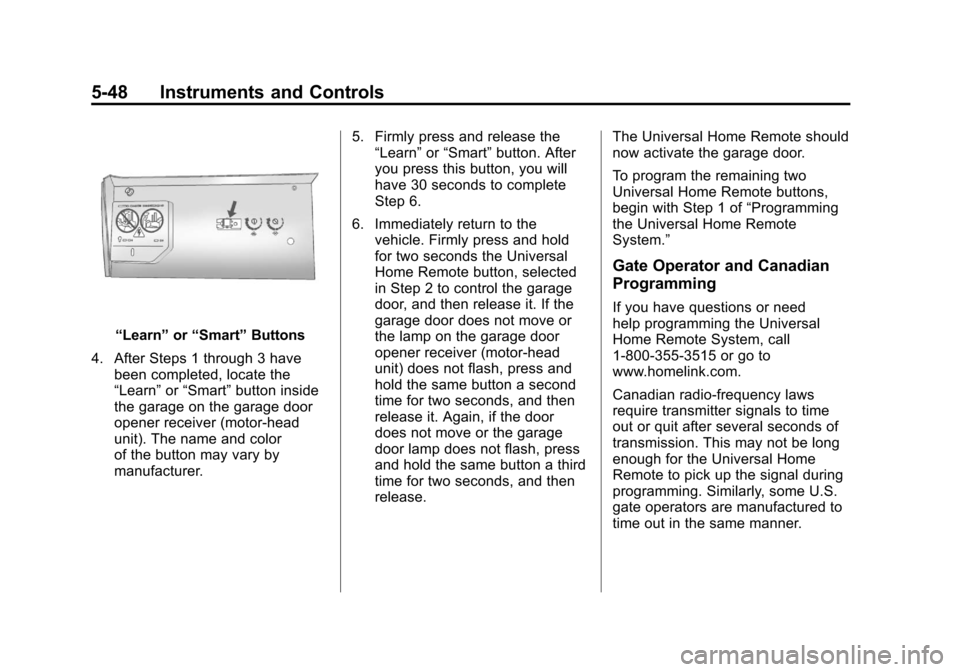
“Learn”or“Smart” Buttons
4. After Steps 1 through 3 have been completed, locate the
“Learn” or“Smart” button inside
the garage on the garage door
opener receiver (motor-head
unit). The name and color
of the button may vary by
manufacturer. 5. Firmly press and release the
“Learn” or“Smart” button. After
you press this button, you will
have 30 seconds to complete
Step 6.
6. Immediately return to the vehicle. Firmly press and hold
for two seconds the Universal
Home Remote button, selected
in Step 2 to control the garage
door, and then release it. If the
garage door does not move or
the lamp on the garage door
opener receiver (motor-head
unit) does not flash, press and
hold the same button a second
time for two seconds, and then
release it. Again, if the door
does not move or the garage
door lamp does not flash, press
and hold the same button a third
time for two seconds, and then
release. The Universal Home Remote should
now activate the garage door.
To program the remaining two
Universal Home Remote buttons,
begin with Step 1 of
“Programming
the Universal Home Remote
System.”
Gate Operator and Canadian
Programming
If you have questions or need
help programming the Universal
Home Remote System, call
1‐800‐355‐3515 or go to
www.homelink.com.
Canadian radio-frequency laws
require transmitter signals to time
out or quit after several seconds of
transmission. This may not be long
enough for the Universal Home
Remote to pick up the signal during
programming. Similarly, some U.S.
gate operators are manufactured to
time out in the same manner.