buttons CADILLAC SRX 2011 2.G Owners Manual
[x] Cancel search | Manufacturer: CADILLAC, Model Year: 2011, Model line: SRX, Model: CADILLAC SRX 2011 2.GPages: 498, PDF Size: 7.62 MB
Page 14 of 498
Black plate (8,1)Cadillac SRX Owner Manual - 2011
1-8 In Brief
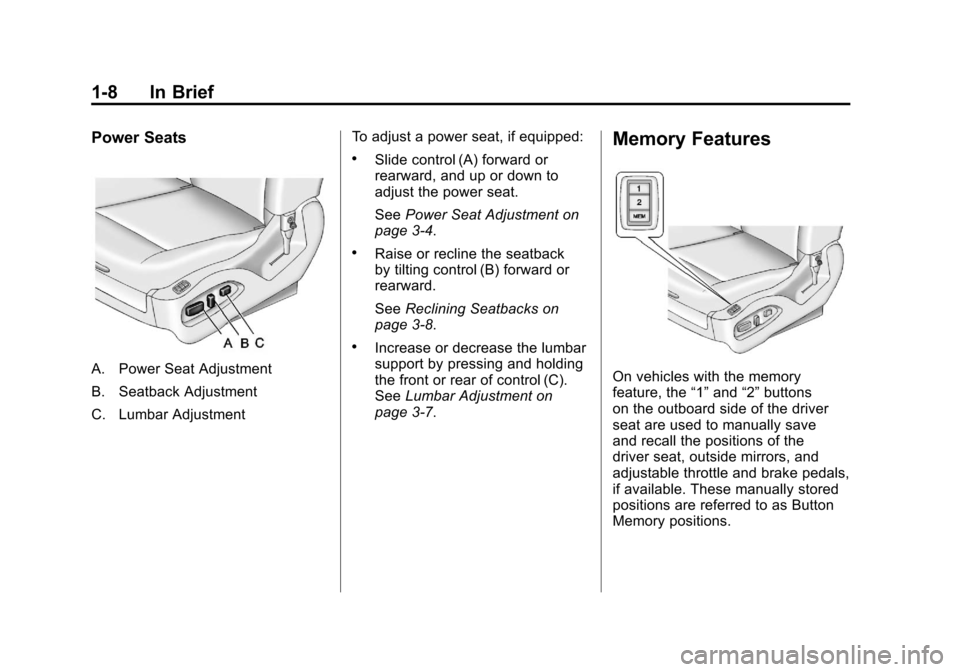
Power Seats
A. Power Seat Adjustment
B. Seatback Adjustment
C. Lumbar AdjustmentTo adjust a power seat, if equipped:
.Slide control (A) forward or
rearward, and up or down to
adjust the power seat.
See
Power Seat Adjustment on
page 3‑4.
.Raise or recline the seatback
by tilting control (B) forward or
rearward.
See Reclining Seatbacks on
page 3‑8.
.Increase or decrease the lumbar
support by pressing and holding
the front or rear of control (C).
See Lumbar Adjustment on
page 3‑7.
Memory Features
On vehicles with the memory
feature, the “1”and “2”buttons
on the outboard side of the driver
seat are used to manually save
and recall the positions of the
driver seat, outside mirrors, and
adjustable throttle and brake pedals,
if available. These manually stored
positions are referred to as Button
Memory positions.
Page 15 of 498
Black plate (9,1)Cadillac SRX Owner Manual - 2011
In Brief 1-9
The vehicle will also automatically
save driver seat, outside mirror,
and adjustable throttle and brake
pedal positions to the current driver
Remote Keyless Entry (RKE)
transmitter when the ignition is
turned off. These automatically
stored positions are referred to
as RKE Memory positions.
Storing Button Memory Positions
To save positions into Button
Memory:
1. Adjust the driver seat,seatback recliner, both outside
mirrors, and adjustable pedals,
if available, to the desired driving
positions.
2. Press and release the MEM (Memory) button.
3. Press “1”until a beep sounds.
4. Repeat Steps 1 through 3 for a second driver using “2.”To recall the manually saved
Button Memory positions, press
and hold
“1”or“2.” The driver seat,
outside mirrors, and adjustable
pedals, if available, move to the
positions stored to those buttons
when pressed. Releasing “1”or“2”
before the stored positions are
reached stops the recall.
To automatically recall RKE Memory
positions, unlock the driver door
with the RKE transmitter, and open
the driver door. On vehicles with
Keyless Access, opening the driver
door when an RKE transmitter
is present will activate the RKE
Memory recall. If the driver door
is already open, pressing the
RKE transmitter Kbutton will also
activate the RKE Memory recall.
The driver seat, outside mirrors,
and pedals, if available, will move to
the previously saved RKE Memory
positions. See
“Memory Seats” underPower
Seat Adjustment on page 3‑4 for
more information.
Easy Exit Driver Seat
This feature moves the seat
rearward allowing the driver more
room to exit the vehicle.
To activate, place the ignition in
OFF and open the driver door. If the
driver door is already open, placing
the ignition in OFF will activate the
easy exit driver seat.
This feature is turned on or off using
the vehicle personalization menu.
See “Easy Exit Driver Seat” under
Vehicle Personalization on
page 5‑40 for more information.
Page 16 of 498
Black plate (10,1)Cadillac SRX Owner Manual - 2011
1-10 In Brief
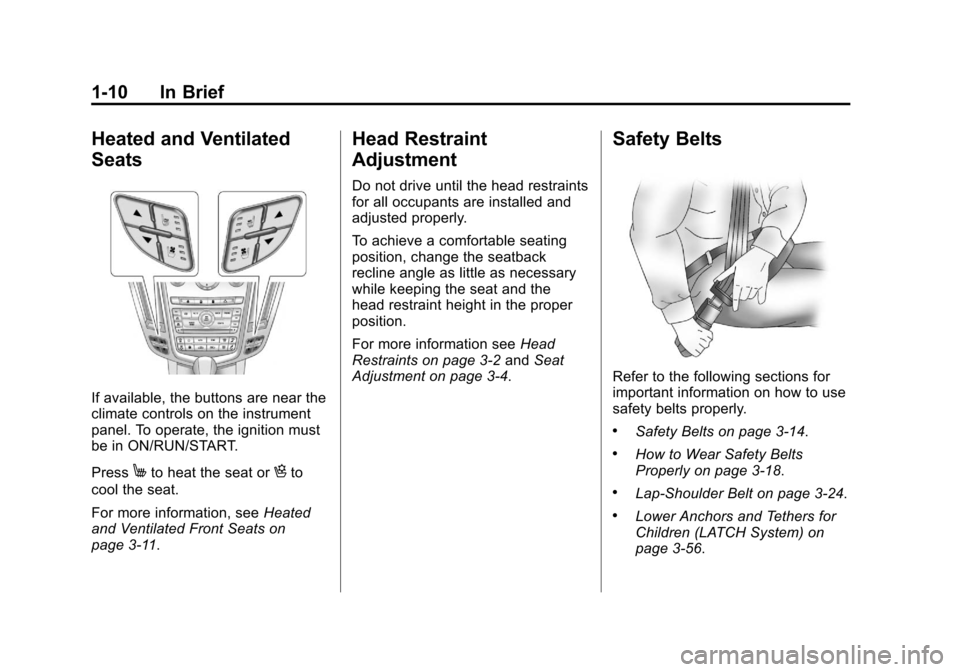
Heated and Ventilated
Seats
If available, the buttons are near the
climate controls on the instrument
panel. To operate, the ignition must
be in ON/RUN/START.
Press
Mto heat the seat orHto
cool the seat.
For more information, see Heated
and Ventilated Front Seats on
page 3‑11.
Head Restraint
Adjustment
Do not drive until the head restraints
for all occupants are installed and
adjusted properly.
To achieve a comfortable seating
position, change the seatback
recline angle as little as necessary
while keeping the seat and the
head restraint height in the proper
position.
For more information see Head
Restraints on page 3‑2 andSeat
Adjustment on page 3‑4.
Safety Belts
Refer to the following sections for
important information on how to use
safety belts properly.
.Safety Belts on page 3‑14.
.How to Wear Safety Belts
Properly on page 3‑18.
.Lap-Shoulder Belt on page 3‑24.
.Lower Anchors and Tethers for
Children (LATCH System) on
page 3‑56.
Page 23 of 498
Black plate (17,1)Cadillac SRX Owner Manual - 2011
In Brief 1-17
Vehicle Features
Radio(s)
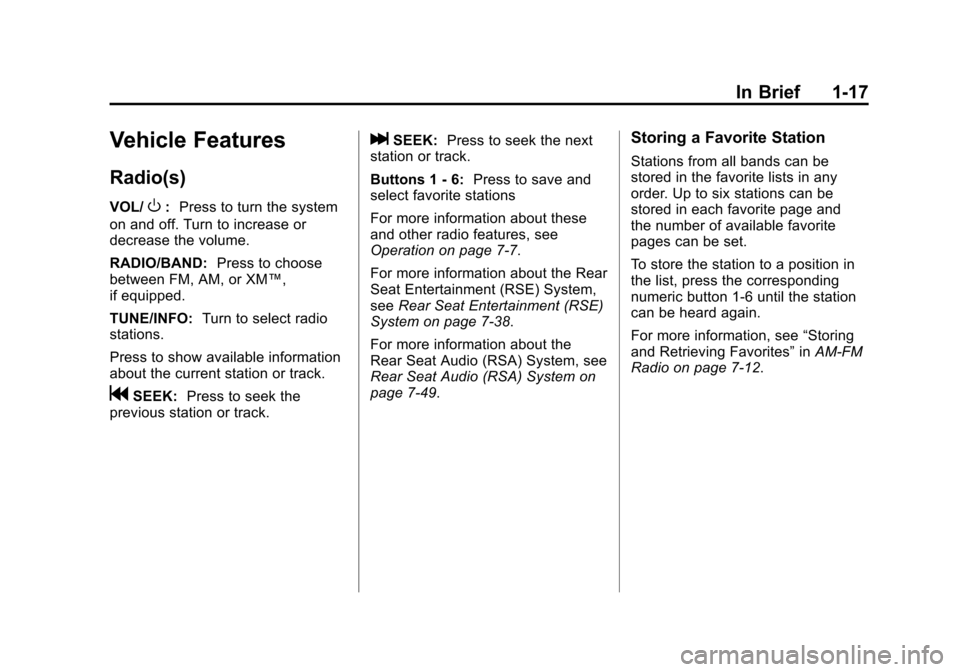
VOL/O:Press to turn the system
on and off. Turn to increase or
decrease the volume.
RADIO/BAND: Press to choose
between FM, AM, or XM™,
if equipped.
TUNE/INFO: Turn to select radio
stations.
Press to show available information
about the current station or track.
gSEEK: Press to seek the
previous station or track.
lSEEK: Press to seek the next
station or track.
Buttons 1 ‐6: Press to save and
select favorite stations
For more information about these
and other radio features, see
Operation on page 7‑7.
For more information about the Rear
Seat Entertainment (RSE) System,
see Rear Seat Entertainment (RSE)
System on page 7‑38.
For more information about the
Rear Seat Audio (RSA) System, see
Rear Seat Audio (RSA) System on
page 7‑49.Storing a Favorite Station
Stations from all bands can be
stored in the favorite lists in any
order. Up to six stations can be
stored in each favorite page and
the number of available favorite
pages can be set.
To store the station to a position in
the list, press the corresponding
numeric button 1-6 until the station
can be heard again.
For more information, see “Storing
and Retrieving Favorites” inAM-FM
Radio on page 7‑12.
Page 34 of 498
Black plate (28,1)Cadillac SRX Owner Manual - 2011
1-28 In Brief
SeeRadio Frequency
Statement on page 13‑20 for
information regarding Part 15
of the Federal Communications
Commission (FCC) rules and
Industry Canada Standards
RSS-210/220/310.
OnStar Steering Wheel
Controls
This vehicle may have a Talk/Mute
button that can be used to interact
with OnStar Hands-Free calling.
See Steering Wheel Controls on
page 5‑2 for more information.
On some vehicles, the mute button
can be used to dial numbers into
voice mail systems, or to dial phone
extensions. See the OnStar Owner's
Guide for more information.
Your Responsibility
Increase the volume of the radio
if the OnStar Advisor cannot be
heard.
If the light next to the OnStar
buttons is red, the system may
not be functioning properly. Push
the
Qbutton and request a vehicle
diagnostic. If the light appears clear
(no light appears), your OnStar
subscription has expired and all
services have been deactivated.
Push the
Qbutton to confirm that
the OnStar equipment is active.
Page 57 of 498
Black plate (23,1)Cadillac SRX Owner Manual - 2011
Keys, Doors and Windows 2-23
A noise may be heard during the
resetting of the power foldaway
mirrors. This sound is normal after a
manual folding operation.
Heated Mirrors
<
(Rear Window Defogger):
Press to heat the mirrors.
See “Rear Window Defogger” under
Dual Automatic Climate Control
System on page 8‑1 for more
information.
Automatic Dimming
Mirror
If the vehicle has the automatic
dimming mirror, the driver outside
mirror automatically adjusts for the
glare of headlamps behind you.
Reverse Tilt Mirrors
If the vehicle is equipped with
memory seats, there is an option to
have the mirrors tilt down, when in
R (Reverse), to more easily see the
ground near the vehicle.
When the vehicle is shifted to
R (Reverse), both the driver and
passenger mirrors will tilt downward.
They will return to their previous
position when the vehicle is shifted
out of R (Reverse), the ignition is
turned to OFF, or the vehicle is left
in R (Reverse).
This feature can be turned on or
off. See Vehicle Personalization on
page 5‑40.
Interior Mirrors
Manual Rearview Mirror
Adjust the inside rearview mirror
for a clear view of the area behind
your vehicle. To avoid glare of the
headlamps from behind, push the
tab forward for daytime and pull it
for nighttime use.
Vehicles with OnStar
®have three
additional control buttons located at
the bottom of the mirror. See your
dealer for more information about
OnStar and how to subscribe to it.
See the OnStar Owner's Guide for
more information about the services
OnStar provides.
Page 58 of 498
Black plate (24,1)Cadillac SRX Owner Manual - 2011
2-24 Keys, Doors and Windows
Automatic Dimming
Rearview Mirror
The vehicle may have an automatic
dimming inside rearview mirror.
Automatic dimming reduces the
glare from the headlamps of the
vehicle behind you. The dimming
feature and the indicator light come
on each time the vehicle is started.
Vehicles with OnStar
®have three
additional control buttons located at
the bottom of the mirror. See your
dealer for more information about
OnStar and how to subscribe to it.
See the OnStar Owner's Guide for
more information about the services
OnStar provides.
Cleaning the Mirror
Do not spray glass cleaner directly
on the mirror. Use a soft towel
dampened with water.
Windows
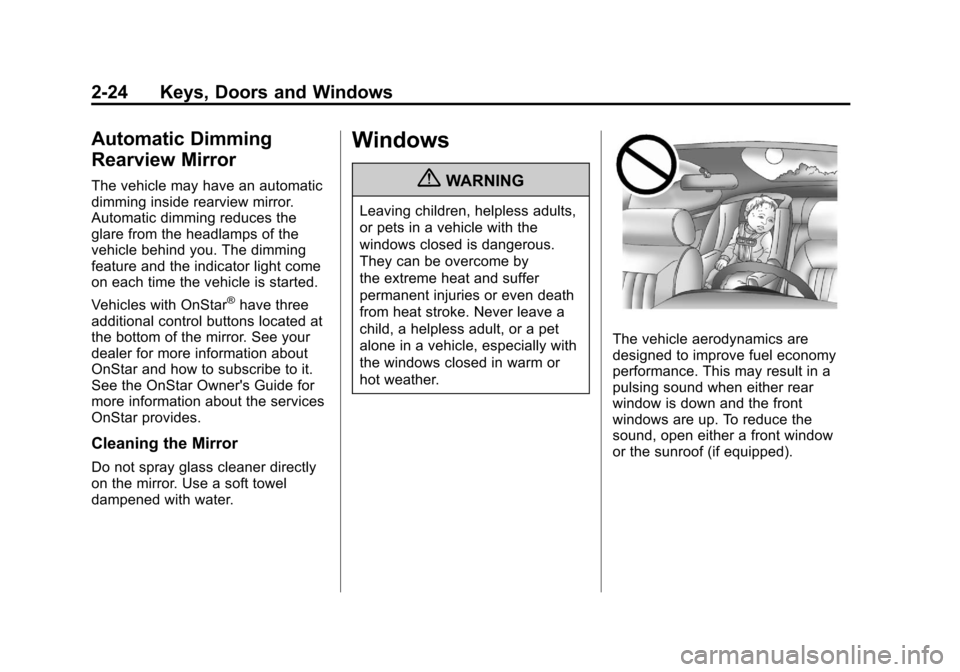
{WARNING
Leaving children, helpless adults,
or pets in a vehicle with the
windows closed is dangerous.
They can be overcome by
the extreme heat and suffer
permanent injuries or even death
from heat stroke. Never leave a
child, a helpless adult, or a pet
alone in a vehicle, especially with
the windows closed in warm or
hot weather.
The vehicle aerodynamics are
designed to improve fuel economy
performance. This may result in a
pulsing sound when either rear
window is down and the front
windows are up. To reduce the
sound, open either a front window
or the sunroof (if equipped).
Page 69 of 498
Black plate (5,1)Cadillac SRX Owner Manual - 2011
Seats and Restraints 3-5
To adjust the lumbar support, see
Lumbar Adjustment on page 3‑7.
Memory Seats
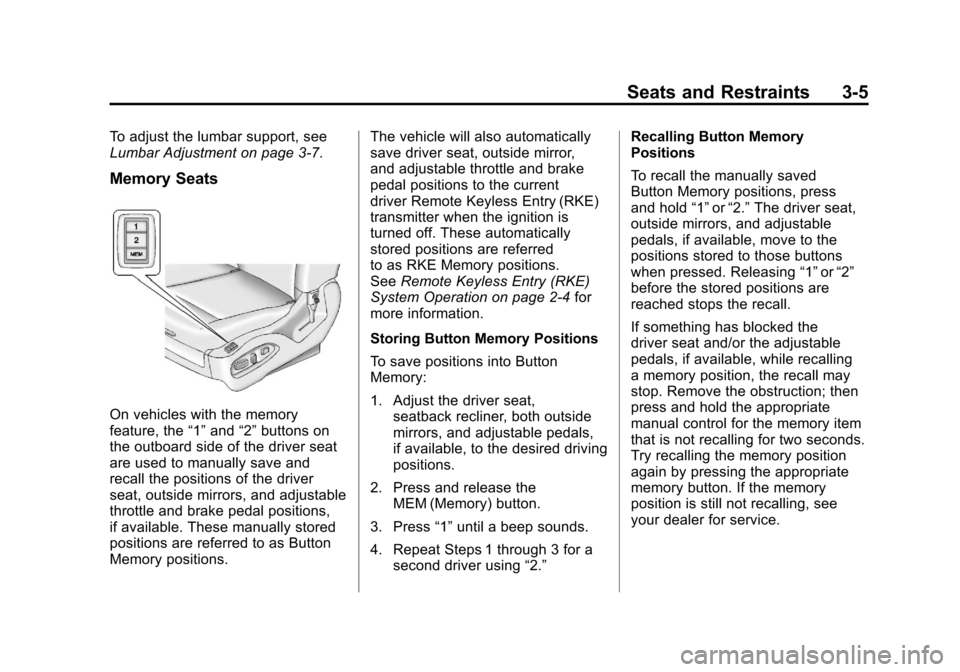
On vehicles with the memory
feature, the“1”and “2”buttons on
the outboard side of the driver seat
are used to manually save and
recall the positions of the driver
seat, outside mirrors, and adjustable
throttle and brake pedal positions,
if available. These manually stored
positions are referred to as Button
Memory positions. The vehicle will also automatically
save driver seat, outside mirror,
and adjustable throttle and brake
pedal positions to the current
driver Remote Keyless Entry (RKE)
transmitter when the ignition is
turned off. These automatically
stored positions are referred
to as RKE Memory positions.
See
Remote Keyless Entry (RKE)
System Operation on page 2‑4 for
more information.
Storing Button Memory Positions
To save positions into Button
Memory:
1. Adjust the driver seat, seatback recliner, both outside
mirrors, and adjustable pedals,
if available, to the desired driving
positions.
2. Press and release the MEM (Memory) button.
3. Press “1”until a beep sounds.
4. Repeat Steps 1 through 3 for a second driver using “2.”Recalling Button Memory
Positions
To recall the manually saved
Button Memory positions, press
and hold
“1”or“2.” The driver seat,
outside mirrors, and adjustable
pedals, if available, move to the
positions stored to those buttons
when pressed. Releasing “1”or“2”
before the stored positions are
reached stops the recall.
If something has blocked the
driver seat and/or the adjustable
pedals, if available, while recalling
a memory position, the recall may
stop. Remove the obstruction; then
press and hold the appropriate
manual control for the memory item
that is not recalling for two seconds.
Try recalling the memory position
again by pressing the appropriate
memory button. If the memory
position is still not recalling, see
your dealer for service.
Page 70 of 498
Black plate (6,1)Cadillac SRX Owner Manual - 2011
3-6 Seats and Restraints
Recalling RKE Memory Positions
(Memory Remote Recall)
The Memory Remote Recall feature
can recall the driver seat, outside
mirrors, and adjustable pedals,
if available, to previously stored
RKE Memory positions when
entering the vehicle.
Every time the ignition is
placed in OFF, the positions
of the driver seat, outside mirrors,
and adjustable pedals, if available,
are automatically stored to the RKE
transmitter that was used to start
the vehicle. These positions are
called RKE Memory positions and
may be different than the previously
mentioned Button Memory positions
saved to the“1”or“2” buttons. To automatically recall RKE
Memory positions, unlock the driver
door with the RKE transmitter, and
open the driver door. On vehicles
with Keyless Access, opening the
driver door when an RKE transmitter
is present will activate the RKE
Memory recall. If the driver door
is already open, pressing the
RKE transmitter
Kbutton will also
activate the RKE Memory recall.
The driver seat, outside mirrors,
and pedals, if available, will move to
the previously saved RKE Memory
positions.
This feature is turned on or off using
the vehicle personalization menu.
See “Memory Remote Recall”
under Vehicle Personalization on
page 5‑40 for more information. To stop recall movement, press
one of the memory, power mirror,
or power seat controls, or the
adjustable pedal switch, if available.
If something has blocked the
driver seat and/or the adjustable
pedals, if available, while recalling
a memory position, the recall
may stop. Remove the obstruction;
then press and hold the appropriate
manual control for the memory item
that is not recalling for two seconds.
Try recalling the memory position
again by opening the driver door
and pressing the RKE transmitter
K
button. If the memory position is
still not recalling, see your dealer
for service.
Page 74 of 498
Black plate (10,1)Cadillac SRX Owner Manual - 2011
3-10 Seats and Restraints
Heated Front Seats
{WARNING
If you cannot feel temperature
change or pain to the skin, the
seat heater may cause burns
even at low temperatures.
To reduce the risk of burns,
people with such a condition
should use care when using
the seat heater, especially for
long periods of time. Do not
place anything on the seat that
insulates against heat, such as
a blanket, cushion, cover or
similar item. This may cause
the seat heater to overheat.
An overheated seat heater may
cause a burn or may damage
the seat.
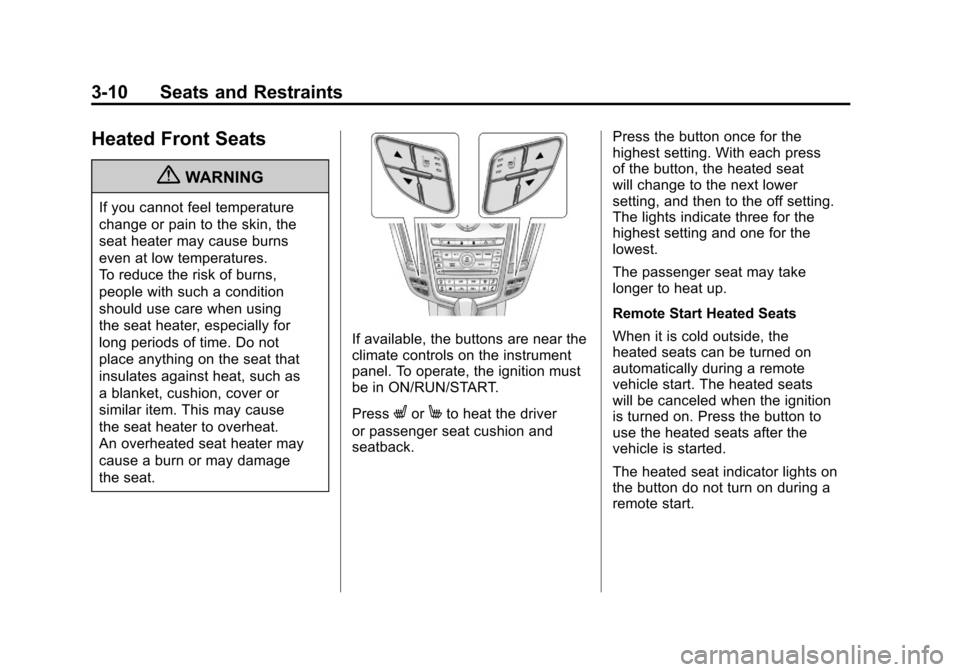
If available, the buttons are near the
climate controls on the instrument
panel. To operate, the ignition must
be in ON/RUN/START.
Press
LorMto heat the driver
or passenger seat cushion and
seatback. Press the button once for the
highest setting. With each press
of the button, the heated seat
will change to the next lower
setting, and then to the off setting.
The lights indicate three for the
highest setting and one for the
lowest.
The passenger seat may take
longer to heat up.
Remote Start Heated Seats
When it is cold outside, the
heated seats can be turned on
automatically during a remote
vehicle start. The heated seats
will be canceled when the ignition
is turned on. Press the button to
use the heated seats after the
vehicle is started.
The heated seat indicator lights on
the button do not turn on during a
remote start.