reset CADILLAC SRX 2011 2.G User Guide
[x] Cancel search | Manufacturer: CADILLAC, Model Year: 2011, Model line: SRX, Model: CADILLAC SRX 2011 2.GPages: 498, PDF Size: 7.62 MB
Page 216 of 498
Black plate (12,1)Cadillac SRX Owner Manual - 2011
7-12 Infotainment System
Radio
AM-FM Radio
Control Buttons
The buttons used to control the
radio are:
RADIO/BAND:Press to turn the
radio on and choose between AM,
FM, and XM™, if equipped.
MENU/SELECT: Press and turn to
navigate the available menus.
TUNE: Turn to search for stations.
INFO: Press to display additional
information that may be available for
the current song.
lSEEK/gSEEK: Press to
search for stations.
FAV: Press to open the
favorites list.
1 to 6: Press to select preset
stations.
k(Play/Pause): Press to pause
time shifted content, if equipped.
RDS (Radio Data System)
The radio may have RDS. The RDS
feature is available for use only on
FM stations that broadcast RDS
information. This feature only works
when the information from the radio
station is available. In rare cases,
a radio station could broadcast
incorrect information that causes the
radio features to work improperly.
If this happens, contact the radio
station.
While the radio is tuned to an
FM-RDS station, the station name
or call letters display.
Radio Menus
Radio menus are available for AM
and FM.
Turn the MENU/SELECT knob to
open the main radio menu for that
frequency.
Selecting a Band
Press the RADIO/BAND button
to choose AM, FM, or XM™,
if equipped. The last station that
was playing starts playing again.
Selecting a Station
Seek Tuning (Radio with CD)
If the radio station is not known:
Briefly press
gSEEK orlSEEK.
To automatically search for the next
available station. If a station is not
found, the radio switches to a more
sensitive search level. If a station
still is not found, the frequency that
was last active begins to play.
If the radio station is known:
Press and hold
gSEEK or
lSEEK until the station on the
display is reached, then release
the button.
Page 254 of 498
Black plate (50,1)Cadillac SRX Owner Manual - 2011
7-50 Infotainment System
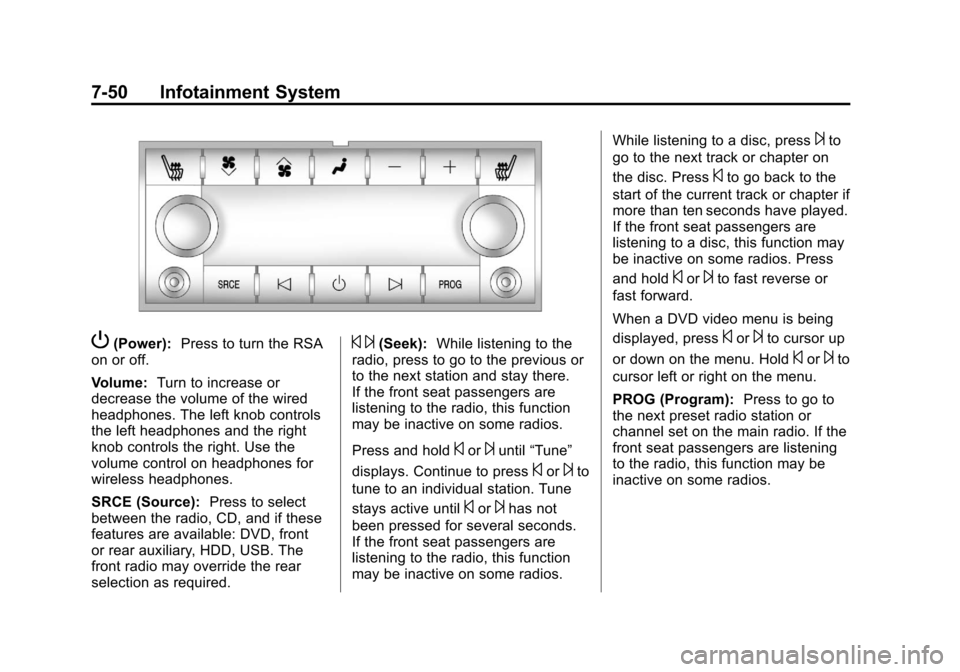
P(Power):Press to turn the RSA
on or off.
Volume: Turn to increase or
decrease the volume of the wired
headphones. The left knob controls
the left headphones and the right
knob controls the right. Use the
volume control on headphones for
wireless headphones.
SRCE (Source): Press to select
between the radio, CD, and if these
features are available: DVD, front
or rear auxiliary, HDD, USB. The
front radio may override the rear
selection as required.© ¨(Seek): While listening to the
radio, press to go to the previous or
to the next station and stay there.
If the front seat passengers are
listening to the radio, this function
may be inactive on some radios.
Press and hold
©or¨until “Tune”
displays. Continue to press
©or¨to
tune to an individual station. Tune
stays active until
©or¨has not
been pressed for several seconds.
If the front seat passengers are
listening to the radio, this function
may be inactive on some radios. While listening to a disc, press
¨to
go to the next track or chapter on
the disc. Press
©to go back to the
start of the current track or chapter if
more than ten seconds have played.
If the front seat passengers are
listening to a disc, this function may
be inactive on some radios. Press
and hold
©or¨to fast reverse or
fast forward.
When a DVD video menu is being
displayed, press
©or¨to cursor up
or down on the menu. Hold
©or¨to
cursor left or right on the menu.
PROG (Program): Press to go to
the next preset radio station or
channel set on the main radio. If the
front seat passengers are listening
to the radio, this function may be
inactive on some radios.
Page 310 of 498
Black plate (34,1)Cadillac SRX Owner Manual - 2011
9-34 Driving and Operating
Ride Control Systems
Traction Control
System (TCS)
The vehicle has a Traction Control
System (TCS) that limits wheel spin.
On a front-wheel-drive vehicle,
the system operates if it senses
that one or both of the front wheels
are spinning or beginning to lose
traction. On an All-Wheel-Drive
(AWD) vehicle, the system will
operate if it senses that any of the
wheels are spinning or beginning to
lose traction. When this happens,
the system brakes the spinning
wheel(s) and/or reduces engine
power to limit wheel spin.
The system may be heard or felt
while it is working, but this is
normal.
TCS is on whenever the vehicle
is started. To limit wheel spin,
especially in slippery roadconditions, the system should
always be left on. But, TCS can
be turned off if needed.
dflashes to indicate that the
traction control system is active.
If there is a problem detected
with TCS, SERVICE TRACTION
CONTROL and SERVICE
STABILITRAK may be displayed on
the Driver Information Center (DIC)
and
dwill be on. See Ride Control
System Messages on page 5‑37.
When this message is displayed
and
dcomes on and stays on,
the vehicle is safe to drive but the
system is not operational. Driving
should be adjusted accordingly. Notice:
Do not repeatedly brake
or accelerate heavily when TCS is
off. The vehicle's driveline could
be damaged.
If
dcomes on and stays on, reset
the system by:
1. Stopping the vehicle.
2. Turning the engine off and waiting 15 seconds.
3. Starting the engine.
If
dstill comes on and stays on at a
speed above 20 km/h (13 mph), see
your dealer for service.
A chime may also sound when the
light comes on steady.
The
gis located on the console.
Page 312 of 498
Black plate (36,1)Cadillac SRX Owner Manual - 2011
9-36 Driving and Operating
When the stability control system
activates, the Traction Control
System (TCS)/StabiliTrak light
will flash on the instrument panel.
This also occurs when traction
control is activated. A noise may
be heard or vibration may be felt
in the brake pedal. This is normal.
Continue to steer the vehicle in the
intended direction.
If there is a problem detected
with StabiliTrak, SERVICE
STABILITRAK is displayed on the
Driver Information Center (DIC)
and
dwill stay on. SeeVehicleMessages on page 5‑32. When
this message is displayed and/or
d
comes on and stays on, the vehicle
is safe to drive but the system is
not operational. Driving should be
adjusted accordingly. See
Ride
Control System Messages on
page 5‑37.
If
dcomes on and stays on, reset
the system by:
1. Stopping the vehicle.
2. Turning the engine off and waiting 15 seconds.
3. Starting the engine.
If
dstill comes on and stays on at a
speed above 20 km/h (13 mph), see
your dealer for service.
gis located on the console.
StabiliTrak can be turned off
if needed by pressing and
holding
guntilgandicome on the
instrument panel. When StabiliTrak
is turned off, the system will not
assist with directional control of the
vehicle or limit wheel spin. Driving
should be adjusted accordingly.
Press and release
gagain to turn
the system back on.
Page 352 of 498
Black plate (14,1)Cadillac SRX Owner Manual - 2011
10-14 Vehicle Care
What to Do with Used Oil
Used engine oil contains certain
elements that can be unhealthy for
your skin and could even cause
cancer. Do not let used oil stay on
your skin for very long. Clean your
skin and nails with soap and water,
or a good hand cleaner. Wash or
properly dispose of clothing or rags
containing used engine oil. See the
manufacturer's warnings about the
use and disposal of oil products.
Used oil can be a threat to the
environment. If you change your
own oil, be sure to drain all the
oil from the filter before disposal.
Never dispose of oil by putting it
in the trash or pouring it on the
ground, into sewers, or into streams
or bodies of water. Recycle it by
taking it to a place that collects
used oil.
Engine Oil Life System
When to Change Engine Oil
This vehicle has a computer system
that indicates when to change the
engine oil and filter. This is based
on engine revolutions and engine
temperature, and not on mileage.
Based on driving conditions, the
mileage at which an oil change is
indicated can vary considerably.
For the oil life system to work
properly, the system must be reset
every time the oil is changed.
When the system has calculated
that oil life has been diminished,
it indicates that an oil change is
necessary. A CHANGE ENGINE
OIL SOON message comes on. See
Engine Oil Messages on page 5‑35.
Change the oil as soon as possible
within the next 1 000 km (600 miles).It is possible that, if driving under
the best conditions, the oil life
system might indicate that an oil
change is not necessary for up to a
year. The engine oil and filter must
be changed at least once a year
and at this time the system must
be reset. Your dealer has trained
service people who will perform
this work and reset the system.
It is also important to check the
oil regularly over the course of
an oil drain interval and keep it
at the proper level.
If the system is ever reset
accidentally, the oil must be
changed at 5 000 km (3,000 miles)
since the last oil change.
Remember to reset the oil life
system whenever the oil is
changed.
Page 353 of 498
Black plate (15,1)Cadillac SRX Owner Manual - 2011
Vehicle Care 10-15
How to Reset the Engine Oil
Life System
Reset the system whenever the
engine oil is changed so that the
system can calculate the next
engine oil change. To reset the
system:
1. Using the DIC MENU button andthumbwheel on the turn signal
lever, display REMAINING OIL
LIFE on the DIC. See Driver
Information Center (DIC) on
page 5‑28 andEngine Oil
Messages on page 5‑35.
2. Press the SET button to reset the oil life at 100%.
Be careful not to reset the oil
life display accidentally at any
time other than after the oil is
changed. It cannot be reset
accurately until the next oil
change. The oil life system can also be reset
as follows:
1. Turn the ignition on with the
engine off.
2. Fully press and release the accelerator pedal three times
within five seconds.
If the CHANGE ENGINE OIL
SOON message is not on, the
system is reset.
The system is reset when the
CHANGE ENGINE OIL SOON
message is off.
If the CHANGE ENGINE OIL SOON
message comes back on when the
vehicle is started, the engine oil life
system has not been reset. Repeat
the procedure.
Automatic Transmission
Fluid
How to Check Automatic
Transmission Fluid
It is not necessary to check
the transmission fluid level.
A transmission fluid leak is the
only reason for fluid loss. If a leak
occurs, take the vehicle to your
dealer service department and
have it repaired as soon as
possible.
There is a special procedure
for checking and changing the
transmission fluid. Because this
procedure is difficult, you should
have this done at your dealer
service department. Contact your
dealer for additional information
or the procedure can be found in
the service manual. To purchase
a service manual, see Service
Publications Ordering Information
on page 13‑15.
Page 370 of 498
Black plate (32,1)Cadillac SRX Owner Manual - 2011
10-32 Vehicle Care
4. After wiper blade replacement,ensure that cover hook slides
into slot in blade assembly.
5. Snap cover down to secure.
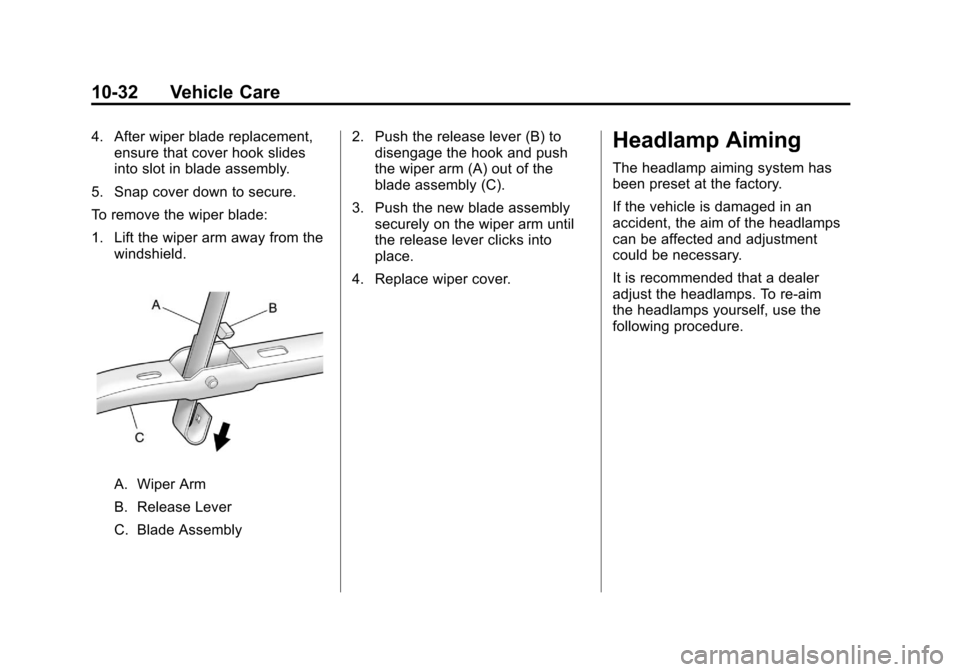
To remove the wiper blade:
1. Lift the wiper arm away from the windshield.
A. Wiper Arm
B. Release Lever
C. Blade Assembly 2. Push the release lever (B) to
disengage the hook and push
the wiper arm (A) out of the
blade assembly (C).
3. Push the new blade assembly securely on the wiper arm until
the release lever clicks into
place.
4. Replace wiper cover.
Headlamp Aiming
The headlamp aiming system has
been preset at the factory.
If the vehicle is damaged in an
accident, the aim of the headlamps
can be affected and adjustment
could be necessary.
It is recommended that a dealer
adjust the headlamps. To re-aim
the headlamps yourself, use the
following procedure.
Page 407 of 498
Black plate (69,1)Cadillac SRX Owner Manual - 2011
Vehicle Care 10-69
After the tires have been
rotated, adjust the front and rear
inflation pressures as shown on
the Tire and Loading Information
label. SeeTire Pressure on
page 10‑61 andVehicle Load
Limits on page 9‑12.
Reset the Tire Pressure Monitor
System. See Tire Pressure
Monitor Operation on
page 10‑64.
Make certain that all wheel
nuts are properly tightened.
See “Wheel Nut Torque” under
Capacities and Specifications on
page 12‑2.
{WARNING
Rust or dirt on a wheel, or on the
parts to which it is fastened, can
make wheel nuts become loose
(Continued)
WARNING (Continued)
after time. The wheel could come
off and cause an accident. When
changing a wheel, remove any
rust or dirt from places where the
wheel attaches to the vehicle.
In an emergency, use a cloth or a
paper towel to do this; but be sure
to use a scraper or wire brush
later, if needed, to get all the rust
or dirt off. SeeIf a Tire Goes Flat
on page 10‑77.
Lightly coat the center of the
wheel hub with wheel bearing
grease after a wheel change or
tire rotation to prevent corrosion
or rust build-up. Do not get
grease on the flat wheel
mounting surface or on
the wheel nuts or bolts.
When It Is Time for New
Tires
Various factors, such as
maintenance, temperatures,
driving speeds, vehicle loading,
and road conditions influence
when you need new tires.
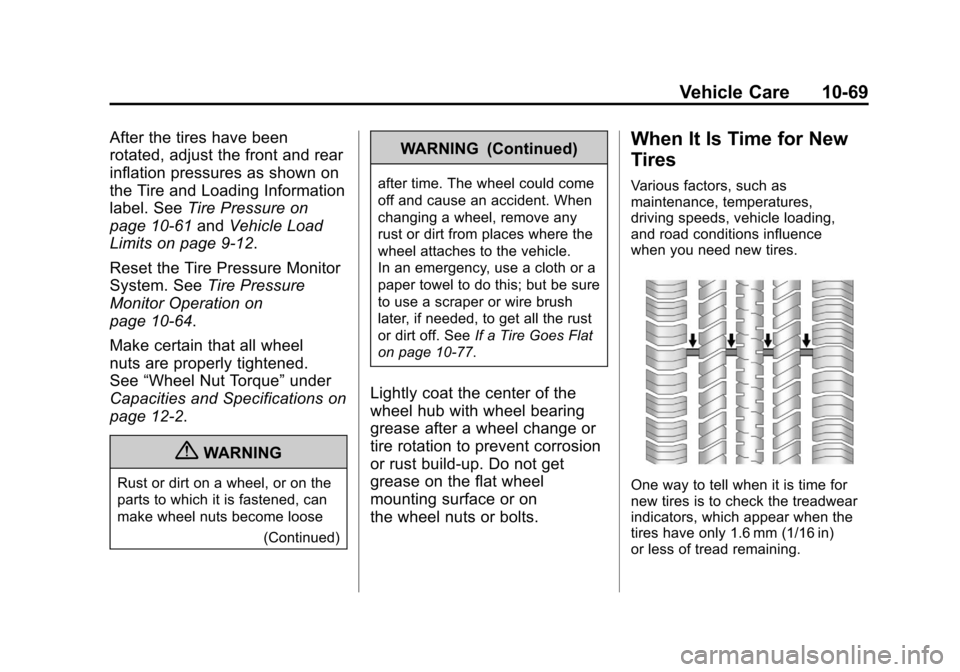
One way to tell when it is time for
new tires is to check the treadwear
indicators, which appear when the
tires have only 1.6 mm (1/16 in)
or less of tread remaining.
Page 450 of 498
Black plate (2,1)Cadillac SRX Owner Manual - 2011
11-2 Service and Maintenance
{WARNING
Performing maintenance work can
be dangerous. Some jobs can
cause serious injury. Perform
maintenance work only if you
have the required know-how and
the proper tools and equipment.
If in doubt, see your dealer to
have a qualified technician do
the work. SeeDoing Your Own
Service Work on page 10‑4.
At your dealer, you can be
certain that you will receive the
highest level of service available.
Your dealer has specially trained
service technicians, uses genuine
replacement parts, as well as,
up‐to‐date tools and equipment
to ensure fast and accurate
diagnostics. The proper replacement parts,
fluids, and lubricants to use are
listed in
Recommended Fluids
and Lubricants on page 11‑7 and
Maintenance Replacement Parts on
page 11‑9. We recommend the use
of genuine parts from your dealer.
Rotation of New Tires
To maintain ride, handling, and
performance of the vehicle, it is
important that the first rotation
service for new tires be performed.
Tires should be rotated every
12 000 km/7,500 miles. See Tire
Rotation on page 10‑68.
Scheduled
Maintenance
When the Change Engine Oil
Soon Message Displays
Change engine oil and filter.
See Engine Oil on page 10‑10.
An Emission Control Service.
When the CHANGE ENGINE OIL
SOON message displays, service
is required for the vehicle as
soon as possible, within the next
1 000 km/600 miles. If driving under
the best conditions, the engine oil
life system might not indicate the
need for vehicle service for more
than a year. The engine oil and filter
must be changed at least once a
year and the oil life system must
be reset. Your dealer has trained
service technicians who will perform
this work and reset the system.
Page 451 of 498
Black plate (3,1)Cadillac SRX Owner Manual - 2011
Service and Maintenance 11-3
If the engine oil life system is reset
accidentally, service the vehicle
within 5 000 km/3,000 miles since
the last service. Reset the oil life
system whenever the oil is changed.
SeeEngine Oil Life System on
page 10‑14.
Every Engine Oil Change
.Change engine oil and
filter. Reset oil life system.
See Engine Oil on page 10‑10
and Engine Oil Life System on
page 10‑14. An Emission
Control Service.
.Engine coolant level check.
See Engine Coolant on
page 10‑19.
.Engine cooling system
inspection. Visual inspection
of hoses, pipes, fittings, and
clamps and replacement,
if needed.
.Windshield washer fluid level
check. See Washer Fluid on
page 10‑24.
.Windshield wiper blade
inspection for wear, cracking,
or contamination and windshield
and wiper blade cleaning,
if contaminated. See Exterior
Care on page 10‑101. Worn
or damaged wiper blade
replacement. See Wiper Blade
Replacement on page 10‑31.
.Tire inflation pressures
check. See Tire Pressure on
page 10‑61.
.Tire wear inspection. See Tire
Inspection on page 10‑68.
.Rotate tires if necessary.
See Tire Rotation on
page 10‑68.
.Fluids visual leak check
(or every 12 months, whichever
occurs first). A leak in any
system must be repaired and
the fluid level checked.
.Engine air cleaner filter
inspection. See Engine Air
Cleaner/Filter on page 10‑16.
.Brake system inspection
(or every 12 months, whichever
occurs first).
.Steering and suspension
inspection. Visual inspection
for damaged, loose, or missing
parts or signs of wear.
.Body hinges and latches,
key lock cylinders, folding
seat hardware, and sunroof
(if equipped) lubrication.
See Recommended Fluids
and Lubricants on page 11‑7.
More frequent lubrication may
be required when the vehicle
is exposed to a corrosive
environment. Applying silicone
grease on weatherstrips with a
clean cloth makes them last
longer, seal better, and not stick
or squeak.