instrument panel CADILLAC SRX 2011 2.G Service Manual
[x] Cancel search | Manufacturer: CADILLAC, Model Year: 2011, Model line: SRX, Model: CADILLAC SRX 2011 2.GPages: 498, PDF Size: 7.62 MB
Page 304 of 498
Black plate (28,1)Cadillac SRX Owner Manual - 2011
9-28 Driving and Operating
Manual Mode
Driver Shift Control (DSC)
Notice:If you drive the vehicle
at a high rpm without upshifting
while using Driver Shift Control
(DSC), you could damage the
vehicle. Always upshift when
necessary while using DSC.
Driver Shift Control (DSC)
allows you to shift an automatic
transmission similar to a manual
transmission. To use the DSC
feature:
1. Move the shift lever to the left from D (Drive) to
M (Manual Mode).
If you do not move the shift lever
forward or rearward, the vehicle
will be in Sport Mode. When you
are in Sport Mode the vehicle
will still shift automatically.
The transmission may remain
in a gear longer than it would in
the normal driving mode based
on braking, throttle input, and
vehicle lateral acceleration. SPORT MODE ON will be
displayed in the DIC. See
Ride
Control System Messages on
page 5‑37. The word “sport”
will display below the odometer.
The gear position will also be
indicated in the tachometer.
Within Sport Mode there is a
further performance feature
called Performance Mode Lift
Foot (PMLF) Mode. The feature
is activated automatically when
sports oriented driving is
detected, based on cornering
and on/off throttle application.
PMLF allows the transmission to
hold the current gear instead of
upshifting when the throttle is
lifted.
2. To enter M (Manual Mode), press the shift lever forward to upshift
or rearward to downshift.
An M will be displayed in
the DIC. 3. To return to Sport Mode from
M (Manual Mode), press and
briefly hold the shift lever
forward.
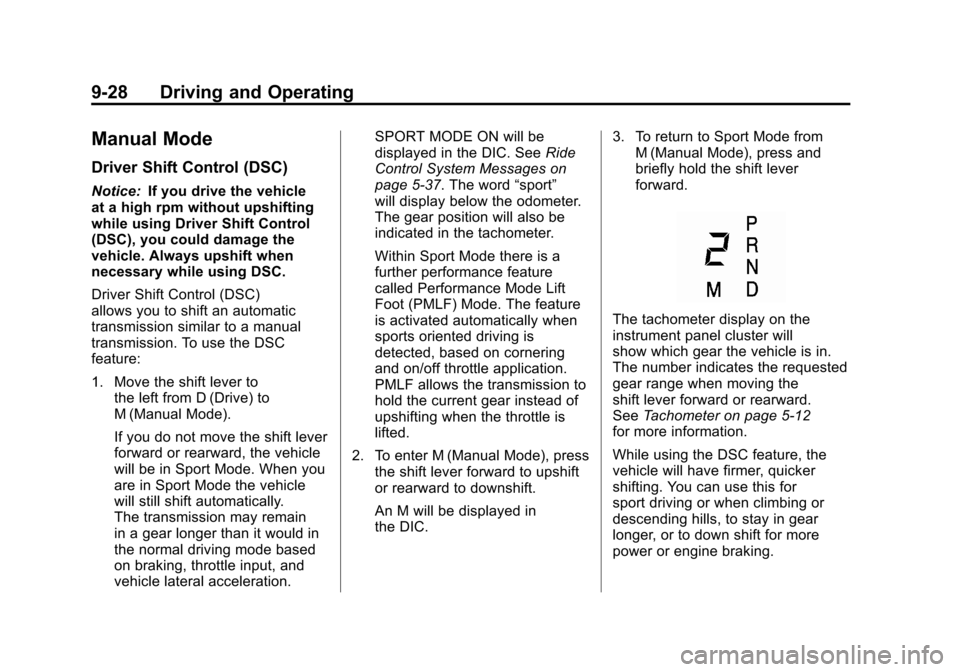
The tachometer display on the
instrument panel cluster will
show which gear the vehicle is in.
The number indicates the requested
gear range when moving the
shift lever forward or rearward.
See Tachometer on page 5‑12
for more information.
While using the DSC feature, the
vehicle will have firmer, quicker
shifting. You can use this for
sport driving or when climbing or
descending hills, to stay in gear
longer, or to down shift for more
power or engine braking.
Page 312 of 498
Black plate (36,1)Cadillac SRX Owner Manual - 2011
9-36 Driving and Operating
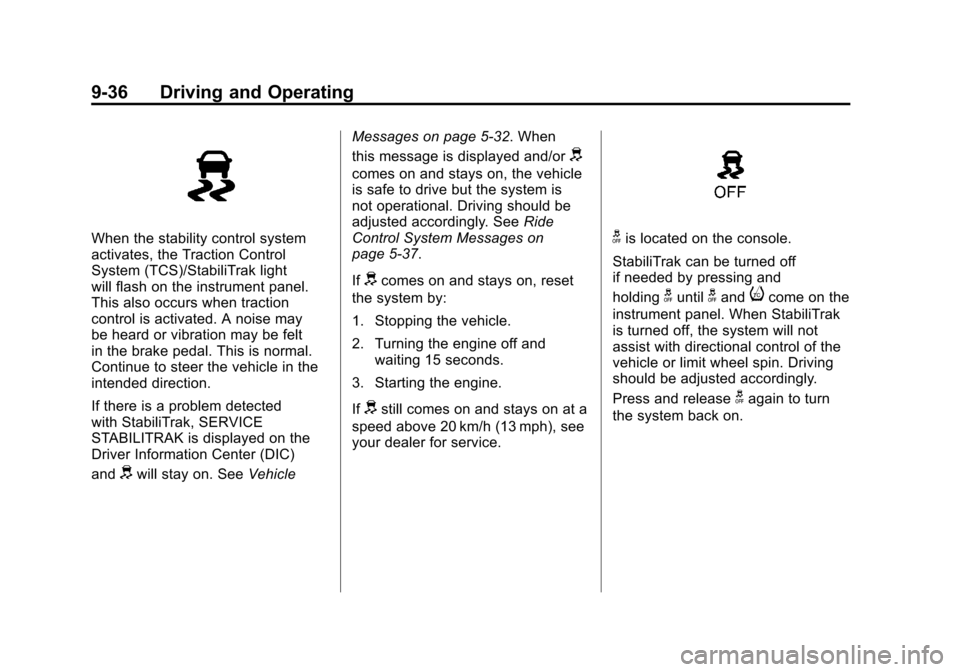
When the stability control system
activates, the Traction Control
System (TCS)/StabiliTrak light
will flash on the instrument panel.
This also occurs when traction
control is activated. A noise may
be heard or vibration may be felt
in the brake pedal. This is normal.
Continue to steer the vehicle in the
intended direction.
If there is a problem detected
with StabiliTrak, SERVICE
STABILITRAK is displayed on the
Driver Information Center (DIC)
and
dwill stay on. SeeVehicleMessages on page 5‑32. When
this message is displayed and/or
d
comes on and stays on, the vehicle
is safe to drive but the system is
not operational. Driving should be
adjusted accordingly. See
Ride
Control System Messages on
page 5‑37.
If
dcomes on and stays on, reset
the system by:
1. Stopping the vehicle.
2. Turning the engine off and waiting 15 seconds.
3. Starting the engine.
If
dstill comes on and stays on at a
speed above 20 km/h (13 mph), see
your dealer for service.
gis located on the console.
StabiliTrak can be turned off
if needed by pressing and
holding
guntilgandicome on the
instrument panel. When StabiliTrak
is turned off, the system will not
assist with directional control of the
vehicle or limit wheel spin. Driving
should be adjusted accordingly.
Press and release
gagain to turn
the system back on.
Page 315 of 498
Black plate (39,1)Cadillac SRX Owner Manual - 2011
Driving and Operating 9-39
The cruise control light on the
instrument panel cluster comes on
after the cruise control has been set
to the desired speed.
1. Press
T.
2. Get up to the desired speed.
3. Press and release the −SET
button located on the steering
wheel.
4. Take your foot off the accelerator.
Resuming a Set Speed
If the cruise control is set at a
desired speed and then the brakes
are applied, the cruise control is
disengaged without erasing the
set speed from memory.
Once the vehicle speed reaches
about 40 km/h (25 mph) or more,
press the +RES button on the
steering wheel. The vehicle returns
to the previous set speed and stays
there. Increasing Speed While Cruise
Control is at a Set Speed
If the cruise control system is
already activated,.Press and hold the +RES button
on the steering wheel until the
desired speed is reached, then
release it.
.To increase vehicle speed in
small amounts, press the +RES
button. Each time this is done,
the vehicle goes about 1.6 km/h
(1 mph) faster.
Reducing Speed While Cruise
Control is at a Set Speed
If the cruise control system is
already activated,
.Press and hold the −SET button
on the steering wheel until the
desired lower speed is reached,
then release it.
.To slow down in small amounts,
press the −SET button on the
steering wheel briefly. Each time
this is done, the vehicle goes
about 1.6 km/h (1 mph) slower.
Passing Another Vehicle While
Using Cruise Control
Use the accelerator pedal to
increase the vehicle speed. When
you take your foot off the pedal,
the vehicle will slow down to the
previous set cruise speed.
Using Cruise Control on Hills
How well the cruise control will work
on hills depends upon the vehicle
speed, load, and the steepness
of the hills. When going up steep
hills, you might have to step on
the accelerator pedal to maintain
the vehicle speed. When going
downhill, you might have to brake
or shift to a lower gear to keep the
vehicle speed down. If the brake
is applied the cruise control
disengages.
Page 317 of 498
Black plate (41,1)Cadillac SRX Owner Manual - 2011
Driving and Operating 9-41
How the System Works
When the vehicle is shifted into
R (Reverse) the front and rear
sensors are automatically turned on,
after the vehicle is shifted out of
R (Reverse), the rear sensors are
turned off and the front sensors
stay on until the vehicle is above
a certain speed. The front sensors
may also be turned on by pressing
the park assist button located next
to the shift lever without shifting
into R (Reverse) while the vehicle
is traveling at a low speed.
See“Turning the System On
and Off” later in this section.
When the vehicle is in N (Neutral),
the system may be active. If the
vehicle is in a car wash, the sensors
may detect objects in the car wash.
See “Turning the System On and
Off” later in this section to turn the
system off. High-toned beeps heard from the
front speakers are for objects
detected near the front bumper.
Low-toned beeps heard from the
rear speakers are for objects
detected near the rear bumper.
When an object is detected, high or
low‐tone beeps are heard. As the
vehicle gets closer to an object, the
time between the beeps becomes
shorter. When the distance is less
than 30 cm (11.8 in), beeping is
continuous. The distance may
be less during warmer or humid
weather.
PARK ASSIST OFF displays on
the Driver Information Center (DIC)
to indicate that UFRPA is off.
The message disappears after
a short period of time.
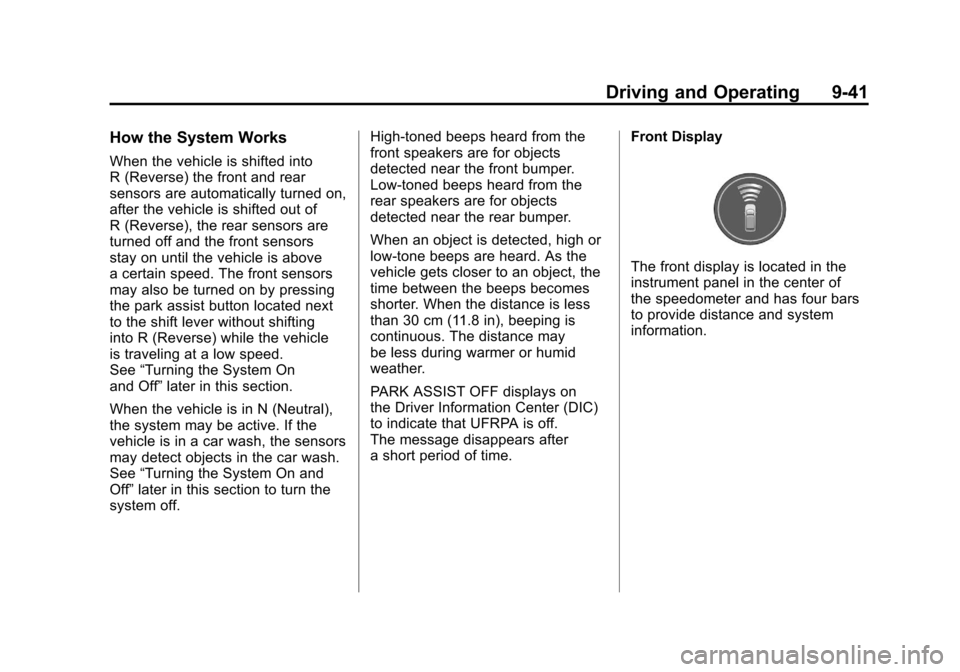
Front Display
The front display is located in the
instrument panel in the center of
the speedometer and has four bars
to provide distance and system
information.
Page 323 of 498
Black plate (47,1)Cadillac SRX Owner Manual - 2011
Driving and Operating 9-47
Fuel
Use of the recommended fuel
is an important part of the proper
maintenance of this vehicle. To help
keep the engine clean and maintain
optimum vehicle performance, we
recommend the use of gasoline
advertised as TOP TIER Detergent
Gasoline.
Look for the TOP TIER label on the
fuel pump to ensure gasoline meets
enhanced detergency standards
developed by auto companies. A list
of marketers providing TOP TIER
Detergent Gasoline can be found at
www.toptiergas.com.
The 8th digit of the Vehicle
Identification Number (VIN) shows
the code letter or number that
identifies the vehicle's engine.
The VIN is at the top left of the
instrument panel. SeeVehicle
Identification Number (VIN) on
page 12‑1. Vehicles that have a FlexFuel badge
and a yellow fuel cap can use either
unleaded gasoline or ethanol fuel
containing up to 85% ethanol (E85).
See
Fuel E85 (85% Ethanol) on
page 9‑50. For all other vehicles,
use only the unleaded gasoline
described under Recommended
Fuel on page 9‑47.
Recommended Fuel
If the vehicle has the 3.0L V6 engine
(VIN Code Y), use regular unleaded
gasoline with a posted octane
rating of 87 or higher. If the octane
rating is less than 87, an audible
knocking noise, commonly referred
to as spark knock, might be heard
when driving. If this occurs, use
a gasoline rated at 87 octane or
higher as soon as possible. If heavy
knocking is heard when using
gasoline rated at 87 octane or
higher, the engine needs service.
Page 332 of 498
Black plate (56,1)Cadillac SRX Owner Manual - 2011
9-56 Driving and Operating
Towing with a Stability Control
System
When towing, the sound of the
stability control system might be
heard. The system is reacting to the
vehicle movement caused by the
trailer, which mainly occurs during
cornering. This is normal when
towing heavier trailers.
Following Distance
Stay at least twice as far behind the
vehicle ahead as you would when
driving the vehicle without a trailer.
This can help to avoid situations
that require heavy braking and
sudden turns.
Passing
More passing distance is needed
when towing a trailer. Because the
rig is longer, it is necessary to go
farther beyond the passed vehicle
before returning to the lane.
Backing Up
Hold the bottom of the steering
wheel with one hand. To move the
trailer to the left, move that hand to
the left. To move the trailer to the
right, move your hand to the right.
Always back up slowly and,
if possible, have someone
guide you.
Making Turns
Notice:Making very sharp turns
while trailering could cause the
trailer to come in contact with the
vehicle. The vehicle could be
damaged. Avoid making very
sharp turns while trailering.
When turning with a trailer, make
wider turns than normal so the
trailer will not strike soft shoulders,
curbs, road signs, trees or other
objects. Use the turn signal well in
advance and avoid jerky or sudden
maneuvers.
Turn Signals When Towing a
Trailer
The turn signal indicators on the
instrument panel flash whenever
signaling a turn or lane change.
Properly hooked up, the trailer
lamps also flash, telling other
drivers the vehicle is turning,
changing lanes or stopping.
When towing a trailer, the arrows on
the instrument panel flash for turns
even if the bulbs on the trailer are
burned out. Check occasionally to
be sure the trailer bulbs are still
working.
Page 339 of 498
Black plate (1,1)Cadillac SRX Owner Manual - 2011
Vehicle Care 10-1
Vehicle Care
General Information
General Information . . . . . . . . . . 10-2
California Proposition65 Warning . . . . . . . . . . . . . . . . . 10-2
California Perchlorate Materials Requirements . . . . 10-3
Accessories and Modifications . . . . . . . . . . . . . . . 10-3
Vehicle Checks
Doing Your OwnService Work . . . . . . . . . . . . . . . 10-4
Hood . . . . . . . . . . . . . . . . . . . . . . . . 10-5
Engine Compartment Overview . . . . . . . . . . . . . . . . . . . 10-6
Engine Cover . . . . . . . . . . . . . . . . 10-9
Engine Oil . . . . . . . . . . . . . . . . . . 10-10
Engine Oil Life System . . . . . 10-14
Automatic Transmission Fluid . . . . . . . . . . . . . . . . . . . . . . 10-15
Engine Air Cleaner/Filter . . . . 10-16
Cooling System . . . . . . . . . . . . 10-18
Engine Coolant . . . . . . . . . . . . . 10-19
Engine Overheating . . . . . . . . 10-22
Power Steering Fluid . . . . . . . 10-24
Washer Fluid . . . . . . . . . . . . . . . 10-24 Brakes . . . . . . . . . . . . . . . . . . . . . 10-25
Brake Fluid . . . . . . . . . . . . . . . . . 10-26
Battery . . . . . . . . . . . . . . . . . . . . . 10-28
All-Wheel Drive . . . . . . . . . . . . . 10-28
Starter Switch Check . . . . . . . 10-29
Automatic Transmission Shift
Lock Control Function
Check . . . . . . . . . . . . . . . . . . . . . 10-29
Ignition Transmission Lock Check . . . . . . . . . . . . . . . . . . . . . 10-30
Park Brake and P (Park) Mechanism Check . . . . . . . . 10-30
Wiper Blade Replacement . . . . . . . . . . . . . . 10-31
Headlamp Aiming
Headlamp Aiming . . . . . . . . . . 10-32
Bulb Replacement
Bulb Replacement . . . . . . . . . . 10-36
Halogen Bulbs . . . . . . . . . . . . . . 10-36
High Intensity Discharge(HID) Lighting . . . . . . . . . . . . . 10-36
Headlamps . . . . . . . . . . . . . . . . . 10-36
Fog Lamps . . . . . . . . . . . . . . . . . 10-41
Turn Signal Lamps . . . . . . . . . 10-41
Back-Up Lamps . . . . . . . . . . . . 10-43
License Plate Lamp . . . . . . . . 10-44
Replacement Bulbs . . . . . . . . . 10-45
Electrical System
Electrical System Overload . . . . . . . . . . . . . . . . . . 10-45
Fuses and Circuit Breakers . . . . . . . . . . . . . . . . . . 10-46
Engine Compartment Fuse
Block . . . . . . . . . . . . . . . . . . . . . 10-46
Instrument Panel Fuse Block . . . . . . . . . . . . . . . . . . . . . 10-49
Rear Compartment Fuse Block . . . . . . . . . . . . . . . . . . . . . 10-51
Wheels and Tires
Tires . . . . . . . . . . . . . . . . . . . . . . . . 10-54
Tire Sidewall Labeling . . . . . . 10-55
Tire Designations . . . . . . . . . . . 10-57
Tire Terminology andDefinitions . . . . . . . . . . . . . . . . 10-58
Tire Pressure . . . . . . . . . . . . . . . 10-61
Tire Pressure for High-Speed Operation . . . . . . . . . . . . . . . . . 10-62
Tire Pressure Monitor System . . . . . . . . . . . . . . . . . . . 10-63
Tire Pressure Monitor Operation . . . . . . . . . . . . . . . . . 10-64
Tire Inspection . . . . . . . . . . . . . . 10-68
Tire Rotation . . . . . . . . . . . . . . . 10-68
When It Is Time for New Tires . . . . . . . . . . . . . . . . . . . . . . 10-69
Page 343 of 498
Black plate (5,1)Cadillac SRX Owner Manual - 2011
Vehicle Care 10-5
Hood
To open the hood:
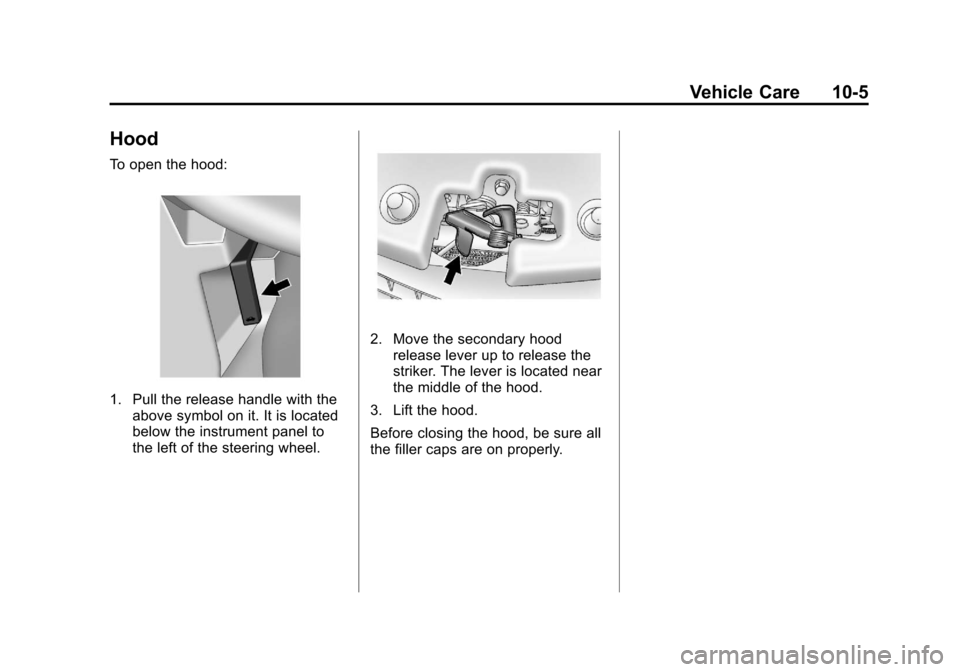
1. Pull the release handle with theabove symbol on it. It is located
below the instrument panel to
the left of the steering wheel.
2. Move the secondary hoodrelease lever up to release the
striker. The lever is located near
the middle of the hood.
3. Lift the hood.
Before closing the hood, be sure all
the filler caps are on properly.
Page 360 of 498
Black plate (22,1)Cadillac SRX Owner Manual - 2011
10-22 Vehicle Care
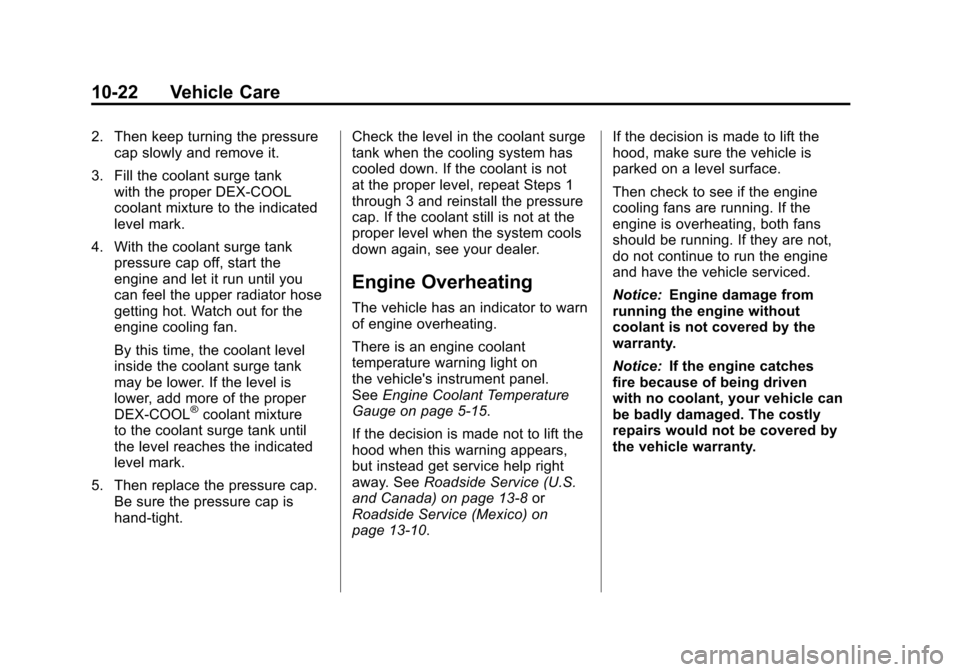
2. Then keep turning the pressurecap slowly and remove it.
3. Fill the coolant surge tank with the proper DEX-COOL
coolant mixture to the indicated
level mark.
4. With the coolant surge tank pressure cap off, start the
engine and let it run until you
can feel the upper radiator hose
getting hot. Watch out for the
engine cooling fan.
By this time, the coolant level
inside the coolant surge tank
may be lower. If the level is
lower, add more of the proper
DEX-COOL
®coolant mixture
to the coolant surge tank until
the level reaches the indicated
level mark.
5. Then replace the pressure cap. Be sure the pressure cap is
hand-tight. Check the level in the coolant surge
tank when the cooling system has
cooled down. If the coolant is not
at the proper level, repeat Steps 1
through 3 and reinstall the pressure
cap. If the coolant still is not at the
proper level when the system cools
down again, see your dealer.
Engine Overheating
The vehicle has an indicator to warn
of engine overheating.
There is an engine coolant
temperature warning light on
the vehicle's instrument panel.
See
Engine Coolant Temperature
Gauge on page 5‑15.
If the decision is made not to lift the
hood when this warning appears,
but instead get service help right
away. See Roadside Service (U.S.
and Canada) on page 13‑8 or
Roadside Service (Mexico) on
page 13‑10. If the decision is made to lift the
hood, make sure the vehicle is
parked on a level surface.
Then check to see if the engine
cooling fans are running. If the
engine is overheating, both fans
should be running. If they are not,
do not continue to run the engine
and have the vehicle serviced.
Notice:
Engine damage from
running the engine without
coolant is not covered by the
warranty.
Notice: If the engine catches
fire because of being driven
with no coolant, your vehicle can
be badly damaged. The costly
repairs would not be covered by
the vehicle warranty.
Page 386 of 498
Black plate (48,1)Cadillac SRX Owner Manual - 2011
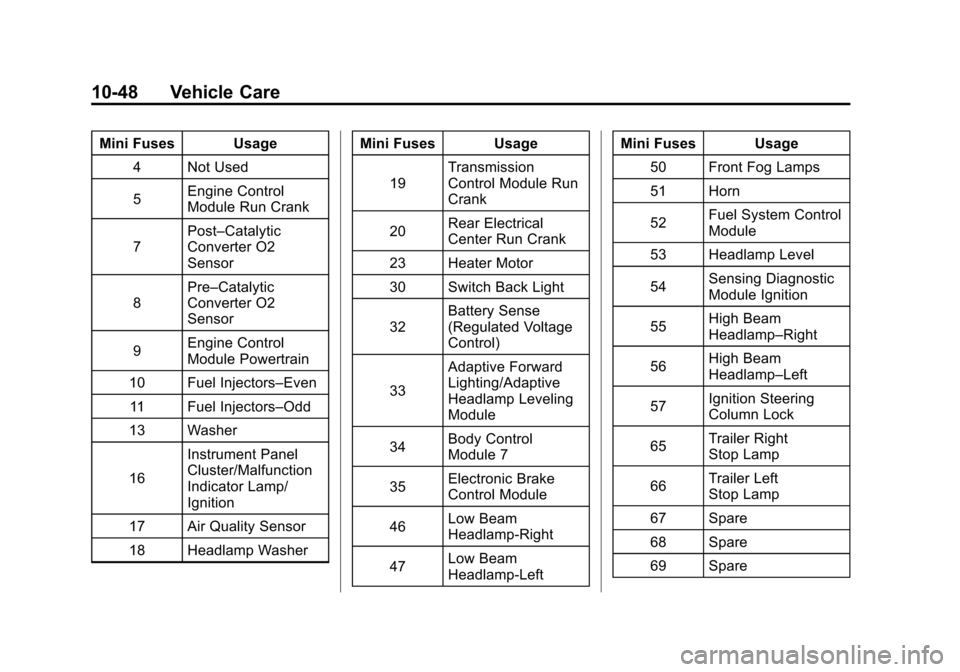
10-48 Vehicle Care
Mini Fuses Usage4 Not Used
5 Engine Control
Module Run Crank
7 Post–Catalytic
Converter O2
Sensor
8 Pre–Catalytic
Converter O2
Sensor
9 Engine Control
Module Powertrain
10 Fuel Injectors–Even 11 Fuel Injectors–Odd
13 Washer
16 Instrument Panel
Cluster/Malfunction
Indicator Lamp/
Ignition
17 Air Quality Sensor
18 Headlamp Washer Mini Fuses Usage
19 Transmission
Control Module Run
Crank
20 Rear Electrical
Center Run Crank
23 Heater Motor
30 Switch Back Light
32 Battery Sense
(Regulated Voltage
Control)
33 Adaptive Forward
Lighting/Adaptive
Headlamp Leveling
Module
34 Body Control
Module 7
35 Electronic Brake
Control Module
46 Low Beam
Headlamp‐Right
47 Low Beam
Headlamp‐Left Mini Fuses Usage
50 Front Fog Lamps
51 Horn
52 Fuel System Control
Module
53 Headlamp Level
54 Sensing Diagnostic
Module Ignition
55 High Beam
Headlamp–Right
56 High Beam
Headlamp–Left
57 Ignition Steering
Column Lock
65 Trailer Right
Stop Lamp
66 Trailer Left
Stop Lamp
67 Spare
68 Spare
69 Spare