climate control CADILLAC SRX 2011 2.G Owners Manual
[x] Cancel search | Manufacturer: CADILLAC, Model Year: 2011, Model line: SRX, Model: CADILLAC SRX 2011 2.GPages: 498, PDF Size: 7.62 MB
Page 1 of 498

Black plate (1,1)Cadillac SRX Owner Manual - 2011
2011 Cadillac SRX Owner ManualM
In Brief. . . . . . . . . . . . . . . . . . . . . . . . 1-1
Instrument Panel . . . . . . . . . . . . . . 1-2
Initial Drive Information . . . . . . . . 1-4
Vehicle Features . . . . . . . . . . . . . 1-17
Performance and Maintenance . . . . . . . . . . . . . . . . 1-23
Keys, Doors and Windows . . . 2-1
Keys and Locks . . . . . . . . . . . . . . . 2-2
Doors . . . . . . . . . . . . . . . . . . . . . . . . 2-14
Vehicle Security . . . . . . . . . . . . . . 2-19
Exterior Mirrors . . . . . . . . . . . . . . . 2-21
Interior Mirrors . . . . . . . . . . . . . . . . 2-23
Windows . . . . . . . . . . . . . . . . . . . . . 2-24
Roof . . . . . . . . . . . . . . . . . . . . . . . . . . 2-28
Seats and Restraints . . . . . . . . . 3-1
Head Restraints . . . . . . . . . . . . . . . 3-2
Front Seats . . . . . . . . . . . . . . . . . . . . 3-4
Rear Seats . . . . . . . . . . . . . . . . . . . 3-12
Safety Belts . . . . . . . . . . . . . . . . . . 3-14
Airbag System . . . . . . . . . . . . . . . . 3-30
Child Restraints . . . . . . . . . . . . . . 3-47 Storage
. . . . . . . . . . . . . . . . . . . . . . . 4-1
Storage Compartments . . . . . . . . 4-1
Additional Storage Features . . . 4-3
Roof Rack System . . . . . . . . . . . . 4-11
Instruments and Controls . . . . 5-1
Controls . . . . . . . . . . . . . . . . . . . . . . . 5-2
Warning Lights, Gauges, and
Indicators . . . . . . . . . . . . . . . . . . . 5-10
Information Displays . . . . . . . . . . 5-28
Vehicle Messages . . . . . . . . . . . . 5-32
Vehicle Personalization . . . . . . . 5-40
Universal Remote System . . . . 5-46
Lighting . . . . . . . . . . . . . . . . . . . . . . . 6-1
Exterior Lighting . . . . . . . . . . . . . . . 6-1
Interior Lighting . . . . . . . . . . . . . . . . 6-6
Lighting Features . . . . . . . . . . . . . . 6-7
Infotainment System . . . . . . . . . 7-1
Introduction . . . . . . . . . . . . . . . . . . . . 7-1
Radio . . . . . . . . . . . . . . . . . . . . . . . . . 7-12 Audio Players . . . . . . . . . . . . . . . . 7-20
Rear Seat Infotainment . . . . . . . 7-38
Phone . . . . . . . . . . . . . . . . . . . . . . . . 7-51
Climate Controls . . . . . . . . . . . . . 8-1
Climate Control Systems . . . . . . 8-1
Air Vents . . . . . . . . . . . . . . . . . . . . . . . 8-6
Maintenance . . . . . . . . . . . . . . . . . . . 8-6
Driving and Operating . . . . . . . . 9-1
Driving Information . . . . . . . . . . . . . 9-2
Starting and Operating . . . . . . . 9-17
Engine Exhaust . . . . . . . . . . . . . . 9-24
Automatic Transmission . . . . . . 9-26
Drive Systems . . . . . . . . . . . . . . . . 9-30
Brakes . . . . . . . . . . . . . . . . . . . . . . . 9-30
Ride Control Systems . . . . . . . . 9-34
Cruise Control . . . . . . . . . . . . . . . . 9-38
Object Detection Systems . . . . 9-40
Fuel . . . . . . . . . . . . . . . . . . . . . . . . . . 9-47
Towing . . . . . . . . . . . . . . . . . . . . . . . 9-54
Conversions and Add-Ons . . . 9-62
Page 7 of 498
Black plate (1,1)Cadillac SRX Owner Manual - 2011
In Brief 1-1
In Brief
Instrument Panel
Instrument Panel . . . . . . . . . . . . . . 1-2
Initial Drive Information
Initial Drive Information . . . . . . . . 1-4
Remote Keyless Entry (RKE)System . . . . . . . . . . . . . . . . . . . . . . 1-4
Remote Vehicle Start . . . . . . . . . 1-5
Door Locks . . . . . . . . . . . . . . . . . . . 1-5
Liftgate . . . . . . . . . . . . . . . . . . . . . . . . 1-6
Windows . . . . . . . . . . . . . . . . . . . . . . 1-7
Seat Adjustment . . . . . . . . . . . . . . 1-7
Memory Features . . . . . . . . . . . . . 1-8
Heated and Ventilated Seats . . . . . . . . . . . . . . . . . . . . . . . 1-10
Head Restraint Adjustment . . . . . . . . . . . . . . . . . 1-10
Safety Belts . . . . . . . . . . . . . . . . . . 1-10
Sensing System for Passenger Airbag . . . . . . . . . . 1-11
Mirror Adjustment . . . . . . . . . . . . 1-11
Steering Wheel Adjustment . . . . . . . . . . . . . . . . . 1-12 Throttle and Brake Pedal
Adjustment . . . . . . . . . . . . . . . . . 1-13
Interior Lighting . . . . . . . . . . . . . . 1-13
Exterior Lighting . . . . . . . . . . . . . 1-14
Windshield Wiper/Washer . . . . 1-14
Climate Controls . . . . . . . . . . . . . 1-16
Transmission . . . . . . . . . . . . . . . . 1-16Vehicle Features
Radio(s) . . . . . . . . . . . . . . . . . . . . . 1-17
Satellite Radio . . . . . . . . . . . . . . . 1-19
Portable Audio Devices . . . . . . 1-19
Bluetooth
®. . . . . . . . . . . . . . . . . . . 1-19
Steering Wheel Controls . . . . . 1-20
Cruise Control . . . . . . . . . . . . . . . 1-20
Navigation System . . . . . . . . . . . 1-21
Driver Information Center (DIC) . . . . . . . . . . . . . . . 1-21
Vehicle Personalization . . . . . . 1-21
Rear Vision Camera (RVC) . . . . . . . . . . . . . 1-22
Ultrasonic Parking Assist . . . . 1-22
Storage Compartments . . . . . . 1-22
Power Outlets . . . . . . . . . . . . . . . 1-23
Universal Remote System . . . 1-23
Performance and Maintenance
Traction Control System (TCS) . . . . . . . . . . . . . . 1-23
StabiliTrak
®System . . . . . . . . . 1-24
Tire Pressure Monitor . . . . . . . . 1-24
Tire Sealant and Compressor Kit . . . . . . . . . . . . . 1-24
Engine Oil Life System . . . . . . 1-25
Fuel E85 (85% Ethanol) . . . . . 1-25
Driving for Better Fuel Economy . . . . . . . . . . . . . . . . . . . 1-25
Roadside Service . . . . . . . . . . . . 1-26
OnStar
®. . . . . . . . . . . . . . . . . . . . . 1-26
Page 9 of 498

Black plate (3,1)Cadillac SRX Owner Manual - 2011
In Brief 1-3
A.Air Vents on page 8‑6.
B. Turn and Lane‐Change Lever. See Turn and Lane-Change
Signals on page 6‑5.
Driver Information Center (DIC)
Controls. See Driver Information
Center (DIC) on page 5‑28.
C. Cruise Control on page 9‑38.
D. Instrument Cluster on
page 5‑11.
E. Steering Wheel Controls on
page 5‑2.
F. AM-FM Radio on page 7‑12.
Navigation System
(If Equipped). See Navigation
System Manual.
G. Driver Information Center (DIC) Display. See Driver Information
Center (DIC) on page 5‑28.
H. Clock (Analog Clock) on
page 5‑7 orClock (Digital
Clock) on page 5‑8. I.
Safety Locks on page 2‑13.
Power Door Locks on
page 2‑12.
Hazard Warning Flashers on
page 6‑5.
J. Exterior Lamp Controls on
page 6‑1.
Front Fog Lamps on page 6‑6
(If Equipped).
Instrument Panel Illumination
Control on page 6‑6.
K. Data Link Connector (DLC). See Malfunction Indicator Lamp
on page 5‑19.
L. Steering Wheel Adjustment on
page 5‑2.
M. Horn on page 5‑3.
N. Adjustable Pedal Control (If Equipped). See Adjustable
Throttle and Brake Pedal on
page 9‑17.
O. Start/Stop Button. See Ignition
Positions on page 9‑18. P.
Windshield Wiper/Washer on
page 5‑3.
Rear Window Wiper/Washer on
page 5‑5.
Q. Heated Front Seats on
page 3‑10 (If Equipped).
Heated and Ventilated
Front Seats on page 3‑11
(If Equipped).
R. Parking Brake on page 9‑31.
S. Shift Lever. See Shifting Into
Park on page 9‑22.
T. StabiliTrak
®System on
page 9‑35.
Ultrasonic Parking Assist on
page 9‑40 (If Equipped).
Economy Mode (If Equipped).
See Fuel Economy Mode on
page 9‑29.
U. Dual Automatic Climate Control
System on page 8‑1.
V. Glove Box on page 4‑1.
Page 11 of 498
Black plate (5,1)Cadillac SRX Owner Manual - 2011
In Brief 1-5
Remote Vehicle Start
With this feature the engine can be
started from outside of the vehicle.
Starting the Vehicle
1. PressQon the RKE transmitter.
2. Within two seconds, press and hold
/until the turn
signal lamps flash. Or for about
2 seconds if the vehicle is not
in view.
When the vehicle starts, the parking
lamps will turn on and remain on
as long as the engine is running.
The doors will be locked and
the climate control system may
come on.
The engine will continue to run for
10 minutes. Repeat the steps for a
10-minute time extension. Remote
start can be extended only once.
Canceling a Remote Start
To cancel a remote start:
.Press and hold/until the
parking lamps turn off.
.Turn on the hazard warning
flashers.
.Turn the vehicle on and then off.
See Remote Vehicle Start on
page 2‑10.
Door Locks
To lock or unlock a door, use
the Remote Keyless Entry (RKE)
transmitter from the outside.
From inside the vehicle with the
doors locked, pull once on the door
handle to unlock it, and a second
time to open it or use the power
door lock switch.
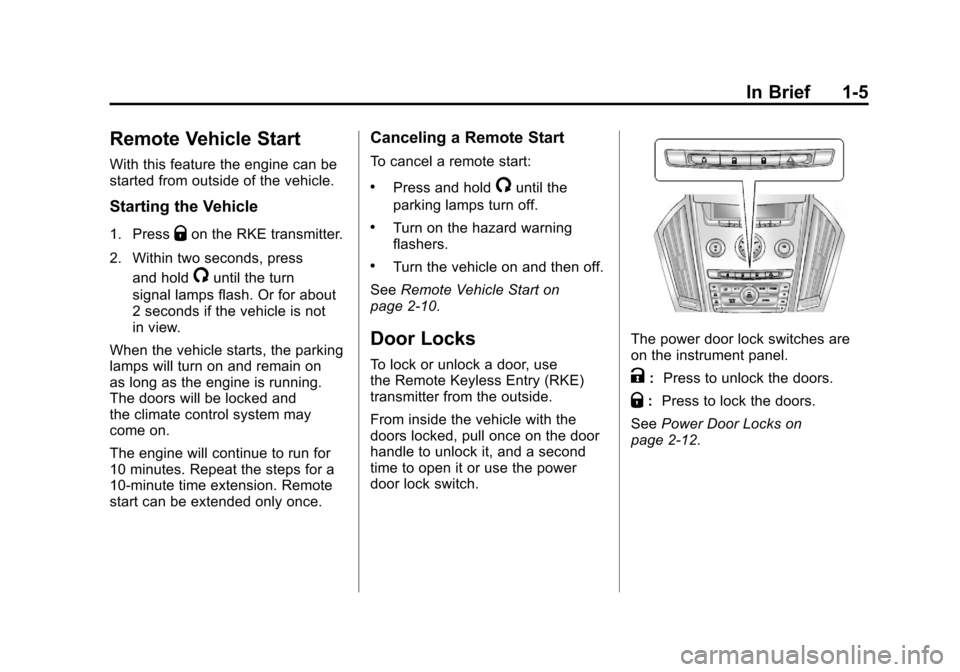
The power door lock switches are
on the instrument panel.
K: Press to unlock the doors.
Q:Press to lock the doors.
See Power Door Locks on
page 2‑12.
Page 16 of 498
Black plate (10,1)Cadillac SRX Owner Manual - 2011
1-10 In Brief
Heated and Ventilated
Seats
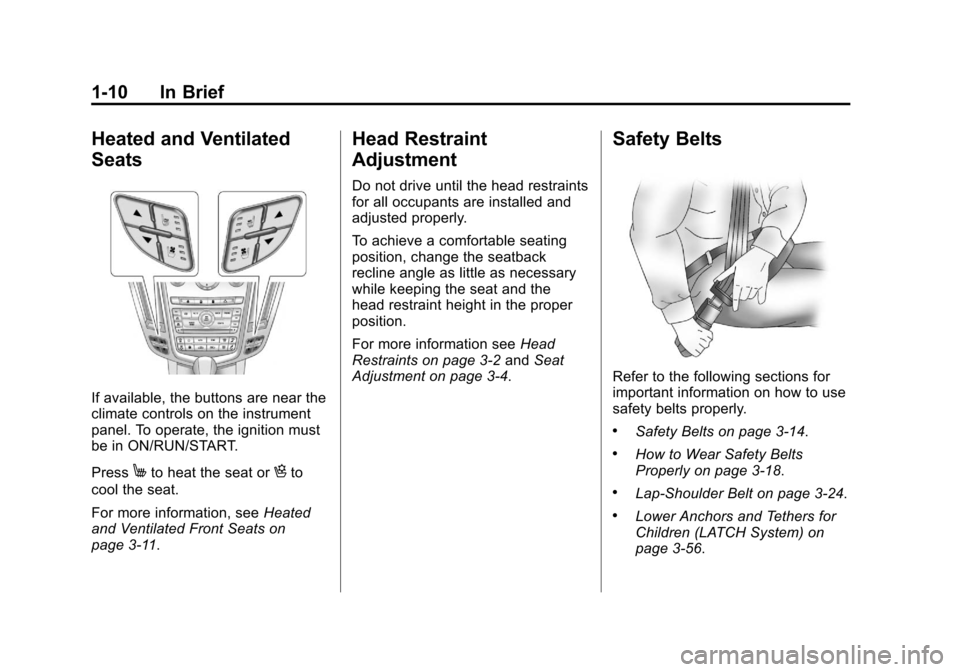
If available, the buttons are near the
climate controls on the instrument
panel. To operate, the ignition must
be in ON/RUN/START.
Press
Mto heat the seat orHto
cool the seat.
For more information, see Heated
and Ventilated Front Seats on
page 3‑11.
Head Restraint
Adjustment
Do not drive until the head restraints
for all occupants are installed and
adjusted properly.
To achieve a comfortable seating
position, change the seatback
recline angle as little as necessary
while keeping the seat and the
head restraint height in the proper
position.
For more information see Head
Restraints on page 3‑2 andSeat
Adjustment on page 3‑4.
Safety Belts
Refer to the following sections for
important information on how to use
safety belts properly.
.Safety Belts on page 3‑14.
.How to Wear Safety Belts
Properly on page 3‑18.
.Lap-Shoulder Belt on page 3‑24.
.Lower Anchors and Tethers for
Children (LATCH System) on
page 3‑56.
Page 22 of 498
Black plate (16,1)Cadillac SRX Owner Manual - 2011
1-16 In Brief
Climate Controls
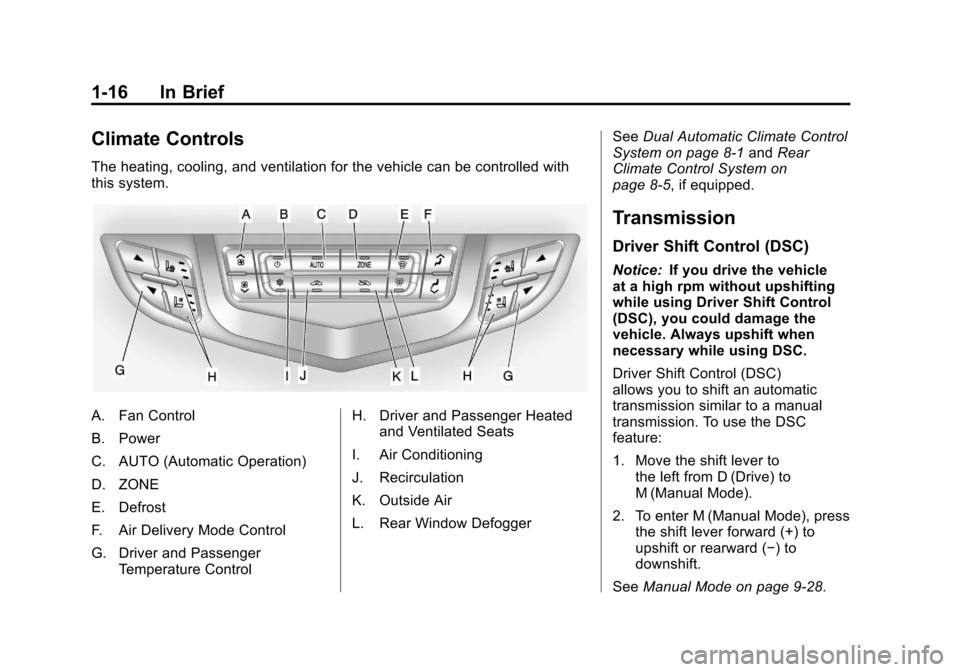
The heating, cooling, and ventilation for the vehicle can be controlled with
this system.
A. Fan Control
B. Power
C. AUTO (Automatic Operation)
D. ZONE
E. Defrost
F. Air Delivery Mode Control
G. Driver and PassengerTemperature Control H. Driver and Passenger Heated
and Ventilated Seats
I. Air Conditioning
J. Recirculation
K. Outside Air
L. Rear Window Defogger See
Dual Automatic Climate Control
System on page 8‑1 andRear
Climate Control System on
page 8‑5, if equipped.
Transmission
Driver Shift Control (DSC)
Notice: If you drive the vehicle
at a high rpm without upshifting
while using Driver Shift Control
(DSC), you could damage the
vehicle. Always upshift when
necessary while using DSC.
Driver Shift Control (DSC)
allows you to shift an automatic
transmission similar to a manual
transmission. To use the DSC
feature:
1. Move the shift lever to the left from D (Drive) to
M (Manual Mode).
2. To enter M (Manual Mode), press the shift lever forward (+) to
upshift or rearward (−) to
downshift.
See Manual Mode on page 9‑28.
Page 27 of 498
Black plate (21,1)Cadillac SRX Owner Manual - 2011
In Brief 1-21
−SET:Press to set the speed and
activate cruise control or make the
vehicle decelerate.
[: Press to disengage cruise
control without erasing the set
speed from memory.
See Cruise Control on page 9‑38.
Navigation System
The vehicle's navigation system
(if equipped) provides detailed maps
of most major freeways and roads.
After a destination has been set,
the system provides turn-by-turn
instructions for reaching the
destination. In addition, the system
can help locate a variety of points
of interest (POI), such as banks,
airports, restaurants, and more.
See the Navigation System manual
for more information.
Driver Information
Center (DIC)
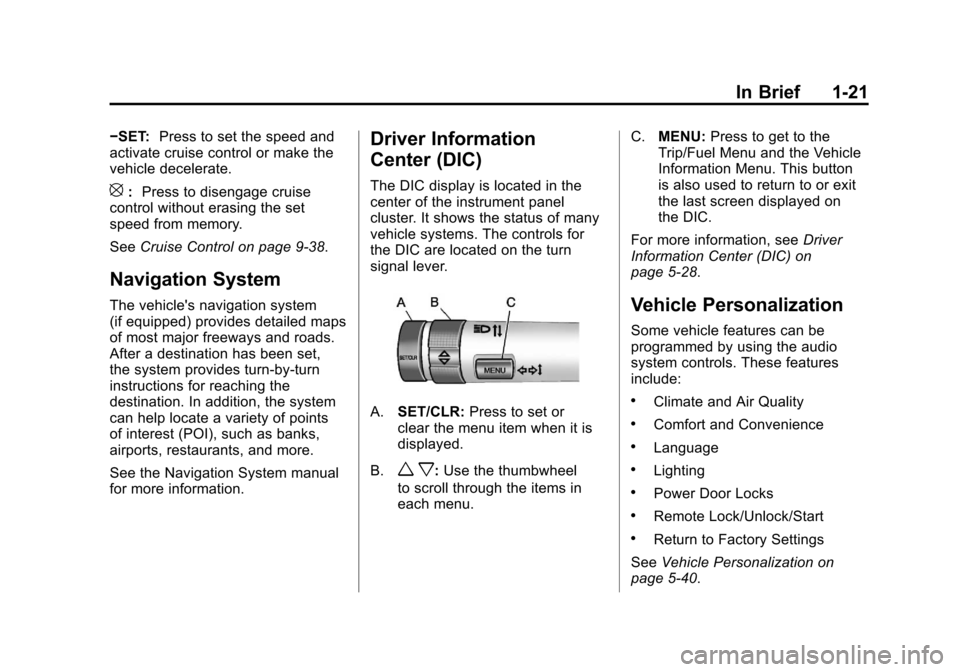
The DIC display is located in the
center of the instrument panel
cluster. It shows the status of many
vehicle systems. The controls for
the DIC are located on the turn
signal lever.
A.SET/CLR: Press to set or
clear the menu item when it is
displayed.
B.
w x: Use the thumbwheel
to scroll through the items in
each menu. C.
MENU: Press to get to the
Trip/Fuel Menu and the Vehicle
Information Menu. This button
is also used to return to or exit
the last screen displayed on
the DIC.
For more information, see Driver
Information Center (DIC) on
page 5‑28.
Vehicle Personalization
Some vehicle features can be
programmed by using the audio
system controls. These features
include:
.Climate and Air Quality
.Comfort and Convenience
.Language
.Lighting
.Power Door Locks
.Remote Lock/Unlock/Start
.Return to Factory Settings
See Vehicle Personalization on
page 5‑40.
Page 29 of 498
Black plate (23,1)Cadillac SRX Owner Manual - 2011
In Brief 1-23
Power Outlets
The accessory power outlets can be
used to plug in electrical equipment,
such as a cell phone or MP3 player.
The vehicle has four accessory
power outlets. The power outlets
located below the climate control
system inside the front storage
bin, inside the center floor console,
and on the rear of the center floor
console are powered while the
vehicle is in ON/RUN/START or
ACC/ACCESSORY mode, or until
the driver door is opened within
10 minutes of turning off the vehicle.
The power outlet located in the rear
cargo area is powered at all times.
Open the protective cap to use the
accessory power outlet.
SeePower Outlets on page 5‑9.
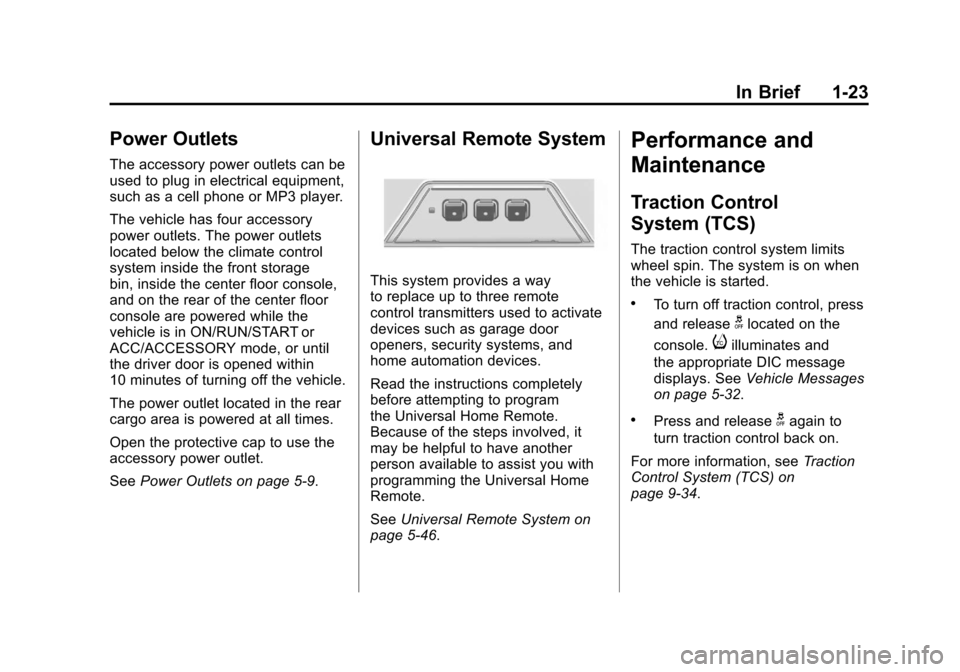
Universal Remote System
This system provides a way
to replace up to three remote
control transmitters used to activate
devices such as garage door
openers, security systems, and
home automation devices.
Read the instructions completely
before attempting to program
the Universal Home Remote.
Because of the steps involved, it
may be helpful to have another
person available to assist you with
programming the Universal Home
Remote.
SeeUniversal Remote System on
page 5‑46.
Performance and
Maintenance
Traction Control
System (TCS)
The traction control system limits
wheel spin. The system is on when
the vehicle is started.
.To turn off traction control, press
and release
glocated on the
console.
iilluminates and
the appropriate DIC message
displays. See Vehicle Messages
on page 5‑32.
.Press and releasegagain to
turn traction control back on.
For more information, see Traction
Control System (TCS) on
page 9‑34.
Page 44 of 498

Black plate (10,1)Cadillac SRX Owner Manual - 2011
2-10 Keys, Doors and Windows
3. Remove the old battery. Do notuse a metal object.
4. Insert the new battery, positive side facing down. Replace with a
CR2032 or equivalent battery.
5. Snap the transmitter back together.
Remote Vehicle Start
If available, this feature allows you
to start the engine from outside the
vehicle.
/(Remote Vehicle Start):
This button will be on the RKE
transmitter if the vehicle has
remote start.
Vehicles with an automatic climate
control system will automatically
change to a heating or cooling mode depending on the outside
temperature during a remote start.
When the ON/RUN/START ignition
mode is selected , the climate
control system will return to its
setting from when the vehicle
was last turned off.
Laws in some local communities
may restrict the use of remote
starters. For example, some laws
may require a person using remote
start to have the vehicle in view.
Check local regulations for any
requirements.
There are other conditions which
can affect the performance of the
transmitter, see
Remote Keyless
Entry (RKE) System on page 2‑3
for additional information. Starting the Engine Using Remote
Start
To start the engine using the remote
start feature:
1. Press
Qon the RKE transmitter.
2. Within two seconds, press and hold
/until the turn signal
lamps flash. This confirms
the request to remote start the
vehicle has been received. If the
vehicle' s lamps are not visible,
press and hold
/for at least
two seconds.
During the remote start the
vehicle's doors will be locked
and the parking lamps will
remain on as long as the engine
is running.
3. Press the brake pedal and select the ON/RUN/START ignition
mode to drive the vehicle.
The engine will shut off after
10 minutes unless a time
extension is done or the ignition
is put in ON/RUN/START.
Page 48 of 498
Black plate (14,1)Cadillac SRX Owner Manual - 2011
2-14 Keys, Doors and Windows
Doors
Liftgate (Manual)
{WARNING
Exhaust gases can enter the
vehicle if it is driven with the
liftgate, trunk/hatch open,
or with any objects that pass
through the seal between the
body and the trunk/hatch or
liftgate. Engine exhaust contains
Carbon Monoxide (CO) which
cannot be seen or smelled. It can
cause unconsciousness and even
death.(Continued)
WARNING (Continued)
If the vehicle must be driven with
the liftgate, or trunk/hatch open:
.Close all of the windows.
.Fully open the air outlets
on or under the instrument
panel.
.Adjust the Climate Control
system to a setting that
brings in only outside air
and set the fan speed to the
highest setting. See Climate
Control System in the Index.
.If the vehicle is equipped with
a power liftgate, disable the
power liftgate function.
For more information about
carbon monoxide, see Engine
Exhaust on page 9‑24. Notice:
If you open the liftgate
without checking for overhead
obstructions such as a garage
door, you could damage the
liftgate or the liftgate glass.
Always check to make sure
the area above and behind the
liftgate is clear before opening it.
For vehicles without keyless access,
unlock the vehicle before opening
the liftgate.
Press the touchpad located in the
handle of the liftgate, above the
license plate, and lift up to open.
Do not press the touchpad while
closing the liftgate. This will cause
the liftgate to be unlatched.
Always close the liftgate before
driving.