Door lock CADILLAC SRX 2012 2.G User Guide
[x] Cancel search | Manufacturer: CADILLAC, Model Year: 2012, Model line: SRX, Model: CADILLAC SRX 2012 2.GPages: 502, PDF Size: 6.23 MB
Page 34 of 502
Black plate (4,1)Cadillac SRX Owner Manual (Include Mex) - 2012
2-4 Keys, Doors, and Windows
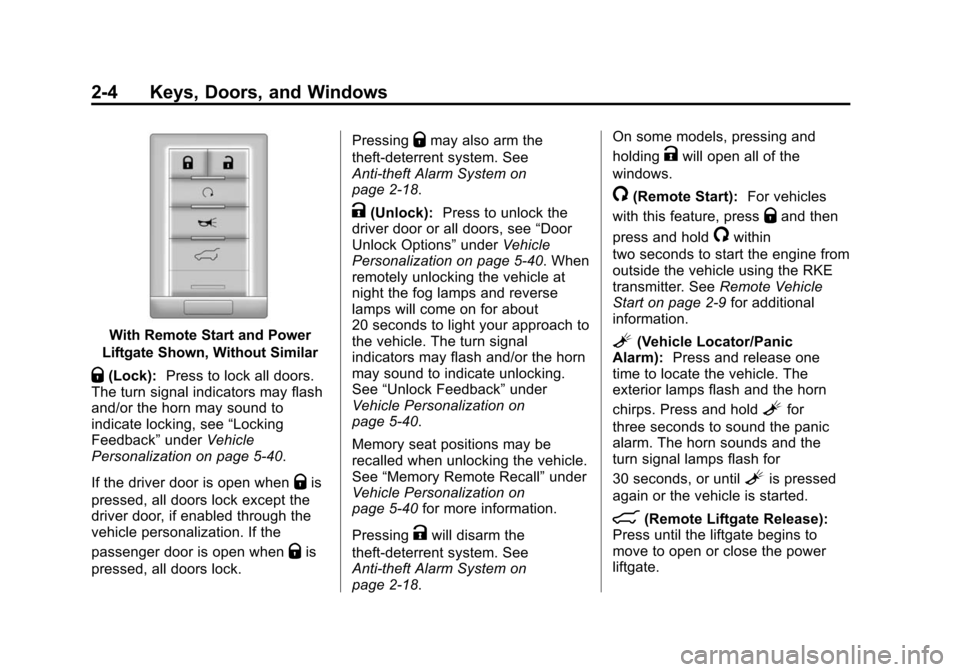
With Remote Start and Power
Liftgate Shown, Without Similar
Q(Lock): Press to lock all doors.
The turn signal indicators may flash
and/or the horn may sound to
indicate locking, see “Locking
Feedback” underVehicle
Personalization on page 5‑40.
If the driver door is open when
Qis
pressed, all doors lock except the
driver door, if enabled through the
vehicle personalization. If the
passenger door is open when
Qis
pressed, all doors lock. Pressing
Qmay also arm the
theft-deterrent system. See
Anti-theft Alarm System on
page 2‑18.
K(Unlock): Press to unlock the
driver door or all doors, see “Door
Unlock Options” underVehicle
Personalization on page 5‑40. When
remotely unlocking the vehicle at
night the fog lamps and reverse
lamps will come on for about
20 seconds to light your approach to
the vehicle. The turn signal
indicators may flash and/or the horn
may sound to indicate unlocking.
See “Unlock Feedback” under
Vehicle Personalization on
page 5‑40.
Memory seat positions may be
recalled when unlocking the vehicle.
See “Memory Remote Recall” under
Vehicle Personalization on
page 5‑40 for more information.
Pressing
Kwill disarm the
theft-deterrent system. See
Anti-theft Alarm System on
page 2‑18. On some models, pressing and
holding
Kwill open all of the
windows.
/(Remote Start): For vehicles
with this feature, press
Qand then
press and hold
/within
two seconds to start the engine from
outside the vehicle using the RKE
transmitter. See Remote Vehicle
Start on page 2‑9 for additional
information.
L(Vehicle Locator/Panic
Alarm): Press and release one
time to locate the vehicle. The
exterior lamps flash and the horn
chirps. Press and hold
Lfor
three seconds to sound the panic
alarm. The horn sounds and the
turn signal lamps flash for
30 seconds, or until
Lis pressed
again or the vehicle is started.
8(Remote Liftgate Release):
Press until the liftgate begins to
move to open or close the power
liftgate.
Page 35 of 502
Black plate (5,1)Cadillac SRX Owner Manual (Include Mex) - 2012
Keys, Doors, and Windows 2-5
Keyless Access Operation
Some vehicles have the keyless
access system that lets you lock
and unlock the doors and access
the liftgate without removing the
remote transmitter from your pocket,
purse, briefcase, etc. The keyless
entry transmitter must be within 1 m
(3 ft) of the door being opened.
If the vehicle has this feature, there
will be a body colored touch pad on
the outside front door handles.
Keyless Unlocking
With the transmitter within 1 m (3 ft),
approach the front door and pull the
handle. If the transmitter is
recognized, the door will unlock
and open.
Entering any door other than the
driver door will always cause all of
the doors to unlock. This is not
customizable.To customize which doors unlock
when the driver
’s door is opened,
see “Passive Unlock” underVehicle
Personalization on page 5‑40.
Keyless Locking
If the vehicle has the keyless
access system, this feature allows
you to select whether the doors
automatically lock during normal
vehicle exit. When the vehicle is
turned off and all doors become
closed, the vehicle will determine
how many keyless access
transmitters remain in the vehicle
interior. If at least one keyless
access transmitter has been
removed from the interior of the
vehicle, the doors will lock after
eight seconds.
If there are two keyless access
transmitters in the vehicle and one
is removed, the other will be locked
in. A person approaching the outside of the locked vehicle without
an authorized keyless access
transmitter will not be able to open
the door, even with the transmitter in
the vehicle.
You may temporarily disable the
keyless locking feature by pressing
and holding the power door unlock
button on the instrument panel for
several seconds with a door open.
Keyless locking will then remain
disabled until the door lock switch is
pressed, or until the vehicle is
turned on.
To customize whether the doors
automatically lock when you exit the
vehicle, see
“Passive Locking”
under Vehicle Personalization on
page 5‑40.
Page 36 of 502
Black plate (6,1)Cadillac SRX Owner Manual (Include Mex) - 2012
2-6 Keys, Doors, and Windows
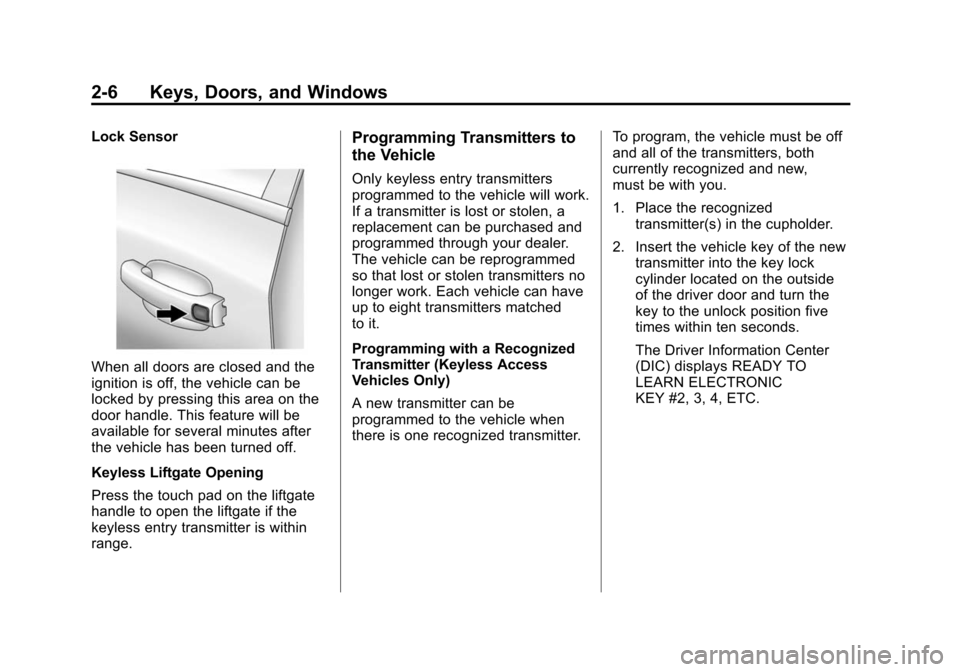
Lock Sensor
When all doors are closed and the
ignition is off, the vehicle can be
locked by pressing this area on the
door handle. This feature will be
available for several minutes after
the vehicle has been turned off.
Keyless Liftgate Opening
Press the touch pad on the liftgate
handle to open the liftgate if the
keyless entry transmitter is within
range.
Programming Transmitters to
the Vehicle
Only keyless entry transmitters
programmed to the vehicle will work.
If a transmitter is lost or stolen, a
replacement can be purchased and
programmed through your dealer.
The vehicle can be reprogrammed
so that lost or stolen transmitters no
longer work. Each vehicle can have
up to eight transmitters matched
to it.
Programming with a Recognized
Transmitter (Keyless Access
Vehicles Only)
A new transmitter can be
programmed to the vehicle when
there is one recognized transmitter.To program, the vehicle must be off
and all of the transmitters, both
currently recognized and new,
must be with you.
1. Place the recognized
transmitter(s) in the cupholder.
2. Insert the vehicle key of the new transmitter into the key lock
cylinder located on the outside
of the driver door and turn the
key to the unlock position five
times within ten seconds.
The Driver Information Center
(DIC) displays READY TO
LEARN ELECTRONIC
KEY #2, 3, 4, ETC.
Page 37 of 502
Black plate (7,1)Cadillac SRX Owner Manual (Include Mex) - 2012
Keys, Doors, and Windows 2-7
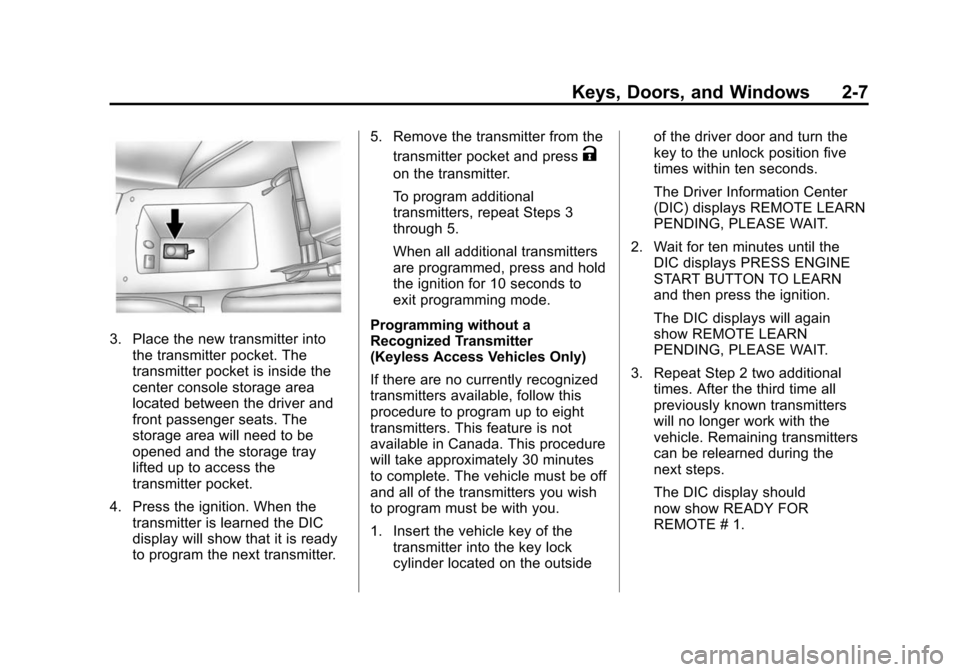
3. Place the new transmitter intothe transmitter pocket. The
transmitter pocket is inside the
center console storage area
located between the driver and
front passenger seats. The
storage area will need to be
opened and the storage tray
lifted up to access the
transmitter pocket.
4. Press the ignition. When the transmitter is learned the DIC
display will show that it is ready
to program the next transmitter. 5. Remove the transmitter from the
transmitter pocket and press
K
on the transmitter.
To program additional
transmitters, repeat Steps 3
through 5.
When all additional transmitters
are programmed, press and hold
the ignition for 10 seconds to
exit programming mode.
Programming without a
Recognized Transmitter
(Keyless Access Vehicles Only)
If there are no currently recognized
transmitters available, follow this
procedure to program up to eight
transmitters. This feature is not
available in Canada. This procedure
will take approximately 30 minutes
to complete. The vehicle must be off
and all of the transmitters you wish
to program must be with you.
1. Insert the vehicle key of the transmitter into the key lock
cylinder located on the outside of the driver door and turn the
key to the unlock position five
times within ten seconds.
The Driver Information Center
(DIC) displays REMOTE LEARN
PENDING, PLEASE WAIT.
2. Wait for ten minutes until the DIC displays PRESS ENGINE
START BUTTON TO LEARN
and then press the ignition.
The DIC displays will again
show REMOTE LEARN
PENDING, PLEASE WAIT.
3. Repeat Step 2 two additional times. After the third time all
previously known transmitters
will no longer work with the
vehicle. Remaining transmitters
can be relearned during the
next steps.
The DIC display should
now show READY FOR
REMOTE # 1.
Page 40 of 502
Black plate (10,1)Cadillac SRX Owner Manual (Include Mex) - 2012
2-10 Keys, Doors, and Windows
Other conditions can affect the
performance of the transmitter.
SeeRemote Keyless Entry (RKE)
System on page 2‑3 for additional
information.
Starting the Engine Using Remote
Start
1. Press and release
Qon the
RKE transmitter.
2. Within two seconds, press and hold
/until the turn signal
lamps flash. This confirms the
request to remote start the
vehicle has been received. If the
vehicle' s lamps are not visible,
press and hold
/for at least
two seconds. During the remote start the
doors will be locked and the
parking lamps will remain on as
long as the engine is running.
The engine will shut off after
10 minutes unless a time
extension is done or the ignition
is put in ON/RUN/START.
3. Press the brake pedal and select the ON/RUN/START ignition
mode to drive the vehicle.
Extending Engine Run Time
For a 10-minute extension, repeat
Steps 1 and 2 while the engine is
still running. The remote start can
only be extended once.
When the remote start is extended,
the second 10-minute period will
start immediately. For example, if the vehicle has
been running for five minutes, and
10 minutes are added, the engine
will run for a total of 15 minutes.
A maximum of two remote starts,
or a remote start with an extension,
are allowed between ignition cycles.
The vehicle's ignition must be
changed to ON/RUN/START and
then back to OFF before the remote
start procedure can be used again.
Shutting the Engine Off After a
Remote Start
To cancel a remote start, do any of
the following:.Press/until the parking lamps
turn off.
.Turn on the hazard warning
flashers.
.Turn the vehicle on and then
back off.
Page 41 of 502
Black plate (11,1)Cadillac SRX Owner Manual (Include Mex) - 2012
Keys, Doors, and Windows 2-11
Conditions in Which Remote Start
Will Not Work
The remote start will not operate if
any of the following occur:
.The ignition is in any mode other
than OFF.
.The transmitter is in the vehicle.
.The hood is not closed.
.The hazard warning flashers
are on.
.There is an emission control
system malfunction.
.The engine coolant temperature
is too high.
.The oil pressure is low.
.Two remote vehicle starts have
already been used.
.The vehicle is not in P (Park).
Door Locks
{WARNING
Unlocked doors can be
dangerous.
.Passengers, especially
children, can easily open the
doors and fall out of a moving
vehicle. The chance of being
thrown out of the vehicle in a
crash is increased if the
doors are not locked. So, all
passengers should wear
safety belts properly and the
doors should be locked
whenever the vehicle is
driven.
.Young children who get into
unlocked vehicles may be
unable to get out. A child can
be overcome by extreme heat
and can suffer permanent
injuries or even death from
heat stroke. Always lock the
vehicle whenever leaving it.(Continued)
WARNING (Continued)
.Outsiders can easily enter
through an unlocked door
when slowing or stopping the
vehicle. Lock the doors to
help prevent this from
happening.
To lock or unlock the doors from
the outside, press
QorKon the
Remote Keyless Entry (RKE)
transmitter. See Remote Keyless
Entry (RKE) System Operation on
page 2‑3.
To unlock a door from the inside,
pull once on the door handle to
unlock it, and a second time to
open it.
Page 42 of 502
Black plate (12,1)Cadillac SRX Owner Manual (Include Mex) - 2012
2-12 Keys, Doors, and Windows
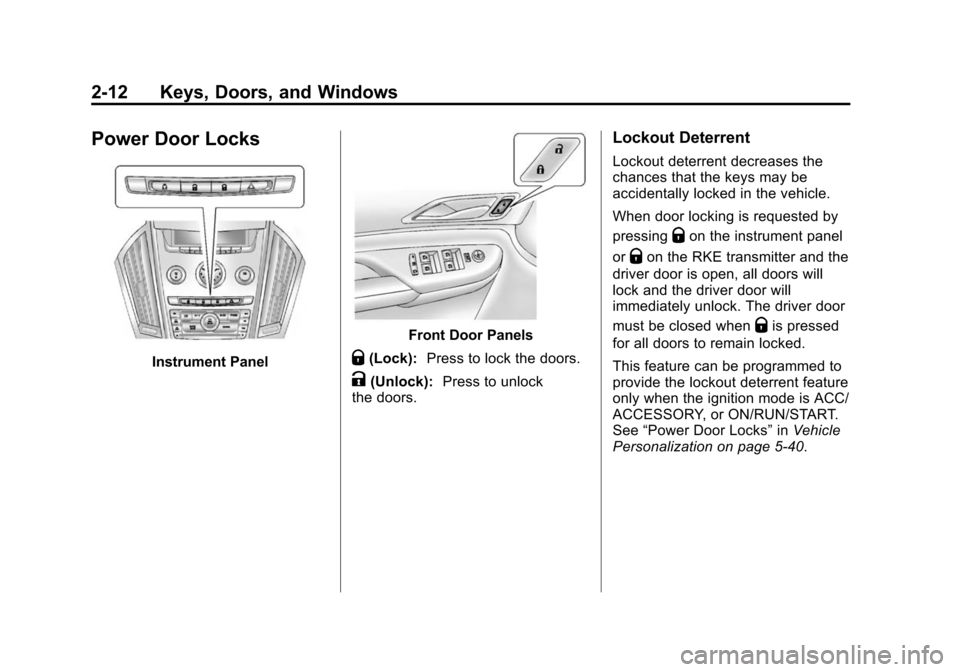
Power Door Locks
Instrument Panel
Front Door Panels
Q(Lock):Press to lock the doors.
K(Unlock): Press to unlock
the doors.
Lockout Deterrent
Lockout deterrent decreases the
chances that the keys may be
accidentally locked in the vehicle.
When door locking is requested by
pressing
Qon the instrument panel
or
Qon the RKE transmitter and the
driver door is open, all doors will
lock and the driver door will
immediately unlock. The driver door
must be closed when
Qis pressed
for all doors to remain locked.
This feature can be programmed to
provide the lockout deterrent feature
only when the ignition mode is ACC/
ACCESSORY, or ON/RUN/START.
See “Power Door Locks” inVehicle
Personalization on page 5‑40.
Page 43 of 502
Black plate (13,1)Cadillac SRX Owner Manual (Include Mex) - 2012
Keys, Doors, and Windows 2-13
Delayed Locking
When this feature is enabled and
the doors are locked with the power
lock switch on the instrument panel,
three chimes sound to signal that
the delayed locking feature is in
use. All doors lock five seconds
after the last door is closed.
When the delayed locking feature
is in use, pressing
Qon the
instrument panel or
Qon the
RKE transmitter will override the
feature and lock all doors
immediately.
This feature can be programmed by
using the Driver Information Center
(DIC). See “Delayed Door Lock” in
Vehicle Personalization on
page 5‑40. The delayed locking
feature is only available if “Unlocked
Door Anti-Lockout” is disabled.
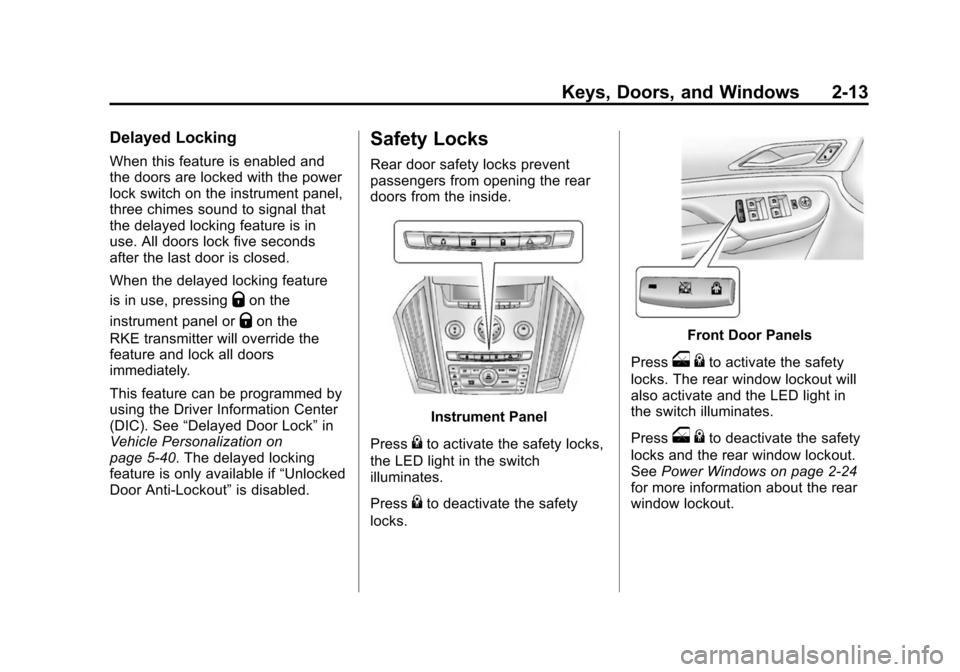
Safety Locks
Rear door safety locks prevent
passengers from opening the rear
doors from the inside.
Instrument Panel
Press
{to activate the safety locks,
the LED light in the switch
illuminates.
Press
{to deactivate the safety
locks.
Front Door Panels
Press
o {to activate the safety
locks. The rear window lockout will
also activate and the LED light in
the switch illuminates.
Press
o {to deactivate the safety
locks and the rear window lockout.
See Power Windows on page 2‑24
for more information about the rear
window lockout.
Page 44 of 502
Black plate (14,1)Cadillac SRX Owner Manual (Include Mex) - 2012
2-14 Keys, Doors, and Windows
Doors
Liftgate
{WARNING
Exhaust gases can enter the
vehicle if it is driven with the
liftgate or trunk/hatch open,
or with any objects that pass
through the seal between the
body and the trunk/hatch or
liftgate. Engine exhaust contains
carbon monoxide (CO) which
cannot be seen or smelled.
It can cause unconsciousness
and even death.(Continued)
WARNING (Continued)
If the vehicle must be driven with
the liftgate or trunk/hatch open:
.Close all of the windows.
.Fully open the air outlets on
or under the instrument
panel.
.Adjust the Climate Control
system to a setting that
brings in only outside air and
set the fan speed to the
highest setting. See“Climate
Control Systems” in the
Index.
.If the vehicle is equipped with
a power liftgate, disable the
power liftgate function.
For more information about
carbon monoxide, see Engine
Exhaust on page 9‑24. Notice:
If you open the liftgate
without checking for overhead
obstructions such as a garage
door, you could damage the
liftgate or the liftgate glass.
Always check to make sure the
area above and behind the liftgate
is clear before opening it.
Manual Liftgate
For vehicles without keyless access,
unlock the vehicle before opening
the liftgate.
Press the touch pad located in the
handle of the liftgate, above the
license plate, and lift up to open.
Do not press the touch pad while
closing the liftgate. This will cause
the liftgate to be unlatched.
Always close the liftgate before
driving.
Page 45 of 502
Black plate (15,1)Cadillac SRX Owner Manual (Include Mex) - 2012
Keys, Doors, and Windows 2-15
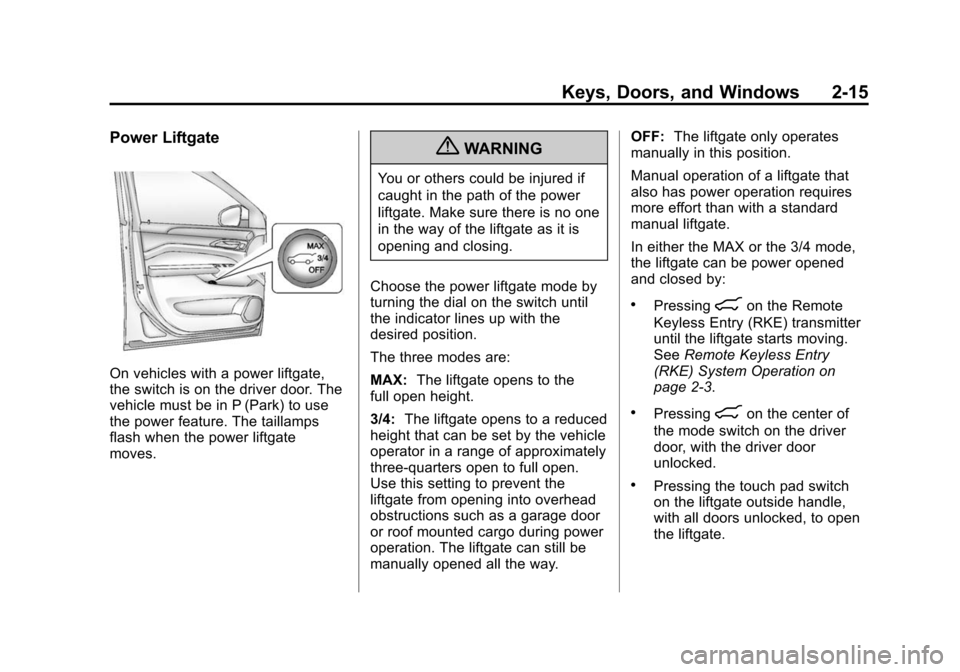
Power Liftgate
On vehicles with a power liftgate,
the switch is on the driver door. The
vehicle must be in P (Park) to use
the power feature. The taillamps
flash when the power liftgate
moves.
{WARNING
You or others could be injured if
caught in the path of the power
liftgate. Make sure there is no one
in the way of the liftgate as it is
opening and closing.
Choose the power liftgate mode by
turning the dial on the switch until
the indicator lines up with the
desired position.
The three modes are:
MAX: The liftgate opens to the
full open height.
3/4: The liftgate opens to a reduced
height that can be set by the vehicle
operator in a range of approximately
three‐quarters open to full open.
Use this setting to prevent the
liftgate from opening into overhead
obstructions such as a garage door
or roof mounted cargo during power
operation. The liftgate can still be
manually opened all the way. OFF:
The liftgate only operates
manually in this position.
Manual operation of a liftgate that
also has power operation requires
more effort than with a standard
manual liftgate.
In either the MAX or the 3/4 mode,
the liftgate can be power opened
and closed by:
.Pressing8on the Remote
Keyless Entry (RKE) transmitter
until the liftgate starts moving.
See Remote Keyless Entry
(RKE) System Operation on
page 2‑3.
.Pressing8on the center of
the mode switch on the driver
door, with the driver door
unlocked.
.Pressing the touch pad switch
on the liftgate outside handle,
with all doors unlocked, to open
the liftgate.