remote start CADILLAC SRX 2012 2.G Owner's Manual
[x] Cancel search | Manufacturer: CADILLAC, Model Year: 2012, Model line: SRX, Model: CADILLAC SRX 2012 2.GPages: 502, PDF Size: 6.23 MB
Page 166 of 502
Black plate (36,1)Cadillac SRX Owner Manual (Include Mex) - 2012
5-36 Instruments and Controls
Anytime this message stays on, the
vehicle should be taken to your
dealer for service as soon as
possible.
Fuel System Messages
FUEL LEVEL LOW
This message displays when the
vehicle is low on fuel. Refuel as
soon as possible
TIGHTEN GAS CAP
This message displays when the
fuel cap is not on tight. Tighten the
fuel cap.
Key and Lock Messages
NO REMOTE DETECTED
This message displays when trying
to start the vehicle if an RKE
transmitter is not detected. The
transmitter battery may be weak.
See“Starting the Vehicle with a
Low Transmitter Battery” under
Remote Keyless Entry (RKE)
System Operation on page 2‑3.
NO REMOTE PRESS BRAKE
TO RESTART
This message is displayed if the
remote is no longer detected in the
vehicle. Press the brake pedal to
restart the vehicle.
NUMBER OF KEYS
PROGRAMMED
This message displays when
programming new keys to the
vehicle.
REMOTE LEFT IN VEHICLE
This message displays when
leaving the vehicle with the
RKE transmitter still inside.
REPLACE BATTERY IN
REMOTE KEY
This message displays when the
battery in the RKE transmitter needs
to be replaced.
Lamp Messages
AFL (ADAPTIVE FORWARD
LIGHTING) LAMPS NEED
SERVICE
This message displays when the
Adaptive Forward Lighting (AFL)
system is disabled and needs
service. See your dealer. See
Adaptive Forward Lighting (AFL) on
page 6‑3 for more information.
AUTOMATIC LIGHT
CONTROL ON
This message is displayed when the
exterior lamp control is in AUTO and
the lights have turned on. See
Twilight Sentinel on page 6‑4.
AUTOMATIC LIGHT
CONTROL OFF
This message is displayed when the
exterior lamp control is in AUTO and
the lights have turned off. See
Twilight Sentinel on page 6‑4.
Page 171 of 502
Black plate (41,1)Cadillac SRX Owner Manual (Include Mex) - 2012
Instruments and Controls 5-41
Entering the Personalization
Menus
1. Press CONFIG to access theConfiguration Settings menu.
2. Turn the MENU/SELECT knob to highlight Vehicle Settings.
3. Press the center of the MENU/ SELECT knob to select the
Vehicle Settings menu.
The following list of menu items
will be available:
.Climate and Air Quality
.Comfort and Convenience
.Language
.Lighting
.Power Door Locks
.Remote Locking, Unlocking,
Starting
.Return to Factory Settings
Turn the MENU/SELECT knob to
highlight the menu. Press the knob
to select it. Each of the menus is
detailed in the following information.
Climate and Air Quality
Select the Climate and Air Quality
menu and the following will be
displayed:
.Auto Fan Speed
.Air Quality Sensor
.Remote Start Auto Seat Cool
.Remote Start Auto Heated Seats
.Auto Defog
.Auto Rear Defog
Auto Fan Speed
This will allow you to select the
automatic fan speed. This feature
sets the climate control fan speed to
maintain the interior temperature.
Press the MENU/SELECT knob
when Auto Fan Speed is highlighted
to open the menu. Turn the knob to
highlight High, Medium, or Low.
Press the knob to confirm the
selection and move back to the
last menu. Air Quality Sensor
This will allow you to select whether
the system will operate at high or
low sensitivity. Only vehicles with
the dual zone climate control will
have this option.
Press the MENU/SELECT knob
when Air Quality Sensor is
highlighted to open the menu.
Turn the knob to highlight High or
Low Sensitivity. Press the knob to
confirm the selection and move
back to the last menu.
Remote Start Auto Seat Cool
When on, this feature will turn the
vented seats on when using remote
start on warm days.
Press the MENU/SELECT knob
when Remote Start Auto Seat Cool
is highlighted. Turn the knob to
select On or Off. Press the knob to
confirm and go back to the
last menu.
Page 172 of 502
Black plate (42,1)Cadillac SRX Owner Manual (Include Mex) - 2012
5-42 Instruments and Controls
Remote Start Auto Heated Seats
When on, this feature will turn the
heated seats on when using remote
start on cold days.
Press the MENU/SELECT knob
when Remote Start Auto Heated
Seats is highlighted. Turn the knob
to select On or Off. Press the knob
to confirm and go back to the
last menu.
Auto Defog
This will allow you to turn the auto
defog on or off.
Press the MENU/SELECT knob
when Auto Defog is highlighted to
open the menu. Turn the knob to
highlight On or Off. Press the knob
to confirm the selection and move
back to the last menu.
Auto Rear Defog
This will allow you to turn the auto
rear defog on or off.
Press the MENU/SELECT knob
when Auto Rear Defog is
highlighted to open the menu.Turn the knob to highlight On or Off.
Press the knob to confirm the
selection and move back to the
last menu.
Comfort and Convenience
Select the Comfort and
Convenience menu and the
following will be displayed:
.Easy Exit Driver Seat
.Chime Volume
.Reverse Tilt Mirror
.Auto Wipe in Reverse Gear
Easy Exit Driver Seat
This allows you to turn the easy exit
driver seat feature on or off. When
on, this feature will move the driver
seat rearward upon turning the
ignition off and the driver door
opened. This may be performed to
make it easier to exit the vehicle.
See Power Seat Adjustment on
page 3‑4 for more information. Press the MENU/SELECT knob
when Easy Exit Driver Seat is
highlighted. Turn the knob to select
On or Off. Press the knob to confirm
and go back to the last menu.
Chime Volume
This allows the selection of the
chime volume level.
Press the MENU/SELECT knob
when Chime Volume is highlighted.
Turn the knob to select Normal or
High. Press the knob to confirm and
go back to the last menu.
Reverse Tilt Mirror
This allows you to turn the reverse
tilt mirror feature on or off. When on,
both the driver and passenger
mirrors will tilt downward when
vehicle is shifted to R (Reverse) to
improve visibility of the ground near
the rear wheels. They will return to
their previous driving position
when the vehicle is shifted out of
R (Reverse), the ignition is turned to
OFF, or the vehicle is left in reverse.
Page 174 of 502
Black plate (44,1)Cadillac SRX Owner Manual (Include Mex) - 2012
5-44 Instruments and Controls
Auto Door Unlock
This allows selection of which of the
doors will automatically unlock when
the vehicle is shifted into P (Park).
Press the MENU/SELECT knob
when Auto Door Unlock is
highlighted. Turn the knob to select
All Doors, Driver Door, or Off. Press
the knob to confirm and go back to
the last menu.
Delayed Door Lock
When on, this feature will delay the
locking of the doors until
five seconds after the last door is
closed. You will hear three chimes
to signal delayed locking is in use.
Pressing either the power lock
button or the lock button on the RKE
transmitter twice will override the
delayed locking feature and
immediately lock all of the doors.
Press the MENU/SELECT knob
when Delayed Door Lock is
highlighted. Turn the knob to select
On or Off. Press the knob to confirm
and go back to the last menu.Remote Lock/Unlock/Start
Select Remote Lock/Unlock/Start
and the following will be displayed:
.Unlock Feedback (Lights)
.Locking Feedback
.Door Unlock Options
.Passive Door Lock
.Passive Door Unlock
.Memory Remote Recall
.Remote Left in Vehicle Reminder
Unlock Feedback (Lights)
When on, the exterior lamps will
flash when unlocking the vehicle
with the RKE transmitter.
Press the MENU/SELECT knob
when Unlock Feedback (Lights) is
highlighted. Turn the knob to select
Flash Lights or Off. Press the knob
to confirm and go back to the
last menu. Locking Feedback
This allows selection of what type of
feedback is given when locking the
vehicle with the RKE transmitter.
Press the MENU/SELECT knob
when Locking Feedback is
highlighted. Turn the knob to select
Lights and Horn, Lights Only, Horn
Only, or Off. Press the knob to
confirm and go back to the
last menu.
Door Unlock Options
This allows selection of which doors
will unlock when pressing the unlock
button on the RKE transmitter.
Press the MENU/SELECT knob
when Door Unlock Options is
highlighted. Turn the knob to select
All Doors or Driver Door Only. When
set to Driver Door Only, the driver
door will unlock the first time the
unlock button is pressed and all
doors will unlock when the button is
pressed a second time.
Page 177 of 502
Black plate (47,1)Cadillac SRX Owner Manual (Include Mex) - 2012
Instruments and Controls 5-47
Programming the Universal
Remote System
For questions or help programming
the Universal Remote system, call
1‐800‐355‐3515 or go to
www.homelink.com.
Programming a garage door opener
involves time-sensitive actions, so
read the entire procedure before
starting. Otherwise, the device will
time out and the procedure will have
to be repeated.
To program up to three devices:
1. Hold the end of the hand-heldtransmitter about 3 to 8 cm (1 to
3 in) away from the Universal
Remote system buttons while
keeping the indicator light in
view. The hand-held transmitter
was supplied by the
manufacturer of the garage door
opener receiver
(motor-head unit). 2. At the same time, press and
hold both the hand-held
transmitter button and one of the
three Universal Remote system
buttons to be used to operate
the garage door. Do not release
the Universal Remote system
button or the hand-held
transmitter button until the
indicator light changes from a
slowly to a rapidly flashing light.
You now may release both
buttons.
Some entry gates and garage
door openers may require
substitution of Step 2 with the
procedure noted in “Gate
Operator and Canadian
Programming” later in this
section. 3. Press and hold for five seconds
the newly trained Universal
Remote system button (the
button selected in Step 2) while
observing the indicator light and
garage door activation.
.If the indicator light stays on
continuously or the garage
door starts to move when
the Universal Remote
system button is pressed
and released, then the
programming is complete.
There is no need to
continue programming
Steps 4 through 6.
.If the Universal Remote
system indicator light blinks
rapidly for two seconds,
then turns to a constant
light and the garage door
does not move, continue
with programming Steps 4
through 6.
Page 225 of 502
Black plate (35,1)Cadillac SRX Owner Manual (Include Mex) - 2012
Infotainment System 7-35
Selecting a Track
Using the control buttons:
.PressgSEEK orlSEEK to
select the previous or next track.
.Turn the TUNE knob to select a
track in the current submenu.
The track will start to play.
Selecting a track in a different
folder:
1. Turn the MENU/SELECT knob.
2. Select Folder List.
3. Select the folder.
4. Select the track.
Searching for Tracks
It is normal for the search feature
to take some time to display the
information after reading the device
due to the amount of information
stored.
Files that do not have any meta
data stored in the ID3 tag display
as Unknown. Tracks can be searched by:
.Playlists
.Artists
.Albums
.Song Titles
.Genres
The number of objects in each
category is shown in parentheses
after the category.
To search for tracks:
1. Turn the MENU/SELECT knob.
2. Select Search.
3. Select: Playlists, Artists, Albums, Song Titles, or Genres.
4. Select the track. The search rate increases if the MENU/SELECT
knob is continuously turned
while searching in a list.
Recording Tracks to MEM
See Mass Storage Media (MEM) on
page 7‑24 for more information.
Rear Seat
Infotainment
Rear Seat Entertainment
(RSE) System
The vehicle may have a DVD Rear
Seat Entertainment (RSE) system.
The RSE system works with the
vehicle's infotainment system. The
DVD player is part of the front radio.
The RSE system includes a radio
with a DVD player, two rear seat
video display screens, audio/video
jacks, two wireless headphones,
and a remote control. See CD/DVD
Player on page 7‑21 or the separate
navigation manual for more
information on the vehicle's DVD
system.
Page 230 of 502
Black plate (40,1)Cadillac SRX Owner Manual (Include Mex) - 2012
7-40 Infotainment System
If a CD, DVD, or MP3 disc is in the
Radio DVD slot, the remote control
Obutton can be used to turn on the
video screen display and start the
disc. The infotainment system can
also turn on the video screen
display. See CD/DVD Player on
page 7‑21 or the separate
navigation manual for more
information.
Notice: Storing the remote
control in a hot area or in direct
sunlight can damage it, and the
repairs will not be covered by the
warranty. Storage in extreme cold
can weaken the batteries. Keep
the remote control stored in a
cool, dry place. Remote Control ButtonsO(Power):
Press to turn the video
screens on and off.
P(Illumination): Press to turn the
remote control backlight on. The
backlight times out after several
seconds if no other button is
pressed.
v(Title): Press to return to the
main menu of the DVD. This
function could vary for each disc.
y(Main Menu): Press to access
the DVD menu. The DVD menu is
different on every DVD. Use the
navigation arrows to move the
cursor. After making a selection
press the enter button. This button
only operates when using a DVD.
n,q,p,o(Menu Navigation
Arrows): Use the arrow buttons to
navigate through a menu.
r(Enter): Press to select the
highlighted choice in any menu.
z(Display Menu): Press to
adjust the brightness and screen
display mode, and display the
language menu.
q(Return): Press to exit the
current active menu and return to
the previous menu. This button
operates only when the display
menu or a DVD menu is active.
c(Stop): Press to stop playing,
rewinding, or fast forwarding a DVD.
Press twice to return to the
beginning of the DVD.
s(Play/Pause): Press to start
playing a DVD. Press to pause a
DVD while it is playing. Press again
to continue playing.
Depending on the infotainment
system in the vehicle, DVD
playback may be slowed down by
pressing
sthen[. Reverse slow
play by pressing
sthenr.
Press
sagain to cancel slow play.
Page 233 of 502
Black plate (43,1)Cadillac SRX Owner Manual (Include Mex) - 2012
Infotainment System 7-43
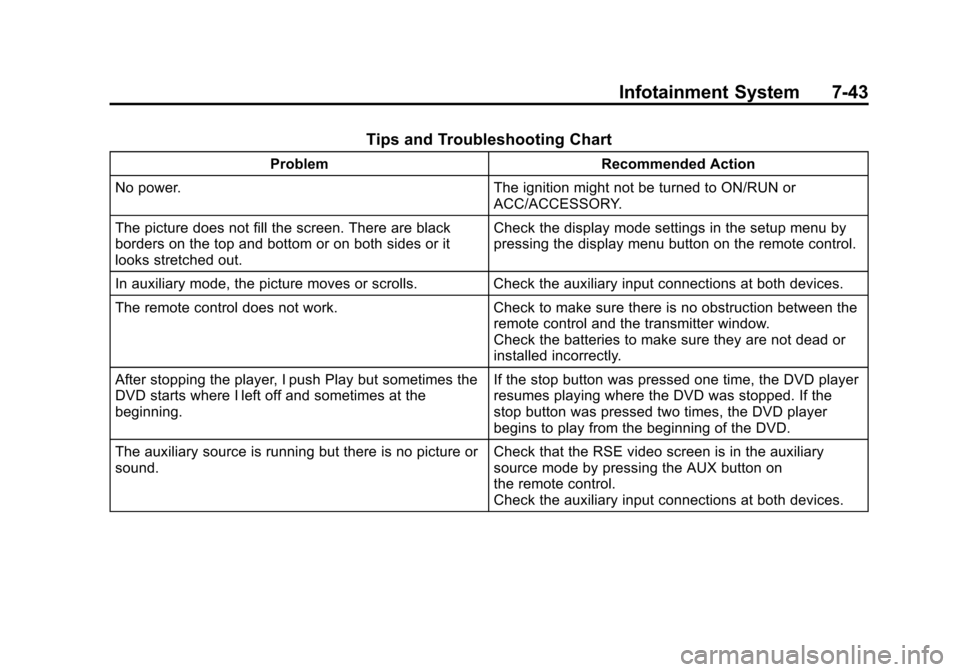
Tips and Troubleshooting Chart
ProblemRecommended Action
No power. The ignition might not be turned to ON/RUN or
ACC/ACCESSORY.
The picture does not fill the screen. There are black
borders on the top and bottom or on both sides or it
looks stretched out. Check the display mode settings in the setup menu by
pressing the display menu button on the remote control.
In auxiliary mode, the picture moves or scrolls. Check the auxiliary input connections at both devices.
The remote control does not work. Check to make sure there is no obstruction between the
remote control and the transmitter window.
Check the batteries to make sure they are not dead or
installed incorrectly.
After stopping the player, I push Play but sometimes the
DVD starts where I left off and sometimes at the
beginning. If the stop button was pressed one time, the DVD player
resumes playing where the DVD was stopped. If the
stop button was pressed two times, the DVD player
begins to play from the beginning of the DVD.
The auxiliary source is running but there is no picture or
sound. Check that the RSE video screen is in the auxiliary
source mode by pressing the AUX button on
the remote control.
Check the auxiliary input connections at both devices.
Page 268 of 502
Black plate (4,1)Cadillac SRX Owner Manual (Include Mex) - 2012
8-4 Climate Controls
Rear Window Defogger
=(Rear Window Defogger):
Press to turn the rear window
defogger on or off.
The rear window defogger
turns off automatically after about
10 minutes. If turned on again it
runs for about five minutes before
turning off. At higher speeds, the
rear window defogger may stay
on continuously.
The rear window defogger can
be set to automatic operation.
See “Climate and Air Quality”
under Vehicle Personalization on
page 5‑40. When Auto Rear Defog
is selected, the rear window
defogger turns on automatically
when the interior temperature is cold
and the outside temperature is
about 40°F and below. The auto
rear defogger turns off automatically
after about 10 minutes. At higher
speeds, the rear window defogger
may stay on continuously. The heated outside rearview mirrors
turn on when the rear window
defogger button is on and help to
clear fog or frost from the surface of
the mirrors. See
Heated Mirrors on
page 2‑21.
Notice: Do not try to clear frost
or other material from the inside
of the front windshield and rear
window with a razor blade or
anything else that is sharp. This
may damage the rear window
defogger grid and affect your
radio's ability to pick up stations
clearly. The repairs would not be
covered by your warranty.
Heated and Ventilated Seats:
Press to heat or ventilate the seat.
See Heated and Ventilated Front
Seats on page 3‑10. Remote Start Climate Control
Operation:
For vehicles with the
remote vehicle start feature, the
climate control system may run
when the vehicle is started remotely.
The system uses the driver's
previous settings to heat or cool the
inside of the vehicle. See Remote
Vehicle Start on page 2‑9.
The rear window defogger turns on
if it is cold outside.
Sensors
The solar sensor, located on top
of the instrument panel near the
windshield, monitors the solar heat.
The climate control system uses
the sensor information to adjust
the temperature, fan speed,
recirculation, and air delivery mode
for best comfort.
If the sensor is covered, the
automatic climate control system
may not work properly.
Page 292 of 502
Black plate (20,1)Cadillac SRX Owner Manual (Include Mex) - 2012
9-20 Driving and Operating
Starting the Gasoline
Engine
Place the transmission in the proper
gear by moving the shift lever to
P (Park) or N (Neutral). To restart
the engine when the vehicle is
already moving, use N (Neutral).
Notice:Do not try to shift to
P (Park) if the vehicle is moving.
If you do, you could damage the
transmission. Shift to P (Park)
only when the vehicle is stopped.
The keyless access transmitter must
be inside the vehicle for the ignition
to work.
Cell phone chargers can interfere
with the operation of the Keyless
Access System. Battery chargers
should not be plugged in when
starting or turning off the engine. To start the vehicle:
Starting Procedure
1. With the brake pedal applied,
press the START button located
on the instrument panel. See
Ignition Positions on page 9‑18.
2. When the engine begins cranking, let go of the button and
the engine cranks automatically
until it starts.
If the transmitter is not in the
vehicle or something is
interfering with the transmitter,
the Driver Information Center
(DIC) will display NO REMOTE
DETECTED. See Driver
Information Center (DIC) on
page 5‑28 for more information. If the battery in the keyless
access transmitter needs
replacing, the DIC displays
REPLACE BATTERY IN
REMOTE KEY. The vehicle can
still be driven. See
Remote
Keyless Entry (RKE) System
Operation on page 2‑3 for more
information.
3. Do not race the engine immediately after starting it.
Operate the engine and
transmission gently until the oil
warms up and lubricates all
moving parts.