steering CADILLAC SRX 2012 2.G Owner's Manual
[x] Cancel search | Manufacturer: CADILLAC, Model Year: 2012, Model line: SRX, Model: CADILLAC SRX 2012 2.GPages: 502, PDF Size: 6.23 MB
Page 181 of 502
Black plate (1,1)Cadillac SRX Owner Manual (Include Mex) - 2012
Lighting 6-1
Lighting
Exterior Lighting
Exterior Lamp Controls . . . . . . . . 6-1
Headlamp High/Low-BeamChanger . . . . . . . . . . . . . . . . . . . . . 6-2
Flash-to-Pass . . . . . . . . . . . . . . . . . 6-2
Daytime Running Lamps (DRL) . . . . . . . . . . . . . . . . 6-3
Adaptive Forward Lighting (AFL) . . . . . . . . . . . . . . . 6-3
Twilight Sentinel . . . . . . . . . . . . . . 6-4
Hazard Warning Flashers . . . . . 6-5
Turn and Lane-Change Signals . . . . . . . . . . . . . . . . . . . . . . 6-6
Front Fog Lamps . . . . . . . . . . . . . . 6-6
Interior Lighting
Instrument Panel Illumination Control . . . . . . . . . . . . . . . . . . . . . . 6-7
Cargo Lamp . . . . . . . . . . . . . . . . . . 6-7
Courtesy Lamps . . . . . . . . . . . . . . 6-7
Dome Lamps . . . . . . . . . . . . . . . . . 6-7
Reading Lamps . . . . . . . . . . . . . . . 6-7
Lighting Features
Entry Lighting . . . . . . . . . . . . . . . . . 6-8
Exit Lighting . . . . . . . . . . . . . . . . . . . 6-8
Battery Load Management . . . . 6-8
Exterior Lighting
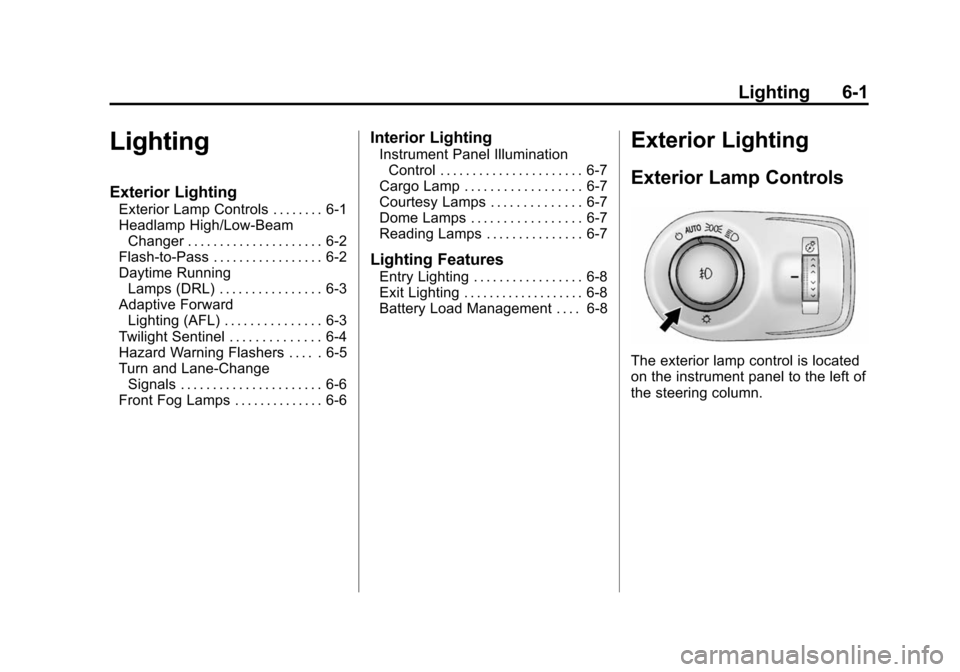
Exterior Lamp Controls
The exterior lamp control is located
on the instrument panel to the left of
the steering column.
Page 184 of 502
Black plate (4,1)Cadillac SRX Owner Manual (Include Mex) - 2012
6-4 Lighting
Curve Lighting
The light beam pivots based on the
steering wheel position and vehicle
speed of at least 10 km/h (6 mph).
The headlamps shine at an angle of
up to 15 degrees to the right or left
of the direction of travel.
Highway Lighting
If the vehicle is traveling straight
continuously at high speeds, the
light beam automatically raises
slightly to increase the headlamp
range.
City Lighting
If the vehicle speed is less than
50 km/h (31 mph), the headlamp
range is automatically reduced.Twilight Sentinel
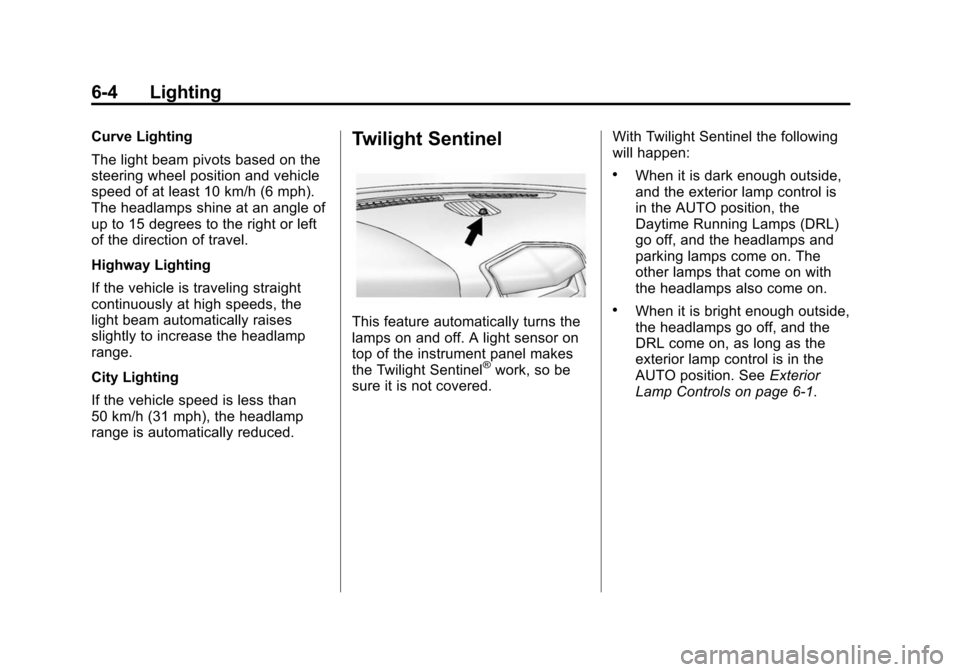
This feature automatically turns the
lamps on and off. A light sensor on
top of the instrument panel makes
the Twilight Sentinel
®work, so be
sure it is not covered. With Twilight Sentinel the following
will happen:
.When it is dark enough outside,
and the exterior lamp control is
in the AUTO position, the
Daytime Running Lamps (DRL)
go off, and the headlamps and
parking lamps come on. The
other lamps that come on with
the headlamps also come on.
.When it is bright enough outside,
the headlamps go off, and the
DRL come on, as long as the
exterior lamp control is in the
AUTO position. See
Exterior
Lamp Controls on page 6‑1.
Page 186 of 502
Black plate (6,1)Cadillac SRX Owner Manual (Include Mex) - 2012
6-6 Lighting
Turn and Lane-Change
Signals
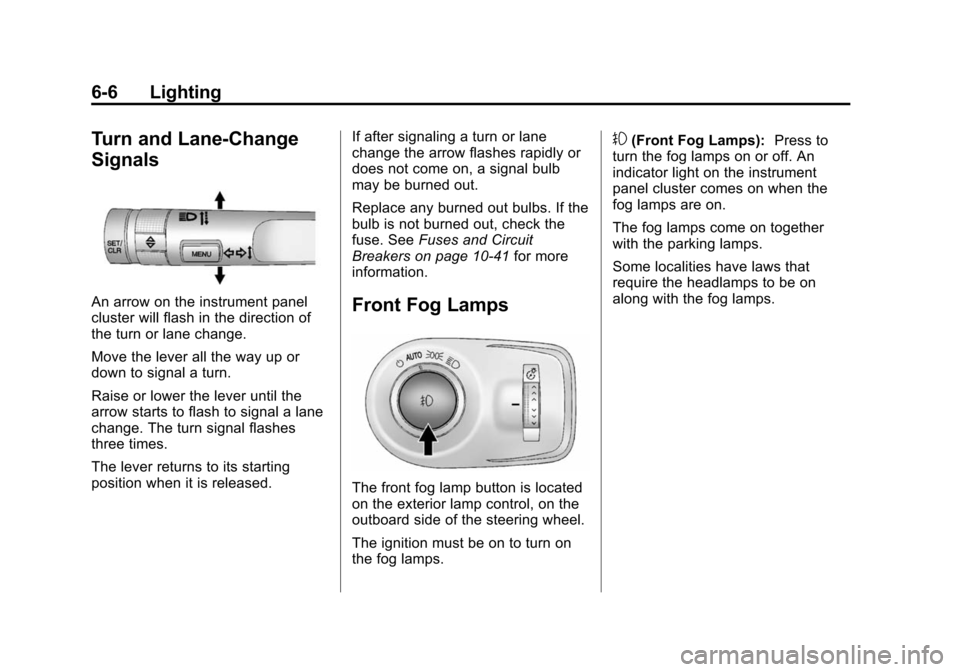
An arrow on the instrument panel
cluster will flash in the direction of
the turn or lane change.
Move the lever all the way up or
down to signal a turn.
Raise or lower the lever until the
arrow starts to flash to signal a lane
change. The turn signal flashes
three times.
The lever returns to its starting
position when it is released.If after signaling a turn or lane
change the arrow flashes rapidly or
does not come on, a signal bulb
may be burned out.
Replace any burned out bulbs. If the
bulb is not burned out, check the
fuse. See
Fuses and Circuit
Breakers on page 10‑41 for more
information.Front Fog Lamps
The front fog lamp button is located
on the exterior lamp control, on the
outboard side of the steering wheel.
The ignition must be on to turn on
the fog lamps.
#(Front Fog Lamps): Press to
turn the fog lamps on or off. An
indicator light on the instrument
panel cluster comes on when the
fog lamps are on.
The fog lamps come on together
with the parking lamps.
Some localities have laws that
require the headlamps to be on
along with the fog lamps.
Page 197 of 502
Black plate (7,1)Cadillac SRX Owner Manual (Include Mex) - 2012
Infotainment System 7-7
Q.(REC
.CD/DVD: Records content
from audio CDs and MP3/
WMA CDs.
.AUX: Records content
from USB mass storage
devices.
R. PHONE
.Opens the phone
main menu.
.Mutes the audio system.
Operation
Controls
The infotainment system is
operated by using the pushbuttons,
multifunction knobs, menus shown
on the display, and steering wheel
controls, if equipped.
Turning the System On or Off
VOL/O(Volume/Power): Press to
turn the system on and off.
Automatic Switch‐Off
If the infotainment system has
been turned on after the ignition is
turned off, the system will turn off
automatically after 10 minutes.
Volume Control
VOL/O(Volume/Power): Turn to
adjust the volume.
PHONE: For vehicles with OnStar,
press and hold PHONE to mute the
infotainment system. Press and
hold PHONE again, or turn the
VOL/
Oknob to cancel mute. For vehicles without OnStar
®, press
PHONE to mute the infotainment
system. Press PHONE again,
or turn the VOL/
Oknob to
cancel mute.
Menu System
Controls
The MENU/SELECT knob and
the BACK
/button are used to
navigate the menu system.
MENU/SELECT: Press to:
.Select or activate the highlighted
menu option.
.Confirm a set value.
.Turn a system setting on or off.
Turn to:
.Enter the menu system.
.Highlight a menu option.
.Select a value.
Page 226 of 502
Black plate (36,1)Cadillac SRX Owner Manual (Include Mex) - 2012
7-36 Infotainment System
Before Driving
The RSE is for rear seat
passengers only. The driver cannot
safely view the video screen while
driving.
In severe or extreme weather
conditions the RSE system may not
work until the temperature is within
the operating range. The operating
range is above−20°C (−4°F)
and below 60°C (140°F). If the
temperature is outside of this range,
heat or cool the vehicle until it is
within the operating range.
Global Off
Depending on the infotainment
system, the RSE system may have
a Global Off feature. The Global Off
feature disables all RSE system
features. Press and hold the radio
power button for more than
three seconds for Global Off to
disable the RSE features. A padlock icon may display on the
infotainment screen when the
Global Off feature is on. On some
infotainment systems, the Global Off
feature can be turned off by
performing one of the following:
.Press and hold the radio power
button for more than
three seconds.
.Insert or eject any disc.
.Insert a DVD video disc.
.Press the Remote Control power
button.
.Press the MEM/CD/AUX button
or the
kbutton when a DVD
video disc is in the player.
.Press the SRC button on the
steering wheel when a DVD
video disc is in the player.
.Cycle the ignition.
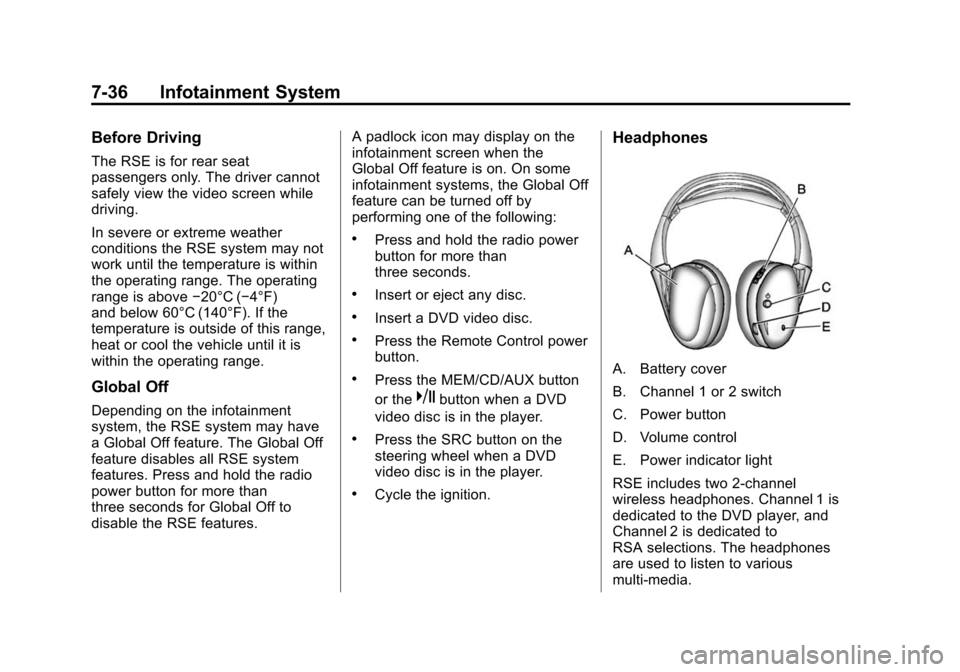
Headphones
A. Battery cover
B. Channel 1 or 2 switch
C. Power button
D. Volume control
E. Power indicator light
RSE includes two 2-channel
wireless headphones. Channel 1 is
dedicated to the DVD player, and
Channel 2 is dedicated to
RSA selections. The headphones
are used to listen to various
multi‐media.
Page 238 of 502
Black plate (48,1)Cadillac SRX Owner Manual (Include Mex) - 2012
7-48 Infotainment System
Bluetooth Controls
Use the buttons located on the
infotainment system and the
steering wheel to operate the
Bluetooth system.
Steering Wheel Controls
b/g(Push To Talk) :Press to
answer incoming calls, confirm
system information, and start voice
recognition.
0/c(End Call/Mute): Press to
end a call, reject a call, or cancel an
operation.
Infotainment System Controls
If equipped, the infotainment system
allows certain controls to be
selected on the infotainment display.
For information about how to
navigate the menu system using the
infotainment controls, see Operation
on page 7‑7.
PHONE: Press to enter the Phone
main menu.
Voice Recognition
The voice recognition system uses
commands to control the system
and dial phone numbers.
Noise: The system may not
recognize voice commands if there
is too much background noise.
When to Speak: A tone sounds to
indicate that the system is ready for
a voice command. Wait for the tone
and then speak.
How to Speak: Speak clearly in a
calm and natural voice.
Audio System
When using the Bluetooth system,
sound comes through the vehicle's
front audio system speakers and
overrides the audio system. Use the
VOL/
Oknob during a call to
change the volume level. The
adjusted volume level remains in
memory for later calls. The system
maintains a minimum volume level.
Other Information
The Bluetooth®word mark and
logos are owned by the Bluetooth®
SIG, Inc. and any use of such marks
by General Motors is under license.
Other trademarks and trade names
are those of their respective owners.
See Radio Frequency Statement on
page 13‑21 for information
regarding Part 15 of the Federal
Communications Commission (FCC)
rules and Industry Canada
Standards RSS-GEN/210/220/310.
Page 243 of 502
Black plate (53,1)Cadillac SRX Owner Manual (Include Mex) - 2012
Infotainment System 7-53
Bluetooth
(Voice Recognition)
Using Voice Recognition
To use voice recognition, press theb/gbutton located on the steering
wheel. Use the commands below for
the various voice features. For
additional information, say "Help"
while you are in a voice
recognition menu.
Pairing
A Bluetooth‐enabled cell phone
must be paired to the Bluetooth
system and then connected to the
vehicle before it can be used. See
your cell phone manufacturer's user
guide for Bluetooth functions before
pairing the cell phone. If a Bluetooth
phone is not connected, calls will be
made using OnStar Hands‐Free
Calling, if available. See OnStar
Overview on page 14‑1 for more
information. Pairing Information
.A Bluetooth phone with MP3
capability cannot be paired to
the vehicle as a phone and an
MP3 player at the same time.
.Up to five cell phones can be
paired to the Bluetooth system.
.The pairing process is disabled
when the vehicle is moving.
.Pairing only needs to be
completed once, unless the
pairing information on the cell
phone changes or the cell phone
is deleted from the system.
.Only one paired cell phone can
be connected to the Bluetooth
system at a time.
.If multiple paired cell phones are
within range of the system, the
system connects to the first
available paired cell phone in the
order that they were first paired
to the system. To link to a
different paired phone, see
“Linking to a Different Phone”
later in this section.
Page 249 of 502
Black plate (59,1)Cadillac SRX Owner Manual (Include Mex) - 2012
Infotainment System 7-59
Clearing the System
Unless information is deleted out of
the in‐vehicle Bluetooth system, it
will be retained indefinitely. This
includes all saved name tags in the
phone book and phone pairing
information. For information on how
to delete this information, see the
previous sections on“Deleting a
Paired Phone” and“Deleting
Name Tags.”
Bluetooth
(UHP Mexico Only)
General Information
Vehicles with a Universal
Hands‐free Phone (UHP) system
can use a Bluetooth
®capable
mobile phone with a Hands-Free
Profile to make and receive phone
calls. The infotainment system and
voice control are used to control the
system. The system can be used
while the ignition is in ON/RUN or
ACC/ACCESSORY. The range of the UHP system can
be up to 10 m (33 ft). Not all phones
support all functions and not all
phones work with the UHP system.
Other Information
The Bluetooth word mark and logos
are owned by the Bluetooth®SIG,
Inc. and any use of such marks by
General Motors is under license.
Other trademarks and trade names
are those of their respective owners.
UHP Controls
Use the buttons located on the
infotainment system and the
steering wheel to operate the UHP
system.
Steering Wheel Controls
Steering wheel controls can be
used to:
.Answer incoming calls
.Confirm system information
.Start voice recognition
.End a call
.Reject a call
.Cancel an operation
.Make outgoing calls using the
call list
b/g(Push To Talk) : Press to
answer incoming calls, to confirm
system information, and to start
voice control. Press and hold for two
to three seconds to access the
call list.
$/i(End call/Mute) : Press to
end a call, reject a call, or to cancel
an operation.
To make outgoing calls using the
call list.
1. Press the
b/gbutton.
2. Highlight the phone number by toggling the SRC switch up
or down.
3. Dial the highlighted number by pressing the
b/gbutton.
Page 253 of 502
Black plate (63,1)Cadillac SRX Owner Manual (Include Mex) - 2012
Infotainment System 7-63
To make a call using the Call
Lists menu:
1. Press PHONE twice, or pressPHONE once on vehicles with a
navigation system.
2. Select Call Lists.
3. Select the Incoming Calls, Outgoing Calls, or Missed
Calls list.
4. Select the name or number you want to call.
Making a Call
To make a call:
1. Press PHONE twice, or press PHONE once on vehicles with a
navigation system.
2. Select Enter Number for vehicles without a navigation system.
3. Select the numbers to be dialed. For vehicles with a navigation
system, touch the numbers on
the infotainment screen. For vehicles without a navigation
system, see
“Entering a
Character Sequence” in
Operation on page 7‑7 for more
information.
4. Select Call to start dialing the number.
Accepting or Declining a Call
When an incoming call is received,
the infotainment system mutes and
a ring tone is heard in the vehicle.
To accept the incoming call, turn the
MENU/SELECT knob to “Answer”
and press the MENU/SELECT knob,
or press the
b/gbutton on the
steering wheel controls.
To decline the incoming call, turn
the MENU/SELECT knob to
“decline” and press the MENU/
SELECT knob, or press
the
b/gbutton on the
steering wheel controls. Call Waiting
Call waiting must be supported on
the mobile phone and enabled by
the wireless service carrier to work.
To accept the incoming call, turn the
MENU/SELECT knob to
“Answer”
and press the MENU/SELECT knob,
or press the
b/gbutton on the
steering wheel controls.
To decline the incoming call, turn
the MENU/SELECT knob to
“Decline” and press the MENU/
SELECT knob, or press
the
$/ibutton on the
steering wheel controls.
1. Press PHONE.
2. Select Switch Call from the menu.
Page 254 of 502
Black plate (64,1)Cadillac SRX Owner Manual (Include Mex) - 2012
7-64 Infotainment System
Conference Calling
Conference calling and three way
calling must be supported on the
mobile phone and enabled by the
wireless service carrier to work.
To start a conference call while in
a call:
1. Press the MENU/SELECT knoband select Enter Number.
2. Enter the character sequence then select call.
3. After the call has been placed, press the MENU/SELECT knob
and choose Merge Calls.
4. To add more callers to the conference call, repeat steps 1
through 3. The number of callers
that can be added is limited by
your wireless service carrier.
To disconnect from one caller while
in a conference call, select Detach
Number from the menu and select
the number to hang up on. Ending a Call
Press the MENU/SELECT knob
and select Hang Up, or press
the
$/ibutton on the steering
wheel controls.
To Mute a Call
Press the MENU/SELECT knob and
select Mute Call.
To Cancel Mute
Press the MENU/SELECT knob and
select Mute Call.
Dual Tone Multi-Frequency (DTMF)
Tones
The UHP system can send numbers
during a call. This is used when
calling a menu driven phone
system.
To access this system:
1. Press the MENU/SELECT knob and select Enter Number.
2. Enter the character sequence.
Operating UHP Using Voice
Control
The voice control of the UHP
system enables you to operate
several functions of the mobile
phone using your voice. The UHP
system uses voice commands to
control the system and dial phone
numbers. After input of the
command the infotainment system
guides you through the dialogue
with appropriate questions and
feedback to achieve the desired
action. The commands and
numbers can be spoken without a
pause between the individual words.
In addition you can save telephone
numbers under a name tag that is
selectable by you. The telephone
connection can be set up with
this name.
In the event of incorrect operation or
incorrect codes, the voice control
gives you voice feedback and
requests you to re-enter the
desired command.