ignition CADILLAC SRX 2012 2.G Workshop Manual
[x] Cancel search | Manufacturer: CADILLAC, Model Year: 2012, Model line: SRX, Model: CADILLAC SRX 2012 2.GPages: 502, PDF Size: 6.23 MB
Page 311 of 502
Black plate (39,1)Cadillac SRX Owner Manual (Include Mex) - 2012
Driving and Operating 9-39
Increasing Speed While Cruise
Control is at a Set Speed
If the cruise control system is
already activated,
.Press and hold the +RES button
on the steering wheel until the
desired speed is reached, then
release it.
.To increase vehicle speed in
small amounts, press the +RES
button. Each time this is done,
the vehicle goes about 1.6 km/h
(1 mph) faster.
Reducing Speed While Cruise
Control is at a Set Speed
If the cruise control system is
already activated,
.Press and hold the −SET button
on the steering wheel until the
desired lower speed is reached,
then release it.
.To slow down in small amounts,
press the −SET button on the
steering wheel briefly. Each time
this is done, the vehicle goes
about 1.6 km/h (1 mph) slower.
Passing Another Vehicle While
Using Cruise Control
Use the accelerator pedal to
increase the vehicle speed.
When you take your foot off the
pedal, the vehicle will slow down to
the previous set cruise speed.
Using Cruise Control on Hills
How well the cruise control will work
on hills depends upon the vehicle
speed, load, and the steepness of
the hills. When going up steep hills,
you might have to step on the
accelerator pedal to maintain the
vehicle speed. When going
downhill, you might have to brake or
shift to a lower gear to keep the
vehicle speed down. If the brake is
applied the cruise control
disengages. Ending Cruise Control
There are three ways to end cruise
control:
.Step lightly on the brake pedal.
.Press theJOFF button on the
steering wheel.
.Press theJbutton on the
steering wheel.
Erasing Speed Memory
The cruise control set speed is
erased from memory by pressing
the
Jbutton or if the ignition is
turned off.
Page 343 of 502
Black plate (11,1)Cadillac SRX Owner Manual (Include Mex) - 2012
Vehicle Care 10-11
SeeEngine Oil Messages on
page 5‑35. Change the oil as
soon as possible within the next
1 000 km (600 mi). It is possible that,
if driving under the best conditions,
the oil life system might indicate that
an oil change is not necessary for
up to a year. The engine oil and
filter must be changed at least once
a year and at this time the system
must be reset. Your dealer has
trained service people who will
perform this work and reset the
system. It is also important to check
the oil regularly over the course of
an oil drain interval and keep it at
the proper level.
If the system is ever reset
accidentally, the oil must be
changed at 5 000 km (3,000 mi)
since the last oil change.
Remember to reset the oil life
system whenever the oil is
changed.How to Reset the Engine Oil
Life System
Reset the system whenever the
engine oil is changed so that the
system can calculate the next
engine oil change. To reset the
system:
1. Using the DIC MENU button and
thumbwheel on the turn signal
lever, display REMAINING OIL
LIFE on the DIC. See Driver
Information Center (DIC) on
page 5‑28 andEngine Oil
Messages on page 5‑35.
2. Press the SET/CLR button to reset the oil life at 100%.
Be careful not to reset the oil life
display accidentally at any time
other than after the oil is
changed. It cannot be reset
accurately until the next oil
change. The oil life system can also be reset
as follows:
1. Turn the ignition on with the
engine off.
2. Fully press and release the accelerator pedal three times
within five seconds.
If the CHANGE ENGINE OIL
SOON message is not on,
the system is reset.
The system is reset when the
CHANGE ENGINE OIL SOON
message is off.
If the CHANGE ENGINE OIL SOON
message comes back on when the
vehicle is started, the engine oil life
system has not been reset. Repeat
the procedure.
Page 357 of 502
Black plate (25,1)Cadillac SRX Owner Manual (Include Mex) - 2012
Vehicle Care 10-25
Starter Switch Check
{WARNING
When you are doing this
inspection, the vehicle could
move suddenly. If the vehicle
moves, you or others could be
injured.
1. Before starting this check, be sure there is enough room
around the vehicle.
2. Firmly apply both the parking brake and the regular brake.
See Parking Brake on
page 9‑31.
Do not use the accelerator
pedal, and be ready to turn off
the engine immediately if it
starts. 3. Try to start the engine in each
gear. The vehicle should start
only in P (Park) or N (Neutral).
If the vehicle starts in any other
position, contact your dealer for
service.
Automatic Transmission
Shift Lock Control
Function Check
{WARNING
When you are doing this
inspection, the vehicle could
move suddenly. If the vehicle
moves, you or others could be
injured.
1. Before starting this check, be sure there is enough room
around the vehicle. It should be
parked on a level surface. 2. Firmly apply the parking brake.
See Parking Brake on
page 9‑31.
Be ready to apply the regular
brake immediately if the vehicle
begins to move.
3. With the engine off, turn the ignition on, but do not start the
engine. Without applying the
regular brake, try to move the
shift lever out of P (Park) with
normal effort. If the shift lever
moves out of P (Park), contact
your dealer for service.
Page 375 of 502
Black plate (43,1)Cadillac SRX Owner Manual (Include Mex) - 2012
Vehicle Care 10-43
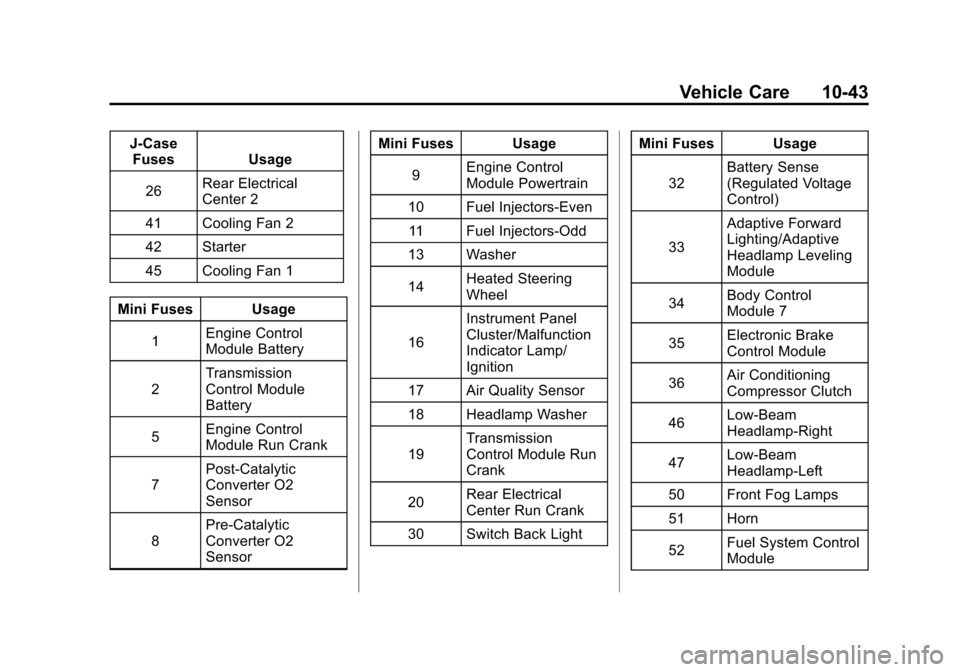
J-CaseFuses Usage
26 Rear Electrical
Center 2
41 Cooling Fan 2
42 Starter
45 Cooling Fan 1
Mini Fuses Usage 1 Engine Control
Module Battery
2 Transmission
Control Module
Battery
5 Engine Control
Module Run Crank
7 Post-Catalytic
Converter O2
Sensor
8 Pre-Catalytic
Converter O2
Sensor Mini Fuses Usage
9 Engine Control
Module Powertrain
10 Fuel Injectors-Even 11 Fuel Injectors-Odd
13 Washer
14 Heated Steering
Wheel
16 Instrument Panel
Cluster/Malfunction
Indicator Lamp/
Ignition
17 Air Quality Sensor
18 Headlamp Washer
19 Transmission
Control Module Run
Crank
20 Rear Electrical
Center Run Crank
30 Switch Back Light Mini Fuses Usage
32 Battery Sense
(Regulated Voltage
Control)
33 Adaptive Forward
Lighting/Adaptive
Headlamp Leveling
Module
34 Body Control
Module 7
35 Electronic Brake
Control Module
36 Air Conditioning
Compressor Clutch
46 Low-Beam
Headlamp‐Right
47 Low-Beam
Headlamp‐Left
50 Front Fog Lamps
51 Horn
52 Fuel System Control
Module
Page 376 of 502
Black plate (44,1)Cadillac SRX Owner Manual (Include Mex) - 2012
10-44 Vehicle Care
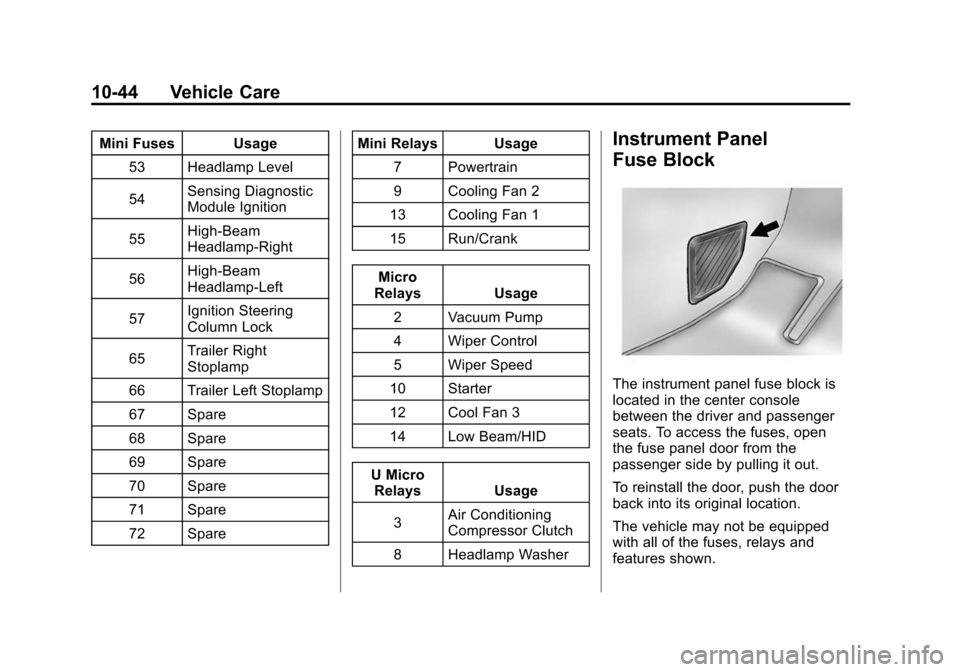
Mini Fuses Usage53 Headlamp Level
54 Sensing Diagnostic
Module Ignition
55 High-Beam
Headlamp-Right
56 High-Beam
Headlamp-Left
57 Ignition Steering
Column Lock
65 Trailer Right
Stoplamp
66 Trailer Left Stoplamp
67 Spare
68 Spare
69 Spare
70 Spare
71 Spare
72 Spare Mini Relays Usage
7 Powertrain
9 Cooling Fan 2
13 Cooling Fan 1
15 Run/Crank
Micro
Relays Usage
2 Vacuum Pump
4 Wiper Control
5 Wiper Speed
10 Starter
12 Cool Fan 3
14 Low Beam/HID
U Micro Relays Usage
3 Air Conditioning
Compressor Clutch
8 Headlamp WasherInstrument Panel
Fuse Block
The instrument panel fuse block is
located in the center console
between the driver and passenger
seats. To access the fuses, open
the fuse panel door from the
passenger side by pulling it out.
To reinstall the door, push the door
back into its original location.
The vehicle may not be equipped
with all of the fuses, relays and
features shown.
Page 380 of 502
Black plate (48,1)Cadillac SRX Owner Manual (Include Mex) - 2012
10-48 Vehicle Care
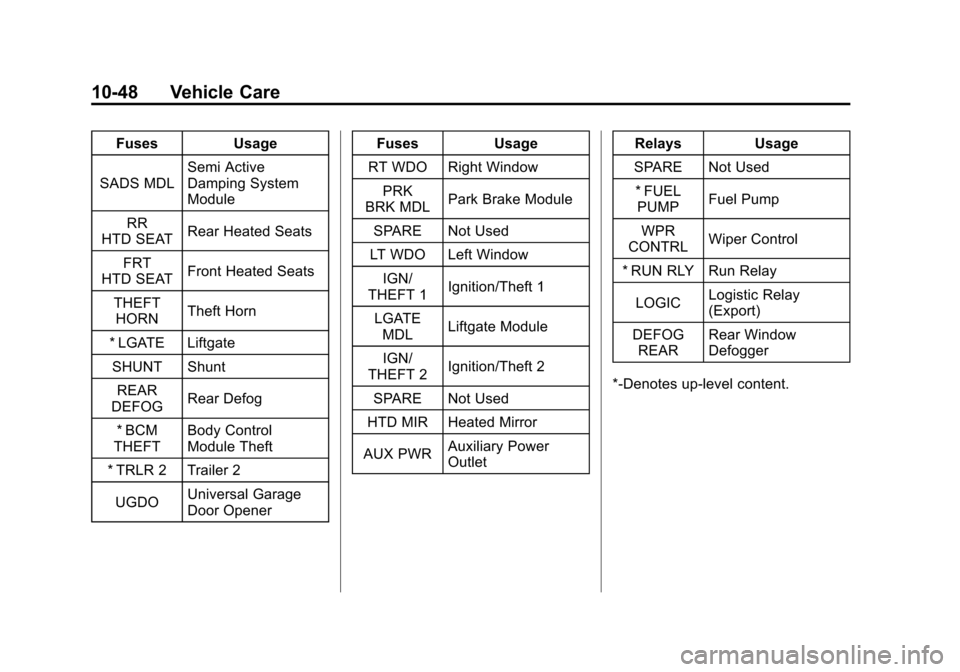
FusesUsage
SADS MDL Semi Active
Damping System
Module
RR
HTD SEAT Rear Heated Seats
FRT
HTD SEAT Front Heated Seats
THEFT HORN Theft Horn
* LGATE Liftgate SHUNT Shunt REAR
DEFOG Rear Defog
* BCM
THEFT Body Control
Module Theft
* TRLR 2 Trailer 2
UGDO Universal Garage
Door Opener Fuses
Usage
RT WDO Right Window PRK
BRK MDL Park Brake Module
SPARE Not Used
LT WDO Left Window
IGN/
THEFT 1 Ignition/Theft 1
LGATE MDL Liftgate Module
IGN/
THEFT 2 Ignition/Theft 2
SPARE Not Used
HTD MIR Heated Mirror
AUX PWR Auxiliary Power
Outlet Relays
Usage
SPARE Not Used * FUEL PUMP Fuel Pump
WPR
CONTRL Wiper Control
* RUN RLY Run Relay
LOGIC Logistic Relay
(Export)
DEFOG REAR Rear Window
Defogger
*‐Denotes up‐level content.
Page 391 of 502
Black plate (59,1)Cadillac SRX Owner Manual (Include Mex) - 2012
Vehicle Care 10-59
Always check the TPMS malfunction
telltale after replacing one or more
tires or wheels on your vehicle to
ensure that the replacement or
alternate tires and wheels allow
the TPMS to continue to function
properly.
SeeTire Pressure Monitor
Operation on page 10‑59 for
additional information.
Federal Communications
Commission (FCC) Rules and
with Industry Canada
Standards
See Radio Frequency Statement on
page 13‑21 for information
regarding Part 15 of the Federal
Communications Commission (FCC)
Rules and with Industry Canada
Standards RSS-GEN/210/220/310.
Tire Pressure Monitor
Operation
This vehicle may have a Tire
Pressure Monitor System (TPMS).
The TPMS is designed to warn the
driver when a low tire pressure
condition exists. TPMS sensors are
mounted onto each tire and wheel
assembly, excluding the spare tire
and wheel assembly. The TPMS
sensors monitor the air pressure
in the tires and transmit the tire
pressure readings to a receiver
located in the vehicle.
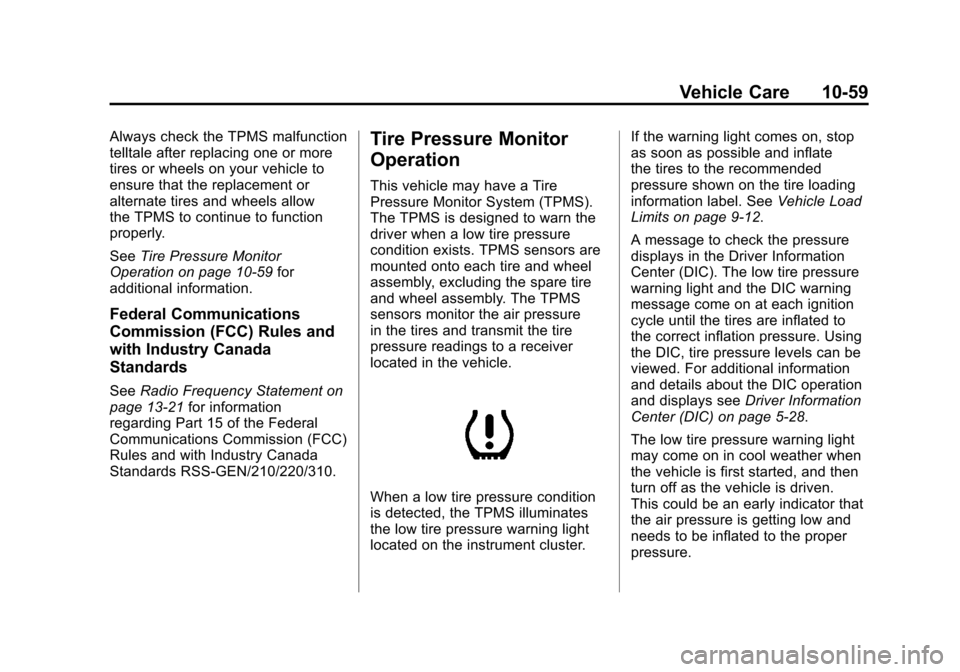
When a low tire pressure condition
is detected, the TPMS illuminates
the low tire pressure warning light
located on the instrument cluster. If the warning light comes on, stop
as soon as possible and inflate
the tires to the recommended
pressure shown on the tire loading
information label. See
Vehicle Load
Limits on page 9‑12.
A message to check the pressure
displays in the Driver Information
Center (DIC). The low tire pressure
warning light and the DIC warning
message come on at each ignition
cycle until the tires are inflated to
the correct inflation pressure. Using
the DIC, tire pressure levels can be
viewed. For additional information
and details about the DIC operation
and displays see Driver Information
Center (DIC) on page 5‑28.
The low tire pressure warning light
may come on in cool weather when
the vehicle is first started, and then
turn off as the vehicle is driven.
This could be an early indicator that
the air pressure is getting low and
needs to be inflated to the proper
pressure.
Page 392 of 502
Black plate (60,1)Cadillac SRX Owner Manual (Include Mex) - 2012
10-60 Vehicle Care
A Tire and Loading Information label
shows the size of the original
equipment tires and the correct
inflation pressure for the tires when
they are cold. SeeVehicle Load
Limits on page 9‑12, for an example
of the Tire and Loading Information
label and its location. Also see Tire
Pressure on page 10‑56.
The TPMS can warn about a low
tire pressure condition but it
does not replace normal tire
maintenance. See Tire Inspection
on page 10‑63, Tire Rotation on
page 10‑63 andTires on
page 10‑49. Notice:
Tire sealant materials are
not all the same. A non-approved
tire sealant could damage the
TPMS sensors. TPMS sensor
damage caused by using an
incorrect tire sealant is not
covered by the vehicle
warranty. Always use only the
GM-approved tire sealant
available through your dealer or
included in the vehicle.
Factory-installed Tire Inflator Kits
use a GM approved liquid tire
sealant. Using non-approved tire
sealants could damage the TPMS
sensors. See Tire Sealant and
Compressor Kit on page 10‑73 for
information regarding the inflator kit
materials and instructions.TPMS Malfunction Light and
Message
The TPMS will not function properly
if one or more of the TPMS sensors
are missing or inoperable. When the
system detects a malfunction, the
low tire pressure warning light
flashes for about one minute and
then stays on for the remainder of
the ignition cycle. A DIC warning
message also displays. The
malfunction light and DIC warning
message come on at each ignition
cycle until the problem is corrected.
Some of the conditions that can
cause these to come on are:
.One of the road tires has been
replaced with the spare tire.
The spare tire does not have a
TPMS sensor. The malfunction
light and the DIC message
should go off after the road tire
is replaced and the sensor
matching process is performed
successfully. See "TPMS Sensor
Matching Process" later in this
section.
Page 393 of 502
Black plate (61,1)Cadillac SRX Owner Manual (Include Mex) - 2012
Vehicle Care 10-61
.The TPMS sensor matching
process was not done or
not completed successfully
after rotating the tires. The
malfunction light and the DIC
message should go off after
successfully completing the
sensor matching process.
See "TPMS Sensor Matching
Process" later in this section.
.One or more TPMS sensors
are missing or damaged.
The malfunction light and the
DIC message should go off
when the TPMS sensors are
installed and the sensor
matching process is performed
successfully. See your dealer
for service.
.Replacement tires or wheels do
not match the original equipment
tires or wheels. Tires and wheels
other than those recommended
could prevent the TPMS from
functioning properly. SeeBuying
New Tires on page 10‑65.
.Operating electronic devices or
being near facilities using radio
wave frequencies similar to the
TPMS could cause the TPMS
sensors to malfunction.
If the TPMS is not functioning
properly, it cannot detect or signal a
low tire condition. See your dealer
for service if the TPMS malfunction
light and DIC message come on
and stay on.
TPMS Sensor Matching
Process
Each TPMS sensor has a unique
identification code. The identification
code needs to be matched to a new
tire/wheel position after rotating the
vehicle’s tires or replacing one or
more of the TPMS sensors.
Also, the TPMS sensor matching
process should be performed after
replacing a spare tire with a road
tire containing the TPMS sensor.
The malfunction light and the DIC
message should go off at the next
ignition cycle. The sensors are
matched to the tire/wheel positions,
using a TPMS relearn tool, in the
following order: driver side front tire,
passenger side front tire, passenger
side rear tire, and driver side rear.
See your dealer for service or to
purchase a relearn tool.
Page 394 of 502
Black plate (62,1)Cadillac SRX Owner Manual (Include Mex) - 2012
10-62 Vehicle Care
There are two minutes to match
the first tire/wheel position, and
five minutes overall to match all
four tire/wheel positions. If it takes
longer, the matching process stops
and must be restarted.
The TPMS sensor matching
process is:
1. Set the parking brake.
2. Place the vehicle power mode inON/RUN/START. See Ignition
Positions on page 9‑18.
3. Select the vehicle information menu using the menu button.
4. Select the tire pressure screen using the up/down thumbwheel.
5. Press and hold SET to begin the sensor matching process. 6. Press SET to confirm selection.
The horn sounds twice to signal
the receiver is in relearn mode
and TIRE LEARNING ACTIVE
message displays on the DIC
screen.
7. Start with the driver side front tire.
8. Place the relearn tool against the tire sidewall, near the valve
stem. Then press the button to
activate the TPMS sensor.
A horn chirp confirms that the
sensor identification code has
been matched to this tire and
wheel position.
9. Proceed to the passenger side front tire, and repeat the
procedure in Step 8. 10. Proceed to the passenger side
rear tire, and repeat the
procedure in Step 8.
11. Proceed to the driver side rear tire, and repeat the procedure
in Step 8. The horn sounds
two times to indicate the
sensor identification code has
been matched to the driver
side rear tire, and the TPMS
sensor matching process is
no longer active. The TIRE
LEARNING ACTIVE message
on the DIC display screen
goes off.
12. Press STOP to turn the ignition off.
13. Set all four tires to the recommended air pressure
level as indicated on the Tire
and Loading Information label.