lock CADILLAC SRX 2012 2.G Repair Manual
[x] Cancel search | Manufacturer: CADILLAC, Model Year: 2012, Model line: SRX, Model: CADILLAC SRX 2012 2.GPages: 502, PDF Size: 6.23 MB
Page 174 of 502
Black plate (44,1)Cadillac SRX Owner Manual (Include Mex) - 2012
5-44 Instruments and Controls
Auto Door Unlock
This allows selection of which of the
doors will automatically unlock when
the vehicle is shifted into P (Park).
Press the MENU/SELECT knob
when Auto Door Unlock is
highlighted. Turn the knob to select
All Doors, Driver Door, or Off. Press
the knob to confirm and go back to
the last menu.
Delayed Door Lock
When on, this feature will delay the
locking of the doors until
five seconds after the last door is
closed. You will hear three chimes
to signal delayed locking is in use.
Pressing either the power lock
button or the lock button on the RKE
transmitter twice will override the
delayed locking feature and
immediately lock all of the doors.
Press the MENU/SELECT knob
when Delayed Door Lock is
highlighted. Turn the knob to select
On or Off. Press the knob to confirm
and go back to the last menu.Remote Lock/Unlock/Start
Select Remote Lock/Unlock/Start
and the following will be displayed:
.Unlock Feedback (Lights)
.Locking Feedback
.Door Unlock Options
.Passive Door Lock
.Passive Door Unlock
.Memory Remote Recall
.Remote Left in Vehicle Reminder
Unlock Feedback (Lights)
When on, the exterior lamps will
flash when unlocking the vehicle
with the RKE transmitter.
Press the MENU/SELECT knob
when Unlock Feedback (Lights) is
highlighted. Turn the knob to select
Flash Lights or Off. Press the knob
to confirm and go back to the
last menu. Locking Feedback
This allows selection of what type of
feedback is given when locking the
vehicle with the RKE transmitter.
Press the MENU/SELECT knob
when Locking Feedback is
highlighted. Turn the knob to select
Lights and Horn, Lights Only, Horn
Only, or Off. Press the knob to
confirm and go back to the
last menu.
Door Unlock Options
This allows selection of which doors
will unlock when pressing the unlock
button on the RKE transmitter.
Press the MENU/SELECT knob
when Door Unlock Options is
highlighted. Turn the knob to select
All Doors or Driver Door Only. When
set to Driver Door Only, the driver
door will unlock the first time the
unlock button is pressed and all
doors will unlock when the button is
pressed a second time.
Page 175 of 502
Black plate (45,1)Cadillac SRX Owner Manual (Include Mex) - 2012
Instruments and Controls 5-45
When set to All Doors, all of the
doors will unlock at the first press of
the unlock button. Press the knob to
confirm and go back to the
last menu.
Passive Door Lock
If the vehicle has the Remote
Keyless Entry (RKE) system, when
enabled, this feature allows the
doors to lock after several seconds
if all doors are closed and at least
one RKE transmitter has been
removed from the interior of the
vehicle. It does not matter how far
away the RKE transmitter is from
the vehicle. This feature can also be
configured to chirp the horn when
the doors are passively locked.
Press the MENU/SELECT knob
when Passive Door Lock is
highlighted. Turn the knob to select
On With Chirp, On, or Off. Press the
knob to confirm and go back to the
last menu.Passive Door Unlock
If the vehicle has the RKE system,
this feature allows you to select
which doors will automatically
unlock when you open the driver
door with the RKE transmitter
present.
Press the MENU/SELECT knob
when Passive Door Unlock is
highlighted. Turn the knob to select
All Doors or Driver Door. Press the
knob to confirm and go back to the
last menu.
Memory Remote Recall
This allows the Memory Remote
Recall feature to be turned on or off.
Press the MENU/SELECT knob
when Memory Remote Recall is
highlighted. Turn the knob to select
On or Off. Press the knob to confirm
and go back to the last menu.
Remote Left in Vehicle Reminder
This allows the Remote Left In
Vehicle reminder feature to be
turned on or off. If on, the horn will
chirp if a remote is left in the
vehicle.
Press the MENU/SELECT knob
when Remote Left In Vehicle is
highlighted. Turn the knob to select
On or Off. Press the knob to confirm
and go back to the last menu.
Return to Factory Settings
Select Return to Factory Settings
to return all of the vehicle
personalization to the default
settings. Turn the knob to select Yes
or No. Press the knob to confirm
and go back to the last menu.
Page 200 of 502
Black plate (10,1)Cadillac SRX Owner Manual (Include Mex) - 2012
7-10 Infotainment System
DSP (Digital Signal Processing)
Settings
For vehicles with DSP, it is used to
provide a choice of different
listening experiences.
.2.0 Normal‐Select this setting
to adjust the audio for normal
mode. This provides the best
sound quality for all seating
positions.
.Centerpoint ‐Centerpoint®
signal processing circuitry. This
setting creates a surround sound
listening experience from stereo
CDs and satellite radio.
For more information on Bose
®
Centerpoint®signal processing
circuitry, please visit www.
bose.com/centerpoint.
.5.1 Surround ‐The infotainment
system used in conjunction with
the Bose
®5.1 Cabin Surround®
sound system for the vehicle
includes digital 5.1 decoding.
This technology unlocks the full
benefit of digital 5.1 recordings,
so digitally encoded music and
movie soundtracks can be
presented faithfully and
accurately. If the video screens
or Rear Seat Audio (RSA) are
on, 5.1 Surround is not
available.
To adjust the DSP settings:
1. Press the TONE button.
2. Select DSP.
3. Select the setting.
Press the BACK
/button to go
back to the Tone Settings menu.
System Settings
Configuring the Number of
Favorite Pages
To configure the number of available
favorite pages:
1. Press the CONFIG button.
2. Select Radio Settings.
3. Select Radio Favorites.
4. Select the number of available favorite pages.
5. Press the BACK
/button
to go back to the System
Configuration menu.
Page 207 of 502
Black plate (17,1)Cadillac SRX Owner Manual (Include Mex) - 2012
Infotainment System 7-17
Pausing XM with the Vehicle
Turned Off
If XM is paused when the vehicle is
turned off, the radio continues to
buffer the current radio station for
up to 20 minutes. If the vehicle is
turned back on within 20 minutes,
the radio resumes playback from the
paused point.
XM Messages
XL (Explicit Language
Channels):These channels, or any
others, can be blocked by request,
by calling 1-800-929-2100 in the
U.S. and 1-877-438-9677 in
Canada.
XM Updating: The encryption code
in the receiver is being updated, no
action is required. This process
should take no longer than
30 seconds.
Loading XM: The audio system is
acquiring and processing audio and
text data, no action is needed. This
message should disappear shortly. Channel Off Air:
This channel is
not currently in service. Tune in to
another channel.
Channel Unauth: This channel is
blocked or cannot be received with
your XM Subscription package.
Channel Unavailable: This
previously assigned channel is no
longer assigned. Tune to another
station.
No Artist Info: The system is
working properly. No artist
information is available at this time
on this channel.
No Title Info: The system is
working properly. No song title
information is available at this time
on this channel.
No CAT Info: The system is
working properly. No category
information is available at this time
on this channel. No Information:
The system is
working properly. No text or
informational messages are
available at this time on this
channel.
No Subscription Please Renew:
XM subscription needs to be
reactivated. Contact XM at
www.xmradio.com or call
1-800-929-2100 in the U.S. and
www.xmradio.ca or call
1-877-438-9677 in Canada.
No XM Signal: The system is
working properly. The vehicle may
be in a location where the XM signal
is being blocked. When the vehicle
is moved into an open area, the
signal should return.
CAT Not Found: The system is
working properly. There are no
channels available for the selected
category.
XM Radio ID: If tuned to channel 0,
this message alternates with the
XM Radio eight‐digit radio ID label.
This label is needed to activate the
service.
Page 226 of 502
Black plate (36,1)Cadillac SRX Owner Manual (Include Mex) - 2012
7-36 Infotainment System
Before Driving
The RSE is for rear seat
passengers only. The driver cannot
safely view the video screen while
driving.
In severe or extreme weather
conditions the RSE system may not
work until the temperature is within
the operating range. The operating
range is above−20°C (−4°F)
and below 60°C (140°F). If the
temperature is outside of this range,
heat or cool the vehicle until it is
within the operating range.
Global Off
Depending on the infotainment
system, the RSE system may have
a Global Off feature. The Global Off
feature disables all RSE system
features. Press and hold the radio
power button for more than
three seconds for Global Off to
disable the RSE features. A padlock icon may display on the
infotainment screen when the
Global Off feature is on. On some
infotainment systems, the Global Off
feature can be turned off by
performing one of the following:
.Press and hold the radio power
button for more than
three seconds.
.Insert or eject any disc.
.Insert a DVD video disc.
.Press the Remote Control power
button.
.Press the MEM/CD/AUX button
or the
kbutton when a DVD
video disc is in the player.
.Press the SRC button on the
steering wheel when a DVD
video disc is in the player.
.Cycle the ignition.
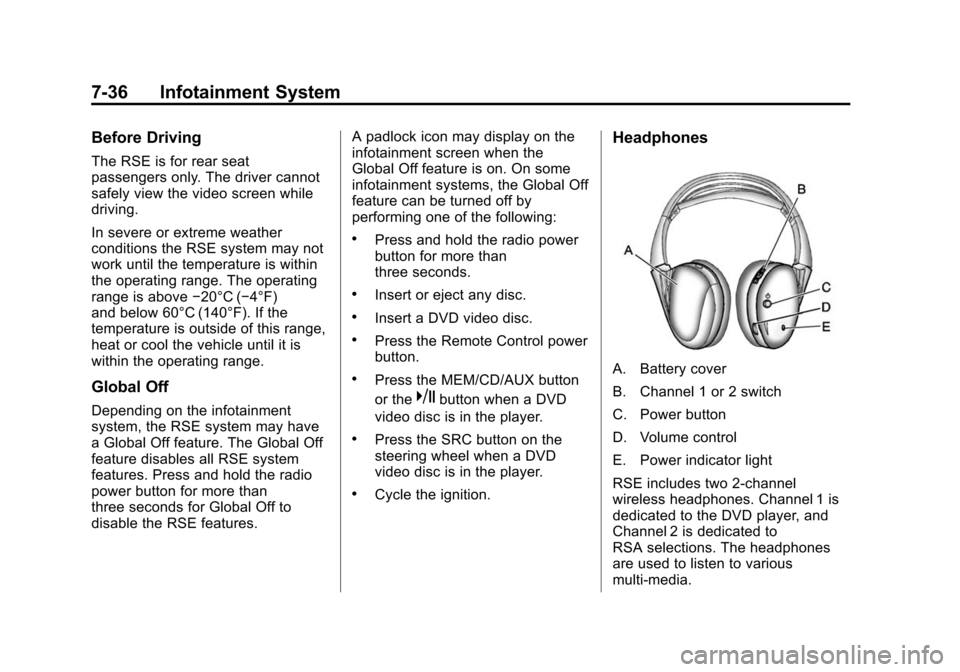
Headphones
A. Battery cover
B. Channel 1 or 2 switch
C. Power button
D. Volume control
E. Power indicator light
RSE includes two 2-channel
wireless headphones. Channel 1 is
dedicated to the DVD player, and
Channel 2 is dedicated to
RSA selections. The headphones
are used to listen to various
multi‐media.
Page 229 of 502
Black plate (39,1)Cadillac SRX Owner Manual (Include Mex) - 2012
Infotainment System 7-39
Video Screens
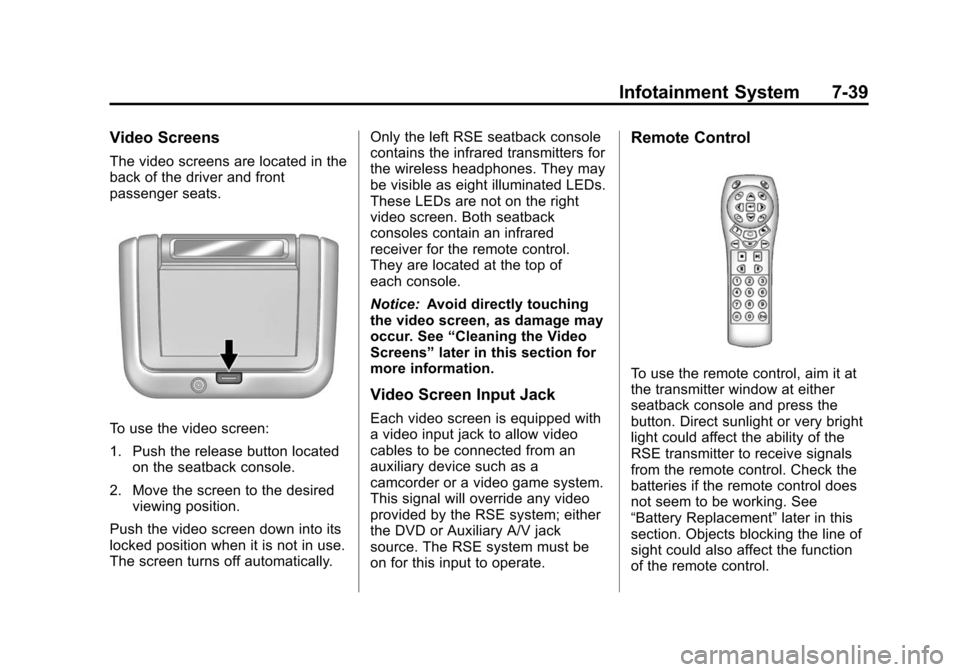
The video screens are located in the
back of the driver and front
passenger seats.
To use the video screen:
1. Push the release button locatedon the seatback console.
2. Move the screen to the desired viewing position.
Push the video screen down into its
locked position when it is not in use.
The screen turns off automatically. Only the left RSE seatback console
contains the infrared transmitters for
the wireless headphones. They may
be visible as eight illuminated LEDs.
These LEDs are not on the right
video screen. Both seatback
consoles contain an infrared
receiver for the remote control.
They are located at the top of
each console.
Notice:
Avoid directly touching
the video screen, as damage may
occur. See “Cleaning the Video
Screens” later in this section for
more information.
Video Screen Input Jack
Each video screen is equipped with
a video input jack to allow video
cables to be connected from an
auxiliary device such as a
camcorder or a video game system.
This signal will override any video
provided by the RSE system; either
the DVD or Auxiliary A/V jack
source. The RSE system must be
on for this input to operate.
Remote Control
To use the remote control, aim it at
the transmitter window at either
seatback console and press the
button. Direct sunlight or very bright
light could affect the ability of the
RSE transmitter to receive signals
from the remote control. Check the
batteries if the remote control does
not seem to be working. See
“Battery Replacement” later in this
section. Objects blocking the line of
sight could also affect the function
of the remote control.
Page 257 of 502
Black plate (67,1)Cadillac SRX Owner Manual (Include Mex) - 2012
Infotainment System 7-67
Example of a dialogue
User:“Select device.”
Voice output: “Please, say a device
number to select.”
User: “device number.”
Voice output: “Do you want to select
the device number “device number.”
(The device name appears on the
infotainment display screen)
User: “Yes.”
Voice output: “One moment please,
the system searches for the
selected device.”
Voice output: “Device number
“device number” is selected, ending
session.”
Telephone Number Dialing
After the “Dial”command, the voice
control requests input of a number.
The telephone number must be
spoken in your normal speech
without any artificial pauses
between the numbers. Recognition is best, if a pause of at
least half a second is made after
every three to five digits. The
infotainment system then repeats
the numbers recognized.
Available Commands:
.“Dial”: the inputs are accepted.
.“Digit”: a numeric value between
“0-9”
is entered.
.“Delete”: the number last
entered or the block of numbers
last entered is deleted.
.“Plus”: a preceding “+”is entered
for a call abroad.
.“Verify”: the inputs are repeated
by the voice output.
.“Asterisk”: an asterisk “*”is
entered.
.“Hash”: a hash character “#”is
entered.
.“Pause”: a pause is entered into
the character sequence.
.“Help”
.“Cancel” The telephone number entered can
have a maximum length of 25 digits.
To be able to make a call abroad
you can say the word
“Plus”(+) at
the beginning of your number. The
plus allows you to call from any
country without knowing the prefix
for calls made abroad in that
country. Then say the required
country code.
Example of a dialogue
User: “Dial.”
Voice output: “Please, say the
number to dial.”
User: “Plus four nine.”
User: “Seven three one.”
Voice output: “Seven three one.”
User: “One one nine nine.”
Voice output: “One one nine nine.”
User: “Dial.”
Voice output: “The number is being
dialled.”
Page 261 of 502
Black plate (71,1)Cadillac SRX Owner Manual (Include Mex) - 2012
Infotainment System 7-71
“Made for iPod”means that an
electronic accessory has been
designed to connect specifically to
iPod and has been certified
by the developer to meet Apple
performance standards. Apple is not
responsible for the operation of this
device or its compliance with safety
and regulatory standards.
iPod, iPod classic, iPod nano, and
iPod touch are trademarks of
Apple Inc., registered in the
U.S. and other countries.Fees and Taxes —Subscription fee,
taxes, one time activation fee, and
other fees may apply. Subscription
fee is consumer only. All fees and
programming subject to change.
Subscriptions subject to Customer
Agreement available at
www.xmradio.com. XM™ service
only available in the 48 contiguous
United States and Canada*.
*Canada —Some deterioration of
service may occur in extreme
northern latitudes. This is beyond
the control of XM™ Satellite Radio.
Explicit Language Notice —
Channels with frequent explicit
language are indicated with an
“XL” preceding the channel name. Channel blocking is available for
XM Satellite Radio receivers by
notifying XM at:
.USA Customers
—Visit
www.xmradio.com or
call 1-800-xmradio
(1-800-967-2346).
.Canadian Customers —Visit
www.xmradio.ca or
call 1-877-438-9677.
It is prohibited to copy, decompile,
disassemble, reverse engineer,
hack, manipulate, or otherwise
make available any technology or
software incorporated in receivers
compatible with the XM™ Satellite
Radio System or that support the
XM website, the Online Service or
any of its content. Furthermore, the
AMBER voice compression software
included in this product is protected
by intellectual property rights
including patent rights, copyrights,
and trade secrets of Digital Voice
Systems, Inc.
Page 270 of 502
Black plate (6,1)Cadillac SRX Owner Manual (Include Mex) - 2012
8-6 Climate Controls
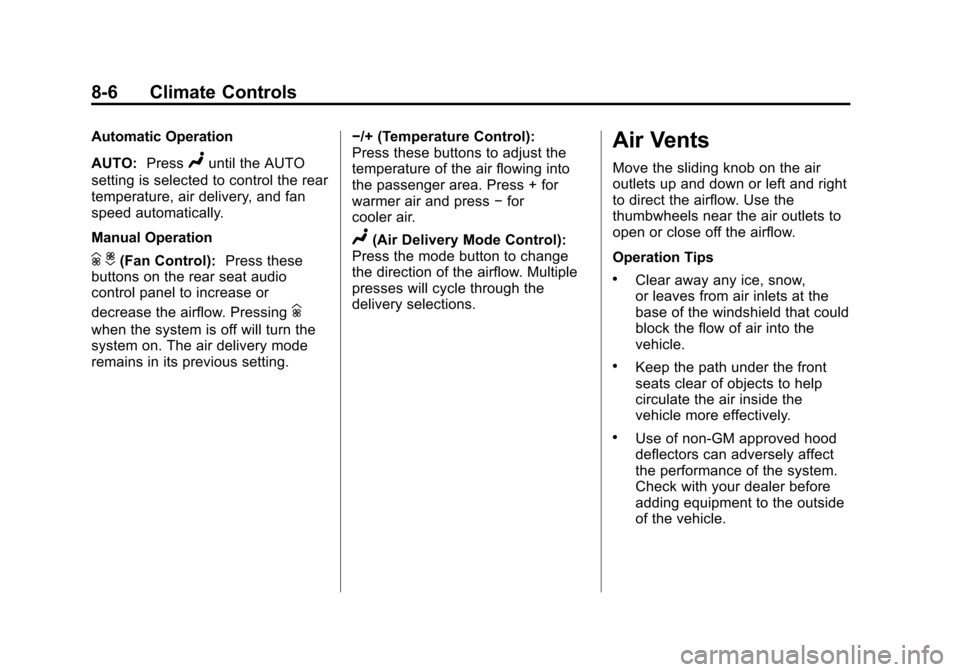
Automatic Operation
AUTO:Press
Nuntil the AUTO
setting is selected to control the rear
temperature, air delivery, and fan
speed automatically.
Manual Operation
h i(Fan Control): Press these
buttons on the rear seat audio
control panel to increase or
decrease the airflow. Pressing
h
when the system is off will turn the
system on. The air delivery mode
remains in its previous setting. −/+ (Temperature Control):
Press these buttons to adjust the
temperature of the air flowing into
the passenger area. Press + for
warmer air and press
−for
cooler air.
N(Air Delivery Mode Control):
Press the mode button to change
the direction of the airflow. Multiple
presses will cycle through the
delivery selections.
Air Vents
Move the sliding knob on the air
outlets up and down or left and right
to direct the airflow. Use the
thumbwheels near the air outlets to
open or close off the airflow.
Operation Tips
.Clear away any ice, snow,
or leaves from air inlets at the
base of the windshield that could
block the flow of air into the
vehicle.
.Keep the path under the front
seats clear of objects to help
circulate the air inside the
vehicle more effectively.
.Use of non‐GM approved hood
deflectors can adversely affect
the performance of the system.
Check with your dealer before
adding equipment to the outside
of the vehicle.
Page 273 of 502
Black plate (1,1)Cadillac SRX Owner Manual (Include Mex) - 2012
Driving and Operating 9-1
Driving and
Operating
Driving Information
Distracted Driving . . . . . . . . . . . . . 9-2
Defensive Driving . . . . . . . . . . . . . 9-3
Drunk Driving . . . . . . . . . . . . . . . . . 9-3
Control of a Vehicle . . . . . . . . . . . 9-4
Braking . . . . . . . . . . . . . . . . . . . . . . . 9-4
Steering . . . . . . . . . . . . . . . . . . . . . . . 9-4
Off-Road Recovery . . . . . . . . . . . . 9-5
Loss of Control . . . . . . . . . . . . . . . . 9-5
Driving on Wet Roads . . . . . . . . . 9-6
Highway Hypnosis . . . . . . . . . . . . 9-8
Hill and Mountain Roads . . . . . . 9-8
Winter Driving . . . . . . . . . . . . . . . . . 9-9
If the Vehicle Is Stuck . . . . . . . . 9-11
Vehicle Load Limits . . . . . . . . . . 9-12
Starting and Operating
New Vehicle Break-In . . . . . . . . 9-16
Adjustable Throttle andBrake Pedal . . . . . . . . . . . . . . . . 9-17
Ignition Positions . . . . . . . . . . . . 9-18
Starting the Gasoline Engine . . . . . . . . . . . . . . . . . . . . . 9-20
Engine Heater . . . . . . . . . . . . . . . 9-22
Retained Accessory Power (RAP) . . . . . . . . . . . . . . . 9-22
Shifting Into Park . . . . . . . . . . . . 9-22
Shifting out of Park . . . . . . . . . . 9-24
Parking over Things That Burn . . . . . . . . . . . . . . . . . . 9-24
Engine Exhaust
Engine Exhaust . . . . . . . . . . . . . . 9-24
Running the Vehicle WhileParked . . . . . . . . . . . . . . . . . . . . . 9-25
Automatic Transmission
Automatic Transmission . . . . . 9-26
Manual Mode . . . . . . . . . . . . . . . . 9-28
Fuel Economy Mode . . . . . . . . . 9-29
Drive Systems
All-Wheel Drive . . . . . . . . . . . . . . 9-30
Brakes
Antilock BrakeSystem (ABS) . . . . . . . . . . . . . . 9-30
Parking Brake . . . . . . . . . . . . . . . 9-31
Brake Assist . . . . . . . . . . . . . . . . . 9-33
Hill Start Assist (HSA) . . . . . . . 9-33
Ride Control Systems
Traction Control System (TCS) . . . . . . . . . . . . . . 9-34
StabiliTrak
®System . . . . . . . . . 9-35
Limited-Slip Rear Axle . . . . . . . 9-37
Selective Ride Control . . . . . . . 9-37
Cruise Control
Cruise Control . . . . . . . . . . . . . . . 9-37
Object Detection Systems
Ultrasonic Parking Assist . . . . 9-40
Rear Vision Camera (RVC) . . . . . . . . . . . . . 9-43