remote start CADILLAC SRX 2013 2.G User Guide
[x] Cancel search | Manufacturer: CADILLAC, Model Year: 2013, Model line: SRX, Model: CADILLAC SRX 2013 2.GPages: 432, PDF Size: 7.13 MB
Page 35 of 432
Black plate (5,1)Cadillac SRX Owner Manual - 2013 - CRC - 11/9/12
Keys, Doors, and Windows 2-5
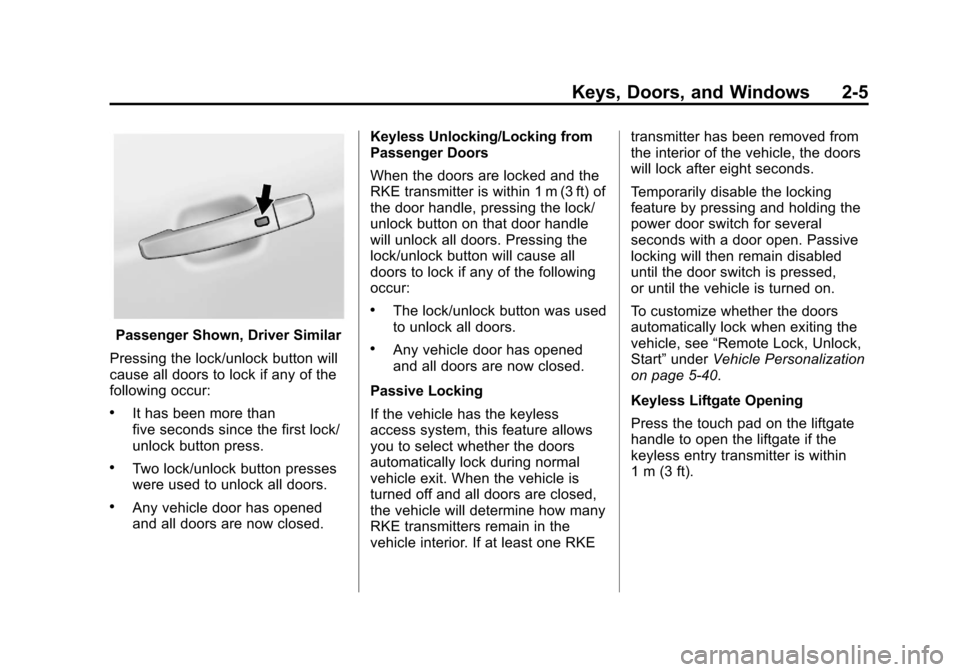
Passenger Shown, Driver Similar
Pressing the lock/unlock button will
cause all doors to lock if any of the
following occur:
.It has been more than
five seconds since the first lock/
unlock button press.
.Two lock/unlock button presses
were used to unlock all doors.
.Any vehicle door has opened
and all doors are now closed. Keyless Unlocking/Locking from
Passenger Doors
When the doors are locked and the
RKE transmitter is within 1 m (3 ft) of
the door handle, pressing the lock/
unlock button on that door handle
will unlock all doors. Pressing the
lock/unlock button will cause all
doors to lock if any of the following
occur:
.The lock/unlock button was used
to unlock all doors.
.Any vehicle door has opened
and all doors are now closed.
Passive Locking
If the vehicle has the keyless
access system, this feature allows
you to select whether the doors
automatically lock during normal
vehicle exit. When the vehicle is
turned off and all doors are closed,
the vehicle will determine how many
RKE transmitters remain in the
vehicle interior. If at least one RKE transmitter has been removed from
the interior of the vehicle, the doors
will lock after eight seconds.
Temporarily disable the locking
feature by pressing and holding the
power door switch for several
seconds with a door open. Passive
locking will then remain disabled
until the door switch is pressed,
or until the vehicle is turned on.
To customize whether the doors
automatically lock when exiting the
vehicle, see
“Remote Lock, Unlock,
Start” under Vehicle Personalization
on page 5‑40.
Keyless Liftgate Opening
Press the touch pad on the liftgate
handle to open the liftgate if the
keyless entry transmitter is within
1 m (3 ft).
Page 37 of 432
Black plate (7,1)Cadillac SRX Owner Manual - 2013 - CRC - 11/9/12
Keys, Doors, and Windows 2-7
Programming without a
Recognized Transmitter (Keyless
Access Vehicles Only)
If there are no currently recognized
transmitters available, follow this
procedure to program up to eight
transmitters. This feature is not
available in Canada. This procedure
will take approximately 30 minutes
to complete. The vehicle must be off
and all of the transmitters you wish
to program must be with you.
1. Insert the vehicle key of thetransmitter into the key lock
cylinder on the driver door
handle and turn the key,
counterclockwise, to the unlock
position five times within
10 seconds.
The Driver Information Center
(DIC) displays REMOTE LEARN
PENDING, PLEASE WAIT. 2. Wait for ten minutes until the
DIC displays PRESS ENGINE
START BUTTON TO LEARN
and then press the START
button.
The DIC displays will again
show REMOTE LEARN
PENDING, PLEASE WAIT.
3. Repeat Step 2 two additional times. After the third time all
previously known transmitters
will no longer work with the
vehicle. Remaining transmitters
can be relearned during the next
steps.
The DIC display should
now show READY FOR
REMOTE # 1.
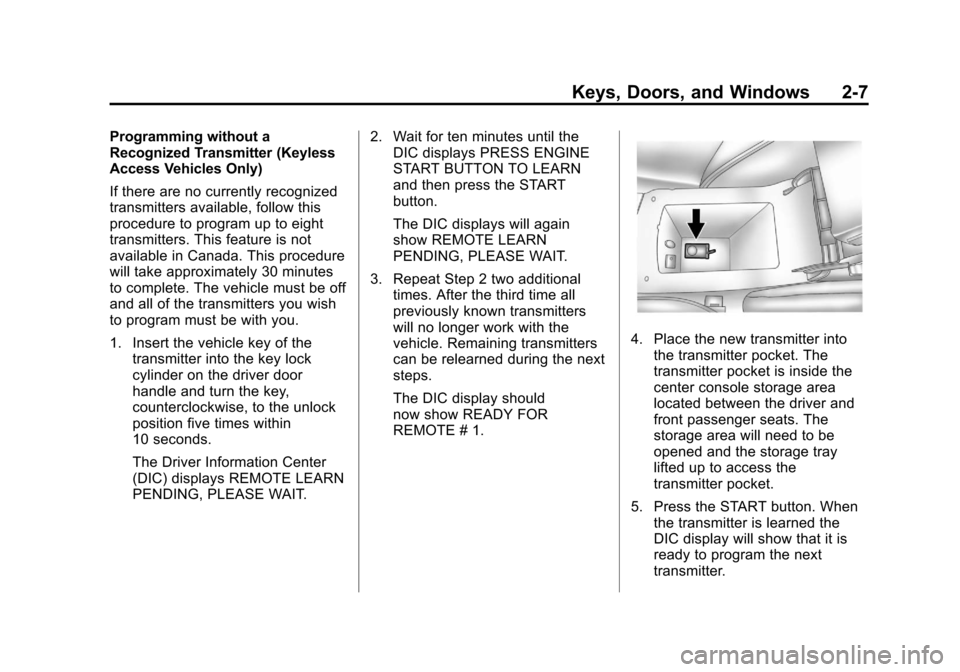
4. Place the new transmitter intothe transmitter pocket. The
transmitter pocket is inside the
center console storage area
located between the driver and
front passenger seats. The
storage area will need to be
opened and the storage tray
lifted up to access the
transmitter pocket.
5. Press the START button. When the transmitter is learned the
DIC display will show that it is
ready to program the next
transmitter.
Page 38 of 432
Black plate (8,1)Cadillac SRX Owner Manual - 2013 - CRC - 11/9/12
2-8 Keys, Doors, and Windows
6. Remove the transmitter from thetransmitter pocket and press the
transmitter
KorQbutton.
To program additional
transmitters, repeat Steps 4
through 6.
When all additional transmitters
are programmed, press and
hold the START button for
10 seconds to exit
programming mode.
Starting the Vehicle with a Low
Transmitter Battery
If the transmitter battery is weak,
the DIC may display NO REMOTE
DETECTED when you try to start
the vehicle. The REPLACE
BATTERY IN REMOTE KEY
message may also be displayed at
this time.
To start the vehicle:
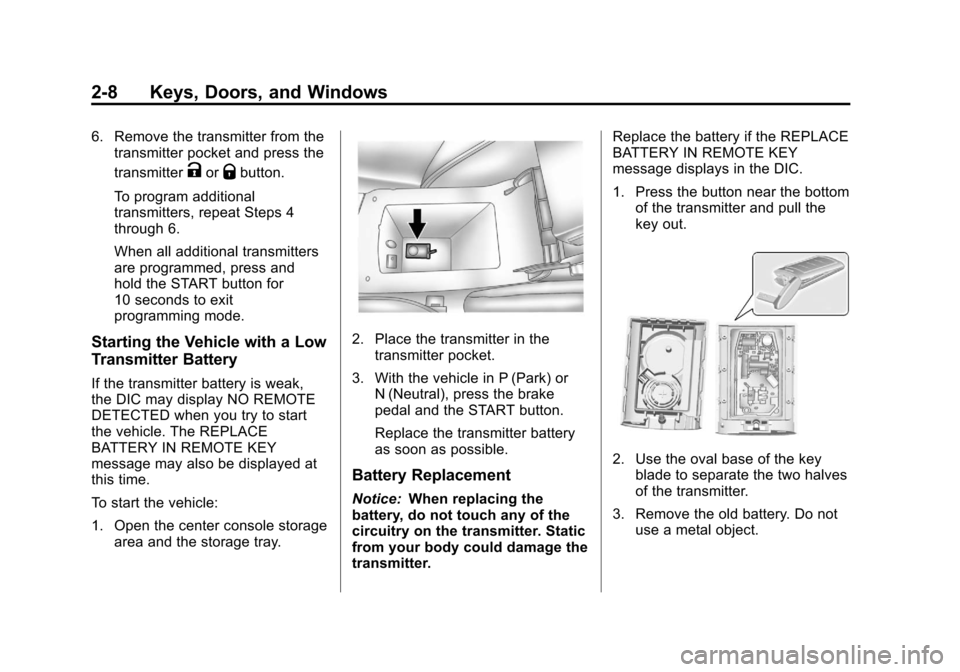
1. Open the center console storage area and the storage tray.
2. Place the transmitter in thetransmitter pocket.
3. With the vehicle in P (Park) or N (Neutral), press the brake
pedal and the START button.
Replace the transmitter battery
as soon as possible.
Battery Replacement
Notice: When replacing the
battery, do not touch any of the
circuitry on the transmitter. Static
from your body could damage the
transmitter. Replace the battery if the REPLACE
BATTERY IN REMOTE KEY
message displays in the DIC.
1. Press the button near the bottom
of the transmitter and pull the
key out.
2. Use the oval base of the keyblade to separate the two halves
of the transmitter.
3. Remove the old battery. Do not use a metal object.
Page 39 of 432
Black plate (9,1)Cadillac SRX Owner Manual - 2013 - CRC - 11/9/12
Keys, Doors, and Windows 2-9
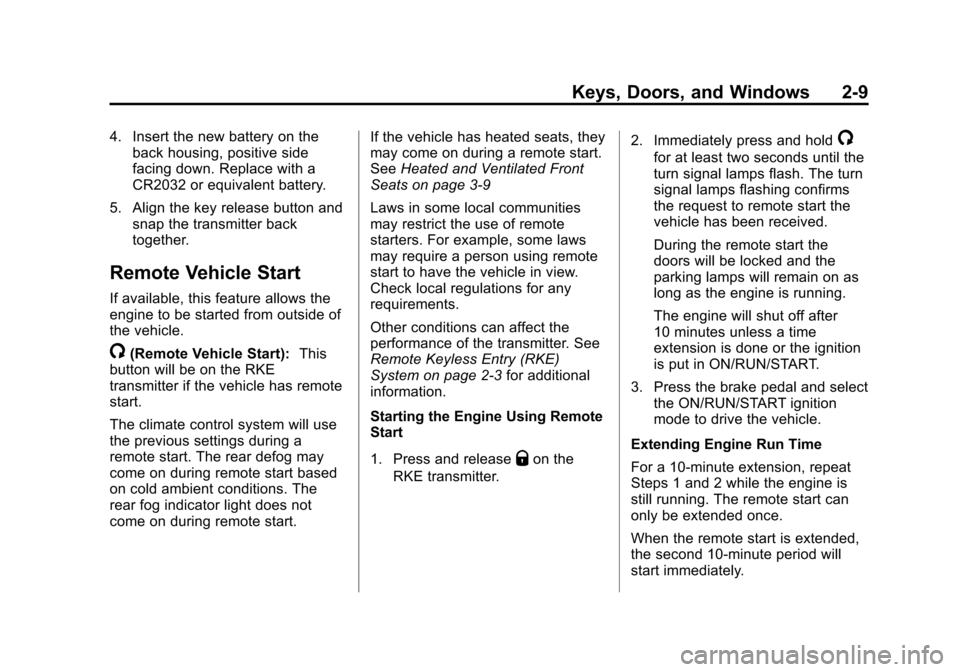
4. Insert the new battery on theback housing, positive side
facing down. Replace with a
CR2032 or equivalent battery.
5. Align the key release button and snap the transmitter back
together.
Remote Vehicle Start
If available, this feature allows the
engine to be started from outside of
the vehicle.
/(Remote Vehicle Start): This
button will be on the RKE
transmitter if the vehicle has remote
start.
The climate control system will use
the previous settings during a
remote start. The rear defog may
come on during remote start based
on cold ambient conditions. The
rear fog indicator light does not
come on during remote start. If the vehicle has heated seats, they
may come on during a remote start.
See
Heated and Ventilated Front
Seats on page 3‑9
Laws in some local communities
may restrict the use of remote
starters. For example, some laws
may require a person using remote
start to have the vehicle in view.
Check local regulations for any
requirements.
Other conditions can affect the
performance of the transmitter. See
Remote Keyless Entry (RKE)
System on page 2‑3 for additional
information.
Starting the Engine Using Remote
Start
1. Press and release
Qon the
RKE transmitter. 2. Immediately press and hold
/
for at least two seconds until the
turn signal lamps flash. The turn
signal lamps flashing confirms
the request to remote start the
vehicle has been received.
During the remote start the
doors will be locked and the
parking lamps will remain on as
long as the engine is running.
The engine will shut off after
10 minutes unless a time
extension is done or the ignition
is put in ON/RUN/START.
3. Press the brake pedal and select the ON/RUN/START ignition
mode to drive the vehicle.
Extending Engine Run Time
For a 10-minute extension, repeat
Steps 1 and 2 while the engine is
still running. The remote start can
only be extended once.
When the remote start is extended,
the second 10-minute period will
start immediately.
Page 40 of 432
Black plate (10,1)Cadillac SRX Owner Manual - 2013 - CRC - 11/9/12
2-10 Keys, Doors, and Windows
For example, if the vehicle has
been running for five minutes, and
10 minutes are added, the engine
will run for a total of 15 minutes.
A maximum of two remote starts,
or a remote start with an extension,
are allowed between ignition cycles.
The vehicle's ignition must be
changed to ON/RUN/START and
then back to OFF before the remote
start procedure can be used again.
Shutting the Engine Off After a
Remote Start
To cancel a remote start, do any of
the following:
.Press/until the parking lamps
turn off.
.Turn on the hazard warning
flashers.
.Turn the vehicle on and then
back off. Conditions in Which Remote Start
Will Not Work
The remote start will not operate if
any of the following occur:
.The ignition is in any mode other
than OFF.
.The transmitter is in the vehicle.
.The hood is not closed.
.The hazard warning flashers
are on.
.There is an emission control
system malfunction.
.The engine coolant temperature
is too high.
.The oil pressure is low.
.Two remote vehicle starts have
already been used.
.The vehicle is not in P (Park).
Door Locks
{WARNING
Unlocked doors can be
dangerous.
.Passengers, especially
children, can easily open the
doors and fall out of a moving
vehicle. The chance of being
thrown out of the vehicle in a
crash is increased if the
doors are not locked. So, all
passengers should wear
safety belts properly and the
doors should be locked
whenever the vehicle is
driven.
.Young children who get into
unlocked vehicles may be
unable to get out. A child can
be overcome by extreme heat
and can suffer permanent
injuries or even death from
heat stroke. Always lock the
vehicle whenever leaving it.
(Continued)
Page 45 of 432
Black plate (15,1)Cadillac SRX Owner Manual - 2013 - CRC - 11/9/12
Keys, Doors, and Windows 2-15
OFF:The liftgate only operates
manually in this position.
Manual operation of a liftgate that
also has power operation requires
more effort than with a standard
manual liftgate.
In either the MAX or the 3/4 mode,
the liftgate can be power opened
and closed by:
.Pressing8on the Remote
Keyless Entry (RKE) transmitter
until the liftgate starts moving.
See Remote Keyless Entry
(RKE) System Operation on
page 2‑3.
.Pressing8on the center of
the mode switch on the driver
door, with the driver door
unlocked.
.Pressing the touch pad switch
on the liftgate outside handle,
with all doors unlocked, to open
the liftgate.
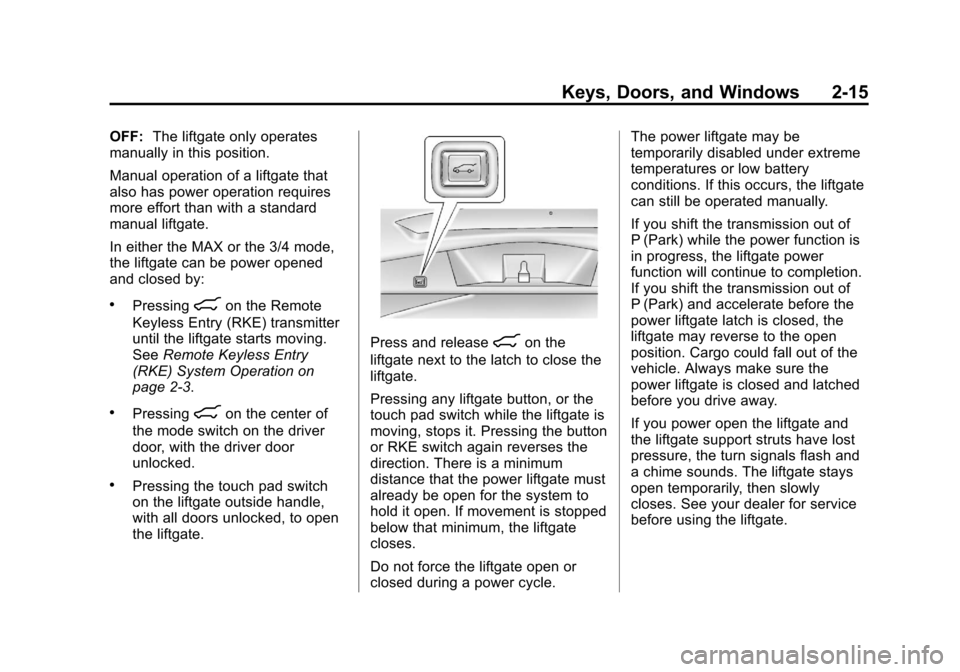
Press and release8on the
liftgate next to the latch to close the
liftgate.
Pressing any liftgate button, or the
touch pad switch while the liftgate is
moving, stops it. Pressing the button
or RKE switch again reverses the
direction. There is a minimum
distance that the power liftgate must
already be open for the system to
hold it open. If movement is stopped
below that minimum, the liftgate
closes.
Do not force the liftgate open or
closed during a power cycle. The power liftgate may be
temporarily disabled under extreme
temperatures or low battery
conditions. If this occurs, the liftgate
can still be operated manually.
If you shift the transmission out of
P (Park) while the power function is
in progress, the liftgate power
function will continue to completion.
If you shift the transmission out of
P (Park) and accelerate before the
power liftgate latch is closed, the
liftgate may reverse to the open
position. Cargo could fall out of the
vehicle. Always make sure the
power liftgate is closed and latched
before you drive away.
If you power open the liftgate and
the liftgate support struts have lost
pressure, the turn signals flash and
a chime sounds. The liftgate stays
open temporarily, then slowly
closes. See your dealer for service
before using the liftgate.
Page 49 of 432
Black plate (19,1)Cadillac SRX Owner Manual - 2013 - CRC - 11/9/12
Keys, Doors, and Windows 2-19
If the engine does not start and the
security light stays on, there is a
problem with the system. Turn the
ignition off and try again.
If the vehicle will not change
ignition modes (ACC/ACCESSORY,
ON/RUN/START, OFF), and the
RKE transmitter appears to be
undamaged, try another transmitter.
Or, you may try placing the
transmitter in the transmitter pocket
located in the center console. See
“NO REMOTE DETECTED”under
Key and Lock Messages on
page 5‑34. If the ignition modes will not change
with the other transmitter, your
vehicle needs service. If the ignition
does change modes, the first
transmitter may be faulty. See
your dealer who can service the
theft-deterrent system and have a
new RKE transmitter programmed to
the vehicle.
It is possible for the immobilizer
system to learn new or replacement
RKE transmitters. Up to eight
transmitters can be programmed for
the vehicle. To program additional
transmitters, see
“Programming
Transmitters to the Vehicle” under
Remote Keyless Entry (RKE)
System Operation on page 2‑3.
Do not leave the key or device
that disarms or deactivates the
theft-deterrent system in the vehicle.Exterior Mirrors
Convex Mirrors
{WARNING
A convex mirror can make things,
like other vehicles, look farther
away than they really are. If you
cut too sharply into the right lane,
you could hit a vehicle on the
right. Check the inside mirror or
glance over your shoulder before
changing lanes.
The passenger side mirror is convex
shaped. A convex mirror's surface is
curved so more can be seen from
the driver seat.
Page 54 of 432
Black plate (24,1)Cadillac SRX Owner Manual - 2013 - CRC - 11/9/12
2-24 Keys, Doors, and Windows
If there is something blocking the
window during automatic closing,
the window will reverse direction
for a short distance. Weather
conditions such as extreme cold
and/or ice may cause the window to
auto-reverse. The window will return
to normal operation once the object
or condition is removed.
If conditions prevent the window
from closing and the window
continues to auto-reverse, it is
possible to close the window with
the ignition in ON/RUN/START by
holding the window switch in the
partially or fully pulled up position.
Release of the switch from the
partially pulled up position will cause
the window to stop. Release of the
switch from the fully pulled up
position will activate the express-up
and related obstacle detection
features.Overload
If the windows are repeatedly
operated within a short time, the
window operation is disabled for a
short time.
Remote Window Operation
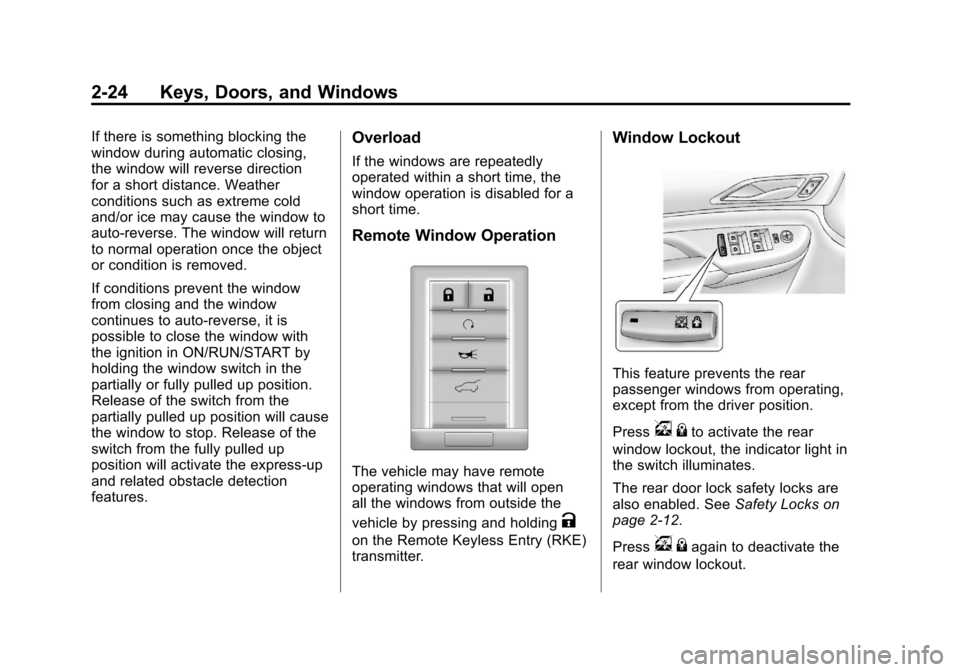
The vehicle may have remote
operating windows that will open
all the windows from outside the
vehicle by pressing and holding
K
on the Remote Keyless Entry (RKE)
transmitter.
Window Lockout
This feature prevents the rear
passenger windows from operating,
except from the driver position.
Press
v{to activate the rear
window lockout, the indicator light in
the switch illuminates.
The rear door lock safety locks are
also enabled. See Safety Locks on
page 2‑12.
Press
v {again to deactivate the
rear window lockout.
Page 66 of 432
Black plate (10,1)Cadillac SRX Owner Manual - 2013 - CRC - 11/9/12
3-10 Seats and Restraints
When this feature is off, the symbols
on the buttons are white. When a
heated seat is turned on, the symbol
turns red. When a ventilated seat
(if available) is turned on, the
symbol turns blue.
Press the button once for the
highest setting. With each press of
the button, the seat will change to
the next lower setting, and then to
the off setting. The indicator lights
next to the buttons indicate three for
the highest setting and one for the
lowest. If the front heated seats are
on high, the level may automatically
be lowered after approximately
30 minutes.
The passenger seat may take
longer to heat up.Remote Start Heated and
Ventilated Seats
During a remote start, the heated or
ventilated seats can be turned on
automatically. When it is cold
outside, the heated seats turn on,
and when it is hot outside the
ventilated seats turn on. This
feature is canceled when the
ignition is turned on. Press the
button to use the heated or
ventilated seats after the vehicle is
started.
The heated or ventilated seat
indicator lights on the button do not
turn on during a remote start.
The temperature performance of an
unoccupied seat may be reduced.
This is normal.
The heated or ventilated seats will
not turn on during a remote start
unless they are enabled in the
vehicle personalization menu. See
Remote Vehicle Start on page 2‑9
andVehicle Personalization on
page 5‑40.
Rear Seats
Split Folding Seatbacks
With this feature, either side of the
rear seatback can be folded down
for more cargo space.
Folding the Seatbacks
Notice: Folding a rear seat with
the safety belts still fastened may
cause damage to the seat or the
safety belts. Always unbuckle the
safety belts and return them to
their normal stowed position
before folding a rear seat.
To fold the seatback:
1. Unbuckle the rear safety belts and move the front seatbacks to
the upright position. See
Reclining Seatbacks on
page 3‑6.
2. Make sure that there is nothing under, in front of, or on the seat.
Page 83 of 432
Black plate (27,1)Cadillac SRX Owner Manual - 2013 - CRC - 11/9/12
Seats and Restraints 3-27
In many crashes severe enough to
inflate the airbag, windshields are
broken by vehicle deformation.
Additional windshield breakage may
also occur from the front outboard
passenger airbag.
.Airbags are designed to inflate
only once. After an airbag
inflates, you will need some new
parts for the airbag system.
If you do not get them, the
airbag system will not be there
to help protect you in another
crash. A new system will include
airbag modules and possibly
other parts. The service manual
for the vehicle covers the need
to replace other parts.
.The vehicle has a crash sensing
and diagnostic module which
records information after a
crash. SeeVehicle Data
Recording and Privacy on
page 13‑19 andEvent Data
Recorders on page 13‑20.
.Let only qualified technicians
work on the airbag systems.
Improper service can mean that
an airbag system will not work
properly. See your dealer for
service.
Passenger Sensing
System
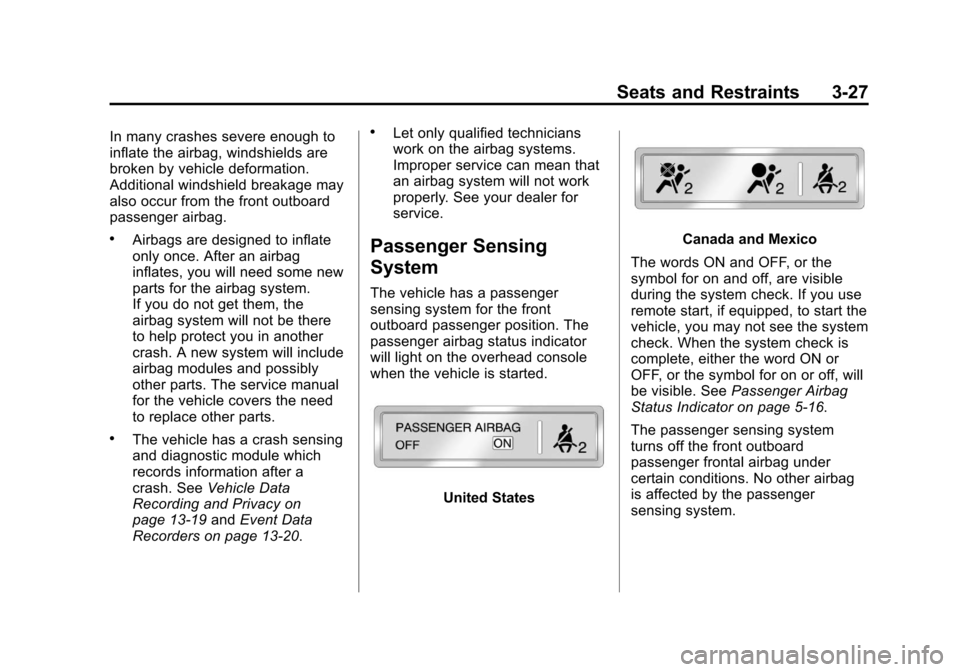
The vehicle has a passenger
sensing system for the front
outboard passenger position. The
passenger airbag status indicator
will light on the overhead console
when the vehicle is started.
United States
Canada and Mexico
The words ON and OFF, or the
symbol for on and off, are visible
during the system check. If you use
remote start, if equipped, to start the
vehicle, you may not see the system
check. When the system check is
complete, either the word ON or
OFF, or the symbol for on or off, will
be visible. See Passenger Airbag
Status Indicator on page 5‑16.
The passenger sensing system
turns off the front outboard
passenger frontal airbag under
certain conditions. No other airbag
is affected by the passenger
sensing system.