remote control CADILLAC SRX 2013 2.G Owner's Manual
[x] Cancel search | Manufacturer: CADILLAC, Model Year: 2013, Model line: SRX, Model: CADILLAC SRX 2013 2.GPages: 432, PDF Size: 7.13 MB
Page 172 of 432
Black plate (48,1)Cadillac SRX Owner Manual - 2013 - CRC - 11/9/12
5-48 Instruments and Controls
6. Immediately return to thevehicle. Firmly press and hold
for two seconds the Universal
Remote system button, selected
in Step 2 to control the garage
door, and then release it. If the
garage door does not move or
the lamp on the garage door
opener receiver (motor-head
unit) does not flash, press and
hold the same button a second
time for two seconds, then
release it. Again, if the door
does not move or the garage
door lamp does not flash, press
and hold the same button a third
time for two seconds, then
release.
The Universal Remote system
should now activate the
garage door.
To program the remaining two
Universal Remote system buttons,
begin with Step 1 of “Programming
the Universal Remote System.”Gate Operator and Canadian
Programming
If you have questions or need help
programming the Universal Remote
system, call 1-800-355-3515 or go
to www.homelink.com.
Canadian radio-frequency laws
require transmitter signals to time
out or quit after several seconds of
transmission. This may not be long
enough for the Universal Remote
system to pick up the signal during
programming. Similarly, some U.S.
gate operators are manufactured to
time out in the same manner.
If you live in Canada, or you are
having difficulty programming a gate
operator or garage door opener by
using the “Programming the
Universal Remote System”
procedures, regardless of where
you live, replace Step 2 under
“Programming the Universal Remote
System” with the following:
Continue to press and hold the
Universal Remote system button
while you press and release every two seconds (cycle) the hand-held
transmitter button until the
frequency signal has been
successfully accepted by the
Universal Remote system. The
Universal Remote system indicator
light will flash slowly at first and then
rapidly. Proceed with Step 3 under
“Programming the Universal Remote
System”
to complete.
Universal Remote System
Operation
Using the Universal Remote
System
Press and hold the appropriate
Universal Remote system button for
at least half of a second. The
indicator light will come on while the
signal is being transmitted.
Erasing Universal Remote
System Buttons
All programmed buttons should be
erased when the vehicle is sold or
the lease ends.
Page 173 of 432
Black plate (49,1)Cadillac SRX Owner Manual - 2013 - CRC - 11/9/12
Instruments and Controls 5-49
To erase all programmed buttons on
the Universal Remote system
device:
1. Press and hold down the twooutside buttons until the
indicator light begins to flash.
This should take about
10 seconds.
2. Release both buttons.
Reprogramming a Single
Universal Remote System
Button
To reprogram any of the three
Universal Remote system buttons:
1. Press and hold the desired Universal Remote system
button. Do not release the
button. 2. The indicator light will begin to
flash after 20 seconds. Without
releasing the button, proceed
with Step 1 under “Programming
the Universal Remote System.”
If you have questions or need help
programming the Universal Remote
system, call 1-800-355-3515 or go
to www.homelink.com. You may
also call the customer assistance
phone number under Customer
Assistance Offices (U.S. and
Canada) on page 13‑5 orCustomer
Assistance Offices (Mexico) on
page 13‑5.
Page 182 of 432
Black plate (8,1)Cadillac SRX Owner Manual - 2013 - CRC - 11/9/12
6-8 Lighting
Lighting Features
Entry Lighting
The headlamps, taillamps, license
plate lamps, back-up lamps, dome
lamps, and most of the interior lights
turn on briefly, when
Kis pressed
on the Remote Keyless Entry (RKE)
transmitter. After about 30 seconds
the exterior lamps turn off, and then
the dome and remaining interior
lights dim to off. The entry lighting
can be manually turned off by
changing the ignition out of the off
position, or by pressing
Qon the
RKE transmitter.
This feature can be changed. See
Vehicle Personalization on
page 5‑40.
Exit Lighting
The headlamps, taillamps, parking
lamps, back-up lamps, and license
plate lamps come on at night, or in
areas with limited lighting, when a
door is opened after the ignition is
turned off. The dome lamps also
come on when the driver door is
opened after the ignition is changed
to the off position.
The exterior lights and dome lamp
remain on after the door is closed
for a set amount of time, then
automatically turn off.
The exterior lights turn off
immediately by turning the exterior
lamps control to off.
This feature can be changed. See
Vehicle Personalization on
page 5‑40.
Battery Load
Management
The vehicle has Electric Power
Management (EPM) that estimates
the battery's temperature and state
of charge. It then adjusts the voltage
for best performance and extended
life of the battery.
When the battery's state of charge
is low, the voltage is raised slightly
to quickly bring the charge back up.
When the state of charge is high,
the voltage is lowered slightly to
prevent overcharging. If the vehicle
has a voltmeter gauge or a voltage
display on the Driver Information
Center (DIC), you may see the
voltage move up or down. This is
normal. If there is a problem, an
alert will be displayed.
Page 192 of 432
Black plate (6,1)Cadillac SRX Owner Manual - 2013 - CRC - 11/9/12
8-6 Climate Controls
Remote Start Climate Control
Operation:For vehicles with the
remote vehicle start feature, the
climate control system may run
when the vehicle is started remotely.
The system uses the driver ’s
previous settings to heat or cool the
inside of the vehicle. The rear defog
may come on during remote start
based on cold ambient conditions.
The rear defog indicator light does
not come on during a remote
start. If the vehicle has heated or
ventilated seats, they may come on
during a remote start. See Remote
Vehicle Start on page 2‑9 and
Heated and Ventilated Seats on
page 1‑9.
The rear window defogger turns on
if it is cold outside.Sensor
The solar sensor, located on top
of the instrument panel near the
windshield, monitors the solar heat.
The climate control system uses
the sensor information to adjust
the temperature, fan speed,
recirculation, and air delivery mode
for best comfort.
If the sensor is covered, the
automatic climate control system
may not work properly.
Rear Climate Control
System
For vehicles with a rear climate
control system, the settings can be
adjusted with the rear climate
control buttons and the touch
screen.
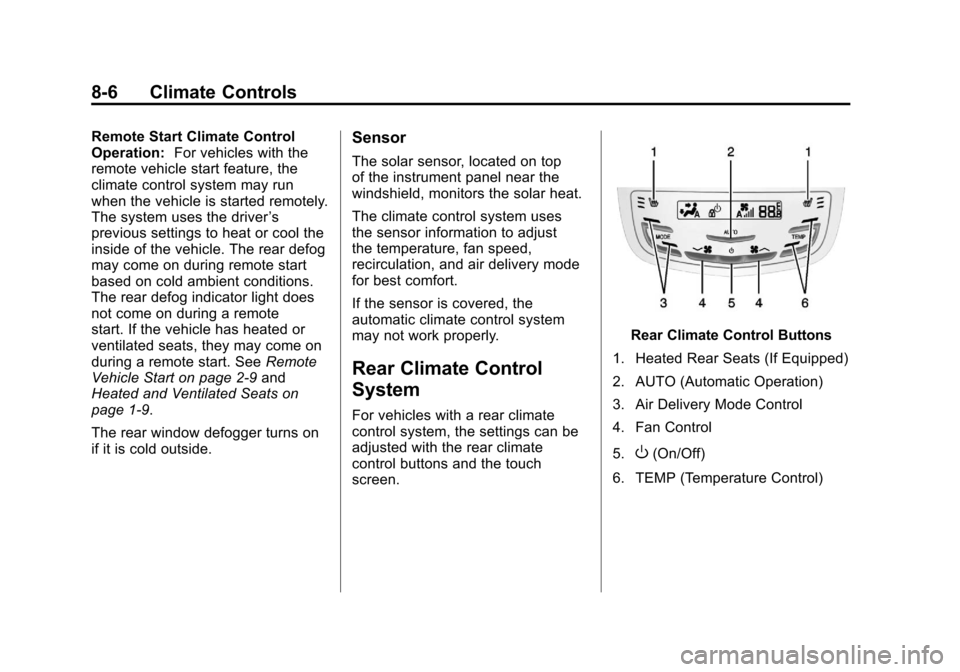
Rear Climate Control Buttons
1. Heated Rear Seats (If Equipped)
2. AUTO (Automatic Operation)
3. Air Delivery Mode Control
4. Fan Control
5.
O(On/Off)
6. TEMP (Temperature Control)
Page 214 of 432
Black plate (18,1)Cadillac SRX Owner Manual - 2013 - CRC - 11/9/12
9-18 Driving and Operating
Cell phone chargers can interfere
with the operation of the Keyless
Access System. Battery chargers
should not be plugged in when
starting or turning off the engine.
To start the vehicle:
Starting Procedure
1. With the brake pedal applied,press the START button located
on the instrument panel. See
Ignition Positions on page 9‑16.
2. When the engine begins cranking, let go of the button and
the engine cranks automatically
until it starts.
If the transmitter is not in the
vehicle or something is
interfering with the transmitter,
the Driver Information Center
(DIC) will display NO REMOTE
DETECTED. See Driver
Information Center (DIC) on
page 5‑27.
If the battery in the keyless
access transmitter needs
replacing, the DIC displays REPLACE BATTERY IN
REMOTE KEY. The vehicle can
still be driven. See
Remote
Keyless Entry (RKE) System
Operation on page 2‑3.
3. Do not race the engine immediately after starting it.
Operate the engine and
transmission gently until the oil
warms up and lubricates all
moving parts.
4. If the engine does not start and no DIC message is displayed,
wait 15 seconds before trying
again to let the cranking motor
cool down.
If the engine does not start after
5-10 seconds, especially in very
cold weather (below −18°C or
0°F), it could be flooded with too
much gasoline. Try pushing the
accelerator pedal all the way to
the floor while cranking for up to
15 seconds. Notice:
Cranking the engine for
long periods of time, by pressing
the START button immediately
after cranking has ended, can
overheat and damage the
cranking motor, and drain the
battery. Wait at least 15 seconds
between each try, to allow the
cranking motor to cool down.
When the engine starts, let go of the
accelerator. If the vehicle starts
briefly but then stops again, do the
same thing. This clears the extra
gasoline from the engine.
The vehicle has a
Computer-Controlled Cranking
System. This feature assists in
starting the engine and protects
components. Once cranking has
been initiated, the engine continues
cranking for a few seconds or until
the vehicle starts. If the engine does
not start, cranking automatically
stops after 15 seconds to prevent
cranking motor damage. To prevent
gear damage, this system also
prevents cranking if the engine is
already running.
Page 271 of 432
Black plate (3,1)Cadillac SRX Owner Manual - 2013 - CRC - 11/9/12
Vehicle Care 10-3
California Proposition
65 Warning
Most motor vehicles, including this
one, contain and/or emit chemicals
known to the State of California to
cause cancer and birth defects or
other reproductive harm. Engine
exhaust, many parts and systems,
many fluids, and some component
wear by-products contain and/or
emit these chemicals.
California Perchlorate
Materials Requirements
Certain types of automotive
applications, such as airbag
initiators, safety belt pretensioners,
and lithium batteries contained in
Remote Keyless Entry transmitters,
may contain perchlorate materials.
Special handling may be necessary.
For additional information, see
www.dtsc.ca.gov/hazardouswaste/
perchlorate.
Accessories and
Modifications
Adding non‐dealer accessories or
making modifications to the vehicle
can affect vehicle performance and
safety, including such things as
airbags, braking, stability, ride and
handling, emissions systems,
aerodynamics, durability, and
electronic systems like antilock
brakes, traction control, and stability
control. These accessories or
modifications could even cause
malfunction or damage not covered
by the vehicle warranty.
Page 412 of 432
Black plate (4,1)Cadillac SRX Owner Manual - 2013 - CRC - 11/9/12
14-4 OnStar
Destination Download:PressQ,
then request the Advisor to
download directions to the
navigation system in the vehicle.
After the call ends, press the “Go”
button on the navigation screen to
begin driving directions.
Destinations can also be
downloaded on the go. For
information about eNav, Destination
Download, and coverage maps
see www.onstar.com (U.S.),
www.onstar.ca (Canada).
Connections
OnStar Hands-Free Calling allows
calls to be made and received from
the vehicle. The vehicle can also be
controlled from a cell phone through
the OnStar RemoteLink mobile
app. For coverage maps, see
www.onstar.com (U.S.),
www.onstar.ca (Canada).
Hands-Free Calling
1. Press=. System responds:
“OnStar ready.”
2. Say “Call.”System responds:
“Please say the name or number
to call.”
3. Say the entire number without pausing, including a “1”and the
area code. System responds:
“OK calling.”
Calling 911 Emergency
1. Press=. The system responds
“OnStar Ready,” followed by
a tone.
2. Say “Call.”The system responds
“Please say the name or number
to call.”
3. Say “911”without pausing. The
system responds “911.”
4. Say “Call.”The system responds
“OK, dialing 911.”
Retrieve My Number
1. Press=. System responds:
“OnStar ready.”
2. Say “My number.” System
responds: “Your OnStar
Hands-Free Calling number is.”
End a Call
Press=. System responds: “Call
ended.”
Store a Name Tag for Speed
Dialing
1. Press=. System responds:
“OnStar ready.”
2. Say “Store.” System responds:
“Please say the number you
would like to store.”
3. Say the entire number without pausing. System responds:
“Please say the name tag.”
4. Pick a name tag. System responds: “About to store
Page 414 of 432
Black plate (6,1)Cadillac SRX Owner Manual - 2013 - CRC - 11/9/12
14-6 OnStar
How OnStar Service Works
Automatic Crash Response,
Emergency Services, Crisis Assist,
Stolen Vehicle Assistance, Vehicle
Diagnostics, Remote Door Unlock,
Roadside Assistance, Turn-by-Turn
Navigation, and Hands-Free Calling
are available on most vehicles. Not
all OnStar services are available
everywhere or on all vehicles. For
more information, a full description
of OnStar services, system
limitations, and OnStar terms and
conditions:
.In the U.S. see www.onstar.com
(U.S.) or call 1-888-4-ONSTAR.
(1-888-466-7827).
.In Canada see www.onstar.ca
(Canada) or call
1-888-4-ONSTAR.
(1-888-466-7827).
.TTY 1-877-248-2080.
.PressQto speak with an
Advisor. OnStar services require a vehicle
electrical system, wireless service,
and GPS satellite technologies to be
available and operating for features
to function properly. These systems
may not operate if the battery is
discharged or disconnected.
OnStar service cannot work unless
your vehicle is in a place where
OnStar has an agreement with a
wireless service provider for service
in that area, and the wireless
service provider has coverage,
network capacity, reception, and
technology compatible with OnStar
service. Service involving location
information about the vehicle cannot
work unless GPS signals are
available, unobstructed, and
compatible with the OnStar
hardware. OnStar service may not
work if the OnStar equipment is not
properly installed or it has not been
properly maintained. If equipment or
software is added, connected,
or modified, OnStar service may not
work. Other problems beyond the
control of OnStar may prevent service such as hills, tall buildings,
tunnels, weather, electrical system
design and architecture of the
vehicle, damage to the vehicle in a
crash, or wireless phone network
congestion or jamming.
See
Radio Frequency Statement on
page 13‑21 for information
regarding Part 15 of the Federal
Communications Commission (FCC)
rules and Industry Canada
Standards RSS-GEN/210/220/310.
Services for People with
Disabilities
Advisors provide services to help
subscribers with physical disabilities
and medical conditions.
Press
Qfor help with:
.Locating a gas station with an
attendant to pump gas.
.Finding a hotel, restaurant, etc.,
that meets accessibility needs.
.Providing directions to the
closest hospital or pharmacy in
urgent situations.
Page 424 of 432

Black plate (6,1)Cadillac SRX Owner Manual - 2013 - CRC - 11/9/12
i-6 INDEX
Headlamps (cont'd)Turn Signal Lamps . . . . . . . . . 10-31
Twilight Sentinel . . . . . . . . . . . . . . . 6-4
Washer . . . . . . . . . . . . . . . . . . . . . . . . 5-6
Heated Rear Seats . . . . . . . . . . . . . . . . . . . 3-12
Steering Wheel . . . . . . . . . . . . . . . . 5-3
Heated and Ventilated Front Seats . . . . . . . . . . . . . . . . . . . . . . . . . 3-9
Heated Mirrors . . . . . . . . . . . . . . . . . 2-21
Heater Engine . . . . . . . . . . . . . . . . . . . . . . . . 9-19
High-Beam On Light . . . . . . . . . . . 5-25
High-Speed Operation . . . . . . . . 10-52
Highway Hypnosis . . . . . . . . . . . . . . 9-7
Hill and Mountain Roads . . . . . . . . 9-7
Hill Start Assist (HSA) . . . . . . . . . 9-31
Hood . . . . . . . . . . . . . . . . . . . . . . . . . . 10-5
Horn . . . . . . . . . . . . . . . . . . . . . . . . . . . . 5-3
How to Wear Safety Belts Properly . . . . . . . . . . . . . . . . . . . . . . 3-14I
Ignition Positions . . . . . . . . . . . . . . 9-16
Immobilizer . . . . . . . . . . . . . . . . . . . . 2-18
IndicatorVehicle Ahead . . . . . . . . . . . . . . . . 5-22
Infants and Young Children, Restraints . . . . . . . . . . . . . . . . . . . . 3-36
Infotainment . . . . . . . . . . . . . . . . . . . . 7-1
Infotainment System . . . . . . . . . . 13-21
Instrument Cluster . . . . . . . . . . . . . 5-10
Introduction . . . . . . . . . . . . . . . . . . . . . . . iii
J
Jump Starting . . . . . . . . . . . . . . . . . 10-82
K
Key and Lock Messages . . . . . . . 5-34
Keyless Entry Remote (RKE) System . . . . . . . . 2-3
Keys . . . . . . . . . . . . . . . . . . . . . . . . . . . . 2-2
L
Labeling, Tire Sidewall . . . . . . . . 10-44
Lamps
Cargo . . . . . . . . . . . . . . . . . . . . . . . . . . 6-7
Courtesy . . . . . . . . . . . . . . . . . . . . . . . 6-7
Daytime Running (DRL) . . . . . . . 6-2
Dome . . . . . . . . . . . . . . . . . . . . . . . . . . 6-7
Exterior Controls . . . . . . . . . . . . . . . 6-1
Front Fog . . . . . . . . . . . . . . . . . . . . . . 6-6
License Plate . . . . . . . . . . . . . . . 10-33
Malfunction Indicator . . . . . . . . . 5-17
Messages . . . . . . . . . . . . . . . . . . . . 5-34
On Reminder . . . . . . . . . . . . . . . . . 5-26
Reading . . . . . . . . . . . . . . . . . . . . . . . 6-7
Lane Departure Warning (LDW) . . . . . . . . . . . . . . . 9-57
Lane Departure Warning Light . . . . . . . . . . . . . . . . . . . . . . . . . 5-21
Lap-Shoulder Belt . . . . . . . . . . . . . 3-15
LATCH System Replacing Parts after aCrash . . . . . . . . . . . . . . . . . . . . . . . 3-49
LATCH, Lower Anchors and Tethers for Children . . . . . . . . . . 3-41
Page 427 of 432

Black plate (9,1)Cadillac SRX Owner Manual - 2013 - CRC - 11/9/12
INDEX i-9
Passenger Compartment AirFilter . . . . . . . . . . . . . . . . . . . . . . . . . . 8-8
Passenger Sensing System . . . 3-27
Perchlorate Materials Requirements, California . . . . . 10-3
Personalization Vehicle . . . . . . . . . . . . . . . . . . . . . . . 5-40
Power Door Locks . . . . . . . . . . . . . . . . . . . 2-11
Mirrors . . . . . . . . . . . . . . . . . . . . . . . . 2-20
Outlets . . . . . . . . . . . . . . . . . . . . . . . . 5-7
Retained Accessory (RAP) . . . 9-19
Seat Adjustment . . . . . . . . . . . . . . . 3-4
Steering Fluid . . . . . . . . . . . . . . . 10-19
Windows . . . . . . . . . . . . . . . . . . . . . 2-22
Pregnancy, Using Safety
Belts . . . . . . . . . . . . . . . . . . . . . . . . . 3-18
Privacy Radio FrequencyIdentification (RFID) . . . . . . . 13-21
Program
Courtesy Transportation . . . . 13-13
Proposition 65 Warning, California . . . . . . . . . . . . . . . . . . . . . 10-3R
Radio FrequencyIdentification (RFID) . . . . . . . . 13-21
Statement . . . . . . . . . . . . . . . . . . 13-21
Reading Lamps . . . . . . . . . . . . . . . . . 6-7
Rear Axle Limited-Slip . . . . . . . . . . . . . . . . . . . 9-34
Rear Climate Control System . . . 8-6
Rear Seat Pass-Through Door . . . . . . . . . . 3-12
Rear Seats . . . . . . . . . . . . . . . . . . . . 3-10
Heated . . . . . . . . . . . . . . . . . . . . . . . 3-12
Rear Window Washer/Wiper . . . . 5-5
Rearview Mirrors . . . . . . . . . . . . . . 2-21 Automatic Dimming . . . . . . . . . . . 2-21
Reclining Seatbacks . . . . . . . . . . . . 3-6
Recommended
Fuel . . . . . . . . . . . . . . . . . . . . . . . . . . 9-59
Recommended Fluids and Lubricants . . . . . . . . . . . . . . . . . . . 11-13
Records Maintenance . . . . . . . . . . . . . . . . .11-16
Recreational Vehicle Towing . . . . . . . . . . . . . . . . . . . . . . 10-85
Reimbursement Program,
GM Mobility . . . . . . . . . . . . . . . . . . 13-7 Remote Keyless Entry (RKE)
System . . . . . . . . . . . . . . . . . . . . . . . . 2-3
Remote Vehicle Start . . . . . . . . . . . 2-9
Replacement Bulbs . . . . . . . . . . . 10-33
Replacement Parts Airbags . . . . . . . . . . . . . . . . . . . . . . . 3-33
Maintenance . . . . . . . . . . . . . . . . .11-15
Replacing Airbag System . . . . . . 3-33
Replacing LATCH System Parts after a Crash . . . . . . . . . . . 3-49
Replacing Safety Belt
System Parts after a Crash . . . 3-20
Reporting Safety Defects Canadian Government . . . . . . 13-19
General Motors . . . . . . . . . . . . . 13-19
U.S. Government . . . . . . . . . . . 13-18
Restraints Where to Put . . . . . . . . . . . . . . . . . 3-40
Retained Accessory Power (RAP) . . . . . . . . . . . . . . . . . 9-19
Reverse Tilt Mirrors . . . . . . . . . . . . 2-21
Ride Control Systems
Limited Slip Rear Axle . . . . . . . . 9-34
Messages . . . . . . . . . . . . . . . . . . . . 5-37
Selective . . . . . . . . . . . . . . . . . . . . . 9-34