light CADILLAC SRX 2013 2.G Workshop Manual
[x] Cancel search | Manufacturer: CADILLAC, Model Year: 2013, Model line: SRX, Model: CADILLAC SRX 2013 2.GPages: 432, PDF Size: 7.13 MB
Page 149 of 432
Black plate (25,1)Cadillac SRX Owner Manual - 2013 - CRC - 11/9/12
Instruments and Controls 5-25
For vehicles with the fuel economy
mode light, it comes on when the
eco (economy) button, located next
to the shift lever, is pressed. Press
the button again to turn off the light
and exit the fuel economy mode.
SeeDriving for Better Fuel
Economy on page 1‑23 andFuel
Economy Mode on page 9‑26 for
more information.
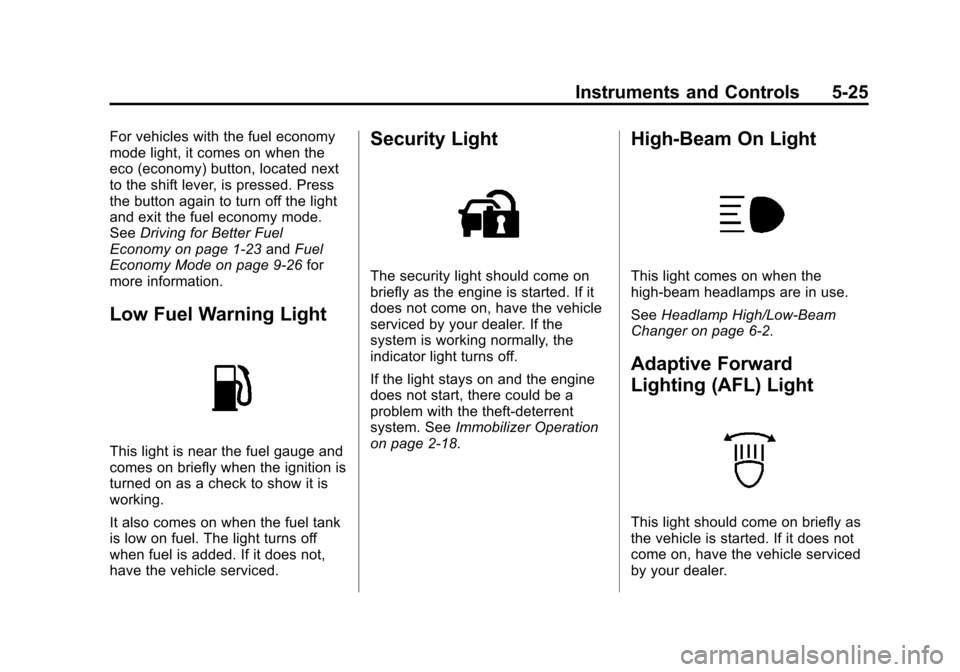
Low Fuel Warning Light
This light is near the fuel gauge and
comes on briefly when the ignition is
turned on as a check to show it is
working.
It also comes on when the fuel tank
is low on fuel. The light turns off
when fuel is added. If it does not,
have the vehicle serviced.
Security Light
The security light should come on
briefly as the engine is started. If it
does not come on, have the vehicle
serviced by your dealer. If the
system is working normally, the
indicator light turns off.
If the light stays on and the engine
does not start, there could be a
problem with the theft-deterrent
system. See Immobilizer Operation
on page 2‑18.
High-Beam On Light
This light comes on when the
high-beam headlamps are in use.
See Headlamp High/Low-Beam
Changer on page 6‑2.
Adaptive Forward
Lighting (AFL) Light
This light should come on briefly as
the vehicle is started. If it does not
come on, have the vehicle serviced
by your dealer.
Page 150 of 432
Black plate (26,1)Cadillac SRX Owner Manual - 2013 - CRC - 11/9/12
5-26 Instruments and Controls
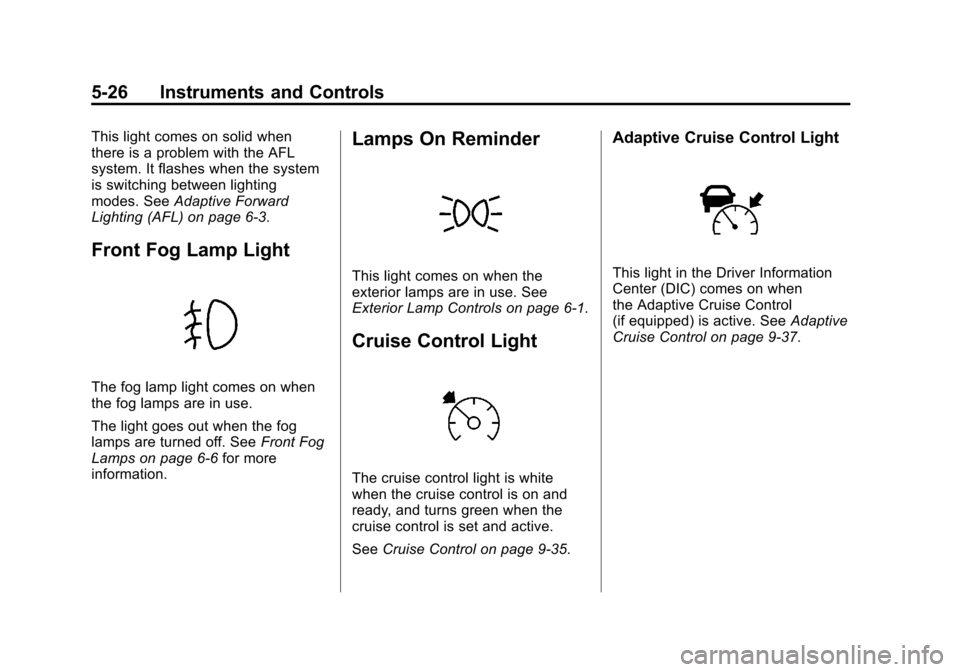
This light comes on solid when
there is a problem with the AFL
system. It flashes when the system
is switching between lighting
modes. SeeAdaptive Forward
Lighting (AFL) on page 6‑3.
Front Fog Lamp Light
The fog lamp light comes on when
the fog lamps are in use.
The light goes out when the fog
lamps are turned off. See Front Fog
Lamps on page 6‑6 for more
information.
Lamps On Reminder
This light comes on when the
exterior lamps are in use. See
Exterior Lamp Controls on page 6‑1.
Cruise Control Light
The cruise control light is white
when the cruise control is on and
ready, and turns green when the
cruise control is set and active.
See Cruise Control on page 9‑35.
Adaptive Cruise Control Light
This light in the Driver Information
Center (DIC) comes on when
the Adaptive Cruise Control
(if equipped) is active. See Adaptive
Cruise Control on page 9‑37.
Page 151 of 432
Black plate (27,1)Cadillac SRX Owner Manual - 2013 - CRC - 11/9/12
Instruments and Controls 5-27
Information Displays
Driver Information
Center (DIC)
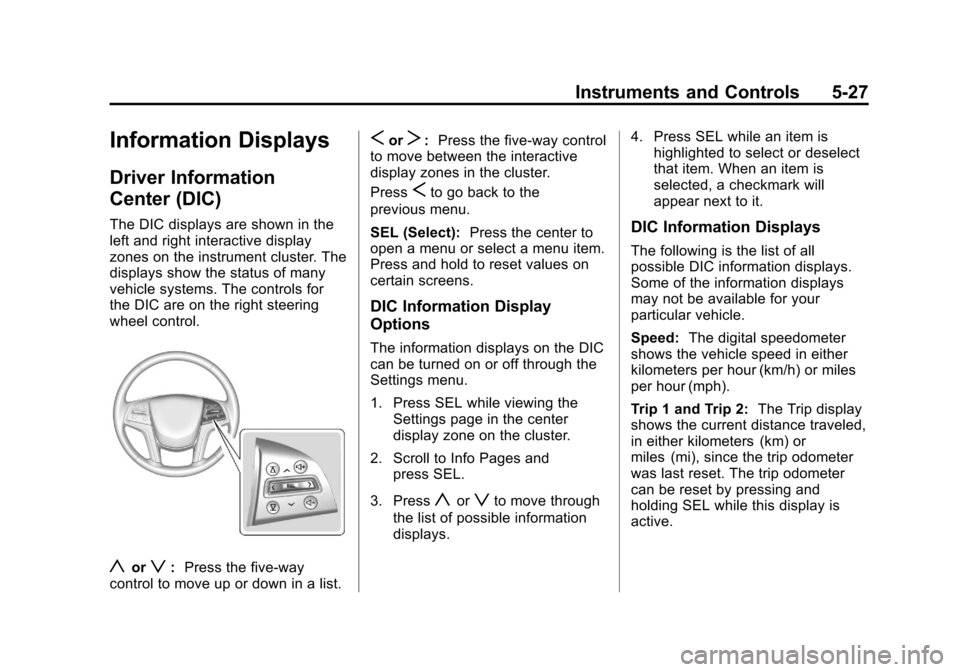
The DIC displays are shown in the
left and right interactive display
zones on the instrument cluster. The
displays show the status of many
vehicle systems. The controls for
the DIC are on the right steering
wheel control.
yorz:Press the five-way
control to move up or down in a list.
SorT: Press the five-way control
to move between the interactive
display zones in the cluster.
Press
Sto go back to the
previous menu.
SEL (Select): Press the center to
open a menu or select a menu item.
Press and hold to reset values on
certain screens.
DIC Information Display
Options
The information displays on the DIC
can be turned on or off through the
Settings menu.
1. Press SEL while viewing the
Settings page in the center
display zone on the cluster.
2. Scroll to Info Pages and press SEL.
3. Press
yorzto move through
the list of possible information
displays. 4. Press SEL while an item is
highlighted to select or deselect
that item. When an item is
selected, a checkmark will
appear next to it.
DIC Information Displays
The following is the list of all
possible DIC information displays.
Some of the information displays
may not be available for your
particular vehicle.
Speed: The digital speedometer
shows the vehicle speed in either
kilometers per hour (km/h) or miles
per hour (mph).
Trip 1 and Trip 2: The Trip display
shows the current distance traveled,
in either kilometers (km) or
miles (mi), since the trip odometer
was last reset. The trip odometer
can be reset by pressing and
holding SEL while this display is
active.
Page 158 of 432
Black plate (34,1)Cadillac SRX Owner Manual - 2013 - CRC - 11/9/12
5-34 Instruments and Controls
Key and Lock Messages
NO REMOTE DETECTED
This message displays when trying
to start the vehicle if an RKE
transmitter is not detected. The
transmitter battery may be weak.
See“Starting the Vehicle with a Low
Transmitter Battery” underRemote
Keyless Entry (RKE) System
Operation on page 2‑3.
NO REMOTE PRESS BRAKE
TO RESTART
This message is displayed if the
remote is no longer detected in the
vehicle. Press the brake pedal to
restart the vehicle.
NUMBER OF KEYS
PROGRAMMED
This message displays when
programming new keys to the
vehicle.
REMOTE LEFT IN VEHICLE
This message displays when
leaving the vehicle with the RKE
transmitter still inside.
REPLACE BATTERY IN
REMOTE KEY
This message displays when the
battery in the RKE transmitter needs
to be replaced.
Lamp Messages
AFL (ADAPTIVE FORWARD
LIGHTING) LAMPS NEED
SERVICE
This message displays when the
AFL system is disabled and needs
service. See your dealer. See
Adaptive Forward Lighting (AFL) on
page 6‑3.
AUTOMATIC LIGHT
CONTROL ON
This message is displayed when the
exterior lamp control is in AUTO and
the lights have turned on. See
Twilight Sentinel on page 6‑4.
AUTOMATIC LIGHT
CONTROL OFF
This message is displayed when the
exterior lamp control is in AUTO and
the lights have turned off. See
Twilight Sentinel on page 6‑4.
XXX TURN INDICATOR
FAILURE
When one of the turn signals is out,
this message displays to show
which bulb needs to be replaced.
See Bulb Replacement on
page 10‑27 andReplacement Bulbs
on page 10‑33.
TURN SIGNAL ON
This message is displayed if the
turn signal has been left on. Turn off
the turn signal.
Page 163 of 432
Black plate (39,1)Cadillac SRX Owner Manual - 2013 - CRC - 11/9/12
Instruments and Controls 5-39
TIRE LEARNING ACTIVE
This message displays when the
system is learning new tires. See
Tire Pressure Monitor Operation on
page 10‑54.
TIRE LOW ADD AIR TO TIRE
This message displays when the
pressure in one or more of the tires
is low.
This message also displays LEFT
FRONT, RIGHT FRONT, LEFT
REAR, or RIGHT REAR to indicate
the location of the low tire.
The low tire pressure warning light
will also come on. SeeTire
Pressure Light on page 5‑24.
If a tire pressure message appears
on the DIC, stop as soon as you
can. Inflate the tires by adding air
until the tire pressure is equal to the
values shown on the Tire and
Loading Information label. See Tires
on page 10‑42, Vehicle Load Limits
on page 9‑10, and Tire Pressure on
page 10‑51. You can receive more than one tire
pressure message at a time. The
DIC also shows the tire pressure
values. See
Driver Information
Center (DIC) on page 5‑27.
Transmission Messages
SERVICE TRANSMISSION
This message displays if there is a
problem with the transmission. See
your dealer.
SHIFT DENIED
This message displays when using
the Driver Shift Control (DSC) and
attempting to shift to a gear not
appropriate for the vehicle speed
and engine revolutions per
minute (rpm). See Manual Mode on
page 9‑24.
SHIFT TO PARK
This message displays when the
transmission needs to be shifted to
P (Park). This may appear when
attempting to remove the key from
the vehicle if the vehicle is not in
P (Park).
TRANSMISSION HOT —IDLE
ENGINE
This message displays and a chime
sounds if the transmission fluid in
the vehicle gets hot. Driving with the
transmission fluid temperature high
can cause damage to the vehicle.
Stop the vehicle and let it idle to
allow the transmission to cool. This
message clears when the fluid
temperature reaches a safe level.
Page 164 of 432
Black plate (40,1)Cadillac SRX Owner Manual - 2013 - CRC - 11/9/12
5-40 Instruments and Controls
Vehicle Reminder
Messages
ICE POSSIBLE DRIVE
WITH CARE
This message is displayed when ice
conditions are possible.
TURN WIPER CONTROL TO
INTERMITTENT FIRST
This message is displayed when
attempting to adjust the intermittent
wiper speed without intermittent
selected on the wiper control. See
Windshield Wiper/Washer on
page 5‑3.
Vehicle Speed Messages
SELECTED SPEED LIMIT
EXCEEDED
This message is displayed when the
vehicle speed is greater than the set
speed. See "Speed Warning" under
Driver Information Center (DIC) on
page 5‑27.
Washer Fluid Messages
WASHER FLUID LOW ADD
FLUID
This message may display when
the washer fluid level is low. See
Washer Fluid on page 10‑20.
Vehicle
Personalization
The audio system controls are used
to access the personalization
menus for customizing vehicle
features.
Personalization Menus
1. Press SETTINGS on theHome page.
2. Press Vehicle Settings.
The following list of menu items may
be available:
.Climate and Air Quality
.Collision/Detection Systems
.Comfort and Convenience
.Lighting
.Power Door Locks
.Remote Lock, Unlock, Start
Page 167 of 432
Black plate (43,1)Cadillac SRX Owner Manual - 2013 - CRC - 11/9/12
Instruments and Controls 5-43
Easy Exit Options
This allows the Easy Exit Options
feature to be turned on or off.
Press Easy Exit Options. Press to
select Off or On. Press
SBack to
go back to the last menu.
Chime Volume
This allows the selection of the
chime volume level.
Press Chime Volume. Press + or −
to adjust the volume between 0 and
63. Press
SBack to go back to the
last menu.
Reverse Tilt Mirror
When on, both the driver and
passenger mirrors will tilt downward
when the vehicle is shifted to
R (Reverse) to improve visibility of
the ground near the rear wheels.
They will return to their previous
driving position when the vehicle is
shifted out of R (Reverse) or the
ignition is turned to OFF. Press Reverse Tilt Mirror. Press
to select Off or On, On - Driver
and Passenger, On - Driver or
On - Passenger. Press
SBack to
go back to the last menu.
Language
Select the Language menu and the
following will be displayed:
.English
.French
.Spanish
Press to select the language.
Press
SBack to go back to the
last menu.
Lighting
Select the Lighting menu and the
following will be displayed:
.Vehicle Locator Lights
.Exit Lighting Vehicle Locator Lights
This feature will flash the exterior
lights when
Kon the RKE
transmitter is pressed to locate the
vehicle.
Press Vehicle Locator Lights. Press
to select Off or On. Press
SBack to
go back to the last menu.
Exit Lighting
This allows the selection of how
long the exterior lamps stay on
when leaving the vehicle when it is
dark outside.
Press Exit Lighting. Press to select
Off, 30 Seconds, 60 Seconds,
or 120 Seconds. Press
SBack to
go back to the last menu.
Power Door Locks
Select Power Door Locks and the
following will be displayed:
.Unlocked Door Anti Lock Out
.Auto Door Unlock
.Delayed Door Lock
Page 168 of 432
Black plate (44,1)Cadillac SRX Owner Manual - 2013 - CRC - 11/9/12
5-44 Instruments and Controls
Unlocked Door Anti Lock Out
When on, this feature will keep the
driver door from locking when the
door is open. If Off is selected, the
Delayed Door Lock menu will be
available.
Press Unlocked Door Anti Lock
Out. Press to select Off or On.
Press
SBack to go back to the
last menu.
Auto Door Unlock
This allows selection of which of the
doors will automatically unlock when
the vehicle is shifted into P (Park).
Press Auto Door Unlock. Press to
select Off, All Doors, or Driver Door.
Press
SBack to go back to the
last menu.
Delayed Door Lock
When on, this feature will delay the
locking of the doors. To override the
delay, press the power door lock
switch on the door. Press Delayed Door Lock. Press to
select Off or On. Press
SBack to
go back to the last menu.
Remote Lock, Unlock, Start
Select Remote Lock, Unlock, Start
and the following may be displayed:
.Remote Unlock Light Feedback
.Remote Lock Feedback
.Remote Door Unlock
.Remote Start Auto Cool Seats
.Remote Start Auto Heat Seats
.Passive Door Unlock
.Passive Door Lock
.Remote Left in Vehicle Reminder
Remote Unlock Light Feedback
When on, the exterior lamps will
flash when unlocking the vehicle
with the RKE transmitter.
Press Remote Unlock Light
Feedback. Press to select Off or
Flash Lights. Press
SBack to go
back to the last menu. Remote Lock Feedback
This allows selection of what type of
feedback is given when locking the
vehicle with the RKE transmitter.
Press Remote Lock Feedback.
Press to select Off, Lights and
Horn, Lights Only, or Horn Only.
Press
SBack to go back to the
last menu.
Remote Door Unlock
This allows selection of which doors
will unlock when pressing
Kon the
RKE transmitter.
Press Remote Door Unlock. Press
to select All Doors or Driver Door
Only. Press
SBack to go back to
the last menu.
Remote Start Auto Cool Seats
If equipped and turned on, this
feature will turn the cooled seats on
when using remote start on
warm days.
Page 169 of 432
Black plate (45,1)Cadillac SRX Owner Manual - 2013 - CRC - 11/9/12
Instruments and Controls 5-45
Press Remote Start Auto Cool
Seats. Press to select Off or On.
On some vehicles select Off,
On - Driver and Passenger, or
On - Driver. Press
SBack to go
back to the last menu.
Remote Start Auto Heat Seats
If equipped and turned on, this
feature will turn the heated seats on
when using remote start on
cold days.
Press Remote Start Auto Heat
Seats. Press to select Off or On.
On some vehicles select Off,
On - Driver and Passenger, or
On - Driver. Press
SBack to go
back to the last menu.
Passive Door Unlock
This allows the selection of what
doors will unlock when using the
button on the driver door to unlock
the vehicle. Press Passive Door Unlock. Press
to select All Doors or Driver Door
Only. Press
SBack to go back to
the last menu.
Passive Door Lock
This feature can be turned on or off
or to select feedback when using
the button on the driver door to lock
the vehicle. See Remote Keyless
Entry (RKE) System Operation on
page 2‑3.
Press Passive Door Lock. Press to
select On, On with Horn Chirp,
or Off. Press
SBack to go back to
the last menu.
Remote Left in Vehicle Reminder
This feature will alert the driver if the
remote is left in the vehicle.
Press Remote Left in Vehicle
Reminder. Press to select Off or On.
Press
SBack to go back to the
last menu.
Universal Remote
System
See Radio Frequency Statement on
page 13‑21 for information
regarding Part 15 of the Federal
Communications Commission (FCC)
rules and Industry Canada
Standards RSS-GEN/210/220/310.
Universal Remote System
Programming
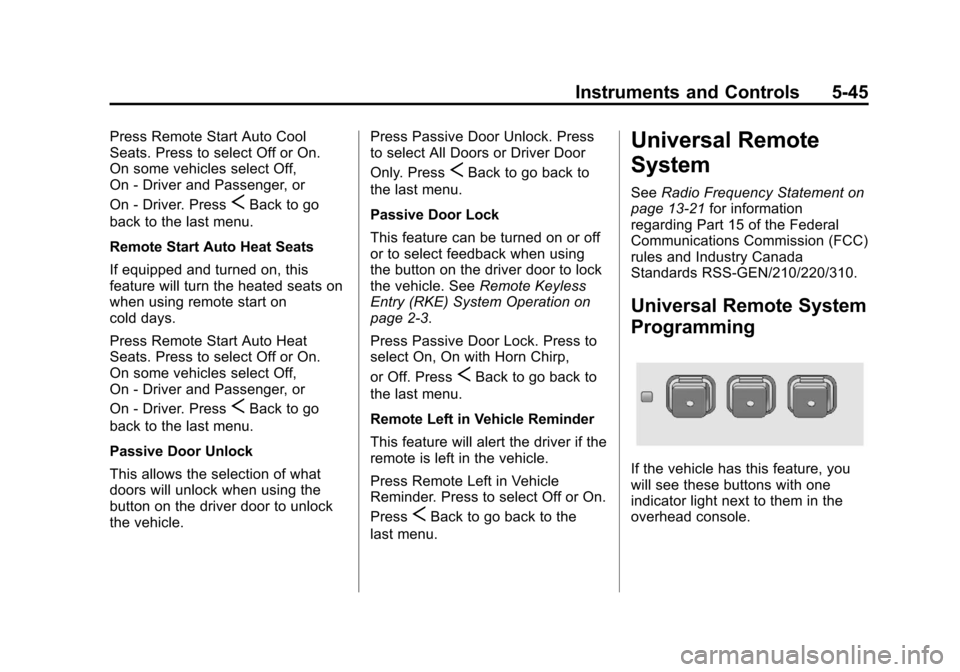
If the vehicle has this feature, you
will see these buttons with one
indicator light next to them in the
overhead console.
Page 170 of 432
Black plate (46,1)Cadillac SRX Owner Manual - 2013 - CRC - 11/9/12
5-46 Instruments and Controls
This system provides a way to
replace up to three remote control
transmitters used to activate
devices such as garage door
openers, security systems, and
home automation devices.
Do not use the Universal Remote
system with any garage door opener
that does not have the stop and
reverse feature. This includes any
garage door opener model
manufactured before April 1,1982.
Read the instructions completely
before attempting to program the
Universal Remote system. Because
of the steps involved, it may be
helpful to have another person
available to assist with programming
the Universal Remote system.
Keep the original hand-held
transmitter for use in other vehicles
as well as for future Universal
Remote system programming.It is also recommended that upon
the sale of the vehicle, the
programmed Universal Remote
system buttons be erased for
security purposes. See
“Erasing
Universal Remote System Buttons”
later in this section.
When programming a garage door,
park outside of the garage. Park
directly in line with and facing the
garage door opener motor-head or
gate motor-head. Be sure that
people and objects are clear of
the garage door or gate being
programmed.
It is recommended that a new
battery be installed in the hand-held
transmitter for quicker and more
accurate transmission of the
radio-frequency signal.Programming the Universal
Remote System
For questions or help programming
the Universal Remote system,
call 1-800-355-3515 or go to
www.homelink.com.
Programming a garage door opener
involves time-sensitive actions, so
read the entire procedure before
starting. Otherwise, the device will
time out and the procedure will have
to be repeated.
To program up to three devices:
1. Hold the end of the hand-held
transmitter about 3 to 8 cm
(1 to 3 in) away from the
Universal Remote system
buttons while keeping the
indicator light in view. The
hand-held transmitter was
supplied by the manufacturer of
the garage door opener receiver
(motor-head unit).