wheel CADILLAC SRX 2013 2.G Owners Manual
[x] Cancel search | Manufacturer: CADILLAC, Model Year: 2013, Model line: SRX, Model: CADILLAC SRX 2013 2.GPages: 432, PDF Size: 7.13 MB
Page 2 of 432

Black plate (2,1)Cadillac SRX Owner Manual - 2013 - CRC - 11/9/12
2013 Cadillac SRX Owner ManualM
Vehicle Care. . . . . . . . . . . . . . . . . 10-1
General Information . . . . . . . . . . 10-2
Vehicle Checks . . . . . . . . . . . . . . . 10-4
Headlamp Aiming . . . . . . . . . . . 10-26
Bulb Replacement . . . . . . . . . . 10-27
Electrical System . . . . . . . . . . . . 10-34
Wheels and Tires . . . . . . . . . . . 10-42
Jump Starting . . . . . . . . . . . . . . . 10-82
Towing . . . . . . . . . . . . . . . . . . . . . . 10-85
Appearance Care . . . . . . . . . . . 10-89
Service and Maintenance . . . 11-1
General Information . . . . . . . . . . 11-1
Cadillac Premium Care
Maintenance . . . . . . . . . . . . . . . . 11-3
Maintenance Schedule . . . . . . . 11-4 Special Application
Services . . . . . . . . . . . . . . . . . . . . 11-9
Additional Maintenance and Care . . . . . . . . . . . . . . . . . . . 11-10
Recommended Fluids, Lubricants, and Parts . . . . . . 11-13
Maintenance Records . . . . . . . 11-16
Technical Data . . . . . . . . . . . . . . . 12-1
Vehicle Identification . . . . . . . . . 12-1
Vehicle Data . . . . . . . . . . . . . . . . . . 12-2
Customer Information . . . . . . . 13-1
Customer Information . . . . . . . . 13-1
Reporting Safety Defects . . . . 13-18
Vehicle Data Recording and Privacy . . . . . . . . . . . . . . . . . . . . 13-19 OnStar
. . . . . . . . . . . . . . . . . . . . . . . 14-1
OnStar Overview . . . . . . . . . . . . . 14-1
OnStar Services . . . . . . . . . . . . . . 14-2
OnStar Additional
Information . . . . . . . . . . . . . . . . . . 14-5
Index . . . . . . . . . . . . . . . . . . . . . i-1
Page 5 of 432

Black plate (5,1)Cadillac SRX Owner Manual - 2013 - CRC - 11/9/12
Introduction v
Vehicle Symbol Chart
Here are some additional symbols
that may be found on the vehicle
and what they mean. For more
information on the symbol, refer to
the Index.
9:Airbag Readiness Light
#:Air Conditioning
!:Antilock Brake System (ABS)
g:Audio Steering Wheel Controls
or OnStar®
$: Brake System Warning Light
":Charging System
I:Cruise Control
B: Engine Coolant Temperature
O:Exterior Lamps
#:Fog Lamps
.: Fuel Gauge
+:Fuses
3: Headlamp High/Low-Beam
Changer
(: Heated Steering Wheel
j:LATCH System Child
Restraints
*: Malfunction Indicator Lamp
::Oil Pressure
g:Outside Power Foldaway
Mirrors
O: Power
/:Remote Vehicle Start
>:Safety Belt Reminders
7:Tire Pressure Monitor
d:Traction Control/StabiliTrak®
M:Windshield Washer Fluid
Page 7 of 432
Black plate (1,1)Cadillac SRX Owner Manual - 2013 - CRC - 11/9/12
In Brief 1-1
In Brief
Instrument Panel
Instrument Panel . . . . . . . . . . . . . . 1-2
Initial Drive Information
Initial Drive Information . . . . . . . . 1-4
Remote Keyless Entry (RKE)System . . . . . . . . . . . . . . . . . . . . . . 1-4
Remote Vehicle Start . . . . . . . . . 1-5
Door Locks . . . . . . . . . . . . . . . . . . . 1-5
Liftgate . . . . . . . . . . . . . . . . . . . . . . . . 1-6
Windows . . . . . . . . . . . . . . . . . . . . . . 1-7
Seat Adjustment . . . . . . . . . . . . . . 1-8
Memory Features . . . . . . . . . . . . . 1-9
Heated and Ventilated Seats . . . . . . . . . . . . . . . . . . . . . . . . 1-9
Head Restraint Adjustment . . . . . . . . . . . . . . . . . 1-10
Safety Belts . . . . . . . . . . . . . . . . . . 1-10
Passenger Sensing System . . . . . . . . . . . . . . . . . . . . . 1-10 Mirror Adjustment . . . . . . . . . . . . 1-11
Steering Wheel
Adjustment . . . . . . . . . . . . . . . . . 1-11
Throttle and Brake Pedal Adjustment . . . . . . . . . . . . . . . . . 1-12
Interior Lighting . . . . . . . . . . . . . . 1-12
Exterior Lighting . . . . . . . . . . . . . 1-13
Windshield Wiper/Washer . . . . 1-13
Climate Controls . . . . . . . . . . . . . 1-15
Transmission . . . . . . . . . . . . . . . . 1-16
Vehicle Features
Steering Wheel Controls . . . . . 1-16
Cruise Control . . . . . . . . . . . . . . . 1-17
Infotainment System . . . . . . . . . 1-17
Driver Information Center (DIC) . . . . . . . . . . . . . . . 1-18
Forward Collision Alert (FCA) System . . . . . . . . . . . . . . . . . . . . . 1-18
Lane Departure Warning (LDW) . . . . . . . . . . . . . 1-18
Side Blind Zone Alert (SBZA) . . . . . . . . . . . . . . . 1-19 Rear Vision
Camera (RVC) . . . . . . . . . . . . . 1-19
Ultrasonic Parking Assist . . . . 1-19
Active Emergency Braking System . . . . . . . . . . . . . . . . . . . . . 1-19
Storage Compartments . . . . . . 1-19
Power Outlets . . . . . . . . . . . . . . . 1-20
Universal Remote System . . . 1-20
Performance and Maintenance
Traction Control System (TCS) . . . . . . . . . . . . . . 1-21
StabiliTrak
®System . . . . . . . . . 1-21
Tire Pressure Monitor . . . . . . . . 1-21
Tire Sealant and Compressor Kit . . . . . . . . . . . . . 1-22
Engine Oil Life System . . . . . . 1-22
Fuel E85 (85% Ethanol) . . . . . 1-23
Driving for Better Fuel
Economy . . . . . . . . . . . . . . . . . . . 1-23
Roadside Service . . . . . . . . . . . . 1-23
OnStar
®. . . . . . . . . . . . . . . . . . . . . 1-23
Page 9 of 432

Black plate (3,1)Cadillac SRX Owner Manual - 2013 - CRC - 11/9/12
In Brief 1-3
1.Air Vents on page 8‑8.
2. Turn and Lane-Change Lever. See Turn and Lane-Change
Signals on page 6‑5.
3. Cruise Control on page 9‑35.
4. Instrument Cluster on page 5‑10.
5. Steering Wheel Controls on
page 5‑2.
Driver Information Center (DIC)
Controls. See Driver Information
Center (DIC) on page 5‑27.
6. Windshield Wiper/Washer on
page 5‑3.
Rear Window Wiper/Washer on
page 5‑5.
7. AM-FM Radio. See the CUE infotainment manual.
Navigation System (If Equipped).
See the CUE infotainment
manual. 8. Light Sensor. See
Twilight
Sentinel on page 6‑4.
9. Dual Automatic Climate Control
System on page 8‑1.
10. Exterior Lamp Controls on
page 6‑1.
Front Fog Lamps on page 6‑6
(If Equipped).
Instrument Panel Illumination
Control on page 6‑6.
11. Hood Release. See Hood on
page 10‑5.
12. Data Link Connector (DLC) (Out of View). See Malfunction
Indicator Lamp on page 5‑17.
13. Steering Wheel Adjustment on
page 5‑2.
14. Horn on page 5‑3. 15. Pedal Adjust Control (Out of
View). See Adjustable Throttle
and Brake Pedal on page 9‑15
(If Equipped).
16. Start/Stop Button. See Ignition
Positions on page 9‑16.
17. Hazard Warning Flashers on
page 6‑5.
18. Heated and Ventilated Front
Seats on page 3‑9
(If Equipped).
19. CD Player. See the CUE infotainment manual.
Blu Ray Optical Drive (If
Equipped). See the CUE
infotainment manual.
20. Parking Brake on page 9‑28.
21. Shift Lever. See Automatic
Transmission on page 9‑23.
Page 17 of 432
Black plate (11,1)Cadillac SRX Owner Manual - 2013 - CRC - 11/9/12
In Brief 1-11
The passenger airbag status
indicator will be visible on the
overhead console when the vehicle
is started. SeePassenger Sensing
System on page 3‑27.
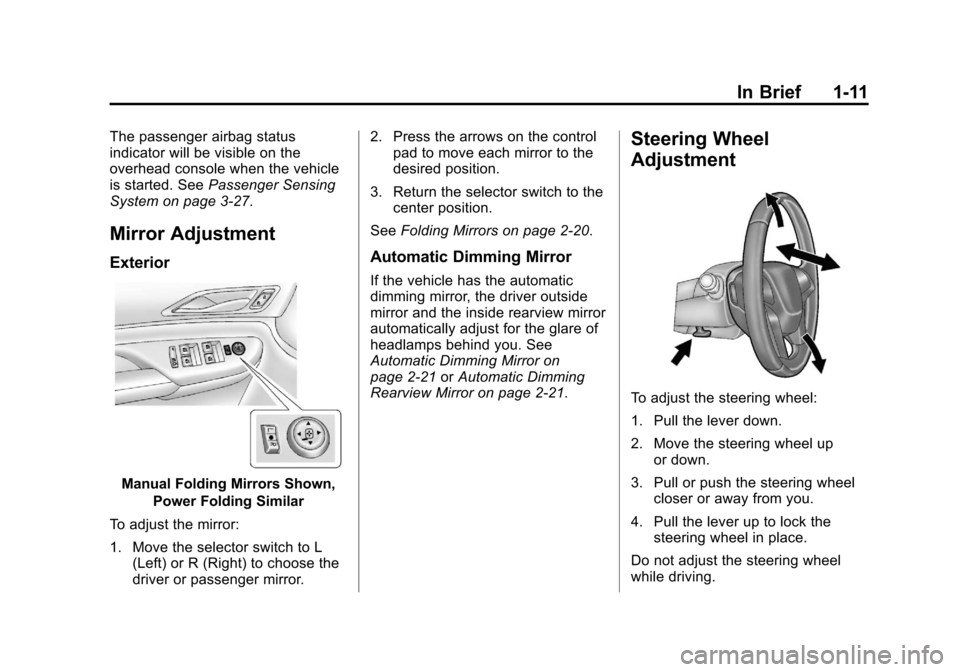
Mirror Adjustment
Exterior
Manual Folding Mirrors Shown,
Power Folding Similar
To adjust the mirror:
1. Move the selector switch to L (Left) or R (Right) to choose the
driver or passenger mirror. 2. Press the arrows on the control
pad to move each mirror to the
desired position.
3. Return the selector switch to the center position.
See Folding Mirrors on page 2‑20.
Automatic Dimming Mirror
If the vehicle has the automatic
dimming mirror, the driver outside
mirror and the inside rearview mirror
automatically adjust for the glare of
headlamps behind you. See
Automatic Dimming Mirror on
page 2‑21 orAutomatic Dimming
Rearview Mirror on page 2‑21.
Steering Wheel
Adjustment
To adjust the steering wheel:
1. Pull the lever down.
2. Move the steering wheel up
or down.
3. Pull or push the steering wheel closer or away from you.
4. Pull the lever up to lock the steering wheel in place.
Do not adjust the steering wheel
while driving.
Page 22 of 432
Black plate (16,1)Cadillac SRX Owner Manual - 2013 - CRC - 11/9/12
1-16 In Brief
SeeDual Automatic Climate Control
System on page 8‑1 andRear
Climate Control System on page 8‑6
(If Equipped).
Transmission
Driver Shift Control (DSC)
Driver Shift Control (DSC) allows
you to shift an automatic
transmission similar to a manual
transmission. To use the DSC
feature:
1. Move the shift lever to the left from D (Drive) to Sport Mode.
2. To enter M (Manual Mode), press the shift lever forward (+) to
upshift or rearward (−) to
downshift.
See Manual Mode on page 9‑24.
Vehicle Features
Steering Wheel Controls
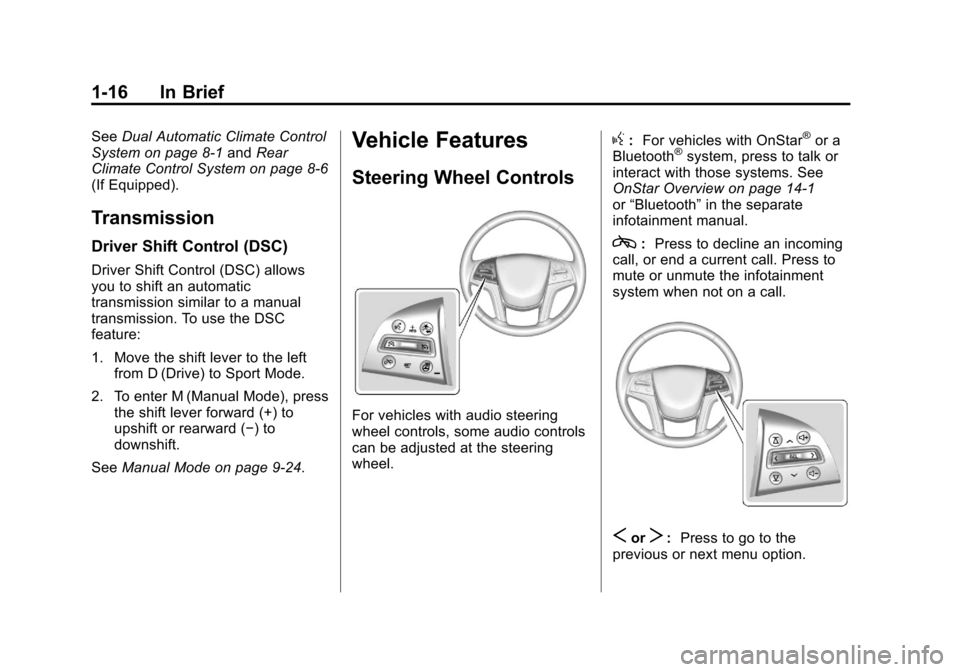
For vehicles with audio steering
wheel controls, some audio controls
can be adjusted at the steering
wheel.
g:For vehicles with OnStar®or a
Bluetooth®system, press to talk or
interact with those systems. See
OnStar Overview on page 14‑1
or “Bluetooth” in the separate
infotainment manual.
c: Press to decline an incoming
call, or end a current call. Press to
mute or unmute the infotainment
system when not on a call.
SorT: Press to go to the
previous or next menu option.
Page 23 of 432
Black plate (17,1)Cadillac SRX Owner Manual - 2013 - CRC - 11/9/12
In Brief 1-17
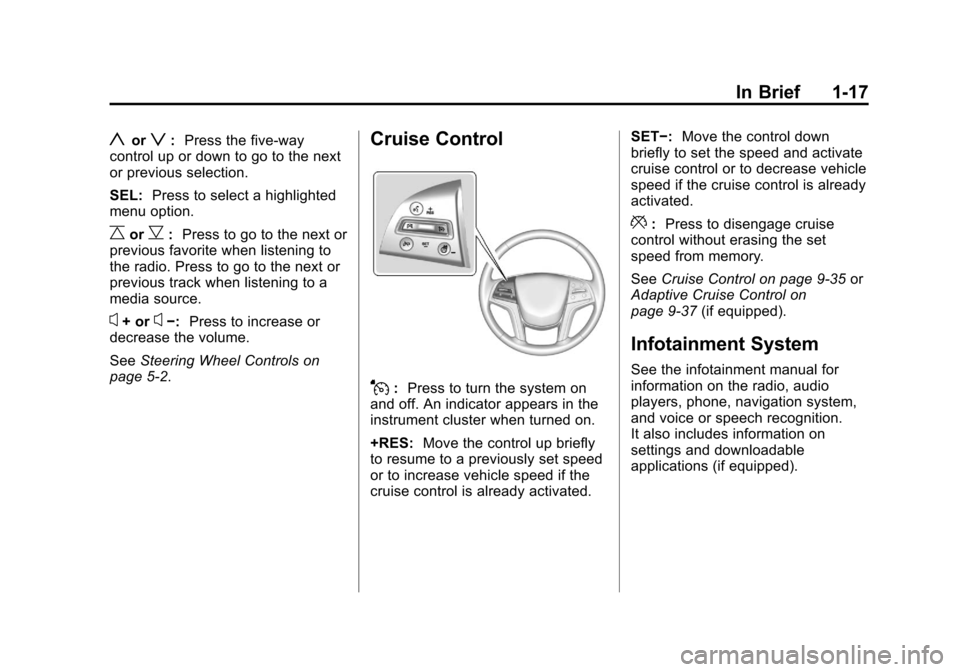
yorz:Press the five-way
control up or down to go to the next
or previous selection.
SEL: Press to select a highlighted
menu option.
CorB: Press to go to the next or
previous favorite when listening to
the radio. Press to go to the next or
previous track when listening to a
media source.
x+ orx−: Press to increase or
decrease the volume.
See Steering Wheel Controls on
page 5‑2.
Cruise Control
J: Press to turn the system on
and off. An indicator appears in the
instrument cluster when turned on.
+RES: Move the control up briefly
to resume to a previously set speed
or to increase vehicle speed if the
cruise control is already activated. SET−:
Move the control down
briefly to set the speed and activate
cruise control or to decrease vehicle
speed if the cruise control is already
activated.
*: Press to disengage cruise
control without erasing the set
speed from memory.
See Cruise Control on page 9‑35 or
Adaptive Cruise Control on
page 9‑37 (if equipped).
Infotainment System
See the infotainment manual for
information on the radio, audio
players, phone, navigation system,
and voice or speech recognition.
It also includes information on
settings and downloadable
applications (if equipped).
Page 27 of 432
Black plate (21,1)Cadillac SRX Owner Manual - 2013 - CRC - 11/9/12
In Brief 1-21
Performance and
Maintenance
Traction Control
System (TCS)
The traction control system limits
wheel spin. The system is on when
the vehicle is started.
.To turn off traction control, press
and release
gon the center
stack.
iilluminates in the
instrument cluster. The Traction
Control Off message is
displayed in the DIC. See Ride
Control System Messages on
page 5‑37.
.Press and releasegagain to
turn traction control back on.
i
goes out in the instrument
cluster. The Traction Control
On message is displayed in the
DIC. See Ride Control System
Messages on page 5‑37. See
Traction Control System (TCS)
on page 9‑31.
StabiliTrak®System
The StabiliTrak system assists with
directional control of the vehicle in
difficult driving conditions. The
system is on when the vehicle is
started.
.To turn off both Traction Control
and StabiliTrak, press and
hold
gon the center stack,
until
gandiilluminate in the
instrument cluster. The Traction
Control Off message is
displayed in the DIC. See Ride
Control System Messages on
page 5‑37.
.Pressgagain to turn on both
systems.
gandigo out in the
instrument cluster. The Traction
Control On message is
displayed in the DIC. See Ride
Control System Messages on
page 5‑37. See
StabiliTrak
®System on
page 9‑33.
Tire Pressure Monitor
This vehicle may have a Tire
Pressure Monitor System (TPMS).
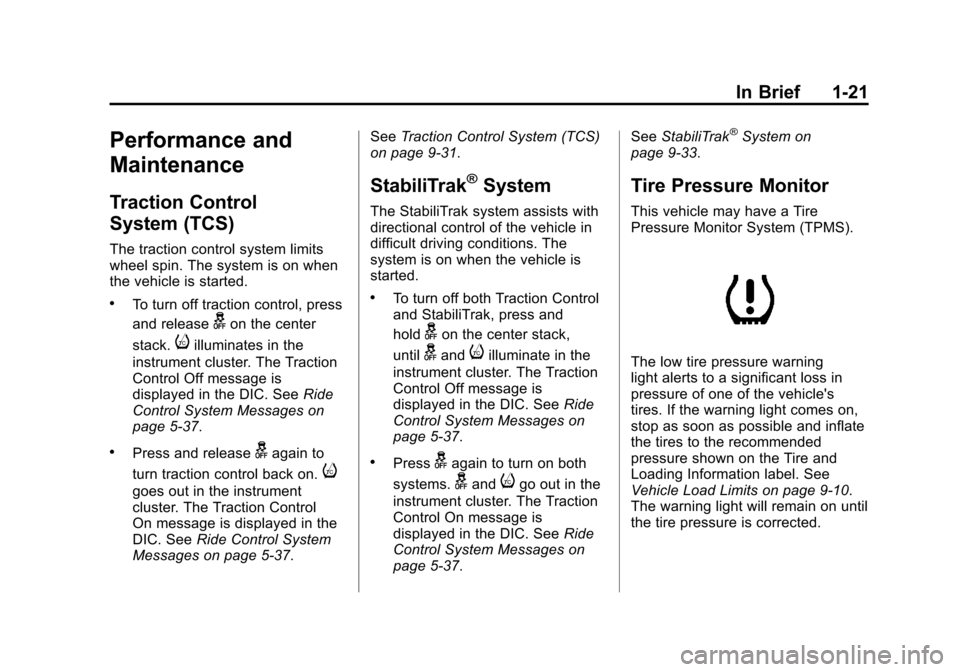
The low tire pressure warning
light alerts to a significant loss in
pressure of one of the vehicle's
tires. If the warning light comes on,
stop as soon as possible and inflate
the tires to the recommended
pressure shown on the Tire and
Loading Information label. See
Vehicle Load Limits on page 9‑10.
The warning light will remain on until
the tire pressure is corrected.
Page 28 of 432
Black plate (22,1)Cadillac SRX Owner Manual - 2013 - CRC - 11/9/12
1-22 In Brief
The low tire pressure warning light
may come on in cool weather when
the vehicle is first started, and then
turn off as the vehicle is driven. This
may be an early indicator that the
tire pressures are getting low and
the tires need to be inflated to the
proper pressure.
The TPMS does not replace normal
monthly tire maintenance. Maintain
the correct tire pressures.
SeeTire Pressure Monitor System
on page 10‑53.
Tire Sealant and
Compressor Kit
This vehicle may come with a spare
tire and tire changing equipment or
a tire sealant and compressor kit.
The kit can be used to temporarily
seal small punctures in the tread
area of the tire. See Tire Sealant
and Compressor Kit on page 10‑67.
If the vehicle came with a spare tire
and tire changing equipment, see If
a Tire Goes Flat on page 10‑65.
Engine Oil Life System
The engine oil life system calculates
engine oil life based on vehicle use
and displays the CHANGE ENGINE
OIL SOON message when it is time
to change the engine oil and filter.
The oil life system should be reset
to 100% only following an oil
change.
Resetting the Oil Life System
1. Using the DIC controls on the right side of the steering
wheel, display REMAINING OIL
LIFE on the DIC. See Driver
Information Center (DIC) on
page 5‑27. When remaining
oil life is low, the CHANGE
ENGINE OIL SOON message
will appear on the display. See
Engine Oil Messages on
page 5‑33. 2. Press SEL on the DIC controls
and hold SEL down for a few
seconds to clear the CHANGE
ENGINE OIL SOON message
and reset the oil life at 100%.
Be careful not to reset the oil
life display accidentally at any
time other than after the oil is
changed. It cannot be reset
accurately until the next oil
change.
The oil life system can also be reset
as follows:
1. Turn the ignition on with the engine off.
2. Fully press and release the accelerator pedal three times
within five seconds.
If the CHANGE ENGINE OIL
SOON message is not on, the
system is reset.
See Engine Oil Life System on
page 10‑10.
Page 77 of 432
Black plate (21,1)Cadillac SRX Owner Manual - 2013 - CRC - 11/9/12
Seats and Restraints 3-21
All vehicle airbags have the word
AIRBAG on the trim or on an
attached label near the deployment
opening.
For frontal airbags, the word
AIRBAG is on the center of the
steering wheel for the driver and on
the instrument panel for the front
outboard passenger.
For seat-mounted side impact
airbags, the word AIRBAG is on the
side of the seatback closest to
the door.
For roof-rail airbags, the word
AIRBAG is on the ceiling or trim.
Airbags are designed to supplement
the protection provided by safety
belts. Even though today's airbags
are also designed to help reduce
the risk of injury from the force of an
inflating bag, all airbags must inflate
very quickly to do their job.Here are the most important things
to know about the airbag system:
{WARNING
You can be severely injured or
killed in a crash if you are not
wearing your safety belt, even
with airbags. Airbags are
designed to work with safety
belts, not replace them. Also,
airbags are not designed to inflate
in every crash. In some crashes
safety belts are the only restraint.
See
When Should an Airbag
Inflate? on page 3‑24.
Wearing your safety belt during a
crash helps reduce the chance of
hitting things inside the vehicle or
being ejected from it. Airbags are
“supplemental restraints” to the
safety belts. Everyone in the
vehicle should wear a safety belt
properly, whether or not there is
an airbag for that person.
{WARNING
Because airbags inflate with great
force and faster than the blink of
an eye, anyone who is up
against, or very close to any
airbag when it inflates can be
seriously injured or killed. Do not
sit unnecessarily close to any
airbag, as you would be if sitting
on the edge of the seat or leaning
forward. Safety belts help keep
you in position before and during
a crash. Always wear a safety
belt, even with airbags. The driver
should sit as far back as possible
while still maintaining control of
the vehicle.
Occupants should not lean on or
sleep against the door or side
windows in seating positions with
seat-mounted side impact airbags
and/or roof-rail airbags.