LOCKS CADILLAC SRX 2014 User Guide
[x] Cancel search | Manufacturer: CADILLAC, Model Year: 2014, Model line: SRX, Model: CADILLAC SRX 2014Pages: 416, PDF Size: 4.56 MB
Page 65 of 416

Black plate (11,1)Cadillac SRX Owner Manual (GMNA-Localizing-U.S./Canada/Mexico-
6081464) - 2014 - CRC - 10/4/13
Seats and Restraints 3-11
To raise the seatback:
1. Lift the lever on top of theseatback. Raise the seatback
and release the lever. A tab near
the seatback lever raises when
the seatback is unlocked.
2. Push the seatback rearward until it locks in the upright position.
A tab near the seatback lever
retracts when the seatback is
locked in place.
3. Make sure the rear safety belts are not twisted or caught
between the seat cushion and
the seatback.
Reclining the Seatbacks
To recline the seatback:
1. Lift and hold the lever on top ofthe seatback. A tab near the
seatback lever raises when the
seatback is unlocked. 2. Tilt the seatback rearward, and
then release the lever when the
seatback is in the desired
position. A tab near the seatback
lever retracts when the seatback
is locked in place.
Heated Rear Seats
{Warning
If you cannot feel temperature
change or pain to the skin, the
seat heater may cause burns.
See the Warning under Heated
and Ventilated Front Seats on
page 3-8.
If available, the buttons are on the
rear climate control panel on the
rear of the center console.
With the ignition in ON/RUN/START,
press
MorLto heat the left or right
outboard seat cushion and
seatback. An indicator on the
climate control display appears
when this feature is on.
Press the button once for the
highest setting. With each press of
the button, the heated seat changes
to the next lower setting, and then
Page 68 of 416
Black plate (14,1)Cadillac SRX Owner Manual (GMNA-Localizing-U.S./Canada/Mexico-
6081464) - 2014 - CRC - 10/4/13
3-14 Seats and Restraints
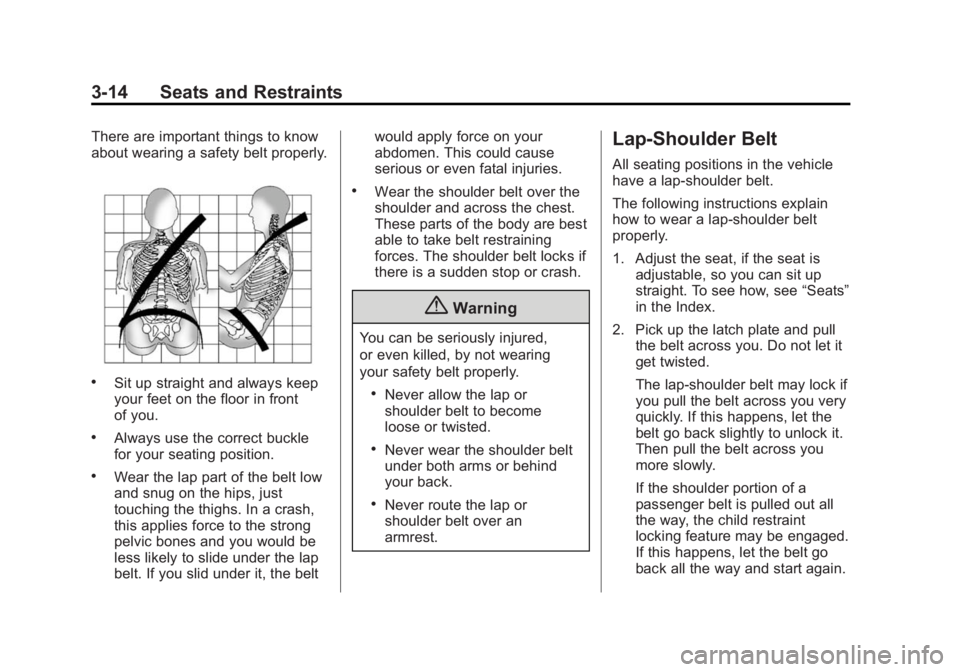
There are important things to know
about wearing a safety belt properly.
.Sit up straight and always keep
your feet on the floor in front
of you.
.Always use the correct buckle
for your seating position.
.Wear the lap part of the belt low
and snug on the hips, just
touching the thighs. In a crash,
this applies force to the strong
pelvic bones and you would be
less likely to slide under the lap
belt. If you slid under it, the beltwould apply force on your
abdomen. This could cause
serious or even fatal injuries.
.Wear the shoulder belt over the
shoulder and across the chest.
These parts of the body are best
able to take belt restraining
forces. The shoulder belt locks if
there is a sudden stop or crash.
{Warning
You can be seriously injured,
or even killed, by not wearing
your safety belt properly.
.Never allow the lap or
shoulder belt to become
loose or twisted.
.Never wear the shoulder belt
under both arms or behind
your back.
.Never route the lap or
shoulder belt over an
armrest.
Lap-Shoulder Belt
All seating positions in the vehicle
have a lap-shoulder belt.
The following instructions explain
how to wear a lap-shoulder belt
properly.
1. Adjust the seat, if the seat is
adjustable, so you can sit up
straight. To see how, see “Seats”
in the Index.
2. Pick up the latch plate and pull the belt across you. Do not let it
get twisted.
The lap-shoulder belt may lock if
you pull the belt across you very
quickly. If this happens, let the
belt go back slightly to unlock it.
Then pull the belt across you
more slowly.
If the shoulder portion of a
passenger belt is pulled out all
the way, the child restraint
locking feature may be engaged.
If this happens, let the belt go
back all the way and start again.
Page 113 of 416
Black plate (5,1)Cadillac SRX Owner Manual (GMNA-Localizing-U.S./Canada/Mexico-
6081464) - 2014 - CRC - 10/4/13
Storage 4-5
Cargo Tie-Downs
For vehicles equipped with cargo
tie‐downs, the four tie-downs are
located in the rear compartment of
the vehicle. Use the tie-downs to
secure small loads.
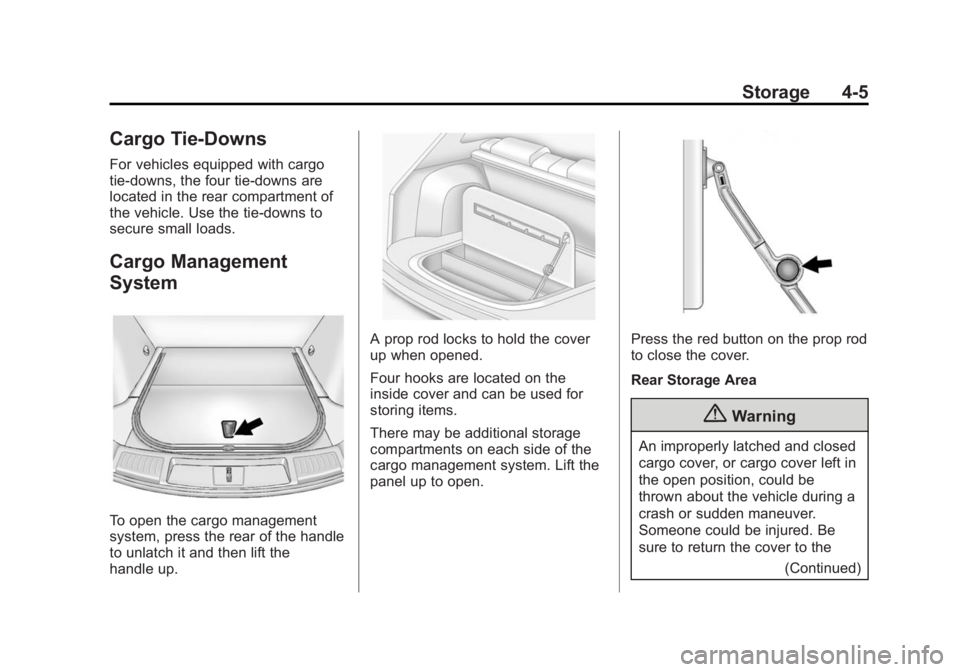
Cargo Management
System
To open the cargo management
system, press the rear of the handle
to unlatch it and then lift the
handle up.
A prop rod locks to hold the cover
up when opened.
Four hooks are located on the
inside cover and can be used for
storing items.
There may be additional storage
compartments on each side of the
cargo management system. Lift the
panel up to open.Press the red button on the prop rod
to close the cover.
Rear Storage Area
{Warning
An improperly latched and closed
cargo cover, or cargo cover left in
the open position, could be
thrown about the vehicle during a
crash or sudden maneuver.
Someone could be injured. Be
sure to return the cover to the(Continued)
Page 161 of 416

Black plate (41,1)Cadillac SRX Owner Manual (GMNA-Localizing-U.S./Canada/Mexico-
6081464) - 2014 - CRC - 10/4/13
Instruments and Controls 5-41
Radio
Press to display the Radio Menu
and the following may be displayed:
.Manage Favorites
.Number of Favorites Shown
.Audible Touch Feedback
.Bose Audio Pilot
.Maximum Start Up Volume
Manage Favorites
This allows favorites to be edited.
See “Manage Favorites” in
“Settings” under“Radio” in the
infotainment manual.
Number of Favorites Shown
Press to set the number of favorites
to display.
Select the desired number or select
Auto and the infotainment system
will automatically adjust the number
of favorite shown. Audible Touch Feedback
This allows Audible Touch
Feedback to be turned on or off.
Select Off or On.
Bose Audio Pilot
This feature adjusts the volume
based on the noise in the vehicle.
See
“Bose AudioPilot Noise
Compensation Technology” under
“Infotainment System Settings” in
the infotainment manual.
Maximum Startup Volume
This feature sets the maximum
startup volume. If the vehicle is
started and the volume is greater
than this level, the volume is
adjusted to this level. To set the
maximum startup volume, press +
or −to increase or decrease.
Vehicle
Select and the following may be
displayed:
.Climate and Air Quality
.Collision/Detection Systems
.Comfort and Convenience
.Lighting
.Power Door Locks
.Remote Lock, Unlock, Start
Climate and Air Quality
Select and the following may be
displayed:
.Auto Fan Max Speed
.Air Quality Sensor
.Auto Defog
Auto Fan Max Speed
This feature will set the maximum
auto fan speed.
Select Low, Medium, or High.
Air Quality Sensor
This allows for selection of air
quality sensor operation at high or
low sensitivity.
Select Off, Low Sensitivity, or High
Sensitivity.
Page 163 of 416
Black plate (43,1)Cadillac SRX Owner Manual (GMNA-Localizing-U.S./Canada/Mexico-
6081464) - 2014 - CRC - 10/4/13
Instruments and Controls 5-43
.Chime Volume
.Reverse Tilt Mirror
Auto Memory Recall
This allows the feature to be turned
on or off.
Select Off, On - Driver Door Open,
or On - At Ignition On.
Easy Exit Options
This allows the feature to be turned
on or off.
Select Off or On.
Chime Volume
This allows the selection of the
chime volume level.
Press + or −to adjust the volume.
Reverse Tilt Mirror
This allows the feature to be turned
on or off.
Select Off, On - Driver and
Passenger, On - Driver, or On -
Passenger. Lighting
Select and the following may be
displayed:
.Vehicle Locator Lights
.Auto High Beam
.Exit Lighting
Vehicle Locator Lights
This feature will flash the exterior
lamps when
Kon the Remote
Keyless Entry (RKE) transmitter is
pressed to locate the vehicle.
Select Off or On.
Auto High Beam
This allows the feature to be turned
on or off.
Select On or Off. On some vehicles
select Off, Normal Sensitivity,
or Low Sensitivity.
Exit Lighting
This allows the selection of how
long the exterior lamps stay on
when leaving the vehicle when it is
dark outside. Select Off, 30 Seconds,
60 Seconds, or 120 Seconds.
Power Door Locks
Select and the following may be
displayed:
.Unlocked Door Anti Lock Out
.Auto Door Unlock
.Delayed Door Lock
Unlocked Door Anti Lock Out
When on, this feature will keep the
driver door from locking when the
door is open. If Off is selected, the
Delayed Door Lock menu will be
available.
Select Off or On.
Auto Door Unlock
This allows selection of which of the
doors will automatically unlock when
the vehicle is shifted into P (Park)
with an automatic transmission or
when the vehicle is turned off with a
manual transmission.
Select Off, All Doors, or Driver Door.
Page 173 of 416

Black plate (3,1)Cadillac SRX Owner Manual (GMNA-Localizing-U.S./Canada/Mexico-
6081464) - 2014 - CRC - 10/4/13
Lighting 6-3
.The IntelliBeam system can be
disabled by the High/Low-Beam
Changer or the Flash-to-Pass
feature. If this happens, the
High/Low-Beam Changer must
be activated two times within
five seconds to reactivate the
IntelliBeam system. The
instrument cluster light will come
on to indicate the IntelliBeam is
reactivated. SeeHeadlamp
High/Low-Beam Changer on
page 6-3 orFlash-to-Pass on
page 6-3.
The high beams may not turn off
automatically if the system cannot
detect another vehicle's lamps
because of any of the following:
.The other vehicle's lamps are
missing, damaged, obstructed
from view, or otherwise
undetected.
.The other vehicle's lamps are
covered with dirt, snow, and/or
road spray.
.The other vehicle's lamps cannot
be detected due to dense
exhaust, smoke, fog, snow, road
spray, mist, or other airborne
obstructions.
.The vehicle's windshield is dirty,
cracked, or obstructed by
something that blocks the view
of the light sensor.
.The vehicle is loaded such that
the front end points upward,
causing the light sensor to aim
high and not detect headlamps
and taillamps.
.Driving on winding or hilly roads.
The high-beam headlamps may
need to be disabled if any of the
above conditions exist.
This feature can be turned on or off
in vehicle personalization. See
Vehicle Personalization on
page 5-40.
Headlamp High/
Low-Beam Changer
Push the turn signal lever away
from you and release to turn the
high beams on. To return to low
beams, push the lever again or pull
it toward you and release.
This indicator light turns on in the
instrument cluster when the
high-beam headlamps are on.
Flash-to-Pass
The flash-to-pass feature works with
the low beams or Daytime Running
Lamps (DRL) on or off.
To flash the high beams, pull the
turn signal lever all the way toward
you, then release it.
Page 212 of 416
Black plate (22,1)Cadillac SRX Owner Manual (GMNA-Localizing-U.S./Canada/Mexico-
6081464) - 2014 - CRC - 10/4/13
9-22 Driving and Operating
Warning (Continued)
.There are holes or openings
in the vehicle body from
damage or aftermarket
modifications that are not
completely sealed.
If unusual fumes are detected or
if it is suspected that exhaust is
coming into the vehicle:
.Drive it only with the windows
completely down.
.Have the vehicle repaired
immediately.
Never park the vehicle with the
engine running in an enclosed
area such as a garage or a
building that has no fresh air
ventilation.
Running the Vehicle
While Parked
It is better not to park with the
engine running.
If the vehicle is left with the engine
running, follow the proper steps to
be sure the vehicle will not move.
See Shifting Into Park on page 9-19
and Engine Exhaust on page 9-21.
If parking on a hill and pulling a
trailer, see Driving Characteristics
and Towing Tips on page 9-61.
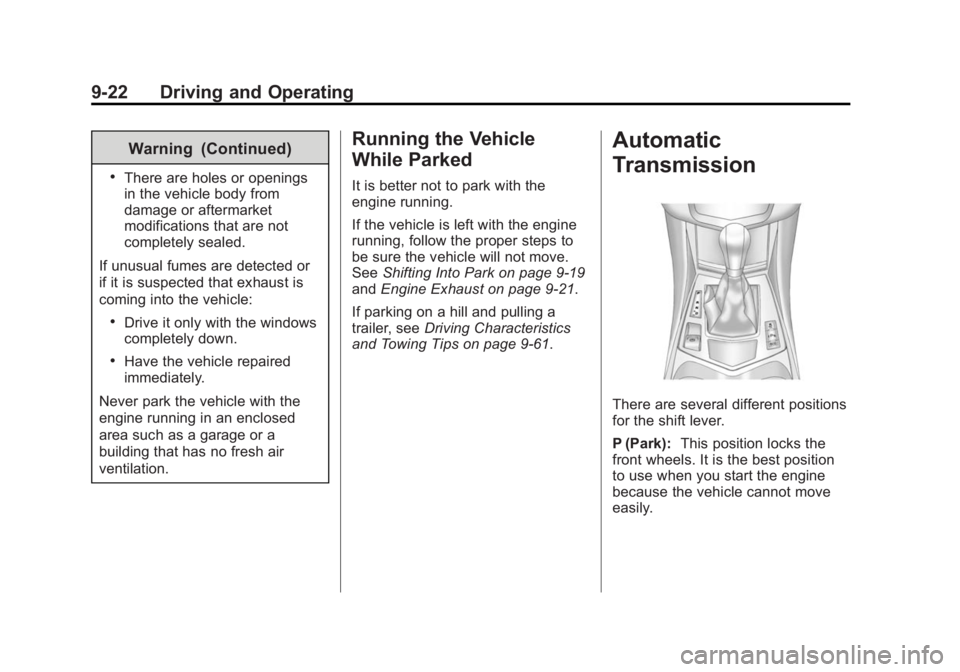
Automatic
Transmission
There are several different positions
for the shift lever.
P (Park): This position locks the
front wheels. It is the best position
to use when you start the engine
because the vehicle cannot move
easily.
Page 324 of 416
Black plate (64,1)Cadillac SRX Owner Manual (GMNA-Localizing-U.S./Canada/Mexico-
6081464) - 2014 - CRC - 10/4/13
10-64 Vehicle Care
{Warning
Lifting a vehicle and getting under
it to do maintenance or repairs is
dangerous without the
appropriate safety equipment and
training. If a jack is provided with
the vehicle, it is designed only for
changing a flat tire. If it is used for
anything else, you or others could
be badly injured or killed if the
vehicle slips off the jack. If a jack
is provided with the vehicle, only
use it for changing a flat tire.
If a tire goes flat, avoid further tire
and wheel damage by driving slowly
to a level place, well off the road,
if possible. Turn on the hazard
warning flashers. See Hazard
Warning Flashers on page 6-6.
{Warning
Changing a tire can be
dangerous. The vehicle can slip
off the jack and roll over or fall
causing injury or death. Find a
level place to change the tire. To
help prevent the vehicle from
moving:
1. Set the parking brake firmly.
2. Put an automatic transmission in P (Park) or a
manual transmission in
1 (First) or R (Reverse).
3. Turn off the engine and do not restart while the vehicle
is raised.
4. Do not allow passengers to remain in the vehicle.
5. Place wheel blocks on both sides of the tire at the
opposite corner of the tire
being changed. This vehicle may come with a jack
and spare tire or a tire sealant and
compressor kit. To use the jacking
equipment to change a spare tire
safely, follow the instructions below.
Then see
Tire Changing on
page 10-73. To use the tire sealant
and compressor kit, see Tire
Sealant and Compressor Kit on
page 10-65.
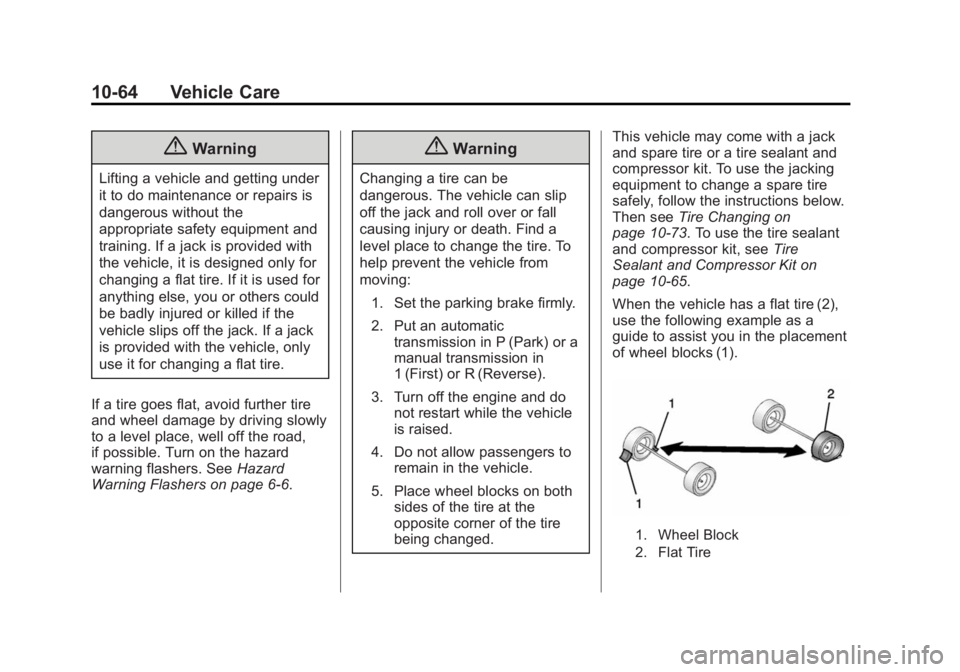
When the vehicle has a flat tire (2),
use the following example as a
guide to assist you in the placement
of wheel blocks (1).
1. Wheel Block
2. Flat Tire
Page 333 of 416
Black plate (73,1)Cadillac SRX Owner Manual (GMNA-Localizing-U.S./Canada/Mexico-
6081464) - 2014 - CRC - 10/4/13
Vehicle Care 10-73
Tire Changing
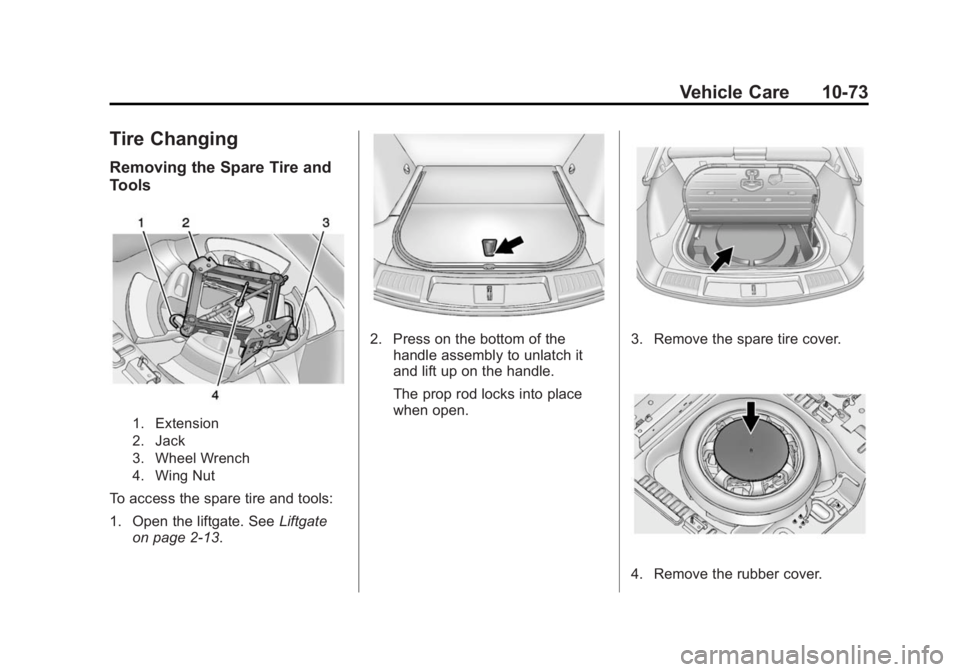
Removing the Spare Tire and
Tools
1. Extension
2. Jack
3. Wheel Wrench
4. Wing Nut
To access the spare tire and tools:
1. Open the liftgate. SeeLiftgate
on page 2-13.
2. Press on the bottom of the handle assembly to unlatch it
and lift up on the handle.
The prop rod locks into place
when open.3. Remove the spare tire cover.
4. Remove the rubber cover.
Page 347 of 416
Black plate (87,1)Cadillac SRX Owner Manual (GMNA-Localizing-U.S./Canada/Mexico-
6081464) - 2014 - CRC - 10/4/13
Vehicle Care 10-87
5. Follow the dolly manufacturer'sinstructions for preparing the
vehicle and dolly for towing.
6. Release the parking brake.
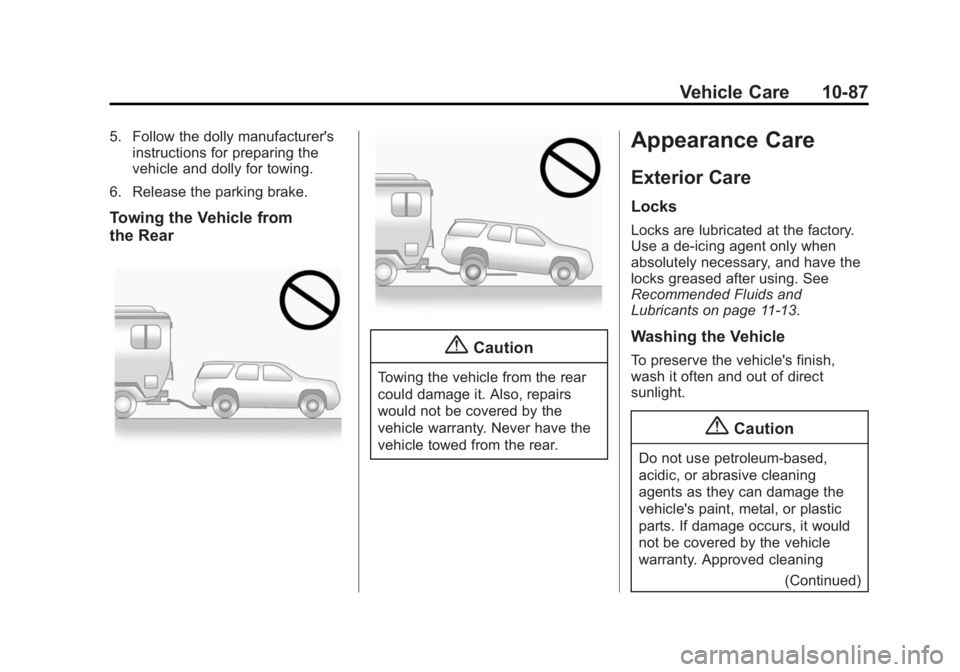
Towing the Vehicle from
the Rear
{Caution
Towing the vehicle from the rear
could damage it. Also, repairs
would not be covered by the
vehicle warranty. Never have the
vehicle towed from the rear.
Appearance Care
Exterior Care
Locks
Locks are lubricated at the factory.
Use a de-icing agent only when
absolutely necessary, and have the
locks greased after using. See
Recommended Fluids and
Lubricants on page 11-13.
Washing the Vehicle
To preserve the vehicle's finish,
wash it often and out of direct
sunlight.
{Caution
Do not use petroleum-based,
acidic, or abrasive cleaning
agents as they can damage the
vehicle's paint, metal, or plastic
parts. If damage occurs, it would
not be covered by the vehicle
warranty. Approved cleaning (Continued)