LOCKS CADILLAC SRX 2014 Owner's Manual
[x] Cancel search | Manufacturer: CADILLAC, Model Year: 2014, Model line: SRX, Model: CADILLAC SRX 2014Pages: 416, PDF Size: 4.56 MB
Page 1 of 416
Black plate (1,1)Cadillac SRX Owner Manual (GMNA-Localizing-U.S./Canada/Mexico-
6081464) - 2014 - CRC - 10/4/13
2014 Cadillac SRX Owner ManualM
In Brief. . . . . . . . . . . . . . . . . . . . . . . . 1-1
Instrument Panel . . . . . . . . . . . . . . 1-2
Initial Drive Information . . . . . . . . 1-4
Vehicle Features . . . . . . . . . . . . . 1-15
Performance and Maintenance . . . . . . . . . . . . . . . . 1-19
Keys, Doors, and Windows . . . . . . . . . . . . . . . . . . . . 2-1
Keys and Locks . . . . . . . . . . . . . . . 2-1
Doors . . . . . . . . . . . . . . . . . . . . . . . . 2-13
Vehicle Security . . . . . . . . . . . . . . 2-17
Exterior Mirrors . . . . . . . . . . . . . . . 2-19
Interior Mirrors . . . . . . . . . . . . . . . . 2-21
Windows . . . . . . . . . . . . . . . . . . . . . 2-22
Roof . . . . . . . . . . . . . . . . . . . . . . . . . . 2-25
Seats and Restraints . . . . . . . . . 3-1
Head Restraints . . . . . . . . . . . . . . . 3-2
Front Seats . . . . . . . . . . . . . . . . . . . . 3-3
Rear Seats . . . . . . . . . . . . . . . . . . . 3-10
Safety Belts . . . . . . . . . . . . . . . . . . 3-12
Airbag System . . . . . . . . . . . . . . . . 3-20
Child Restraints . . . . . . . . . . . . . . 3-33 Storage
. . . . . . . . . . . . . . . . . . . . . . . 4-1
Storage Compartments . . . . . . . . 4-1
Additional Storage Features . . . 4-3
Roof Rack System . . . . . . . . . . . . 4-11
Instruments and Controls . . . . 5-1
Controls . . . . . . . . . . . . . . . . . . . . . . . 5-2
Warning Lights, Gauges, and
Indicators . . . . . . . . . . . . . . . . . . . . 5-9
Information Displays . . . . . . . . . . 5-26
Vehicle Messages . . . . . . . . . . . . 5-29
Vehicle Personalization . . . . . . . 5-40
Universal Remote System . . . . 5-46
Lighting . . . . . . . . . . . . . . . . . . . . . . . 6-1
Exterior Lighting . . . . . . . . . . . . . . . 6-1
Interior Lighting . . . . . . . . . . . . . . . . 6-7
Lighting Features . . . . . . . . . . . . . . 6-9
Infotainment System . . . . . . . . . 7-1
Introduction . . . . . . . . . . . . . . . . . . . . 7-1 Climate Controls
. . . . . . . . . . . . . 8-1
Climate Control Systems . . . . . . 8-1
Air Vents . . . . . . . . . . . . . . . . . . . . . . . 8-7
Maintenance . . . . . . . . . . . . . . . . . . . 8-8
Driving and Operating . . . . . . . . 9-1
Driving Information . . . . . . . . . . . . . 9-2
Starting and Operating . . . . . . . 9-14
Engine Exhaust . . . . . . . . . . . . . . 9-21
Automatic Transmission . . . . . . 9-22
Drive Systems . . . . . . . . . . . . . . . . 9-26
Brakes . . . . . . . . . . . . . . . . . . . . . . . 9-27
Ride Control Systems . . . . . . . . 9-30
Cruise Control . . . . . . . . . . . . . . . . 9-33
Driver Assistance Systems . . . 9-44
Fuel . . . . . . . . . . . . . . . . . . . . . . . . . . 9-57
Trailer Towing . . . . . . . . . . . . . . . . 9-61
Conversions and Add-Ons . . . 9-69
Vehicle Care . . . . . . . . . . . . . . . . . 10-1
General Information . . . . . . . . . . 10-2
Vehicle Checks . . . . . . . . . . . . . . . 10-3
Headlamp Aiming . . . . . . . . . . . 10-26
Bulb Replacement . . . . . . . . . . 10-26
Electrical System . . . . . . . . . . . . 10-33
Wheels and Tires . . . . . . . . . . . 10-42
Page 7 of 416
Black plate (1,1)Cadillac SRX Owner Manual (GMNA-Localizing-U.S./Canada/Mexico-
6081464) - 2014 - CRC - 10/4/13
In Brief 1-1
In Brief
Instrument Panel
Instrument Panel . . . . . . . . . . . . . . 1-2
Initial Drive Information
Initial Drive Information . . . . . . . . 1-4
Remote Keyless Entry (RKE)System . . . . . . . . . . . . . . . . . . . . . . 1-4
Remote Vehicle Start . . . . . . . . . 1-4
Door Locks . . . . . . . . . . . . . . . . . . . 1-5
Liftgate . . . . . . . . . . . . . . . . . . . . . . . . 1-6
Windows . . . . . . . . . . . . . . . . . . . . . . 1-7
Seat Adjustment . . . . . . . . . . . . . . 1-7
Memory Features . . . . . . . . . . . . . 1-8
Heated and Ventilated Seats . . . . . . . . . . . . . . . . . . . . . . . . 1-9
Head Restraint Adjustment . . . . 1-9
Safety Belts . . . . . . . . . . . . . . . . . . 1-10
Passenger Sensing System . . . . . . . . . . . . . . . . . . . . . 1-10 Mirror Adjustment . . . . . . . . . . . . 1-10
Steering Wheel
Adjustment . . . . . . . . . . . . . . . . . 1-11
Throttle and Brake Pedal Adjustment . . . . . . . . . . . . . . . . . 1-11
Interior Lighting . . . . . . . . . . . . . . 1-12
Exterior Lighting . . . . . . . . . . . . . 1-12
Windshield Wiper/Washer . . . . 1-13
Climate Controls . . . . . . . . . . . . . 1-14
Transmission . . . . . . . . . . . . . . . . 1-15
Vehicle Features
Steering Wheel Controls . . . . . 1-15
Cruise Control . . . . . . . . . . . . . . . 1-16
Infotainment System . . . . . . . . . 1-17
Driver Information Center (DIC) . . . . . . . . . . . . . . . 1-17
Forward Collision Alert (FCA) System . . . . . . . . . . . . . . . . . . . . . 1-17
Lane Departure Warning (LDW) . . . . . . . . . . . . . 1-17 Side Blind Zone
Alert (SBZA) . . . . . . . . . . . . . . . 1-18
Rear Vision Camera (RVC) . . . . . . . . . . . . . 1-18
Ultrasonic Parking Assist . . . . 1-18
Active Emergency Braking
System . . . . . . . . . . . . . . . . . . . . . 1-18
Storage Compartments . . . . . . 1-18
Power Outlets . . . . . . . . . . . . . . . 1-19
Universal Remote System . . . 1-19
Performance and Maintenance
Traction Control/Electronic Stability Control . . . . . . . . . . . . 1-19
Tire Pressure Monitor . . . . . . . . 1-20
Engine Oil Life System . . . . . . 1-20
Driving for Better Fuel Economy . . . . . . . . . . . . . . . . . . . 1-21
Roadside Service . . . . . . . . . . . . 1-22
OnStar
®. . . . . . . . . . . . . . . . . . . . . 1-22
Page 11 of 416
Black plate (5,1)Cadillac SRX Owner Manual (GMNA-Localizing-U.S./Canada/Mexico-
6081464) - 2014 - CRC - 10/4/13
In Brief 1-5
When the vehicle starts, the parking
lamps will remain on as long as the
engine is running. The doors will be
locked and the climate control
system may come on.
The engine will continue to run for
10 minutes. Repeat the steps for a
10-minute time extension. Remote
start can be extended only once.
Canceling a Remote Start
To cancel a remote start, do any of
the following:
.Press and hold/until the
parking lamps turn off.
.Turn on the hazard warning
flashers.
.Turn the vehicle on and then off.
See Remote Vehicle Start on
page 2-8.
Door Locks
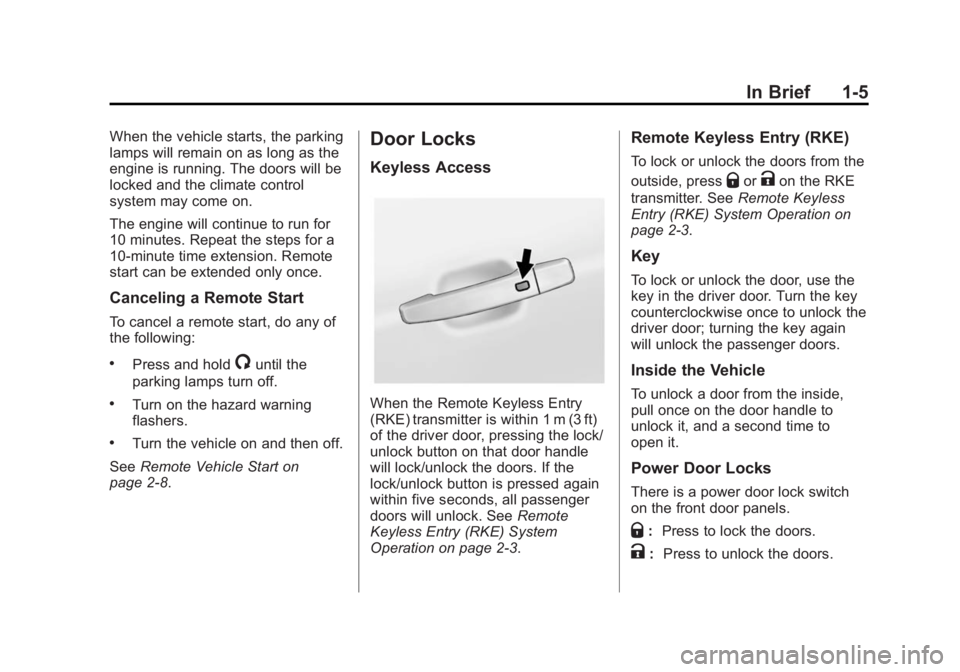
Keyless Access
When the Remote Keyless Entry
(RKE) transmitter is within 1 m (3 ft)
of the driver door, pressing the lock/
unlock button on that door handle
will lock/unlock the doors. If the
lock/unlock button is pressed again
within five seconds, all passenger
doors will unlock. See Remote
Keyless Entry (RKE) System
Operation on page 2-3.
Remote Keyless Entry (RKE)
To lock or unlock the doors from the
outside, press
QorKon the RKE
transmitter. See Remote Keyless
Entry (RKE) System Operation on
page 2-3.
Key
To lock or unlock the door, use the
key in the driver door. Turn the key
counterclockwise once to unlock the
driver door; turning the key again
will unlock the passenger doors.
Inside the Vehicle
To unlock a door from the inside,
pull once on the door handle to
unlock it, and a second time to
open it.
Power Door Locks
There is a power door lock switch
on the front door panels.
Q: Press to lock the doors.
K: Press to unlock the doors.
Page 12 of 416

Black plate (6,1)Cadillac SRX Owner Manual (GMNA-Localizing-U.S./Canada/Mexico-
6081464) - 2014 - CRC - 10/4/13
1-6 In Brief
SeePower Door Locks on
page 2-11.
Liftgate
Manual Liftgate Operation
For vehicles without Keyless
Access, unlock the vehicle before
opening the liftgate.
Press the touch pad in the handle of
the liftgate above the license plate
and lift up to open.
Do not press the touch pad while
closing the liftgate. This will cause
the liftgate to be unlatched.
Power Liftgate Operation
On vehicles with a power liftgate,
the switch is on the driver door. The
vehicle must be in P (Park) to use
the power feature. The taillamps
flash when the power liftgate
moves. Choose a power liftgate mode by
turning the dial on the switch until
the indicator lines up with the
desired position. Press the center of
the switch.
The three modes are:
MAX:
The liftgate opens to the full
open height.
3/4: The liftgate opens to a reduced
height that can be set by the vehicle
operator in a range of approximately
three-quarters open to full open.
OFF: The liftgate only operates
manually in this position.
See Liftgate on page 2-13.
Page 29 of 416
Black plate (1,1)Cadillac SRX Owner Manual (GMNA-Localizing-U.S./Canada/Mexico-
6081464) - 2014 - CRC - 10/4/13
Keys, Doors, and Windows 2-1
Keys, Doors, and
Windows
Keys and Locks
Keys . . . . . . . . . . . . . . . . . . . . . . . . . . 2-1
Remote Keyless Entry (RKE)System . . . . . . . . . . . . . . . . . . . . . . 2-2
Remote Keyless Entry (RKE) System Operation . . . . . . . . . . . 2-3
Remote Vehicle Start . . . . . . . . . 2-8
Door Locks . . . . . . . . . . . . . . . . . . 2-10
Power Door Locks . . . . . . . . . . . 2-11
Delayed Locking . . . . . . . . . . . . . 2-11
Automatic Door Locks . . . . . . . 2-11
Lockout Protection . . . . . . . . . . . 2-12
Safety Locks . . . . . . . . . . . . . . . . . 2-12
Doors
Liftgate . . . . . . . . . . . . . . . . . . . . . . 2-13
Vehicle Security
Vehicle Security . . . . . . . . . . . . . . 2-17
Vehicle Alarm System . . . . . . . 2-17
Immobilizer . . . . . . . . . . . . . . . . . . 2-18
Immobilizer Operation . . . . . . . 2-18
Exterior Mirrors
Convex Mirrors . . . . . . . . . . . . . . 2-19
Power Mirrors . . . . . . . . . . . . . . . . 2-20
Folding Mirrors . . . . . . . . . . . . . . . 2-20
Heated Mirrors . . . . . . . . . . . . . . . 2-21
Automatic Dimming Mirror . . . 2-21
Reverse Tilt Mirrors . . . . . . . . . . 2-21
Interior Mirrors
Interior Rearview Mirrors . . . . . 2-21
Manual Rearview Mirror . . . . . . 2-21
Automatic Dimming Rearview Mirror . . . . . . . . . . . . . . . . . . . . . . . 2-22
Windows
Windows . . . . . . . . . . . . . . . . . . . . . 2-22
Power Windows . . . . . . . . . . . . . 2-22
Sun Visors . . . . . . . . . . . . . . . . . . . 2-25
Roof
Sunroof . . . . . . . . . . . . . . . . . . . . . . 2-25
Keys and Locks
Keys
{Warning
Leaving children in a vehicle with
a Remote Keyless Entry (RKE)
transmitter is dangerous and
children or others could be
seriously injured or killed. They
could operate the power windows
or other controls or make the
vehicle move. The windows will
function with the RKE transmitter
in the vehicle, and children or
others could be caught in the path
of a closing window. Do not leave
children in a vehicle with an RKE
transmitter.
Page 38 of 416
Black plate (10,1)Cadillac SRX Owner Manual (GMNA-Localizing-U.S./Canada/Mexico-
6081464) - 2014 - CRC - 10/4/13
2-10 Keys, Doors, and Windows
.Two remote vehicle starts or a
start with an extension have
already been used.
.The vehicle is not in P (Park).
Door Locks
{Warning
Unlocked doors can be
dangerous.
.Passengers, especially
children, can easily open the
doors and fall out of a moving
vehicle. The chance of being
thrown out of the vehicle in a
crash is increased if the
doors are not locked. So, all
passengers should wear
safety belts properly and the
doors should be locked
whenever the vehicle is
driven.(Continued)
Warning (Continued)
.Young children who get into
unlocked vehicles may be
unable to get out. A child can
be overcome by extreme heat
and can suffer permanent
injuries or even death from
heat stroke. Always lock the
vehicle whenever leaving it.
.Outsiders can easily enter
through an unlocked door
when slowing or stopping the
vehicle. Lock the doors to
help prevent this from
happening. Keyless Access
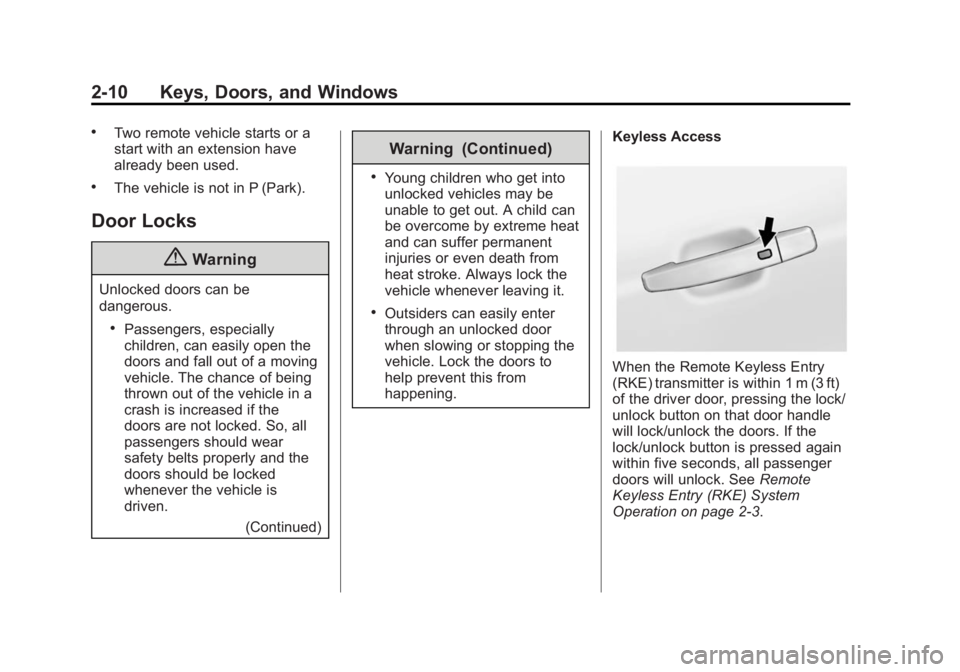
When the Remote Keyless Entry
(RKE) transmitter is within 1 m (3 ft)
of the driver door, pressing the lock/
unlock button on that door handle
will lock/unlock the doors. If the
lock/unlock button is pressed again
within five seconds, all passenger
doors will unlock. See
Remote
Keyless Entry (RKE) System
Operation on page 2-3.
Page 39 of 416
Black plate (11,1)Cadillac SRX Owner Manual (GMNA-Localizing-U.S./Canada/Mexico-
6081464) - 2014 - CRC - 10/4/13
Keys, Doors, and Windows 2-11
Key
To lock or unlock the door, use the
key in the driver door. Turn the key
counterclockwise once to unlock the
driver door; turning the key again
will unlock the passenger doors.
Inside the Vehicle
To unlock a door from the inside,
pull once on the door handle to
unlock it, and a second time to
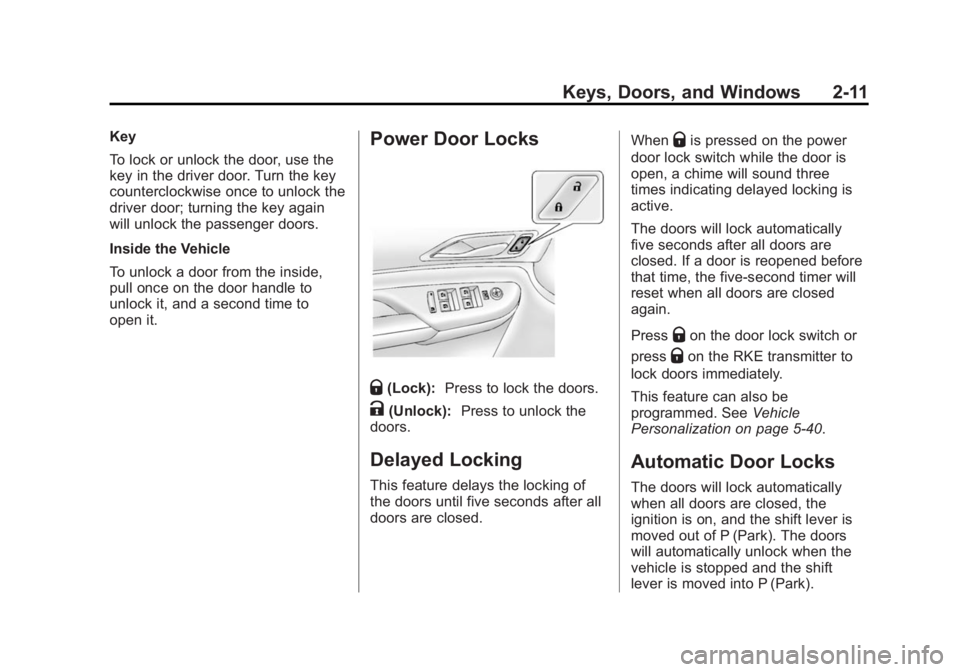
open it.Power Door Locks
Q(Lock):Press to lock the doors.
K(Unlock): Press to unlock the
doors.
Delayed Locking
This feature delays the locking of
the doors until five seconds after all
doors are closed. When
Qis pressed on the power
door lock switch while the door is
open, a chime will sound three
times indicating delayed locking is
active.
The doors will lock automatically
five seconds after all doors are
closed. If a door is reopened before
that time, the five-second timer will
reset when all doors are closed
again.
Press
Qon the door lock switch or
press
Qon the RKE transmitter to
lock doors immediately.
This feature can also be
programmed. See Vehicle
Personalization on page 5-40.
Automatic Door Locks
The doors will lock automatically
when all doors are closed, the
ignition is on, and the shift lever is
moved out of P (Park). The doors
will automatically unlock when the
vehicle is stopped and the shift
lever is moved into P (Park).
Page 40 of 416

Black plate (12,1)Cadillac SRX Owner Manual (GMNA-Localizing-U.S./Canada/Mexico-
6081464) - 2014 - CRC - 10/4/13
2-12 Keys, Doors, and Windows
Use the manual or power door locks
to unlock the doors if someone
needs to exit, and to lock the doors
again.
The power door locks can be
programmed through the Driver
Information Center (DIC). See
Vehicle Personalization on
page 5-40.
Lockout Protection
Lockout protection decreases the
chances that the keys may be
accidentally locked in the vehicle.
When door locking is requested by
pressing
Qon the front door panels
or the RKE transmitter and the
driver door is open, all doors will
lock and the driver door will
immediately unlock. The driver door
must be closed when
Qis pressed
for all doors to remain locked.
This feature can be programmed to
provide the lockout protection
feature only when the ignition mode
is ACC/ACCESSORY, or ON/RUN/ START. See
“Power Door Locks” in
Vehicle Personalization on
page 5-40.
Safety Locks
The rear door safety locks prevent
passengers from opening the rear
doors from inside the vehicle.
PressZ {to activate the safety
locks. The indicator light comes on
when activated. The rear door power windows are
also disabled. See
Power Windows
on page 2-22.
Press
Z {again to deactivate the
safety locks and power windows.
If a rear door handle is being pulled
when the safety lock is deactivated,
that door will remain locked and the
indicator light may flash. Release
the handle, then press the safety
lock twice to deactivate the safety
locks.
Page 52 of 416

Black plate (24,1)Cadillac SRX Owner Manual (GMNA-Localizing-U.S./Canada/Mexico-
6081464) - 2014 - CRC - 10/4/13
2-24 Keys, Doors, and Windows
If there is something blocking the
window during automatic closing,
the window will reverse direction for
a short distance. Weather conditions
such as extreme cold and/or ice
may cause the window to
auto-reverse. The window will return
to normal operation once the object
or condition is removed.
If conditions prevent the window
from closing and the window
continues to auto-reverse, it is
possible to close the window with
the ignition in ON/RUN/START by
holding the window switch in the
partially or fully pulled up position.
Release of the switch from the
partially pulled up position will cause
the window to stop. Release of the
switch from the fully pulled up
position will activate the express-up
and related obstacle detection
features.Overload
If the windows are repeatedly
operated within a short time, the
window operation is disabled for a
short time.
Remote Window Operation
If equipped, the remote operating
windows will open all the windows
from outside the vehicle by pressing
and holding
Kon the Remote
Keyless Entry (RKE) transmitter.
Window Lockout
This feature prevents the rear
passenger windows from operating
except from the driver position.
Press
Z {to activate the rear
window lockout. The indicator light
in the switch illuminates.
The rear door safety locks are also
enabled. See Safety Locks on
page 2-12.
Press
Z {again to deactivate the
rear window lockout.
Page 53 of 416
Black plate (25,1)Cadillac SRX Owner Manual (GMNA-Localizing-U.S./Canada/Mexico-
6081464) - 2014 - CRC - 10/4/13
Keys, Doors, and Windows 2-25
If an inside rear door handle is
being pulled at the same time a
safety lock is deactivated, only that
door will remain locked and the
indicator light may flash. Release
the handle, then press the safety
lock twice to deactivate the safety
locks.
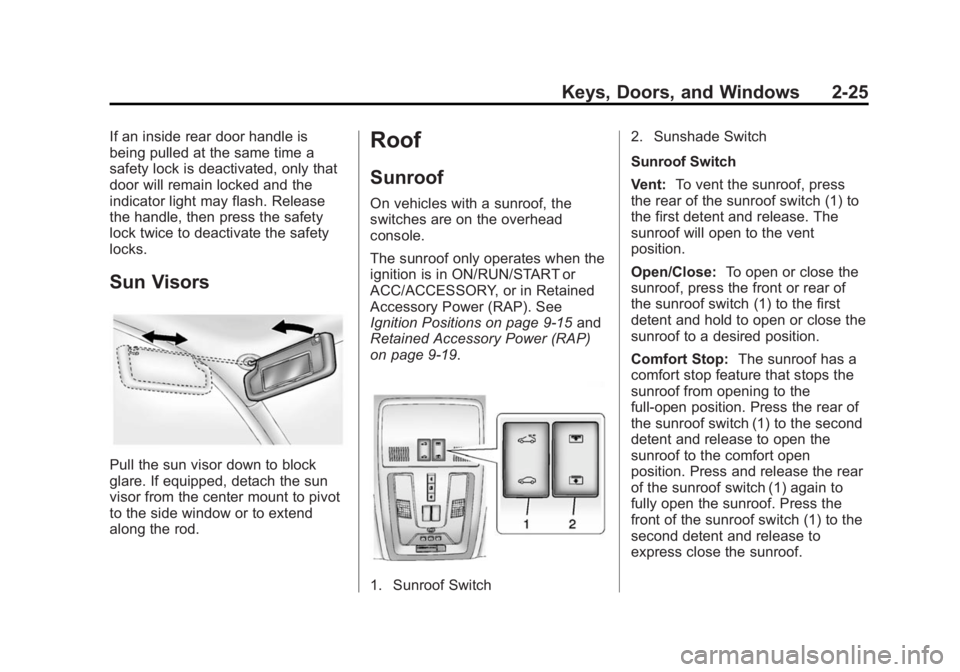
Sun Visors
Pull the sun visor down to block
glare. If equipped, detach the sun
visor from the center mount to pivot
to the side window or to extend
along the rod.
Roof
Sunroof
On vehicles with a sunroof, the
switches are on the overhead
console.
The sunroof only operates when the
ignition is in ON/RUN/START or
ACC/ACCESSORY, or in Retained
Accessory Power (RAP). See
Ignition Positions on page 9-15and
Retained Accessory Power (RAP)
on page 9-19.
1. Sunroof Switch 2. Sunshade Switch
Sunroof Switch
Vent:
To vent the sunroof, press
the rear of the sunroof switch (1) to
the first detent and release. The
sunroof will open to the vent
position.
Open/Close: To open or close the
sunroof, press the front or rear of
the sunroof switch (1) to the first
detent and hold to open or close the
sunroof to a desired position.
Comfort Stop: The sunroof has a
comfort stop feature that stops the
sunroof from opening to the
full-open position. Press the rear of
the sunroof switch (1) to the second
detent and release to open the
sunroof to the comfort open
position. Press and release the rear
of the sunroof switch (1) again to
fully open the sunroof. Press the
front of the sunroof switch (1) to the
second detent and release to
express close the sunroof.