climate control CADILLAC SRX 2014 User Guide
[x] Cancel search | Manufacturer: CADILLAC, Model Year: 2014, Model line: SRX, Model: CADILLAC SRX 2014Pages: 416, PDF Size: 4.56 MB
Page 49 of 416
Black plate (21,1)Cadillac SRX Owner Manual (GMNA-Localizing-U.S./Canada/Mexico-
6081464) - 2014 - CRC - 10/4/13
Keys, Doors, and Windows 2-21
Resetting the Power Folding
Mirrors
Reset the power folding mirrors if:
.The mirrors are accidentally
obstructed while folding.
.They are accidentally manually
folded/unfolded.
.The mirrors do not stay in the
unfolded position.
.The mirrors vibrate at normal
driving speeds.
Fold and unfold the mirrors one time
using the mirror controls to reset
them to their normal position.
A noise may be heard during the
resetting of the power folding
mirrors. This sound is normal after a
manual folding operation.
Heated Mirrors
1
(Rear Window Defogger):
Press to heat the mirrors.
See “Rear Window Defogger” under
Dual Automatic Climate Control
System on page 8-1.
Automatic Dimming
Mirror
If the vehicle has the automatic
dimming mirror, the driver outside
mirror automatically adjusts for the
glare of headlamps behind you.
Reverse Tilt Mirrors
If the vehicle is equipped with
memory mirrors, there is an option
to have the mirrors tilt down, when
in R (Reverse), to more easily see
the ground near the vehicle.
When the vehicle is shifted to
R (Reverse), both the driver and
passenger mirrors will tilt downward.
They will return to their previous
position when the vehicle is shifted
out of R (Reverse), the ignition is
turned to OFF, or the vehicle is left
in R (Reverse) for an extended
period of time.
This feature can be turned on or off.
See Vehicle Personalization on
page 5-40.
Interior Mirrors
Interior Rearview Mirrors
Adjust the rearview mirror for a clear
view of the area behind your
vehicle.
If equipped with OnStar, there are
three buttons at the bottom of the
mirror. See your dealer for more
information on the system and how
to subscribe to OnStar. See OnStar
Overview on page 14-1.
To avoid accidental OnStar calls,
clean the mirror with the ignition off.
Do not spray glass cleaner directly
on the mirror. Use a soft towel
dampened with water.
Manual Rearview Mirror
Push the tab forward for daytime
use and pull it rearward for
nighttime use to avoid glare of the
headlamps from behind.
Page 63 of 416
Black plate (9,1)Cadillac SRX Owner Manual (GMNA-Localizing-U.S./Canada/Mexico-
6081464) - 2014 - CRC - 10/4/13
Seats and Restraints 3-9
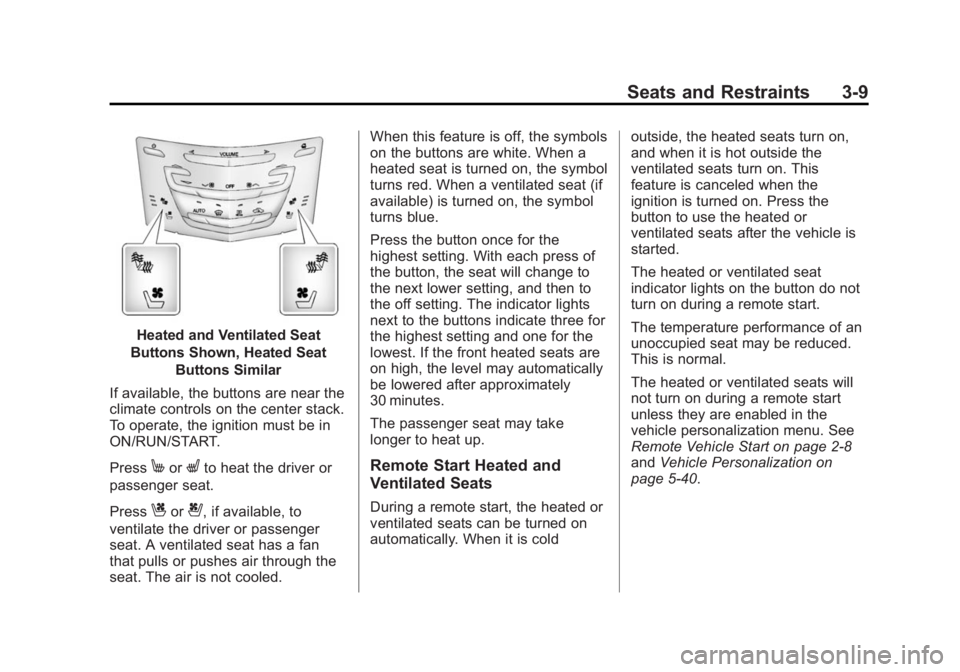
Heated and Ventilated Seat
Buttons Shown, Heated Seat Buttons Similar
If available, the buttons are near the
climate controls on the center stack.
To operate, the ignition must be in
ON/RUN/START.
Press
MorLto heat the driver or
passenger seat.
Press
Cor{, if available, to
ventilate the driver or passenger
seat. A ventilated seat has a fan
that pulls or pushes air through the
seat. The air is not cooled. When this feature is off, the symbols
on the buttons are white. When a
heated seat is turned on, the symbol
turns red. When a ventilated seat (if
available) is turned on, the symbol
turns blue.
Press the button once for the
highest setting. With each press of
the button, the seat will change to
the next lower setting, and then to
the off setting. The indicator lights
next to the buttons indicate three for
the highest setting and one for the
lowest. If the front heated seats are
on high, the level may automatically
be lowered after approximately
30 minutes.
The passenger seat may take
longer to heat up.
Remote Start Heated and
Ventilated Seats
During a remote start, the heated or
ventilated seats can be turned on
automatically. When it is cold
outside, the heated seats turn on,
and when it is hot outside the
ventilated seats turn on. This
feature is canceled when the
ignition is turned on. Press the
button to use the heated or
ventilated seats after the vehicle is
started.
The heated or ventilated seat
indicator lights on the button do not
turn on during a remote start.
The temperature performance of an
unoccupied seat may be reduced.
This is normal.
The heated or ventilated seats will
not turn on during a remote start
unless they are enabled in the
vehicle personalization menu. See
Remote Vehicle Start on page 2-8
and
Vehicle Personalization on
page 5-40.
Page 65 of 416

Black plate (11,1)Cadillac SRX Owner Manual (GMNA-Localizing-U.S./Canada/Mexico-
6081464) - 2014 - CRC - 10/4/13
Seats and Restraints 3-11
To raise the seatback:
1. Lift the lever on top of theseatback. Raise the seatback
and release the lever. A tab near
the seatback lever raises when
the seatback is unlocked.
2. Push the seatback rearward until it locks in the upright position.
A tab near the seatback lever
retracts when the seatback is
locked in place.
3. Make sure the rear safety belts are not twisted or caught
between the seat cushion and
the seatback.
Reclining the Seatbacks
To recline the seatback:
1. Lift and hold the lever on top ofthe seatback. A tab near the
seatback lever raises when the
seatback is unlocked. 2. Tilt the seatback rearward, and
then release the lever when the
seatback is in the desired
position. A tab near the seatback
lever retracts when the seatback
is locked in place.
Heated Rear Seats
{Warning
If you cannot feel temperature
change or pain to the skin, the
seat heater may cause burns.
See the Warning under Heated
and Ventilated Front Seats on
page 3-8.
If available, the buttons are on the
rear climate control panel on the
rear of the center console.
With the ignition in ON/RUN/START,
press
MorLto heat the left or right
outboard seat cushion and
seatback. An indicator on the
climate control display appears
when this feature is on.
Press the button once for the
highest setting. With each press of
the button, the heated seat changes
to the next lower setting, and then
Page 110 of 416
Black plate (2,1)Cadillac SRX Owner Manual (GMNA-Localizing-U.S./Canada/Mexico-
6081464) - 2014 - CRC - 10/4/13
4-2 Storage
Cupholders
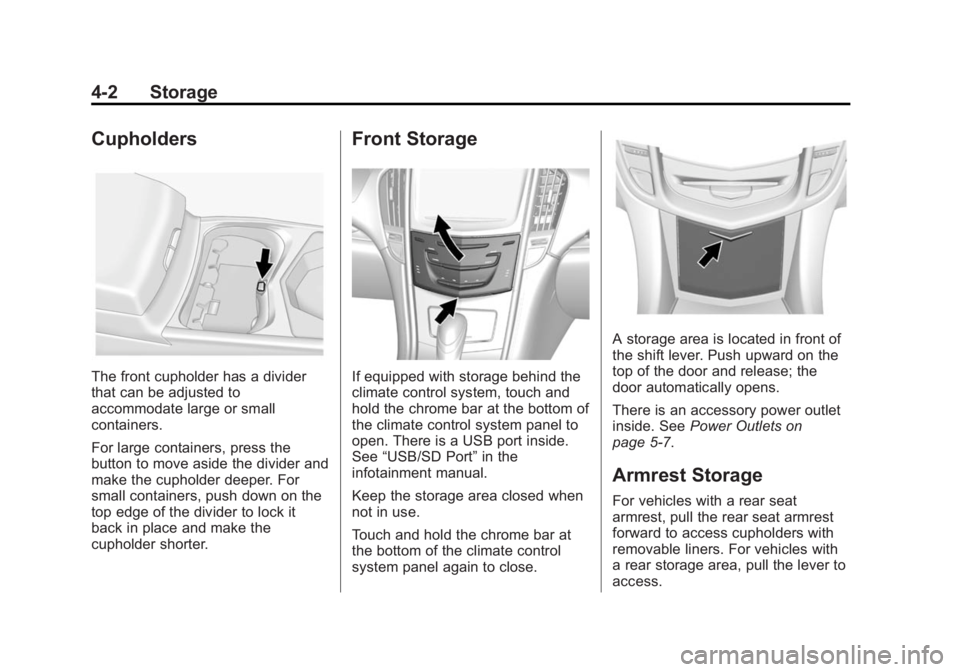
The front cupholder has a divider
that can be adjusted to
accommodate large or small
containers.
For large containers, press the
button to move aside the divider and
make the cupholder deeper. For
small containers, push down on the
top edge of the divider to lock it
back in place and make the
cupholder shorter.
Front Storage
If equipped with storage behind the
climate control system, touch and
hold the chrome bar at the bottom of
the climate control system panel to
open. There is a USB port inside.
See“USB/SD Port” in the
infotainment manual.
Keep the storage area closed when
not in use.
Touch and hold the chrome bar at
the bottom of the climate control
system panel again to close.
A storage area is located in front of
the shift lever. Push upward on the
top of the door and release; the
door automatically opens.
There is an accessory power outlet
inside. See Power Outlets on
page 5-7.
Armrest Storage
For vehicles with a rear seat
armrest, pull the rear seat armrest
forward to access cupholders with
removable liners. For vehicles with
a rear storage area, pull the lever to
access.
Page 127 of 416
Black plate (7,1)Cadillac SRX Owner Manual (GMNA-Localizing-U.S./Canada/Mexico-
6081464) - 2014 - CRC - 10/4/13
Instruments and Controls 5-7
Setting the Time
To set the time:
1. From the Home Page, press theSETTINGS screen button and
press Time and Date.
2. Press Set Time and press + or −
to increase or decrease hours,
minutes, and AM or PM. Press
12Hr or 24Hr for 12 or 24 hour
clock.
3. Press
}to go back to the
previous menu.
If auto timing is set, the time
displayed on the clock may not
update immediately when driving
into a new time zone.
To set the date:
1. Press the SETTINGS screen button and press Time and Date.
2. Press Set Date and press + or −
to increase or decrease month,
day, or year.
3. Press
}to go back to the
previous menu.
Power Outlets
The accessory power outlets can be
used to plug in electrical equipment,
such as a cell phone or MP3 player.
The vehicle may have five
accessory power outlets.
The accessory power outlets are:
.Below the climate control system
inside the front storage bin.
.Inside the center floor console.
.On the rear of the center floor
console. For vehicles with a rear
climate control system, there will
be two accessory power outlets
on the rear of the center floor
console.
.In the rear cargo area.
These are powered while the
vehicle is in ON/RUN/START or
ACC/ACCESSORY mode, or until
the driver door is opened within
10 minutes of turning off the vehicle.
The power outlet located in the rear
cargo area is powered at all times. There is a small cap that must be
removed to access the accessory
power outlet. When not using the
outlet be sure to cover it with the
protective cap.
{Caution
Leaving electrical equipment
plugged in for an extended period
of time while the vehicle is off will
drain the battery. Power is always
supplied to the rear cargo outlet.
Always unplug electrical
equipment when not in use and
do not plug in equipment that
exceeds the maximum 20 ampere
rating.
Certain accessory power plugs may
not be compatible with the
accessory power outlet and could
overload vehicle or adapter fuses.
If a problem is experienced, see
your dealer.
Page 128 of 416
Black plate (8,1)Cadillac SRX Owner Manual (GMNA-Localizing-U.S./Canada/Mexico-
6081464) - 2014 - CRC - 10/4/13
5-8 Instruments and Controls
When adding electrical equipment,
be sure to follow the proper
installation instructions included with
the equipment. SeeAdd-On
Electrical Equipment on page 9-69.
{Caution
Hanging heavy equipment from
the power outlet can cause
damage not covered by the
vehicle warranty. The power
outlets are designed for
accessory power plugs only, such
as cell phone charge cords.
Cigarette Lighter
There may be a cigarette lighter
under the climate control system,
inside the front storage bin.
To activate the cigarette lighter,
push it into the heating element and
let go. The lighter pops out when it
is ready to be used.
{Caution
Holding a cigarette lighter in while
it is heating does not let the
lighter back away from the
heating element when it is hot.
Damage from overheating can
occur to the lighter or heating
element, or a fuse could be
blown. Do not hold a cigarette
lighter in while it is heating.
Ashtrays
There may be an ashtray under the
climate control system on the center
stack. Press the door to release the
ashtray.
To empty the ashtray, remove it from
the instrument panel by holding the
edges and pulling straight out. To
reinstall, push the tray back into
place. There may also be ashtrays on the
center floor console behind the shift
lever and in the rear doors.
{Caution
If papers, pins, or other
flammable items are put in the
ashtray, hot cigarettes or other
smoking materials could ignite
them and possibly damage the
vehicle. Never put flammable
items in the ashtray.
Page 161 of 416

Black plate (41,1)Cadillac SRX Owner Manual (GMNA-Localizing-U.S./Canada/Mexico-
6081464) - 2014 - CRC - 10/4/13
Instruments and Controls 5-41
Radio
Press to display the Radio Menu
and the following may be displayed:
.Manage Favorites
.Number of Favorites Shown
.Audible Touch Feedback
.Bose Audio Pilot
.Maximum Start Up Volume
Manage Favorites
This allows favorites to be edited.
See “Manage Favorites” in
“Settings” under“Radio” in the
infotainment manual.
Number of Favorites Shown
Press to set the number of favorites
to display.
Select the desired number or select
Auto and the infotainment system
will automatically adjust the number
of favorite shown. Audible Touch Feedback
This allows Audible Touch
Feedback to be turned on or off.
Select Off or On.
Bose Audio Pilot
This feature adjusts the volume
based on the noise in the vehicle.
See
“Bose AudioPilot Noise
Compensation Technology” under
“Infotainment System Settings” in
the infotainment manual.
Maximum Startup Volume
This feature sets the maximum
startup volume. If the vehicle is
started and the volume is greater
than this level, the volume is
adjusted to this level. To set the
maximum startup volume, press +
or −to increase or decrease.
Vehicle
Select and the following may be
displayed:
.Climate and Air Quality
.Collision/Detection Systems
.Comfort and Convenience
.Lighting
.Power Door Locks
.Remote Lock, Unlock, Start
Climate and Air Quality
Select and the following may be
displayed:
.Auto Fan Max Speed
.Air Quality Sensor
.Auto Defog
Auto Fan Max Speed
This feature will set the maximum
auto fan speed.
Select Low, Medium, or High.
Air Quality Sensor
This allows for selection of air
quality sensor operation at high or
low sensitivity.
Select Off, Low Sensitivity, or High
Sensitivity.
Page 162 of 416

Black plate (42,1)Cadillac SRX Owner Manual (GMNA-Localizing-U.S./Canada/Mexico-
6081464) - 2014 - CRC - 10/4/13
5-42 Instruments and Controls
Auto Defog
When set to On, the front defog will
automatically react to temperature
and humidity conditions that may
cause fogging. Only vehicles with
the dual automatic climate control
will have this option.
Select Off or On.
Collision / Detection Systems
Select the Collision/Detection
Systems menu and the following
may display:
.Alert Type
.Auto Collision Preparation
.Go Notifier
.Side Blind Zone Alert
Alert Type
This feature will set crash alerts to
beeps or seat vibrations. This
setting affects all crash alerts
including:
.Forward Collision
.Lane Departure Warning
.Adaptive Cruise Control
.Parking Assist
.Backing Warning
Select Beeps or Safety Alert Seat.
Auto Collision Preparation
This feature will turn on or off the
Forward Collision Alert feature as
well as the Automatic Braking
capability of the Auto Collision
Preparation feature. With the Alert
and Brake setting, both Forward
Collision Alert as well as the
Automatic Braking capability of the
Auto Collision Preparation feature
are available. The Alert setting
disables most automatic braking
functions of the Auto Collision
Preparation feature. Some
last-second automatic braking
capability is still provided with the
Alert setting, but it is much less
likely to be triggered by most driving
conditions. Off disables all Forward
Collision Alert and Automatic
Braking capabilities of the Auto Collision Preparation feature. See
Active Emergency Braking System
on page 9-51.
Select Off, Alert & Brake, or Alert.
Go Notifier
This feature will give a reminder that
Adaptive Cruise Control provides
when it has brought the vehicle to a
complete stop behind another
stopping vehicle, and then that
vehicle drives on. See
Adaptive
Cruise Control on page 9-36.
Select Off or On.
Side Blind Zone Alert
This allows the feature to be turned
on or off. See Side Blind Zone Alert
(SBZA) on page 9-53.
Select Off or On.
Comfort and Convenience
Select and the following may be
displayed:
.Auto Memory Recall
.Easy Exit Options
Page 179 of 416
Black plate (9,1)Cadillac SRX Owner Manual (GMNA-Localizing-U.S./Canada/Mexico-
6081464) - 2014 - CRC - 10/4/13
Lighting 6-9
Lighting Features
Entry Lighting
The headlamps, taillamps, license
plate lamps, dome lamps, and most
of the interior lights turn on briefly at
night, or in areas with limited
lighting, when
Kis pressed on the
Remote Keyless Entry (RKE)
transmitter. After about 30 seconds
the exterior lamps turn off, and then
the dome and remaining interior
lights dim to off. The entry lighting
can be manually turned off by
changing the ignition out of the off
position, or by pressing
Qon the
RKE transmitter.
This feature can be changed. See
Vehicle Personalization on
page 5-40.
Exit Lighting
The headlamps, taillamps, parking
lamps, and license plate lamps
come on at night, or in areas with
limited lighting, when a door is opened after the ignition is turned
off. The dome lamps also come on
when the driver door is opened after
the ignition is changed to the off
position.
The exterior lamps and dome lamp
remain on after the door is closed
for a set amount of time, then
automatically turn off.
The exterior lamps turn off
immediately by turning the exterior
lamps control to off.
This feature can be changed. See
Vehicle Personalization on
page 5-40.
Battery Load
Management
The vehicle has Electric Power
Management (EPM) that estimates
the battery's temperature and state
of charge. It then adjusts the voltage
for best performance and extended
life of the battery.
When the battery's state of charge
is low, the voltage is raised slightly
to quickly bring the charge back up.
When the state of charge is high,
the voltage is lowered slightly to
prevent overcharging. If the vehicle
has a voltmeter gauge or a voltage
display on the Driver Information
Center (DIC), you may see the
voltage move up or down. This is
normal. If there is a problem, an
alert will be displayed.
The battery can be discharged at
idle if the electrical loads are very
high. This is true for all vehicles.
This is because the generator
(alternator) may not be spinning fast
enough at idle to produce all of the
power needed for very high
electrical loads.
A high electrical load occurs when
several of the following are on, such
as: headlamps, high beams, fog
lamps, rear window defogger,
climate control fan at high speed,
heated seats, engine cooling fans,
trailer loads, and loads plugged into
accessory power outlets.
Page 183 of 416
Black plate (1,1)Cadillac SRX Owner Manual (GMNA-Localizing-U.S./Canada/Mexico-
6081464) - 2014 - CRC - 10/4/13
Climate Controls 8-1
Climate Controls
Climate Control Systems
Dual Automatic Climate ControlSystem . . . . . . . . . . . . . . . . . . . . . . 8-1
Rear Climate Control System . . . . . . . . . . . . . . . . . . . . . . 8-6
Air Vents
Air Vents . . . . . . . . . . . . . . . . . . . . . . 8-7
Maintenance
Passenger Compartment AirFilter . . . . . . . . . . . . . . . . . . . . . . . . . 8-8
Climate Control Systems
Dual Automatic Climate Control System
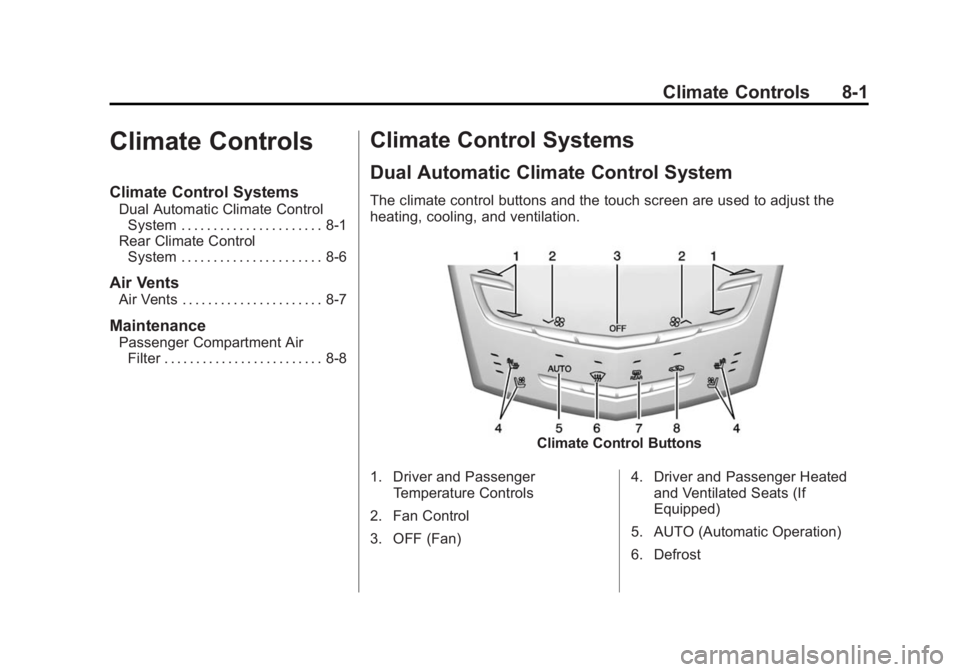
The climate control buttons and the touch screen are used to adjust the
heating, cooling, and ventilation.
Climate Control Buttons
1. Driver and Passenger Temperature Controls
2. Fan Control
3. OFF (Fan) 4. Driver and Passenger Heated
and Ventilated Seats (If
Equipped)
5. AUTO (Automatic Operation)
6. Defrost