light CADILLAC SRX 2016 2.G Owner's Manual
[x] Cancel search | Manufacturer: CADILLAC, Model Year: 2016, Model line: SRX, Model: CADILLAC SRX 2016 2.GPages: 319, PDF Size: 3.29 MB
Page 64 of 319
Cadillac SRX Owner Manual (GMNA-Localizing-MidEast-9369636) - 2016 -
crc - 6/1/15
Seats and Restraints 63
The best way to protect the fetus is
to protect the mother. When a safety
belt is worn properly, it is more likely
that the fetus will not be hurt in a
crash. For pregnant women, as for
anyone, the key to making safety
belts effective is wearing them
properly.
Safety System Check
Now and then, check that the safety
belt reminder light, safety belts,
buckles, latch plates, retractors, and
anchorages are all working properly.
Look for any other loose or
damaged safety belt system parts
that might keep a safety belt system
from doing its job. See your dealer
to have it repaired. Torn or frayed
safety belts may not protect you in a
crash. They can rip apart under
impact forces. If a belt is torn or
frayed, get a new one right away.
Make sure the safety belt reminder
light is working. SeeSafety Belt
Reminders 0111.
Keep safety belts clean and dry.
See Safety Belt Care 063.
Safety Belt Care
Keep belts clean and dry.
{Warning
Do not bleach or dye safety belts.
It may severely weaken them. In
a crash, they might not be able to
provide adequate protection.
Clean safety belts only with mild
soap and lukewarm water.
Replacing Safety Belt
System Parts after a
Crash
{Warning
A crash can damage the safety
belt system in the vehicle.
A damaged safety belt system
may not properly protect the
person using it, resulting in
serious injury or even death in a
crash. To help make sure the
safety belt systems are working
(Continued)
Warning (Continued)
properly after a crash, have them
inspected and any necessary
replacements made as soon as
possible.
After a minor crash, replacement of
safety belts may not be necessary.
But the safety belt assemblies that
were used during any crash may
have been stressed or damaged.
See your dealer to have the safety
belt assemblies inspected or
replaced.
New parts and repairs may be
necessary even if the safety belt
system was not being used at the
time of the crash.
Have the safety belt pretensioners
checked if the vehicle has been in a
crash, or if the airbag readiness light
stays on after you start the vehicle
or while you are driving. See Airbag
Readiness Light 0112.
Page 66 of 319
Cadillac SRX Owner Manual (GMNA-Localizing-MidEast-9369636) - 2016 -
crc - 6/1/15
Seats and Restraints 65
Warning (Continued)
airbag when it inflates can be
seriously injured or killed. Do not
sit unnecessarily close to any
airbag, as you would be if sitting
on the edge of the seat or leaning
forward. Safety belts help keep
you in position before and during
a crash. Always wear a safety
belt, even with airbags. The driver
should sit as far back as possible
while still maintaining control of
the vehicle. The safety belts and
the front outboard passenger
airbags are most effective when
you are sitting well back and
upright in the seat with both feet
on the floor.
Occupants should not lean on or
sleep against the door or side
windows in seating positions with
seat-mounted side impact airbags
and/or roof-rail airbags.
{Warning
Children who are up against,
or very close to, any airbag when
it inflates can be seriously injured
or killed. Always secure children
properly in the vehicle. To read
how, seeOlder Children 073 or
Infants and Young Children 074.
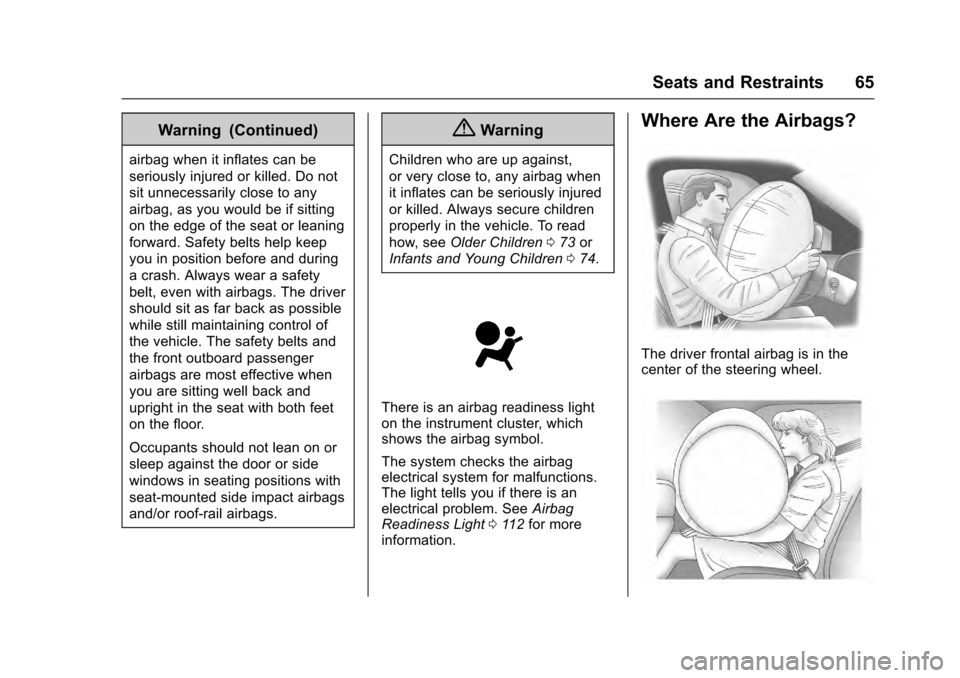
There is an airbag readiness light
on the instrument cluster, which
shows the airbag symbol.
The system checks the airbag
electrical system for malfunctions.
The light tells you if there is an
electrical problem. See Airbag
Readiness Light 0112 for more
information.
Where Are the Airbags?
The driver frontal airbag is in the
center of the steering wheel.
Page 71 of 319
Cadillac SRX Owner Manual (GMNA-Localizing-MidEast-9369636) - 2016 -
crc - 6/1/15
70 Seats and Restraints
.My vehicle has a rear seat too
small to accommodate a
rear-facing infant seat; or
. The infant has a medical
condition which, according to the
infant's physician, makes it
necessary for the infant to ride in
the front seat so that the driver
can constantly monitor the
child's condition.
Child age 1 to 12: A child age 1 to
12 must ride in the front seat
because:
. My vehicle has no rear seat;
. Although children ages 1 to 12
ride in the rear seat(s) whenever
possible, children ages 1 to 12
sometimes must ride in the front
because no space is available in
the rear seat(s) of my vehicle; or
. The child has a medical
condition which, according to the
child's physician, makes it
necessary for the child to ride in
the front seat so that the driver
can constantly monitor the
child's condition. Medical Condition: A passenger
has a medical condition which,
according to his or her physician:
.
Causes the passenger airbag to
pose a special risk for the
passenger; and
. Makes the potential harm from
the passenger airbag in a crash
greater than the potential harm
from turning off the airbag and
allowing the passenger, even if
belted, to hit the dashboard or
windshield in a crash.
{Warning
If the front outboard passenger
frontal airbag is turned off for a
person who does not belong to a
category indicated in this section,
that person will not have the extra
protection of an airbag. In a
crash, the airbag will not be able
to inflate and help protect the
person sitting there. Do not turn
off the front outboard passenger
(Continued)
Warning (Continued)
frontal airbag unless the person
sitting there belongs to a category
indicated in this section.
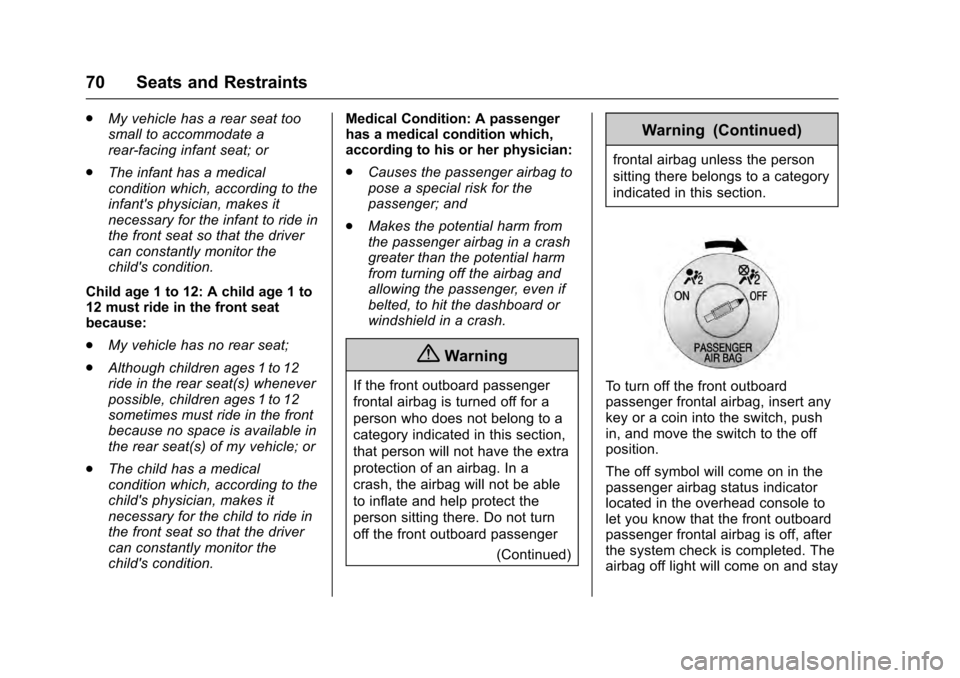
To turn off the front outboard
passenger frontal airbag, insert any
key or a coin into the switch, push
in, and move the switch to the off
position.
The off symbol will come on in the
passenger airbag status indicator
located in the overhead console to
let you know that the front outboard
passenger frontal airbag is off, after
the system check is completed. The
airbag off light will come on and stay
Page 72 of 319
Cadillac SRX Owner Manual (GMNA-Localizing-MidEast-9369636) - 2016 -
crc - 6/1/15
Seats and Restraints 71
on to let you know that the front
outboard passenger frontal airbag is
off. SeeAirbag On-Off Light 0113.
{Warning
If the airbag readiness light ever
comes on and stays on, it means
that something may be wrong
with the airbag system. For
example, the front outboard
passenger frontal airbag could
inflate even though the airbag
on-off switch is turned off.
To help avoid injury to yourself or
others, have the vehicle serviced
right away. See Airbag Readiness
Light 0112 for more information,
including important safety
information.
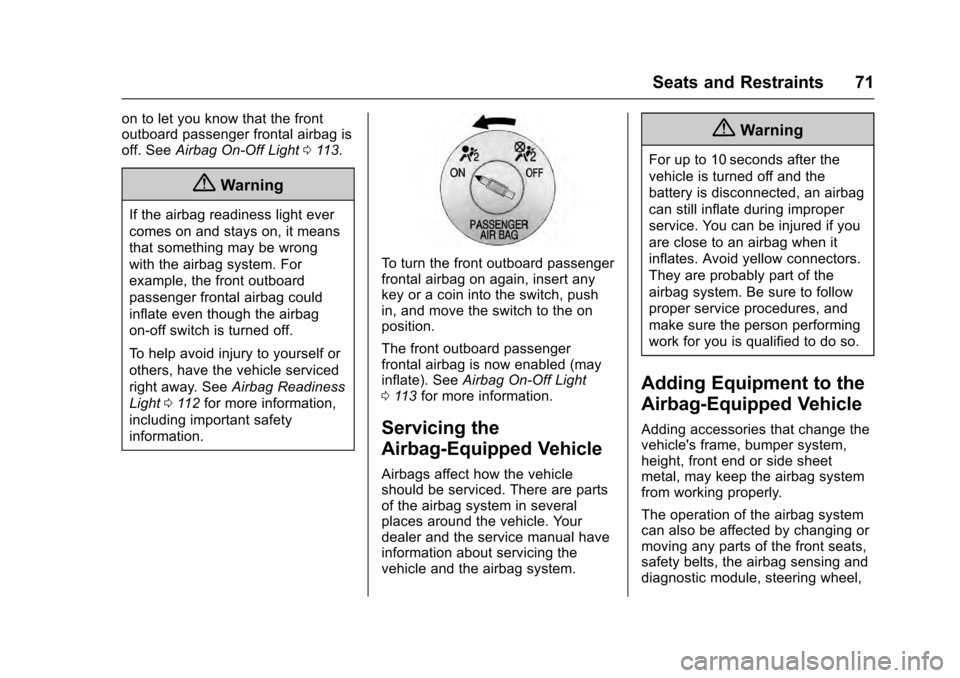
To turn the front outboard passenger
frontal airbag on again, insert any
key or a coin into the switch, push
in, and move the switch to the on
position.
The front outboard passenger
frontal airbag is now enabled (may
inflate). See Airbag On-Off Light
0 113 for more information.
Servicing the
Airbag-Equipped Vehicle
Airbags affect how the vehicle
should be serviced. There are parts
of the airbag system in several
places around the vehicle. Your
dealer and the service manual have
information about servicing the
vehicle and the airbag system.
{Warning
For up to 10 seconds after the
vehicle is turned off and the
battery is disconnected, an airbag
can still inflate during improper
service. You can be injured if you
are close to an airbag when it
inflates. Avoid yellow connectors.
They are probably part of the
airbag system. Be sure to follow
proper service procedures, and
make sure the person performing
work for you is qualified to do so.
Adding Equipment to the
Airbag-Equipped Vehicle
Adding accessories that change the
vehicle's frame, bumper system,
height, front end or side sheet
metal, may keep the airbag system
from working properly.
The operation of the airbag system
can also be affected by changing or
moving any parts of the front seats,
safety belts, the airbag sensing and
diagnostic module, steering wheel,
Page 73 of 319
Cadillac SRX Owner Manual (GMNA-Localizing-MidEast-9369636) - 2016 -
crc - 6/1/15
72 Seats and Restraints
instrument panel, any airbag
module, ceiling or pillar garnish trim,
overhead console, front sensors,
side impact sensors, or airbag
wiring.
Your dealer and the service manual
have information about the location
of the airbag sensors, sensing and
diagnostic module, and airbag
wiring.
If the vehicle has rollover roof-rail
airbags, seeDifferent Size Tires
and Wheels 0269 for additional
important information.
If your vehicle needs to be modified
because you have a disability and
you have questions about whether
the modifications will affect the
vehicle’s airbag system, or if you
have questions about whether the
airbag system will be affected if the
vehicle is modified for any other
reason, contact your dealer.Airbag System Check
The airbag system does not need
regularly scheduled maintenance or
replacement. Make sure the airbag
readiness light is working. See
Airbag Readiness Light 0112.
Caution
If an airbag covering is damaged,
opened, or broken, the airbag
may not work properly. Do not
open or break the airbag
coverings. If there are any
opened or broken airbag
coverings, have the airbag
covering and/or airbag module
replaced. For the location of the
airbags, see Where Are the
Airbags? 065. See your dealer
for service.
Replacing Airbag System
Parts after a Crash
{Warning
A crash can damage the airbag
systems in the vehicle.
A damaged airbag system may
not work properly and may not
protect you and your
passenger(s) in a crash, resulting
in serious injury or even death. To
help make sure the airbag
systems are working properly
after a crash, have them
inspected and any necessary
replacements made as soon as
possible.
If an airbag inflates, you will need to
replace airbag system parts. See
your dealer for service.
If the airbag readiness light stays on
after the vehicle is started or comes
on when you are driving, the airbag
system may not work properly. Have
the vehicle serviced right away. See
Airbag Readiness Light 0112.
Page 88 of 319
Cadillac SRX Owner Manual (GMNA-Localizing-MidEast-9369636) - 2016 -
crc - 6/1/15
Seats and Restraints 87
Warning (Continued)
guarantee that an airbag will not
deploy under some unusual
circumstance, even though it is
turned off.
Secure rear-facing child restraints
in a rear seat, even if the airbag
is off. If you secure a
forward-facing child restraint in
the front outboard seat, always
move the front passenger seat as
far back as it will go. It is better to
secure the child restraint in a
rear seat.
{Warning
If the airbag readiness light ever
comes on and stays on, it means
that something may be wrong
with the airbag system. For
example, the front outboard(Continued)
Warning (Continued)
passenger frontal airbag could
inflate even though the airbag
on-off switch is turned off.
To help avoid injury to yourself or
others, have the vehicle serviced
right away. SeeAirbag Readiness
Light 0112 for more information,
including important safety
information.
If the vehicle does not have a rear
seat that will accommodate a
rear-facing child restraint, a
rear-facing child restraint should not
be installed in the vehicle, even if
the airbag is off.
If the child restraint uses a top
tether, see Lower Anchors and
Tethers for Children (LATCH
System) 079 for top tether anchor
locations.
Do not secure a child seat in a
position without a top tether anchor
if a national or local law requires
that the top tether be anchored, or if the instructions that come with the
child restraint say that the top strap
must be anchored.
When using the lap-shoulder belt to
secure the child restraint in this
position, follow the instructions that
came with the child restraint and the
following instructions:
1. Move the seat as far back as it will go before securing the
forward-facing child restraint.
When the airbag on-off switch
has turned off the front
outboard passenger frontal
airbag, the off indicator in the
airbag off light should light and
stay lit when you start the
vehicle. See Airbag On-Off
Light 0113.
2. Put the child restraint on the seat.
3. Pick up the latch plate, and run the lap and shoulder portions
of the vehicle's safety belt
through or around the restraint.
The child restraint instructions
will show you how.
Page 98 of 319

Cadillac SRX Owner Manual (GMNA-Localizing-MidEast-9369636) - 2016 -
crc - 6/1/15
Storage 97
3. Insert the top of the fence intothe lower two clips (1).
4. Turn the bottom of the fence up and insert it into the upper two
clips (2).
D-Ring Sliders
If equipped with a D-ring system,
there are four D-ring sliders that
move along rails. These can be
used as tie-downs when storing
cargo.
Insert the D-ring sliders (1) into the
channel (2) located in the middle of
the rail. Press the button to move
the D-ring slider along the rail.
The loop of the D-ring slider must
be facing inward toward the storage
area and the ring must be in the up
position for proper usage.
Cargo Net
{Warning
Do not stack items higher than
the upper end of the cargo net or
hang anything from the net. Avoid
items that have sharp edges or
that apply excessive force to the
net. If items are not properly
stored, damage to the net could
occur and items can be thrown
about the vehicle. You or others
could be injured. Always store
items behind the net.
If equipped, the cargo net can be
used to store light loads, keeping
them from falling over or being
thrown into the cabin during heavy
braking.
The net should not be overloaded or
used to store heavy loads.
Page 102 of 319
Cadillac SRX Owner Manual (GMNA-Localizing-MidEast-9369636) - 2016 -
crc - 6/1/15
Instruments and Controls 101
Instruments and
Controls
Controls
Steering Wheel Adjustment . . . 102
Steering Wheel Controls . . . . . . 102
Heated Steering Wheel . . . . . . . 102
Horn . . . . . . . . . . . . . . . . . . . . . . . . . . 103
Windshield Wiper/Washer . . . . 103
Rear Window Wiper/Washer . . . . . . . . . . . . . . . . . . . . . 104
Headlamp Washer . . . . . . . . . . . . 105
Clock . . . . . . . . . . . . . . . . . . . . . . . . . 105
Power Outlets . . . . . . . . . . . . . . . . 106
Cigarette Lighter . . . . . . . . . . . . . . 107
Ashtrays . . . . . . . . . . . . . . . . . . . . . . 107
Warning Lights, Gauges, and
Indicators
Warning Lights, Gauges, and Indicators . . . . . . . . . . . . . . . . . . . 107
Instrument Cluster . . . . . . . . . . . . 108
Speedometer . . . . . . . . . . . . . . . . . 109
Odometer . . . . . . . . . . . . . . . . . . . . . 109
Trip Odometer . . . . . . . . . . . . . . . . 110
Tachometer . . . . . . . . . . . . . . . . . . . 110
Fuel Gauge . . . . . . . . . . . . . . . . . . . 110
Engine Coolant Temperature Gauge . . . . . . . . . . . . . . . . . . . . . . . 111 Safety Belt Reminders . . . . . . . . 111
Airbag Readiness Light . . . . . . . 112
Airbag On-Off Light . . . . . . . . . . . 113
Charging System Light . . . . . . . 114
Malfunction Indicator Lamp
(Check Engine Light) . . . . . . . . 115
Brake System Warning Light . . . . . . . . . . . . . . . . . . . . . . . . 116
Electric Parking Brake Light . . . . . . . . . . . . . . . . . . . . . . . . 117
Service Electric Parking Brake Light . . . . . . . . . . . . . . . . . . . . . . . . 117
Antilock Brake System (ABS) Warning Light . . . . . . . . . . . . . . . 118
Lane Departure Warning (LDW) Light . . . . . . . . . . . . . . . . . 118
Vehicle Ahead Indicator . . . . . . . 118
Traction Off Light . . . . . . . . . . . . . 119
StabiliTrak
®OFF Light . . . . . . . . 119
Traction Control System (TCS)/ StabiliTrak
®Light . . . . . . . . . . . . 119
Engine Coolant Temperature Warning Light . . . . . . . . . . . . . . . 120
Tire Pressure Light . . . . . . . . . . . 120
Engine Oil Pressure Light . . . . 120
Fuel Economy Light . . . . . . . . . . 121
Low Fuel Warning Light . . . . . . 121
Security Light . . . . . . . . . . . . . . . . . 121
High-Beam On Light . . . . . . . . . . 122
Adaptive Forward Lighting (AFL) Light . . . . . . . . . . . . . . . . . . 122 Front Fog Lamp Light . . . . . . . . . 122
Lamps On Reminder . . . . . . . . . 122
Cruise Control Light . . . . . . . . . . 122
Information Displays
Driver Information
Center (DIC) . . . . . . . . . . . . . . . . 123
Vehicle Messages
Vehicle Messages . . . . . . . . . . . . 126
Battery Voltage and ChargingMessages . . . . . . . . . . . . . . . . . . . 126
Brake System Messages . . . . . 126
Cruise Control Messages . . . . . 127
Door Ajar Messages . . . . . . . . . . 128
Engine Cooling System Messages . . . . . . . . . . . . . . . . . . . 128
Engine Oil Messages . . . . . . . . . 128
Engine Power Messages . . . . . 129
Fuel System Messages . . . . . . . 129
Key and Lock Messages . . . . . 129
Lamp Messages . . . . . . . . . . . . . . 130
Object Detection System Messages . . . . . . . . . . . . . . . . . . . 130
Ride Control System Messages . . . . . . . . . . . . . . . . . . . 133
Airbag System Messages . . . . 134
Security Messages . . . . . . . . . . . 134
Service Vehicle Messages . . . . 134
Starting the Vehicle Messages . . . . . . . . . . . . . . . . . . . 134
Page 108 of 319
Cadillac SRX Owner Manual (GMNA-Localizing-MidEast-9369636) - 2016 -
crc - 6/1/15
Instruments and Controls 107
Caution (Continued)
outlets are designed for
accessory power plugs only, such
as cell phone charge cords.
Cigarette Lighter
If equipped, the cigarette lighter is
under the climate control system,
inside the front storage bin.
To activate the cigarette lighter,
push it into the heating element and
let go. The lighter pops out when it
is ready to be used.
Caution
Holding a cigarette lighter in while
it is heating does not let the
lighter back away from the
heating element when it is hot.
Damage from overheating can
occur to the lighter or heating
element, or a fuse could be
blown. Do not hold a cigarette
lighter in while it is heating.
Ashtrays
The ashtray is under the climate
control system on the center stack.
Press the door to release the
ashtray.
To empty the ashtray, remove it from
the instrument panel by holding the
edges and pulling straight out. To
reinstall, push the tray back into
place.
There may also be ashtrays on the
center floor console behind the shift
lever and in the rear doors.
Caution
If papers, pins, or other
flammable items are put in the
ashtray, hot cigarettes or other
smoking materials could ignite
them and possibly damage the
vehicle. Never put flammable
items in the ashtray.
Warning Lights,
Gauges, and
Indicators
Warning lights and gauges can
signal that something is wrong
before it becomes serious enough
to cause an expensive repair or
replacement. Paying attention to the
warning lights and gauges could
prevent injury.
Some warning lights come on briefly
when the engine is started to
indicate they are working. When
one of the warning lights comes on
and stays on while driving, or when
one of the gauges shows there may
be a problem, check the section that
explains what to do. Waiting to do
repairs can be costly and even
dangerous.
Page 110 of 319
Cadillac SRX Owner Manual (GMNA-Localizing-MidEast-9369636) - 2016 -
crc - 6/1/15
Instruments and Controls 109
Cluster Application Displays
The cluster has three interactive
display zones.
Use the five-way control on the right
steering wheel control to move
between the different display zones
and scroll through the different
displays.
The left and right zones display
Driver Information Center (DIC)
information. SeeDriver Information
Center (DIC) 0123.
The center zone displays
application information for
navigation, audio, phone,
or settings. A speedometer can also
be displayed in this center zone.
Navigation
If there is no active route, a
compass will be displayed. If there
is an active route, press SEL to end
route guidance or turn the voice
prompts, if equipped, on or off. Audio
While the Audio application page is
displayed, press SEL to enter the
Audio menu. In the Audio menu
search for music or change the
audio source.
Phone
While the Phone application page is
displayed, press SEL to enter the
Phone menu. In the Phone menu,
if there is no active phone call, view
recent calls, or scroll through
contacts. If there is an active call,
mute the phone or switch to handset
operation.
Settings
Press SEL while the Settings
application page is displayed to
enter the Settings menu.
Units :
Press SEL while Units is
highlighted to enter the Units menu.
Choose English or metric units by
pressing SEL while the desired item
is highlighted. A checkmark will be
displayed next to the selected item. Info Pages :
Press SEL while Info
Pages is highlighted to select the
items to be displayed in the DIC
information displays. See Driver
Information Center (DIC) 0123.
Open Source Software : Press
SEL while Open Source Software is
highlighted to display open source
software information.
Speedometer
The speedometer shows the
vehicle's speed in kilometers per
hour (km/h) or miles per hour (mph).
This vehicle is equipped with an
overspeed warning device. When
the vehicle's speed reaches
120 km/h (75 mph), a chime will
sound. A message also displays in
the Driver Information Center (DIC).
See Vehicle Speed Messages
0 135.
Odometer
The odometer shows how far the
vehicle has been driven, in either
kilometers or miles.