window CADILLAC SRX 2016 2.G Owners Manual
[x] Cancel search | Manufacturer: CADILLAC, Model Year: 2016, Model line: SRX, Model: CADILLAC SRX 2016 2.GPages: 319, PDF Size: 3.29 MB
Page 2 of 319

Cadillac SRX Owner Manual (GMNA-Localizing-MidEast-9369636) - 2016 -
crc - 6/1/15
ContentsIntroduction . . . . . . . . . . . . . . . . . . . . . . 2
In Brief . . . . . . . . . . . . . . . . . . . . . . . . . . . 5
Keys, Doors, and Windows . . . . . 24
Seats and Restraints . . . . . . . . . . . 47
Storage . . . . . . . . . . . . . . . . . . . . . . . . . 90
Instruments and Controls . . . . . . 101
Lighting . . . . . . . . . . . . . . . . . . . . . . . 143
Infotainment System . . . . . . . . . . 152
Climate Controls . . . . . . . . . . . . . . 153
Driving and Operating . . . . . . . . . 161
Vehicle Care . . . . . . . . . . . . . . . . . . 221
Service and Maintenance . . . . . 296
Technical Data . . . . . . . . . . . . . . . . 304
Customer Information . . . . . . . . . 307
Index . . . . . . . . . . . . . . . . . . . . 309
Page 6 of 319
Cadillac SRX Owner Manual (GMNA-Localizing-MidEast-9369636) - 2016 -
crc - 6/1/15
In Brief 5
In Brief
Instrument Panel
Instrument Panel . . . . . . . . . . . . . . . . 6
Initial Drive Information
Initial Drive Information . . . . . . . . . . 8
Remote Keyless Entry (RKE)System . . . . . . . . . . . . . . . . . . . . . . . . 8
Remote Vehicle Start . . . . . . . . . . . 8
Door Locks . . . . . . . . . . . . . . . . . . . . . 9
Liftgate . . . . . . . . . . . . . . . . . . . . . . . . . . 9
Windows . . . . . . . . . . . . . . . . . . . . . . . 10
Seat Adjustment . . . . . . . . . . . . . . . 10
Memory Features . . . . . . . . . . . . . . 11
Heated and Ventilated Seats . . . 12
Head Restraint Adjustment . . . . 12
Safety Belts . . . . . . . . . . . . . . . . . . . . 13
Mirror Adjustment . . . . . . . . . . . . . . 13
Steering Wheel Adjustment . . . . 14
Throttle and Brake Pedal Adjustment . . . . . . . . . . . . . . . . . . . 14
Interior Lighting . . . . . . . . . . . . . . . . 14
Exterior Lighting . . . . . . . . . . . . . . . 15
Windshield Wiper/Washer . . . . . . 15
Climate Controls . . . . . . . . . . . . . . . 17
Transmission . . . . . . . . . . . . . . . . . . 18
Vehicle Features
Infotainment System . . . . . . . . . . . 18 Steering Wheel Controls . . . . . . . 18
Cruise Control . . . . . . . . . . . . . . . . . 18
Driver Information
Center (DIC) . . . . . . . . . . . . . . . . . 19
Forward Collision Alert (FCA)
System . . . . . . . . . . . . . . . . . . . . . . . 19
Front Automatic Braking (FAB) System . . . . . . . . . . . . . . . . . . . . . . . 19
Lane Departure Warning (LDW) . . . . . . . . . . . . . . . 20
Side Blind Zone Alert (SBZA) . . . . . . . . . . . . . . . . . . 20
Rear Vision Camera (RVC) . . . . 20
Rear Cross Traffic Alert (RCTA) System . . . . . . . . . . . . . . . . . . . . . . . 20
Parking Assist . . . . . . . . . . . . . . . . . 20
Rear Automatic Braking (RAB) System . . . . . . . . . . . . . . . . . . . . . . . 20
Power Outlets . . . . . . . . . . . . . . . . . 21
Performance and Maintenance
Traction Control/Electronic Stability Control . . . . . . . . . . . . . . 21
Tire Pressure Monitor . . . . . . . . . . 22
Engine Oil Life System . . . . . . . . 22
Driving for Better Fuel Economy . . . . . . . . . . . . . . . . . . . . . 23
Page 8 of 319

Cadillac SRX Owner Manual (GMNA-Localizing-MidEast-9369636) - 2016 -
crc - 6/1/15
In Brief 7
1.Air Vents 0159.
2. Turn Signal Lever. See Turn
and Lane-Change Signals
0 148.
3. Cruise Control 0188.
4. Instrument Cluster 0108.
5. Steering Wheel Controls 0102.
Driver Information Center (DIC)
Controls. See Driver
Information Center (DIC) 0123.
6. Windshield Wiper/Washer
0103.
Rear Window Wiper/Washer
0 104.
7. Infotainment 0152.
8. Light Sensor. See Twilight
Sentinel 0146.
9. Dual Automatic Climate Control
System 0153.
10. Traction Control/Electronic
Stability Control 0186.
11. Heated and Ventilated Front
Seats 053 (If Equipped).
12. Front Storage 091 (If
Equipped). 13. Parking Assist. See
Driver
Assistance Systems 0198.
Lane Departure Warning
Button (If Equipped). See Lane
Departure Warning (LDW)
0 208.
eco Button (If Equipped). See
Fuel Economy Mode 0181.
14. Shift Lever. See Automatic
Transmission 0178.
15. Parking Brake 0183.
16. CD Player. See Infotainment
0 152.
17. Hazard Warning Flashers
0147.
18. ENGINE START/STOP Button. SeeIgnition Positions 0173.
19. Pedal Adjust Control (Out of View) (If Equipped). See
Adjustable Throttle and Brake
Pedal 0172.
20. Horn 0103.
21. Steering Wheel Adjustment
0102. 22. Data Link Connector (DLC)
(Out of View). See Malfunction
Indicator Lamp (Check Engine
Light) 0115.
23. Hood Release. See Hood
0 223.
24. Exterior Lamp Controls 0143.
Front Fog Lamps 0148.
Instrument Panel Illumination
Control 0149.
Page 11 of 319
Cadillac SRX Owner Manual (GMNA-Localizing-MidEast-9369636) - 2016 -
crc - 6/1/15
10 In Brief
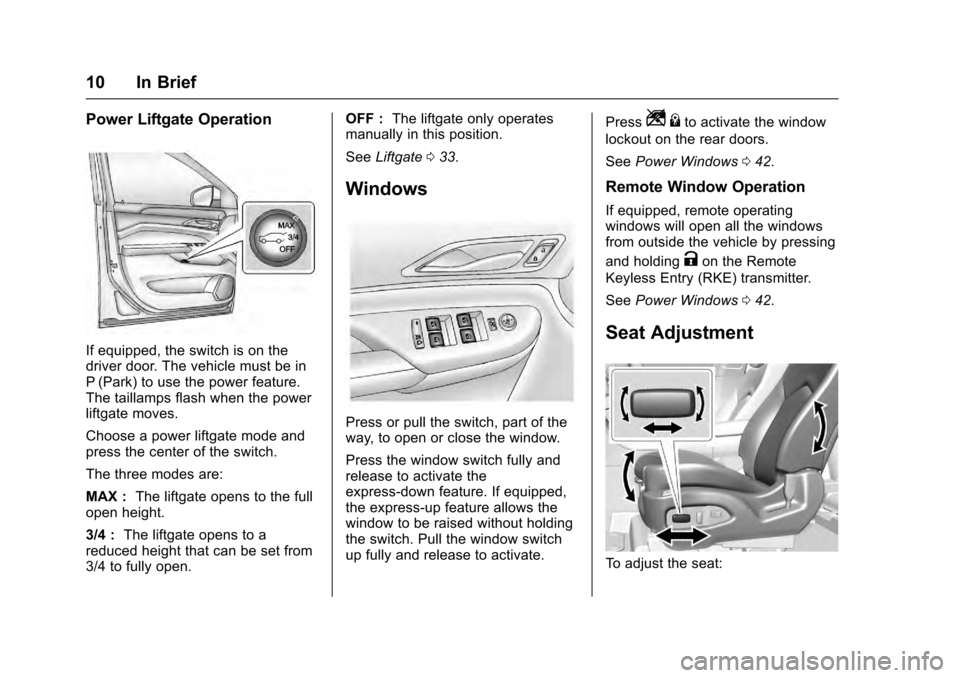
Power Liftgate Operation
If equipped, the switch is on the
driver door. The vehicle must be in
P (Park) to use the power feature.
The taillamps flash when the power
liftgate moves.
Choose a power liftgate mode and
press the center of the switch.
The three modes are:
MAX :The liftgate opens to the full
open height.
3/4 : The liftgate opens to a
reduced height that can be set from
3/4 to fully open. OFF :
The liftgate only operates
manually in this position.
See Liftgate 033.
Windows
Press or pull the switch, part of the
way, to open or close the window.
Press the window switch fully and
release to activate the
express-down feature. If equipped,
the express-up feature allows the
window to be raised without holding
the switch. Pull the window switch
up fully and release to activate. Press
Z
{to activate the window
lockout on the rear doors.
See Power Windows 042.
Remote Window Operation
If equipped, remote operating
windows will open all the windows
from outside the vehicle by pressing
and holding
Kon the Remote
Keyless Entry (RKE) transmitter.
See Power Windows 042.
Seat Adjustment
To adjust the seat:
Page 17 of 319
Cadillac SRX Owner Manual (GMNA-Localizing-MidEast-9369636) - 2016 -
crc - 6/1/15
16 In Brief
thexINT band up for more
frequent wipes or down for less
frequent wipes.
For Rainsense, move the windshield
wiper lever to INT and turn the
x
INT band to adjust the sensitivity to
moisture.
. Turn the band up for more
sensitivity to moisture.
. Turn the band down for less
sensitivity to moisture.
. Move the windshield wiper lever
out of the INT position to
deactivate Rainsense.
OFF : Use to turn the wipers off.
1X : For a single wipe, briefly move
the wiper lever down. For several
wipes, hold the wiper lever down.
Windshield Washer
Pull the windshield wiper lever
toward you to spray windshield
washer fluid and activate the wipers.
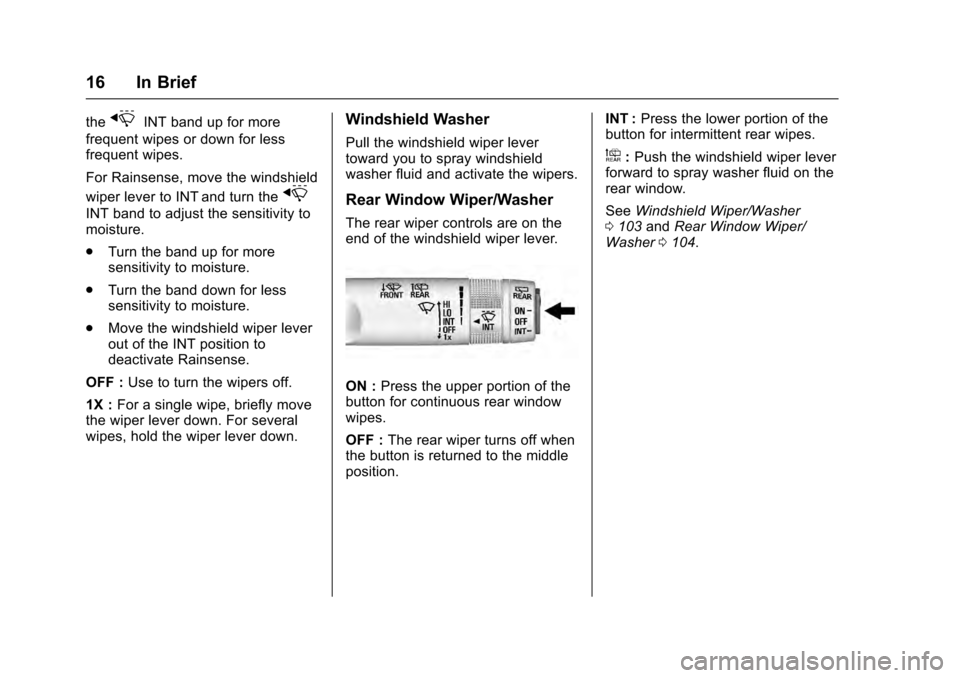
Rear Window Wiper/Washer
The rear wiper controls are on the
end of the windshield wiper lever.
ON : Press the upper portion of the
button for continuous rear window
wipes.
OFF : The rear wiper turns off when
the button is returned to the middle
position. INT :
Press the lower portion of the
button for intermittent rear wipes.
a: Push the windshield wiper lever
forward to spray washer fluid on the
rear window.
See Windshield Wiper/Washer
0 103 andRear Window Wiper/
Washer 0104.
Page 18 of 319
Cadillac SRX Owner Manual (GMNA-Localizing-MidEast-9369636) - 2016 -
crc - 6/1/15
In Brief 17
Climate Controls
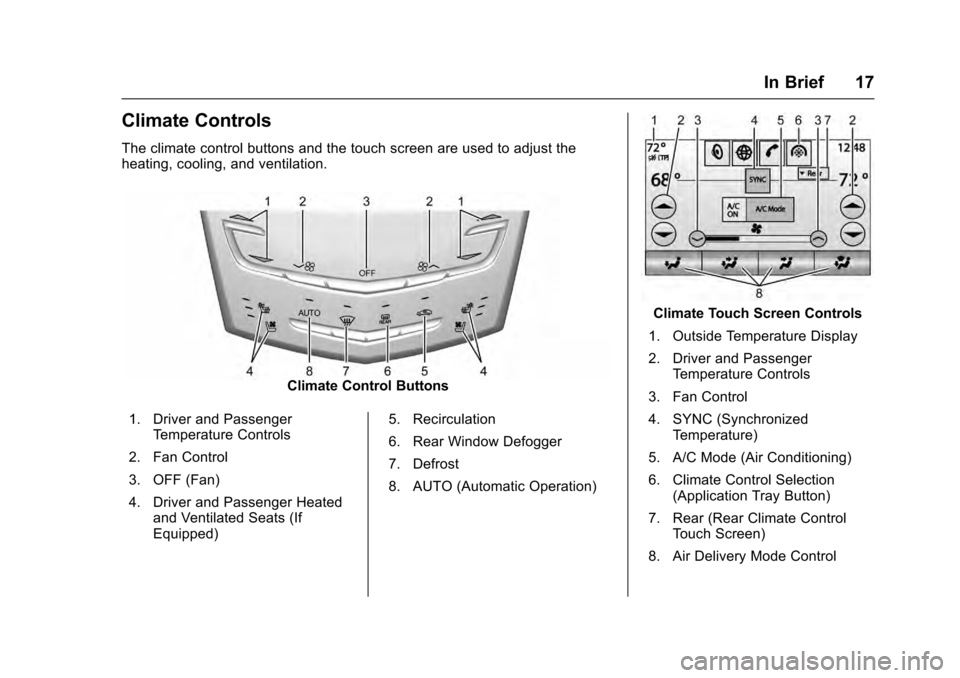
The climate control buttons and the touch screen are used to adjust the
heating, cooling, and ventilation.
Climate Control Buttons
1. Driver and Passenger Temperature Controls
2. Fan Control
3. OFF (Fan)
4. Driver and Passenger Heated and Ventilated Seats (If
Equipped) 5. Recirculation
6. Rear Window Defogger
7. Defrost
8. AUTO (Automatic Operation)
Climate Touch Screen Controls
1. Outside Temperature Display
2. Driver and Passenger Temperature Controls
3. Fan Control
4. SYNC (Synchronized Temperature)
5. A/C Mode (Air Conditioning)
6. Climate Control Selection (Application Tray Button)
7. Rear (Rear Climate Control Touch Screen)
8. Air Delivery Mode Control
Page 25 of 319
Cadillac SRX Owner Manual (GMNA-Localizing-MidEast-9369636) - 2016 -
crc - 6/1/15
24 Keys, Doors, and Windows
Keys, Doors, and
Windows
Keys and Locks
Keys . . . . . . . . . . . . . . . . . . . . . . . . . . . 24
Remote Keyless Entry (RKE)System . . . . . . . . . . . . . . . . . . . . . . . 25
Remote Keyless Entry (RKE) System Operation . . . . . . . . . . . . 25
Remote Vehicle Start . . . . . . . . . . 30
Door Locks . . . . . . . . . . . . . . . . . . . . 31
Power Door Locks . . . . . . . . . . . . . 32
Delayed Locking . . . . . . . . . . . . . . . 32
Automatic Door Locks . . . . . . . . . 32
Lockout Protection . . . . . . . . . . . . . 33
Safety Locks . . . . . . . . . . . . . . . . . . . 33
Doors
Liftgate . . . . . . . . . . . . . . . . . . . . . . . . 33
Vehicle Security
Vehicle Security . . . . . . . . . . . . . . . . 37
Vehicle Alarm System . . . . . . . . . 37
Immobilizer Operation . . . . . . . . . 39
Exterior Mirrors
Convex Mirrors . . . . . . . . . . . . . . . . 40
Power Mirrors . . . . . . . . . . . . . . . . . . 40
Folding Mirrors . . . . . . . . . . . . . . . . . 40 Heated Mirrors . . . . . . . . . . . . . . . . . 41
Automatic Dimming Mirror . . . . . 41
Reverse Tilt Mirrors . . . . . . . . . . . . 41
Interior Mirrors
Interior Rearview Mirrors . . . . . . . 42
Manual Rearview Mirror . . . . . . . . 42
Automatic Dimming Rearview
Mirror . . . . . . . . . . . . . . . . . . . . . . . . . 42
Windows
Windows . . . . . . . . . . . . . . . . . . . . . . . 42
Power Windows . . . . . . . . . . . . . . . 42
Sun Visors . . . . . . . . . . . . . . . . . . . . . 44
Roof
Sunroof . . . . . . . . . . . . . . . . . . . . . . . . 45
Keys and Locks
Keys
{Warning
Leaving children in a vehicle with
a Remote Keyless Entry (RKE)
transmitter is dangerous and
children or others could be
seriously injured or killed. They
could operate the power windows
or other controls or make the
vehicle move. The windows will
function with the RKE transmitter
in the vehicle, and children or
others could be caught in the path
of a closing window. Do not leave
children in a vehicle with an RKE
transmitter.
Page 26 of 319
Cadillac SRX Owner Manual (GMNA-Localizing-MidEast-9369636) - 2016 -
crc - 6/1/15
Keys, Doors, and Windows 25
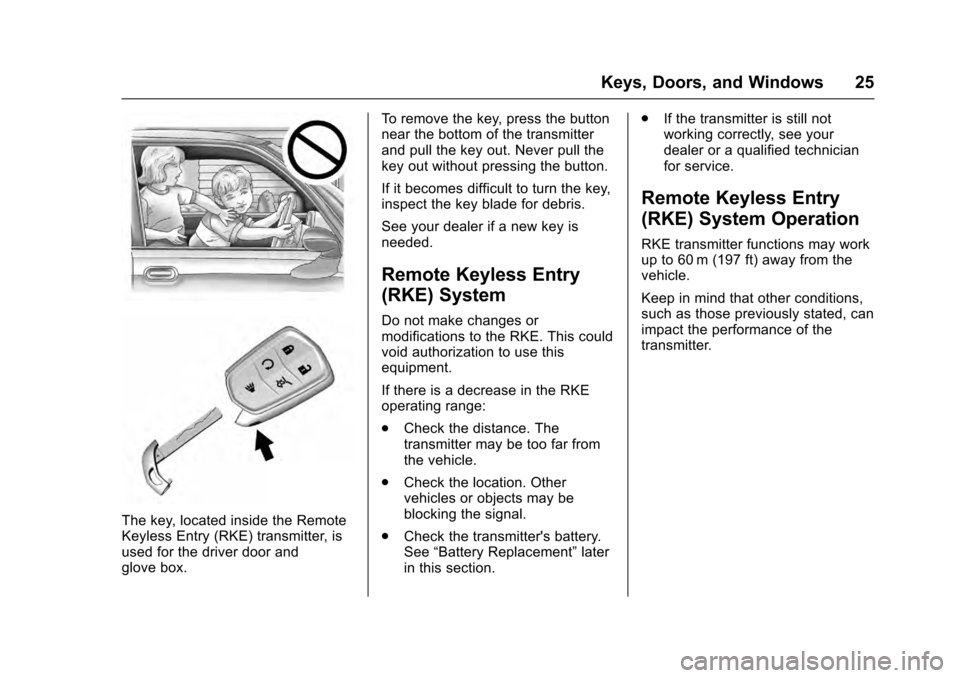
The key, located inside the Remote
Keyless Entry (RKE) transmitter, is
used for the driver door and
glove box.To remove the key, press the button
near the bottom of the transmitter
and pull the key out. Never pull the
key out without pressing the button.
If it becomes difficult to turn the key,
inspect the key blade for debris.
See your dealer if a new key is
needed.
Remote Keyless Entry
(RKE) System
Do not make changes or
modifications to the RKE. This could
void authorization to use this
equipment.
If there is a decrease in the RKE
operating range:
.
Check the distance. The
transmitter may be too far from
the vehicle.
. Check the location. Other
vehicles or objects may be
blocking the signal.
. Check the transmitter's battery.
See “Battery Replacement” later
in this section. .
If the transmitter is still not
working correctly, see your
dealer or a qualified technician
for service.
Remote Keyless Entry
(RKE) System Operation
RKE transmitter functions may work
up to 60 m (197 ft) away from the
vehicle.
Keep in mind that other conditions,
such as those previously stated, can
impact the performance of the
transmitter.
Page 27 of 319
Cadillac SRX Owner Manual (GMNA-Localizing-MidEast-9369636) - 2016 -
crc - 6/1/15
26 Keys, Doors, and Windows
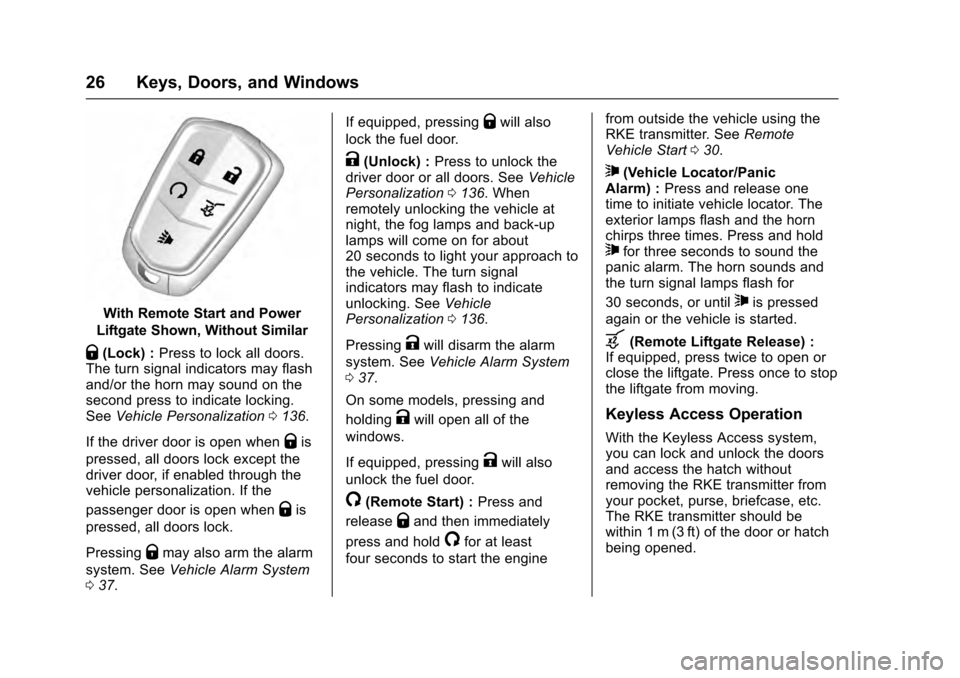
With Remote Start and Power
Liftgate Shown, Without Similar
Q(Lock) : Press to lock all doors.
The turn signal indicators may flash
and/or the horn may sound on the
second press to indicate locking.
See Vehicle Personalization 0136.
If the driver door is open when
Qis
pressed, all doors lock except the
driver door, if enabled through the
vehicle personalization. If the
passenger door is open when
Qis
pressed, all doors lock.
Pressing
Qmay also arm the alarm
system. See Vehicle Alarm System
0 37. If equipped, pressing
Qwill also
lock the fuel door.
K(Unlock) : Press to unlock the
driver door or all doors. See Vehicle
Personalization 0136. When
remotely unlocking the vehicle at
night, the fog lamps and back-up
lamps will come on for about
20 seconds to light your approach to
the vehicle. The turn signal
indicators may flash to indicate
unlocking. See Vehicle
Personalization 0136.
Pressing
Kwill disarm the alarm
system. See Vehicle Alarm System
0 37.
On some models, pressing and
holding
Kwill open all of the
windows.
If equipped, pressing
Kwill also
unlock the fuel door.
/(Remote Start) : Press and
release
Qand then immediately
press and hold
/for at least
four seconds to start the engine from outside the vehicle using the
RKE transmitter. See
Remote
Vehicle Start 030.
7(Vehicle Locator/Panic
Alarm) : Press and release one
time to initiate vehicle locator. The
exterior lamps flash and the horn
chirps three times. Press and hold
7for three seconds to sound the
panic alarm. The horn sounds and
the turn signal lamps flash for
30 seconds, or until
7is pressed
again or the vehicle is started.
b(Remote Liftgate Release) :
If equipped, press twice to open or
close the liftgate. Press once to stop
the liftgate from moving.
Keyless Access Operation
With the Keyless Access system,
you can lock and unlock the doors
and access the hatch without
removing the RKE transmitter from
your pocket, purse, briefcase, etc.
The RKE transmitter should be
within 1 m (3 ft) of the door or hatch
being opened.
Page 28 of 319
Cadillac SRX Owner Manual (GMNA-Localizing-MidEast-9369636) - 2016 -
crc - 6/1/15
Keys, Doors, and Windows 27
Keyless Access can be
programmed to unlock all doors on
the first lock/unlock press from the
driver door. SeeVehicle
Personalization 0136.
Keyless Unlocking/Locking from
the Driver Door
When the doors are locked and the
RKE transmitter is within 1 m (3 ft) of
the driver door handle, pressing the
lock/unlock button on the driver door
handle will unlock the driver door.
If the lock/unlock button is pressed
again within five seconds, all
passenger doors will unlock.
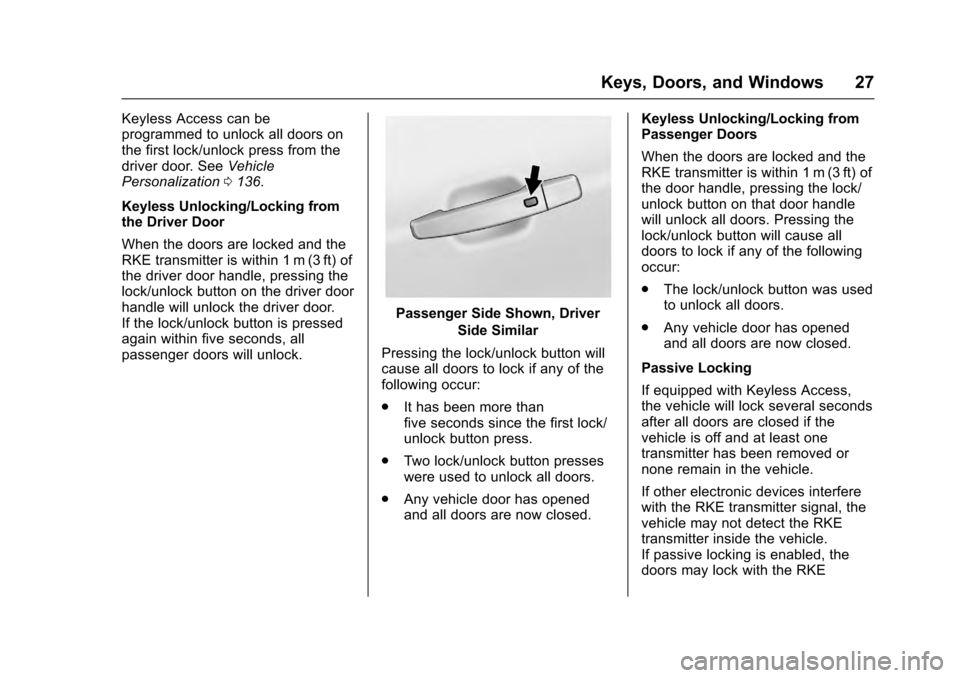
Passenger Side Shown, Driver Side Similar
Pressing the lock/unlock button will
cause all doors to lock if any of the
following occur:
. It has been more than
five seconds since the first lock/
unlock button press.
. Two lock/unlock button presses
were used to unlock all doors.
. Any vehicle door has opened
and all doors are now closed. Keyless Unlocking/Locking from
Passenger Doors
When the doors are locked and the
RKE transmitter is within 1 m (3 ft) of
the door handle, pressing the lock/
unlock button on that door handle
will unlock all doors. Pressing the
lock/unlock button will cause all
doors to lock if any of the following
occur:
.
The lock/unlock button was used
to unlock all doors.
. Any vehicle door has opened
and all doors are now closed.
Passive Locking
If equipped with Keyless Access,
the vehicle will lock several seconds
after all doors are closed if the
vehicle is off and at least one
transmitter has been removed or
none remain in the vehicle.
If other electronic devices interfere
with the RKE transmitter signal, the
vehicle may not detect the RKE
transmitter inside the vehicle.
If passive locking is enabled, the
doors may lock with the RKE