tow CADILLAC STS 2005 1.G User Guide
[x] Cancel search | Manufacturer: CADILLAC, Model Year: 2005, Model line: STS, Model: CADILLAC STS 2005 1.GPages: 446, PDF Size: 2.58 MB
Page 98 of 446
Running the Engine While Parked
It is better not to park with the engine running. But if you
ever have to, here are some things to know.
{CAUTION:
Idling the engine with the climate control
system off could allow dangerous exhaust into
your vehicle. See the earlier caution under
Engine Exhaust on page 2-33.
Also, idling in a closed-in place can let deadly
carbon monoxide (CO) into your vehicle even if
the climate control fan is at the highest setting.
One place this can happen is a garage.
Exhaust — with CO — can come in easily.
NEVER park in a garage with the engine
running.
Another closed-in place can be a blizzard.
SeeWinter Driving on page 4-25.
{CAUTION:
It can be dangerous to get out of your vehicle
if the shift lever is not fully in PARK (P) with
the parking brake rmly set. Your vehicle can
roll. Do not leave your vehicle when the engine
is running unless you have to. If you have left
the engine running, the vehicle can move
suddenly. You or others could be injured. To
be sure your vehicle will not move, even when
you are on fairly level ground, always set your
parking brake after you move the shift lever to
PARK (P).
Follow the proper steps to be sure your vehicle will
not move. SeeShifting Into Park (P) on page 2-30.
If you are parking on a hill and if you are pulling a trailer,
also seeTowing a Trailer on page 4-37.
2-34
Page 99 of 446
Mirrors
Automatic Dimming Rearview Mirror
with OnStar
®
The vehicle may have an automatic dimming inside
rearview mirror with OnStar®controls. For more
information about OnStar®, seeOnStar®System on
page 2-39.
O(On/Off):The on/off button, located on the lower
left side of the mirror, is used for the automatic dimming
functions of the rearview mirror. If the vehicle has the
SmartBeam Intelligent High-Beam Headlamp Control
System, the on/off button can also be used to turn off or
reset this system. See “SmartBeam Intelligent
High-Beam Headlamp Control System” under
Headlamps on page 3-33.
Mirror Operation
The automatic dimming feature comes on each time
the vehicle is started. Automatic dimming reduces
the glare of lights from behind the vehicle.
To turn the automatic dimming feature on or off, press
and release the on/off button. The indicator light will
illuminate when this feature is on.
Cleaning the Mirror
When cleaning the mirror, use a paper towel or similar
material dampened with glass cleaner. Do not spray
glass cleaner directly on the mirror as that may cause
the liquid cleaner to enter the mirror housing.
Automatic Dimming Rearview Mirror
with OnStar
®and Compass
The vehicle may have an automatic dimming inside
rearview mirror with OnStar®and a compass. For more
information about OnStar®, seeOnStar®System on
page 2-39.
The mirror has an eight-point compass display in the
upper right corner of the mirror. When on, the compass
automatically calibrates, or sets the driving direction,
as the vehicle is driven. If the vehicle has the navigation
option, the direction the vehicle is facing will be
displayed on the navigation screen.
O(On/Off):The on/off button is located on the lower
left side of the mirror and is used for the automatic
dimming and compass functions of the rearview mirror.
If the vehicle has the SmartBeam Intelligent High-Beam
Headlamp Control System, the on/off button can
also be used to turn off or reset this system. See
“SmartBeam Intelligent High-Beam Headlamp Control
System” underHeadlamps on page 3-33.
2-35
Page 101 of 446
To adjust for compass variance, do the following:
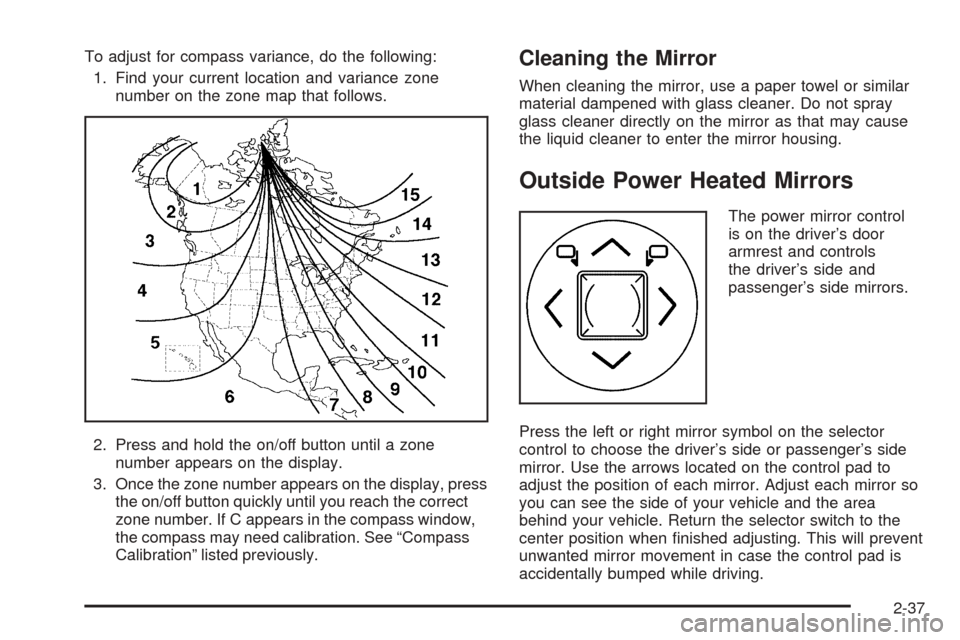
1. Find your current location and variance zone
number on the zone map that follows.
2. Press and hold the on/off button until a zone
number appears on the display.
3. Once the zone number appears on the display, press
the on/off button quickly until you reach the correct
zone number. If C appears in the compass window,
the compass may need calibration. See “Compass
Calibration” listed previously.Cleaning the Mirror
When cleaning the mirror, use a paper towel or similar
material dampened with glass cleaner. Do not spray
glass cleaner directly on the mirror as that may cause
the liquid cleaner to enter the mirror housing.
Outside Power Heated Mirrors
The power mirror control
is on the driver’s door
armrest and controls
the driver’s side and
passenger’s side mirrors.
Press the left or right mirror symbol on the selector
control to choose the driver’s side or passenger’s side
mirror. Use the arrows located on the control pad to
adjust the position of each mirror. Adjust each mirror so
you can see the side of your vehicle and the area
behind your vehicle. Return the selector switch to the
center position when nished adjusting. This will prevent
unwanted mirror movement in case the control pad is
accidentally bumped while driving.
2-37
Page 102 of 446
The preferred mirror positions can be stored with the
memory option. SeeMemory Seat, Mirrors and Steering
Wheel on page 2-65.
The mirrors can be manually folded inward to prevent
damage when going through car washes or conned
spaces. To fold, push the mirror toward the vehicle. To
return the mirror to its original position, push outward.
Be sure to return both mirrors to their original unfolded
position before driving.
When the rear window defogger is turned on, both
outside rear view mirrors are heated to help clear them
of ice, snow, or condensation. See “Rear Window
Defogger” underDual Climate Control System on
page 3-50.
Outside Automatic Dimming Mirror
The driver’s side mirror will adjust for the glare of
headlamps behind you. This feature is controlled by the
on and off settings on the automatic dimming rearview
mirror. SeeAutomatic Dimming Rearview Mirror
with OnStar
®on page 2-35.
Outside Convex Mirror
{CAUTION:
A convex mirror can make things (like other
vehicles) look farther away than they really are.
If you cut too sharply into the right lane, you
could hit a vehicle on your right. Check your
inside mirror or glance over your shoulder
before changing lanes.
The passenger’s side mirror is convex. A convex
mirror’s surface is curved so more can be seen from the
driver’s seat. This mirror does not have a dimming
feature.
Outside Parallel Park Assist Mirror
This feature assists the driver by improving rear obstacle
detection and is useful in viewing the curb when
parallel parking.
Press the left or right mirror symbol on the selector
control to choose the driver or passenger outside mirror.
When the vehicle is shifted into REVERSE (R), the
selected mirror will tilt to a factory programmed position.
2-38
Page 141 of 446
To operate the power tilt feature, push the control up
and the steering wheel will tilt up. Push the control down
and the steering wheel will go down.
If the power tilt control is pressed up or down and held
in that position, there will be a slight movement and
a slight pause followed by a continuous movement in the
direction the control is being pressed. This allows
very ne control of the steering wheel position. If the
control is bumped, the steering wheel moves
approximately one degree in the direction commanded.
Push the control forward and the steering wheel
moves toward the front of the vehicle. Push the control
rearward and the steering wheel moves toward the
rear of the vehicle. To set the memory position,
seeVehicle Personalization on page 2-47andMemory
Seat, Mirrors and Steering Wheel on page 2-65.Heated Steering Wheel
Your vehicle may have a heated steering wheel.
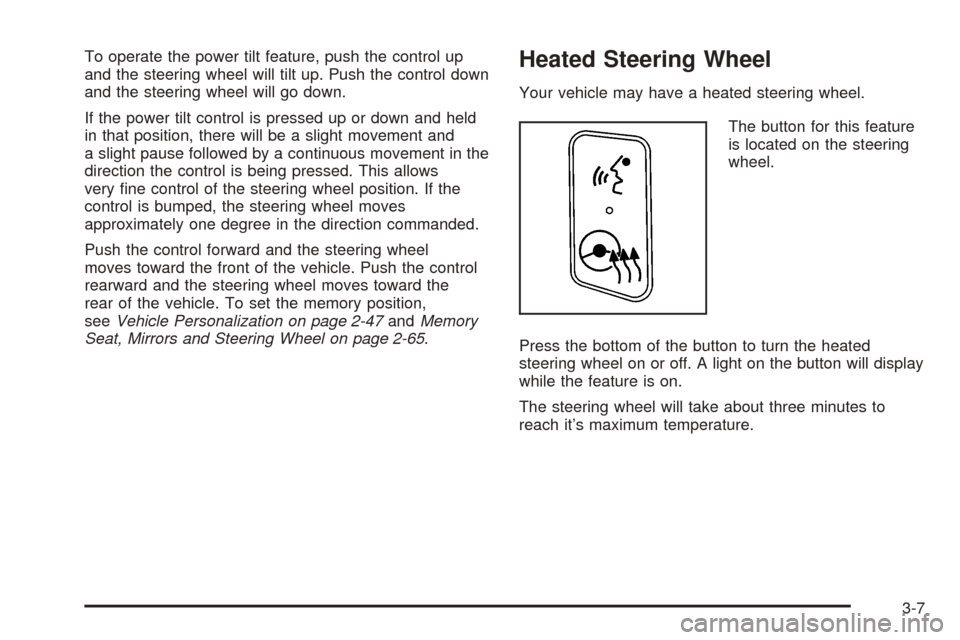
The button for this feature
is located on the steering
wheel.
Press the bottom of the button to turn the heated
steering wheel on or off. A light on the button will display
while the feature is on.
The steering wheel will take about three minutes to
reach it’s maximum temperature.
3-7
Page 147 of 446

Cleaning the System
The radar can become blocked by snow, ice, or dirt.
If so, you may need to turn off the engine and clean the
lens. See “Cleaning the System” underAdaptive
Cruise Control on page 3-20.
Flash-to-Pass
This feature allows you to use the high-beam
headlamps to signal the driver in front of you that
you want to pass.
Pull and hold the turn signal/multifunction lever toward
you to use this feature. When you do, the following
will occur:
If the headlamps are off, in low-beam or in Daytime
Running Lamps (DRL) mode, the high-beam
headlamps will turn on. They’ll stay on as long as
you hold the lever there. Release the lever to
turn them off.
If the headlamps are in high-beam mode, they will
switch to low beam. To return to high-beam, push
the lever away from you.
Windshield Wipers
The lever on the right side of the steering column
operates the windshield wipers.
7(Mist):Pull the lever down and release it for a
single wiping cycle. The lever will return to its original
position. For more cycles, hold the lever down before
releasing it.
9(Off):Put the lever in this position to turn off the
wipers.
&(Delay):Put the lever in this position to set a delay
between wipes. Turn the delay adjustment band to
set the length of the delay.
3-13
Page 148 of 446

x(Delay Adjustment):Use this band to set the
length of the delay between wipes when using the delay
feature. The closer you move the band toward mist,
the longer the delay. The windshield wiper lever must be
in delay for this feature to work.
6(Low Speed):Put the lever in this position for
slow, steady wiping cycles.
1(High Speed):Put the lever in this position for
rapid wiping cycles.
If the windshield wipers are in use for about six seconds
while you are driving, the exterior lamps will come on
automatically if the exterior lamp control is in AUTO.
SeeWiper Activated Headlamps on page 3-37for more
information.
Be sure to clear ice and snow from the wiper blades
before using them. If they’re frozen to the windshield,
gently loosen or thaw them. If the blades do become
damaged, install new blades. For more information, see
Windshield Wiper Blade Replacement on page 5-51.
Heavy snow or ice can overload the wiper motor.
A circuit breaker will stop the motor until it cools down.
Clear away snow or ice to prevent an overload.
Rainsense™ II Wipers
If your vehicle has this feature, the moisture sensor is
mounted on the interior side of the windshield behind the
rearview mirror. It is used to automatically operate the
wipers by monitoring the amount of moisture build-up on
the windshield. Wipes occur as needed to clear the
windshield depending on driving conditions and
the sensitivity setting. In light rain or snow, fewer wipes
will occur. In heavy rain or snow, wipes will occur
more frequently. The Rainsense™ wipers operate in a
delay mode as well as a continuous low or high
speed as needed. If the system is left on for long periods
of time, occasional wipes may occur without any
moisture on the windshield. This is normal and indicates
that the Rainsense™ system is activated.
To activate the Rainsense™ system, turn the wiper
band to delay mode and select one of the four sensitivity
levels indicated on the wiper stalk. The position
closest to off is the lowest sensitivity setting, level one.
This allows more rain or snow to collect on the
windshield between wipes. Turning the wiper band away
from you to higher sensitivity levels increases the
sensitivity of the system and frequency of wipes. The
highest sensitivity setting, level four is closest to low.
3-14
Page 162 of 446
Stationary or Very Slow-Moving Objects
{CAUTION:
Adaptive Cruise Control may not detect and
react to stationary or slow-moving vehicles or
other objects ahead of you. You could crash
into an object ahead of you. Do not use
Adaptive Cruise Control when approaching
stationary or slow-moving vehicles or other
objects.
{CAUTION:
Adaptive Cruise Control may not detect and
react to stationary or slow-moving vehicles or
other objects ahead of you. Your vehicle may
accelerate toward objects, such as a stopped
vehicle that suddenly appears after the lead
vehicle changes lanes. Your complete attention
is always required while driving and you
should be ready to take action and apply the
brakes.
Low-Speed Deactivation
If your speed falls below 20 mph (32 km/h) while
following a vehicle ahead, Adaptive Cruise Control will
begin to disengage. The driver alert symbol on the HUD
will ash and the warning beep will sound. The driver
must take action since Adaptive Cruise Control will
not slow the vehicle to a stop.
3-28
Page 166 of 446
Other Vehicle Lane Changes
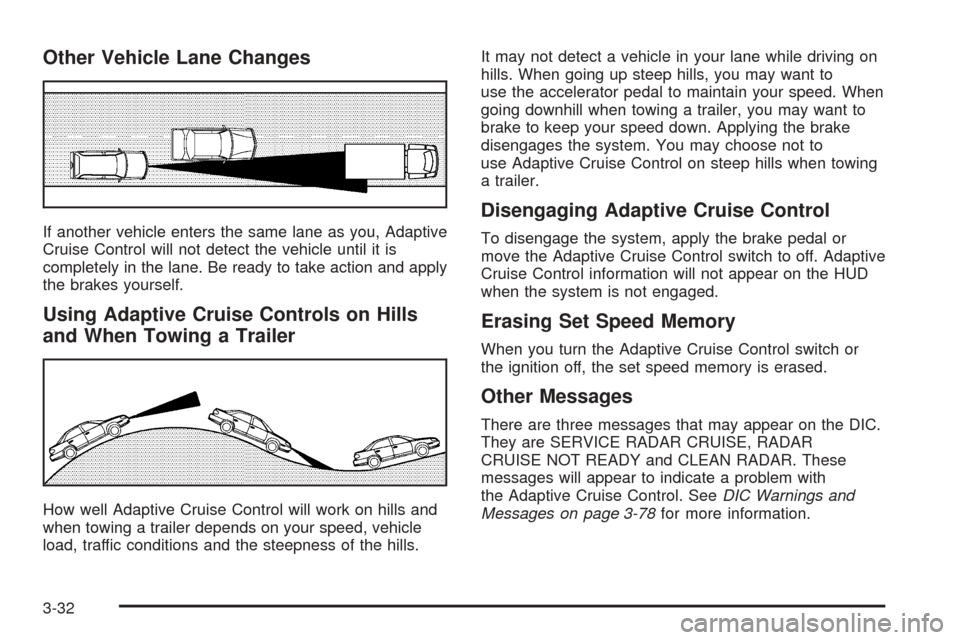
If another vehicle enters the same lane as you, Adaptive
Cruise Control will not detect the vehicle until it is
completely in the lane. Be ready to take action and apply
the brakes yourself.
Using Adaptive Cruise Controls on Hills
and When Towing a Trailer
How well Adaptive Cruise Control will work on hills and
when towing a trailer depends on your speed, vehicle
load, traffic conditions and the steepness of the hills.It may not detect a vehicle in your lane while driving on
hills. When going up steep hills, you may want to
use the accelerator pedal to maintain your speed. When
going downhill when towing a trailer, you may want to
brake to keep your speed down. Applying the brake
disengages the system. You may choose not to
use Adaptive Cruise Control on steep hills when towing
a trailer.
Disengaging Adaptive Cruise Control
To disengage the system, apply the brake pedal or
move the Adaptive Cruise Control switch to off. Adaptive
Cruise Control information will not appear on the HUD
when the system is not engaged.
Erasing Set Speed Memory
When you turn the Adaptive Cruise Control switch or
the ignition off, the set speed memory is erased.
Other Messages
There are three messages that may appear on the DIC.
They are SERVICE RADAR CRUISE, RADAR
CRUISE NOT READY and CLEAN RADAR. These
messages will appear to indicate a problem with
the Adaptive Cruise Control. SeeDIC Warnings and
Messages on page 3-78for more information.
3-32
Page 177 of 446
If the battery continues to discharge, even with the
engine idling at a higher rpm setting, some electrical
loads will automatically be reduced. When this occurs,
the rear window defogger may take slightly longer
to clear the glass and the fan may cut back to a lower
speed. For more battery saving information, see “Battery
Saver Active Message” underDIC Warnings and
Messages on page 3-78.
Inadvertent Power Battery Saver
This feature is designed to protect your vehicle’s battery
against drainage from the interior lamps, trunk lamp,
glove box lamp, or the garage door opener. When the
ignition is turned off, the power to these features will
automatically turn off after 10 minutes (three minutes if
a new car has 15 miles (24 km) or less). Power will
be restored for an additional 10 minutes if any door is
opened, the trunk is opened or the courtesy lamp switch
is turned on.
Head-Up Display (HUD)
{CAUTION:
If the HUD image is too bright, or too high in
your eld of view, it may take you more time to
see things you need to see when it is dark
outside. Be sure to keep the HUD image dim
and placed low in your eld of view.
The Head-Up Display (HUD) allows you to see some of
the driver information that appears on your instrument
panel cluster on the windshield.
The information may be displayed in English or metric
units and appears as an image focused out toward
the front of your vehicle. To change from English
to metric units, seeDIC Controls and Displays on
page 3-74.
3-43