radio CADILLAC STS 2005 1.G Service Manual
[x] Cancel search | Manufacturer: CADILLAC, Model Year: 2005, Model line: STS, Model: CADILLAC STS 2005 1.GPages: 446, PDF Size: 2.58 MB
Page 244 of 446

w(Tune):Turning the tune knob will fast track
reverse or advance through the tracks in all folders or
playlists. The track number and le name will appear on
the display for each track. Turning this knob while in
random will fast track reverse or advance the tracks in
sequential order.
4(Information):Press this button, while an MP3 CD
is loaded, to view the Title, Artist, Album, or Folder
names. To view this information, perform the following:
1. Press the tune/select knob to enter the
main menu.
2. Turn the tune/select knob until INFO appears on
the display.
3. Press the tune/select knob to select INFO. The
display will change to show the additional MP3
information.
4. Press one of the following pushbuttons to view that
specic information.
F1 TTLE (Title):To display the title name.
F2 ATST (Artist):To display the artist name.
F3 ALBM (Album):To display the album name.
F4 FLDR (Folder):To display the folder name.
5. Press the BACK (F6) button to exit the display. To
return to the original display, repeatedly press the
BACK (F6) button or wait for the display to time out.SRCE (Source):Press this button to select a source,
either radio or CD. The CD must be loaded to select the
source and to play. CD will appear on the display if a
CD is loaded. If a CD is not loaded, the display will not
change from the radio source.
Z(Eject):Press this button to stop a CD when it is
playing or to eject a CD when it is not playing. Eject
may be activated with the ignition and the radio off.
CD Messages
If the CD comes out, it could be for one of the following
reasons:
If it is very hot. When the temperature returns to
normal, the CD should play.
If you are driving on a very rough road. When the
road becomes smoother, the CD should play.
The CD is dirty, scratched, wet, or upside down.
The air is very humid. If so, wait about an hour
and try again.
The format of the CD may not be compatible.
See “MP3 Format” earlier in this section.
There may have been a problem while burning
the CD.
The label may be caught in the CD player.
If the CD is not playing correctly, for any other reason,
try a known good CD.
3-110
Page 245 of 446
If any error occurs repeatedly or if an error cannot be
corrected, contact your GM dealer. If the radio displays
an error message, write it down and provide it to
your GM dealer when reporting the problem.
Congurable Radio Display Keys
This feature allows you to customize the four keys that
are located on each side of the radio display to
make it easier to adjust the radio features and other
non-radio related features are also available for
customization.
To program the congurable radio display keys, perform
the following steps:
1. Press the tune/select knob to enter the main menu.
2. Turn the tune/select knob until SETUP appears
on the display.
3. Press the tune/select knob to enter into SETUP.
4. Turn the tune/select knob until CONFIGURE
DISPLAY KEYS appears on the display.
5. Press the tune/select knob to enter into
CONFIGURE DISPLAY KEYS.
6. Turn the tune/select knob to select which of the four
congurable keys you would like to change. The
currently assigned feature will be shown.7. Press the tune/select knob to select the congurable
key to change.
8. Turn the tune/select knob to nd the feature that
you would like to store to the key.
9. Press the tune/select knob when you have found
the feature to be stored. The display will update,
by showing the symbol of the feature that you
selected next to the congurable key.
10. Repeat the previous steps for each congurable key.
Once a feature is programmed to a key, the feature will
not appear on the display when programming the
remaining congurable keys. The congurable keys can
be changed at any time.
Navigation/Radio System
Your vehicle may have a navigation radio system that
includes Radio Data System (RDS) with Program
Type (PTY) selections that will seek out the kind of
music you want to listen to and XM™ Satellite Radio
Service capabilities (if equipped). The radio can
also communicate with the navigation system to
broadcast announcements on traffic, weather, and
emergency alert communications. For information on
how to use this system, see the “Navigation System”
manual.
3-111
Page 246 of 446
Radio Personalization
Accessing the Radio’s Main Menu
(Base Audio System)
There are two different procedures for accessing the
radio’s main menu depending upon whether or not your
vehicle has the Navigation system.
To access the main menu of the radio, do one of the
following:
Using the Base audio system, press the CNFG
button located on the radio or press the tune/select
knob located on the right side of the radio. Then
turn the tune/select knob clockwise or
counterclockwise to scroll through the menu items.
If your vehicle has the Navigation system, see the
Navigation System manual supplied with your
vehicle for more information on accessing the main
menu and for descriptions of the menu items for
the Navigation system.The main menu for the Base audio system consists of
the following menu items:
eBASS - MID - TREBLE
xBALANCE - FADER
eEQ EQUALIZER
H/A (HOME/AWAY) PRESETS
AUTOSTORE PRESETS
CAT CATEGORY
TA TRAFFIC ANNOUNCE
RECALL RDS (Radio Data System) MESSAGE
AF ALTERNATE FREQ. (Frequency)
ASEEK LOCAL/DISTANT
8SET CLOCK
BSET DATE
4INFO (Information)
LANG LANGUAGE
SETUP
3-112
Page 247 of 446
Radio Main Menu Item Descriptions
(Base Audio System)
The following descriptions are for the Base audio system.
For information pertaining to the Navigation audio
system, see “Audio System” in the Index of the
Navigation System manual supplied with your vehicle.
eBASS - MID (Midrange) - TREBLE:This menu item
allows you to adjust the levels for the bass, midrange
and treble features of the audio system. See “Setting the
Tone (Bass/Treble)” underRadio with CD on page 3-94
for more information.
xBALANCE - FADER:This menu item allows you to
adjust the levels for the balance and fader features
of the audio system. See “Adjusting the Speakers
(Balance/Fade)” underRadio with CD on page 3-94for
more information.
eEQ (Equalizer):This menu item allows you to
choose among ve preset equalizations for the audio
system. See “Audio Equalizer” underRadio with CD on
page 3-94for more information.
H/A (Home/Away) PRESETS:This menu item allows
you to switch back and forth between your home
and away preset radio stations. See “Presets
Home/Away” underRadio with CD on page 3-94for
more information.AUTOSTORE PRESETS:This menu item allows you to
automatically store radio stations with the strongest
signals as presets. See “Autostore Presets” underRadio
with CD on page 3-94for more information.
CAT (Category):This menu item allows you to select
radio stations based on preset categories. See
“Activating Program Type (PTY) Stations” underRadio
with CD on page 3-94for more information.
TA (Traffic Announcement):This menu item allows
you to turn the TA feature on and off. See “TA
(Traffic Announcement)” underRadio with CD on
page 3-94for more information.
RECALL RDS MESSAGE:This menu item allows you
to view an RDS radio station message broadcast by
a radio station. See “MSG (Message)” underRadio with
CD on page 3-94for more information.
AF (Alternate Frequency):This menu item allows you
to turn the AF feature on and off. See “Activating
Program Type (PTY) Stations (RDS and XM™)” under
Radio with CD on page 3-94for more information.
3-113
Page 248 of 446
ASEEK LOCAL/DISTANT:This feature instructs the
audio system to seek only local radio stations with
the strongest signal or to seek all radio stations with a
strong signal in a large area. Use LOCAL when you are
in urban areas where there are several strong radio
station signals and you want to limit the number
of stations to those with the strongest signals only. Use
DISTANT when you are in rural areas where there
are fewer radio station signals available.
See “Local/Distant Selection” underRadio with CD on
page 3-94for more information.
8SET CLOCK:Use this menu item to set the time.
SeeSetting the Time on page 3-93for more information.
BSET DATE:Use this menu item to set the date.
SeeSetting the Time on page 3-93for more information.
4(Information):This menu item is used to display
XM™ satellite radio service and CD MP3 playback
information. See “
4(Information)” underRadio with CD
on page 3-94for more information.LANG (Language):To change the language displayed
on the radio, select LANGUAGE by pressing the
tune/select knob. Turn the tune/select knob to scroll
through the following available languages:
ENGLISH
GERMAN
FRENCH
SPANISH
JAPANESE
To make your selection, press the tune/select knob. If
you accidentally select a language that you did not want,
ENGLISH is always at the top of the language list.
SETUP:When you select this menu item, the following
submenu is available:
PERSONAL SETTINGS MENU
DRIVER SELECTION
DRIVER EXIT SETTINGS
CONFIGURE DISPLAY KEYS
SETUP Submenu Items
The following choices are available for programming
using the Base audio system.
3-114
Page 249 of 446
PERSONAL SETTINGS MENU
This item turns the entire list of personalization features
on or off. This item allows you to program certain
features to a preferred setting for up to two people. The
number of available features varies depending upon
which options are purchased. When this item is
on, a check mark will appear after it. For more
information on the PERSONAL SETTINGS MENU item,
seeVehicle Personalization on page 2-47.
DRIVER SELECTION
When you select this item, the following submenu
appears:
DRIVER 1
DRIVER 2
RECALL DRIVER SETTINGS
STORE DRIVER SETTINGS
For more information on the DRIVER SELECTION
submenu item, see “Recalling Driver Settings”
and “Storing Driver Settings” underMemory Seat,
Mirrors and Steering Wheel on page 2-65.
DRIVER EXIT SETTINGS
When you select this item, the following submenu
appears:
RECALL EXIT SETTINGS
STORE EXIT SETTINGSFor more information on the DRIVER EXIT SETTINGS
submenu item, see “Recalling Exit Settings” and
“Storing Exit Settings” underMemory Seat, Mirrors and
Steering Wheel on page 2-65.
CONFIGURE DISPLAY KEYS
(Base Audio System)
This item allows you to customize the functions of the
four congurable keys located to the left and right of the
audio display. See “Congurable Radio Display Keys”
underRadio with CD on page 3-94for programming
information.
Theft-Deterrent Feature
THEFTLOCK®is designed to discourage theft of your
vehicle’s radio. The feature works automatically by
learning a portion of the Vehicle Identication Number
(VIN). If the radio is moved to a different vehicle, it
will not operate. If the radio is removed from your
vehicle, the original VIN in the radio can be used to
trace the radio back to your vehicle.
With THEFTLOCK
®activated, the radio will not
operate if stolen.
3-115
Page 250 of 446
Audio Steering Wheel Controls
The audio steering wheel controls may be different
depending on your vehicles options. Some audio
controls can be adjusted at the steering wheel. They
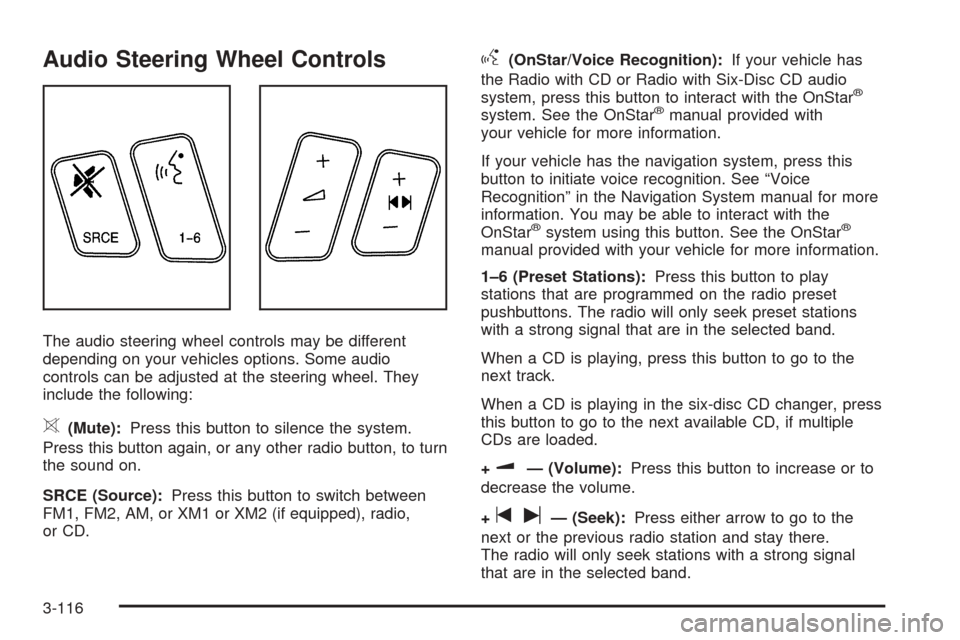
include the following:
>(Mute):Press this button to silence the system.
Press this button again, or any other radio button, to turn
the sound on.
SRCE (Source):Press this button to switch between
FM1, FM2, AM, or XM1 or XM2 (if equipped), radio,
or CD.
g(OnStar/Voice Recognition):If your vehicle has
the Radio with CD or Radio with Six-Disc CD audio
system, press this button to interact with the OnStar
®
system. See the OnStar®manual provided with
your vehicle for more information.
If your vehicle has the navigation system, press this
button to initiate voice recognition. See “Voice
Recognition” in the Navigation System manual for more
information. You may be able to interact with the
OnStar
®system using this button. See the OnStar®
manual provided with your vehicle for more information.
1–6 (Preset Stations):Press this button to play
stations that are programmed on the radio preset
pushbuttons. The radio will only seek preset stations
with a strong signal that are in the selected band.
When a CD is playing, press this button to go to the
next track.
When a CD is playing in the six-disc CD changer, press
this button to go to the next available CD, if multiple
CDs are loaded.
+
u— (Volume):Press this button to increase or to
decrease the volume.
+
tu— (Seek):Press either arrow to go to the
next or the previous radio station and stay there.
The radio will only seek stations with a strong signal
that are in the selected band.
3-116
Page 251 of 446
When a CD is playing, press the minus sign to go to the
start of the current track, if more than 10 seconds
have played. Press the plus sign to go to the next track.
If either the minus or the plus button are pressed
more than once, the player will continue moving
backward or forward through the CD.
Press and hold the SEEK plus or minus button, until
you hear a beep. The CD will fast forward or fast reverse
through the CD. Press either button again to play the
passage.
If you have the navigation system, some of the audio
steering wheel controls work when a DVD is playing in
the navigation radio. See the Navigation System
manual for more information.
Radio Reception
AM
The range for most AM stations is greater than for FM,
especially at night. The longer range can cause
station frequencies to interfere with each other. Static
can occur on AM stations caused by things like
storms and power lines. Try reducing the treble to
reduce this noise.
FM Stereo
FM stereo will give the best sound, but FM signals will
reach only about 10 to 40 miles (16 to 65 km). Tall
buildings or hills can interfere with FM signals, causing
the sound to fade in and out.
XM™ Satellite Radio Service
XM™ Satellite Radio Service gives digital radio
reception from coast to coast. Just as with FM, tall
buildings or hills can interfere with satellite radio signals,
causing the sound to fade in and out. The radio may
display NO XM SIGNAL to indicate interference.
Cellular Phone Usage
Cellular phone usage may cause interference with your
vehicle’s radio. This interference may occur when
making or receiving phone calls, charging the phone’s
battery, or simply having the phone on. This interference
is an increased level of static while listening to the
radio. If static is received while listening to the radio,
unplug the cellular phone and turn it off.
3-117
Page 252 of 446
Care of Your CDs
Handle CDs carefully. Store them in their original cases
or other protective cases and away from direct
sunlight and dust. If the surface of a CD is soiled,
dampen a clean, soft cloth in a mild, neutral detergent
solution and clean it, wiping from the center to the edge.
Be sure never to touch the side without writing when
handling CDs. Pick up CDs by grasping the outer edges
or the edge of the hole and the outer edge.
Care of the CD Player
The use of CD lens cleaners for CD players is not
advised, due to the risk of contaminating the lens of the
CD optics with lubricants internal to the CD mechanism.
Diversity Antenna System
The AM-FM antenna is integrated with the rear window
defogger, located in the rear window. Make sure that
the inside surface of the rear window is not scratched
and that the grid lines on the glass are not damaged.
If the inside surface is damaged, it could interfere
with radio reception.Notice:Do not apply aftermarket glass tinting with
metallic lm. The metallic lm in some tinting
materials will interfere with or distort the incoming
radio reception. Any damage caused to your
backglass antenna due to metallic tinting materials
will not be covered by your warranty.
Notice:Do not try to clear frost or other material
from the inside of the rear window with a razor blade
or anything else that is sharp, as this may damage
the rear window defogger grid and affect your
radio’s ability to pick up stations clearly. The repairs
would not be covered by your warranty.
If static is heard on the radio, when the rear window
defogger is turned on, it could mean that a defogger grid
line has been damaged. If this is true, the grid line
must be repaired.
If adding an aftermarket cellular telephone to your
vehicle, and the antenna needs to be attached to the
glass, make sure that the grid lines for the AM-FM
antennas are not damaged. Make sure the cellular
telephone antenna does not touch a grid line.
XM™ Satellite Radio Antenna
System
The XM™ Satellite Radio antenna is located on the roof
of your vehicle. Keep this antenna clear of snow and
ice build up for clear radio reception.
3-118
Page 334 of 446
Jump Starting
If your battery has run down, you may want to use
another vehicle and some jumper cables to start your
vehicle. Be sure to use the following steps to do it safely.
{CAUTION:
Batteries can hurt you. They can be dangerous
because:
They contain acid that can burn you.
They contain gas that can explode or
ignite.
They contain enough electricity to
burn you.
If you do not follow these steps exactly, some
or all of these things can hurt you.
Notice:Ignoring these steps could result in costly
damage to your vehicle that would not be covered
by your warranty.
Trying to start your vehicle by pushing or pulling it
will not work, and it could damage your vehicle.
1. Check the other vehicle. It must have a 12-volt
battery with a negative ground system.Notice:If the other vehicle’s system is not a 12-volt
system with a negative ground, both vehicles can
be damaged. Only use vehicles with 12-volt systems
with negative grounds to jump start your vehicle.
2. Get the vehicles close enough so the jumper cables
can reach, but be sure the vehicles are not touching
each other. If they are, it could cause a ground
connection you do not want. You would not be able
to start your vehicle and the bad grounding could
damage the electrical systems.
To avoid the possibility of the vehicles rolling, set
the parking brake rmly on both vehicles involved in
the jump start procedure. Put an automatic
transmission in PARK (P) or a manual transmission
in NEUTRAL before setting the parking brake.
Notice:If you leave your radio or other accessories
on during the jump starting procedure, they could
be damaged. The repairs would not be covered
by your warranty. Always turn off your radio and
other accessories when jump starting your vehicle.
3. Turn off the ignition on both vehicles. Unplug
unnecessary accessories plugged into the cigarette
lighter or the accessory power outlets. Turn off
the radio and all lamps that are not needed. This
will avoid sparks and help save both batteries. And
it could save the radio!
5-38