radio CADILLAC STS 2005 1.G User Guide
[x] Cancel search | Manufacturer: CADILLAC, Model Year: 2005, Model line: STS, Model: CADILLAC STS 2005 1.GPages: 446, PDF Size: 2.58 MB
Page 129 of 446
Memory Seat, Mirrors and Steering
Wheel
If your vehicle has the memory feature, you can
program and recall memory settings for the following
features for up to two drivers:
The driver’s seat position
The outside rearview mirrors position
The telescopic steering column position, if equipped
The following settings and presets are set automatically:
The language, radio and XM™ presets, tone,
volume, playback mode (AM/FM or CD), last
displayed stations and compact disc position
The last climate control setting
The Head-Up Display (HUD) position, if equipped
Other personalization settings (for example, remote
start settings)
SeeVehicle Personalization on page 2-47.For vehicles with the base audio system, memory
features are programmed and recalled through the radio
from the DRIVER SELECTION and the DRIVER EXIT
SETTINGS submenus. See “Entering the Driver
Selection Submenu” and “Entering the Driver Exit
Settings Submenu” later in this section for more
information on recalling and programming the memory
settings using the base audio system.
For vehicles with the Navigation system, memory
features are programmed and recalled through the
navigation display. See “Personalization” in the Index of
the Navigation System manual for more information
on programming and recalling the memory settings using
the Navigation system.
For vehicles with the Navigation system, you can also
recall the memory features by using voice recognition, if
equipped. See “Voice Recognition” in the Index of the
Navigation System manual for more information.
2-65
Page 130 of 446
Entering the Driver Selection Submenu
To enter the memory programming mode for your
driver settings, use the following procedure:
1. Be sure the ignition is either on, in ACC position, or
in RAP and place the transmission in PARK (P) or
the vehicle speed is less than 6 mph (9 km/h).
2. Press any button on the appropriate keyless access
transmitter to identify yourself as Driver 1 or
Driver 2.
3. Turn on the radio by pressing the power/
volume knob.
4. Press the CNFG radio button to enter the main
menu of the radio.
5. Turn the tune/select knob and scroll to SETUP.
6. Press the tune/select knob to enter the
SETUP menu.
7. Turn the tune/select knob and scroll to DRIVER
SELECTION.
8. Press the tune/select knob to enter the DRIVER
SELECTION submenu. The following items will
appear:
DRIVER 1
DRIVER 2
RECALL DRIVER SETTINGS
STORE DRIVER SETTINGS
Driver Selection Submenu Items
DRIVER 1/DRIVER 2
The numbers on the back of each keyless access
transmitter correspond to DRIVER 1 and DRIVER 2. If
you would like to recall or store driver settings for
the driver that does not correspond to the number on
the back of the keyless access transmitter that you are
using, use the following procedure:
1. Enter the memory programming mode for your
driver settings by following the instructions listed
previously under “Entering the Driver Selection
Submenu.”
2. From the DRIVER SELECTION submenu, turn the
tune/select knob to highlight the driver number that
you want, either DRIVER 1 or DRIVER 2.
3. Set your choice by pressing in the tune/select knob.
If you would like to recall driver settings for the
selected driver, see “RECALL DRIVER SETTINGS”
later in this section.
If you would like to store driver settings for the selected
driver, see “STORE DRIVER SETTINGS” later in this
section.
If you would like to recall exit settings for the selected
driver, see “RECALL EXIT SETTINGS” later in this
section.
2-66
Page 131 of 446

If you would like to store exit settings for the selected
driver, see “STORE EXIT SETTINGS” later in this
section.
RECALL DRIVER SETTINGS
To recall driver settings, use the following procedure:
1. Enter the memory programming mode for your
driver settings by following the instructions listed
previously under “Entering the Driver Selection
Submenu.”
2. From the DRIVER SELECTION submenu, turn the
tune/select knob to scroll to RECALL DRIVER
SETTINGS and press in the knob.
If the vehicle is in PARK (P), one beep will sound
and your previously saved driving position will
then be recalled.
If the vehicle is not in PARK (P), three beeps will
sound and your previously saved driving position will
not be recalled.
A memory recall can be stopped by pressing any
memory seat or mirror position button.
If you would like the stored driving positions to be
recalled when unlocking your vehicle with the keyless
access transmitter or when starting your vehicle,
see “REMOTE RECALL MEMORY” or “START
BUTTON RECALL” underVehicle Personalization on
page 2-47.
STORE DRIVER SETTINGS
To store driver settings, use the following procedure:
1. Adjust your settings for the driver’s seat, the outside
rearview mirrors and the steering column to a
comfortable driving position.
2. Enter the memory programming mode for your
driver settings by following the instructions listed
previously under “Entering the Driver Selection
Submenu.”
3. From the DRIVER SELECTION submenu, turn the
tune/select knob to scroll to STORE DRIVER
SETTINGS and press in the knob. Two beeps will
sound to conrm that your driver settings are saved.
4. Set the HUD position, if equipped, the climate
control temperature, fan speed and mode
settings, the radio presets, tone, volume, playback
mode (AM/FM, XM™, or CD) and compact disc
position.
Your memory settings are now programmed. Any
changes that are made to the HUD, audio
system and climate controls while driving will be
automatically stored when the ignition is turned off.
5. Repeat the procedure for a second driver by
programming the other driver number.
2-67
Page 132 of 446
Entering the Driver Exit Settings
Submenu
To enter the memory programming mode for your exit
settings, use the following procedure:
1. Be sure the ignition is either on, in ACC position, or
in RAP and place the transmission in PARK (P) or
the vehicle speed is less than 6 mph (9 km/h).
2. Press any button on the appropriate keyless access
transmitter to identify yourself as Driver 1 or
Driver 2.
3. Turn on the radio by pressing the power/
volume knob.
4. Press the CNFG radio button to enter the main
menu of the radio.
5. Turn the tune/select knob and scroll to SETUP.
6. Press the tune/select knob to enter the
SETUP menu.
7. Turn the tune/select knob and scroll to DRIVER
EXIT SETTINGS.
8. Press the tune/select knob to enter the DRIVER
EXIT SETTINGS submenu. The following items
will appear:
RECALL EXIT SETTINGS
STORE EXIT SETTINGS
Driver Exit Settings Submenu Items
RECALL EXIT SETTINGS
To recall exit settings, use the following procedure:
1. Enter the memory programming mode for your exit
settings by following the instructions listed
previously under “Entering the Driver Exit Settings
Submenu.”
2. From the DRIVER EXIT SETTINGS submenu, turn
the tune/select knob to scroll to RECALL EXIT
SETTINGS and press in the knob.
If the vehicle is in PARK (P), one beep will sound
and your previously saved exit position will then be
recalled.
If the vehicle is not in PARK (P), three beeps will
sound and your previously saved exit position
will not be recalled.
A memory recall can be stopped by pressing any
memory seat or mirror position button.
If you would like the stored exit positions to be recalled
when your vehicle is in PARK (P), the vehicle is off
and the driver’s door is opened, see “AUTO EXIT SEAT”
and “AUTO EXIT COLUMN” underVehicle
Personalization on page 2-47.
2-68
Page 136 of 446
Engine Coolant Temperature Warning Light......3-67
Engine Coolant Temperature Gage..................3-67
Malfunction Indicator Lamp.............................3-68
Oil Pressure Light.........................................3-70
Security Light...............................................3-71
Fog Lamp Light............................................3-71
Lights On Reminder......................................3-71
Cruise Control Light......................................3-72
Highbeam On Light.......................................3-72
Fuel Gage...................................................3-72
Driver Information Center (DIC).......................3-73
DIC Controls and Displays.............................3-74
DIC Warnings and Messages.........................3-78
Other Messages...........................................3-91Audio System(s).............................................3-92
Setting the Time...........................................3-93
Radio with CD..............................................3-94
Navigation/Radio System..............................3-111
Radio Personalization..................................3-112
Theft-Deterrent Feature................................3-115
Audio Steering Wheel Controls......................3-116
Radio Reception.........................................3-117
Care of Your CDs.......................................3-118
Care of the CD Player.................................3-118
Diversity Antenna System.............................3-118
XM™ Satellite Radio Antenna System............3-118
Section 3 Instrument Panel
3-2
Page 139 of 446
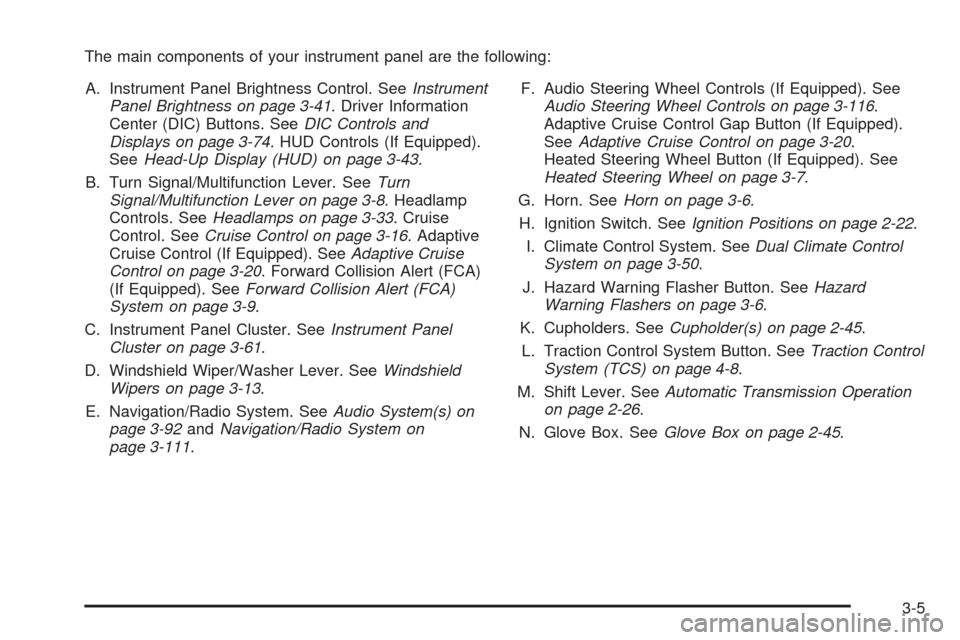
The main components of your instrument panel are the following:
A. Instrument Panel Brightness Control. SeeInstrument
Panel Brightness on page 3-41. Driver Information
Center (DIC) Buttons. SeeDIC Controls and
Displays on page 3-74. HUD Controls (If Equipped).
SeeHead-Up Display (HUD) on page 3-43.
B. Turn Signal/Multifunction Lever. SeeTurn
Signal/Multifunction Lever on page 3-8. Headlamp
Controls. SeeHeadlamps on page 3-33. Cruise
Control. SeeCruise Control on page 3-16. Adaptive
Cruise Control (If Equipped). SeeAdaptive Cruise
Control on page 3-20. Forward Collision Alert (FCA)
(If Equipped). SeeForward Collision Alert (FCA)
System on page 3-9.
C. Instrument Panel Cluster. SeeInstrument Panel
Cluster on page 3-61.
D. Windshield Wiper/Washer Lever. SeeWindshield
Wipers on page 3-13.
E. Navigation/Radio System. SeeAudio System(s) on
page 3-92andNavigation/Radio System on
page 3-111.F. Audio Steering Wheel Controls (If Equipped). See
Audio Steering Wheel Controls on page 3-116.
Adaptive Cruise Control Gap Button (If Equipped).
SeeAdaptive Cruise Control on page 3-20.
Heated Steering Wheel Button (If Equipped). See
Heated Steering Wheel on page 3-7.
G. Horn. SeeHorn on page 3-6.
H. Ignition Switch. SeeIgnition Positions on page 2-22.
I. Climate Control System. SeeDual Climate Control
System on page 3-50.
J. Hazard Warning Flasher Button. SeeHazard
Warning Flashers on page 3-6.
K. Cupholders. SeeCupholder(s) on page 2-45.
L. Traction Control System Button. SeeTraction Control
System (TCS) on page 4-8.
M. Shift Lever. SeeAutomatic Transmission Operation
on page 2-26.
N. Glove Box. SeeGlove Box on page 2-45.
3-5
Page 143 of 446
Replace burned-out bulbs to help avoid possible
accidents. Check the fuse and for burned-out bulbs if
the arrow fails to work when signaling a turn. SeeFuses
and Circuit Breakers on page 5-95for more information.
Turn Signal On Chime
If the turn signal is left on for about 1 mile (1.6 km), a
warning chime will sound and the Turn Signal On
message will appear on the Driver Information
Center (DIC) display. See “Turn Signal On” under
DIC Warnings and Messages on page 3-78for more
information.
Headlamp High/Low-Beam Changer
Push forward on the turn signal/multifunction lever
to change the headlamps from low to high beam. Pull
the lever back and then release it to change from high to
low beam.
This light on the instrument
panel cluster will be on,
indicating high-beam
usage.
Forward Collision Alert (FCA)
System
If your vehicle has this feature, be sure to read this
entire section before using it.
The system operates on a radio frequency subject to
Federal Communications Commission (FCC) Rules and
with Industry Canada.
This device complies with Part 15 of the FCC Rules.
Operation is subject to the following two conditions:
1. This device may not cause interference, and
2. This device must accept any interference received,
including interference that may cause undesired
operation of the device.
This device complies with RSS-210 of Industry Canada.
Operation is subject to the following two conditions:
1. This device may not cause interference, and
2. This device must accept any interference received,
including interference that may cause undesired
operation of the device.
Changes or modications to this system by other than
an authorized service facility could void authorization to
use this equipment.
3-9
Page 154 of 446
Using Cruise Control on Hills
How well your cruise control will work on hills depends
upon your speed, load and the steepness of the
hills. When going up steep hills, you may have to step
on the accelerator pedal to maintain your speed.
When going downhill, you may have to brake to keep
your speed down. Applying the brake will take you out of
cruise control. If you need to apply the brake due to
the grade of the downhill slope, you may not want
to attempt to use your cruise control feature.
Ending Cruise Control
To end a cruise control session, step lightly on the
brake pedal.
Stepping on the brake pedal will end the current cruise
control session only. Move the cruise control switch
to off to turn off the system completely.
Erasing Speed Memory
When you turn off the cruise control or the ignition, your
cruise control set speed memory is erased.
Adaptive Cruise Control
If your vehicle has this feature, be sure to read this
entire section before using it.The system operates on a radio frequency subject to
Federal Communications Commission (FCC) Rules and
with Industry Canada.
This device complies with Part 15 of the FCC Rules.
Operation is subject to the following two conditions:
1. This device may not cause interference, and
2. This device must accept any interference received,
including interference that may cause undesired
operation of the device.
This device complies with RSS-210 of Industry Canada.
Operation is subject to the following two conditions:
1. This device may not cause interference, and
2. This device must accept any interference received,
including interference that may cause undesired
operation of the device.
Changes or modications to this system by other than
an authorized service facility could void authorization to
use this equipment.
Adaptive Cruise Control is an enhancement to
traditional cruise control and is not a safety system.
It allows you to keep cruise control engaged in moderate
traffic conditions without having to constantly reset
your cruise control. Adaptive Cruise Control uses
radar to detect a vehicle directly ahead in your
path, within a distance of 328 ft (100 m), and
operates at speeds above 25 mph (40 km/h).
3-20
Page 178 of 446
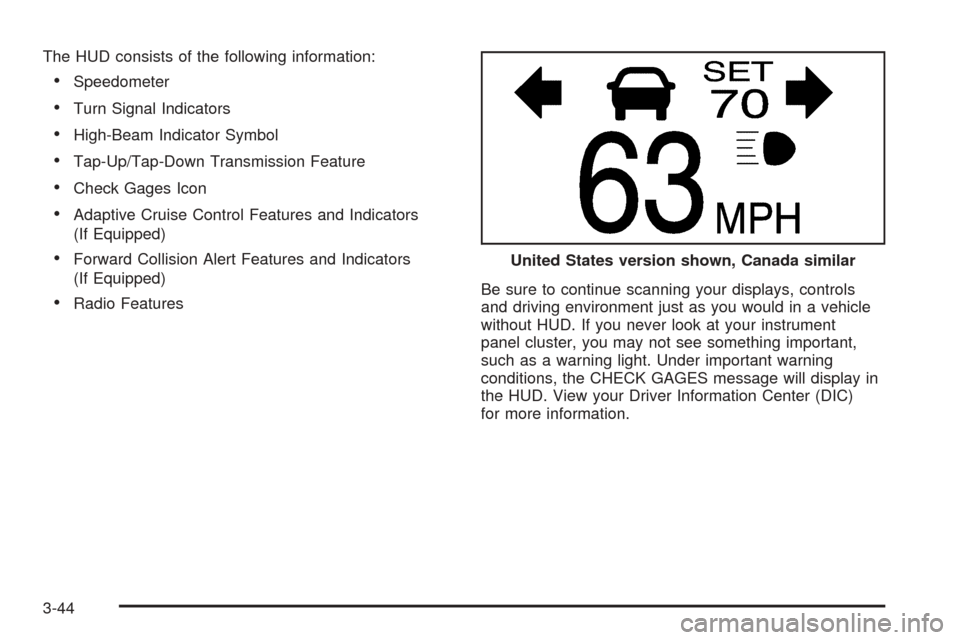
The HUD consists of the following information:
Speedometer
Turn Signal Indicators
High-Beam Indicator Symbol
Tap-Up/Tap-Down Transmission Feature
Check Gages Icon
Adaptive Cruise Control Features and Indicators
(If Equipped)
Forward Collision Alert Features and Indicators
(If Equipped)
Radio FeaturesBe sure to continue scanning your displays, controls
and driving environment just as you would in a vehicle
without HUD. If you never look at your instrument
panel cluster, you may not see something important,
such as a warning light. Under important warning
conditions, the CHECK GAGES message will display in
the HUD. View your Driver Information Center (DIC)
for more information.United States version shown, Canada similar
3-44
Page 183 of 446
If a trailer was attached to your vehicle, or a bicycle or
an object was hanging out of your trunk during your
last drive cycle, the light may also ash red. The light will
continue to ash whenever in REVERSE (R) until
your vehicle is driven forward at least 15 mph (25 km/h)
without any obstructions behind the vehicle.
For cleaning instructions, seeWashing Your Vehicle on
page 5-89.
Accessory Power Outlets
Your vehicle is equipped with accessory power outlets.
The outlets can be used to plug in electrical equipment
such as a cellular telephone, CB radio, etc.
Your vehicle has one outlet in front of the center
console, one in the center console lid and there may be
an additional outlet in the rear of the center console.
Your vehicle may have a small cap that must be
removed to access the accessory power outlet. If it
does, when not using the outlet be sure to cover it with
the protective cap.
Notice:Leaving electrical equipment on for
extended periods will drain the battery. Always turn
off electrical equipment when not in use and do
not plug in equipment that exceeds the maximum
amperage rating.Certain accessory power plugs may not be compatible
to the accessory power outlet and could result in
blown vehicle or adapter fuses. If you experience a
problem, see your dealer for additional information on
the accessory power outlets.
Notice:Adding any electrical equipment to your
vehicle may damage it or keep other components
from working as they should. The repairs would not
be covered by your warranty. Do not use equipment
exceeding maximum amperage rating. Check
with your dealer before adding electrical equipment.
Follow the proper installation instructions that are
included with any electrical equipment you install.
Notice:Improper use of the power outlet can cause
damage not covered by your warranty. Do not
hang any type of accessory or accessory bracket
from the plug because the power outlets are
designed for accessory power plugs only.
Ashtrays and Cigarette Lighter
Your vehicle may have an ashtray and cigarette lighter.
Notice:If you put papers, pins, or other ammable
items in the ashtray, hot cigarettes or other smoking
materials could ignite them and possibly damage
your vehicle. Never put ammable items in the
ashtray.
3-49