climate control CADILLAC STS 2006 1.G User Guide
[x] Cancel search | Manufacturer: CADILLAC, Model Year: 2006, Model line: STS, Model: CADILLAC STS 2006 1.GPages: 480, PDF Size: 2.74 MB
Page 128 of 480
KEY FOB REMINDER
This feature chirps the horn three times when the
driver’s door is closed and there is a keyless access
transmitter left inside of the vehicle. This will only occur
when the vehicle is off.
Programmable Modes
Mode 1:ON
Mode 2:OFF
Before your vehicle was shipped from the factory, it was
programmed to Mode 1. The mode to which the vehicle
was programmed may have been changed since it left
the factory.
To program the vehicle to a different mode, use the
following procedure:
1. Enter the PERSONAL SETTINGS MENU by
following the instructions listed previously under
“Entering the Personal Settings Menu.”
2. Turn the tune/select knob until KEY FOB
REMINDER is highlighted.
3. Press the tune/select knob to switch back and forth
between on and off.
When the mode is turned on, a check mark will
appear next to the feature name.
The mode you selected is now set. You can either exit
the programming mode by following the instructions
later in this section or program the next feature available
on your vehicle.
REMOTE START
If your vehicle has this feature, it allows you to choose
the features you would like to have activated when you
engage the remote start on your vehicle. These features
include the climate control system, the rear defogger, and
the seat temperature, if your vehicle has this feature.
Activating these features helps provide a more
comfortable vehicle upon entry. See “Remote Vehicle
Start” underKeyless Access System Operation on
page 2-5for more information.
Mode 1:ON
Mode 2:OFF
Before your vehicle was shipped from the factory,
it was programmed to Mode 1. The mode to which the
vehicle was programmed may have been changed
since it left the factory.
To program the vehicle to a different mode, use the
following procedure:
1. Enter the PERSONAL SETTINGS MENU by
following the instructions listed previously under
“Entering the Personal Settings Menu.”
2. Turn the tune/select knob until REMOTE START is
highlighted.
3. Press the tune/select knob to switch back and forth
between on and off.
2-56
Page 129 of 480
When REMOTE START is on, a check mark will appear
next to the feature name. You can then choose to
activate any or all of the following features by turning
the tune/select knob to highlight the feature, then
pressing the knob to turn it on.
CLIMATE CONTROL:The climate control system will
engage when the vehicle is started using the remote
start feature. It will be at the same climate control setting
that was last used by the driver using that keyless
entry transmitter.
REAR WINDOW DEFOG:If this feature is active, the
rear defogger will engage when the vehicle is started
using the remote start feature.
SEAT TEMP (Temperature) CONTROL:If your vehicle
has this feature and this feature is active, the seats
will be heated or cooled when the vehicle is started
using the remote start feature.
The mode you selected is now set. You can either exit
the programming mode by following the instructions
later in this section or program the next feature available
on your vehicle by pressing the F6 (BACK) button,
located on the radio, to return to the PERSONAL
SETTINGS MENU.REMOTE RECALL MEMORY
If your vehicle has the optional memory package, you
will have this feature. When this feature is turned on, you
can recall any previously programmed seat position
and mirror position when the unlock button on the
keyless access transmitter is pressed.
Programmable Modes
Mode 1:ON
Mode 2:OFF
Before your vehicle was shipped from the factory, it was
programmed to Mode 2 with the exception of recall
seat to driver position which is on. The mode to which
the vehicle was programmed may have been changed
since it left the factory.
To program the vehicle to a different mode, use the
following procedure:
1. Enter the PERSONAL SETTINGS MENU by
following the instructions listed previously under
“Entering the Personal Settings Menu.”
2. Turn the tune/select knob until REMOTE RECALL
MEMORY is highlighted.
3. Press the tune/select knob to switch back and forth
between on and off.
When the mode is turned on, a check mark will
appear next to the feature name.
2-57
Page 142 of 480
Memory Seat, Mirrors and
Steering Wheel
If your vehicle has the memory feature, you can
program and recall memory settings for the following
features for up to two drivers:
The driver’s seat position
The outside rearview mirrors position
The telescopic steering column position
The following settings and presets are set automatically:
The language, radio and XM™ presets, tone,
volume, playback mode (AM/FM or CD), last
displayed stations, and compact disc position
The last climate control setting
The Head-Up Display (HUD) position, if your
vehicle has this feature
Other personalization settings, for example, remote
start settings
SeeVehicle Personalization on page 2-53.For vehicles with the base audio system, memory
features are programmed and recalled through the radio
from the DRIVER SELECTION and the DRIVER EXIT
SETTINGS submenus. See “Entering the Driver
Selection Submenu” and “Entering the Driver Exit
Settings Submenu” later in this section for more
information on recalling and programming the memory
settings using the base audio system.
For vehicles with the Navigation system, memory
features are programmed and recalled through the
navigation display. See “Personalization” in the Index
of the Navigation System manual for more information
on programming and recalling the memory settings using
the Navigation system.
For vehicles with the Navigation system, you can also
recall the memory features by using voice recognition,
if your vehicle has this feature. See “Voice Recognition”
in the Index of the Navigation System manual for
more information.
2-70
Page 144 of 480
RECALL DRIVER SETTINGS
To recall driver settings, use the following procedure:
1. Enter the memory programming mode for your
driver settings by following the instructions listed
previously under “Entering the Driver Selection
Submenu.”
2. From the DRIVER SELECTION submenu, turn the
tune/select knob to scroll to RECALL DRIVER
SETTINGS and press in the knob.
If the vehicle is in PARK (P), one beep will sound
and your previously saved driving position will
then be recalled.
If the vehicle is not in PARK (P), three beeps will
sound and your previously saved driving position will
not be recalled.
A memory recall can be stopped by pressing any
memory seat or mirror position button.
If you would like the stored driving positions to be
recalled when unlocking your vehicle with the keyless
access transmitter or when starting your vehicle,
see “REMOTE RECALL MEMORY” or “START
BUTTON RECALL” underVehicle Personalization
on page 2-53.
STORE DRIVER SETTINGS
To store driver settings, use the following procedure:
1. Adjust your settings for the driver’s seat, the outside
rearview mirrors, and the steering column to a
comfortable driving position.
2. Enter the memory programming mode for your
driver settings by following the instructions listed
previously under “Entering the Driver Selection
Submenu.”
3. From the DRIVER SELECTION submenu, turn
the tune/select knob to scroll to STORE DRIVER
SETTINGS and press in the knob. Two beeps will
sound to conrm that your driver settings are saved.
4. Set the HUD position, if your vehicle has this
feature, the climate control temperature, fan
speed and mode settings, the radio presets, tone,
volume, playback mode (AM/FM, XM™, or CD), and
compact disc position.
Your memory settings are now programmed. Any
changes that are made to the HUD, audio system,
and climate controls while driving will be
automatically stored when the ignition is turned off.
5. Repeat the procedure for a second driver by
programming the other driver number.
2-72
Page 147 of 480
Instrument Panel Overview...............................3-4
Hazard Warning Flashers................................3-6
Other Warning Devices...................................3-6
Horn .............................................................3-6
Power Tilt Wheel and Telescopic Steering
Column......................................................3-6
Heated Steering Wheel...................................3-7
Turn Signal/Multifunction Lever.........................3-7
Turn and Lane-Change Signals........................3-8
Headlamp High/Low-Beam Changer..................3-8
Forward Collision Alert (FCA) System................3-9
Flash-to-Pass...............................................3-12
Windshield Wipers........................................3-13
Rainsense™ II Wipers...................................3-14
Windshield Washer.......................................3-15
Headlamp Washer........................................3-15
Cruise Control..............................................3-16
Adaptive Cruise Control.................................3-19
Headlamps..................................................3-31
Wiper Activated Headlamps............................3-35
Headlamps on Reminder................................3-35
Daytime Running Lamps (DRL).......................3-35
Fog Lamps ..................................................3-37
Twilight Sentinel
®..........................................3-37
Exterior Lighting Battery Saver........................3-38
Instrument Panel Brightness...........................3-39Entry Lighting...............................................3-39
Parade Dimming...........................................3-39
Reading Lamps............................................3-40
Battery Load Management.............................3-40
Inadvertent Power Battery Saver.....................3-40
Head-Up Display (HUD).................................3-40
Ultrasonic Rear Parking Assist (URPA)............3-44
Accessory Power Outlet(s).............................3-46
Ashtray(s) and Cigarette Lighter......................3-47
Climate Controls............................................3-48
Dual Climate Control System..........................3-48
Outlet Adjustment.........................................3-54
Rear Climate Control System.........................3-54
Passenger Compartment Air Filter...................3-55
Warning Lights, Gages, and Indicators............3-57
Instrument Panel Cluster................................3-58
Speedometer and Odometer...........................3-59
Tachometer.................................................3-59
Safety Belt Reminder Light.............................3-59
Passenger Safety Belt Reminder Light.............3-60
Airbag Readiness Light..................................3-60
Passenger Airbag Status Indicator...................3-61
Charging System Light..................................3-63
Brake System Warning Light..........................3-64
Anti-Lock Brake System Warning Light.............3-65
Section 3 Instrument Panel
3-1
Page 151 of 480
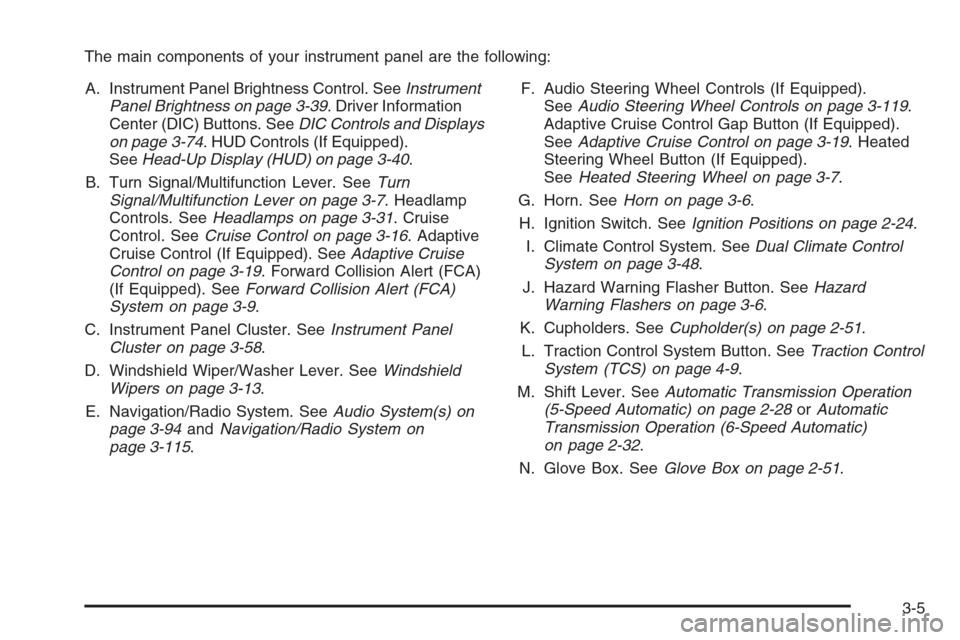
The main components of your instrument panel are the following:
A. Instrument Panel Brightness Control. SeeInstrument
Panel Brightness on page 3-39. Driver Information
Center (DIC) Buttons. SeeDIC Controls and Displays
on page 3-74. HUD Controls (If Equipped).
SeeHead-Up Display (HUD) on page 3-40.
B. Turn Signal/Multifunction Lever. SeeTurn
Signal/Multifunction Lever on page 3-7. Headlamp
Controls. SeeHeadlamps on page 3-31. Cruise
Control. SeeCruise Control on page 3-16. Adaptive
Cruise Control (If Equipped). SeeAdaptive Cruise
Control on page 3-19. Forward Collision Alert (FCA)
(If Equipped). SeeForward Collision Alert (FCA)
System on page 3-9.
C. Instrument Panel Cluster. SeeInstrument Panel
Cluster on page 3-58.
D. Windshield Wiper/Washer Lever. SeeWindshield
Wipers on page 3-13.
E. Navigation/Radio System. SeeAudio System(s) on
page 3-94andNavigation/Radio System on
page 3-115.F. Audio Steering Wheel Controls (If Equipped).
SeeAudio Steering Wheel Controls on page 3-119.
Adaptive Cruise Control Gap Button (If Equipped).
SeeAdaptive Cruise Control on page 3-19. Heated
Steering Wheel Button (If Equipped).
SeeHeated Steering Wheel on page 3-7.
G. Horn. SeeHorn on page 3-6.
H. Ignition Switch. SeeIgnition Positions on page 2-24.
I. Climate Control System. SeeDual Climate Control
System on page 3-48.
J. Hazard Warning Flasher Button. SeeHazard
Warning Flashers on page 3-6.
K. Cupholders. SeeCupholder(s) on page 2-51.
L. Traction Control System Button. SeeTraction Control
System (TCS) on page 4-9.
M. Shift Lever. SeeAutomatic Transmission Operation
(5-Speed Automatic) on page 2-28orAutomatic
Transmission Operation (6-Speed Automatic)
on page 2-32.
N. Glove Box. SeeGlove Box on page 2-51.
3-5
Page 186 of 480
Reading Lamps
The reading lamps are located on the overhead
console. These lamps come on automatically when any
door is opened.
For manual operation, press the button next to each
lamp to turn it on. Press it again to turn the lamp off.
If the reading lamps are left on, they automatically shut
off 10 minutes after the ignition has been turned off.
Battery Load Management
The battery load management feature is designed to
monitor the vehicle’s electrical load and determine when
the battery is in a heavy discharge condition. During
times of high electrical loading, the engine may idle at a
higher revolutions per minute (rpm) setting than normal to
make sure the battery charges. High electrical loads may
occur when several of the following are on: headlamps,
high beams, fog lamps, rear window defogger, the
climate control fan at high speeds, heated seats and
engine cooling fans.
If the battery continues to discharge, even with the
engine idling at a higher rpm setting, some electrical
loads will automatically be reduced. When this occurs,
the rear window defogger may take slightly longer
to clear the glass and the fan may cut back to a lower
speed. For more battery saving information, see “Battery
Saver Active Message” underDIC Warnings and
Messages on page 3-79.
Inadvertent Power Battery Saver
This feature is designed to protect your vehicle’s battery
against drainage from the interior lamps, trunk lamp,
glove box lamp, or the garage door opener. When the
ignition is turned off, the power to these features will
automatically turn off after 10 minutes (three minutes if
a new car has 15 miles (24 km) or less). Power will
be restored for an additional 10 minutes if any door is
opened, the trunk is opened or the courtesy lamp switch
is turned on.
Head-Up Display (HUD)
{CAUTION:
If the HUD image is too bright, or too high in
your eld of view, it may take you more time to
see things you need to see when it is dark
outside. Be sure to keep the HUD image dim
and placed low in your eld of view.
If equipped, the Head-Up Display (HUD) allows you to
see some of the driver information that appears on your
instrument panel cluster on the windshield.
3-40
Page 193 of 480
Ashtray(s) and Cigarette Lighter
Your vehicle may have an ashtray and cigarette lighter.
Notice:If you put papers, pins, or other ammable
items in the ashtray, hot cigarettes or other
smoking materials could ignite them and possibly
damage your vehicle. Never put ammable items in
the ashtray.
Ashtray
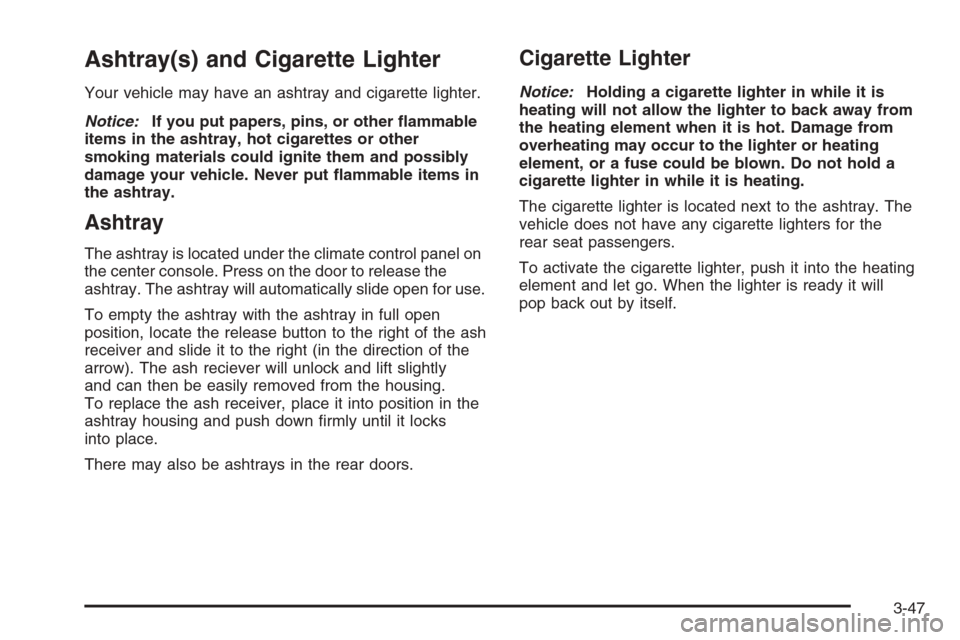
The ashtray is located under the climate control panel on
the center console. Press on the door to release the
ashtray. The ashtray will automatically slide open for use.
To empty the ashtray with the ashtray in full open
position, locate the release button to the right of the ash
receiver and slide it to the right (in the direction of the
arrow). The ash reciever will unlock and lift slightly
and can then be easily removed from the housing.
To replace the ash receiver, place it into position in the
ashtray housing and push down rmly until it locks
into place.
There may also be ashtrays in the rear doors.
Cigarette Lighter
Notice:Holding a cigarette lighter in while it is
heating will not allow the lighter to back away from
the heating element when it is hot. Damage from
overheating may occur to the lighter or heating
element, or a fuse could be blown. Do not hold a
cigarette lighter in while it is heating.
The cigarette lighter is located next to the ashtray. The
vehicle does not have any cigarette lighters for the
rear seat passengers.
To activate the cigarette lighter, push it into the heating
element and let go. When the lighter is ready it will
pop back out by itself.
3-47
Page 194 of 480
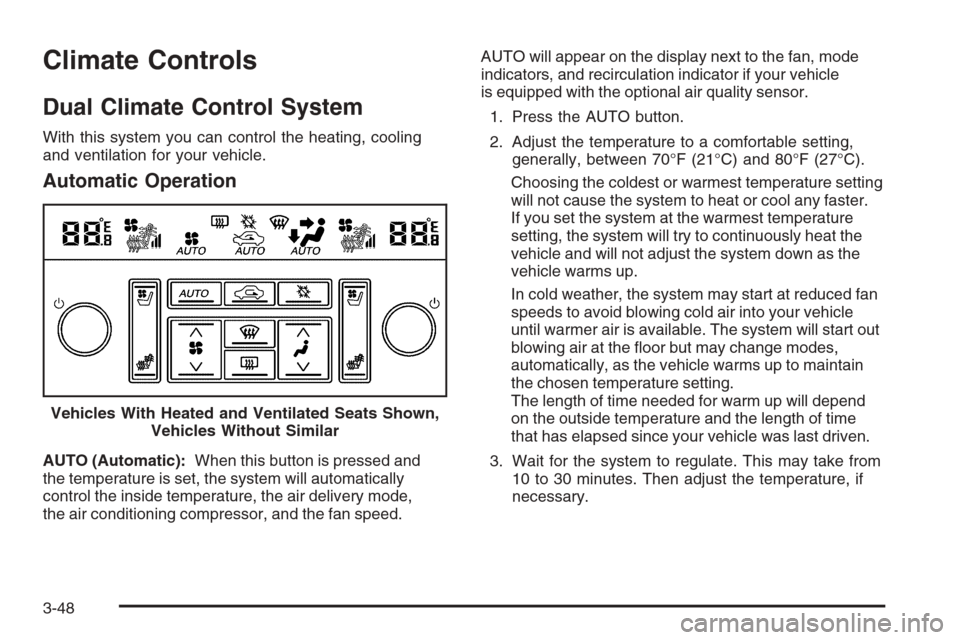
Climate Controls
Dual Climate Control System
With this system you can control the heating, cooling
and ventilation for your vehicle.
Automatic Operation
AUTO (Automatic):When this button is pressed and
the temperature is set, the system will automatically
control the inside temperature, the air delivery mode,
the air conditioning compressor, and the fan speed.AUTO will appear on the display next to the fan, mode
indicators, and recirculation indicator if your vehicle
is equipped with the optional air quality sensor.
1. Press the AUTO button.
2. Adjust the temperature to a comfortable setting,
generally, between 70°F (21°C) and 80°F (27°C).
Choosing the coldest or warmest temperature setting
will not cause the system to heat or cool any faster.
If you set the system at the warmest temperature
setting, the system will try to continuously heat the
vehicle and will not adjust the system down as the
vehicle warms up.
In cold weather, the system may start at reduced fan
speeds to avoid blowing cold air into your vehicle
until warmer air is available. The system will start out
blowing air at the oor but may change modes,
automatically, as the vehicle warms up to maintain
the chosen temperature setting.
The length of time needed for warm up will depend
on the outside temperature and the length of time
that has elapsed since your vehicle was last driven.
3. Wait for the system to regulate. This may take from
10 to 30 minutes. Then adjust the temperature, if
necessary. Vehicles With Heated and Ventilated Seats Shown,
Vehicles Without Similar
3-48
Page 195 of 480
You can switch from English to metric units through the
Driver Information Center (DIC). SeeDIC Controls
and Displays on page 3-74.
The air-conditioning system removes moisture from the
air, so you may notice water dripping underneath
your vehicle while idling or after turning off the engine.
This is normal.
Manual Operation
yNz(Mode):Pressing the mode switch and
changing the mode cancels automatic operation and
allows the operator to manually select the air delivery
location. Press AUTO to return to automatic operation.
The outboard air outlets will always receive airow
regardless of the mode selected. SeeOutlet
Adjustment on page 3-54to change this airow
from the outboard outlets.
To change the current mode, select one of the following:
Y(Vent):This mode directs air to the instrument
panel outlets.
\(Bi-Level):This mode directs approximately half
of the air to the instrument panel outlets, and then
directs most of the remaining air to the oor outlets.
In automatic operation, cooler air is directed to the
upper outlets and warmer air to the oor outlets.
[(Floor):This mode directs most of the air to the
oor outlets with some air directed to the outboard
outlets, and a little air directed to the windshield and
side windows.
The mode switch can also be used to select the defog
mode. Information on defogging and defrosting can
be found later in this section.
yAz(Fan):Press this switch to increase or
decrease the fan speed. Pressing this switch cancels
automatic operation and allows the operator to manually
select the amount of airow. Press AUTO to return to
automatic operation.
If the airow seems low when the fan speed is at the
highest setting, the passenger compartment air lter may
need to be replaced. For more information, see
Passenger Compartment Air Filter on page 3-55and
Scheduled Maintenance on page 6-4.
h(Recirculation):This button controls the air source
for the climate control system. If you are in AUTO mode,
pressing this button once will choose recirculation. This
mode keeps outside air from coming in the vehicle and
recirculates the air in the vehicle. It can be used to
prevent outside air and odors from entering your vehicle
or to help cool the air inside your vehicle more quickly.
3-49