transmission CADILLAC STS 2006 1.G Owner's Manual
[x] Cancel search | Manufacturer: CADILLAC, Model Year: 2006, Model line: STS, Model: CADILLAC STS 2006 1.GPages: 480, PDF Size: 2.74 MB
Page 181 of 480

Wiper Activated Headlamps
This feature activates the headlamps and parking lamps
after the windshield wipers have been in use for
about six seconds. For this feature to work, automatic
lighting must be enabled. SeeHeadlamps on page 3-31
for additional information.
When the ignition is turned off, the wiper-activated
headlamps will immediately turn off. They will also turn
off if the windshield wiper control is turned off.
Headlamps on Reminder
A warning chime will sound if the exterior lamp control
is left on in either the headlamp or parking lamp position
and the driver’s door is opened with the ignition off.
SeeLights On Reminder on page 3-71for additional
information.
Daytime Running Lamps (DRL)
Daytime Running Lamps (DRL) can make it easier for
others to see the front of your vehicle during the
day. DRL can be helpful in many different driving
conditions, but they can be especially helpful in the short
periods after dawn and before sunset. Fully functional
daytime running lamps are required on all vehicles
rst sold in Canada.
The DRL system will make the turn signal lamps come
on when the following conditions are met:
It is still daylight and the ignition is on,
the automatic lights are enabled, and
the transmission is not in PARK (P).
When DRL are on, only your front turn signal lamps will
be on. No other exterior lamps will be on when the DRL
are being used. Your instrument panel will not be lit.
3-35
Page 187 of 480
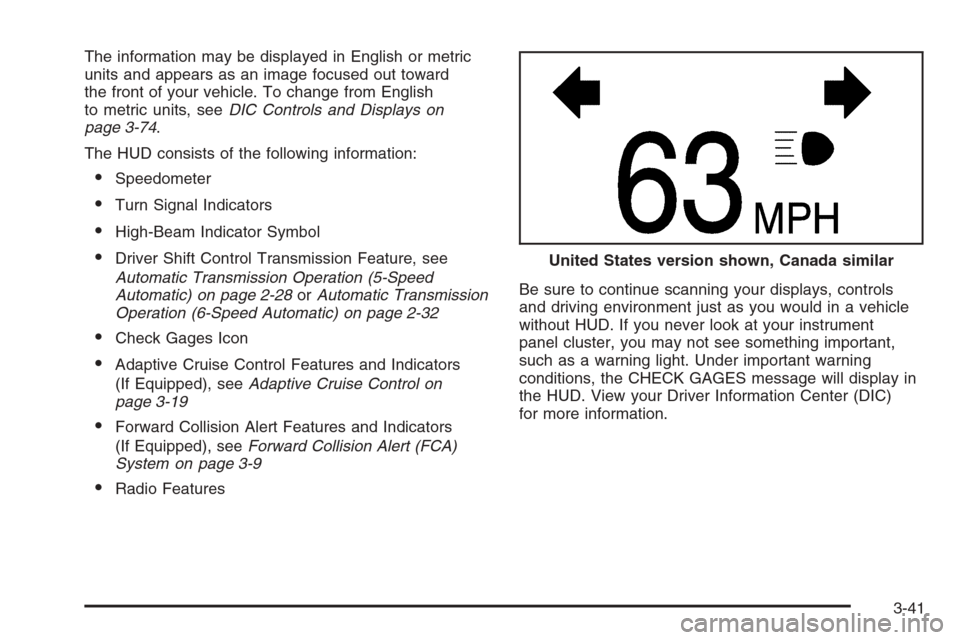
The information may be displayed in English or metric
units and appears as an image focused out toward
the front of your vehicle. To change from English
to metric units, seeDIC Controls and Displays on
page 3-74.
The HUD consists of the following information:
Speedometer
Turn Signal Indicators
High-Beam Indicator Symbol
Driver Shift Control Transmission Feature, see
Automatic Transmission Operation (5-Speed
Automatic) on page 2-28orAutomatic Transmission
Operation (6-Speed Automatic) on page 2-32
Check Gages Icon
Adaptive Cruise Control Features and Indicators
(If Equipped), seeAdaptive Cruise Control on
page 3-19
Forward Collision Alert Features and Indicators
(If Equipped), seeForward Collision Alert (FCA)
System on page 3-9
Radio FeaturesBe sure to continue scanning your displays, controls
and driving environment just as you would in a vehicle
without HUD. If you never look at your instrument
panel cluster, you may not see something important,
such as a warning light. Under important warning
conditions, the CHECK GAGES message will display in
the HUD. View your Driver Information Center (DIC)
for more information.United States version shown, Canada similar
3-41
Page 214 of 480
Notice:Modications made to the engine,
transmission, exhaust, intake, or fuel system of
your vehicle or the replacement of the original tires
with other than those of the same Tire Performance
Criteria (TPC) can affect your vehicle’s emission
controls and may cause this light to come on.
Modications to these systems could lead to costly
repairs not covered by your warranty. This may
also result in a failure to pass a required Emission
Inspection/Maintenance test. SeeAccessories
and Modifications on page 5-3.
This light should come on briey, as a check to show
you it is working, as you start the engine. If the light
does not come on, have it repaired. This light will also
come on during a malfunction in one of two ways:
Light Flashing— A misre condition has
been detected. A misre increases vehicle
emissions and may damage the emission control
system on your vehicle. Diagnosis and service may
be required.
Light On Steady— An emission control system
malfunction has been detected on your vehicle.
Diagnosis and service may be required.
If the Light Is Flashing
The following may prevent more serious damage to
your vehicle:
Reducing vehicle speed
Avoiding hard accelerations
Avoiding steep uphill grades
If the light stops ashing and remains on steady, see
“If the Light Is On Steady” following.
If the light continues to ash, when it is safe to do so,
stop the vehicle. Find a safe place to park your vehicle.
Turn the engine off, wait at least 10 seconds and
restart the engine. If the light remains on steady, see
“If the Light Is On Steady” following. If the light is
still ashing, follow the previous steps, and see your
dealer for service as soon as possible.
3-68
Page 219 of 480
Driver Information Center (DIC)
The Driver Information Center (DIC) gives you the
status of many of your vehicle’s systems. The DIC is
also used to display warning/status messages. All
messages will appear in the DIC display located at the
bottom of the instrument panel cluster, below the
tachometer and speedometer. The DIC buttons are
located on the instrument panel, to the left of the
steering wheel.
The DIC comes on when the ignition is on. After a short
delay, the DIC will display the current driver and the
information that was last displayed before the engine
was turned off.
The top line of the DIC display shows the vehicle system
information and the warning/status messages. The
bottom line of the DIC display shows either the odometer,
the trip odometer A or the trip odometer B information on
the left side. Only one odometer can appear at a time.
See “Trip Information” underDIC Controls and Displays
on page 3-74for information on changing the display to
show the odometer or trip odometer information. The
bottom line of the DIC display also shows the outside
temperature on the right side and the shift lever position
indicator in the center.SeeAutomatic Transmission Operation (5-Speed
Automatic) on page 2-28orAutomatic Transmission
Operation (6-Speed Automatic) on page 2-32for more
information on the shift lever positions.
When the sport mode is active, an S will appear next to
the shift position indicator on the center of the DIC
display. When the manual mode is active, an M will
appear on the DIC display. When the normal mode is
active, only the shift position indicator will appear. While
the Driver Shift Control (DSC) feature is active, the DIC
will change to show the selected gear. See “Driver Shift
Control (DSC)” underAutomatic Transmission Operation
(5-Speed Automatic) on page 2-28orAutomatic
Transmission Operation (6-Speed Automatic) on
page 2-32for more information.
If a problem is detected, a warning message will appear
on the display. Be sure to take any message that
appears on the display seriously and remember that
clearing the message will only make the message
disappear, not correct the problem.
3-73
Page 220 of 480
DIC Controls and Displays
The Driver Information Center (DIC) has different modes
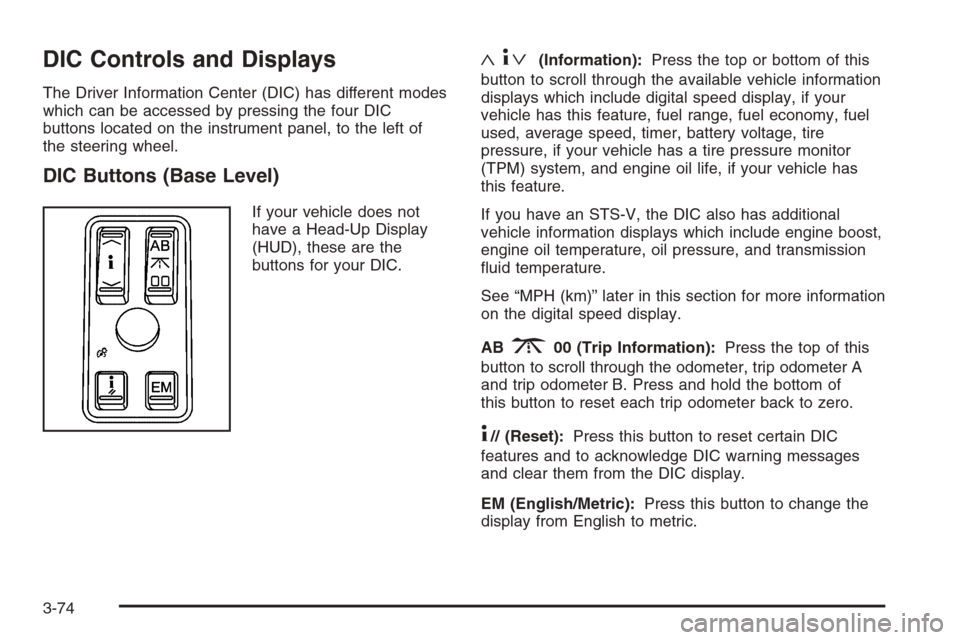
which can be accessed by pressing the four DIC
buttons located on the instrument panel, to the left of
the steering wheel.
DIC Buttons (Base Level)
If your vehicle does not
have a Head-Up Display
(HUD), these are the
buttons for your DIC.
«4ª(Information):Press the top or bottom of this
button to scroll through the available vehicle information
displays which include digital speed display, if your
vehicle has this feature, fuel range, fuel economy, fuel
used, average speed, timer, battery voltage, tire
pressure, if your vehicle has a tire pressure monitor
(TPM) system, and engine oil life, if your vehicle has
this feature.
If you have an STS-V, the DIC also has additional
vehicle information displays which include engine boost,
engine oil temperature, oil pressure, and transmission
uid temperature.
See “MPH (km)” later in this section for more information
on the digital speed display.
AB
300 (Trip Information):Press the top of this
button to scroll through the odometer, trip odometer A
and trip odometer B. Press and hold the bottom of
this button to reset each trip odometer back to zero.
4// (Reset):Press this button to reset certain DIC
features and to acknowledge DIC warning messages
and clear them from the DIC display.
EM (English/Metric):Press this button to change the
display from English to metric.
3-74
Page 224 of 480
ENGINE OIL LIFE
If your vehicle has this display, it shows the estimated
oil life remaining. If you see 99% ENGINE OIL LIFE
on the display, that means that 99% of the current oil
life remains.
When the oil life is depleted, the CHANGE ENGINE OIL
SOON message will appear on the display. You
should change your oil as soon as possible. In addition
to the engine oil life system monitoring the oil life,
additional maintenance is recommended in the
Maintenance Schedule in this manual. SeeScheduled
Maintenance on page 6-4andEngine Oil on page 5-18.
After an oil change, reset the ENGINE OIL LIFE
display. To reset, seeEngine Oil Life System on
page 5-22. The display will show 100% ENGINE OIL
LIFE after it has been reset. Also clear the CHANGE
ENGINE OIL SOON message from the display.
ENGLISH DISPLAY UNITS (METRIC
DISPLAY UNITS)
This display allows you to select between English and
metric units of measurement if your vehicle has the
uplevel DIC. Press the reset button to switch between
English and metric units.
Blank Line
This display shows no information.
ENGINE BOOST (STS-V Only)
This display shows a graphic that indicates the amount
of boost the engine is receiving in either pounds per
square inch (psi) or kilopascals (kPa).
ENGINE OIL TEMPERATURE (STS-V Only)
This display shows the engine oil temperature in
either degrees Fahrenheit (°F) or degrees Celsius (°C).
OIL PRESSURE (STS-V Only)
This display shows the oil pressure in either pounds per
square inch (psi) or kilopascals (kPa).
TRANS (Transmission) FLUID TEMP
(Temperature) (STS-V Only)
This display shows the transmission uid temperature in
either degrees Fahrenheit (°F) or degrees Celsius (°C).
Trip Information Display Menu Items
The following display menu items can be displayed by
pressing the trip Information button.
Odometer
Press the trip information button until the odometer
appears on the DIC display. The odometer shows the
total distance the vehicle has been driven in either
miles (mi) or kilometers (km).
3-78
Page 235 of 480
SERVICE STABILITY SYS (System)
Your vehicle may have a vehicle stability enhancement
system called StabiliTrak®.
SeeStabiliTrak
®System on page 4-11. The SERVICE
STABILITY SYS message will display if there has
been a problem detected with StabiliTrak
®.
If the SERVICE STABILITY SYS message comes on
while you are driving, pull off the road as soon as
possible and stop carefully. Try resetting the system by
turning the ignition off then back on. If the SERVICE
STABILITY SYS message still stays on or comes back
on again while you are driving, your vehicle needs
service. Have the StabiliTrak
®System inspected by your
GM dealer as soon as possible.
SERVICE STEERING SYS (System)
Your vehicle may have a speed variable assist steering
system. SeeSteering on page 4-12.
The SERVICE STEERING SYS message will display if
a problem is detected with the speed variable assist
steering system. When this message is displayed, you
may notice that the effort required to steer the vehicle
increases or feels “heavier,” but you will still be able to
steer the vehicle.
SERVICE SUSPENSION SYS (System)
This message will display when the suspension
system is not operating properly. Have your vehicle
serviced by your GM dealer.
SERVICE TIRE MONITOR
If your vehicle has a Tire Pressure Monitor (TPM)
system, this message will display if the TPM system is
not working properly. Have your vehicle serviced by
your GM dealer as soon as possible.
SERVICE THEFT SYSTEM
This message will display when there is a problem with
the hood open and closed switches. The switches may
need to be replaced. When this message is displayed,
the theft-deterrent system will still be protecting the
interior of the vehicle, however, the hood area will not be
protected at this time. Also, the remote start function will
not work when this message appears. See your
GM dealer for service.
SERVICE TRANSMISSION
This message will display when there is a problem with
the transmission of your vehicle. Have your vehicle
serviced by your GM dealer.
3-89
Page 238 of 480
TRACTION ACTIVE
This message will display when the traction control
system is actively limiting wheel spin. Slippery
road conditions may exist if this message is displayed,
so adjust your driving accordingly. The message will
stay on for a few seconds after the traction control
system stops limiting wheel spin. SeeTraction Control
System (TCS) on page 4-9for more information.
TRANS (Transmission) HOT IDLE
ENGINE
This message will display when the transmission uid in
your vehicle is too hot. Stop the vehicle and allow it
to idle until the transmission cools down or until
this message is removed.
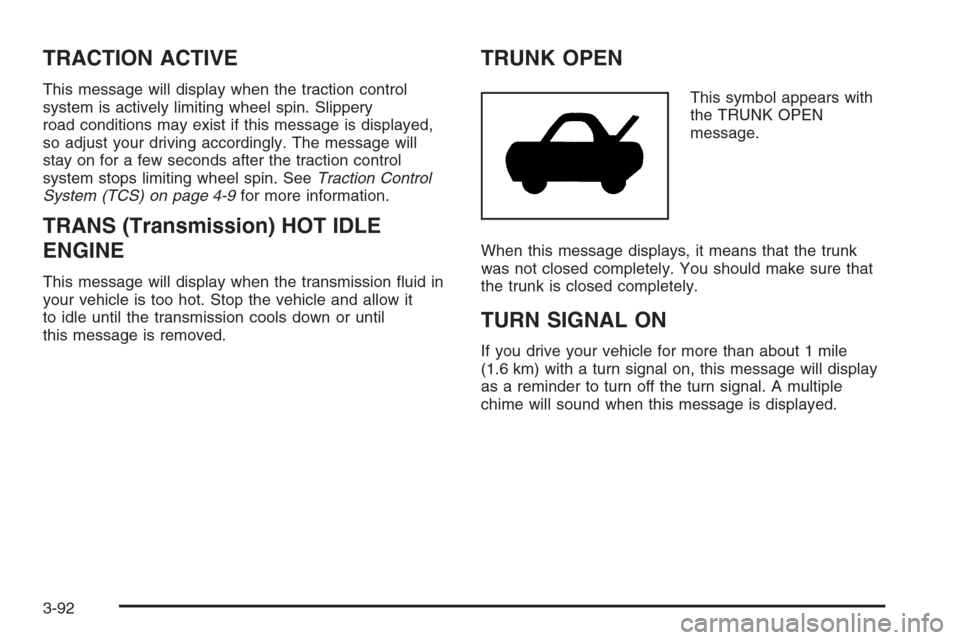
TRUNK OPEN
This symbol appears with
the TRUNK OPEN
message.
When this message displays, it means that the trunk
was not closed completely. You should make sure that
the trunk is closed completely.
TURN SIGNAL ON
If you drive your vehicle for more than about 1 mile
(1.6 km) with a turn signal on, this message will display
as a reminder to turn off the turn signal. A multiple
chime will sound when this message is displayed.
3-92
Page 281 of 480
Steering Tips
It is important to take curves at a reasonable speed.
A lot of the “driver lost control” accidents mentioned on
the news happen on curves. Here is why:
Experienced driver or beginner, each of us is subject
to the same laws of physics when driving on curves.
The traction of the tires against the road surface makes
it possible for the vehicle to change its path when
you turn the front wheels. If there is no traction, inertia
will keep the vehicle going in the same direction. If
you have ever tried to steer a vehicle on wet ice, you
will understand this.
The traction you can get in a curve depends on the
condition of your tires and the road surface, the angle
at which the curve is banked, and your speed. While you
are in a curve, speed is the one factor you can control.
Suppose you are steering through a sharp curve.
Then you suddenly accelerate. Both control
systems — steering and acceleration — have to do
their work where the tires meet the road. Adding the
sudden acceleration can demand too much of those
places. You can lose control. SeeTraction Control
System (TCS) on page 4-9andStabiliTrak
®System
on page 4-11.
What should you do if this ever happens? Ease up on
the accelerator pedal, steer the vehicle the way you
want it to go, and slow down.Since your vehicle is equipped with StabiliTrak
®,
the system may be active. SeeDIC Warnings and
Messages on page 3-79andStabiliTrak
®System on
page 4-11.
Speed limit signs near curves warn that you should
adjust your speed. Of course, the posted speeds
are based on good weather and road conditions. Under
less favorable conditions you will want to go slower.
If you need to reduce your speed as you approach
a curve, do it before you enter the curve, while your
front wheels are straight ahead.
Try to adjust your speed so you can “drive” through the
curve. Maintain a reasonable, steady speed. Wait to
accelerate until you are out of the curve, and then
accelerate gently into the straightaway.
To help you steer in the direction you want to go, during
certain sharp or sudden cornering maneuvers, gear
selection is controlled. This will maximize the available
drive wheel torque and minimize the transmission
response time and shift activity. During this kind of
maneuver, the transmission shifts automatically
as vehicle speed changes.
Adding non-GM accessories can affect your vehicle’s
performance. SeeAccessories and Modications
on page 5-3.
4-13
Page 294 of 480
If you drive regularly in steep country, or if you are
planning to visit there, here are some tips that can make
your trips safer and more enjoyable.
Keep your vehicle in good shape. Check all uid
levels and also the brakes, tires, cooling system,
and transmission. These parts can work hard
on mountain roads.
{CAUTION:
If you do not shift down, your brakes could get
so hot that they would not work well. You
would then have poor braking or even none
going down a hill. You could crash. Shift down
to let your engine assist your brakes on a
steep downhill slope.
{CAUTION:
Coasting downhill in NEUTRAL (N) or with the
ignition off is dangerous. Your brakes will have
to do all the work of slowing down. They could
get so hot that they would not work well.
CAUTION: (Continued)
CAUTION: (Continued)
You would then have poor braking or even
none going down a hill. You could crash.
Always have your engine running and your
vehicle in gear when you go downhill.
Know how to go down hills. The most important
thing to know is this: let your engine do some of
the slowing down. Shift to a lower gear when you go
down a steep or long hill.
Know how to go uphill. You may want to shift down
to a lower gear. The lower gears help cool your
engine and transmission, and you can climb the
hill better.
Stay in your own lane when driving on two-lane
roads in hills or mountains. Do not swing wide
or cut across the center of the road. Drive at speeds
that let you stay in your own lane.
As you go over the top of a hill, be alert. There
could be something in your lane, like a stalled car
or an accident.
You may see highway signs on mountains that warn
of special problems. Examples are long grades,
passing or no-passing zones, a falling rocks area,
or winding roads. Be alert to these and take
appropriate action.
4-26