transmission CADILLAC STS 2007 1.G User Guide
[x] Cancel search | Manufacturer: CADILLAC, Model Year: 2007, Model line: STS, Model: CADILLAC STS 2007 1.GPages: 560, PDF Size: 2.92 MB
Page 145 of 560

Gate Operator and Canadian
Programming
Canadian radio-frequency laws require transmitter
signals to time out or quit after several seconds
of transmission. This may not be long enough
for Universal Home Remote to pick up the signal
during programming. Similarly, some U.S. gate
operators are manufactured to time out in
the same manner.
If you live in Canada, or you are having difficulty
programming a gate operator or garage door
opener by using the “Programming Universal
Home Remote” procedures, regardless of where
you live, replace Step 3 under “Programming
Universal Home Remote” with the following:
Continue to press and hold the Universal Home
Remote button while you press and release every
two seconds (cycle) the hand-held transmitter
button until the frequency signal has been
successfully accepted by the Universal Home
Remote. The Universal Home Remote indicator
light will ash slowly at rst and then rapidly.
Proceed with Step 4 under “Programming
Universal Home Remote” to complete.
Using Universal Home Remote
Press and hold the appropriate Universal Home
Remote button for at least half of a second.
The indicator light will come on while the signal is
being transmitted.
Erasing Universal Home Remote
Buttons
To erase programming from the three Universal
Home Remote buttons do the following:
1. Press and hold down the two outside buttons
until the indicator light begins to ash, after
20 seconds. Do not hold the two outside
buttons for longer than 30 seconds.
2. Release both buttons.
The Universal Home Remote is now in the training
(learning) mode and can be programmed at any
time beginning with Step 2 under “Programming
Universal Home Remote” shown earlier in
this section.
Individual buttons cannot be erased, but they can
be reprogrammed. See “Reprogramming a
Single Universal Home Remote Button” following
this section.
145
Page 149 of 560
Certain features can be programmed not to recall
until the ignition is turned off.
To change feature preferences, use the following
procedure.
Entering the Personal Settings Menu
To enter the feature programming mode, use
the following procedure:
1. Be sure the ignition is either on, in Acc., or in
RAP and place the transmission in PARK (P)
or make sure that the vehicle speed is
less than 6 mph (9 km/h).
To avoid excessive drain on the battery, it is
recommended that the headlamps are
turned off.
2. Press any button on the appropriate keyless
access transmitter to identify yourself as
Driver 1 or Driver 2.
3. Turn on the radio by pressing the
power/volume knob.
4. Press the CNFG radio button or the
tune/select knob located on the right side of
the radio to enter the radio’s main menu.5. Turn the tune/select knob and scroll to
SETUP.
6. Press the tune/select knob to enter the
SETUP menu.
7. Turn the tune/select knob and scroll to
PERSONAL SETTINGS MENU, then
press the tune/select knob to turn the feature
on. A check mark appears after this
selection when it is turned on and the entire
list of personalization features will appear.
8. Turn the tune/select knob and scroll to the
feature you want to change, then press the
tune/select knob to turn the feature on or off. If
the feature is turned on, a check mark will
appear next to the feature name.
Some features have submenus that show
additional features that can be turned on or off.
After entering a submenu, turn the tune/select
knob and scroll to the feature you want to
change, then press the tune/select knob
to turn the feature on or off.
149
Page 162 of 560

DOORS UNLOCK AT OFF
This feature allows all of the doors to automatically
unlock when the ignition is turned off.
Programmable Modes
Mode 1:ON
Mode 2:OFF
Before your vehicle was shipped from the factory,
it was programmed to Mode 2. The mode to
which the vehicle was programmed may have
been changed since it left the factory.
To program the vehicle to a different mode, use
the following procedure:
1. Enter the PERSONAL SETTINGS MENU by
following the instructions listed previously
under “Entering the Personal Settings Menu.”
2. Turn the tune/select knob until DOORS
UNLOCK AT OFF is highlighted.
3. Press the tune/select knob to switch between
on and off.
When the mode is turned on, a check mark
will appear next to the feature name.The mode you selected is now set. You can either
exit the programming mode by following the
instructions later in this section or program the
next feature available on your vehicle.
DRIVER UNLOCK IN PARK
The feature allows the driver’s door to
automatically unlock when the transmission is
shifted into PARK (P).
Programmable Modes
Mode 1:ON
Mode 2:OFF
Before your vehicle was shipped from the factory,
it was programmed to Mode 2. The mode to
which the vehicle was programmed may have
been changed since it left the factory.
To program the vehicle to a different mode, use
the following procedure:
1. Enter the PERSONAL SETTINGS MENU by
following the instructions listed previously
under “Entering the Personal Settings Menu.”
2. Turn the tune/select knob until DRIVER
UNLOCK IN PARK is highlighted.
162
Page 163 of 560

3. Press the tune/select knob to switch back and
forth between on and off.
When the mode is turned on, a check mark
will appear next to the feature name.
The mode you selected is now set. You can either
exit the programming mode by following the
instructions later in this section or program the
next feature available on your vehicle.
DOORS UNLOCK IN PARK
The feature allows all of the doors to automatically
unlock when the transmission is shifted into
PARK (P).
Programmable Modes
Mode 1:ON
Mode 2:OFF
Before your vehicle was shipped from the factory,
it was programmed to Mode 1. The mode to
which the vehicle was programmed may have
been changed since it left the factory.To program the vehicle to a different mode, use
the following procedure:
1. Enter the PERSONAL SETTINGS MENU by
following the instructions listed previously
under “Entering the Personal Settings Menu.”
2. Turn the tune/select knob until DOORS
UNLOCK IN PARK is highlighted.
3. Press the tune/select knob to switch back and
forth between on and off.
When the mode is turned on, a check mark
will appear next to the feature name.
The mode you selected is now set. You can either
exit the programming mode by following the
instructions later in this section or program the
next feature available on your vehicle.
163
Page 170 of 560

For vehicles with the Navigation system, memory
features are programmed and recalled through
the navigation display. See “Personalization” in the
Index of the Navigation System manual for more
information on programming and recalling the
memory settings using the Navigation system.
For vehicles with the Navigation system, you can
also recall the memory features by using voice
recognition, if your vehicle has this feature.
See “Voice Recognition” in the Index of the
Navigation System manual for more information.
Entering the Driver Selection
Submenu
To enter the memory programming mode for your
driver settings, use the following procedure:
1. Be sure the ignition is either on, in Acc., or in
RAP and place the transmission in PARK (P)
or make sure that the vehicle speed is
less than 6 mph (9 km/h).
2. Press any button on the appropriate keyless
access transmitter to identify yourself as
Driver 1 or Driver 2.3. Turn on the radio by pressing the
power/volume knob.
4. Press the CNFG radio button to enter the
main menu of the radio.
5. Turn the tune/select knob and scroll to
SETUP.
6. Press the tune/select knob to enter the
SETUP menu.
7. Turn the tune/select knob and scroll to
DRIVER SELECTION.
8. Press the tune/select knob to enter the
DRIVER SELECTION submenu. The following
items will appear:DRIVER 1
DRIVER 2
RECALL DRIVER SETTINGS
STORE DRIVER SETTINGS
170
Page 172 of 560

STORE DRIVER SETTINGS
To store driver settings, use the following
procedure:
1. Adjust your settings for the driver’s seat, the
outside rearview mirrors, and the steering
column to a comfortable driving position.
2. Enter the memory programming mode for
your driver settings by following the
instructions listed previously under “Entering
the Driver Selection Submenu.”
3. From the DRIVER SELECTION submenu,
turn the tune/select knob to scroll to STORE
DRIVER SETTINGS and press in the
knob. Two beeps will sound to conrm that
your driver settings are saved.
4. Set the HUD position, if your vehicle has this
feature, the climate control temperature, fan
speed and mode settings, the radio presets,
tone, volume, playback mode (AM/FM,
XM™, or CD), and compact disc position.
Your memory settings are now programmed.
Any changes that are made to the HUD,
audio system, and climate controls while
driving will be automatically stored when the
ignition is turned off.
5. Repeat the procedure for a second driver by
programming the other driver number.
Entering the Driver Exit Settings
Submenu
To enter the memory programming mode for your
exit settings, use the following procedure:
1. Be sure the ignition is either on, in Acc., or in
RAP and place the transmission in PARK (P)
or make sure that the vehicle speed is
less than 6 mph (9 km/h).
2. Press any button on the appropriate keyless
access transmitter to identify yourself as
Driver 1 or Driver 2.
3. Turn on the radio by pressing the
power/volume knob.
4. Press the CNFG radio button to enter the
main menu of the radio.
5. Turn the tune/select knob and scroll to SETUP.
6. Press the tune/select knob to enter the
SETUP menu.
7. Turn the tune/select knob and scroll to
DRIVER EXIT SETTINGS.
8. Press the tune/select knob to enter the
DRIVER EXIT SETTINGS submenu.
The following items will appear:
RECALL EXIT SETTINGS
STORE EXIT SETTINGS
172
Page 179 of 560
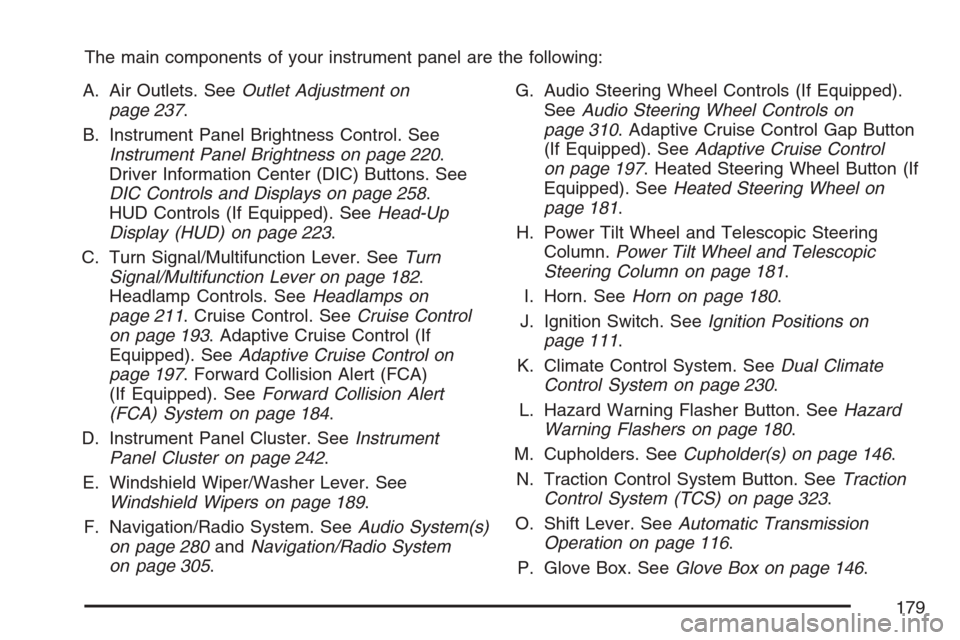
The main components of your instrument panel are the following:
A. Air Outlets. SeeOutlet Adjustment on
page 237.
B. Instrument Panel Brightness Control. See
Instrument Panel Brightness on page 220.
Driver Information Center (DIC) Buttons. See
DIC Controls and Displays on page 258.
HUD Controls (If Equipped). SeeHead-Up
Display (HUD) on page 223.
C. Turn Signal/Multifunction Lever. SeeTurn
Signal/Multifunction Lever on page 182.
Headlamp Controls. SeeHeadlamps on
page 211. Cruise Control. SeeCruise Control
on page 193. Adaptive Cruise Control (If
Equipped). SeeAdaptive Cruise Control on
page 197. Forward Collision Alert (FCA)
(If Equipped). SeeForward Collision Alert
(FCA) System on page 184.
D. Instrument Panel Cluster. SeeInstrument
Panel Cluster on page 242.
E. Windshield Wiper/Washer Lever. See
Windshield Wipers on page 189.
F. Navigation/Radio System. SeeAudio System(s)
on page 280andNavigation/Radio System
on page 305.G. Audio Steering Wheel Controls (If Equipped).
SeeAudio Steering Wheel Controls on
page 310. Adaptive Cruise Control Gap Button
(If Equipped). SeeAdaptive Cruise Control
on page 197. Heated Steering Wheel Button (If
Equipped). SeeHeated Steering Wheel on
page 181.
H. Power Tilt Wheel and Telescopic Steering
Column.Power Tilt Wheel and Telescopic
Steering Column on page 181.
I. Horn. SeeHorn on page 180.
J. Ignition Switch. SeeIgnition Positions on
page 111.
K. Climate Control System. SeeDual Climate
Control System on page 230.
L. Hazard Warning Flasher Button. SeeHazard
Warning Flashers on page 180.
M. Cupholders. SeeCupholder(s) on page 146.
N. Traction Control System Button. SeeTraction
Control System (TCS) on page 323.
O. Shift Lever. SeeAutomatic Transmission
Operation on page 116.
P. Glove Box. SeeGlove Box on page 146.
179
Page 216 of 560

Headlamps on Reminder
A warning chime will sound if the exterior lamp
control is left on in either the headlamp or parking
lamp position and the driver’s door is opened
with the ignition off. SeeLights On Reminder on
page 256for additional information.
Daytime Running Lamps (DRL)
Daytime Running Lamps (DRL) can make it easier
for others to see the front of your vehicle during
the day. DRL can be helpful in many different
driving conditions, but they can be especially
helpful in the short periods after dawn and before
sunset. Fully functional daytime running lamps
are required on all vehicles rst sold in Canada.
The DRL system will make the turn signal lamps
come on when the following conditions are met:
It is still daylight and the ignition is on,
the automatic lights are enabled, and
the transmission is not in PARK (P).
When DRL are on, only your front turn signal
lamps will be on. No other exterior lamps will be
on when the DRL are being used. Your instrument
panel will not be lit.When the automatic lights are enabled and it is dark
enough outside, the DRL will turn off and the
low-beam headlamps will turn on. When it is bright
enough outside, the low-beam headlamps will go
off, and the DRL will turn back on. If you start your
vehicle in a dark garage, the automatic headlamp
system will come on immediately. Once you leave
the garage, it will take about one minute for the
automatic headlamp system to change to DRL if it
is light outside. During that delay, your instrument
panel cluster may not be as bright as usual. Make
sure your instrument panel brightness lever is in the
full bright position. SeeInstrument Panel Brightness
on page 220.
To operate your vehicle with the DRL off, turn the
exterior lamp control off and then do one of the
following:
Turn the exterior lamp control to the parking
lamp position.
Turn the exterior lamp control to the headlamp
position.
Turn the exterior lamp control from AUTO to
off and back to AUTO.
216
Page 223 of 560

Head-Up Display (HUD)
{CAUTION:
If the HUD image is too bright, or too high
in your eld of view, it may take you more
time to see things you need to see when it
is dark outside. Be sure to keep the HUD
image dim and placed low in your eld
of view.
If equipped, the Head-Up Display (HUD) allows
you to see some of the driver information that
appears on your instrument panel cluster on the
windshield.
The information may be displayed in English or
metric units and appears as an image focused out
toward the front of your vehicle. To change
from English to metric units, seeDIC Controls and
Displays on page 258.
The HUD consists of the following information:
Speedometer
Turn Signal Indicators
High-Beam Indicator Symbol
Driver Shift Control Transmission Feature,
seeAutomatic Transmission Operation on
page 116
Check Gages Icon
Adaptive Cruise Control Features and
Indicators (If Equipped), seeAdaptive Cruise
Control on page 197
Forward Collision Alert Features and
Indicators (If Equipped), seeForward Collision
Alert (FCA) System on page 184
Radio Features
United States version shown, Canada similar
223
Page 252 of 560

Malfunction Indicator Lamp
Check Engine Light
Your vehicle has a
computer which
monitors operation of
the fuel, ignition,
and emission control
systems.
This system is called OBD II (On-Board
Diagnostics-Second Generation) and is intended
to assure that emissions are at acceptable
levels for the life of the vehicle, helping to produce
a cleaner environment. The check engine light
comes on to indicate that there is a problem and
service is required. Malfunctions often will be
indicated by the system before any problem is
apparent. This may prevent more serious damage
to your vehicle. This system is also designed to
assist your service technician in correctly
diagnosing any malfunction.Notice:If you keep driving your vehicle with
this light on, after awhile, the emission controls
might not work as well, your vehicle’s fuel
economy might not be as good, and the engine
might not run as smoothly. This could lead
to costly repairs that might not be covered by
your warranty.
Notice:Modications made to the engine,
transmission, exhaust, intake, or fuel system
of your vehicle or the replacement of the
original tires with other than those of the same
Tire Performance Criteria (TPC) can affect
your vehicle’s emission controls and can cause
this light to come on. Modications to these
systems could lead to costly repairs not
covered by your warranty. This could also
result in a failure to pass a required Emission
Inspection/Maintenance test. SeeAccessories
and Modifications on page 363.
252