audio CADILLAC STS 2007 1.G Owner's Manual
[x] Cancel search | Manufacturer: CADILLAC, Model Year: 2007, Model line: STS, Model: CADILLAC STS 2007 1.GPages: 560, PDF Size: 2.92 MB
Page 305 of 560

Navigation/Radio System
Your vehicle could have a navigation radio
system.
The navigation system has built-in features
intended to minimize driver distraction. Technology
alone, no matter how advanced, can never
replace your own judgment. See the Navigation
System manual for some tips to help you
reduce distractions while driving.
Radio Personalization
Accessing the Radio’s Main Menu
(Base Audio System)
There are two different procedures for accessing
the radio’s main menu depending upon whether
or not your vehicle has the Navigation system.To access the main menu of the radio, do one of
the following:
Using the Base audio system, press the
CNFG button located on the radio or press the
tune/select knob located on the right side of
the radio. Then turn the tune/select knob
clockwise or counterclockwise to scroll through
the menu items.
If your vehicle has the Navigation system, see
the Navigation System manual supplied with
your vehicle for more information on accessing
the main menu and for descriptions of the
menu items for the Navigation system.
305
Page 306 of 560
The main menu for the Base audio system
consists of the following menu items:
eBASS - MID - TREBLE
xBALANCE - FADER
eEQ EQUALIZER
H/A (HOME/AWAY) PRESETS
AUTOSTORE PRESETS
CAT CATEGORY
TA TRAFFIC ANNOUNCE
RECALL RDS (Radio Data System)
MESSAGE
AF ALTERNATE FREQ. (Frequency)
ASEEK LOCAL/DISTANT
8SET CLOCK
BSET DATE
4INFO (Information)
LANG LANGUAGE
SETUP
Radio Main Menu Item Descriptions
(Base Audio System)
The following descriptions are for the Base audio
system. For information pertaining to the
Navigation audio system, see “Audio System” in
the Index of the Navigation System manual
supplied with your vehicle.
eBASS - MID (Midrange) - TREBLE:This
menu item lets you adjust the levels for the bass,
midrange and treble features of the audio
system. See “Setting the Tone (Bass/Treble)”
underRadio with CD on page 282for more
information.
xBALANCE - FADER:This menu item lets you
adjust the levels for the balance and fader
features of the audio system. See “Adjusting the
Speakers (Balance/Fade)” underRadio with CD on
page 282for more information.
eEQ (Equalizer):This menu item lets you
choose among ve preset equalizations for the
audio system. See “Audio Equalizer” underRadio
with CD on page 282for more information.
306
Page 307 of 560
H/A (Home/Away) PRESETS:This menu item
lets you switch back and forth between your home
and away preset radio stations. See “Presets
Home/Away” underRadio with CD on page 282
for more information.
AUTOSTORE PRESETS:This menu item lets
you automatically store radio stations with
the strongest signals as presets. See “Autostore
Presets” underRadio with CD on page 282
for more information.
CAT (Category):This menu item lets you select
radio stations based on preset categories. See
“Activating Program Type (PTY) Stations”
underRadio with CD on page 282for more
information.
TA (Traffic Announcement):This menu item lets
you turn the TA feature on and off. See “TA
(Traffic Announcement)” underRadio with CD on
page 282for more information.
RECALL RDS MESSAGE:This menu item lets
you view an RDS radio station message broadcast
by a radio station. See “MSG (Message)” under
Radio with CD on page 282for more information.AF (Alternate Frequency):This menu item lets
you turn the AF feature on and off. See “Activating
Program Type (PTY) Stations (RDS and XM™)”
underRadio with CD on page 282for more
information.
ASEEK LOCAL/DISTANT:This feature instructs
the audio system to seek only local radio
stations with the strongest signal or to seek all
radio stations with a strong signal in a large area.
Use LOCAL while in urban areas where there
are several strong radio station signals and you
want to limit the number of stations to those
with the strongest signals only. Use DISTANT
while in rural areas where there are fewer
radio station signals available.
See “Local/Distant Selection” underRadio with CD
on page 282for more information.
8SET CLOCK:Use this menu item to set
the time.
SeeSetting the Time on page 281for more
information.
307
Page 308 of 560
BSET DATE:Use this menu item to set
the date.
SeeSetting the Time on page 281for more
information.
4(Information):This menu item is used to
display XM™ satellite radio service and CD MP3
playback information. See “
4(Information)”
underRadio with CD on page 282for more
information.
LANG (Language):To change the language
displayed on the radio, select LANGUAGE
by pressing the tune/select knob. Turn the
tune/select knob to scroll through the following
available languages:
ENGLISH
GERMAN
FRENCH
SPANISH
JAPANESE
To make your selection, press the tune/select
knob. If you accidentally select a language that you
did not want, ENGLISH is always at the top of
the language list.SETUP:When you select this menu item, the
following submenu is available:
PERSONAL SETTINGS MENU
DRIVER SELECTION
DRIVER EXIT SETTINGS
CONFIGURE DISPLAY KEYS
SETUP Submenu Items
The following choices are available for
programming using the Base audio system.
PERSONAL SETTINGS MENU
This item turns the entire list of personalization
features on or off. This item allows you to program
certain features to a preferred setting for up to
two people. The number of available features
varies depending upon which options are
purchased. While this item is on, a check mark
appears after it. For more information on the
PERSONAL SETTINGS MENU item, seeVehicle
Personalization on page 148.
308
Page 309 of 560
DRIVER SELECTION
When you select this item, the following submenu
displays:
DRIVER 1
DRIVER 2
RECALL DRIVER SETTINGS
STORE DRIVER SETTINGS
For more information on the DRIVER SELECTION
submenu item, see “Recalling Driver Settings”
and “Storing Driver Settings” underMemory Seat,
Mirrors and Steering Wheel on page 169.
DRIVER EXIT SETTINGS
When you select this item, the following
submenu displays:
RECALL EXIT SETTINGS
STORE EXIT SETTINGS
For more information on the DRIVER EXIT
SETTINGS submenu item, see “Recalling Exit
Settings” and “Storing Exit Settings” underMemory
Seat, Mirrors and Steering Wheel on page 169.
CONFIGURE DISPLAY KEYS
(Base Audio System)
This item lets you customize the functions of the
four congurable keys located to the left and
right of the audio display. See “Congurable Radio
Display Keys” underRadio with CD on page 282
for programming information.
Theft-Deterrent Feature
THEFTLOCK®is designed to discourage theft
of your vehicle’s radio. The feature works
automatically by learning a portion of the Vehicle
Identication Number (VIN). If the radio is
moved to a different vehicle, it does not operate.
If the radio is removed from your vehicle, the
original VIN in the radio can be used to trace the
radio back to your vehicle.
With THEFTLOCK
®activated, the radio will not
operate if stolen.
309
Page 310 of 560
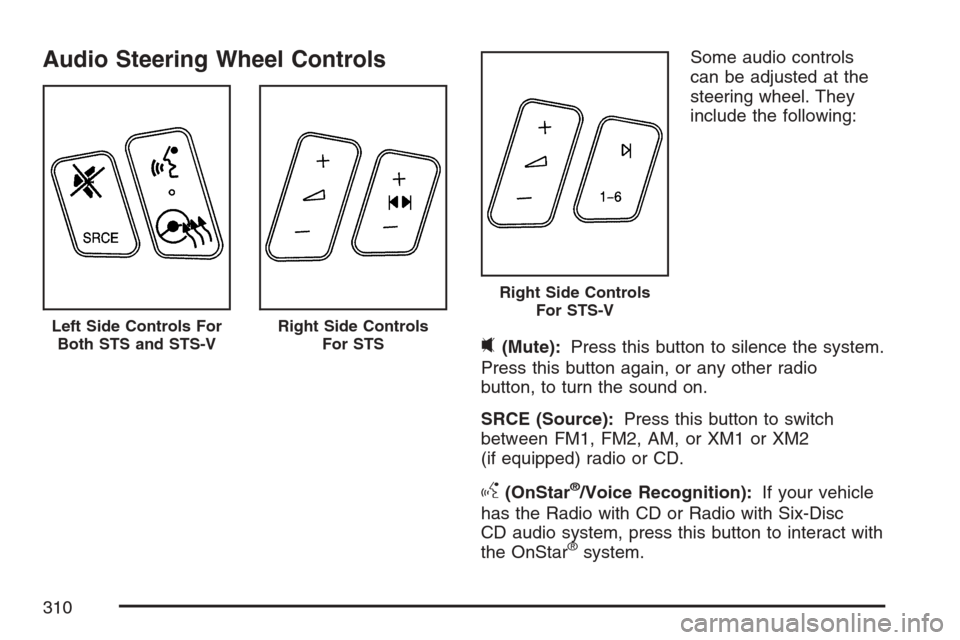
Audio Steering Wheel ControlsSome audio controls
can be adjusted at the
steering wheel. They
include the following:
0(Mute):Press this button to silence the system.
Press this button again, or any other radio
button, to turn the sound on.
SRCE (Source):Press this button to switch
between FM1, FM2, AM, or XM1 or XM2
(if equipped) radio or CD.
g(OnStar®/Voice Recognition):If your vehicle
has the Radio with CD or Radio with Six-Disc
CD audio system, press this button to interact with
the OnStar
®system.
Left Side Controls For
Both STS and STS-VRight Side Controls
For STS
Right Side Controls
For STS-V
310
Page 546 of 560

Appearance Care (cont.)
Vehicle Care/Appearance Materials.......... 484
Washing Your Vehicle.............................. 480
Weatherstrips........................................... 480
Windshield and Wiper Blades................... 481
Wood Panels........................................... 479
Ashtray(s).................................................... 229
Audio System(s).......................................... 280
Audio Steering Wheel Controls................. 310
Care of Your CD Player........................... 313
Care of Your CDs.................................... 313
Diversity Antenna System......................... 314
Navigation/Radio System, see
Navigation Manual................................ 305
Audio Systems
Radio Personalization............................... 305
Audio System(s)
Radio with CD......................................... 282
Setting the Time...................................... 281
Theft-Deterrent Feature............................ 309
Understanding Radio Reception............... 312
XM™ Satellite Radio Antenna System...... 314
Automatic Transmission
Fluid........................................................ 388
Operation................................................. 116B
Battery........................................................ 408
Electric Power Management..................... 221
Exterior Lighting Battery Saver................. 219
Inadvertent Power Saver.......................... 222
Load Management................................... 221
Before Leaving on a Long Trip.................... 340
Brake
Anti-Lock Brake System (ABS)................. 321
Emergencies............................................ 323
Panic Assist............................................. 327
Parking.................................................... 121
System Warning Light.............................. 248
Brakes........................................................ 405
Braking....................................................... 320
Braking in Emergencies............................... 323
Break-In, New Vehicle................................. 111
Bulb Replacement....................................... 417
Back-Up Lamps....................................... 418
Halogen Bulbs......................................... 418
High Intensity Discharge (HID) Lighting.... 418
Replacement Bulbs.................................. 419
Buying New Tires........................................ 441
546
Page 557 of 560
Securing a Child Restraint
Rear Seat Position..................................... 57
Right Front Seat Position........................... 59
Security Light.............................................. 256
Service........................................................ 362
Accessories and Modications.................. 363
Adding Equipment to the Outside of
Your Vehicle......................................... 365
California Proposition 65 Warning............. 363
Doing Your Own Work............................. 364
Engine Soon Light................................... 252
Publications Ordering Information............. 543
Servicing Your Airbag-Equipped Vehicle......... 78
Sheet Metal Damage................................... 483
Shifting Into Park (P)................................... 122
Shifting Out of Park (P)............................... 124
Shoulder Belt Height Adjuster........................ 29
Signals, Turn and Lane-Change.................. 182
Spare Tire
Compact.................................................. 475
Installing.................................................. 466
Removing................................................ 465
Storing..................................................... 473
Specications, Capacities............................ 498
Speedometer............................................... 243StabiliTrak®System..................................... 326
Starting Your Engine................................... 113
Steering...................................................... 327
Steering Wheel Controls, Audio................... 310
Steering Wheel Controls, Memory............... 169
Steering Wheel, Heated .............................. 181
Steering Wheel, Power Tilt Wheel and
Telescopic Steering Column..................... 181
Storage Areas
Center Console Storage Area................... 146
Convenience Net..................................... 146
Cupholder(s)............................................ 146
Glove Box................................................ 146
Stuck in Sand, Mud, Ice, or Snow............... 348
Sun Visors.................................................. 107
Sunroof....................................................... 147
T
Tachometer................................................. 243
TCS Warning Light...................................... 250
Telescopic Steering Column, Power
Tilt Wheel................................................ 181
Theft-Deterrent, Radio................................. 309
Theft-Deterrent System................................ 108
557