battery CADILLAC STS 2007 1.G Owner's Manual
[x] Cancel search | Manufacturer: CADILLAC, Model Year: 2007, Model line: STS, Model: CADILLAC STS 2007 1.GPages: 560, PDF Size: 2.92 MB
Page 255 of 560

Your vehicle will not pass this inspection if the OBD
(on-board diagnostic) system determines that
critical emission control systems have not been
completely diagnosed by the system. The vehicle
would be considered not ready for inspection.
This can happen if you have recently replaced the
battery or if the battery has run down. The
diagnostic system is designed to evaluate critical
emission control systems during normal driving.
This may take several days of routine driving. If you
have done this and your vehicle still does not pass
the inspection for lack of OBD system readiness,
your dealer can prepare the vehicle for inspection.
Oil Pressure Light
{CAUTION:
Do not keep driving if the oil pressure is
low. If you do, your engine can become so
hot that it catches re. You or others could
be burned. Check your oil as soon as
possible and have your vehicle serviced.Notice:Lack of proper engine oil maintenance
may damage the engine. The repairs would
not be covered by your warranty. Always follow
the maintenance schedule in this manual for
changing engine oil.
If equipped, this light
tells you if there could be
a problem with your
engine oil pressure.
This light will come on briey when you start your
engine. That is a check to be sure the light
works. If it does not come on, be sure to have it
xed so it will be there to warn you if something
goes wrong.
When the light comes on and stays on, it means
that oil is not owing through your engine properly.
You could be low on oil and you might have
some other system problem.
255
Page 259 of 560
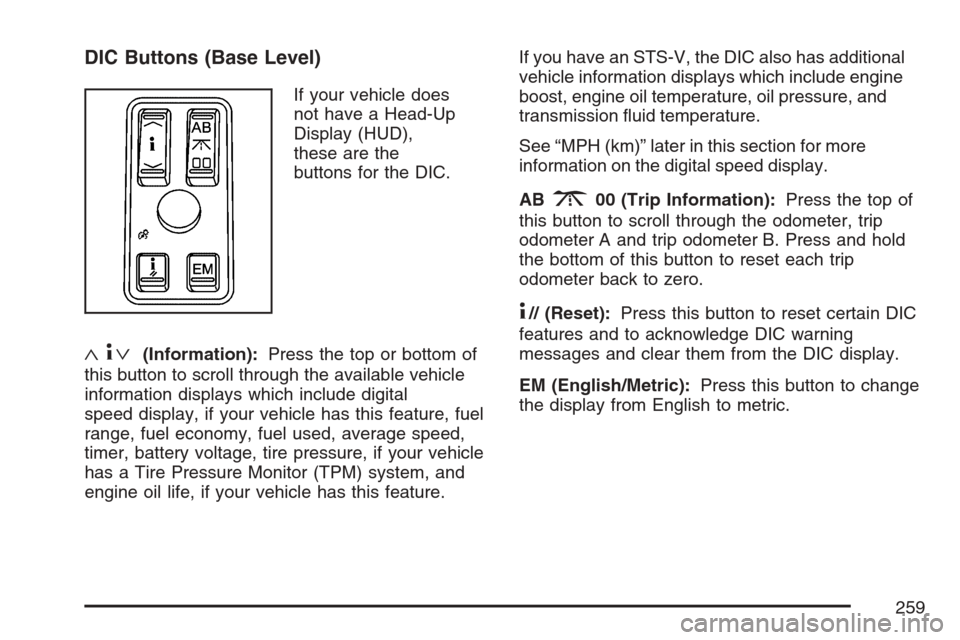
DIC Buttons (Base Level)
If your vehicle does
not have a Head-Up
Display (HUD),
these are the
buttons for the DIC.
«4ª(Information):Press the top or bottom of
this button to scroll through the available vehicle
information displays which include digital
speed display, if your vehicle has this feature, fuel
range, fuel economy, fuel used, average speed,
timer, battery voltage, tire pressure, if your vehicle
has a Tire Pressure Monitor (TPM) system, and
engine oil life, if your vehicle has this feature.If you have an STS-V, the DIC also has additional
vehicle information displays which include engine
boost, engine oil temperature, oil pressure, and
transmission uid temperature.
See “MPH (km)” later in this section for more
information on the digital speed display.
AB
300 (Trip Information):Press the top of
this button to scroll through the odometer, trip
odometer A and trip odometer B. Press and hold
the bottom of this button to reset each trip
odometer back to zero.
4// (Reset):Press this button to reset certain DIC
features and to acknowledge DIC warning
messages and clear them from the DIC display.
EM (English/Metric):Press this button to change
the display from English to metric.
259
Page 260 of 560
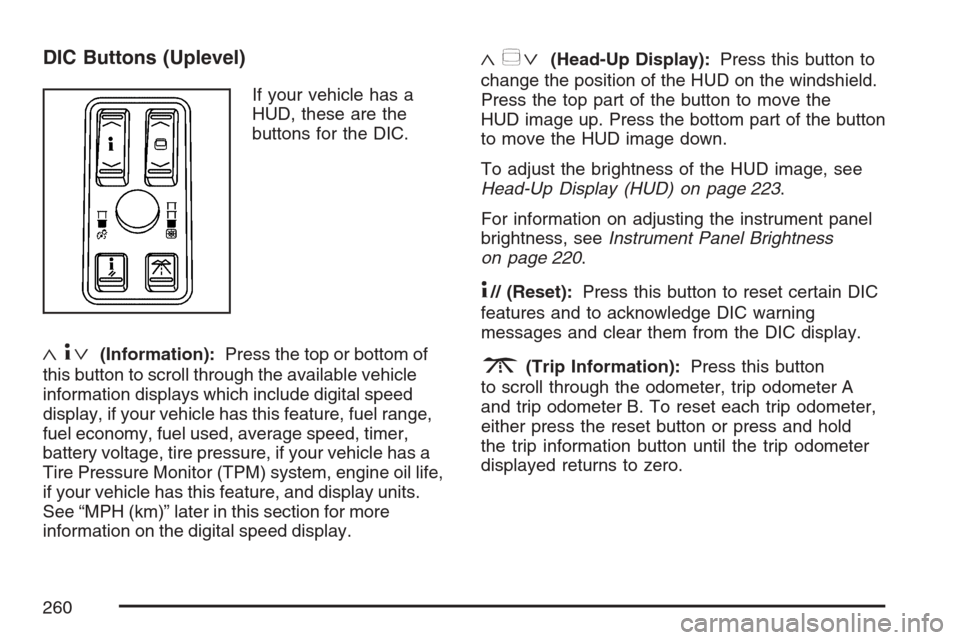
DIC Buttons (Uplevel)
If your vehicle has a
HUD, these are the
buttons for the DIC.
«4ª(Information):Press the top or bottom of
this button to scroll through the available vehicle
information displays which include digital speed
display, if your vehicle has this feature, fuel range,
fuel economy, fuel used, average speed, timer,
battery voltage, tire pressure, if your vehicle has a
Tire Pressure Monitor (TPM) system, engine oil life,
if your vehicle has this feature, and display units.
See “MPH (km)” later in this section for more
information on the digital speed display.
«~ª(Head-Up Display):Press this button to
change the position of the HUD on the windshield.
Press the top part of the button to move the
HUD image up. Press the bottom part of the button
to move the HUD image down.
To adjust the brightness of the HUD image, see
Head-Up Display (HUD) on page 223.
For information on adjusting the instrument panel
brightness, seeInstrument Panel Brightness
on page 220.
4// (Reset):Press this button to reset certain DIC
features and to acknowledge DIC warning
messages and clear them from the DIC display.
3(Trip Information):Press this button
to scroll through the odometer, trip odometer A
and trip odometer B. To reset each trip odometer,
either press the reset button or press and hold
the trip information button until the trip odometer
displayed returns to zero.
260
Page 262 of 560
AVG MPH (AVG km/h)
This display shows the average speed of the
vehicle in miles per hour (mph) or kilometers per
hour (km/h). This average is calculated based on
the various vehicle speeds recorded since the last
reset of this display. To reset AVG MPH, press the
reset button. The display will return to zero.
TIMER OFF
This display can be used like a stopwatch. You can
record the time it takes to travel from one point to
another. To access the timer, press the information
button until 00:00:00 TIMER OFF displays. To turn
on the timer, press the reset button until TIMER ON
displays. The timer will then start. To turn off the
timer, press the reset button again until TIMER OFF
displays. The timer will stop and display the end
timing value. To reset the timer, press and hold the
reset button after the timer has been stopped. The
display will return to zero.
BATTERY VOLTS
This display shows the current battery voltage.
If the voltage is in the normal range, the value will
display. For example, the display may read
13.2 BATTERY VOLTS. If the voltage is low, the
display will have LOW after it. If the voltage is high,the display will have HIGH after it. Your vehicle’s
charging system regulates voltage based on
the state of the battery. The battery voltage may
uctuate when viewing this information on the DIC.
This is normal. SeeCharging System Light on
page 247for more information.
If there is a problem with the battery charging
system, the DIC may display a message. SeeDIC
Warnings and Messages on page 264and
Electric Power Management on page 221for
more information.
Tire Pressure
If your vehicle has a Tire Pressure Monitor (TPM)
system, this display shows the air pressure of
each road tire in either pounds per square
inch (psi) or kilopascals (kPa). If the tire pressure
is normal, the value will display. If the tire
pressure is low, LOW will appear on the display
with the value. If the tire pressure is high,
HIGH will appear on the display with the value.
Press the information button to scroll through the
following displays:
LF TIRE:This display shows the air pressure in
the driver’s side front tire.
RF TIRE:This display shows the air pressure in
the passenger’s side front tire.
262
Page 265 of 560

AUTOMATIC LIGHTS OFF
This message displays when the automatic
headlamps are turned off. SeeHeadlamps on
page 211for more information.
AUTOMATIC LIGHTS ON
This message displays when the automatic
headlamps are turned on. SeeHeadlamps on
page 211for more information.
BATTERY NOT CHARGING SERVICE
CHARGING SYS (System)
This symbol appears
with this message.
This message displays when a problem with the
charging system has been detected. Have your
vehicle serviced by your dealer.
BATTERY SAVER ACTIVE
This message displays when the system detects
that the battery voltage is dropping beyond a
reasonable level. The battery saver system starts
reducing certain features of the vehicle that
you may be able to notice. At the point that the
features are disabled, this message is displayed.
It means that the vehicle is trying to save the
charge in the battery.
Turn off all unnecessary accessories to allow the
battery to recharge.
The normal battery voltage range is
11.5 to 15.5 volts. You can monitor battery voltage
on the DIC by pressing the information button
until you nd BATTERY VOLTS.
265
Page 266 of 560
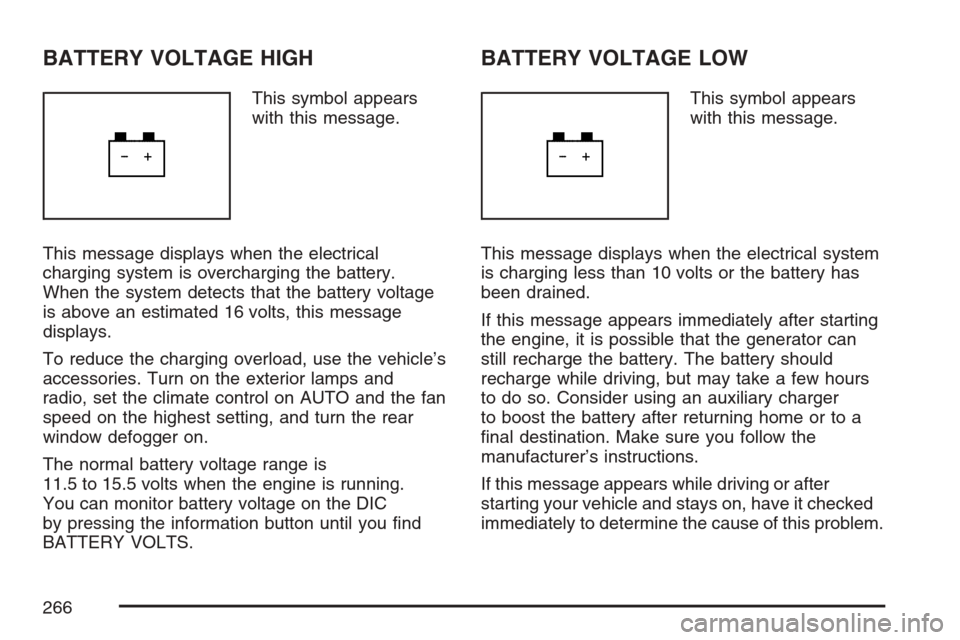
BATTERY VOLTAGE HIGH
This symbol appears
with this message.
This message displays when the electrical
charging system is overcharging the battery.
When the system detects that the battery voltage
is above an estimated 16 volts, this message
displays.
To reduce the charging overload, use the vehicle’s
accessories. Turn on the exterior lamps and
radio, set the climate control on AUTO and the fan
speed on the highest setting, and turn the rear
window defogger on.
The normal battery voltage range is
11.5 to 15.5 volts when the engine is running.
You can monitor battery voltage on the DIC
by pressing the information button until you nd
BATTERY VOLTS.
BATTERY VOLTAGE LOW
This symbol appears
with this message.
This message displays when the electrical system
is charging less than 10 volts or the battery has
been drained.
If this message appears immediately after starting
the engine, it is possible that the generator can
still recharge the battery. The battery should
recharge while driving, but may take a few hours
to do so. Consider using an auxiliary charger
to boost the battery after returning home or to a
nal destination. Make sure you follow the
manufacturer’s instructions.
If this message appears while driving or after
starting your vehicle and stays on, have it checked
immediately to determine the cause of this problem.
266
Page 267 of 560
To help the generator recharge the battery quickly,
you can reduce the load on the electrical system
by turning off the accessories.
The normal battery voltage range is
11.5 to 15.5 volts. You can monitor battery voltage
on the DIC by pressing the information button
until you nd BATTERY VOLTS.
CHANGE ENGINE OIL SOON
This message displays when service is required
for your vehicle. See your dealer. SeeEngine
Oil on page 380andScheduled Maintenance on
page 505for more information.
When you reset the CHANGE ENGINE OIL
SOON message by clearing it from the display,
you still must reset the engine oil life system
separately. For more information on resetting the
engine oil life system, seeEngine Oil Life
System on page 383.
CHECK BRAKE FLUID
This message displays if the ignition is on to
inform the driver that the brake uid level is low.
Have the brake system serviced by your dealer as
soon as possible. SeeBrake System Warning
Light on page 248for more information.
CHECK GAS CAP
This message displays when the fuel cap has not
been fully tightened. Recheck the fuel cap to
ensure that it is on and tightened properly.
CHECK TIRE PRESSURE
If your vehicle has a Tire Pressure Monitor (TPM)
system, this message displays when the tire
pressure in one of the tires needs to be checked.
SeeDIC Controls and Displays on page 258
for more information on checking your vehicle’s
tire pressures. If a tire pressure message appears
on the DIC, stop as soon as you can. Have the
tire pressures checked and set to those shown on
the Tire Loading Information label. SeeTire
Pressure Monitor System on page 433and
Ination - Tire Pressure on page 431for more
information. If the tire pressure is low, the low tire
pressure warning light comes on. SeeLow Tire
Pressure Warning Light on page 249.
267
Page 271 of 560

FUEL LEVEL LOW
This symbol appears
with this message.
This message displays when your vehicle is low
on fuel. Rell the fuel tank as soon as possible.
A single chime sounds when this message is
displayed.
HOOD AJAR
This symbol appears
with this message.
This message displays if the hood was not closed
completely. Make sure that the hood is closed
completely.
ICE POSSIBLE
This message displays when the outside
temperature is cold enough to create icy road
conditions. Adjust your driving accordingly.
KEY FOB BATTERY LOW
This message displays when the battery in the
keyless access transmitter is low. Replace
the battery in the transmitter. See “Battery
Replacement” underKeyless Access System
Operation on page 88.
LEFT REAR DOOR AJAR
This symbol appears
with this message.
This message displays if the driver’s side rear
door was not closed completely. Make sure that
the door is closed completely.
271
Page 272 of 560

NO FOBS DETECTED
This message displays if the vehicle does not
detect the presence of a keyless access
transmitter when you have attempted to start the
vehicle or a vehicle door has just closed. The
following conditions may cause this message
to appear:
Driver-added equipment plugged into the
accessory power outlet on the center console
is causing interference. Examples of these
devices are cell phones and cell phone
chargers, two-way radios, power inverters, or
similar items. Try moving the keyless
access transmitter away from these devices
when starting the vehicle. In addition,
PDA devices and remote garage and gate
openers may also generate Electromagnetic
Interference (EMI) that may interfere with
the keyless access transmitter. Do not carry
the keyless access transmitter in the same
pocket or bag as these devices.
The vehicle is experiencing Electromagnetic
Interference (EMI). Some locations, such as
airports, automatic toll booths, and some
gas stations, have EMI elds which may
interfere with the keyless access transmitter.
If moving the transmitter
to different locations
within the vehicle does
not help, place the
transmitter in the center
console transmitter
pocket with the buttons
facing forward and
then press the
START button.
The vehicle’s battery voltage is low. The
battery voltage must be above 10 volts for
the keyless access transmitter to be
detected properly.
272
Page 286 of 560

5. Press the tune/select knob to select.
AUTOSTORE displays. The radio
automatically searches the band and selects
and stores the six radio stations with the
strongest signal. The stations are stored by
signal strength, not sequential order. The
set preset station number displays above the
set pushbutton. Whenever that numbered
pushbutton is pressed for less than
two seconds, the station that was
set returns.
6. Press the BACK (F6) button to exit the
display. To return to the original display,
repeatedly press the BACK (F6) button or wait
for the display to time out.
This feature does not function with the XM™
radio stations.
The radio presets do not have to be reset when
the vehicle is started, or when the battery power
is removed.PRESETS HOME/AWAY:This feature stores
two different kinds of station presets. HOME
can be used for local stations and AWAY for
stations outside of the local broadcasting area.
To set preset stations for home and away perform
the following steps:
1. Press the tune/select knob to enter the
main menu.
2. Turn the tune/select knob until PRESETS
HOME/AWAY displays.
3. Press the tune/select knob to select.
HOME or AWAY displays.
4. Press the BACK (F6) button to exit the
display. To return to the original display,
repeatedly press the BACK (F6) button or wait
for the display to time out.
This feature does not function with the XM™ radio
stations.
Follow the manual or automatic steps previously
listed for setting the preset pushbuttons for
both home and away.
286