ignition CADILLAC STS 2007 1.G Owner's Manual
[x] Cancel search | Manufacturer: CADILLAC, Model Year: 2007, Model line: STS, Model: CADILLAC STS 2007 1.GPages: 560, PDF Size: 2.92 MB
Page 154 of 560

REMOTE RECALL MEMORY
If your vehicle has the optional memory package,
you will have this feature. When this feature is
turned on, you can recall any previously
programmed seat position and mirror position
when the unlock button on the keyless access
transmitter is pressed.
Programmable Modes
Mode 1:ON
Mode 2:OFF
Before your vehicle was shipped from the factory,
it was programmed to Mode 2 with the exception
of recall seat to driver position which is on.
The mode to which the vehicle was programmed
may have been changed since it left the factory.
To program the vehicle to a different mode,
use the following procedure:
1. Enter the PERSONAL SETTINGS MENU by
following the instructions listed previously
under “Entering the Personal Settings Menu.”
2. Turn the tune/select knob until REMOTE
RECALL MEMORY is highlighted.3. Press the tune/select knob to switch back and
forth between on and off.
When the mode is turned on, a check mark
will appear next to the feature name.
If this feature is selected, START BUTTON
RECALL cannot be selected.
The mode you selected is now set. You can either
exit the programming mode by following the
instructions later in this section or program the
next feature available on your vehicle.
START BUTTON RECALL
If your vehicle has the optional memory package,
you will have this feature. When this feature is
turned on, you can recall any previously
programmed seat, mirror, and steering column
position when the start button on the ignition
is pressed.
154
Page 159 of 560
EXT. (Exterior) LIGHTS AT UNLOCK
This feature turns on the exterior lamps when the
keyless access transmitter is used to unlock
the vehicle. The lamps will remain on for about
20 seconds unless a door is opened, the ignition is
in Acc., on, or START, or the keyless access
transmitter is used to lock the vehicle.
Programmable Modes
Mode 1:ON
Mode 2:OFF
Before your vehicle was shipped from the factory,
it was programmed to Mode 1. The mode to
which the vehicle was programmed may have
been changed since it left the factory.
To program the vehicle to a different mode, use
the following procedure:
1. Enter the PERSONAL SETTINGS MENU by
following the instructions listed previously
under “Entering the Personal Settings Menu.”
2. Turn the tune/select knob until EXT. LIGHTS
AT UNLOCK is highlighted.3. Press the tune/select knob to switch back and
forth between on and off.
When the mode is turned on, a check mark
will appear next to the feature name.
The mode you selected is now set. You can either
exit the programming mode by following the
instructions later in this section or program the
next feature available on your vehicle.
HORN CHIRPS AT LOCK
This feature sounds the horn once when the
keyless access transmitter is used to lock
the vehicle. All doors must be closed for this
feature to work.
Programmable Modes
Mode 1:ON
Mode 2:OFF
Before your vehicle was shipped from the factory,
it was programmed to Mode 2. The mode to
which the vehicle was programmed may have
been changed since it left the factory.
159
Page 161 of 560
To determine the mode to which the vehicle is
programmed or to program the vehicle to a
different mode, use the following procedure:
1. Enter the PERSONAL SETTINGS MENU by
following the instructions listed previously
under “Entering the Personal Settings Menu.”
2. Turn the tune/select knob until TWILIGHT
DELAY is highlighted.
3. Press the tune/select knob to scroll through
the available delay settings and set your
selection.
If you choose Mode 1, the exterior lamps will
not illuminate when you exit the vehicle.
Only one mode can be selected at a time.
The mode you selected is now set. You can either
exit the programming mode by following the
instructions later in this section or program the
next feature available on your vehicle.
DRIVER UNLOCK AT OFF
This feature allows the driver’s door to
automatically unlock when the ignition is
turned off.Programmable Modes
Mode 1:ON
Mode 2:OFF
Before your vehicle was shipped from the factory,
it was programmed to Mode 2. The mode to
which the vehicle was programmed may have
been changed since it left the factory.
To program the vehicle to a different mode, use
the following procedure:
1. Enter the PERSONAL SETTINGS MENU by
following the instructions listed previously
under “Entering the Personal Settings Menu.”
2. Turn the tune/select knob until DRIVER
UNLOCK AT OFF is highlighted.
3. Press the tune/select knob to switch between
on and off.
When the mode is turned on, a check mark
will appear next to the feature name.
The mode you selected is now set. You can either
exit the programming mode by following the
instructions later in this section or program the
next feature available on your vehicle.
161
Page 162 of 560

DOORS UNLOCK AT OFF
This feature allows all of the doors to automatically
unlock when the ignition is turned off.
Programmable Modes
Mode 1:ON
Mode 2:OFF
Before your vehicle was shipped from the factory,
it was programmed to Mode 2. The mode to
which the vehicle was programmed may have
been changed since it left the factory.
To program the vehicle to a different mode, use
the following procedure:
1. Enter the PERSONAL SETTINGS MENU by
following the instructions listed previously
under “Entering the Personal Settings Menu.”
2. Turn the tune/select knob until DOORS
UNLOCK AT OFF is highlighted.
3. Press the tune/select knob to switch between
on and off.
When the mode is turned on, a check mark
will appear next to the feature name.The mode you selected is now set. You can either
exit the programming mode by following the
instructions later in this section or program the
next feature available on your vehicle.
DRIVER UNLOCK IN PARK
The feature allows the driver’s door to
automatically unlock when the transmission is
shifted into PARK (P).
Programmable Modes
Mode 1:ON
Mode 2:OFF
Before your vehicle was shipped from the factory,
it was programmed to Mode 2. The mode to
which the vehicle was programmed may have
been changed since it left the factory.
To program the vehicle to a different mode, use
the following procedure:
1. Enter the PERSONAL SETTINGS MENU by
following the instructions listed previously
under “Entering the Personal Settings Menu.”
2. Turn the tune/select knob until DRIVER
UNLOCK IN PARK is highlighted.
162
Page 166 of 560

KEYLESS LOCK DELAY
This feature allows you to select whether the
doors automatically lock during normal vehicle exit.
When the ignition is turned off and all doors
become closed, the vehicle will determine how
many keyless access transmitters remain in
the vehicle interior. If at least one keyless access
transmitter has been removed from the interior
of the vehicle, the doors will lock after 10 seconds.
For example, if there are two keyless access
transmitters in the vehicle and one is removed, the
other will be locked in. The keyless access
transmitter locked in the vehicle can still be used
to start the vehicle or unlock the doors, if
needed. A person approaching the outside of the
locked vehicle without an authorized keyless
access transmitter, however, will not be able to
open the door, even with a transmitter in the
vehicle.
You may temporarily disable the passive door
locking feature by pressing the door unlock switch
for three seconds on an open door. Passive
door locking will then remain disabled until a door
lock switch is pressed or until the power mode
transitions from the off power mode.Programmable Modes
Mode 1:ON
Mode 2:OFF
Before your vehicle was shipped from the factory,
it was programmed to Mode 2. The mode to
which the vehicle was programmed may have
been changed since it left the factory.
To program the vehicle to a different mode, use
the following procedure:
1. Enter the PERSONAL SETTINGS MENU by
following the instructions listed previously
under “Entering the Personal Settings Menu.”
2. Turn the tune/select knob until KEYLESS
LOCK DELAY is highlighted.
3. Press the tune/select knob to switch back and
forth between on and off.
When the mode is turned on, a check mark
will appear next to the feature name.
The mode you selected is now set. You can either
exit the programming mode by following the
instructions later in this section or program the
next feature available on your vehicle.
166
Page 170 of 560

For vehicles with the Navigation system, memory
features are programmed and recalled through
the navigation display. See “Personalization” in the
Index of the Navigation System manual for more
information on programming and recalling the
memory settings using the Navigation system.
For vehicles with the Navigation system, you can
also recall the memory features by using voice
recognition, if your vehicle has this feature.
See “Voice Recognition” in the Index of the
Navigation System manual for more information.
Entering the Driver Selection
Submenu
To enter the memory programming mode for your
driver settings, use the following procedure:
1. Be sure the ignition is either on, in Acc., or in
RAP and place the transmission in PARK (P)
or make sure that the vehicle speed is
less than 6 mph (9 km/h).
2. Press any button on the appropriate keyless
access transmitter to identify yourself as
Driver 1 or Driver 2.3. Turn on the radio by pressing the
power/volume knob.
4. Press the CNFG radio button to enter the
main menu of the radio.
5. Turn the tune/select knob and scroll to
SETUP.
6. Press the tune/select knob to enter the
SETUP menu.
7. Turn the tune/select knob and scroll to
DRIVER SELECTION.
8. Press the tune/select knob to enter the
DRIVER SELECTION submenu. The following
items will appear:DRIVER 1
DRIVER 2
RECALL DRIVER SETTINGS
STORE DRIVER SETTINGS
170
Page 172 of 560

STORE DRIVER SETTINGS
To store driver settings, use the following
procedure:
1. Adjust your settings for the driver’s seat, the
outside rearview mirrors, and the steering
column to a comfortable driving position.
2. Enter the memory programming mode for
your driver settings by following the
instructions listed previously under “Entering
the Driver Selection Submenu.”
3. From the DRIVER SELECTION submenu,
turn the tune/select knob to scroll to STORE
DRIVER SETTINGS and press in the
knob. Two beeps will sound to conrm that
your driver settings are saved.
4. Set the HUD position, if your vehicle has this
feature, the climate control temperature, fan
speed and mode settings, the radio presets,
tone, volume, playback mode (AM/FM,
XM™, or CD), and compact disc position.
Your memory settings are now programmed.
Any changes that are made to the HUD,
audio system, and climate controls while
driving will be automatically stored when the
ignition is turned off.
5. Repeat the procedure for a second driver by
programming the other driver number.
Entering the Driver Exit Settings
Submenu
To enter the memory programming mode for your
exit settings, use the following procedure:
1. Be sure the ignition is either on, in Acc., or in
RAP and place the transmission in PARK (P)
or make sure that the vehicle speed is
less than 6 mph (9 km/h).
2. Press any button on the appropriate keyless
access transmitter to identify yourself as
Driver 1 or Driver 2.
3. Turn on the radio by pressing the
power/volume knob.
4. Press the CNFG radio button to enter the
main menu of the radio.
5. Turn the tune/select knob and scroll to SETUP.
6. Press the tune/select knob to enter the
SETUP menu.
7. Turn the tune/select knob and scroll to
DRIVER EXIT SETTINGS.
8. Press the tune/select knob to enter the
DRIVER EXIT SETTINGS submenu.
The following items will appear:
RECALL EXIT SETTINGS
STORE EXIT SETTINGS
172
Page 179 of 560
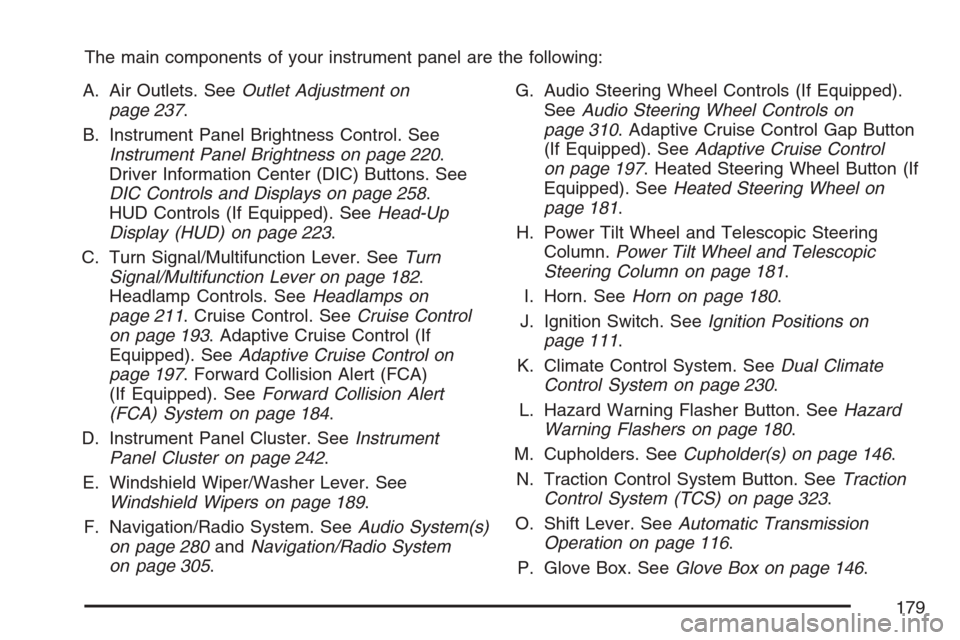
The main components of your instrument panel are the following:
A. Air Outlets. SeeOutlet Adjustment on
page 237.
B. Instrument Panel Brightness Control. See
Instrument Panel Brightness on page 220.
Driver Information Center (DIC) Buttons. See
DIC Controls and Displays on page 258.
HUD Controls (If Equipped). SeeHead-Up
Display (HUD) on page 223.
C. Turn Signal/Multifunction Lever. SeeTurn
Signal/Multifunction Lever on page 182.
Headlamp Controls. SeeHeadlamps on
page 211. Cruise Control. SeeCruise Control
on page 193. Adaptive Cruise Control (If
Equipped). SeeAdaptive Cruise Control on
page 197. Forward Collision Alert (FCA)
(If Equipped). SeeForward Collision Alert
(FCA) System on page 184.
D. Instrument Panel Cluster. SeeInstrument
Panel Cluster on page 242.
E. Windshield Wiper/Washer Lever. See
Windshield Wipers on page 189.
F. Navigation/Radio System. SeeAudio System(s)
on page 280andNavigation/Radio System
on page 305.G. Audio Steering Wheel Controls (If Equipped).
SeeAudio Steering Wheel Controls on
page 310. Adaptive Cruise Control Gap Button
(If Equipped). SeeAdaptive Cruise Control
on page 197. Heated Steering Wheel Button (If
Equipped). SeeHeated Steering Wheel on
page 181.
H. Power Tilt Wheel and Telescopic Steering
Column.Power Tilt Wheel and Telescopic
Steering Column on page 181.
I. Horn. SeeHorn on page 180.
J. Ignition Switch. SeeIgnition Positions on
page 111.
K. Climate Control System. SeeDual Climate
Control System on page 230.
L. Hazard Warning Flasher Button. SeeHazard
Warning Flashers on page 180.
M. Cupholders. SeeCupholder(s) on page 146.
N. Traction Control System Button. SeeTraction
Control System (TCS) on page 323.
O. Shift Lever. SeeAutomatic Transmission
Operation on page 116.
P. Glove Box. SeeGlove Box on page 146.
179
Page 196 of 560

Reducing Speed While Using Cruise
Control
There are two ways to reduce your speed while
using cruise control:
Press in the button at the end of the lever until
you reach the lower speed desired, then
release it.
To slow down in very small amounts, briey
press the set button. Each time you do this,
you will go about 1 mph (1.6 km/h) slower.
Passing Another Vehicle While Using
Cruise Control
Use the accelerator pedal to increase your speed.
When you take your foot off the pedal, the
vehicle will slow down to the cruise control speed
you set earlier.
Using Cruise Control on Hills
How well the cruise control works on hills depends
upon the vehicle speed, load, and the steepness of
the hills. When going up steep hills, you might have
to step on the accelerator pedal to maintain the
vehicle’s speed. When going downhill, you might
have to brake to keep the vehicle’s speed down.
Applying the brake will turn off the cruise control. If
you need to apply the brake due to the grade of the
downhill slope, you might not want to attempt to use
your cruise control feature.
Ending Cruise Control
To end a cruise control session, step lightly on the
brake pedal.
Stepping on the brake pedal will end the current
cruise control session only. Move the cruise control
switch to off to turn off the system completely.
Erasing Speed Memory
When you turn off the cruise control or the
ignition, the cruise control set speed memory
is erased.
196
Page 210 of 560

Other Vehicle Lane Changes
If another vehicle enters the same lane as you,
Adaptive Cruise Control will not detect the vehicle
until it is completely in the lane. Be ready to
take action and apply the brakes yourself.
Using Adaptive Cruise Controls on Hills
and When Towing a Trailer
How well Adaptive Cruise Control will work on hills
and when towing a trailer depends on your
speed, vehicle load, traffic conditions and thesteepness of the hills. It may not detect a vehicle
in your lane while driving on hills. When going
up steep hills, you may want to use the accelerator
pedal to maintain your speed. When going
downhill when towing a trailer, you may want to
brake to keep your speed down. Applying the
brake disengages the system. You may choose
not to use Adaptive Cruise Control on steep
hills when towing a trailer.
Disengaging Adaptive Cruise Control
To disengage the system, apply the brake pedal
or move the Adaptive Cruise Control switch to
off. Adaptive Cruise Control information will
not appear on the HUD when the system is not
engaged.
Erasing Set Speed Memory
When you turn the Adaptive Cruise Control switch
or the ignition off, the set speed memory is erased.
210