battery CADILLAC STS 2008 1.G User Guide
[x] Cancel search | Manufacturer: CADILLAC, Model Year: 2008, Model line: STS, Model: CADILLAC STS 2008 1.GPages: 500, PDF Size: 5.81 MB
Page 133 of 500
To change feature preferences, use the following
procedure.
Entering the Personal Settings Menu
To enter the feature programming mode:
1. Be sure the ignition is either on, in ACCESSORY,
or in RAP and place the transmission in PARK (P)
or make sure that the vehicle speed is less than
6 mph (9 km/h).
To avoid excessive drain on the battery, it is
recommended that the headlamps are turned off.
2. Press any button on the appropriate keyless
access transmitter to identify yourself as
Driver 1 or Driver 2.
Turn on the radio by pressing the
power/volume knob.
3. Press the CNFG radio button or the tune/select
knob located on the right side of the radio to
enter the radio’s main menu.
4. Turn the tune/select knob and scroll to SETUP.5. Press the tune/select knob to enter the SETUP menu.
6. Turn the tune/select knob and scroll to PERSONAL
SETTINGS MENU, then press the tune/select knob
to turn the feature on. A check mark appears
after this selection when it is turned on and the
entire list of personalization features will appear.
7. Turn the tune/select knob and scroll to the feature
you want to change, then press the tune/select
knob to turn the feature on or off. If the feature is
turned on, a check mark will appear next to the
feature name.
Some features have submenus that show
additional features that can be turned on or off.
After entering a submenu, turn the tune/select knob
and scroll to the feature you want to change,
then press the tune/select knob to turn the feature
on or off.
2-61
Page 155 of 500
Instrument Panel Overview...............................3-4
Hazard Warning Flashers................................3-6
Other Warning Devices...................................3-6
Horn.............................................................3-6
Power Tilt Wheel and Telescopic
Steering Column.........................................3-7
Heated Steering Wheel...................................3-7
Turn Signal/Multifunction Lever.........................3-8
Turn and Lane-Change Signals........................3-8
Headlamp High/Low-Beam Changer..................3-9
Forward Collision Alert (FCA) System..............3-10
Flash-to-Pass...............................................3-13
Windshield Wipers........................................3-14
Rainsense™ II Wipers...................................3-15
Windshield Washer.......................................3-16
Headlamp Washer........................................3-16
Cruise Control..............................................3-17
Adaptive Cruise Control.................................3-20
Headlamps..................................................3-33
Wiper Activated Headlamps............................3-37Headlamps on Reminder................................3-37
Daytime Running Lamps (DRL).......................3-37
Fog Lamps..................................................3-39
Twilight Sentinel
®..........................................3-39
Exterior Lighting Battery Saver........................3-40
Instrument Panel Brightness...........................3-41
Entry Lighting...............................................3-41
Parade Dimming...........................................3-41
Reading Lamps............................................3-42
Battery Load Management.............................3-42
Electric Power Management...........................3-42
Inadvertent Power Battery Saver.....................3-43
Head-Up Display (HUD).................................3-43
Accessory Power Outlet(s).............................3-46
Ashtray(s) and Cigarette Lighter......................3-47
Climate Controls............................................3-48
Dual Climate Control System..........................3-48
Outlet Adjustment.........................................3-54
Rear Climate Control System.........................3-54
Passenger Compartment Air Filter...................3-55
Section 3 Instrument Panel
3-1
Page 194 of 500
If you start your vehicle in a dark garage, the automatic
headlamp system will come on immediately. Once you
leave the garage, it will take about one minute for the
automatic headlamp system to change to DRL if it is
light outside. During that delay, the instrument panel
cluster might not be as bright as usual. Make sure the
instrument panel brightness control is in full bright
position. SeeInstrument Panel Brightness on page 3-41
for more information.
You can idle the vehicle with the lamps off, even when
it is dark outside. First set the parking brake while
the ignition is in OFF/ACCESSORY. Then start the
vehicle. The lamps will stay off until the parking brake
is released.
Twilight Sentinel
®also provides exterior illumination
as you leave the vehicle. If Twilight Sentinel®has
turned on the lamps when you turn off the ignition,
the lamps will remain on until:
The exterior lamp switch is moved from off to
the parking lamp position.
A delay time that you select has elapsed.SeeVehicle Personalization on page 2-60to select
the delay time that you want. You can also select
no delay time.
If the ignition is turned off with the exterior lamp switch
in the parking lamp or headlamp position, the Twilight
Sentinel
®delay will not occur. The lamps will turn off
as soon as the switch is turned off.
As with any vehicle, the regular headlamp system
should be turned on when needed.
Exterior Lighting Battery Saver
If the parking lamps or headlamps have been left on,
the exterior lamps will turn off about 10 minutes after
the ignition is turned off. This protects against draining
the battery in case you have accidentally left the
headlamps or parking lamps on. The battery saver
does not work if the headlamps are turned on after
the ignition is turned off.
If you need to leave the lamps on for more than
10 minutes, use the exterior lamp control to turn
the lamps back on.
3-40
Page 196 of 500
Reading Lamps
The reading lamps are located on the overhead console.
These lamps come on automatically when any door is
opened.
For manual operation, press the button next to each
lamp to turn it on or off.
If the reading lamps are left on, they automatically shut
off 10 minutes after the ignition has been turned off.
Battery Load Management
The battery load management feature is designed to
monitor the vehicle’s electrical load and determine when
the battery is in a heavy discharge condition. During
times of high electrical loading, the engine may idle
at a higher revolutions per minute (rpm) setting
than normal to make sure the battery charges.
High electrical loads may occur when several of the
following are on: headlamps, high beams, fog lamps,
rear window defogger, the climate control fan at
high speeds, heated seats and engine cooling fans.If the battery continues to discharge, even with the
engine idling at a higher rpm setting, some electrical
loads will automatically be reduced. When this occurs,
the rear window defogger may take slightly longer
to clear the glass and the fan may cut back to a lower
speed. For more battery saving information, see
“Battery Saver Active Message” underDIC Warnings
and Messages on page 3-80.
Electric Power Management
The vehicle has Electric Power Management (EPM)
that estimates the battery’s temperature and state
of charge. It then adjusts the voltage for best
performance and extended life of the battery.
When the battery’s state of charge is low, the voltage
is raised slightly to quickly put the charge back in.
When the state of charge is high, the voltage is lowered
slightly to prevent overcharging. If the vehicle has a
voltmeter gage or a voltage display on the Driver
Information Center (DIC), you may see the voltage
move up or down. This is normal. If there is a problem,
an alert will be displayed.
3-42
Page 197 of 500
The battery can be discharged at idle if the electrical
loads are very high. This is true for all vehicles.
This is because the generator (alternator) may not be
spinning fast enough at idle to produce all the power
that is needed for very high electrical loads.
A high electrical load occurs when several of the
following loads are on: headlamps, high beams, fog
lamps, rear window defogger, climate control fan at
high speed, heated seats, engine cooling fans, trailer
loads, and loads plugged into accessory power outlets.
EPM works to prevent excessive discharge of the
battery. It does this by balancing the generator’s output
and the vehicle’s electrical needs. It can increase
engine idle speed to generate more power, whenever
needed. It can temporarily reduce the power demands
of some accessories.
Normally, these actions occur in steps or levels, without
being noticeable. In rare cases at the highest levels
of corrective action, this action may be noticeable to
the driver. If so, a Driver Information Center (DIC)
message might be displayed, such as Battery Saver
Active or Service Battery Charging System. If this
message is displayed, it is recommended that the
driver reduce the electrical loads as much as possible.
SeeDIC Warnings and Messages on page 3-80.Inadvertent Power Battery Saver
This feature is designed to protect your vehicle’s battery
against drainage from the interior lamps, trunk lamp,
glove box lamp, or the garage door opener. When the
ignition is turned off, the power to these features will
automatically turn off after 10 minutes (three minutes if
a new car has 15 miles (24 km) or less). Power will
be restored for an additional 10 minutes if any door is
opened, the trunk is opened or the courtesy lamp switch
is turned on.
Head-Up Display (HUD)
{CAUTION:
If the HUD image is too bright, or too high in
your eld of view, it may take you more time
to see things you need to see when it is dark
outside. Be sure to keep the HUD image dim
and placed low in your eld of view.
For vehicles with the Head-Up Display (HUD), it projects
some of the driver information that appears on the
instrument panel cluster onto the windshield.
3-43
Page 201 of 500
Notice:Leaving electrical equipment plugged in for
an extended period of time while the vehicle is off
will drain the battery. Power is always supplied
to the outlets. Always unplug electrical equipment
when not in use and do not plug in equipment
that exceeds the maximum 20 ampere rating.
Certain accessory power plugs may not be compatible
to the accessory power outlet and could result in
blown vehicle or adapter fuses. If you experience a
problem, see your dealer for additional information on
the accessory power outlets.
Notice:Adding any electrical equipment to your
vehicle may damage it or keep other components
from working as they should. The repairs would
not be covered by your warranty. Do not use
equipment exceeding maximum amperage rating
of 20 amperes. Check with your dealer/retailer
before adding electrical equipment.
Follow the proper installation instructions that are
included with any electrical equipment you install.
Notice:Improper use of the power outlet can
cause damage not covered by your warranty.
Do not hang any type of accessory or accessory
bracket from the plug because the power outlets
are designed for accessory power plugs only.Ashtray(s) and Cigarette Lighter
Your vehicle may have an ashtray and cigarette lighter.
Notice:If you put papers, pins, or other ammable
items in the ashtray, hot cigarettes or other smoking
materials could ignite them and possibly damage
your vehicle. Never put ammable items in the
ashtray.
Ashtray
For vehicles with an ashtray, it is located under the
climate control panel on the center console. Press
on the door to release the ashtray. The ashtray
automatically slides open for use.
To empty the ashtray with the ashtray in full open
position, locate the release button to the right of the ash
receiver and slide it to the right (in the direction of the
arrow). The ash receiver will unlock and lift slightly and
can then be easily removed from the housing. To replace
the ash receiver, place it into position in the ashtray
housing and push down rmly until it locks into place.
3-47
Page 224 of 500
Emissions Inspection and
Maintenance Programs
Some state/provincial and local governments have or
might begin programs to inspect the emission control
equipment on your vehicle. Failure to pass this
inspection could prevent you from getting a vehicle
registration.
Here are some things you need to know to help your
vehicle pass an inspection:
Your vehicle will not pass this inspection if the check
engine light is on or not working properly.
To perform a check engine light bulb check with the
keyless ignition, make sure the transmitter fob is in the
passenger compartment. SeeIgnition Positions on
page 2-28. Press the bottom of the Acc. button on the
instrument panel and hold the button down for ve
seconds. The instrument panel, including the check
engine light, will light up and the ignition will be on,
but the engine will not start — if you press the bottom
of the Acc. button only briey, less than ve seconds,
the accessory power mode will be turned on, but not
the ignition. After the bulb check, be sure to press and
release the Acc. button again to turn the ignition off
and avoid draining the vehicle’s battery.Your vehicle will not pass this inspection if the OBD
(on-board diagnostic) system determines that critical
emission control systems have not been completely
diagnosed by the system. The vehicle would be
considered not ready for inspection. This can happen if
you have recently replaced the battery or if the battery
has run down. The diagnostic system is designed to
evaluate critical emission control systems during normal
driving. This may take several days of routine driving.
If you have done this and your vehicle still does not pass
the inspection for lack of OBD system readiness, your
dealer/retailer can prepare the vehicle for inspection.
Oil Pressure Light
Your vehicle may have
this feature.
3-70
Page 229 of 500
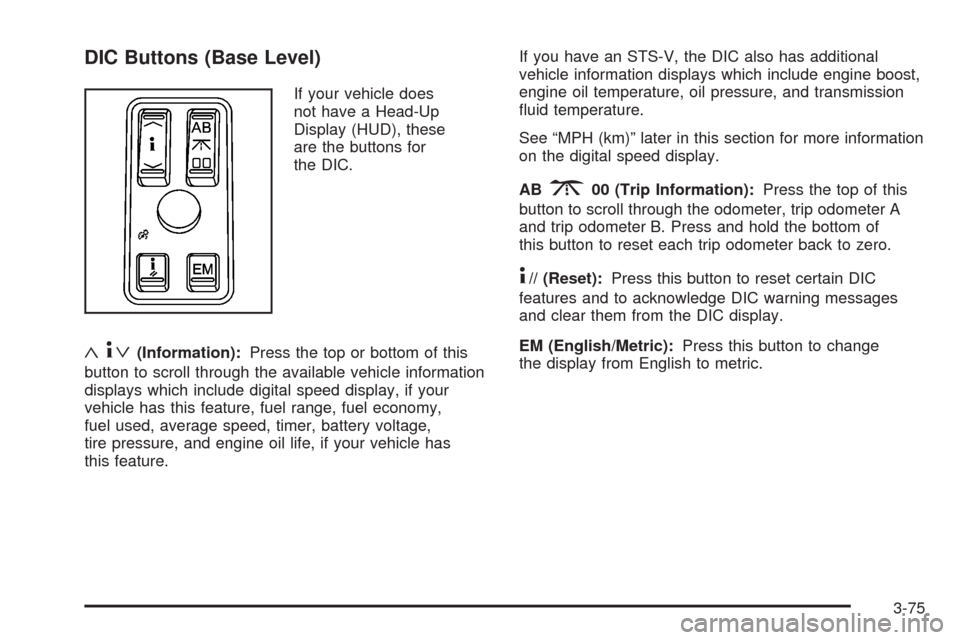
DIC Buttons (Base Level)
If your vehicle does
not have a Head-Up
Display (HUD), these
are the buttons for
the DIC.
«4ª(Information):Press the top or bottom of this
button to scroll through the available vehicle information
displays which include digital speed display, if your
vehicle has this feature, fuel range, fuel economy,
fuel used, average speed, timer, battery voltage,
tire pressure, and engine oil life, if your vehicle has
this feature.If you have an STS-V, the DIC also has additional
vehicle information displays which include engine boost,
engine oil temperature, oil pressure, and transmission
uid temperature.
See “MPH (km)” later in this section for more information
on the digital speed display.
AB
300 (Trip Information):Press the top of this
button to scroll through the odometer, trip odometer A
and trip odometer B. Press and hold the bottom of
this button to reset each trip odometer back to zero.
4// (Reset):Press this button to reset certain DIC
features and to acknowledge DIC warning messages
and clear them from the DIC display.
EM (English/Metric):Press this button to change
the display from English to metric.
3-75
Page 230 of 500
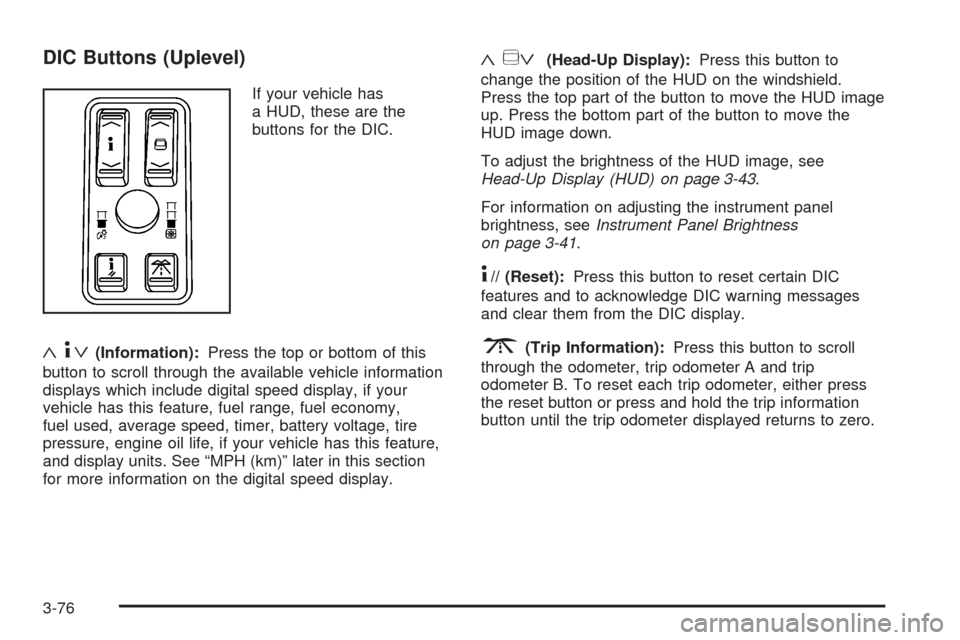
DIC Buttons (Uplevel)
If your vehicle has
a HUD, these are the
buttons for the DIC.
«4ª(Information):Press the top or bottom of this
button to scroll through the available vehicle information
displays which include digital speed display, if your
vehicle has this feature, fuel range, fuel economy,
fuel used, average speed, timer, battery voltage, tire
pressure, engine oil life, if your vehicle has this feature,
and display units. See “MPH (km)” later in this section
for more information on the digital speed display.
«~ª(Head-Up Display):Press this button to
change the position of the HUD on the windshield.
Press the top part of the button to move the HUD image
up. Press the bottom part of the button to move the
HUD image down.
To adjust the brightness of the HUD image, see
Head-Up Display (HUD) on page 3-43.
For information on adjusting the instrument panel
brightness, seeInstrument Panel Brightness
on page 3-41.
4// (Reset):Press this button to reset certain DIC
features and to acknowledge DIC warning messages
and clear them from the DIC display.
3(Trip Information):Press this button to scroll
through the odometer, trip odometer A and trip
odometer B. To reset each trip odometer, either press
the reset button or press and hold the trip information
button until the trip odometer displayed returns to zero.
3-76
Page 232 of 500
TIMER OFF
This display can be used like a stopwatch. You can
record the time it takes to travel from one point to
another. To access the timer, press the information
button until 00:00:00 TIMER OFF displays. To turn
on the timer, press the reset button until TIMER
ON displays. The timer will then start. To turn off
the timer, press the reset button again until TIMER OFF
displays. The timer will stop and display the end
timing value. To reset the timer, press and hold
the reset button after the timer has been stopped.
The display will return to zero.
BATTERY VOLTS
This display shows the current battery voltage. If the
voltage is in the normal range, the value will display. For
example, the display may read 13.2 BATTERY VOLTS.
If the voltage is low, the display will have LOW after it.
If the voltage is high, the display will have HIGH after it.
Your vehicle’s charging system regulates voltage based
on the state of the battery. The battery voltage may
uctuate when viewing this information on the DIC.
This is normal. SeeCharging System Light on page 3-63
for more information.
If there is a problem with the battery charging system,
the DIC may display a message. SeeDIC Warnings and
Messages on page 3-80andElectric Power Management
on page 3-42for more information.
Tire Pressure
This display shows the pressure for each tire in either
pounds per square inch (psi) or kilopascals (kPa). If the
tire pressure is normal, the value will display. If the tire
pressure is low or high, LOW or HIGH will appear on
the display with the value. SeeInflation - Tire Pressure
on page 5-66andDIC Warnings and Messages on
page 3-80for more information. Press the information
button to scroll through the following displays:
LF TIRE:This display shows the pressure in the driver
side front tire.
RF TIRE:This display shows the pressure in the
passenger side front tire.
LR TIRE:This display shows the pressure in the driver
side rear tire.
RR TIRE:This display shows the pressure in the
passenger side rear tire.
If the tire pressure display shows dashes instead of
a value, there may be a problem with your vehicle.
If this consistently occurs, see your dealer/retailer
for service.
3-78