battery CADILLAC STS 2008 1.G Owner's Manual
[x] Cancel search | Manufacturer: CADILLAC, Model Year: 2008, Model line: STS, Model: CADILLAC STS 2008 1.GPages: 500, PDF Size: 5.81 MB
Page 235 of 500
AUTOMATIC LIGHTS OFF
This message displays when the automatic headlamps
are turned off. SeeHeadlamps on page 3-33for
more information.
AUTOMATIC LIGHTS ON
This message displays when the automatic headlamps
are turned on. SeeHeadlamps on page 3-33for
more information.
BATTERY NOT CHARGING SERVICE
CHARGING SYS (System)
This symbol appears
with this message.This message displays when a problem with the
charging system has been detected. Have your
vehicle serviced by your dealer/retailer.
BATTERY SAVER ACTIVE
This message displays when the system detects that
the battery voltage is dropping beyond a reasonable
level. The battery saver system starts reducing
certain features of the vehicle that may be noticeable.
At the point that the features are disabled, this message
is displayed. It means that the vehicle is trying to
save the charge in the battery.
Turn off all unnecessary accessories to allow the
battery to recharge.
The normal battery voltage range is 11.5 to 15.5 volts.
To monitor battery voltage on the DIC, press the
information button until BATTERY VOLTS displays.
3-81
Page 236 of 500
BATTERY VOLTAGE HIGH
This symbol appears
with this message.
This message displays when the electrical charging
system is overcharging the battery. When the system
detects that the battery voltage is above an estimated
16 volts, this message displays.
To reduce the charging overload, use the vehicle’s
accessories:
Turn on the exterior lamps and radio.
Set the climate control on AUTO and the
fan speed on the highest setting.
Turn the rear window defogger on.
The normal battery voltage range is 11.5 to 15.5 volts
when the engine is running. To monitor battery
voltage on the DIC, press the information button until
BATTERY VOLTS displays.
BATTERY VOLTAGE LOW
This symbol appears
with this message.
This message displays when the electrical system is
charging less than 10 volts or the battery has been
drained.
If this message appears immediately after starting the
engine, it is possible that the generator can still recharge
the battery. The battery should recharge while driving,
but may take a few hours to do so. Consider using
an auxiliary charger to boost the battery after returning
home or to a nal destination. Follow the manufacturer’s
instructions.
If this message appears while driving or after starting
your vehicle and stays on, have it checked immediately
to determine the cause of this problem.
To help the generator recharge the battery quickly,
reduce the load on the electrical system by turning off
the accessories.
The normal battery voltage range is 11.5 to 15.5 volts.
To monitor battery voltage on the DIC, press the
information button until BATTERY VOLTS displays.
3-82
Page 241 of 500
HOOD AJAR
This symbol appears
with this message.
This message displays when the hood is not closed
completely. Make sure that the hood is closed
completely. SeeHood Release on page 5-10.
ICE POSSIBLE
This message displays when the outside temperature
is cold enough to create icy road conditions. Adjust your
driving accordingly.
KEY FOB BATTERY LOW
This message displays when the battery in the keyless
access transmitter is low. Replace the battery in the
transmitter. See “Battery Replacement” underKeyless
Access System Operation on page 2-6.
LANE DEPARTURE SYSTEM
UNAVAILABLE
If your vehicle has the Lane Departure Warning (LDW)
system, this message may display if the LDW system
does not activate due to a temporary condition. See the
Index in the Navigation manual for more information.
LEFT REAR DOOR AJAR
This symbol appears
with this message.
This message displays when the driver side rear door
is not closed completely. Make sure that the door
is closed completely.
3-87
Page 242 of 500
NO FOBS DETECTED
This message displays if the vehicle does not detect
the presence of a keyless access transmitter when you
have attempted to start the vehicle or a vehicle door
has just closed. The following conditions may cause
this message to appear:
Driver-added equipment plugged into the accessory
power outlet on the center console is causing
interference. Examples of these devices are cell
phones and cell phone chargers, two-way radios,
power inverters, or similar items. Try moving
the keyless access transmitter away from these
devices when starting the vehicle. In addition,
PDA devices and remote garage and gate openers
may also generate Electromagnetic Interference
(EMI) that may interfere with the keyless access
transmitter. Do not carry the keyless access
transmitter in the same pocket or bag as these
devices.
The vehicle is experiencing Electromagnetic
Interference (EMI). Some locations, such as
airports, automatic toll booths, and some gas
stations, have EMI elds which may interfere
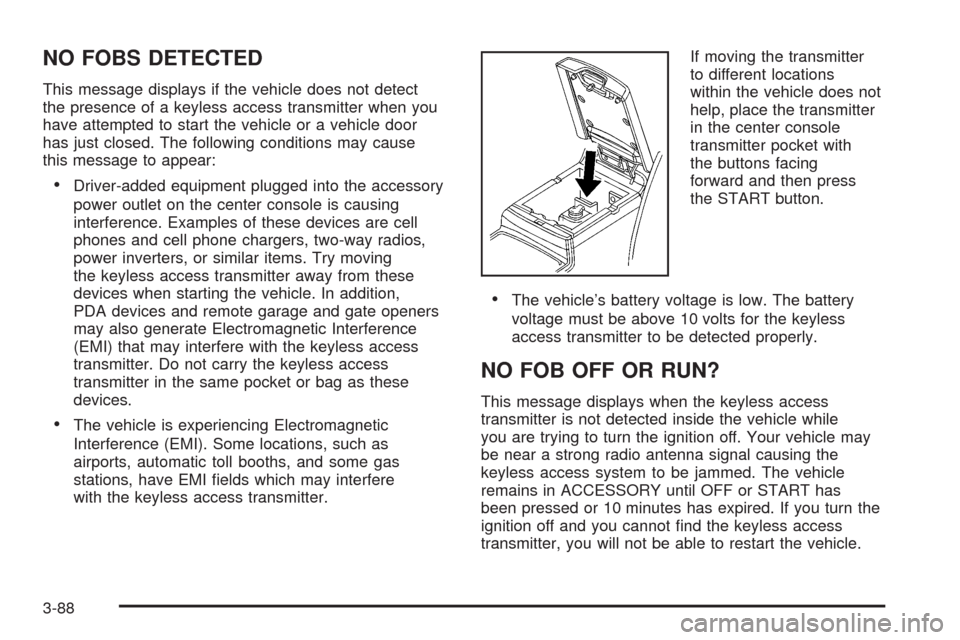
with the keyless access transmitter.If moving the transmitter
to different locations
within the vehicle does not
help, place the transmitter
in the center console
transmitter pocket with
the buttons facing
forward and then press
the START button.
The vehicle’s battery voltage is low. The battery
voltage must be above 10 volts for the keyless
access transmitter to be detected properly.
NO FOB OFF OR RUN?
This message displays when the keyless access
transmitter is not detected inside the vehicle while
you are trying to turn the ignition off. Your vehicle may
be near a strong radio antenna signal causing the
keyless access system to be jammed. The vehicle
remains in ACCESSORY until OFF or START has
been pressed or 10 minutes has expired. If you turn the
ignition off and you cannot nd the keyless access
transmitter, you will not be able to restart the vehicle.
3-88
Page 257 of 500
AUTOSTORE PRESETS:To set the preset stations
automatically, perform the following steps:
1. Turn the radio on.
2. Press BAND to select FM1, FM2, or AM.
3. Press the
wknob to enter the main menu.
4. Turn this knob until AUTOSTORE PRESETS
displays.
5. Press the same knob to select. AUTOSTORE
displays. The radio automatically searches the band
and selects and stores the six radio stations with the
strongest signal. The stations are stored by signal
strength, not sequential order. The set preset station
number displays above the set pushbutton. When
that numbered pushbutton is pressed for less than
two seconds, the station that was set, returns.
6. Press the BACK (F6) button to exit the display. To
return to the original display, repeatedly press the
BACK (F6) button or wait for the display to time out.
This feature does not function with the XM™ radio
stations.
The radio presets do not have to be reset when the
vehicle is started, or when the battery power is removed.PRESETS HOME/AWAY:This feature stores two
different kinds of station presets. HOME can be used for
local stations and AWAY for stations outside of the
local broadcasting area. To set preset stations for home
and away perform the following steps:
1. Press thewknob to enter the main menu.
2. Turn this knob until PRESETS HOME/AWAY
displays.
3. Press the same knob to select. HOME or AWAY
displays.
4. Press the BACK (F6) button to exit the display.
To return to the original display, repeatedly press
the BACK (F6) button or wait for the display to
time out.
This feature does not function with the XM™ radio
stations.
Follow the manual or automatic steps previously
listed for setting the preset pushbuttons for both home
and away.
3-103
Page 292 of 500
When stability control activates, the system
automatically adjusts the front road wheel steering
angle, modies the suspension stiffness, and selectively
applies braking pressure at any one of the vehicle’s
brakes to help maintain directional control of the vehicle.
Adjustments to the steering will not be felt in the
steering wheel. SeeEnhanced StabiliTrak
®on page 4-9.
It is recommended that the battery not be disconnected
when the steering wheel is turned from the center
position. If this occurs, the center position of the steering
wheel could be temporarily changed a small amount.
You can continue to operate your vehicle and, after
a short time, the center position of the steering wheel
will return to normal.
Steering Tips
It is important to take curves at a reasonable speed.
A lot of the “driver lost control” accidents mentioned on
the news happen on curves. Here is why:
Experienced driver or beginner, each of us is subject to
the same laws of physics when driving on curves.
The traction of the tires against the road surface makes
it possible for the vehicle to change its path when
you turn the front wheels. If there is no traction, inertia
will keep the vehicle going in the same direction. If
you have ever tried to steer a vehicle on wet ice, you
will understand this.The traction you can get in a curve depends on the
condition of the tires and the road surface, the angle at
which the curve is banked, and your speed. While
you are in a curve, speed is the one factor you
can control.
Suppose you are steering through a sharp curve.
Then you suddenly accelerate. Both control
systems — steering and acceleration — have to do
their work where the tires meet the road. Adding the
sudden acceleration can demand too much of those
places. You can lose control. SeeTraction Control
System (TCS) on page 4-6andStabiliTrak
®System on
page 4-8orEnhanced StabiliTrak®on page 4-9.
What should you do if this ever happens? Ease up on
the accelerator pedal, steer the vehicle the way you
want it to go, and slow down.
Your stability system might be active. SeeDIC Warnings
and Messages on page 3-80andStabiliTrak
®System
on page 4-8orEnhanced StabiliTrak®on page 4-9.
Speed limit signs near curves warn that you should
adjust your speed. Of course, the posted speeds are
based on good weather and road conditions. Under less
favorable conditions you will want to go slower.
If you need to reduce your speed as you approach a
curve, do it before you enter the curve, while the
front wheels are straight ahead.
4-14
Page 303 of 500
Run your engine only as long as you must. This saves
fuel. When you run the engine, make it go a little
faster than just idle. That is, push the accelerator
slightly. This uses less fuel for the heat that you get and
it keeps the battery charged. You will need a
well-charged battery to restart the vehicle, and possibly
for signaling later on with the headlamps. Let the
heater run for a while.
Then, shut the engine off and close the window almost all
the way to preserve the heat. Start the engine again and
repeat this only when you feel really uncomfortable from
the cold. But do it as little as possible. Preserve the fuel
as long as you can. To help keep warm, you can get out
of the vehicle and do some fairly vigorous exercises
every half hour or so until help comes.If Your Vehicle is Stuck in Sand,
Mud, Ice, or Snow
Slowly and cautiously spin the wheels to free your
vehicle when stuck in sand, mud, ice, or snow. See
Rocking Your Vehicle to Get It Out on page 4-26.
If your vehicle has a traction system, it can often help to
free a stuck vehicle. Refer to your vehicle’s traction
system in the Index. If the stuck condition is too severe
for the traction system to free the vehicle, turn the
traction system off and use the rocking method.
{CAUTION:
If you let your vehicle’s tires spin at high
speed, they can explode, and you or others
could be injured. The vehicle can overheat,
causing an engine compartment re or other
damage. Spin the wheels as little as possible
and avoid going above 35 mph (55 km/h) as
shown on the speedometer.
For information about using tire chains on your vehicle,
seeTire Chains on page 5-82.
4-25
Page 319 of 500
Service............................................................5-3
Accessories and Modications..........................5-3
California Proposition 65 Warning.....................5-3
California Perchlorate Materials Requirements.....5-4
Doing Your Own Service Work.........................5-4
Adding Equipment to the Outside
of Your Vehicle...........................................5-4
Fuel................................................................5-5
Gasoline Octane............................................5-5
Gasoline Specications....................................5-6
California Fuel...............................................5-6
Additives.......................................................5-6
Fuels in Foreign Countries...............................5-7
Filling the Tank..............................................5-7
Filling a Portable Fuel Container.......................5-9
Checking Things Under the Hood....................5-10
Hood Release..............................................5-10
Engine Compartment Overview.......................5-11
Engine Oil...................................................5-18
Engine Oil Life System..................................5-21
Engine Air Cleaner/Filter................................5-23
Automatic Transmission Fluid.........................5-25
Engine Coolant.............................................5-25
Coolant Surge Tank Pressure Cap..................5-29
Engine Overheating.......................................5-29
Overheated Engine Protection Operating Mode . . .5-31Cooling System............................................5-32
Power Steering Fluid.....................................5-39
Windshield Washer Fluid................................5-40
Brakes........................................................5-41
Battery........................................................5-44
Jump Starting...............................................5-45
All-Wheel Drive..............................................5-50
Rear Axle.......................................................5-51
Front Axle......................................................5-52
Headlamp Aiming...........................................5-53
Bulb Replacement..........................................5-54
High Intensity Discharge (HID) Lighting............5-54
Halogen Bulbs..............................................5-54
Back-Up Lamps............................................5-54
Replacement Bulbs.......................................5-55
Windshield Replacement.................................5-55
Windshield Wiper Blade Replacement..............5-55
Tires..............................................................5-57
Winter Tires.................................................5-58
Tire Sidewall Labeling...................................5-59
Tire Terminology and Denitions.....................5-62
Run-Flat Tires (STS-V)..................................5-65
Ination - Tire Pressure.................................5-66
High-Speed Operation...................................5-68
Section 5 Service and Appearance Care
5-1
Page 331 of 500
After you have removed the sight shields (if equipped) on the 3.6L V6 engine, here is what you will see:
A. Underhood Fuse Block. SeeUnderhood Fuse Block
on page 5-118.
B. Remote Negative (-) Terminal. SeeJump Starting on
page 5-45.
C. Remote Positive (+) Terminal. SeeJump Starting on
page 5-45.
D. Battery. SeeBattery on page 5-44.
E. Passenger Compartment Air Filter. SeePassenger
Compartment Air Filter on page 3-55.
F. Power Steering Fluid Reservoir. SeePower Steering
Fluid on page 5-39.
G. Engine Oil Fill Cap. See “When to Add Engine Oil”
underEngine Oil on page 5-18.H. Engine Oil Dipstick (Out of View). See “Checking
Engine Oil” underEngine Oil on page 5-18.
I. Brake Master Cylinder Reservoir. See “Brake Fluid”
underBrakes on page 5-41.
J. Engine Coolant Surge Tank and Pressure Cap. See
Coolant Surge Tank Pressure Cap on page 5-29
andCooling System on page 5-32.
K. Engine Air Cleaner/Filter. SeeEngine Air
Cleaner/Filter on page 5-23.
L. Windshield Washer Fluid Reservoir. See “Adding
Washer Fluid” underWindshield Washer Fluid
on page 5-40.
5-13
Page 333 of 500
After you have removed the sight shields (if equipped) on the 4.6L V8 engine, here is what you will see:
A. Remote Negative (-) Terminal. SeeJump Starting on
page 5-45.
B. Remote Positive (+) Terminal. SeeJump Starting on
page 5-45.
C. Battery. SeeBattery on page 5-44.
D. Passenger Compartment Air Filter. SeePassenger
Compartment Air Filter on page 3-55.
E. Power Steering Fluid Reservoir. SeePower Steering
Fluid on page 5-39.
F. Engine Oil Fill Cap. See “When to Add Engine Oil”
underEngine Oil on page 5-18.
G. Engine Oil Dipstick (Out of View). See “Checking
Engine Oil” underEngine Oil on page 5-18.H. Brake Master Cylinder Reservoir. See “Brake Fluid”
underBrakes on page 5-41.
I. Engine Coolant Surge Tank and Pressure Cap. See
Coolant Surge Tank Pressure Cap on page 5-29
andCooling System on page 5-32.
J. Engine Air Cleaner/Filter. SeeEngine Air
Cleaner/Filter on page 5-23.
K. Underhood Fuse Block. SeeUnderhood Fuse Block
on page 5-118.
L. Windshield Washer Fluid Reservoir. See “Adding
Washer Fluid” underWindshield Washer Fluid
on page 5-40.
5-15