remote control CADILLAC STS 2008 1.G User Guide
[x] Cancel search | Manufacturer: CADILLAC, Model Year: 2008, Model line: STS, Model: CADILLAC STS 2008 1.GPages: 500, PDF Size: 5.81 MB
Page 132 of 500
Vehicle Personalization
Your vehicle has personalization that allows you to
program certain features to a preferred setting for up to
two drivers. The back of the keyless access transmitters
are labelled 1 or 2. Additional keyless access transmitters
programmed to the vehicle, as 3 and/or 4, do not have
a number on the back and are not capable of being
personalized. The number of programmable features
varies depending upon which vehicle options are
purchased.
On all vehicles, features such as climate control settings,
radio and XM™ preset settings, exterior lighting at unlock
and remote lock unlock conrmation, and language have
already been programmed for your convenience. Your
vehicle also has an automatic door locking feature that is
always on. You cannot turn the automatic door locking
feature off. SeeProgrammable Automatic Door Locks on
page 2-15.
Some vehicles have additional features that can be
programmed including the seat, steering column, and
outside rearview mirror position.If your vehicle has the base audio system, the following
information explains the vehicle personalization on
your vehicle.
If your vehicle has the Navigation system, see
“Personalization” in the Index of the Navigation System
manual for information on vehicle personalization.
If your vehicle has the ability to program additional
personalization features, the driver’s preferences
are recalled by pressing any button on the keyless
access transmitter, 1 or 2, by selecting Driver 1 or 2 on
the radio display, or when a valid keyless access
transmitter is detected upon opening the driver’s door.
If more than one valid keyless access transmitter is
detected upon opening the driver’s door, the driver
preferences for the lowest driver number will be recalled.
Certain features can be programmed not to recall until
the ignition is turned off.
The default settings for the personalization features
were set when your vehicle left the factory, but
may have changed from their default state since then.
2-60
Page 136 of 500
REMOTE START
If your vehicle has this feature, it allows you to choose
the features you would like to have activated when
you engage the remote start on your vehicle.
These features include the climate control system,
the rear defogger, and the seat temperature, if your
vehicle has this feature. Activating these features helps
provide a more comfortable vehicle upon entry. See
Remote Vehicle Start on page 2-12for more information.
Programmable Modes
Mode 1:ON (default)
Mode 2:OFF
To program the vehicle to a different mode:
1. Enter the PERSONAL SETTINGS MENU by
following the instructions listed previously under
“Entering the Personal Settings Menu.”
2. Turn the tune/select knob until REMOTE START is
highlighted.
3. Press the tune/select knob to switch back and forth
between on and off.
When REMOTE START is on, a check mark will appear
next to the feature name. You can then choose to
activate any or all of the following features by turning
the tune/select knob to highlight the feature, then
pressing the knob to turn it on.CLIMATE CONTROL:The climate control system will
engage when the vehicle is started using the remote
start feature. It will be at the same climate control setting
that was last used by the driver using that keyless
entry transmitter.
REAR WINDOW DEFOG:If this feature is active, the
rear defogger will engage when the vehicle is started
using the remote start feature.
SEAT TEMP (Temperature) CONTROL:If your vehicle
has this feature and this feature is active, the seats
will be heated or cooled when the vehicle is started
using the remote start feature.
The mode you selected is now set. You can either exit
the programming mode by following the instructions
later in this section or program the next feature available
on your vehicle by pressing the F6 (BACK) button,
located on the radio, to return to the PERSONAL
SETTINGS MENU.
2-64
Page 149 of 500
3. Press the tune/select knob to enter the
SUSPENSION MODE submenu.
4. Turn the tune/select knob to highlight TOURING or
PERFORMANCE.
5. Press the tune/select knob to select the setting.
The mode you selected is now set. You can either exit
the programming mode by following the instructions
later in this section or program the next feature available
on your vehicle by pressing the F6 (BACK) button,
located on the radio, to return to the PERSONAL
SETTINGS MENU.
Exiting the Personal Settings Menu
Once you have nished making your selections on the
base audio system, you will automatically return to
the main audio screen after 15 seconds. You can also
press the F6 (BACK) button, located on the radio,
to return to the main audio screen.
Memory Seat, Mirrors and
Steering Wheel
If your vehicle has the memory feature, you can
program and recall memory settings for the following
features for up to two drivers:
The driver’s seat position
The outside rearview mirrors position
The power tilt wheel and telescopic steering column
position
The following settings and presets are set automatically:
The language, radio and XM™ presets, tone,
volume, playback mode (AM/FM or CD), last
displayed stations, and compact disc position
The last climate control setting
The Head-Up Display (HUD) position, if your
vehicle has this feature
Other personalization settings, for example,
remote start settings
SeeVehicle Personalization on page 2-60.
2-77
Page 195 of 500
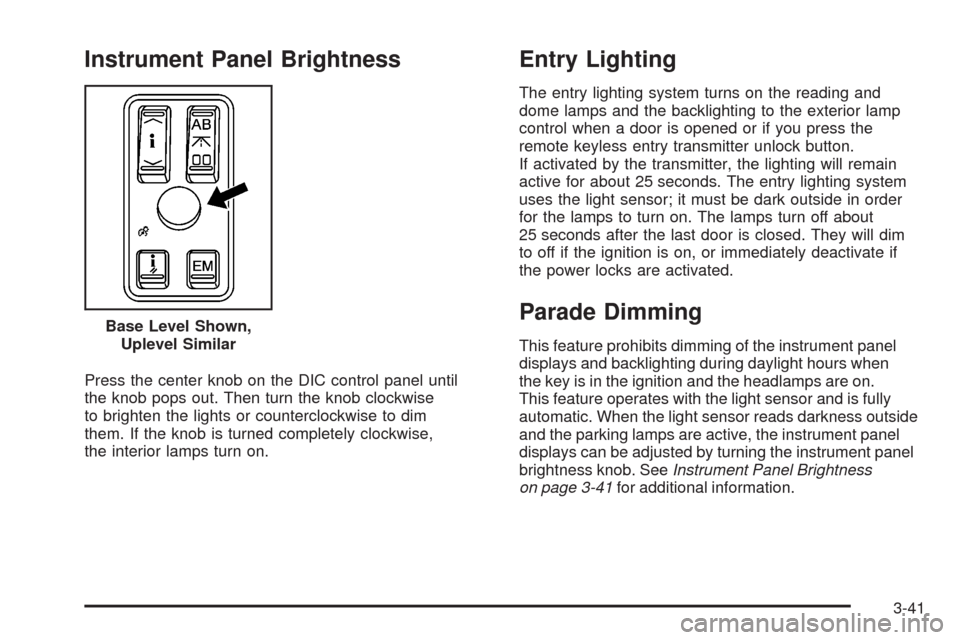
Instrument Panel Brightness
Press the center knob on the DIC control panel until
the knob pops out. Then turn the knob clockwise
to brighten the lights or counterclockwise to dim
them. If the knob is turned completely clockwise,
the interior lamps turn on.
Entry Lighting
The entry lighting system turns on the reading and
dome lamps and the backlighting to the exterior lamp
control when a door is opened or if you press the
remote keyless entry transmitter unlock button.
If activated by the transmitter, the lighting will remain
active for about 25 seconds. The entry lighting system
uses the light sensor; it must be dark outside in order
for the lamps to turn on. The lamps turn off about
25 seconds after the last door is closed. They will dim
to off if the ignition is on, or immediately deactivate if
the power locks are activated.
Parade Dimming
This feature prohibits dimming of the instrument panel
displays and backlighting during daylight hours when
the key is in the ignition and the headlamps are on.
This feature operates with the light sensor and is fully
automatic. When the light sensor reads darkness outside
and the parking lamps are active, the instrument panel
displays can be adjusted by turning the instrument panel
brightness knob. SeeInstrument Panel Brightness
on page 3-41for additional information. Base Level Shown,
Uplevel Similar
3-41
Page 247 of 500
SERVICE TIRE MONITOR
This message displays if a part on the Tire Pressure
Monitor System (TPMS) is not working properly. The tire
pressure light also ashes and then remains on during
the same ignition cycle. SeeTire Pressure Light on
page 3-67. Several conditions may cause this message
to appear. SeeTire Pressure Monitor Operation on
page 5-70for more information. If the warning comes on
and stays on, there may be a problem with the TPMS.
See your dealer/retailer.
SERVICE THEFT SYSTEM
This message displays when there is a problem with
the hood open and closed switches. The switches may
need to be replaced. When this message is displayed,
the theft-deterrent system will still be protecting the
interior of the vehicle, however, the hood area will not
be protected at this time. Also, the remote start function
will not work when this message appears. See your
dealer/retailer for service.
SERVICE TRANSMISSION
This message displays when there is a problem with
the transmission. Have your vehicle serviced by
your dealer/retailer.
SERVICE VEHICLE SOON
This message displays when a non-emissions related
malfunction occurs. Have your vehicle serviced by your
dealer/retailer as soon as possible.
SIDE BLIND ZONE ALERT
SYSTEM OFF
If your vehicle has the Side Blind Zone Alert (SBZA)
system, this message displays when the SBZA system
has been turned off. See the Index in the Navigation
manual andDIC Operation and Displays on page 3-74
for more information.
SPEED LIMITED TO XXX
This message displays when the vehicle speed is
limited to XXX, mph in English mode and km/h in
Metric mode, because the vehicle detects a problem
in the steering, stability control, or suspension system.
Have your vehicle serviced by your dealer/retailer.
3-93
Page 365 of 500
Notice:If you connect a negative cable to the
Engine Control Module (ECM), ECM mounting
bracket, or any cables that attach to the ECM
bracket, you may damage the ECM. Always attach
the negative cable to your vehicle’s remote negative
ground location, instead of the ECM, ECM bracket,
or any cables attached to the ECM bracket.
{CAUTION:
An electric fan can start up even when the
engine is not running and can injure you.
Keep hands, clothing and tools away from
any underhood electric fan.
{CAUTION:
Using a match near a battery can cause battery
gas to explode. People have been hurt doing
this, and some have been blinded. Use a
ashlight if you need more light.
Be sure the battery has enough water. You do
not need to add water to the battery installed
in your new vehicle. But if a battery has ller
caps, be sure the right amount of uid is there.
If it is low, add water to take care of that rst.
If you do not, explosive gas could be present.
Battery uid contains acid that can burn you.
Do not get it on you. If you accidentally get it
in your eyes or on your skin, ush the place
with water and get medical help immediately.
5-47
Page 495 of 500
Oil, Engine Oil Life System..............................5-21
Older Children, Restraints................................1-28
Online Owner Center........................................ 7-4
OnStar, Privacy..............................................7-17
OnStar
®System, see OnStar®Manual...............2-48
Operation, Universal Home Remote System........2-52
Other Warning Devices...................................... 3-6
Outlet Adjustment............................................3-54
Outlets
Accessory Power.........................................3-46
Outside
Automatic Dimming Mirror.............................2-44
Convex Mirror.............................................2-44
Parallel Park Assist Mirror.............................2-44
Power Heated Mirrors..................................2-43
Overheated Engine Protection Operating Mode.....5-31
Owner Checks and Services.............................. 6-9
Owners, Canadian............................................... ii
P
Paint, Damage..............................................5-114
Panic Brake Assist..........................................4-12
Parade Dimming.............................................3-41
Park Aid........................................................2-45
Park Brake....................................................2-35Park (P)
Shifting Into................................................2-36
Shifting Out of............................................2-37
Parking
Assist........................................................2-45
Over Things That Burn.................................2-38
Passenger Airbag Status Indicator.....................3-61
Passenger Compartment Air Filter.....................3-55
Passenger Sensing System..............................1-60
Passing.........................................................4-16
Perchlorate Materials Requirements, California....... 5-4
Power
Door Locks.................................................2-14
Electrical System.......................................5-117
Inadvertent Battery Saver.............................3-43
Lumbar Controls........................................... 1-2
Reclining Seatbacks...................................... 1-4
Retained Accessory (RAP)............................2-29
Seat............................................................ 1-2
Steering Fluid.............................................5-39
Tilt Wheel and Telescopic Steering Column......... 3-7
Windows....................................................2-20
Privacy..........................................................7-16
Event Data Recorders..................................7-16
Navigation System.......................................7-17
OnStar.......................................................7-17
Radio Frequency Identication.......................7-17
Programmable Automatic Door Locks.................2-15
9
Page 496 of 500
R
Radio Frequency Identication (RFID), Privacy......7-17
Radios..........................................................3-98
Radio(s).......................................................3-100
Radios
Navigation/Radio System, see
Navigation Manual..................................3-117
Radio Personalization.................................3-117
Reception.................................................3-123
Setting the Time..........................................3-99
Theft-Deterrent..........................................3-121
Rainsense™ II Wipers.....................................3-15
Reading Lamps..............................................3-42
Rear Axle......................................................5-51
Limited-Slip.................................................. 4-8
Rear Climate Control System............................3-54
Rear Door Security Locks................................2-15
Rear Heated Seats........................................... 1-7
Rearview Mirror, Automatic Dimming..................2-40
Rearview Mirror, Automatic Dimming
with OnStar
®..............................................2-40
Rearview Mirror, Automatic Dimming
with OnStar
®and Compass..........................2-41
Rearview Mirror with Compass and Temperature..... 1-7Reclining Seatbacks, Power............................... 1-4
Recommended Fluids and Lubricants.................6-13
Recreational Vehicle Towing.............................4-31
Remote, Keyless Access System........................ 2-5
Remote Vehicle Start.......................................2-12
Removing the Flat Tire and Installing
the Spare Tire.............................................5-99
Removing the Spare Tire and Tools...................5-98
Replacement Bulbs.........................................5-55
Replacement, Windshield.................................5-55
Reporting Safety Defects
Canadian Government..................................7-14
General Motors...........................................7-14
United States Government............................7-14
Restraint System Check
Checking the Restraint Systems....................1-66
Replacing Restraint System Parts
After a Crash..........................................1-67
Retained Accessory Power (RAP)......................2-29
Roadside
Service........................................................ 7-6
Rocking Your Vehicle to Get it Out....................4-26
Routing, Engine Drive Belt...............................6-16
Run-Flat Tires................................................5-65
Running the Engine While Parked.....................2-39
10
Page 497 of 500
S
Safety Belt
Reminder Light............................................3-59
Safety Belts
Care of....................................................5-110
How to Wear Safety Belts Properly................1-13
Lap-Shoulder Belt........................................1-21
Safety Belt Extender....................................1-27
Safety Belt Use During Pregnancy.................1-27
Safety Belts Are for Everyone......................... 1-8
Safety Warnings and Symbols.............................. iii
Scheduled Maintenance..................................... 6-4
Seats
Head Restraints............................................ 1-6
Heated and Ventilated Seats........................... 1-3
Heated Seats............................................... 1-3
Heated Seats - Rear..................................... 1-7
Memory.....................................................2-77
Power Lumbar.............................................. 1-2
Power Reclining Seatbacks............................. 1-4
Power Seats................................................. 1-2
Securing a Child Restraint
Rear Seat Position......................................1-44
Right Front Seat Position..............................1-47
Security Light.................................................3-71
Service........................................................... 5-3
Accessories and Modications......................... 5-3
Adding Equipment to the Outside
of Your Vehicle.......................................... 5-4Service (cont.)
California Pershlorate Materials Requirements..... 5-4
California Proposition 65 Warning.................... 5-3
Doing Your Own Work................................... 5-4
Engine Soon Light.......................................3-68
Publications Ordering Information...................7-15
Service, Scheduling Appointments....................... 7-9
Servicing Your Airbag-Equipped Vehicle..............1-64
Sheet Metal Damage.....................................5-113
Shifting Into Park (P).......................................2-36
Shifting Out of Park (P)...................................2-37
Side Blind Zone Alert......................................2-47
Signals, Turn and Lane-Change.......................... 3-8
Spare Tire
Compact...................................................5-106
Installing....................................................5-99
Removing
...................................................5-98
Storing.....................................................5-104
Specications, Capacities...............................5-128
Speedometer..................................................3-59
StabiliTrak
®System.......................................... 4-8
Start Vehicle, Remote......................................2-12
Starting the Engine.........................................2-29
Steering........................................................4-13
Steering Wheel Controls, Audio.......................3-121
Steering Wheel Controls, Memory.....................2-77
Steering Wheel, Heated..................................... 3-7
Steering Wheel, Power Tilt Wheel and
Telescopic Steering Column............................ 3-7
11
Page 499 of 500
Traction
Control System (TCS).................................... 4-6
Control System Warning Light.......................3-65
Enhanced StabiliTrak
®................................... 4-9
Limited-Slip Rear Axle.................................... 4-8
Magnetic Ride Control................................... 4-8
StabiliTrak
®System....................................... 4-8
Transmission
Fluid, Automatic...........................................5-25
Transmission Operation, Automatic....................2-32
Trunk............................................................2-16
Turn and Lane-Change Signals.......................... 3-8
Turn Signal/Multifunction Lever........................... 3-8
Twilight Sentinel
®............................................3-39
U
Ultrasonic Rear Parking Assist (URPA)...............2-45
Uniform Tire Quality Grading............................5-79
Universal Home Remote System.......................2-51
Operation...................................................2-52
Using this Manual............................................... iii
V
Valet Lockout Switch.......................................2-25
Vehicle
Control........................................................ 4-3
Damage Warnings........................................... iv
Loading......................................................4-26
Symbols......................................................... iv
Vehicle Data Recording and Privacy..................7-16
Vehicle Identication
Number (VIN)............................................5-116
Service Parts Identication Label..................5-116
Vehicle Personalization....................................2-60
Memory Seat, Mirrors and Steering Wheel.........2-77
Vehicle, Remote Start......................................2-12
Ventilated Seats............................................... 1-3
Ventilation Adjustment......................................3-54
Visors...........................................................2-22
13