keyless CADILLAC STS 2008 1.G Owner's Guide
[x] Cancel search | Manufacturer: CADILLAC, Model Year: 2008, Model line: STS, Model: CADILLAC STS 2008 1.GPages: 500, PDF Size: 5.81 MB
Page 139 of 500
LIGHTS FLASH AT UNLOCK
This feature allows the exterior lamps to ash when
the keyless access transmitter is used to unlock
the vehicle. All doors must be closed for this feature to
work, and the lamps will not ash if the parking
lamps or headlamps are on.
If LIGHTS FLASH AT UNLOCK is turned on and either
KEYLESS FT DOOR UNLOCK or KEYLESS DOORS
UNLOCK is turned on, the exterior lamps will ash when
the doors are passively unlocked. See “KEYLESS
FT (Front) DOOR UNLOCK” and “KEYLESS DOORS
UNLOCK” later in this section for more information.
Programmable Modes
Mode 1:ON (default)
Mode 2:OFFTo program the vehicle to a different mode:
1. Enter the PERSONAL SETTINGS MENU by
following the instructions listed previously under
“Entering the Personal Settings Menu.”
2. Turn the tune/select knob until LIGHTS FLASH AT
UNLOCK is highlighted.
3. Press the tune/select knob to switch back and forth
between on and off.
When the mode is turned on, a check mark will
appear next to the feature name.
The mode you selected is now set. You can either exit
the programming mode by following the instructions
later in this section or program the next feature available
on your vehicle.
2-67
Page 140 of 500
LIGHTS FLASH AT LOCK
This feature allows the exterior lamps to ash once
when the keyless access transmitter is used to lock the
vehicle. All doors must be closed for this feature to
work, and the lamps will not ash if the parking lamps
or headlamps are on.
If LIGHTS FLASH AT LOCK is turned on and either
KEYLESS FT DOOR UNLOCK or KEYLESS DOORS
UNLOCK is turned on, the exterior lamps will ash when
the doors are passively unlocked. See “KEYLESS FT
(Front) DOOR UNLOCK” and “KEYLESS DOORS
UNLOCK” later in this section for more information.
Programmable Modes
Mode 1:ON (default)
Mode 2:OFFTo program the vehicle to a different mode:
1. Enter the PERSONAL SETTINGS MENU by
following the instructions listed previously under
“Entering the Personal Settings Menu.”
2. Turn the tune/select knob until LIGHTS FLASH AT
LOCK is highlighted.
3. Press the tune/select knob to switch back and forth
between on and off.
When the mode is turned on, a check mark will
appear next to the feature name.
You can select this feature by itself, or you can combine
it with Horn Chirps At Lock so that both the exterior
lamps ash and the horn chirps when you lock
your vehicle.
The mode you selected is now set. You can either exit
the programming mode by following the instructions
later in this section or program the next feature available
on your vehicle.
2-68
Page 141 of 500
EXT. (Exterior) LIGHTS AT UNLOCK
This feature turns on the exterior lamps when the
keyless access transmitter is used to unlock the vehicle.
The lamps will remain on for about 20 seconds unless
a door is opened, the ignition is in ACCESSORY, on, or
START, or the keyless access transmitter is used to
lock the vehicle.
Programmable Modes
Mode 1:ON (default)
Mode 2:OFF
To program the vehicle to a different mode:
1. Enter the PERSONAL SETTINGS MENU by
following the instructions listed previously under
“Entering the Personal Settings Menu.”
2. Turn the tune/select knob until EXT. LIGHTS AT
UNLOCK is highlighted.
3. Press the tune/select knob to switch back and forth
between on and off.
When the mode is turned on, a check mark will
appear next to the feature name.
The mode you selected is now set. You can either exit
the programming mode by following the instructions
later in this section or program the next feature available
on your vehicle.
HORN CHIRPS AT LOCK
This feature sounds the horn once when the keyless
access transmitter is used to lock the vehicle. All doors
must be closed for this feature to work.
Programmable Modes
Mode 1:ON
Mode 2:OFF (default)
To program the vehicle to a different mode:
1. Enter the PERSONAL SETTINGS MENU by
following the instructions listed previously under
“Entering the Personal Settings Menu.”
2. Turn the tune/select knob until HORN CHIRPS AT
LOCK is highlighted.
3. Press the tune/select knob to switch back and forth
between on and off.
When the mode is turned on, a check mark will
appear next to the feature name.
The mode you selected is now set. You can either exit
the programming mode by following the instructions
later in this section or program the next feature available
on your vehicle.
2-69
Page 145 of 500
KEYLESS FT (Front) DOOR UNLOCK
This feature automatically unlocks the appropriate front
door when you approach the vehicle with the keyless
access transmitter and pull the respective door handle.
SeeDoor Locks on page 2-14for more information.
Programmable Modes
Mode 1:ON
Mode 2:OFF (default)
To program the vehicle to a different mode:
1. Enter the PERSONAL SETTINGS MENU by
following the instructions listed previously under
“Entering the Personal Settings Menu.”
2. Turn the tune/select knob until KEYLESS FT DOOR
UNLOCK is highlighted.
3. Press the tune/select knob to switch back and forth
between on and off.
When the mode is turned on, a check mark will
appear next to the feature name.
The mode you selected is now set. You can either exit
the programming mode by following the instructions
later in this section or program the next feature available
on your vehicle.
KEYLESS DOORS UNLOCK
This feature automatically unlocks all of the doors when
you approach the vehicle with the keyless access
transmitter and pull either front door handle. SeeDoor
Locks on page 2-14for more information.
Programmable Modes
Mode 1:ON (default)
Mode 2:OFF
To program the vehicle to a different mode:
1. Enter the PERSONAL SETTINGS MENU by
following the instructions listed previously under
“Entering the Personal Settings Menu.”
2. Turn the tune/select knob until KEYLESS DOORS
UNLOCK is highlighted.
3. Press the tune/select knob to switch back and forth
between on and off.
When the mode is turned on, a check mark will
appear next to the feature name.
The mode you selected is now set. You can either exit
the programming mode by following the instructions
later in this section or program the next feature available
on your vehicle.
2-73
Page 146 of 500
LOCK DELAY
This feature delays the locking of the vehicle’s doors for
eight seconds after a power door lock switch or the
lock button on the keyless access transmitter is pressed.
The eight second delay occurs after the last door is
closed. If the keyless access transmitter is left inside of
the vehicle, the doors will not lock.
Programmable Modes
Mode 1:ON (default)
Mode 2:OFF
To program the vehicle to a different mode:
1. Enter the PERSONAL SETTINGS MENU by
following the instructions listed previously under
“Entering the Personal Settings Menu.”
2. Turn the tune/select knob until LOCK DELAY is
highlighted.
3. Press the tune/select knob to switch back and forth
between on and off.
When the mode is turned on, a check mark will
appear next to the feature name.
The mode you selected is now set. You can either exit
the programming mode by following the instructions
later in this section or program the next feature available
on your vehicle.
KEYLESS LOCK DELAY
This feature allows you to select whether the doors
automatically lock during normal vehicle exit. When the
ignition is turned off and all doors become closed,
the vehicle will determine how many keyless access
transmitters remain in the vehicle interior. If at least
one keyless access transmitter has been removed
from the interior of the vehicle, the doors will lock
after 10 seconds.
For example, if there are two keyless access
transmitters in the vehicle and one is removed, the
other will be locked in. The keyless access transmitter
locked in the vehicle can still be used to start the vehicle
or unlock the doors, if needed. A person approaching
the outside of the locked vehicle without an authorized
keyless access transmitter, however, will not be able
to open the door, even with a transmitter in the vehicle.
You may temporarily disable the passive door
locking feature by pressing the door unlock switch
for three seconds on an open door. Passive door locking
will then remain disabled until a door lock switch is
pressed or until the power mode transitions from the
off power mode.
2-74
Page 147 of 500
Programmable Modes
Mode 1:ON
Mode 2:OFF (default)
To program the vehicle to a different mode:
1. Enter the PERSONAL SETTINGS MENU by
following the instructions listed previously under
“Entering the Personal Settings Menu.”
2. Turn the tune/select knob until KEYLESS LOCK
DELAY is highlighted.
3. Press the tune/select knob to switch back and forth
between on and off.
When the mode is turned on, a check mark will
appear next to the feature name.
The mode you selected is now set. You can either exit
the programming mode by following the instructions
later in this section or program the next feature available
on your vehicle.FRONT PASS (Passenger) WINDOW LOCK
This feature allows you to choose whether or not to
have the front passenger window deactivated as part of
the window lockout button. If you would like the front
passenger window to be deactivated when the window
lockout button is pushed, turn this feature on. If this
feature is left off, the window lockout button located on
the door will deactivate only the rear windows. See
Power Windows on page 2-20for more information.
Programmable Modes
Mode 1:ON
Mode 2:OFF (default)
To program the vehicle to a different mode:
1. Enter the PERSONAL SETTINGS MENU by
following the instructions listed previously under
“Entering the Personal Settings Menu.”
2. Turn the tune/select knob until FRONT PASS
WINDOW LOCK is highlighted.
3. Press the tune/select knob to switch back and forth
between on and off.
When the mode is turned on, a check mark will
appear next to the feature name.
The mode you selected is now set. You can either exit
the programming mode by following the instructions
later in this section or program the next feature available
on your vehicle.
2-75
Page 150 of 500
For vehicles with the base audio system, memory
features are programmed and recalled through the radio
from the DRIVER SELECTION and the DRIVER EXIT
SETTINGS submenus. See “Entering the Driver
Selection Submenu” and “Entering the Driver Exit
Settings Submenu” later in this section for more
information on recalling and programming the memory
settings using the base audio system.
For vehicles with the Navigation system, memory
features are programmed and recalled through the
navigation display. See “Personalization” in the Index of
the Navigation System manual for more information
on programming and recalling the memory settings using
the Navigation system.
For vehicles with the Navigation system, you can also
recall the memory features by using voice recognition,
if your vehicle has this feature. See “Voice Recognition”
in the Index of the Navigation System manual for
more information.Entering the Driver Selection Submenu
To enter the memory programming mode for your
driver settings:
1. Be sure the ignition is either on, in ACCESSORY,
or in RAP and place the transmission in PARK (P)
or make sure that the vehicle speed is less than
6 mph (9 km/h).
2. Press any button on the appropriate keyless access
transmitter to identify yourself as Driver 1 or Driver 2.
3. Turn on the radio by pressing the
power/volume knob.
4. Press the CNFG radio button to enter the main
menu of the radio.
5. Turn the tune/select knob and scroll to SETUP.
6. Press the tune/select knob to enter the SETUP menu.
7. Turn the tune/select knob and scroll to DRIVER
SELECTION.
8. Press the tune/select knob to enter the DRIVER
SELECTION submenu. The following items will
appear:
DRIVER 1
DRIVER 2
RECALL DRIVER SETTINGS
STORE DRIVER SETTINGS
2-78
Page 151 of 500
Driver Selection Submenu Items
DRIVER 1/DRIVER 2
The numbers on the back of each keyless access
transmitter correspond to DRIVER 1 and DRIVER 2.
If you would like to recall or store driver settings for
the driver that does not correspond to the number on
the back of the keyless access transmitter that you
are using:
1. Enter the memory programming mode for your
driver settings by following the instructions listed
previously under “Entering the Driver Selection
Submenu.”
2. From the DRIVER SELECTION submenu, turn the
tune/select knob to highlight the driver number that
you want, either DRIVER 1 or DRIVER 2.
3. Set your choice by pressing in the tune/select knob.
If you would like to recall or store driver settings for
the selected driver, see “RECALL DRIVER SETTINGS”
or “STORE DRIVER SETTINGS” later in this section.
If you would like to recall or store exit settings for
the selected driver, see “RECALL EXIT SETTINGS” or
“STORE EXIT SETTINGS” later in this section.
RECALL DRIVER SETTINGS
To recall driver settings:
1. Enter the memory programming mode for your
driver settings by following the instructions listed
previously under “Entering the Driver Selection
Submenu.”
2. From the DRIVER SELECTION submenu, turn the
tune/select knob to scroll to RECALL DRIVER
SETTINGS and press in the knob.
If the vehicle is in PARK (P), one beep will sound
and your previously saved driving position will
then be recalled.
If the vehicle is not in PARK (P), three beeps will
sound and your previously saved driving position will
not be recalled.
A memory recall can be stopped by pressing any
memory seat or mirror position button.
If you would like the stored driving positions to be
recalled when unlocking your vehicle with the keyless
access transmitter or when starting your vehicle,
see “REMOTE RECALL MEMORY” or “START
BUTTON RECALL” underVehicle Personalization
on page 2-60.
2-79
Page 152 of 500
STORE DRIVER SETTINGS
To store driver settings:
1. Adjust your settings for the driver’s seat, the outside
rearview mirrors, and the steering column to a
comfortable driving position.
2. Enter the memory programming mode for your
driver settings by following the instructions listed
previously under “Entering the Driver Selection
Submenu.”
3. From the DRIVER SELECTION submenu, turn the
tune/select knob to scroll to STORE DRIVER
SETTINGS and press in the knob. Two beeps will
sound to conrm that your driver settings are saved.
4. Set the HUD position, if your vehicle has this
feature, the climate control temperature, fan
speed and mode settings, the radio presets, tone,
volume, playback mode (AM/FM, XM™, or CD), and
compact disc position.
Your memory settings are now programmed.
Any changes that are made to the HUD, audio
system, and climate controls while driving will be
automatically stored when the ignition is turned off.
5. Repeat the procedure for a second driver by
programming the other driver number.
Entering the Driver Exit Settings
Submenu
To enter the memory programming mode for your
exit settings:
1. Be sure the ignition is either on, in ACCESSORY,
or in RAP and place the transmission in PARK (P)
or make sure that the vehicle speed is less than
6 mph (9 km/h).
2. Press any button on the appropriate keyless access
transmitter to identify yourself as Driver 1 or Driver 2.
3. Turn on the radio by pressing the
power/volume knob.
4. Press the CNFG radio button to enter the main
menu of the radio.
5. Turn the tune/select knob and scroll to SETUP.
6. Press the tune/select knob to enter the SETUP menu.
7. Turn the tune/select knob and scroll to DRIVER
EXIT SETTINGS.
8. Press the tune/select knob to enter the DRIVER
EXIT SETTINGS submenu. The following items
will appear:
RECALL EXIT SETTINGS
STORE EXIT SETTINGS
2-80
Page 195 of 500
Instrument Panel Brightness
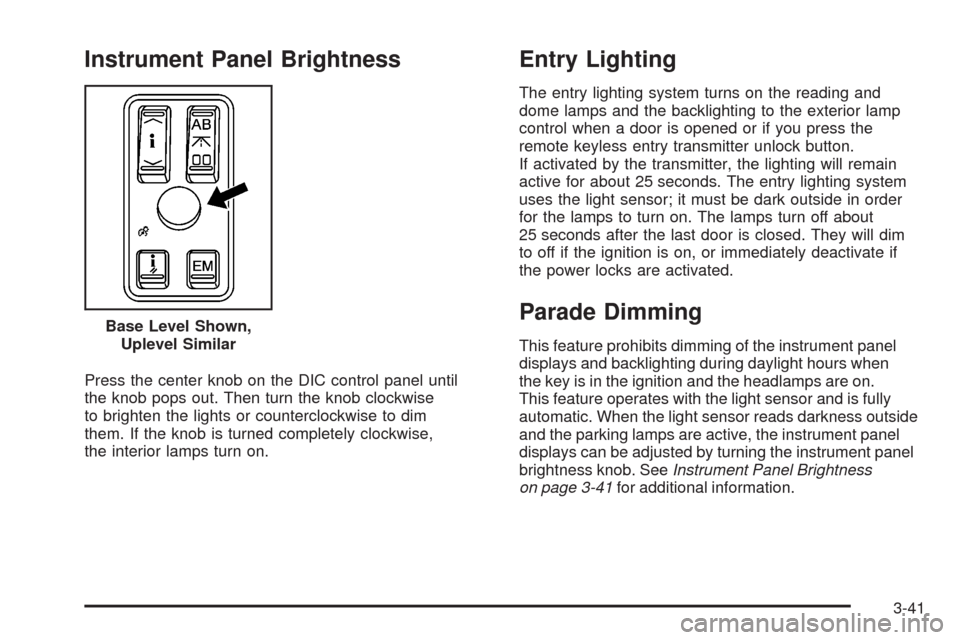
Press the center knob on the DIC control panel until
the knob pops out. Then turn the knob clockwise
to brighten the lights or counterclockwise to dim
them. If the knob is turned completely clockwise,
the interior lamps turn on.
Entry Lighting
The entry lighting system turns on the reading and
dome lamps and the backlighting to the exterior lamp
control when a door is opened or if you press the
remote keyless entry transmitter unlock button.
If activated by the transmitter, the lighting will remain
active for about 25 seconds. The entry lighting system
uses the light sensor; it must be dark outside in order
for the lamps to turn on. The lamps turn off about
25 seconds after the last door is closed. They will dim
to off if the ignition is on, or immediately deactivate if
the power locks are activated.
Parade Dimming
This feature prohibits dimming of the instrument panel
displays and backlighting during daylight hours when
the key is in the ignition and the headlamps are on.
This feature operates with the light sensor and is fully
automatic. When the light sensor reads darkness outside
and the parking lamps are active, the instrument panel
displays can be adjusted by turning the instrument panel
brightness knob. SeeInstrument Panel Brightness
on page 3-41for additional information. Base Level Shown,
Uplevel Similar
3-41